Why it matters
Sooner or later your code will give a wrong answer, and nothing will tell you why. There will be no error message and no red line. The program ran, it printed something, and the something was wrong. To fix it you must see what the variables held at each step, and compare that with what you expected.
A dry run means executing an algorithm by hand, on paper, line by line, exactly as the computer would. You write down every variable after every step. It is called "dry" because nothing actually runs. It is the oldest debugging tool there is, and it is still the fastest when a problem is small. It is also a standard exam and interview task: "what does this code print?" is a dry run, and "why does this fail for the input [4, 9]?" is a dry run that goes looking for a bug.
The skill has three parts, and this lesson teaches each one. You will learn to build a trace table, which is the record you keep while you execute. You will learn to choose test inputs that are likely to expose bugs, because a trace is only as good as the input you pick. And you will learn to read a trace to find the first line where the program and your expectation disagree.
The idea: slow-motion replay
When a sports referee is unsure about a play, the broadcast shows it again in slow motion, one frame at a time. Nothing new happens in the replay. You simply see what was too fast to follow.
A trace is a slow-motion replay of your algorithm. The computer runs millions of steps a second and shows you only the final result. In a trace you run one step at a time, and after each one you write down exactly what every variable holds.
The most important rule of tracing is this: do what the code says, not what you hope it says. If you imagine that a loop "obviously" adds the right number, you will make the same mistake the computer is about to make, but you will not see it. Act as the dumbest, most literal machine possible. Every bug in this lesson was found by someone doing exactly that.
How to build a trace table
A trace table has one column for every variable that changes, one column for every question that is asked (a condition), and one column for output if the algorithm prints anything. It has one row for each step, or, for a loop, one row for each pass.
Follow these rules.
- Write the starting values first. Put the initial value of every variable in the first row, before any code runs.
- Move one line at a time. After each line that changes a variable, record the new value.
- Copy unchanged values forward. If a variable does not change in a row, write its old value again. A blank cell invites mistakes.
- Evaluate every condition with the current values. Write down whether it was true or false, then follow that path.
- Check the loop condition after the last update. The question is asked one more time than the body runs. This is the step people skip.
- Record output when it happens, in the order it appears.
There are two common layouts. In a per-line trace, every line executed gets its own row. That is slow, but it is the safest when you are hunting a bug. In a per-pass trace, one row summarises a whole pass through a loop body. That is shorter, and it is right once you trust the lines inside.
Example 1: a loop that skips
Here is a loop that steps by 2 instead of 1. Trace it before you read the answer.
n <- 5
total <- 0
i <- 1
WHILE i <= n
    total <- total + i
    i <- i + 2
END WHILE
PRINT total
Trace, one row per pass. The condition is checked at the start of each row.
| Pass | i at the check | i <= 5? | total after the body | i after the body |
|---|---|---|---|---|
| 1 | 1 | Yes | 1 | 3 |
| 2 | 3 | Yes | 4 | 5 |
| 3 | 5 | Yes | 9 | 7 |
| 4 | 7 | No, stop | 9 | 7 |
The output is 9. The loop adds the odd numbers up to 5: 1 + 3 + 5 = 9. Row 4 is the extra question that fails. If you left that row out you would never have written down that i ends at 7, which matters if the code after the loop uses i.
Now run the equivalent program, with a print inside the loop so the program writes its own trace:
Output:
i 1 total 1
i 3 total 4
i 5 total 9
total: 9
Compare the printed lines with the table. The program prints the same values as the trace. When your hand trace and the program's printed trace agree, you understand the code. When they disagree, one of them has a mistake, and finding it is the first step towards the bug.
Example 2: the swap that loses a value
A very common mistake is swapping two variables without a spare box. The pseudocode looks natural:
a <- 3
b <- 8
a <- b
b <- a
PRINT a, b
The goal is to print 8 3. Trace it with a row per line:
| Line | a | b |
|---|---|---|
| start | 3 | 8 |
a <- b | 8 | 8 |
b <- a | 8 | 8 |
After the third line both boxes hold 8. The original 3 was overwritten by a <- b and nothing saved it. The output is 8 8, not 8 3. Run it to confirm, and run the corrected version below it, which uses a third box called temp.
Output:
8 8
8 3
The lesson here is that assignment replaces, it does not copy and keep. A "simultaneous" idea such as "put a into b and b into a at the same instant" does not exist in the plain sequence of lines. A line runs, then the next line runs, and each line sees only what earlier lines left behind. This is also the kind of mistake that is invisible when you read the code quickly, and obvious when you trace it.
(Python has a shortcut, a, b = b, a, that does the swap in one line by building both values first. The three-line version is what you will see in pseudocode and in most other languages.)
Example 3: the second-largest bug, and the fix
A learner wants the second largest value in a list, so they keep two variables and update them as they scan:
first <- 0
second <- 0
FOR each x IN A
    IF x > first THEN
        first <- x
    ELSE IF x > second THEN
        second <- x
    END IF
END FOR
RETURN second
Trace it on A = [4, 9, 7], a typical list:
x | x > first? | x > second? | first | second |
|---|---|---|---|---|
| (start) | 0 | 0 | ||
| 4 | Yes | (skipped) | 4 | 0 |
| 9 | Yes | (skipped) | 9 | 0 |
| 7 | No | Yes | 9 | 7 |
The result is 7, which is correct. A single passing test proves very little, so try another. Take A = [4, 9]:
x | x > first? | x > second? | first | second |
|---|---|---|---|---|
| (start) | 0 | 0 | ||
| 4 | Yes | (skipped) | 4 | 0 |
| 9 | Yes | (skipped) | 9 | 0 |
The result is 0, but the correct answer is 4. The trace shows the problem. When 9 arrived and replaced first, the old first (4) was thrown away, because the code assigns to first and never moves the old value anywhere. The second largest is lost.
There is a second bug in the same code. With A = [-5, -2, -9], nothing is greater than 0, so both variables stay at 0 and the function returns 0, which is not even in the list. This is the "start at 0" mistake from Lesson 1.
The fix has two parts. When a new value beats first, push the old first down into second before replacing it. And start from a real item of the list rather than from 0. Run the broken and fixed versions on five inputs:
Output:
[4, 9, 7] 7 7
[9, 4, 7] 7 7
[4, 9] 0 4
[-5, -2, -9] 0 -5
[9, 9, 4] 9 9
The first two inputs hide the bug, and the next two expose it. The values [4, 9, 7] and [9, 4, 7] are "friendly" because the second largest is never overwritten by something larger before it can be saved. The bug needed the list to be in a particular order, or to contain only negatives. That is the argument for choosing your test inputs on purpose. A bug will not wait for you to stumble on the right input.
In the fixed version, None means "no value yet", and A[1:] means "the list without its first item". The last row, [9, 9, 4], returns 9, so this version treats a repeated maximum as the second largest value. Whether that is what the problem wants depends on the wording: "second largest value" might mean the second distinct value (4 here). The trace did not decide that for us, but it made us notice the question.
Example 4: nested loops
A nested loop is a loop inside another loop. For each pass of the outer loop, the inner loop runs completely. Tracing is the best way to see what that means.
count <- 0
FOR i FROM 1 TO 3
    FOR j FROM 1 TO 2
        count <- count + 1
        PRINT i, j, count
    END FOR
END FOR
Think of a clock. The hour hand moves once for every full circle of the minute hand. The outer loop is the hour hand and the inner loop is the minute hand. In a trace table, the inner loop gets rows for every outer pass:
i | j | count after |
|---|---|---|
| 1 | 1 | 1 |
| 1 | 2 | 2 |
| 2 | 1 | 3 |
| 2 | 2 | 4 |
| 3 | 1 | 5 |
| 3 | 2 | 6 |
Run it:
Output:
i 1 j 1 count 1
i 1 j 2 count 2
i 2 j 1 count 3
i 2 j 2 count 4
i 3 j 1 count 5
i 3 j 2 count 6
Two things to see. First, j restarts at 1 every time the outer loop moves on. The inner variable is reset by the inner loop's own initialization. Second, the body runs 3 x 2 = 6 times. In general, an outer loop of a passes with an inner loop of b passes does a * b steps. That multiplication is the reason nested loops get slow so fast, and Lesson 1's "compare every pair" duplicate check, with 1000 items and about 500,000 comparisons, is the same idea in action.
Example 5: reversing the digits of a number
Problem. Given n = 1230, produce the number made of its digits in reverse order, which is 321 (the leading zero disappears). The method builds the answer one digit at a time: take the last digit of n, append it to the right end of the result, and drop it from n.
Appending a digit to a number means multiplying the number by 10 and adding the digit. For example, appending 3 to 32 gives 32 * 10 + 3 = 323.
rev <- 0
WHILE n > 0
    d <- n MOD 10
    rev <- rev * 10 + d
    n <- n DIV 10
END WHILE
Trace for n = 1230:
| Pass | n at the check | d | rev after | n after |
|---|---|---|---|---|
| 1 | 1230 | 0 | 0 | 123 |
| 2 | 123 | 3 | 3 | 12 |
| 3 | 12 | 2 | 32 | 1 |
| 4 | 1 | 1 | 321 | 0 |
| 5 | 0 | (stop) | 321 | 0 |
Output:
d 0 rev 0 n 123
d 3 rev 3 n 12
d 2 rev 32 n 1
d 1 rev 321 n 0
321
Look at pass 1. The digit 0 is appended to 0, and 0 * 10 + 0 is 0, so the trailing zero of 1230 simply vanishes. A trace shows this "surprise" without any guessing, and it answers a question you might otherwise get wrong: is the reverse of 1230 equal to 0321? As a number, no, it is 321.
What happens inside: the call stack
So far every trace has dealt with loops. Recursion needs a different mental picture. A recursive function is one that calls itself, working on a smaller version of the same problem. Take this definition, which adds the numbers from 1 to n:
FUNCTION f(n)
    IF n == 0 THEN
        RETURN 0
    END IF
    RETURN n + f(n - 1)
END FUNCTION
In words: the sum up to n is n plus the sum up to n - 1, and the sum up to 0 is 0. The line IF n == 0 is the base case, the one case that is answered directly without another call. Without a base case, the function would call itself forever.
How does the computer keep track of all the unfinished calls? It uses a structure called the call stack. Think of a stack of plates. When f(3) starts, it needs f(2) before it can finish its addition, so it puts itself on hold and f(2) goes on top of the stack. f(2) needs f(1), and so on. Each waiting call is a plate on the stack, and each plate remembers its own value of n. The top plate is the one running. When the base case f(0) returns 0, its plate comes off, and the plate beneath it can finish its addition and come off too, and so on down to f(3).
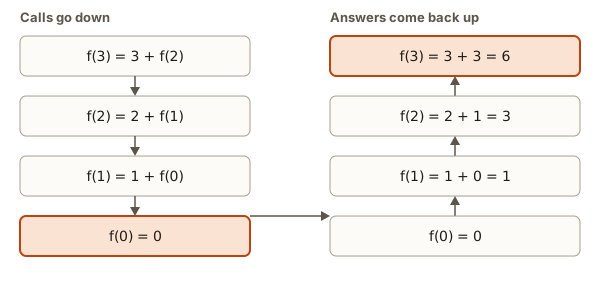 Tracing f(3): calls go down to f(0), then answers return up as 1, 3, 6
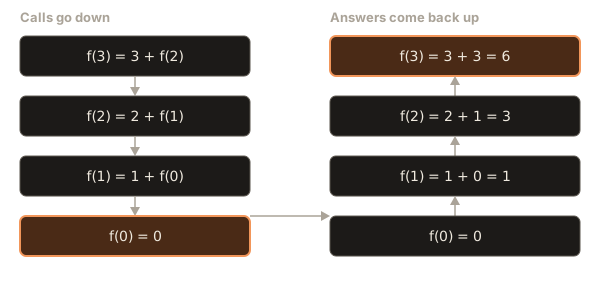
The diagram has two halves. On the left, the calls go down: f(3) calls f(2), which calls f(1), which calls f(0). Nothing has been added yet. On the right, the answers come back up: f(0) is 0, so f(1) is 1 + 0 = 1, so f(2) is 2 + 1 = 3, and f(3) is 3 + 3 = 6.
Step through a recursion in the visualizer below. Watch how the stack grows by one frame for each call, and then shrinks one frame at a time as the answers come back. Each frame holds its own copy of the variables.
The top of the stack is the first box. The call on top is the one running. A filled box is returning a value.
Call factorial(4). It goes on top of the stack.
What to watch: the additions all happen on the way back up, after the base case, never on the way down. The stack is deepest at the moment the base case runs. The depth of the stack is the number of calls waiting, and it grows with n, which is why a recursive function can run out of room for very large inputs.
Here is the same function with printing added, so that you can see the order of events:
Output:
call f(3)
call f(2)
call f(1)
call f(0)
return 0
f(1) returns 1
f(2) returns 3
f(3) returns 6
6
All four "call" lines come first, then the "returns" lines in reverse order. That mirrors the stack: first in, last out.
Now trace f(4) for the factorial version, f(n) = n * f(n - 1) with f(0) = 1. Going down: f(4) = 4 * f(3), f(3) = 3 * f(2), f(2) = 2 * f(1), f(1) = 1 * f(0), f(0) = 1. Coming back up: f(1) = 1, f(2) = 2, f(3) = 6, f(4) = 24.
If you forget the base case, the calls never stop going down. Python protects you by stopping when the stack gets too deep, with this message:
RecursionError: maximum recursion depth exceededThe words "maximum recursion depth exceeded" tell you the stack was filled with waiting calls. The fix is to check the base case, and also to check that each call makes the input smaller, so that it heads towards the base case.
Example 6: one pass of a sorting step
Tracing is how you will learn the sorting algorithms later in this phase. Here is a small preview. A bubble pass walks through a list and compares each pair of neighbours. If a pair is out of order, it swaps them. Take A = [5, 1, 4, 2]:
FOR i FROM 0 TO LENGTH(A) - 2
    IF A[i] > A[i + 1] THEN
        swap A[i] and A[i + 1]
    END IF
END FOR
i | pair compared | out of order? | array after |
|---|---|---|---|
| 0 | 5, 1 | Yes, swap | 1, 5, 4, 2 |
| 1 | 5, 4 | Yes, swap | 1, 4, 5, 2 |
| 2 | 5, 2 | Yes, swap | 1, 4, 2, 5 |
The largest value, 5, has "bubbled" to the end. Run it and compare:
Output:
after compare 0 [1, 5, 4, 2]
after compare 1 [1, 4, 5, 2]
after compare 2 [1, 4, 2, 5]
The loop runs up to LENGTH(A) - 2 because it reads A[i + 1]. If it ran to LENGTH(A) - 1, the last pass would look at A[4], which does not exist. The trace makes the bound obvious: the last pair compared is positions 2 and 3, so i stops at 2.
Tracing by printing
A hand trace is great for short code. For longer code, make the computer do the bookkeeping. Print debugging means adding print lines that show the variables at the moments you care about. You have already used it in several examples.
A few habits make print debugging effective.
- Label every value.
print("i", i, "total", total)is readable.print(i, total)is a column of unlabelled numbers you will misread. - Print at the top of the loop body or right after the update, and keep the position the same, so lines are comparable.
- Print the condition's inputs, not only the result. When a loop never ends, print the variable the condition tests and see why it never changes.
- Cap a loop you suspect is endless. Add a pass counter and
breakout after, say, 20 passes, so your program cannot hang while you look. - Remove the prints when you are done. Leftover debugging output is noise for the next reader.
Larger tools exist. A debugger is a program that runs your program one line at a time, lets you set a breakpoint (a line where it should pause) and shows every variable at each pause, without any print lines. Editors such as VS Code have one built in. It is the same idea as a trace table, automated, and you will use it in later modules. The skill of knowing what to look for is the one you are building here.
Choosing test inputs
A trace is only as good as the input you trace. The most valuable skill is picking inputs that are likely to break the algorithm. Here is a checklist you can apply to nearly any problem.
| Kind of input | Why it matters | Example for "second largest" |
|---|---|---|
| The smallest legal input | Loops that run zero or one time hide off-by-one bugs | [4, 9] |
| A typical input | Proves the basic idea works | [4, 9, 7] |
| Already in order | Some bugs depend on order | [1, 2, 3, 4] |
| In reverse order | The opposite case | [4, 3, 2, 1] |
| Equal values (ties) | > against >= | [9, 9, 4] |
| Negative numbers | Catches "start at 0" | [-5, -2, -9] |
| The boundary of a rule | Where behaviour changes | marks 59 and 60 |
| One item only, or empty | The smallest sizes | [7] |
| A large input | Shows speed problems, not logic ones | a million numbers |
Do not try every row for every problem. Pick the rows that make sense. For a rule that changes at a threshold, test the values on each side of it. For a loop, test the case where it runs 0 times, 1 time and many times.
Five inputs that each exercise a different path find far more bugs than one input run a hundred times. The number of tests matters less than how different they are.
Invariants: what stays true
You can go one step beyond tracing individual values. A loop invariant is a statement that is true at the start of every pass of a loop. If you can name the invariant, you can often see that the algorithm is correct without tracing every input.
For the maximum-of-a-list loop, the invariant is: "best is the largest of the items looked at so far." Check it. Before the loop starts, the only item looked at is A[0], and best is A[0], so it is true. Suppose it is true at the start of a pass. The pass compares A[i] with best and keeps the larger, so afterwards best is the largest of the items looked at so far, which now includes A[i]. So it is true at the start of the next pass. When the loop ends, every item has been looked at, so best is the largest of all of them. That is exactly the result we wanted.
The same thinking finds the bug in the broken second-largest code: the invariant "second is the second largest of the items seen so far" fails after the item 9 arrives in [4, 9], because second is 0 while the right value is 4. Finding the first pass where the invariant breaks points straight at the faulty line.
You do not need to write proofs at this stage. It is enough to ask, for every loop: "what is true each time I come back to the top of this loop?" The question alone catches many mistakes.
A tracing strategy for exam and interview questions
When you are shown code and asked what it prints, use this routine.
- Read the whole thing once, without tracing, to see its shape.
- List the variables and give each a column.
- Write down the starting values.
- Trace line by line. Do not skip lines that "obviously do nothing". Do not combine two updates in your head.
- At every
ifand loop condition, write down true or false. - After a loop, ask whether the last check, the one that failed, was recorded.
- Check your final output against the question. Does it ask what is printed, or the final value of a variable, or the number of passes? Answer exactly that.
Two small traps show up again and again. The first is updating two variables in the wrong order: in a <- b; b <- a + b, the second line uses the new a. The second is mistaking the final value for the last value used. After FOR i FROM 1 TO 3, a loop in Python leaves i at 3, while the equivalent while loop with i <- i + 1 leaves i at 4. Trace both if the exam asks what i is afterwards.
Common mistakes
Skipping steps because it obviously works. Bugs live in the step you skipped. If you cannot be bothered to trace a line, that is probably the line that is wrong.
Updating two variables at once in your head. The computer updates one variable per line, in the order written. In a = b then b = a, the second line sees the new a.
Not checking the loop condition after the last update. The condition is evaluated once more than the body runs. Leaving out that row means you will get the final values of the variables wrong.
Testing only one friendly input. [4, 9, 7] happily passed buggy code. Always add at least one input from the checklist above that is designed to break the code.
Tracing what you meant instead of what you wrote. If your trace says the loop should end and the program runs forever, believe the program. Your trace is wrong, or you have misread a line.
Misreading the real error. A few messages come up repeatedly when tracing goes wrong in code:
IndexError: list index out of rangeYou used an index that does not exist, usually A[len(A)] or a loop one step too long.
ZeroDivisionError: division by zeroA denominator became 0, such as dividing by the length of an empty list. Trace the smallest input.
RecursionError: maximum recursion depth exceededA recursive function never reached its base case.
UnboundLocalError: cannot access local variable 'total' where it is not associated with a valueYou used a variable inside a function before giving it a value. Python reports UnboundLocalError when a function assigns to a name later but reads it before that point. Start the variable at the top, as you do with every accumulator.
A debugging walkthrough
A learner writes a program to add the digits of 4729, and decides to use / because "divide by 10 removes the last digit":
n = 4729
total = 0
while n > 0:
    digit = n % 10
    total = total + digit
    n = n / 10
print(total)
They expect 22. Rather than staring at the code, they add a pass counter and a print line, so the loop cannot run away, and look at the first four passes:
Output:
digit 9 total 9 n 472.9
digit 2.8999999999999773 total 11.899999999999977 n 47.29
digit 7.289999999999999 total 19.189999999999976 n 4.729
digit 4.729 total 23.918999999999976 n 0.4729
The first line is fine: digit 9, total 9. But n became 472.9, not 472. In Python, / gives a number with a fraction (it is true division), while // throws the fraction away. On the next pass, 472.9 % 10 is 2.9 (shown as 2.8999999999999773 because of the way computers store fractions), not 2. From here the digits are nonsense, and n never becomes exactly 0. It keeps shrinking by a factor of 10 until it is so tiny that the computer stores it as 0, which takes 328 passes, by which time total is a meaningless fraction.
The trace pointed straight at line 6 by the second row. The fix is one character: use n = n // 10, as in Lesson 1. This is a typical bug: nothing crashed, nothing warned, and the answer was only wrong. The printed trace, with a loop cap to keep the run safe, found it in under a minute.
The sequence worth copying is: notice the wrong answer, add a counter and prints, find the first row where a value is not what you expected, and fix only that line.
Where tracing is used
Every working programmer traces, many times a day, usually without calling it that. When a test fails, you read the failing input and follow the code with it in mind. When you review someone else's change, you pick an input and walk it through. In interviews, after you write a solution, the strongest habit is to say "let me trace it on the example" and do it aloud, which often catches your own bug before the interviewer does. In exams, trace questions are common because they are quick to set and hard to guess.
Trace tables also grow up. In later modules you will trace the state of a stack, a queue, a hash table or a graph search the same way: write down the whole structure after each step. The variables change, but the habit is the same.
Practice
- Trace
i <- 10; WHILE i > 0: i <- i - 3and list every value ofi.
Solution
i is 10, then 7, then 4, then 1, then -2. At 1 the check 1 > 0 is true, so the body runs and i becomes -2. The check -2 > 0 is false, so the loop stops with i = -2. Listed values: 10, 7, 4, 1, -2.
- Make a trace table for finding the maximum of
[2, 7, 7, 1](startbestat the first item, replace only when strictly greater).
Solution
i | A[i] | A[i] > best? | best |
|---|---|---|---|
| (start) | 2 | ||
| 1 | 7 | Yes | 7 |
| 2 | 7 | No | 7 |
| 3 | 1 | No | 7 |
The maximum is 7. The second 7 does not replace the first, because 7 > 7 is false.
- Trace
f(4)forf(n) = n * f(n - 1)withf(0) = 1. Write the calls going down and the answers coming up.
Solution
Down: f(4) = 4 * f(3), f(3) = 3 * f(2), f(2) = 2 * f(1), f(1) = 1 * f(0), f(0) = 1. Up: f(1) = 1, f(2) = 2, f(3) = 6, f(4) = 24.
- What does this print? Trace it.
x <- 2; y <- 5; x <- x + y; y <- x - y; x <- x - y; PRINT x, y
Solution
| Line | x | y |
|---|---|---|
| start | 2 | 5 |
x <- x + y | 7 | 5 |
y <- x - y | 7 | 2 |
x <- x - y | 5 | 2 |
It prints 5 2. This is a swap that uses arithmetic instead of a third box. It works because each line uses the values left by the line before.
- How many times does the innermost line run?
FOR i FROM 1 TO 4: FOR j FROM 1 TO 3: PRINT i * j. Then give the last line printed.
Solution
4 passes of the outer loop times 3 passes of the inner loop gives 12 runs. The last pair is i = 4, j = 3, so the last line printed is 12.
- Trace the digit-reverse algorithm for
n = 907. What isrev?
Solution
Pass 1: d = 7, rev = 7, n = 90. Pass 2: d = 0, rev = 70, n = 9. Pass 3: d = 9, rev = 709, n = 0. The loop stops and rev = 709. The zero in the middle is kept, because rev * 10 shifts it into place.
- A function is meant to return how many numbers in a list are greater than 10. It starts
count <- 1. Find the bug with the list[12, 3, 15], and give the correct start value.
Solution
Trace: count is 1, then 12 is greater than 10 so count is 2, then 3 is not, then 15 is, so count is 3. It returns 3, but only two numbers qualify. The counter must start at 0. Every answer is too high by 1, which is a typical sign of a wrong starting value.
- What does this print?
n <- 6; steps <- 0; WHILE n != 1: IF n MOD 2 == 0 THEN n <- n DIV 2 ELSE n <- 3 * n + 1; steps <- steps + 1; PRINT steps
Solution
n goes 6, 3, 10, 5, 16, 8, 4, 2, 1. That is 8 moves, so steps is 8 and the program prints 8. Trace: 6 is even, so 3 (step 1). 3 is odd, so 10 (2). 10 is even, so 5 (3). 5 is odd, so 16 (4). 16, 8, 4, 2, 1 are the next four halvings (5, 6, 7, 8). This sequence is famous, and nobody has proved that it reaches 1 for every starting value, so strictly speaking this loop is not known to be finite.
- This pseudocode is meant to print every item of
A = [1, 2, 3, 4, 5], but it prints only2 3 4 5. Find the cause by tracing the first and last pass:FOR i FROM 1 TO LENGTH(A) - 1: PRINT A[i].
Solution
LENGTH(A) is 5, so i runs from 1 to 4 and prints A[1] to A[4], which are 2, 3, 4, 5. It skips A[0], which holds the 1. Arrays are indexed from 0, so the loop must start at 0: FOR i FROM 0 TO LENGTH(A) - 1. A loop that ran from 1 to LENGTH(A) would also be wrong, because A[5] does not exist. Trace the first and the last index to check both ends.
- Write the trace for
binarySearchonA = [1, 3, 5, 7, 9, 11]andtarget = 4. How many comparisons are made, and what is returned?
Solution
Pass 1: low = 0, high = 5, mid = 2, A[2] = 5. Is 5 equal to 4? No. 5 is greater than 4, so high = 1. Pass 2: low = 0, high = 1, mid = 0, A[0] = 1. Less than 4, so low = 1. Pass 3: low = 1, high = 1, mid = 1, A[1] = 3. Less than 4, so low = 2. Now low = 2 is greater than high = 1, so the loop ends. Three passes, and the function returns -1. The array contains neither 4 nor any position for it.
What you now know
- A dry run executes an algorithm by hand. A trace table has a column per variable and a row per step or pass.
- Do what the code says, not what you hope it says. Update one variable per line, in order, and record the failing loop check at the end.
- Assignment replaces the old value, which is why a swap needs a third box.
- Nested loops multiply: an outer loop of
apasses and an inner loop ofbpasses run the bodya * btimes. - Recursion uses a call stack. Calls go down to the base case, and answers come back up.
- Choose test inputs on purpose: the smallest case, ties, negatives, an ordered list, a reversed list, and the boundary of every rule.
- A loop invariant, what is true at the top of every pass, helps you see where an algorithm breaks.
- Print debugging gives you a trace made by the program itself. Use labelled values and cap suspect loops.