Why it matters
Flowcharts get large fast. A loop inside a loop inside a decision turns into a tangle of arrows that nobody wants to read. Pseudocode is the compact alternative: lines that look like code but are written in plain language, with no strict grammar and no compiler to check them.
Textbooks use pseudocode to describe algorithms without picking a language. Interviewers accept it on a whiteboard, because it lets you show the idea without arguing about semicolons. And professional teams use it in design notes, because a ten-line pseudocode sketch is much quicker to review than a hundred lines of finished code.
Writing good pseudocode is also the middle step of the whole method you have been building. You solve an example by hand, you write the steps as pseudocode, and then you translate the pseudocode into the language of your choice. If the pseudocode is clear, the translation is almost mechanical. If the pseudocode is vague, the vagueness shows up later as bugs.
In this lesson you will learn a standard set of conventions, the rules that make pseudocode good, and a reliable way to translate it into Python, including the part that trips up almost every beginner: loop bounds.
The idea: a sketch before the painting
An architect draws a floor plan before anyone lays a brick. The plan has no real walls, but it shows where the rooms are, how big they are and how people move between them. If a door is in the wrong place, you move a line on paper, which costs nothing, instead of knocking down a wall, which costs a lot.
Pseudocode is the floor plan of a program. It shows the structure (what happens in order, where the choices are, what repeats) without the details of one particular language. Fixing a mistake in a pseudocode sketch costs seconds.
There is no official standard, which is both the freedom and the danger. Two people can write different but equally good pseudocode for the same algorithm. What matters is that your pseudocode is consistent (it always means the same thing by the same word), precise (every line has one meaning) and readable (a stranger can follow it). This course uses the set of conventions below. Textbooks you read later may use slightly different words, and you will be able to adapt.
The conventions used in this course
| Need | Write | Notes |
|---|---|---|
| Assign a value | x <- 5 | Read as "x becomes 5". The arrow points into the box. |
| Compare | x == 5, x != 5, x >= 5 | == asks a question. It never changes x. |
| Arithmetic | + - * / and DIV, MOD | 7 DIV 2 is 3 (whole division), 7 MOD 2 is 1 (remainder). |
| Logic | AND, OR, NOT | x > 0 AND x < 10 |
| Input and output | READ n, PRINT n | One value per line. |
| Branch | IF ... THEN ... ELSE IF ... ELSE ... END IF | Indent the bodies. |
| Counted loop | FOR i FROM 1 TO n ... END FOR | Both ends included. |
| Condition loop | WHILE cond ... END WHILE | Test first, then run the body. |
| Function | FUNCTION name(params) ... RETURN value ... END FUNCTION | State what goes in and what comes out. |
| Array item | A[i] | This course counts from 0, so the first item is A[0]. |
| Array size | LENGTH(A) | The number of items. |
| Comment | // text | Explains why, not what. |
Each row deserves a comment.
The arrow <-. Many people write x = 5 for assignment, and in some textbooks you will see x := 5 or a real left arrow. This course uses <- because it cannot be mistaken for a comparison. In a page where = means "store" in one place and "is equal to" in another, a reader has to guess which. With <- for assigning and == for comparing, there is nothing to guess.
DIV and MOD. Division is the operation most likely to behave differently between languages. In pseudocode, say exactly what you mean. 7 DIV 2 is 3 and 7 MOD 2 is 1, so 7 = 2 * 3 + 1. In Python, // and % do the same jobs. In JavaScript you would write Math.floor(7 / 2) and 7 % 2. Pseudocode that uses DIV and MOD works in every language.
FOR loops include both ends. FOR i FROM 1 TO 4 makes i take the values 1, 2, 3 and 4. The word TO includes the last value. This is the most common point of confusion when translating, because Python's range does not include the last value. We will deal with that carefully below.
Arrays count from 0. An array is a numbered row of values stored together. The number of an item is its index. With A = [10, 20, 30], A[0] is 10, A[1] is 20, and A[2] is 30. There is no A[3]. If an array has n items, its last index is n - 1. Almost every language you will use counts from 0, so this course does too.
Indentation. The body of every IF, FOR, WHILE and FUNCTION is indented by four spaces. Together with the END keywords, indentation shows exactly where a block ends. Some pseudocode drops the END lines and relies on indentation alone, which is also fine if you are consistent.
What makes pseudocode good
Four rules separate readable pseudocode from a mess.
1. One action per line. total <- total + x is one action. A line like "go through the list and add up the positives and print the count" is five actions, and none of them is visible.
2. Say how, not just what. "Sort the list" says what. It does not say how, so it cannot appear inside an algorithm whose job is to sort. Inside a bigger algorithm that merely needs a sorted list, "sort A" is fine as long as you say it is a known step. The test is: could a literal-minded helper carry out this line without further thought?
3. Name things well. total, best, count and index tell the reader what a variable is for. Single letters are fine for loop counters (i, j) and for the array itself (A), which is the habit in textbooks.
4. Show the contract. Begin with a comment that says what the function takes and what it gives back. For example:
// Input:  array A of numbers, with at least one item
// Output: the largest value in A
Notice that the contract states an assumption ("at least one item"). Stating the assumption is far better than hiding it, because the maximum of an empty list does not exist.
Three levels of detail
Pseudocode can be written at the wrong level in two directions. Here is the same task, "find the largest number in a list", at three levels.
Too vague:
Look through the list and find the biggest one.This repeats the problem statement. It does not say how to look, what to remember or when to stop.
About right:
FUNCTION maxOf(A)
    best <- A[0]
    FOR i FROM 1 TO LENGTH(A) - 1
        IF A[i] > best THEN
            best <- A[i]
        END IF
    END FOR
    RETURN best
END FUNCTION
This has the memory (best), the loop and its bounds, and the decision. Anyone can trace it.
Too code-like:
int maxOf(int[] A) { int best = A[0]; for (int i = 1; i < A.length; i++) if (A[i] > best) best = A[i]; return best; }This is a real language in disguise. The reader now has to know about types, braces and i++, and the idea has been buried under syntax. If your pseudocode would not make sense to someone who only knows a different language, it is too code-like.
Example 1: the sum from 1 to n
Here is the first complete example. The function takes a whole number n and returns 1 + 2 + ... + n.
FUNCTION sumTo(n)
    total <- 0
    FOR i FROM 1 TO n
        total <- total + i
    END FOR
    RETURN total
END FUNCTION

PRINT sumTo(4)
Trace it for n = 4, with one row per pass:
i | total after |
|---|---|
| (start) | 0 |
| 1 | 1 |
| 2 | 3 |
| 3 | 6 |
| 4 | 10 |
The function returns 10. Now translate it. The picture below shows each pseudocode line next to the Python line it becomes.
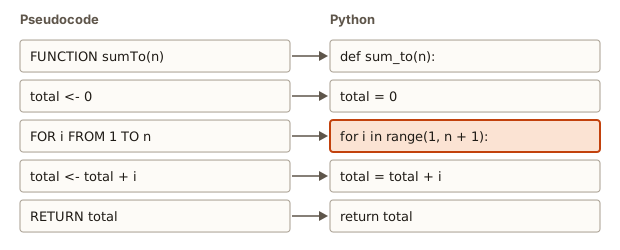 Each pseudocode line maps to one Python line
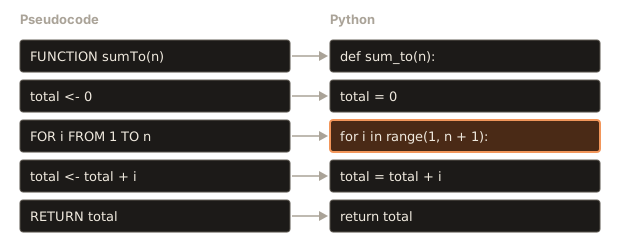
Only the highlighted line is non-obvious. FOR i FROM 1 TO n becomes for i in range(1, n + 1). Python's range(a, b) produces the numbers from a up to but not including b, so to include n you must write n + 1. Run it:
Output:
10
55
0
For n = 0, range(1, 1) is empty, the loop body never runs and the function returns the initial 0, which is right. A good test for any loop-based function is to run it for the smallest legal input, and here the smallest input worked without needing any special-case code.
The word def starts a function definition, and the indented lines below it are the function body. return total hands the value back to whoever called the function. The three print lines at the bottom call the function with different arguments.
In JavaScript the same idea reads as follows, which shows how directly pseudocode carries across languages:
function sumTo(n) {
  let total = 0;
  for (let i = 1; i <= n; i++) total += i;
  return total;
}
console.log(sumTo(4));
The trick to loop bounds
Almost every translation bug lives in the loop bounds, so it is worth learning the rule once.
Pseudocode FOR i FROM a TO b includes both ends. Python range(start, stop) includes start and excludes stop. So:
| Pseudocode | Python | i takes |
|---|---|---|
FOR i FROM 1 TO n | for i in range(1, n + 1) | 1, 2, ..., n |
FOR i FROM 0 TO n - 1 | for i in range(0, n) or range(n) | 0, 1, ..., n - 1 |
FOR i FROM 1 TO LENGTH(A) - 1 | for i in range(1, len(A)) | 1, ..., last index |
FOR i FROM n DOWN TO 1 | for i in range(n, 0, -1) | n, n - 1, ..., 1 |
The pattern: the Python stop value is the pseudocode last value plus one (or minus one when counting down). When you are unsure, write out the first and last value i takes in both versions and compare them. For range(1, 5), the values are 1, 2, 3, 4, so FOR i FROM 1 TO 4.
A second note. In JavaScript, C++ and Java, loops usually say i <= n for an inclusive end and i < n for an exclusive end. The off-by-one danger is the same everywhere. It does not go away with experience. It goes away with the habit of checking the first and last value.
Example 2: the largest item of an array
The pseudocode was shown above. Translate it. Notice LENGTH(A) - 1 becomes len(A) as the stop value of range because stop is exclusive: the last index is len(A) - 1, and range(1, len(A)) stops just before len(A).
Output:
8
-2
7
Trace the first call:
i | A[i] | A[i] > best | best |
|---|---|---|---|
| (start) | 3 | ||
| 1 | 8 | Yes | 8 |
| 2 | 2 | No | 8 |
The second test is the one that exposes a common beginner mistake. If best started at 0 instead of A[0], the all-negative list would wrongly return 0. Starting from the first element of the array is correct for every non-empty array. The third test, a one-item array, shows that range(1, 1) is empty, so the loop does not run, and best is returned as that one item.
Calling max_of([]) with an empty array fails, because A[0] does not exist:
IndexError: list index out of rangeThat is why the contract comment says "at least one item". The function is allowed to assume it, and the caller is responsible for honouring it.
Example 3: the product of 1 to n
This is the factorial, written n!, as in 5! = 5 x 4 x 3 x 2 x 1 = 120. The pseudocode is almost the same as the sum, with two differences that matter: the accumulator starts at 1, and the operator is *.
FUNCTION factorial(n)
    result <- 1
    FOR i FROM 2 TO n
        result <- result * i
    END FOR
    RETURN result
END FUNCTION
The accumulator must start at the value that leaves a product unchanged, which is 1. If it started at 0, every multiplication would give 0 and the answer would be 0 forever. The loop starts at 2 because multiplying by 1 changes nothing, but starting at 1 would also be correct and a little easier to explain.
Output:
120
1
3628800
By convention 0! is 1, and the code gives that without any special case: range(2, 1) is empty, so result stays at its starting value 1. This is a good example of choosing the initial value so that the "do nothing" case is already correct.
Example 4: counting items that meet a condition
Problem. Return how many items in an array are negative.
A counter pattern combines a loop, a decision and an accumulator that goes up by 1:
FUNCTION countNegatives(A)
    count <- 0
    FOR i FROM 0 TO LENGTH(A) - 1
        IF A[i] < 0 THEN
            count <- count + 1
        END IF
    END FOR
    RETURN count
END FUNCTION
For A = [3, -1, -7, 0, 5, -2], the items that satisfy A[i] < 0 are -1, -7 and -2, so the answer is 3. Note that 0 is not negative. Python can walk over the values directly with for x in A, which is simpler when you do not need the position. Both loops do the same work. Use the direct form when you only need the values, and the index form when the position matters.
def count_negatives(A):
    count = 0
    for x in A:
        if x < 0:
            count = count + 1
    return count


print(count_negatives([3, -1, -7, 0, 5, -2]))
The output is 3. A slight variation of this pattern solves a surprising number of problems. Change the condition and you can count even numbers, words longer than 5 letters, or marks below 40.
Example 5: searching, and returning early
Problem. Return the index of target in an array, or -1 if it is not there.
This is linear search from Lesson 1, now written precisely. It introduces a new idea: a function can RETURN from the middle of a loop, which ends the function immediately. This is an early return.
FUNCTION indexOf(A, target)
    FOR i FROM 0 TO LENGTH(A) - 1
        IF A[i] == target THEN
            RETURN i
        END IF
    END FOR
    RETURN -1
END FUNCTION
Look at where the second RETURN sits. It is after the loop, not inside it. It runs only if the loop finishes without ever finding the target. The value -1 is a sentinel result: an impossible index that means "not found". (The caller must check for it.)
Output:
2
-1
0
The third call shows that when a value appears more than once, the function returns the first position, because it returns as soon as it sees a match. If you wanted the last position, you would loop from the end, or keep going and remember the latest match.
Trace the first call:
i | A[i] | equals 30? | action |
|---|---|---|---|
| 0 | 40 | No | continue |
| 1 | 10 | No | continue |
| 2 | 30 | Yes | return 2 |
The loop stops at i = 2 and the rest of the array is never looked at. In the best case, the target is first and the function does one comparison. In the worst case it is last or missing, and the function does as many comparisons as there are items. That best/worst distinction is the beginning of the analysis you will do in the complexity module.
Example 6: binary search
Problem. The same as above, but the array is sorted in ascending order. Use the fact that it is sorted to find the target much faster. This is the guessing game from Lesson 1, written as pseudocode.
You keep two indexes, low and high, that mark the part of the array where the target could still be. Start with the whole array. Look at the middle. If the middle item is the target, you are done. If the target is bigger, it can only be to the right, so move low past the middle. If it is smaller, it can only be to the left, so move high before the middle. Repeat until the range is empty.
FUNCTION binarySearch(A, target)
    low <- 0
    high <- LENGTH(A) - 1
    WHILE low <= high
        mid <- (low + high) DIV 2
        IF A[mid] == target THEN
            RETURN mid
        ELSE IF A[mid] < target THEN
            low <- mid + 1
        ELSE
            high <- mid - 1
        END IF
    END WHILE
    RETURN -1
END FUNCTION
Why low <= high and not low < high? When low == high, there is still one item in the range, and it might be the target. Using < would skip it. And why mid + 1 and mid - 1, not just mid? Because the middle item has already been checked and rejected, so excluding it guarantees the range shrinks every pass. Writing low <- mid can make the range stop shrinking, so the loop never ends. These two details are where almost everyone makes their first binary-search bug, and a trace table finds them.
Run it with a printed trace of low, high and mid on each pass:
Output:
low 0 high 9 mid 4 A[mid] 16
low 5 high 9 mid 7 A[mid] 56
low 5 high 6 mid 5 A[mid] 23
found at 5
low 0 high 9 mid 4 A[mid] 16
low 0 high 3 mid 1 A[mid] 5
low 2 high 3 mid 2 A[mid] 8
found at -1
Walk through the search for 23. The array has 10 items. The middle (index 4) holds 16, which is less than 23, so everything up to index 4 is ruled out and low becomes 5. Now the range is indexes 5 to 9. The middle is index 7, which holds 56, which is more than 23, so high becomes 6. The range is indexes 5 to 6, the middle is index 5, and A[5] is 23. Found in three comparisons, where linear search would have needed six.
The second search, for 7, ends with a different outcome. After low becomes 2 and high becomes 3, the middle is 2, holding 8. Since 8 is more than 7, high becomes mid - 1 = 1. Now low is 2 and high is 1, so low <= high is false, the loop ends and the function returns -1. A range where low is greater than high is the way an empty range is represented. This is also why the loop condition is correct: it is the "is there anything left to look at" test.
Binary search is the first case where the pseudocode is noticeably harder than the idea, and the order of the steps and the exact bounds must be right. Pseudocode lets you check those details before you type a single character of real code.
Example 7: swapping, and reversing an array in place
To swap two values you need a third box. Suppose a holds 3 and b holds 8, and you want to exchange them. If you write a <- b first, the 3 is gone. So you save it first:
temp <- a
a <- b
b <- temp
Trace: temp becomes 3, a becomes 8, b becomes 3. The two values are exchanged. This three-line pattern appears inside every sorting algorithm.
To reverse an array in place, swap the first and the last items, then the second and the second-last, and so on, moving inwards from both ends until the two positions meet. Two index variables, i from the left and j from the right, do the work.
PROCEDURE reverse(A)
    i <- 0
    j <- LENGTH(A) - 1
    WHILE i < j
        temp <- A[i]
        A[i] <- A[j]
        A[j] <- temp
        i <- i + 1
        j <- j - 1
    END WHILE
END PROCEDURE
A procedure is a function that does its work by changing something (here the array itself) rather than by returning a value. Many courses use the word, and so will we when it fits. Why i < j and not i <= j? When i and j meet at the same position, that is the middle item of an odd-length array. It stays where it is, so swapping an item with itself is pointless and the loop can stop.
Output:
[5, 4, 3, 2, 1]
[40, 30, 20, 10]
Trace for [1, 2, 3, 4, 5]:
i | j | action | array |
|---|---|---|---|
| 0 | 4 | swap positions 0 and 4 | 5, 2, 3, 4, 1 |
| 1 | 3 | swap positions 1 and 3 | 5, 4, 3, 2, 1 |
| 2 | 2 | 2 < 2 is false, stop | 5, 4, 3, 2, 1 |
The same two-index trick, one from each end moving inwards, is called the two-pointer technique and it will come back in the array module.
Example 8: a palindrome check
A palindrome reads the same forwards and backwards: level, noon, a. The two-index method from reversing gives a neat check. Compare the first and last characters. If they differ, it is not a palindrome. Otherwise, move inwards and repeat. If the indexes meet without finding a mismatch, it is a palindrome.
FUNCTION isPalindrome(s)
    i <- 0
    j <- LENGTH(s) - 1
    WHILE i < j
        IF s[i] != s[j] THEN
            RETURN false
        END IF
        i <- i + 1
        j <- j - 1
    END WHILE
    RETURN true
END FUNCTIONOutput:
True
True
False
True
True
Check the edge cases. A single letter has i = 0, j = 0, the loop never runs and the function returns True, which is right. An empty text has j = -1, so 0 < -1 is false, the loop never runs and the function returns True. Whether the empty text counts as a palindrome is a decision about the problem. Most definitions say yes. The point is that the pseudocode forced you to ask.
The RETURN false is inside the loop and the RETURN true is after it. Reversing them would be a serious bug: the function would return after the first comparison, whatever the result. Where a RETURN sits, inside or outside the loop, changes the algorithm completely.
Functions: parameters, arguments and return values
You have used functions in every example. The terms are worth getting exact.
A parameter is a name in the function's heading that stands for an input: in FUNCTION indexOf(A, target) the parameters are A and target. An argument is the real value you supply when you call the function: in indexOf([40, 10, 30, 20], 30) the arguments are the array and 30. When the function runs, each parameter holds a copy of the corresponding argument (or, for arrays, a reference to the same array, which is why reverse can change the caller's array).
A function can return a value with RETURN, which gives the value to the caller and ends the function at once. A function that does not return anything useful is a procedure, as in reverse.
Return and print are different things, and beginners mix them up. PRINT shows a value on the screen for a person. RETURN gives a value back to the code that called the function, so that the code can use it. A function that prints its answer instead of returning it cannot be used inside another calculation. A function that returns but never prints needs the caller to print.
Look at what happens when the return is forgotten in Python:
def add_one(n):
    total = n + 1

print(add_one(2))
print(add_one(2) + 1)
The first line prints None, which is Python's value for "nothing", because the function ended without returning anything. The second line stops with an error:
TypeError: unsupported operand type(s) for +: 'NoneType' and 'int'Read it from the end: the program tried to add 1 to a NoneType, a value that is nothing at all. The cause is a missing return, not a bad addition.
Translating pseudocode, step by step
Here is a reliable routine for turning pseudocode into a program. It is the same each time.
- Copy the contract. Turn the input/output comment into the function's name and parameters.
- Translate line by line. Do not rearrange. Each pseudocode line becomes one line or a small block.
- Convert bounds carefully. For every
FOR, write down the first and last values of the counter in the pseudocode, then check that yourrange(...)produces exactly those values. - Check every
RETURN. Is it inside or outside the loop, the same as in the pseudocode? - Run the traced example. Use the same input you traced by hand. The program should print exactly what your trace table says.
- Run the edge cases. The smallest input, a tie, a negative number, a one-item list.
If the program disagrees with the trace, either the translation is wrong or the trace is wrong. Find out which by comparing line by line. That comparison is a powerful way to find bugs.
Dialects you will meet
Once you read pseudocode from other sources, you will see variations. None of them changes the meaning. Assignment may be x := 5 or x ← 5 or SET x TO 5. Blocks may end with END IF, ENDIF, FI or just by indentation. Loops may be REPEAT ... UNTIL cond, which tests at the end and so always runs the body at least once, or FOR EACH item IN list. Array indexes may start at 1 in some textbooks, which is the biggest trap: an algorithm written with 1-based indexes needs its bounds shifted when you translate it into Python. When you meet an unfamiliar dialect, find one small example in the text and trace it, and the conventions become clear.
Common mistakes
Using = for both assigning and comparing. On a page where = sometimes means store and sometimes means "is equal", the reader must guess. Use <- to assign and == to compare. In Python, a stray = in a condition is a syntax error:
SyntaxError: invalid syntax. Maybe you meant '==' or ':=' instead of '='?Skipping the loop bounds. FOR i FROM 1 TO n states them. "Loop through the list" does not. State the first and last value of the counter.
Hiding work in a sentence. "Sort the list" inside a sort algorithm, or "find the duplicate" inside a duplicate finder, skips exactly the part that needed solving.
Inconsistent indentation. If the body of a loop is not clearly indented, the reader cannot see where the loop ends, and neither can you. The same pseudocode with one line moved out of the loop computes a different answer.
Off-by-one in the translation. Writing range(1, n) for FOR i FROM 1 TO n loses the last value. Writing range(len(A) + 1) runs one step past the end of an array and gives:
IndexError: list index out of rangeA RETURN in the wrong place. A RETURN -1 inside the loop of a search ends the function after the first item that does not match, instead of after all items have failed. The next section shows it.
Forgetting to return. A function that computes the answer but does not RETURN gives None.
Assuming indexes start at 1. In this course, and in almost every programming language, the first item is A[0].
A debugging walkthrough
A learner writes this pseudocode for indexOf and translates it faithfully:
FUNCTION indexOf(A, target)
    FOR i FROM 0 TO LENGTH(A) - 1
        IF A[i] == target THEN
            RETURN i
        ELSE
            RETURN -1
        END IF
    END FOR
END FUNCTION
The Python version:
def index_of(A, target):
    for i in range(len(A)):
        if A[i] == target:
            return i
        else:
            return -1
Test it with A = [40, 10, 30, 20]. Calling index_of(A, 40) returns 0, correct. Calling index_of(A, 30) returns -1, which is wrong because 30 is at index 2. Trace the second call:
i = 0: A[0] = 40, is 40 == 30? No -> else branch -> RETURN -1 (function ends here)The else is attached to the if inside the loop, so the function gives up after the very first item. The RETURN -1 should have been placed after the loop ends, where it means "every item has been checked". The fix is to delete the else and put RETURN -1 outside and after the FOR. This is the exact placement in Example 5.
Look at how the bug was found. The learner did not guess. They chose an input where the target was not first, traced one pass, and saw the function end at the wrong time. When an answer is wrong, trace one input and look for the first line where the trace and the program disagree.
Where pseudocode is used
In technical interviews, you will often be asked to "walk me through your approach" before you write code. The best answers speak in pseudocode: set two pointers, move them inwards, compare, return false on a mismatch. The interviewer can then correct the idea early, which saves both of you from a wrong implementation.
In research papers and textbooks, every algorithm appears as pseudocode, because the authors want readers using Python, C++ and Java to follow the same text. In teams, a short pseudocode sketch in a design document or a pull request description lets reviewers agree on the approach before anyone writes the real code. In education platforms and exams, pseudocode questions test whether you can read and trace logic independent of any language.
Practice
- Write pseudocode for a function that returns the product of 1 to n (n factorial).
Solution
FUNCTION factorial(n)
    result <- 1
    FOR i FROM 2 TO n
        result <- result * i
    END FOR
    RETURN result
END FUNCTION
result starts at 1, not 0, because 0 times anything is 0. For n = 4 the values are 2, 6, 24, so the answer is 24. For n = 0 or n = 1 the loop does not run and the answer is 1.
- Write pseudocode that counts how many items in an array are negative, and run the Python on
[0, -3, 4, -1].
Solution
FUNCTION countNegatives(A)
    count <- 0
    FOR i FROM 0 TO LENGTH(A) - 1
        IF A[i] < 0 THEN
            count <- count + 1
        END IF
    END FOR
    RETURN count
END FUNCTION
For [0, -3, 4, -1] the answer is 2: the items -3 and -1. The 0 is not negative.
- Translate
maxOfinto JavaScript, and say which line is the equivalent ofFOR i FROM 1 TO LENGTH(A) - 1.
Solution
function maxOf(A) {
  let best = A[0];
  for (let i = 1; i < A.length; i++) {
    if (A[i] > best) best = A[i];
  }
  return best;
}
console.log(maxOf([3, 8, 2]));
It prints 8. The loop header for (let i = 1; i < A.length; i++) is the equivalent: i runs from 1 to A.length - 1.
- Write the pseudocode for a function
sumOfEvens(A)that returns the sum of the even numbers in an array. UseMOD. Test it by hand on[1, 2, 3, 4, 6].
Solution
FUNCTION sumOfEvens(A)
    total <- 0
    FOR i FROM 0 TO LENGTH(A) - 1
        IF A[i] MOD 2 == 0 THEN
            total <- total + A[i]
        END IF
    END FOR
    RETURN total
END FUNCTION
For [1, 2, 3, 4, 6] the even items are 2, 4 and 6, and the sum is 12.
- Convert each loop header to Python
range. (a)FOR i FROM 3 TO 8(b)FOR i FROM 0 TO n - 1(c)FOR i FROM 10 DOWN TO 1.
Solution
(a) range(3, 9) gives 3 to 8. (b) range(n) or range(0, n) gives 0 to n - 1. (c) range(10, 0, -1) gives 10 down to 1. In each case the stop value is just past the last wanted value.
- Write pseudocode for
secondLargest(A)that works for arrays with at least two items, and note the one detail from Lesson 4's bug story that you must get right.
Solution
FUNCTION secondLargest(A)
    first <- MAX(A[0], A[1])
    second <- MIN(A[0], A[1])
    FOR i FROM 2 TO LENGTH(A) - 1
        IF A[i] > first THEN
            second <- first
            first <- A[i]
        ELSE IF A[i] > second THEN
            second <- A[i]
        END IF
    END FOR
    RETURN second
END FUNCTION
The detail is second <- first before first <- A[i]: the old largest value must move down before it is overwritten. Starting from the first two items (instead of a fixed 0) also makes it correct for negative numbers. For [4, 9, 7]: first 9, second 4, then 7 is not bigger than 9 but is bigger than 4, so second becomes 7. This version treats a repeated maximum as the second largest, so [9, 9, 4] returns 9.
- Trace
binarySearchby hand forA = [3, 6, 9, 12, 15]andtarget = 15. Writelow,highandmidon each pass.
Solution
Pass 1: low = 0, high = 4, mid = 2, A[2] = 9, which is less than 15, so low = 3. Pass 2: low = 3, high = 4, mid = 3, A[3] = 12, less than 15, so low = 4. Pass 3: low = 4, high = 4, mid = 4, A[4] = 15, found. Return 4. The third pass is the one that would be lost if the loop condition were low < high.
- Find the bug in this pseudocode for "return true if the array contains the target": loop over every item;
IF A[i] == target THEN RETURN true ELSE RETURN false. Then fix it.
Solution
The ELSE RETURN false ends the function after the first item that is not the target. For A = [5, 8] and target 8, the first item 5 is not 8, so it returns false, which is wrong. Fix: remove the ELSE and put RETURN false after the loop.
FUNCTION contains(A, target)
    FOR i FROM 0 TO LENGTH(A) - 1
        IF A[i] == target THEN
            RETURN true
        END IF
    END FOR
    RETURN false
END FUNCTION- Write pseudocode for
countVowels(s), which counts the lettersa,e,i,o,uin a texts. Then give the answer for"education".
Solution
FUNCTION countVowels(s)
    count <- 0
    FOR i FROM 0 TO LENGTH(s) - 1
        IF s[i] == "a" OR s[i] == "e" OR s[i] == "i" OR s[i] == "o" OR s[i] == "u" THEN
            count <- count + 1
        END IF
    END FOR
    RETURN count
END FUNCTION
For education: e, u, a, i, o are the vowels, so the answer is 5. (The letters are e-d-u-c-a-t-i-o-n.)
- Write pseudocode for a function
isSorted(A)that returns true if an array is in ascending order. Say whichRETURNgoes inside the loop and which outside, and test it on[1, 2, 2, 5]and[1, 3, 2].
Solution
FUNCTION isSorted(A)
    FOR i FROM 0 TO LENGTH(A) - 2
        IF A[i] > A[i + 1] THEN
            RETURN false
        END IF
    END FOR
    RETURN true
END FUNCTION
RETURN false is inside the loop (the first out-of-order pair proves the array is not sorted) and RETURN true is outside (only after every neighbouring pair has passed). The loop goes up to LENGTH(A) - 2 because it looks at A[i + 1], and i + 1 must not pass the last index. For [1, 2, 2, 5] no pair has A[i] > A[i + 1] (equal is allowed), so the result is true. For [1, 3, 2] the pair 3 and 2 fails, so the result is false.
What you now know
- Pseudocode is code-like plain language that shows the structure of an algorithm without a particular language.
- This course writes
<-to assign,==to compare,MODandDIVfor remainder and whole division,FOR ... END FOR,WHILE ... END WHILE,FUNCTION ... RETURN, andA[i]counted from 0. - Good pseudocode has one action per line, says how and not only what, uses clear names and states its input and output.
- A
FORloop in pseudocode includes both ends, and Pythonrangeexcludes the last value, so check the first and last value of the counter. - Where a
RETURNsits, inside or after a loop, changes what the algorithm does. - You can translate any pseudocode into Python line by line, then check the program against your hand trace.