Why this matters
A program works with data: ages, prices, names, scores, a yes or no answer. Each of those values has to be kept somewhere while the program uses it. A variable is the name you give to one of those places, so you can read the value back later and change it when the program needs a new value. Almost every bug in a beginner's program comes from a variable holding the wrong kind of value, or from a calculation that quietly loses information. This lesson teaches you to pick the right type, to predict what a calculation returns, and to spot the mistakes that interviewers love to ask about.
The idea of a variable
Think of a set of labelled jars on a kitchen shelf. Each jar has a label that says what is inside, such as rice or sugar. The label is the name. The kind of jar, and how much it can hold, is the type. What is in the jar right now is the value. You can take the value out and put a new one in, but you cannot put water in a jar labelled for rice, because the jar was made for something else.
A variable works the same way, except the jars are places in the computer's memory. Memory is a long row of numbered cells, and each cell holds a small piece of information. When you declare a variable, the compiler sets aside enough cells for its type, gives those cells the name you chose, and records the type so it can check every later use. A variable of type int gets four bytes on a typical machine. A variable of type char gets one byte. The type is what makes the size and the meaning fixed.
C++ is a statically typed language. That phrase means the type of every variable is decided when the program is compiled, and it cannot change while the program runs. You write the type once, when you declare the variable, and the compiler enforces it from then on. A jar made for rice will never hold water, and a variable declared as int will never hold the text hello.
Two words describe the first steps with a variable. Declaring a variable means creating it: you say its type and its name. Initialising a variable means giving it its first value. You can do both in one line, or do them in two steps.
Your first program with variables
The program below creates five variables, one of each common type, and prints them. Read it first, then run it. Leave the Input box empty, because this program reads nothing.
The output is:
Anisha is 20
Grade: A
Price: 49.99
Passed: 1
Next year: 21
Trace the program one statement at a time, as you learned in the last lesson. The first five lines create the variables. int age = 20; declares a variable called age of type int, and it starts with the value 20 in the same line. The other four lines do the same with their own types.
The first cout line prints the name, the word is, and the age. The text in quotes is printed exactly as written, and the variables are replaced by their values. Each variable name in the cout line stands for the value currently stored in it, not for the name itself.
The line Passed: 1 surprises many beginners. The variable passed holds true, but cout prints a bool as 1 for true and 0 for false, unless you change the setting. You will meet that setting shortly.
The line age = age + 1; has no type in front of age. It does not create a new variable. It reads the value currently in the existing box, which is 20, adds 1, and stores 21 back in the same box. That is the difference between declaring and assigning. The type is written only once, at the declaration. Every later change is an assignment.
The basic types
The table below lists the types you will use most in this course. The sizes are typical for a 64-bit computer with the common GNU compiler, which is what the Run button uses. The C++ standard promises minimum sizes and an order, not exact sizes, so the numbers can differ on other machines. When you need the exact size, measure it with sizeof, which you will meet in a later lesson.
| Type | What it holds | Typical size | Example value |
|---|---|---|---|
int | Whole numbers, positive or negative | 4 bytes | 42, -7 |
long long | Very large whole numbers | 8 bytes | 9000000000 |
double | Numbers with a decimal point | 8 bytes | 3.14 |
float | Decimal numbers with less precision | 4 bytes | 2.5f |
char | One character, in single quotes | 1 byte | 'x' |
bool | true or false | 1 byte | true |
string | Text of any length, in double quotes | depends on the text | "hello" |
A few points need care. The string type is not built into the language core. It comes from the standard library and needs the line #include <string> at the top of the file. The others are built in.
A char holds one character, and you write it in single quotes, as 'A'. Text in double quotes, such as "A", is a string, even when it holds only one letter. Those two are different types, and the compiler will refuse to mix them. That refusal is one of the most useful checks you will get in this course.
An int on a typical machine holds values from -2147483648 to 2147483647. That is about plus or minus two billion. A long long holds values up to about nine quintillion, which is far larger. Choosing long long when a value could pass two billion is a habit that prevents a whole class of bugs, and you will see why in the next lesson.
Whole numbers and the arithmetic operators
A variable of type int can be used in arithmetic. The four basic operators are + for addition, - for subtraction, * for multiplication and / for division. There is one more operator you will use all the time, %, which gives the remainder after division. The remainder of 17 divided by 5 is 2, because 5 goes into 17 three times with 2 left over.
Here is a short program with each operator. It also shows what happens when the numbers are whole.
#include <iostream>
using namespace std;

int main() {
    int a = 17;
    int b = 5;
    cout << "a + b = " << a + b << endl;
    cout << "a - b = " << a - b << endl;
    cout << "a * b = " << a * b << endl;
    cout << "a / b = " << a / b << endl;
    cout << "a % b = " << a % b << endl;
    return 0;
}
The output is:
a + b = 22
a - b = 12
a * b = 85
a / b = 3
a % b = 2
Look at the division line. 17 / 5 gives 3, not 3.4. When both numbers are int, the division is a whole-number division. The part after the decimal point is thrown away, and nothing is rounded. This rule is one of the most common sources of wrong answers, and you will see it again in the practice problems and in the next lesson.
You can use the remainder operator to find out whether a number is even. If n % 2 is 0, the number has no remainder when divided by 2, so it is even. You will use that trick in many programs, and you will combine it with decisions in a later module.
Variables can be used inside any expression. An expression is a piece of code that produces a value, such as a + b * 2. C++ follows the usual school rules: multiplication and division happen before addition and subtraction, and parentheses change the order. a + b * 2 means a + (b * 2). Write parentheses when you are not sure, because they make the reading clear to the next person, who may be you.
Decimal numbers and their limits
A double holds numbers with a decimal point. Its name comes from "double precision", which means it stores about twice as many binary digits as the older float. A decimal literal, such as 2.5 written in the code, is a double by default. If you want a float, add the letter f at the end, as in 2.5f. For most work in this course, use double.
Decimal numbers have a limit that surprises almost everyone. A computer stores decimals in binary, base two, and some decimals that look simple in base ten cannot be written exactly in base two. The number 0.1 is one example. It repeats forever in binary, so the computer stores the closest value it can. The next program shows what that does to a simple sum.
The output is:
Default output: 0.3
17 digits:      0.30000000000000004
Equal to 0.3?   0
Trace it. The first line prints 0.3, because cout prints a double with about six significant digits by default. That hides the error. The second line changes the setting with setprecision(17), which asks for 17 significant digits. Now the true stored value appears, 0.30000000000000004. The third line compares the sum with 0.3. The comparison gives 0, which means false. The two numbers are not equal, even though both look like 0.3 on screen.
The lesson for your programs is simple. Never compare two decimal values with == and expect a match. If you must compare decimals, check whether they are close enough, or use whole numbers where you can. Money is the best example. Store money as whole cents, not as decimal dollars. The next example shows why.
Money as whole numbers
A shop bills customers in rupees and paise, or in dollars and cents. If you store the prices as decimals, errors creep in when you add many of them, and a total can be off by a cent. The safe method is to store every amount as a whole number of the smallest unit, cents, and convert to dollars only when you print. The program below works both ways and shows the difference.
The output is:
Subtotal in cents: 445
Subtotal in dollars: 4.45
Integer division gives: 4
Trace the three steps. The subtotal is three coffees at 120 cents plus one toast at 85 cents, which is 360 plus 85, so 445 cents. That addition is exact, because whole numbers are exact.
The dollars line divides by 100.0, not 100. The .0 makes the number a double, so the division is a decimal division and the result is 4.45. If you wrote 100 instead, the division would be a whole-number division, as in the third part of the program.
The third part shows the trap. subtotal / 100 with two int values gives 4. The 45 cents are gone. Nothing warns you. The program simply prints a smaller number. This is the single most common way beginners lose money in their programs, and you will see variations of it in every module that follows.
Characters
A char holds one character. Inside the computer every character is a number, using a table called ASCII for the common letters. The letter 'A' is stored as 65, 'B' as 66, and so on. The lowercase 'a' is 97. Because characters are numbers, you can do arithmetic on them. The next program shows both the number and the letter, and it also shows how a string joins text together.
The output is:
letter: a, code: 97
after +1: b, code: 98
Hello, C++
Length: 10
ForgeStack
Trace it. The first line prints the letter a and then its code 97. The (int) in front of letter asks for the number instead of the letter. That is a cast, a conversion from one type to another, and you will study casts properly in the next lesson.
The second part adds 1 to the letter. The result is b, with code 98. This works because letter + 1 is a calculation on the number 97, and the result 98 is then stored back in the char, which shows the letter for that number. Adding 1 to a letter is how many programs move through the alphabet, for example in a simple cipher.
The string part joins text. A string can hold any length of text. The += operator adds text to the end of an existing string, and + joins two strings into a new one. greeting.length() counts the characters, which is 10 for Hello, C++: five letters, a comma, a space and three more characters. Spaces count as characters, and that is why the number is 10 and not 9.
Notice the difference between 'a' and "a". The first is a char, one character, and it has the number 97 as its code. The second is a string containing one character. Mixing them up is a common error, and you will see the exact compiler message in the section on mistakes.
Yes or no: the bool type
A bool holds one of two values, true or false. It is the type behind every decision your program will make, and you will use it constantly in later modules. Here is the rule for printing. By default, cout prints true as 1 and false as 0. To print the words, call boolalpha on the output stream once, and every later bool prints as the word.
#include <iostream>
using namespace std;

int main() {
    bool passed = true;
    cout << "Default: " << passed << endl;
    cout << boolalpha;
    cout << "With boolalpha: " << passed << endl;
    return 0;
}
The output is:
Default: 1
With boolalpha: true
The boolalpha setting stays on until you change it, so it affects every later line of output. That is convenient, but it can surprise you if you move code around. When a judge expects 1 or 0, do not turn the setting on.
Strings and quotes
A string must be created with double quotes for its value, as in string name = "Anisha";. Single quotes are not allowed for strings. Writing string s = 'hi'; is wrong, and the compiler reports an error that you will read in the next section.
Strings have useful operations that you will use often. length() gives the count of characters, and + joins two strings. You will meet more string operations, such as searching and splitting, in later modules. For now the important point is that a string is a value that can grow and shrink, while a char is always exactly one character.
Changing a variable with shorthand
Most changes to a variable follow the same pattern: read the old value, do one operation, store the result back. C++ gives you a short form for each common operation, called a compound assignment. total += 5; means total = total + 5;, and the other operators work the same way. The next block shows the five forms you will use most, with a comment giving the value after each line.
int total = 10;
total += 5;   // 15
total -= 3;   // 12
total *= 2;   // 24
total /= 4;   // 6, a whole-number division
total %= 5;   // 1, the remainder of 6 divided by 5
If you print total after these lines, the output is 1. Each line reads the value left by the line before it, so the order of the lines decides the answer. Swapping the *= and the -= lines would give a different result, and that is exactly the kind of change a tracer must catch. The shorthand has one more common form, ++, which adds 1 to a variable, as in count++;. You saw it in the input lesson, and you will use it in every loop from here on.
Characters are numbers, and + can surprise you
Because a char is a number underneath, the + operator works on characters as it works on numbers. The expression 'a' + 'b' does not join two letters. It adds their codes, 97 and 98, and gives the int 195. So cout << 'a' + 'b'; prints 195. This surprises almost everyone the first time, and it is a favourite interview question for exactly that reason. Joining two strings uses + too, but joining two char values does not, so check the types on both sides before you predict the result.
Choosing a type: a worked decision
Choosing a type is a decision you make for every variable. Walk through the questions in the same order each time, and the choice becomes routine. First ask what kind of value it is: a whole number, a decimal, a single character, a yes or no answer, or text. Then ask how large the value can get, and whether it can be negative. Finally ask whether a decimal error would matter. The table below applies those questions to some realistic values.
| Value | Kind | Largest it can get | Negative? | Type to use |
|---|---|---|---|---|
| Age of a student | Whole number | About 120 | No | int |
| Number of visitors in a year | Whole number | Millions | No | long long |
| Price of a phone in rupees | Money | About a lakh | No | long long in paise, or double if decimals are fine |
Grade letter such as A | One character | One letter | No | char |
| Is the user logged in | Yes or no | Two values | Not applicable | bool |
| Customer name | Text | Any length | Not applicable | string |
| Temperature in a lab | Decimal | Small range | Yes | double |
Notice the two cases that need a second thought. Money is a whole number of the smallest unit, so storing it as long long in paise avoids the decimal errors you saw earlier. A temperature is a decimal and may be negative, so a plain double fits, and an unsigned type would be a serious error. In each row, the type comes from the answer to the questions, not from habit. When you are not sure, write the largest value you expect and test the type with it before you rely on it.
Naming variables
A name is a label you choose, and it has to follow rules. The rules are strict, because the compiler must be able to tell names from language words. The rules are these. A name uses letters, digits and the underscore _. It cannot start with a digit. It cannot contain a space. Uppercase and lowercase letters are different, so Age and age are two different variables. And it cannot be a keyword of the language, such as int, return or double.
Beyond the rules, good names are a matter of kindness to the reader. A name should say what the value means. price tells the reader more than p, and total_marks tells more than tm. Two common styles are used in C++. One is snake_case, with underscores between lowercase words, such as total_marks. The other is camelCase, with capital letters at word starts, such as totalMarks. This course uses camelCase for variables in the examples, and you may use either one, as long as you are consistent inside a file.
Be careful with very short names. A loop counter i is accepted everywhere, but a name such as x or t in the middle of a long program makes the reader guess. In interviews a clear name is worth more than a clever one, because the interviewer reads your code while you explain it.
Declaring several at once, and why one per line is better
C++ lets you declare several variables of the same type in one line, separated by commas:
int a = 1, b = 2, c = 3;This is legal, but one declaration per line is easier to read and easier to change. When you later need to alter one value, you can find it at once. Use the comma form only for short pieces of code where the names are obvious.
Scope: where a variable lives
A variable exists only inside the pair of braces where it was declared. That region is called its scope. A variable declared inside main is visible from its declaration to the closing brace of main. A variable declared inside a smaller pair of braces, such as the body of an if or a loop, disappears when the braces end.
Scope lets two variables have the same name, as long as they are in different regions. The inner one hides the outer one while it is in scope. This is called shadowing, and it is legal, but it is a common source of confusion. The next program makes the rule visible.
The output is:
inside block: 99
after block: 10
a = 8, b = 5
Trace it. The outer x is created with 10. The braces open a new region, and inside them a second x is created with 99. Inside the region the name x refers to the new one, so the first line prints 99. When the closing brace is reached, the inner x disappears, and the name x refers to the outer one again, which holds 10.
The second part is a classic exercise: swapping two values. You cannot do it with two assignments alone. If you write a = b; and then b = a;, the first assignment overwrites the old value of a, so both end up holding 8. The fix is a third variable, temp, that keeps the old value of a safe while a is overwritten. Interviewers ask this question because it checks whether you understand that assignment destroys the old value. You will see the same idea in sorting algorithms in later modules.
What happens in memory
The diagram below shows four variables as labelled boxes, with the type deciding the box size. It is the picture to keep in your head when you read declarations.
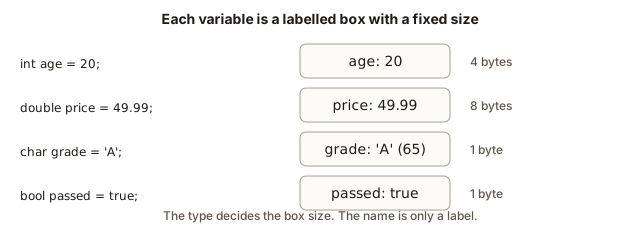 Four variables drawn as labelled boxes: age holds 20 in 4 bytes, price holds 49.99 in 8 bytes, grade holds A (65) in 1 byte, passed holds true in 1 byte
Each box has an address, which is the position of its first byte in memory. You never need the address for ordinary programs, but it explains a lot. The name is only a label that the compiler uses to find the box. The type tells the compiler how many bytes to read and how to interpret them. A char box is one byte, and the bytes 0x41 are read as the letter A, because 0x41 is 65. The same bytes read as an int would be a different number entirely. The type is the instruction for reading the bits.
When you declare a variable without giving it a value, the box is still there, but nothing has been written into it. The bytes contain whatever was left in that part of memory by earlier work. That is why an uninitialised variable can print any number. Consider this code:
int x;
cout << x;
The program may print 0, or 4198400, or a number that changes between runs. Reading an uninitialised variable is a bug, even though the compiler may let it pass with a warning. The cure is to always give the variable a value in the same line as the declaration, such as int x = 0;, unless you have a specific reason to wait.
Compiler errors you will see
Beginners learn fastest from real messages, so the examples below were compiled with g++ on Linux, and the messages are copied from that run. Each one shows the mistake and the message, with a plain explanation of what the message means.
A name cannot start with a digit. This line:
int 2age = 5;gives the message expected unqualified-id before numeric constant. In plain words, the compiler expected a name at that spot and found a number. Rename the variable to age2 or twoAge.
A char needs single quotes. This line:
char c = "A";gives invalid conversion from ‘const char*’ to ‘char’. The double quotes make a string, and a char cannot hold a string. The fix is char c = 'A';.
A string needs double quotes. This line:
string s = 'hi';gives two messages. The first is a warning, multi-character character constant, because the single quotes hold two characters. The second is an error, conversion from ‘int’ to non-scalar type ‘std::string’ requested. The compiler turned 'hi' into a number and then could not turn that number into a string. The fix is string s = "hi";.
A name can be declared only once in the same region. This pair of lines:
int y = 1;
int y = 2;
gives redeclaration of ‘int y’. The second line tries to create a second box with the same label in the same place. Use a different name, or change the first line to an assignment.
A name must be declared before you use it. This line, with no declaration of total anywhere above it:
cout << total << endl;gives ‘total’ was not declared in this scope. The usual causes are a typing mistake, a missing declaration, or a variable declared inside a smaller pair of braces that have already closed.
Debugging walkthrough: the discount that was zero
Here is a real debugging session. A shop wants to show a 15 percent discount on a product that costs 250 rupees. The program below was written in a hurry, and it has a bug. Here is the code and its output:
The output is:
Wrong discount: 0
Right discount: 37
Third: 0
The first line is wrong. A 15 percent discount on 250 should be 37.5, which is 37 when we keep whole rupees. The program says 0. Debugging starts with a question: which part of the calculation gives 0? The expression is 15 / 100 * price. Work it out in the order C++ uses. Multiplication and division happen from left to right at the same level, so the first step is 15 / 100. Both numbers are int, so the division is a whole-number division, and the answer is 0. Then 0 * 250 is 0. The discount is gone before the price is used.
The fix is to multiply first, then divide: price * 15 / 100. The product is 3750, and dividing 3750 by 100 gives 37. That is the value on the second line, and it matches the expected answer.
The third line shows the same error in a different place. The expression 1 / 3 is a whole-number division, so it gives 0, and the 0 is then stored in a double. The double cannot recover the lost part. The fix is to make one operand a decimal, as in 1.0 / 3, which gives 0.333333 on screen.
The debugging method here is the same one you will use in every module. Find the wrong output, work out the expression step by step on paper, and look for a place where information is lost. Then test the fix and keep the test, so the bug does not come back.
Common mistakes
Dividing two int values and expecting a decimal result is the most common error. double half = 1 / 2; stores 0, not 0.5. Make one of the numbers a decimal, such as 1.0 / 2.
Expecting == to match two decimal values is another trap. Compare money in whole cents, or check whether two decimals differ by less than a very small number.
Using char where a string is needed causes compile errors. char holds exactly one character in single quotes, and string holds text in double quotes.
Forgetting to include <string> produces an error that mentions string as an unknown name. Add the include line at the top of the file.
Storing a large value in an int is a quiet bug. If a number may be above about two billion, use long long. You will see in the next lesson what happens when you do not.
Printing an uninitialised variable gives a meaningless number. Always give a variable a value when you declare it, unless you have a reason not to.
Practice
Write each program, compile it with g++ -std=c++17, and check the output against your prediction before you read the solution.
- Declare variables for your name, your age, your height in metres as a
double, and whether you like coffee as abool. Print all four withboolalphaturned on.
Solution
#include <iostream>
#include <string>
using namespace std;

int main() {
    string name = "Anisha";
    int age = 20;
    double heightMetres = 1.62;
    bool likesCoffee = true;

    cout << boolalpha;
    cout << "Name: " << name << endl;
    cout << "Age: " << age << endl;
    cout << "Height: " << heightMetres << endl;
    cout << "Likes coffee: " << likesCoffee << endl;
    return 0;
}- Make an
intcalledscoreequal to 10, then change it to 25 and print it. Then add 5 to it and print again.
Solution
#include <iostream>
using namespace std;

int main() {
    int score = 10;
    score = 25;
    cout << score << endl;
    score = score + 5;
    cout << score << endl;
    return 0;
}
The output is 25 and then 30.
- Predict the output of
cout << 7 / 2 << " " << 7.0 / 2 << endl;, then run it.
Solution
The output is 3 3.5. The first division has two int values and gives 3. The second has a double operand, 7.0, so the division is decimal and gives 3.5.
- Compute the average of the four numbers 7, 8, 9 and 10 as a decimal. Use a
double, and make sure the division is a decimal one.
Solution
#include <iostream>
using namespace std;

int main() {
    int total = 7 + 8 + 9 + 10;
    double average = total / 4.0;
    cout << average << endl;
    return 0;
}
The output is 8.5. The 4.0 makes the division decimal.
- Print the number of hours in a week using a variable for the days and a variable for the hours per day. Then print the number of minutes.
Solution
#include <iostream>
using namespace std;

int main() {
    int days = 7;
    int hoursPerDay = 24;
    int hours = days * hoursPerDay;
    int minutes = hours * 60;
    cout << "Hours: " << hours << endl;
    cout << "Minutes: " << minutes << endl;
    return 0;
}
The output is Hours: 168 and Minutes: 10080.
- A program prints
Forgefollowed by a number, butstring label = 'Forge';will not compile. Rewrite that line so it compiles and prints the word.
Solution
Change the single quotes to double quotes: string label = "Forge";. Strings always use double quotes, and single quotes are for one character.
- Write a program that prints the letter that comes after
min the alphabet, using acharand an addition. Then print the code of that letter as a number.
Solution
#include <iostream>
using namespace std;

int main() {
    char letter = 'm';
    letter = letter + 1;
    cout << letter << endl;
    cout << (int)letter << endl;
    return 0;
}
The output is n and then 110, because m is 109 and n is 110.
- Swap the values of two
stringvariables,firstset to"tea"andsecondset to"coffee", without using a third variable. Hint: you can use arithmetic only for numbers, so think about what a third variable would do and whether the same idea works with strings.
Solution
The honest answer is that you need a third variable here, just as with integers. A third variable keeps one value safe while the other is overwritten. A version without a third variable exists for integers, using a = a + b; b = a - b; a = a - b;, but it fails for strings, and it can overflow for large numbers. The clean program is this:
#include <iostream>
#include <string>
using namespace std;

int main() {
    string first = "tea";
    string second = "coffee";
    string temp = first;
    first = second;
    second = temp;
    cout << first << " " << second << endl;
    return 0;
}
The output is coffee tea.
- Find the bug. A program is supposed to print the average of 3 and 4 as
3.5, but it prints3. Explain why, and fix the line.
Solution
The average is written as (3 + 4) / 2, and both numbers are int, so the division is a whole-number division that gives 3. The fix is to make one operand a decimal: (3 + 4) / 2.0, which prints 3.5.
- Write a program that stores a price of 1,234 rupees and 56 paise as a single whole number of paise, then prints the price in rupees and paise, each as an
int. Hint: division by 100 gives the rupees, and the remainder gives the paise.
Solution
#include <iostream>
using namespace std;

int main() {
    int paise = 123456;
    int rupees = paise / 100;
    int remainder = paise % 100;
    cout << rupees << " rupees and " << remainder << " paise" << endl;
    return 0;
}
The output is 1234 rupees and 56 paise.
- A program computes the number of seconds in one day with
int. Check whether the result fits in aninton a typical machine, and choose the right type for the variable.
Solution
One day is 24 times 60 times 60, which is 86400 seconds. That is far below the limit of about two billion, so an int is enough for one day. The harder question is how many seconds are in a century, which is about 3.15 billion. That is larger than an int can hold, so a century needs long long.
- Write down, without running it, the output of this program. Then run it and explain any difference.
#include <iostream>
using namespace std;

int main() {
    int a = 9;
    int b = 2;
    cout << a / b << " " << a % b << " " << (double)a / b << endl;
    return 0;
}
Solution
The output is 4 1 4.5. The integer division gives 4, the remainder is 1, and the cast to double makes the last division decimal. You will study casts in detail in the next lesson.
What you now know
- A variable is a named, typed place in memory. Declare it with a type and give it a value, then change the value by assignment without repeating the type.
- The main types are
intandlong longfor whole numbers,doubleandfloatfor decimals,charfor one character in single quotes,boolfor true or false, andstringfor text in double quotes. - Division of two
intvalues drops the fraction. Make one operand a decimal when you need a decimal answer. - Decimal numbers are stored with small errors, so compare them with care, and keep money in whole cents.
- A variable lives inside its braces, and an inner variable with the same name hides the outer one.
- Read a compiler error by its location and its key words. The examples in this lesson show the common ones.