Why this matters
Every C++ program you will write in this course, and every solution you send to a coding test, starts from the same small set of pieces. If you can read those pieces without guessing, the rest of the course is about adding one idea at a time. This lesson gives you the first working program, shows you exactly what each piece does, and teaches you how to read the error messages you will see when something goes wrong.
What a program is
A program is a list of instructions. The computer carries them out one after another, from top to bottom, unless an instruction tells it to do something else. Think of a recipe card. It says "boil the water", then "add the pasta", then "wait eight minutes". A cook who follows the card does the steps in order. A computer does the same, except it is far faster and far less forgiving. If one step is missing or written in the wrong order, the result is wrong, and the computer will not guess what you meant.
Programs are written in a programming language. A programming language is a set of words and symbols with fixed rules, so that the meaning of every line is clear. C++ is one such language. It has been in use since the 1980s, and it is still used for games, browsers, operating systems, financial systems and the coding tests that companies use to hire engineers. You learn it here because it shows many ideas very clearly: types, memory, and how data is stored.
Source code and the compiler
A computer's processor cannot run the text you type. It runs machine code, a long sequence of numbers that each mean one tiny operation, such as "add these two numbers" or "move this value to that place in memory". Writing machine code by hand is slow and error prone, so people write in C++ instead.
The text you write is called source code. It is stored in a file that ends in .cpp. Source code is for people to read. To make it run, you pass it through a program called a compiler. The compiler checks your text against the rules of the language, and if the text is valid, it produces an executable, a file of machine code that the computer can run directly.
Here is an everyday comparison. Imagine a recipe written in English, and a cook who reads only a kitchen code that is hard for you to write. A translator reads the recipe once and writes it out in the kitchen code. After that the cook can follow the translated version as many times as needed, without the translator present. The compiler is the translator. Once the executable exists, you can run it again and again without compiling it again, as long as you do not change the source.
This split has a consequence that surprises beginners. A compile can fail even when you think your idea is right, because the compiler is strict about spelling, punctuation and types. A failed compile produces no executable. It produces error messages instead. Reading those messages is a skill of its own, and you will practise it in this lesson.
The compiler used in this course is called g++. It is part of the GNU Compiler Collection, which is free and installed on most Linux systems. You run it from a terminal, the text window where you type commands. On Windows the same course works with the same compiler installed through a standard package, and the commands are identical once you are inside the terminal.
Before you start, check that the compiler is available. Type this command and press Enter:
g++ --versionThe first line of the answer names the compiler and its version. Any version from the last few years is fine for this course. If the command says command not found, the compiler is not installed yet, and you must install it before continuing.
The smallest useful program
Create a folder for your work, open a file called hello.cpp in it, and type the program below exactly as shown. Do not copy and paste it if you can avoid it. Typing it yourself makes you notice every symbol, and that habit saves a lot of time later.
This is a complete program. Press the Run button under the code to see its output. The box also has an Input area. This program reads nothing, so leave the Input area empty.
When you work on your own computer, compile the file and run it in the terminal:
g++ -std=c++17 hello.cpp -o hello
./hello
You should see one line of output:
Hello, world!Each part of the command matters. g++ starts the compiler. -std=c++17 tells the compiler to follow the 2017 version of the C++ standard, which is a published document that defines what the language means. Using a named version keeps your results the same on every machine. hello.cpp is the source file to compile. -o hello names the executable hello. Without -o, the compiler would name it a.out, which is confusing when you have several programs.
The second command, ./hello, runs the executable. The ./ means "in the current folder". On Linux and macOS you must write it, because the terminal does not look in the current folder for programs by default. On Windows you normally type hello alone and the result is a file called hello.exe.
What the compiler does, step by step
It helps to know roughly what happens between the moment you press Enter on the compile command and the moment the executable appears. A C++ compile has four stages. You do not need to run them yourself, but knowing they exist explains many error messages.
The first stage is preprocessing. Lines that start with #, such as #include <iostream>, are instructions to the preprocessor, a part of the compiler that runs before the real translation. The line #include <iostream> is replaced by the actual text of the header file named iostream. That header file declares the tools for printing and reading, such as cout and cin. So after preprocessing, your file is much longer than you wrote it.
The second stage is compiling. The compiler reads the expanded text and checks it. It checks that every name you use has been declared, that every type matches, and that every statement ends properly. If it finds a problem, it stops and prints a message. If the text is valid, it turns it into machine code for your processor, and the result is stored in an object file, which ends in .o on Linux.
The third stage is assembling, which turns the low-level text the compiler produced into the binary form the processor reads. For a beginner it is enough to know that this stage exists.
The fourth stage is linking. Your program uses code that other people wrote, such as the code that prints text to the screen. That code lives in libraries. The linker joins your object file with the library code and writes the single executable file. If the linker cannot find some code your program uses, it reports an error called an undefined reference. You will rarely see one in this course, but it is good to recognise the word.
Keep this picture in mind: text, then a checked translation, then a joined executable, then a run. When an error appears, the message usually tells you which of these stages failed.
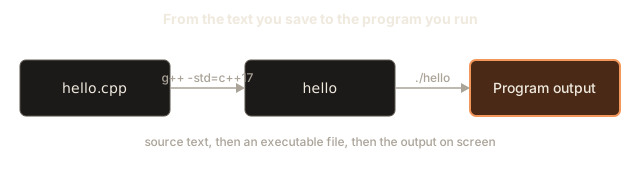
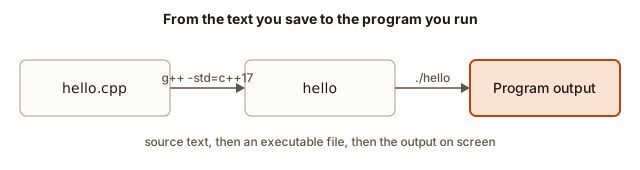 Three boxes in a row: hello.cpp, then the hello executable after g++, then the program output after running it
Each line explained
Here is what each piece of the program means. Read it slowly. Every symbol in it will appear again, many times, through the rest of the course.
| Piece | What it means |
|---|---|
#include <iostream> | Pulls in the header file that declares the input and output tools. Without it, the compiler does not know what std::cout is. |
int main() | Declares the function where the program starts. Every C++ program has exactly one main. The word int says the function gives back a whole number when it finishes. |
{ and } | Mark the start and end of the body of main. Everything between them belongs to main. |
std::cout | The output stream that writes to the screen. std:: says that cout belongs to the standard library, a collection of tools that every C++ compiler provides. |
<< | The insertion operator. It sends the value on its right into the stream on its left. |
"Hello, world!" | A string literal, which is text written directly in the code. The double quotes are part of the notation, and they are not printed. |
std::endl | Ends the current line and makes sure the text is sent to the screen right away. |
; | Ends a statement. A statement is one complete instruction, much as a full stop ends a sentence. |
return 0; | Gives the answer of main back to the operating system. Zero means the program finished without an error. |
The first line, #include <iostream>, has no semicolon, and that is correct. Lines that start with # are read by the preprocessor and follow their own rules. Forgetting this detail is a common source of confusion, so remember it now.
Tracing a program by hand
Before you run a program, you should be able to predict its output. This habit is worth more than any single trick in this lesson. An interviewer who asks you to read a short program and say what it prints is checking whether you understand each statement, and you cannot do that by guessing. The method is called tracing: you follow the program one statement at a time and write down the state of the screen after each step.
Here is a program with four statements. Predict its output before you look at the answer.
Now trace it. Keep a table in your head, or on paper, with one row for each statement.
| Statement that runs | What the screen shows afterwards |
|---|---|
cout << "Step 1"; | Step 1, and the cursor waits right after the 1 |
cout << " then step 2"; | Step 1 then step 2, cursor still on that line |
cout << endl; | The line is finished, and the cursor moves to the start of the next line |
cout << "Step 3" << endl; | Step 3 on the second line, then another new line |
The final output is two lines: Step 1 then step 2 and Step 3. The text after Step 1 is a single space followed by then step 2, because the second string starts with a space. If you forgot that space, the words would run together as Step 1then step 2. This is the kind of detail that interviewers and judges look for, and tracing is how you catch it.
Tracing also shows you why a missing endl changes the layout of the whole output. The first statement has no newline at its end. The text from later statements continues on the same line until something ends it. A missing newline is not a compile error, so the program still runs. It only prints the wrong layout, and you find it only by reading the output carefully.
When you trace a longer program, do it in small pieces. Trace one statement, write the screen, and only then move to the next. Beginners often try to imagine the whole program at once and make small mistakes. Slow, careful tracing is faster in the end, and it trains the same care you will need when the programs get harder.
Compile-time and run-time errors
Errors come in two broad kinds. A compile-time error is found by the compiler before the program runs. The missing semicolons, undeclared names and wrong spellings in this lesson are all compile-time errors. The compiler stops, prints a message, and makes no executable. You fix the text and compile again.
A run-time error is found while the program runs. The compiler accepted the text, but something went wrong when the instructions were carried out. Later in the course you will meet programs that try to read a number that is not there, or use a value that was never set. Those programs compile, start, and then misbehave. Some crash. Others print wrong numbers without any message at all, which is harder to notice.
The difference matters for how you work. Compile-time errors are easy to find because the compiler shows you where they are. Run-time errors need you to check the output against what you expected, and that is why tracing and testing matter so much. A program that compiles is not yet a correct program. It has passed only the grammar check.
Chaining output with << and the end of a line
Output in C++ works like a conveyor belt. You put values on it one after another, each with its own <<. The belt carries them into cout, and cout writes them to the screen in the same order. Here is a program that prints three lines. Its output shows how the pieces join together.
The output is:
Line one
Line two
A B
Let us trace the program line by line.
The first cout line sends the text Line one to the screen, then sends endl, which is a special value that means "end this line". The next line starts at the left edge of the screen.
The second cout line sends Line two and then the characters \n. Those two characters together form a newline escape. A backslash followed by a letter is an escape sequence: it means one special character. \n means "move to the next line". The result is the same as endl in this case, but endl also forces the text out to the screen immediately, while \n only adds the newline to the buffer. A buffer is a small temporary store of text waiting to be written. For a short program you will never see a difference, and many programmers use \n everywhere for that reason, saving endl for places where the text must appear before the program waits for input. This matters in the next lesson, when the program asks the user a question.
The third line sends three values, "A", a single space " " and "B", then endl. The output is A B on one line. The space is inside quotes, so it is a real character in the output. If you wrote "A""B" with no space between, the output would be AB.
Escape sequences are a short list you should learn now. The most useful ones are these:
| Sequence | Meaning | Example output |
|---|---|---|
\n | New line | Moves to the next line |
\t | Tab, a jump to the next tab stop | Lines up columns |
\" | A double quote | "hi" |
\\ | A single backslash | \ |
A backslash is special in a string, so to print one you write two. Windows file paths therefore look strange in code: "C:\\forge\\notes" prints as C:\forge\notes.
A program with tabs, quotes and comments
The next program prints a small receipt. It uses tabs to line up the columns and escape sequences for quotes and backslashes. It also has comments, which you should learn to write from the very start.
A comment is a note for people. The compiler skips it completely, so it can say anything. A line comment starts with // and runs to the end of the line. A block comment starts with /* and ends with */, and it can span several lines. Good comments say why the code exists or what a tricky line means. They do not repeat the code in words.
The output is:
+-----------------------+
| ForgeStack receipt    |
+-----------------------+
Coffee		2 x 120
Toast		1 x 85
Total		325
Thank you!
The \t characters move the text to the next tab stop. Two tabs after Coffee push the 2 x 120 part to the same column as the 1 x 85 part of the next line, so the columns line up. Tab stops are normally every eight characters in a terminal. If you want exact alignment in your own output, count the characters yourself, or use the formatting tools that you will meet in a later lesson.
Notice that the program does not calculate the total. It prints the number 325 as text. In the next lesson you will store the numbers in variables, so the program can add them up itself. For now the job is to see how the output is built.
Namespaces and using namespace std
Each std:: in front of a name says where the name comes from. The std part is a namespace, which is a named group of names. A namespace stops two libraries from clashing when they both have a tool called cout. Writing std:: every time is safe but tiring, so C++ lets you open the namespace once with a line such as using namespace std;.
The program below is the same as the first one, but it uses the short names. Both styles compile to the same executable.
Output:
Name: Anisha
Course: C++
Course examples and most coding tests use using namespace std;, and this course does the same, because it keeps the lines short and the ideas easy to see. Large professional projects often avoid it, because it brings every name from the standard library into your file, and that can cause surprises. For now, pick one style and stay with it inside a file. Do not mix cout in one place and std::cout in another without a reason. Both work, but the mix makes code harder to read.
What happens inside cout
It helps to know what cout really does, because it explains why output sometimes appears a little later than you expected. cout is an object. An object is a value that bundles data with the actions you can ask it to do. The cout object keeps a buffer, which is a short block of memory that holds text waiting to be written. Each << adds text to that buffer. When the buffer is full, or when the program ends, or when the program flushes the buffer, the text is written to the screen in one go.
endl does two jobs. It adds a newline and it flushes the buffer. A flush means "write everything waiting in the buffer now". That is useful when the program is about to wait for the user, because the question must be visible before the program pauses. The newline character \n only adds the newline. It does not flush. For the output in this lesson, both give the same screen result, which is why either is correct.
There is also a rule about main that many beginners never hear. If main reaches its closing brace without a return statement, C++ treats it as if it had written return 0;. You may still write the return line, and this course does, because it makes the intention clear. The number 0 means "success" to the operating system. A program that returns any other number is telling the system something went wrong. You can see the number on Linux with echo $? right after running the program. The example below shows that difference.
#include <iostream>
using namespace std;

int main() {
    cout << "Something went wrong" << endl;
    return 1;
}
After you compile and run that program, echo $? prints 1. This is not part of the output your program prints, and the Run button in this course does not show it. It is how other programs, such as build scripts, learn whether your program succeeded.
Reading an error message
Compiler errors look frightening the first time you see them. They are long, they use unfamiliar words, and they sometimes point to a line that seems fine. The good news is that a compiler reports errors in a predictable way, and a few habits will make them easy to read.
Start with the first error only. Later errors are often caused by the first one, so fixing the first one often makes the rest disappear. Then look at the file name and the line number, which come first. Finally, read the words of the message and compare them with the code on that line.
Here is a program with a missing semicolon. The line with the mistake is number 5. Notice that the message points to line 5 and not to line 4, where the semicolon should be. That happens because the compiler only knows there is a problem when it sees the next statement start.
#include <iostream>
using namespace std;

int main() {
    cout << "Hello" << endl
    cout << "World" << endl;
    return 0;
}
When you compile it, g++ reports:
e1.cpp: In function ‘int main()’:
e1.cpp:5:28: error: expected ‘;’ before ‘cout’
    5 |     cout << "Hello" << endl
      |                            ^
      |                            ;
    6 |     cout << "World" << endl;
Read it in order. The file is e1.cpp, the error is on line 5, column 28, and the compiler expected a semicolon before the word cout on line 6. The caret marks the spot where the semicolon belongs. The fix is to add the semicolon at the end of line 5. Once you do, the program compiles and prints both lines.
The message does not say "missing semicolon" in those words, but the phrase "expected ';'" means the same thing. Learn to translate compiler phrases into plain language. "Expected X before Y" means X is missing just before Y. "was not declared in this scope" means you used a name that the compiler has never heard of. "invalid conversion" means you gave a value of one type where another type was needed.
The second common error is a missing include. Here is a program that forgets #include <iostream>:
int main() {
    cout << "Hello" << endl;
    return 0;
}
The compiler reports:
e3.cpp: In function ‘int main()’:
e3.cpp:2:5: error: ‘cout’ was not declared in this scope
    2 |     cout << "Hello" << endl;
      |     ^~~~
e3.cpp:2:24: error: ‘endl’ was not declared in this scope
Here the compiler is telling you that the names cout and endl are unknown. The cause is not that cout is spelled wrong, but that the header file that declares it was never included. The fix is the #include line at the top. Notice that the compiler reports both names, because both come from the same missing file.
The third common error is a spelling mistake in a name. C++ is case sensitive, which means Cout and cout are different words. The next example misspells cout with a capital letter:
#include <iostream>
using namespace std;

int main() {
    Cout << "Hello" << endl;
    return 0;
}
The message is ‘Cout’ was not declared in this scope. This is the same kind of message as the missing include, and it has the same cure: check the name, letter by letter, against what the language expects.
Common mistakes
These are the mistakes that appear most often in the first week of C++. Each one is easy to fix once you recognise it.
Forgetting the semicolon at the end of a statement is the most common mistake of all. The message usually says expected ';' and points at the line after the one you forgot. Check the line above the caret first.
Writing Cout, COUT or Endl is a case error. The language words are all lowercase. cout, endl and main are the only correct spellings.
Using single quotes for text is a mistake that compiles with a warning, and that makes it tricky. Consider this line:
cout << 'Hello' << endl;The single quotes are meant for one character, such as 'H'. Five characters inside single quotes is not text, and g++ accepts it only with a warning: multi-character character constant. The program then prints a number that has nothing to do with the word Hello. Always treat that warning as an error. Use double quotes for text: "Hello".
Forgetting to type ./ before the program name on Linux is the mistake that makes people think the compiler failed. If hello gives command not found, the compile may have worked perfectly, and you need to type ./hello.
Forgetting to recompile after you edit the source is another common trap. Your edit changes the .cpp file, but the executable is still the old one. Run the compile command again after every change, or the program you run will not match the file you see.
Leaving out a closing quote or brace causes a cascade of errors. The compiler then reports dozens of problems far from the real one. The cure is to read only the first message, and to check that every opening ", (, { has its closing partner.
Debugging walkthrough
Here is a complete debugging session, from a broken file to a correct one. It is the same method you will use for every program in this course. Suppose you write this file and compile it:
#include <iostream>
using namespace std;

int main() {
    cout << "Forge" << endl;
    cout << "Stack" << endl
    cout << "Course" << endl;
    return 0
}
The first error reported is at line 6, column 28: expected ';' before 'cout'. You read it, go to line 6, and see that endl has no semicolon. You add it and recompile. The next error is at line 8, column 13: expected ';' before '}' token. The line return 0 has no semicolon either. You add it and recompile again, and it compiles cleanly.
Notice what you did. You did not guess at the whole file. You fixed the first error, recompiled, and read the new first error. Each compile gives you fresh information. Often two errors look like one. Always verify with a compile after each fix.
Finally, run the program and check the output against what you expected. A program can compile and still print the wrong thing. The compiler checks grammar, not meaning. Only you can check the meaning, by comparing the output with the task.
Judges, input and exact output
In the coding tests and in this course's problem sets, your program is not checked by eye. A judge runs your executable with a fixed input, captures what it prints, and compares that text with the expected text, character by character. A single extra space, a missing newline, or a capital letter where a lowercase one should be will make the answer wrong.
This makes two details important from the start. First, print exactly the text the task asks for, no more and no less. A line such as Enter a number: is extra output that the judge did not ask for, and it can break a test. Second, end each line of output with a newline. Using endl or "\n" at the end of the last line is the safe habit, because the judge may expect the line to finish.
In this lesson the programs read no input, so the Input box in the Run area stays empty. In the next lesson you will type values into that box, and the program will read them. The same idea holds there: the judge sends your program whatever the box would hold, and then it compares what your program prints.
Why C++ has this shape
Some of the strictness you have seen today is not an accident. C++ grew out of a language that wanted programs to run fast and to tell the programmer early about mistakes. The compile step is where the language catches typos, mismatched types and missing names before the program ever runs. A program that compiles has passed a long list of checks. That is why a compile error is a good thing: it is cheaper to find a mistake while compiling than while a customer is using the software.
The same rules help in interviews. Interviewers often ask you to write code on a whiteboard or in a shared editor. A missing semicolon will not get you rejected by itself, but a habit of checking each line against the rules shows that you can work carefully. Reading the first error first, and fixing one thing at a time, is the skill that matters most in these sessions.
Organising your work
Each program you write should live in its own folder, with the source file, the compiled executable and nothing else. Keeping one folder per exercise stops the files from mixing, and it lets you rebuild any earlier program later without guessing which file is which. A simple layout looks like this:
cpp-course/
    01-hello/
        hello.cpp
    02-variables/
        variables.cpp
        variables
Compile from inside the folder that holds the file, so that the paths in the compile command stay short. Name each file after what it does, such as receipt.cpp or average.cpp, and avoid names such as test.cpp or new.cpp, which tell you nothing a week later. When a program stops working after an edit, the folder helps you compare the old and new source, and a version control tool such as Git makes that comparison automatic. You will meet Git in the course's foundations track, so for now simple folders are enough.
The first minute of a coding interview
In a coding interview you may be shown a short program and asked what it prints. The first minute decides how the rest goes. Say the goal of the program in one sentence, then read it from top to bottom, out loud if the interviewer allows it. Name the type of each variable as you meet it. Trace the first statement, then the second, and say what the screen shows after each. Once you reach the end, state the output, and then point out any edge case that changes it, such as an empty line, a zero, or a very large value.
This order looks slow, but it is the order that catches mistakes. Interviewers do not mark you down for a wrong guess as much as for a guess you cannot explain. A tracer who says "the screen now shows Step 1 and the cursor waits after the 1" shows the understanding that the interviewer wants, even before the final answer is right.
Practice
Try each exercise before you open the solution. Type the programs yourself, compile them with g++ -std=c++17, and check the output against what you predicted.
- Write a program that prints your name on one line and your city on the next line. Use
endlat the end of each line.
Solution
#include <iostream>
using namespace std;

int main() {
    cout << "Anisha" << endl;
    cout << "Pune" << endl;
    return 0;
}- Print three words separated by spaces using one
coutstatement and three<<operators. Hint: a space is a character too, so put it inside quotes.
Solution
#include <iostream>
using namespace std;

int main() {
    cout << "Learn" << " " << "to" << " " << "code" << endl;
    return 0;
}- Print a simple house made of text, using at least four lines. Each line must be a separate
coutstatement.
Solution
#include <iostream>
using namespace std;

int main() {
    cout << "   /\\" << endl;
    cout << "  /  \\" << endl;
    cout << " /____\\" << endl;
    cout << " |    |" << endl;
    cout << " |____|" << endl;
    return 0;
}
The backslash must be written twice inside a string, so /\\ prints as /\.
- Print a small table with a header line and two rows. Use
\tbetween the columns, and check that the columns line up in your terminal.
Solution
#include <iostream>
using namespace std;

int main() {
    cout << "Item\tQty\tPrice" << endl;
    cout << "Tea\t2\t30" << endl;
    cout << "Samosa\t1\t25" << endl;
    return 0;
}- Print the text
He said "C++ is fun"and then, on the next line, the pathC:\forge\notes. Hint: a quote inside a string needs a backslash in front of it, and so does every backslash.
Solution
#include <iostream>
using namespace std;

int main() {
    cout << "He said \"C++ is fun\"" << endl;
    cout << "C:\\forge\\notes" << endl;
    return 0;
}- Add a block comment at the top of the program that says what the program does, and check that the output does not change.
Solution
/*
   This program prints a greeting.
   Comments are ignored by the compiler.
*/
#include <iostream>
using namespace std;

int main() {
    cout << "Hi" << endl;
    return 0;
}
The output is still Hi. The comment is removed before the compiler reads the code.
- Delete the line
return 0;from a program with a correctmain. Compile it and run it. Does it still work, and what is the exit status now? Check withecho $?.
Solution
The program still compiles and prints its output. Reaching the closing brace of main makes C++ behave as if return 0; were there, so echo $? prints 0. Keep the line anyway, because it states the intention clearly.
- Predict the output of this program, then run it. Count the blank lines.
#include <iostream>
using namespace std;

int main() {
    cout << "Start" << endl;
    cout << endl;
    cout << "Middle" << "\n" << endl;
    cout << "End";
    return 0;
}
Solution
The output is Start, then a blank line, then Middle, then a blank line, then End with no newline after it. The line cout << "End"; has no endl or \n, so the cursor stays right after End. Judges care about this, so always end the output with a newline unless the task says otherwise.
- The program below has three mistakes. Find them all, fix them one at a time with a recompile after each fix, and write down the messages you saw.
#include <iostream>
using namespace std;

int main() {
    Cout << "Name: " << "Ravi" << endl
    cout << 'Ravi' << endl;
    return 0;
}
Solution
The three mistakes are Cout with a capital C (error: ‘Cout’ was not declared in this scope), the missing semicolon after endl on the line above the second cout (error: expected ';' before 'cout'), and the single quotes around Ravi (a warning, multi-character character constant). The fixed program is:
#include <iostream>
using namespace std;

int main() {
    cout << "Name: " << "Ravi" << endl;
    cout << "Ravi" << endl;
    return 0;
}- Write a program that prints the word
Forgein a box of hyphens, like this: a top line of hyphens, a middle line with the word, and a bottom line of hyphens. Use the same width for all three lines.
Solution
#include <iostream>
using namespace std;

int main() {
    cout << "-----" << endl;
    cout << "Forge" << endl;
    cout << "-----" << endl;
    return 0;
}
Five hyphens match the five characters of Forge. You will learn a shorter way to repeat characters when loops arrive in a later module.
- Explain in one or two plain sentences what the
-std=c++17part of the compile command does. Then say what would happen if you left it out.
Solution
It tells the compiler which version of the C++ standard to follow, so the meaning of your code is the same on every machine. Leaving it out still compiles most programs with the compiler's default version, but the default can change between compiler releases, so a program might behave differently later.
- Write a program with an error on purpose: a name that is not declared, such as
cout << nothing << endl;. Read the message, then write one sentence saying what the compiler is telling you.
Solution
The message is ‘nothing’ was not declared in this scope. It means the compiler has never seen a declaration for a name called nothing. Either the name is misspelled, or a variable with that name was never created. Variables are the subject of the next lesson.
What you now know
- A C++ program is a list of instructions that starts at
main, and its source code is turned into an executable by the compilerg++. - The skeleton is an
#includeline, amainfunction with braces, statements that end with semicolons, and areturn 0;. coutwith<<sends text to the screen.endland\nend a line, and\t,\"and\\are escape sequences inside strings.- Comments are notes that the compiler ignores, and
using namespace std;lets you drop thestd::prefix. - Compiler errors are read from the top, one at a time. Fix the first error, recompile, and read the next one.
- A judge compares your output exactly, so print what the task asks for and end each line with a newline.