Why this matters
Every type has a limit, and every conversion can throw information away. A program that adds two large numbers can print a negative total. A program that divides two whole numbers can print zero for a discount. Those bugs look small, but they cause real money losses and real crashes, and they are exactly what interviewers probe with short questions such as "what does this print?" or "what is wrong with this average?". This lesson finishes the type story. You will learn how much memory a type takes, why big results wrap around, how to convert a value on purpose, and how auto and const help you write safer code.
Bytes and bits
Memory is measured in bytes. A byte holds 8 bits, and a bit is a single binary digit, a 0 or a 1. Think of a byte as a row of eight light switches. Each switch is either off (0) or on (1), and the pattern of switches stores a number. With one switch you can make two patterns, with two switches you can make four, and with eight switches you can make 256 patterns. In general, n bits make 2 to the power n patterns.
A type's size tells you how many patterns it can hold. An int on a typical machine uses 4 bytes, which is 32 bits. That gives 2 to the power 32, about 4.3 billion, patterns. Because an int must also hold negative numbers, half of those patterns are used for negatives and half for zero and positives. The result is the familiar range, from -2147483648 up to 2147483647. The range is not symmetric, because zero takes one of the patterns on the positive side.
The table you saw in the last lesson gave typical sizes. The next program prints the sizes on your own machine using sizeof, a built-in operator that reports how many bytes a type or a variable uses. It returns the size as a number, so you can print it like any other value.
The output on the machine that checked this lesson is:
char:        1
short:       2
int:         4
long:        8
long long:   8
float:       4
double:      8
long double: 16
Read the output carefully. The char is always one byte, by definition. The int is 4 bytes on this machine. The long is 8 bytes on 64-bit Linux and macOS, but only 4 bytes on 64-bit Windows, which is a famous difference that trips up programmers who move code between systems. The long double is 16 bytes here, but other machines use a different size. The C++ standard promises minimums and a fixed order, so a long is at least as big as an int, and a long long is at least 64 bits. Do not hard-code sizes in your programs. If your task needs a type of an exact size, use the fixed-width types from the <cstdint> header, such as int64_t, which you may meet in later modules.
Limits and the numeric_limits tool
Knowing the size is not enough. You also need the largest and smallest value. The <limits> header provides a tool called numeric_limits, which reports the limits of any type. You write it as numeric_limits<int>::max(), where the part in angle brackets names the type and max() asks for its largest value. The next program prints the limits and then shows what happens when an unsigned number goes below zero.
The output is:
int min:          -2147483648
int max:          2147483647
long long max:    9223372036854775807
unsigned int max: 4294967295
0 - 1 as unsigned: 4294967295
The last line deserves a careful trace. An unsigned type holds only zero and positive numbers, so it has twice the positive range of the signed type of the same size. An unsigned int reaches 4294967295 at most. When you subtract 1 from 0, the result is not negative, because unsigned types cannot be negative. Instead the value wraps around, like a clock going past 12 back to 1. The rule is that unsigned arithmetic is always done modulo 2 to the power of the size, which here is 2 to the power 32. Zero minus one is therefore 4294967295. This behaviour is fully defined by the language, and programs rely on it, for example in hash functions and in bit tricks.
Wrapping is useful, but it is also a source of quiet mistakes. If a program uses an unsigned value for a difference and the difference is negative, the result is a huge positive number, and the program continues without any warning. Use signed types for quantities that can be negative, such as a change in temperature, and keep unsigned types for counts that can never go below zero.
Overflow: what happens past the limit
When a result is bigger than its type can hold, the result overflows. The value wraps around, in the same way as the unsigned example. The difference is that for signed types, C++ defines the result of overflow as undefined behaviour. That phrase is strict and important. It means the language gives no guarantee at all about what the program does, and the compiler is allowed to assume that overflow never happens when it optimises your code. In practice many machines simply wrap, so you may see -2147483648 after 2147483647 + 1, as you did in the previous lesson, but you must never rely on that result.
The cure is to choose a type that is big enough for the largest value the program can produce. For a sum of a few numbers in the billions, use long long. For results that can exceed the limit of long long itself, you need a different technique, and interviews often ask about it. Here is the common situation: a program multiplies two values that are individually small enough for an int, but whose product is not. The next example shows the bug and its fix.
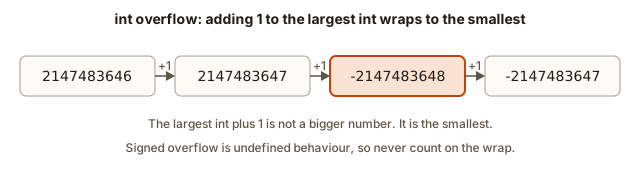 Four int values in a row; adding one to the largest int gives the smallest int, which shows the wrap-around
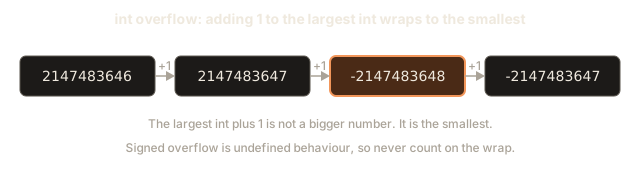
The output on this machine is:
Wrong area: -1794967296
Right area: 2500000000
Trace the first line. width * height is evaluated first, and both operands are int, so the multiplication is done in int. The true product, 2500000000, is larger than the int limit, so it overflows. The stored result becomes a negative number, and only then is that number copied into the long long. The bigger type arrives too late. The second line casts width to long long before the multiplication. Now both operands are long long after the usual rules, so the multiplication is done in the larger type, and the result is correct.
The rule to remember is that the calculation takes the type of its operands, not the type of the variable that receives the result. Making the variable big is not enough. You must make the operands big before they are combined. You will see this rule in every product and sum in the later modules, where numbers grow large.
Casting: converting on purpose
A cast converts a value from one type to another. Some conversions happen automatically, and some need you to ask for them. An automatic conversion from int to double is always safe in value, so C++ does it for you. The reverse direction, from double to int, throws away the fraction, and C++ does it silently when you assign. Writing an explicit cast tells the reader that you meant the conversion.
C++ has two spellings of an explicit cast. The old C style is (double)a, with the type in brackets in front of the value. The preferred C++ style is static_cast<double>(a), which is longer but easy to search for, and the compiler checks it more strictly. This course uses the C++ style in its explanations, and it accepts both in the programs.
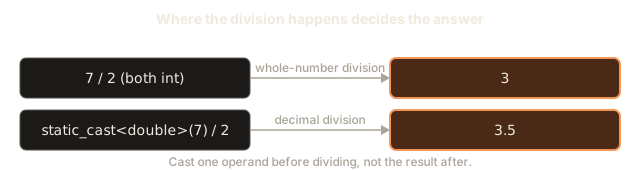
The next program shows the main behaviours of casts. Read the comments before you run it, and predict each line. The diagram below shows the first two lines, where the place of the cast decides the answer.
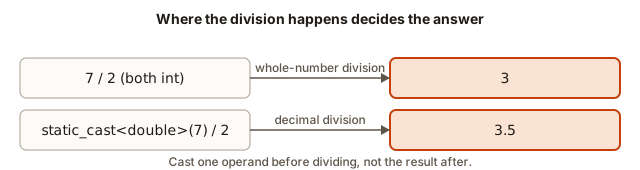 Two divisions of 7 by 2: int by int gives 3, while casting one operand to double gives 3.5
The output is:
7 / 2 as int:          3
7 / 2 as double:       3.5
7 / 2.0:               3.5
(int)-3.9 is:          -3
19.75 rounded up:      20
average with 2 places: 1.75
Trace each line. The first division has two int values, so it is whole-number division, and the answer is 3. The second casts one operand to double before dividing. The cast is applied to sold, which is 7, and the division then uses double arithmetic, so the answer is 3.5. The third line achieves the same thing with the literal 2.0, which is already a double. Either choice works, and the cast is clearer when the value comes from a variable with a name that does not show its type.
The fourth line shows truncation. Converting -3.9 to an int gives -3, not -4. A cast to an integer throws away the fraction toward zero. It does not round. So 3.9 becomes 3 and -3.9 becomes -3. Many beginners expect -4 for negative numbers, and they are surprised by the answer. The rule is that the fraction is dropped, and the direction is toward zero.
The fifth line rounds a positive number to the nearest whole number by adding one half before the cast. 19.75 + 0.5 is 20.25, and the cast drops the 0.25, which leaves 20. The trick works for positive numbers, because it moves every value halfway to the next integer before the cut. For negative numbers the same trick gives the wrong answer for values that are halves, so use the standard library's round function from <cmath> when the numbers may be negative. The label in the program says "rounded up", but strictly the number was rounded to the nearest whole value, and the lesson's point is the method, not the label.
The last line sets two decimals and divides 7 by 4 as a decimal. The answer is 1.75, and the fixed format shows both digits even if the last one were zero.
Truncation, rounding and where the fraction goes
Dropping a fraction happens in three places, and it is worth naming them. The first is integer division, which you have already seen, where 7 / 2 gives 3. The second is a cast from double to int, which keeps the whole part, as in (int)3.9, giving 3. The third is assignment, where a double value is stored into an int variable with no cast at all. The last case compiles, and it is one of the most common hidden bugs in beginner code.
The following fragment shows the third case. It stores a decimal in an int without writing a cast.
double half = 3.5;
int copied = half;
After these two lines, copied holds 3. The value 3.5 was never printed as a whole number, so the loss is silent.
The compiler accepted the assignment. The compiler does not warn about this by default, although the -Wconversion option will. Writing the cast explicitly, as int copied = static_cast<int>(half);, tells every reader that the loss is intended. In real code, prefer the explicit form.
Precision: a double is not a perfect copy of an integer
A double stores about 15 to 17 significant decimal digits. That is plenty for most purposes, but it is not unlimited. A long long can hold numbers with up to 19 digits exactly, so converting a large long long to a double can lose the last digits. The next program makes this visible.
The output is:
stored as long long: 9007199254740993
copied to double:    9007199254740992
copied to int:       3
The LL at the end of the first literal marks it as a long long. The value 9007199254740993 is one more than 2 to the power 53, and a double keeps 53 binary digits of precision, so it cannot represent that odd number. The nearest value it can store is 9007199254740992, and the last digit is lost. The lesson for your programs is clear. Keep whole-number values in integer types, even when they are large, and convert to double only for the final decimal result.
The last two lines of the program repeat the truncation from the previous example, so you can see the same behaviour in one place.
Narrowing with braces
C++ has a newer way to initialise a variable, with braces: int x{3};. Braces forbid some conversions that the older syntax allows, and this rule catches many mistakes at compile time. The conversion that braces refuse is called narrowing, which means converting to a type that may not hold the value. Converting double to int is narrowing, because the fraction may be lost.
#include <iostream>
using namespace std;

int main() {
    int x{3.5};
    cout << x << endl;
    return 0;
}
This program does not compile. The message is:
error: narrowing conversion of ‘3.5e+0’ from ‘double’ to ‘int’ [-Wnarrowing]In plain words, the compiler saw that 3.5 cannot become an int without losing information, and it refused. The fix is either to change the value to a whole number, or to ask for the loss explicitly with a cast, as in int x{static_cast<int>(3.5)};. The compiler is happy with the cast because you have accepted the loss. Use braces by default when you write a new variable, and the compiler will protect you from silent narrowing.
auto: let the compiler choose the type
The keyword auto tells the compiler to work out the type of a variable from the value it is given. The type is still fixed, and it is still decided at compile time. You simply do not write it down. The program below uses auto with an integer, a decimal and a constant.
The output is:
Hours in a week: 168
Price with tax:  295
Trace the types. DAYS_PER_WEEK * 24 is an int times an int, so hours is an int. The literal 250.0 is a double, so price is a double. The expression price * (1 + TAX_RATE) mixes a double with a double, so total is a double. The printed 295 appears without decimals, because the default output drops trailing zeros and shows at most six significant digits. The true value is 295.0.
auto saves typing when a type is long, such as the type of a complicated iterator you will meet later. It also protects you when you change a value's type, because the variable follows the change. The danger is that auto hides the type from the reader. Use it when the type is obvious from the right-hand side, and write the type out when it is not. A variable holding a char should be written as char, because auto c = 'A'; is correct but a reader may not notice that it is not a string.
Be careful with text. auto s = "hi"; does not make a string. The double quotes give a C-style text that has its own type, so write string s = "hi"; when you want a string. auto cannot be used without a value on the right, because it needs something to learn the type from. auto x; is an error.
const: values that must not change
The keyword const makes a variable read-only after it is set. Any later attempt to assign to it is a compile error, and that is the point. A tax rate, a limit or a fixed size should never change while the program runs, and the compiler can check that for you.
The program above used two const variables. Constants are usually written in capital letters with underscores, such as DAYS_PER_WEEK, so the reader sees at once that the value is fixed. Putting constants at the top of the file, outside main, makes them easy to find and to change in one place.
If you try to change a constant, the compiler stops you. The next program is wrong on purpose, so do not run it.
#include <iostream>
using namespace std;

const int MAX_USERS = 10;

int main() {
    MAX_USERS = 20;
    cout << MAX_USERS << endl;
    return 0;
}
The compiler reports:
error: assignment of read-only variable ‘MAX_USERS’The message says exactly what is wrong. The variable was declared const, so assigning to it is not allowed. The fix is to decide whether the value should really change. If it should, remove the const. If it should not, do not assign to it.
Notice that const does not stop you from reading the value, or from using it in calculations. const int limit = 10; and then int twice = limit * 2; is correct. Only writing to the constant is forbidden.
There is also a related keyword, constexpr, which says that a value must be known when the program is compiled. You will meet it in later modules. For now const is enough.
Comparing signed and unsigned values
Mixing signed and unsigned types in one comparison is a classic interview trap, and it works in a way that surprises almost everyone. The next fragment compares a negative int with an unsigned int. Look at the warning, and then predict the answer.
int a = -1;
unsigned int b = 1;
cout << (a < b) << endl;
The output is 0, which means false. The compiler warns comparison of integer expressions of different signedness, and the warning is the clue. Before the comparison, C++ converts the int to the unsigned int type so that both sides have the same type. The value -1 becomes the largest unsigned value, 4294967295, and that is not less than 1. So a < b is false, even though -1 is obviously less than 1.
The rule to take away is simple. Never compare a signed value with an unsigned one, and when a warning mentions different signedness, find the variable that should not be unsigned and change its type. The same rule explains the earlier problem with subtracting from an unsigned count. Use signed types for anything that can go negative, and keep unsigned types for values such as sizes that cannot.
What fits: rules of thumb
When you write a solution, a quick check of the limits prevents most overflow bugs before they happen. Competitive programmers use a few rules of thumb, which you can learn by heart. The table lists the limits of the types you have met, with the rule of thumb that goes with each.
| Type | Smallest value | Largest value | Rule of thumb |
|---|---|---|---|
int | -2147483648 | 2147483647 | About two billion. A value up to 10 to the 9 is safe, with a margin. |
unsigned int | 0 | 4294967295 | About four billion. Safe for values that are never negative, up to 4 times 10 to the 9. |
long long | -9223372036854775808 | 9223372036854775807 | About nine quintillion. A value up to 10 to the 18 is safe, with a margin. |
These rules are useful because the sums and products in real problems often reach these sizes. If the input can contain a billion values, each up to a billion, a sum can reach 10 to the 18, which fits a long long but not an int. Before you write the code, multiply the largest input size by the largest value and check which type holds the result. Doing that check on paper, as an interviewer would expect, is quicker than debugging a wrong answer later.
Padding numbers for money
Money and reports often need a fixed number of digits. A price of 5 cents should print as 05, not 5. The <iomanip> header provides two tools for that. setw(n) sets the minimum width of the next value only, and setfill(c) chooses the character used for padding, and it stays in force until you change it. The next program shows both, including the part that surprises most people.
The output is:
[12.05]
[00042]
[   42]
Trace the first line. The dollars, 12, print without padding, because setw has not been asked for them yet. Then setw(2) makes the cents occupy two places, and setfill('0') fills the empty place with a zero, so 5 cents becomes 05. The second line sets a width of five but keeps the fill character 0 from the first line, so 42 becomes 00042. That is the surprise. The third line resets the fill to a space, and 42 then prints as 42. Always set the fill character you want at the point where you print, because the setting carries over to every later line.
Division and remainder with negative numbers
Whole-number division has one more rule that interviewers test. C++ division rounds toward zero, which means the fraction is always dropped toward zero, whatever the signs. The remainder operator follows the same rule, so that (a / b) * b + a % b always equals a. The next program prints four results so you can see the pattern.
#include <iostream>
using namespace std;

int main() {
    cout << -7 / 2 << endl;
    cout << -7 % 2 << endl;
    cout << 7 / -2 << endl;
    cout << 7 % -2 << endl;
    return 0;
}
The output is:
-3
-1
-3
1
Trace the first two lines. The division -7 / 2 is -3.5, and the fraction is dropped toward zero, which gives -3. The remainder is then -7 - (-3 * 2), which is -1, and the sign of the remainder follows the sign of the first number. The third and fourth lines show the same rule with the signs swapped: 7 / -2 gives -3, and 7 % -2 gives 1, which keeps the sign of the 7.
Many programs break on negative input for exactly this reason. A check such as n % 2 == 1 to test for an odd number is false for -3, because -3 % 2 is -1, not 1. The safe test for oddness is n % 2 != 0. Keep this in mind whenever a value can be negative, because the test you wrote for positive numbers may quietly fail on the negative ones.
Checking before you add
A check on the limits can be written before the calculation, as long as the check itself cannot overflow. For example, to add two int values a and b without overflow, you can test whether b is larger than the largest int minus a. The test uses subtraction of a value that is already in range, so it cannot wrap. Writing that test needs a decision, which a later module teaches, so for now the lesson is the principle: compare the operands against the limit before you combine them, and never trust a sum you have not checked.
For most programs in this course the simpler fix is the right one. Choose long long for the total, cast before multiplying, and check the sizes with the rules of thumb above. The careful test is for the rare case where the largest type is not enough, and an interviewer will ask for it only when the numbers are truly huge.
Choosing types in practice
Pulling the ideas together gives a simple checklist. Choose int for counts and small values you know will stay under about two billion. Choose long long for sums, products, totals and any value that can grow large. Choose double for decimal results, and keep money in whole cents where you can. Use unsigned only for values that can never be negative, and remember that subtraction can wrap. Use auto when the type is obvious from the right-hand side. Use const for values that must not change. Cast explicitly when you convert, so that the reader sees the decision.
These habits look small, but they decide whether a solution passes the hidden tests in a coding round. A judge often feeds the largest possible input, and a program that works for small numbers fails on the large one. Interviewers ask the same question in a different form: "What happens when the numbers get big?" You should have a clear answer ready.
The midpoint: a classic overflow question
The most famous overflow question in interviews is the midpoint of two numbers. Most programmers write (a + b) / 2. That looks right, and it fails when a + b goes past the top of the type. The example below uses unsigned int so that the wrap-around is defined and you can see the wrong answer clearly. Both numbers are 3000000000, and their true midpoint is 3000000000.
The output is:
naive midpoint: 852516352
safe midpoint:  3000000000
Trace the naive line. The sum a + b is 6000000000, which is larger than the largest unsigned int, 4294967295. The sum wraps around by subtracting 4294967296, which leaves 1705032704. Dividing that by 2 gives 852516352, a wrong answer. The safe line works in a different order. b - a is 0, so (b - a) / 2 is 0, and a + 0 is 3000000000. The subtraction never goes past the top, because the second number is never larger than the first in this example.
The diagram below shows the two routes side by side.
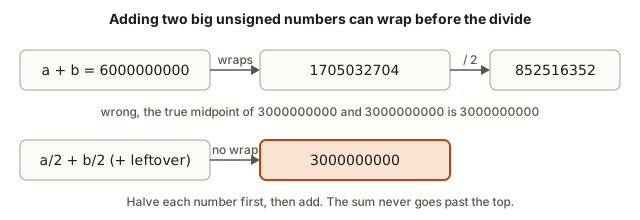 Two routes: a plus b wraps to a wrong midpoint, while halving each number first gives the correct 3000000000
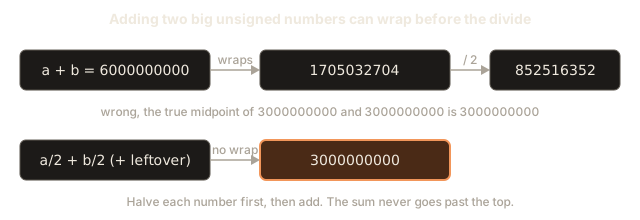
The formula a + (b - a) / 2 works only when a is not larger than b, because otherwise b - a wraps. A formula that works for any pair is a / 2 + b / 2 + (a % 2 + b % 2) / 2. It halves each number first, so the sum never goes past the top, and it adds back the leftover halves. Interviewers like this question, because it tests whether you think about the limits of the type before you write the code.
Debugging walkthrough: the area that came out negative
A small program reports the area of a warehouse floor, and the result is negative for a 50 000 by 50 000 floor. The first step in debugging is to decide whether the result is plausible. An area cannot be negative, so something has overflowed. The second step is to find the expression that produced the result. Here it is width * height, and both are int. The true product, 2500000000, is larger than the int limit, so it wraps to -1794967296. The area is stored in a long long, but the damage was done earlier, during the multiplication.
The fix is the cast from the earlier example. Cast one operand to long long before you multiply, and the multiplication runs in the larger type. The program in that earlier example prints both answers, so you can see the difference in the same run.
The general method is the same as in the last lesson. Write down the value that is wrong, work out each operation with its types, and find the first step where the value leaves the range it should stay in. Overflow is found by checking the sign and size of intermediate results, not only the final answer.
Common mistakes
Choosing int for a total that can pass two billion is the most common error, and the result wraps silently. Use long long for any sum or product that may be large.
Multiplying two int values and then storing the result in a long long is a trap, because the multiplication happens first. Cast one operand before the multiplication.
Expecting (int)-3.9 to give -4 is a mistake. The cast truncates toward zero, so the answer is -3.
Using unsigned for a value that can be negative makes it wrap to a huge positive number. Use a signed type for differences and changes.
Writing int x{3.5}; does not compile, because braces refuse narrowing. Write the cast explicitly, or use a whole number.
Writing auto s = "hi"; creates a text value that is not a string. Write string s = "hi"; when you need a string.
Trying to change a const variable is a compile error. Remove the const if the value really must change.
Practice
Attempt each exercise on paper first, then compile and run your program to check.
- Print the number of bytes used by
short,longandlong doubleon your machine, one per line.
Solution
#include <iostream>
using namespace std;

int main() {
    cout << "short: " << sizeof(short) << endl;
    cout << "long: " << sizeof(long) << endl;
    cout << "long double: " << sizeof(long double) << endl;
    return 0;
}
The values depend on the machine. On 64-bit Linux the output is 2, 8 and 16. On 64-bit Windows long is 4.
- Compute the average of 7 and 2 as a decimal, using a cast. Print it with two decimals.
Solution
#include <iostream>
#include <iomanip>
using namespace std;

int main() {
    int a = 7, b = 2;
    cout << fixed << setprecision(2);
    cout << static_cast<double>(a + b) / 2 << endl;
    return 0;
}
The output is 4.50.
- Create
const int DAYS = 7;and print the number of hours in a week by multiplying by 24. Print the result as anint.
Solution
#include <iostream>
using namespace std;

const int DAYS = 7;

int main() {
    cout << DAYS * 24 << endl;
    return 0;
}
The output is 168.
- Compute the number of seconds in a non-leap year, 365 days, as a
long long. Then check whether anintcould hold the same value on your machine.
Solution
#include <iostream>
using namespace std;

int main() {
    long long seconds = 365LL * 24 * 60 * 60;
    cout << seconds << endl;
    return 0;
}
The output is 31536000. That value is far below the int limit, so an int would hold it on this machine. The LL suffix makes the first multiplication a long long one, which keeps the habit of making the operands big before combining them.
- The program below prints 605032704 for the product of two positive values, which is wrong. Find the reason and fix it without changing the type of the result.
#include <iostream>
using namespace std;

int main() {
    int a = 70000;
    int b = 70000;
    long long product = a * b;
    cout << product << endl;
    return 0;
}
Solution
The product is computed as int, and 70000 times 70000 is 4900000000, which overflows an int and wraps to 605032704. The fix is to cast one operand first: long long product = (long long)a * b;, which prints 4900000000. The result type was already long long, so changing it was not the answer. The operands had to be made large first.
- Explain why
cout << (int)-7.8;prints-7and not-8.
Solution
The cast to int truncates toward zero. It removes the fraction, which is the part after the decimal point. The number -7.8 is between -8 and -7, and the cast moves toward zero to -7. The truncation rule is the same for positive numbers: (int)7.8 is 7.
- Write a program that reads a
doubleprice from the input, for example19.5, and prints the price rounded to the nearest whole number, for a positive price. Use a cast after adding one half.
Solution
#include <iostream>
using namespace std;

int main() {
    double price;
    cin >> price;
    int rounded = static_cast<int>(price + 0.5);
    cout << rounded << endl;
    return 0;
}
With the input 19.5 the output is 20. The trick works for positive numbers. For negative numbers use the round function from <cmath>.
- Predict the output of this program, then run it. Explain the answer.
#include <iostream>
using namespace std;

int main() {
    unsigned int stock = 2;
    unsigned int sold = 5;
    unsigned int left = stock - sold;
    cout << left << endl;
    return 0;
}
Solution
The output is 4294967293. An unsigned value cannot go below zero, so 2 minus 5 wraps around to 2 to the power 32 minus 3. A signed int would print -3. Use a signed type for a quantity that may go negative, such as stock.
- Explain in two plain sentences why
auto x = 2;andauto y = 2.0;give different types.
Solution
The literal 2 is a whole number, so the compiler picks int. The literal 2.0 has a decimal point, so the compiler picks double. The type comes from how the value is written, and auto only copies that choice into the variable.
- Write the midpoint of two
intvalues,aandb, using the formulaa / 2 + b / 2 + (a % 2 + b % 2) / 2. Test it with3and4, which should give 3, and with3and3, which should give 3.
Solution
#include <iostream>
using namespace std;

int main() {
    int a = 3, b = 4;
    cout << a / 2 + b / 2 + (a % 2 + b % 2) / 2 << endl;
    a = 3;
    b = 3;
    cout << a / 2 + b / 2 + (a % 2 + b % 2) / 2 << endl;
    return 0;
}
The output is 3 and then 3. The leftover halves add to 1 when both numbers are odd, and that 1 is added back once. Change the two values to test your own pairs.
- A program declares
const double TAX_RATE = 0.18;and later writesTAX_RATE = 0.20;. What does the compiler say? How would you change the program so the rate can be updated, and what would you give up?
Solution
The compiler reports assignment of read-only variable ‘TAX_RATE’. To allow updates, remove const, so the variable is an ordinary double. You give up the guarantee that nothing can change the rate by accident. For a rate that is set by law, keep const. For a rate that a user can set, a plain variable is correct.
- Explain in two or three sentences why
unsigned intis a poor choice for a temperature that can be below zero, and say which type you would use.
Solution
An unsigned type cannot hold negative values, so a temperature of -5 would wrap to a very large positive number, and the program would keep going without any warning. A signed type such as int or double holds negative temperatures correctly. Use double if the temperature may have decimals.
What you now know
- A type's size in bytes sets how many patterns it can store, and
sizeofandnumeric_limitstell you the size and the limits on your machine. - Unsigned values wrap around at zero, and signed overflow is undefined, so choose a type big enough for the largest result.
- The calculation takes the type of its operands. Cast the operands before a multiplication, not only the variable that holds the result.
- A cast with
static_castconverts a value on purpose. Converting a decimal to an integer truncates toward zero, so(int)-3.9is-3. autolets the compiler choose the type from the value, andconstmakes a value read-only, so the compiler stops accidental changes.- Braces refuse narrowing conversions, and the midpoint of two large numbers is a classic test of whether you think about overflow before you add.