Why this matters
A program that always prints the same thing is only a recording. Input lets a program respond to the person using it, or to the judge that tests it. In coding tests and interviews, reading input is the first step of almost every problem: the test gives you numbers or words on the keyboard, or in a file, and your program must read them correctly before any clever idea can help. A program that reads its input wrongly will fail even when its logic is perfect. This lesson teaches you to read every common kind of input, to avoid the traps that catch most beginners, and to check whether a read succeeded.
Input is data that arrives while the program runs
Think of a paper form with blank lines. The clerk writes the questions, and the person fills in the blanks. The clerk reads each answer in order, puts it in the right box on a ledger, and then uses the ledger to do the work. The form does not know what the person will write, so the clerk must check each answer as it arrives.
A program works the same way. When it reaches an input statement, it stops and waits. The user types characters and presses Enter. The characters go into a holding area that the library calls the input stream, and the program takes out what it asks for, one piece at a time. The piece is then stored in a variable, which is the ledger box you learned about in the last lesson.
The tool that takes input from the keyboard is called cin. It is the partner of cout, the output tool you have already used. The name stands for "console input". The two tools use opposite arrows. Output uses <<, because data flows into cout. Input uses >>, because data flows out of cin and into a variable. A simple way to remember it is that the arrow points in the direction the value goes: cin >> age moves the value into age.
Reading a number
The first program reads two whole numbers and prints their sum. Type the two numbers into the Input box, separated by a space, before you press Run.
For the Input box, type 12 30 and then run the program. The output is:
Enter two numbers: Sum = 42Trace the program. The line int a, b; declares two variables of type int and gives them no value yet. The cout line prints the prompt Enter two numbers: and leaves the cursor at the end of the line. Notice that the prompt has no endl, so the program is still on the same line when it waits for input.
The line cin >> a >> b; does two reads in one statement. The first >> reads the first number from the input and stores it in a. The second >> reads the next number and stores it in b. Each read skips any spaces or line breaks in front of the number, so the input 12 30 and the input 12 followed by Enter and then 30 give the same result. Numbers in the input are separated by spaces or new lines, and cin treats both as gaps.
The last cout line prints the sum. The expression a + b is evaluated first, to 42, and then 42 is printed.
Notice that the text 12 30 does not appear in the output. The screen shows what you type as you type it, because the terminal draws your keystrokes. The program's output is only the text it prints. In the Run box the Input area holds what you typed, and the output holds what the program printed, so the two never mix in the output you compare with the judge's expected text.
Reading a count, then that many values
Most problems in coding tests give the number of values first, and then the values. This is the pattern you will use most. The program reads a count n and then reads exactly n numbers, one at a time. The next example computes an average. Type this into the Input box, one line at a time: 4, then Enter, then 10 20 30 45, then run.
The output is:
Count: 4
Average: 26.25
The loop is new, and you do not need to understand every detail of it yet, because loops get a whole module later. For now, read it as "repeat the body n times". In each round, the program declares a new value, reads one number into it, and adds it to sum. After four rounds, sum holds 10 + 20 + 30 + 45, which is 105.
The line (double)sum / n is a cast. It turns sum into a double for this one calculation, so the division is a decimal division. Without the cast, 105 divided by 4 would be 26 in whole numbers, and the fraction would be lost. You will study casts in the next lesson, but you already know why one is needed here.
The two lines with fixed and setprecision(2) control how decimals are printed. fixed says "always print decimals in plain form", and setprecision(2) says "print two digits after the point". Together they print 26.25, and they also print 3.00 for a whole number such as 3, which is what a report needs. Without them, cout would print 26.25 for this example, but it would print 3 for the whole number 3.
The pattern "read a count, then read that many values" depends on the count being correct. If the input says 4 and then gives only three numbers, the program waits for a fourth number that never comes. Coding tests always give the count exactly, so trust the input format and read exactly what it describes.
What the input buffer is
The Input box is not the whole story. When you type on the keyboard, the characters go into a short holding area called a buffer, a block of memory that waits between the keyboard and the program. The buffer is shared by all the reads your program makes. Each cin >> takes out just the characters it needs and leaves the rest waiting for the next read.
The diagram below shows the buffer after a read. The user has typed a number, pressed Enter, and typed a sentence. The first read is cin >> age. It takes the characters 2 and 0, and it stops before the newline, the invisible character that Enter produces. The newline is still in the buffer when the program reaches the next statement.
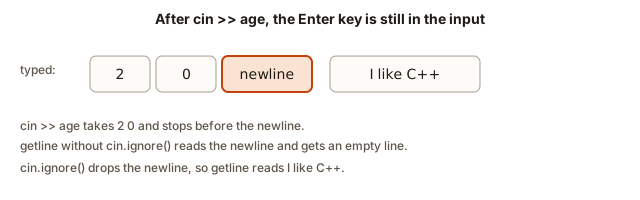 Typed characters 2, 0, a newline and a sentence in a row, with a note that cin stops before the newline
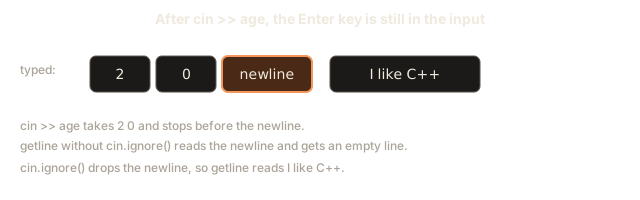
This is why the next statement in many programs misbehaves. The newline is still waiting, and a read that wants a whole line will take it immediately and believe the line is empty. That is the most famous trap in input handling, and the rest of this lesson is built around it.
Reading text with cin
The >> operator reads a word, not a whole sentence. It skips leading spaces, then reads characters until it reaches a space or a line break. It stops there and leaves the space or line break in the buffer. The next example reads a name and an age, and then prints the age next year. Type Ravi 19 into the Input box and run the program.
The output is:
Ravi will be 20 next yearThe first >> reads Ravi into the string called first, because a space ends the word. The second >> skips the space, then reads 19 into the int called age. The string and the number come from the same line, and cin keeps track of where it is between reads, so each read picks up exactly where the last one stopped.
The string type is the one you learned about in the last lesson. It can hold any amount of text, and cin >> fills it one word at a time. For a single word, such as a name without spaces, this is exactly what you want.
The space problem
cin >> stops at the first space, and this breaks any input that is meant to be a full line. If the user types Mary Ann and the program reads with cin >> name, the variable holds only Mary, and Ann waits in the buffer for the next read. To read a whole line, use getline. It reads every character up to the newline, spaces included, and it removes the newline from the buffer without storing it.
Type Mary Ann into the Input box. The output is:
Hello, Mary Ann!getline(cin, full) takes two arguments, separated by a comma. The first is the input source, which is cin. The second is the variable to fill, which is full. The function returns the stream, and you do not need that result here.
Use getline whenever a value can contain spaces, such as a full name, an address, a sentence, or a line of a file. Use cin >> when the value is one word, or a number, or a sequence of numbers. Choosing the right tool for each piece of input is a real skill, and interviewers look for it.
The trap: cin followed by getline
Now the trap. Consider a program that first reads a number and then reads a full line. The user types 20, presses Enter, and then types a sentence. The program below is wrong, and it is written as a plain fence because it is here to show the mistake. Do not run it yet.
#include <iostream>
#include <string>
using namespace std;

int main() {
    int age;
    string line;
    cin >> age;
    getline(cin, line);
    cout << "age: " << age << endl;
    cout << "line: " << line << endl;
    return 0;
}
With the input 20 and then I like C++ a lot on the next line, the output is:
age: 20
line:
The second line is empty. The program did not read the sentence at all. Trace it. cin >> age takes 2 and 0 and stops at the newline, which is still in the buffer. getline then starts reading from that waiting newline. It finds the newline straight away and returns an empty string. The sentence is still waiting in the buffer for a later read that never comes.
Nothing in the message tells you this. The program compiles, runs, and prints an empty line. Beginners often blame getline, but getline is working exactly as designed. The problem is the newline that cin >> left behind. The fix is to throw that newline away before the getline. The next program does that.
Type 20 on the first line and I like C++ a lot on the second, then run. The output is:
age: 20
line: I like C++ a lot
The new statement is cin.ignore();. It removes one character from the input, which is the newline left by the first read. Then getline reads the sentence. The order of statements is the whole fix: the newline must be removed before the line is read.
cin.ignore() with no arguments removes exactly one character. That is enough when you know that one newline is waiting. A stronger version removes everything up to and including the newline, and it is the version used in most contest code:
#include <limits>
// ...
cin.ignore(numeric_limits<streamsize>::max(), '\n');
This line discards characters until it has removed a newline, no matter how many spaces were typed after the number. The numeric_limits tool comes from the <limits> header, and it provides the largest possible count. You can use that version whenever you are not sure how many stray characters are waiting. The short version is fine for the basic case of a number followed by Enter.
A second, quieter trap appears when the program reads a line first and a number second. That order is safe, because getline consumes the newline itself. The trap comes only from reading a number and then a line. Keep that rule in mind, and check the order of your reads whenever a line comes back empty.
Reading a single character
cin >> ch into a char reads one character, and it skips leading spaces first. If the input is x, the statement char ch; cin >> ch; stores 'x' in ch. If the input is x, with spaces in front, the same statement still stores 'x', because spaces are skipped. That skipping is useful for reading menu choices, and it is a problem when the space itself is the thing you need. In that case use getline and look at the first character of the result, or use cin.get(), which returns the next character without skipping anything.
The next program reads a character and then a decimal number. It also shows that the same skipping rule applies to a double.
Type x 4.5 into the Input box. The output is:
char: x
price doubled: 9
cin >> reads a double the same way as an int. It reads the characters that can form a decimal number, and it stops at the first character that cannot. The number 4.5 becomes a double with the value 4.5, and doubling it gives 9. Notice that cout printed 9 and not 9.0, because the default output does not add zeros.
Reading until the input ends
Sometimes the number of values is not given. The input is simply a list, and the program must read until there is nothing left. Judges often do this, and it is the easiest way to read a stream of numbers. The statement while (cin >> value) says "keep reading values into value as long as a read succeeds". When the input ends, the read fails, the loop stops, and the program goes on.
For the Input box, type 3 4 5 on the first line and 6 on the second line. The output is:
Numbers read: 4
Total: 18
Trace the loop. Each time through, cin >> value takes the next number from the buffer and stores it in value. The test in the parentheses is true when the read worked. The body adds the value to total and counts it. After 6 has been read, the buffer holds only the final newline, and the next read finds no more numbers. The read fails, the test is false, and the loop ends.
The total is a long long, because a long list of large numbers can pass the limit of an int. Choosing a bigger type for a running total is a habit that judges reward. You will see why in the next lesson, which studies the limits of each type.
In the Run box you end the input simply by typing nothing more after the last value. Judges do the same thing by ending the input stream. On your own computer you would press Ctrl and D together on Linux to send the end of input, or use the Enter then Ctrl and Z sequence on Windows.
Checking whether a read worked
A read can fail. The user may type a letter when the program expects a number, or the input may end early. Every stream has a state, and a failed read sets a flag called the fail bit. You can check it with cin.fail(), which returns true when the last read failed.
Type abc in the Input box and run it. The output is:
Not a number. x is now 0Two things happened. The flag was set, so cin.fail() returned true. And the variable x, which started at 5, now holds 0. Since C++11, when an extraction of a number fails, the variable is set to zero. Do not rely on that value to mean anything. The reliable signal is the flag.
Now try the input 12abc. The read takes 12, which is a valid number, and stops at the letter a. The flag is not set, because the read succeeded. The letters abc stay in the buffer. The output is You typed 12. The next read from cin would fail at once, because the next character is a letter, and it would keep failing, because the bad text never leaves the buffer. This is why a program that reads several numbers can seem to stop working after one bad value.
You can see that behaviour in the next example. It reads three numbers from the input 10 x 30 and prints what it got. The variables start at -1, so you can see which ones were changed.
#include <iostream>
using namespace std;

int main() {
    int a = -1, b = -1, c = -1;
    cin >> a >> b >> c;
    cout << a << " " << b << " " << c << endl;
    cout << (cin.fail() ? "failed" : "ok") << endl;
    return 0;
}
The output is:
10 0 -1
failed
Trace it. a reads 10 successfully. b tries to read x, which is not a number. The read fails, the flag is set, and b becomes 0. Now the stream is in the failed state, so the read for c does nothing at all, and c keeps its starting value of -1. Once a stream has failed, every later read is ignored until you clear the flag with cin.clear(). That is the reason the program does not crash, and also the reason it quietly produces wrong values if you do not check.
Faster input for contests
When a judge gives you a hundred thousand numbers, the default cin is slower than it needs to be, because it keeps itself synchronised with the older C input functions. Two lines at the start of main remove that synchronisation and untie cin from cout. They do not change what the program prints. They only make reading faster.
ios::sync_with_stdio(false);
cin.tie(nullptr);
Use these lines in contest code when the input is large. Do not mix them with the old scanf and printf functions in the same program, because after the first line the two systems no longer share their buffers, and the output can come out in the wrong order. For this course, which uses cin and cout only, the two lines are safe. You do not need them for small inputs, and the programs in the lessons do not use them, but it helps to know they exist when you read other people's code.
Reading the wrong type
Reading a string when you need a number, or a number when you need text, is a mistake that compiles without complaint and then goes wrong at run time. The compiler checks the type of the variable, but it cannot check what the user will type. If the input says hello and the program reads an int, the read fails, as you saw in the last section. Design your program so that it reads exactly the kind of value the input format promises, and check the flag when a value might be missing.
Planning the reads from the input format
Before you write a single cin line, read the input format in the task and translate it into reads, in the same order. This habit prevents most input bugs, because the code then mirrors the data. The table below shows three common formats and the reads that match each of them.
| Input format in the task | Reads to write |
|---|---|
A count n, then n numbers on one line | cin >> n;, then n reads of one number each |
| A name line, then an age line | getline(cin, name); then cin >> age;, which is safe because the name was read first |
| An age line, then a name line | cin >> age;, then cin.ignore(...), then getline(cin, name); |
| Three numbers on one line | cin >> a >> b >> c; in one statement |
| A letter, then a decimal number | cin >> ch >> price;, which skips any spaces between them |
The third row is the trap from earlier in this lesson. The fourth and fifth rows are the easiest, because >> skips every space and line break between values. Count the reads against the format line by line. If the format has four lines, the program should make four reads, and each read should match one line of the format. When the counts disagree, the program is reading the wrong values, and no amount of printing fixes that until the reads match the format.
Tracing a mixed input step by step
Mixed input is where most reading bugs hide, so it is worth tracing once in full. Suppose the task gives this input, with a count, then a name line, then a line of two numbers:
2
Ravi Kumar
7 9
The program reads cin >> count; first. The buffer holds 2, then a newline, then Ravi Kumar, then a newline, then 7 9 and a final newline. The read takes 2 and stops at the newline. The buffer now starts with the newline, followed by the name line.
Next, the program reads the name with getline(cin, name);. It takes the newline first and returns an empty name. That is the trap again, and the fix is one line: cin.ignore(...) before the getline. After the fix, the same read takes Ravi Kumar and removes its newline. The buffer now holds 7 9 and a newline.
The last part reads two numbers with cin >> a >> b;. Each read skips the spaces in front of its value, so a takes 7 and b takes 9. The buffer keeps only the final newline, which no later read needs. The trace shows the whole rule in three steps: a >> read leaves the newline behind, a getline consumes it, and a >> read after a getline needs no fix at all. Writing the buffer after each read on paper is the surest way to find the one read that behaves differently from the others.
When the input ends early
Judges never give you less input than the format promises, but a program can still run out of data because of a bug in its own reads. Suppose the program reads a count of 3 and then three numbers, but it accidentally reads four times. The fourth read finds nothing and fails. The stream sets its fail flag, and the variable keeps whatever value it had, or 0 for a number. A program that prints that variable shows a plausible-looking wrong answer, and nothing crashes.
The defence has two parts. First, read exactly as many values as the format says, and count your reads against the format line by line. Second, check cin.fail() after any read that might not succeed, and print a clear message when it is set. Interactive programs need the second part most, because a person may close the input early. Judges use fixed input, so the first part does most of the work there. Either way, a read that fails silently is worse than a read that crashes, because the crash shows you where to look.
Lines from a file and Windows line endings
A line of text ends with a newline, but the newline is not always a single character. Files created on Windows often end each line with two characters, a carriage return and a newline, which in C++ is written \r\n. The getline function stops at the \n, but it keeps the \r in front of it, so the string has one extra character that you cannot see on the screen.
You can check this with a length. The input Mary followed by the Windows line ending gives a string of length 5, not 4, because the final character is the carriage return. On the screen the output looks the same, so the bug is invisible until a judge compares the text. The cin >> operator does not have this problem, because it treats \r as a space and skips it. The safe rule is to expect that a judge's file may use either line ending, and to remove the carriage return from any line you read with getline. The method for checking and removing a trailing character uses a decision, which a later module teaches, so for now know the problem exists and read the task's input format carefully.
What an interviewer asks about input
Reading input is not glamorous, but interviewers use it to judge how carefully you think. When a problem gives you input, ask four questions before you write any code. How large can the input be, in the number of values and in the size of each value? Can the input be empty, or can the count be zero? Can the values be negative, and do they fit in the type you plan to use? Do the values arrive on one line or on many, and could the lines have extra spaces?
These questions have practical answers. A count up to a hundred thousand means your reads must be fast, and the loop that reads them must do a constant amount of work each time. An empty input means your program must still print a sensible result, such as zero, rather than crash or print garbage. A value of minus one billion means the type must be signed and large enough. An interviewer who hears these questions knows that you are thinking about the judge's data, not only about the example in front of you, and that is the habit they are looking for.
Common mistakes
Writing cin << a is wrong, because the arrows point the wrong way for input. The correct form is cin >> a, with the arrow pointing toward the variable.
Writing cout >> a is wrong for the same reason. Output uses <<.
Using cin >> name for a full name loses everything after the first space. Use getline(cin, name) for any value that can contain spaces.
Calling getline right after a cin >> read gives an empty string, because the newline is still waiting. Discard it with cin.ignore() first, or read the whole line with getline and convert it afterwards.
Typing letters when the program expects a number makes the read fail, and the variable becomes 0. Check cin.fail() if the input might be wrong.
Forgetting to declare the variable before the cin line gives the compile error was not declared in this scope, which you learned to read in the last lesson.
Reading more numbers than the input contains waits forever in an interactive run, and it reads failures in a judge run. Read exactly the count the format says.
Debugging walkthrough: the program that stopped
A program reads a count and then three numbers, and it prints the sum. It seems to work for the sample input. A judge then sends the numbers 10 x 30, and the sum comes out far too small. The code looks like this:
#include <iostream>
using namespace std;

int main() {
    int a = 0, b = 0, c = 0;
    cin >> a >> b >> c;
    cout << "Sum: " << a + b + c << endl;
    return 0;
}
With the input 10 x 30, the program prints Sum: 10. The debugging method starts with the question "which read went wrong?" The first read succeeded, so a is 10. The second read saw x, failed, and set b to 0. The third read did nothing, because the stream was already failed, so c stayed 0. The sum is 10, which matches the output.
The real bug is that the program never checks the flag. The fix is to test cin.fail() after the reads and report the problem, or to stop the program with a clear message. The correct response depends on the task. Coding tests usually guarantee valid input, so the important lesson is the method: find the first failed read, then trace what every later read did.
To practise that method on paper, write down the buffer after every read. Show what each read took and what it left. Most input bugs become obvious within three reads.
Practice
Try each exercise on your own computer, and type a test input for each one before you read the solution.
- Read two whole numbers and print their product. Test it with the input
6 7.
Solution
#include <iostream>
using namespace std;

int main() {
    int a, b;
    cin >> a >> b;
    cout << a * b << endl;
    return 0;
}
With 6 7 the output is 42.
- Read a first name and a last name, both single words, with
cin >>. Print them asLast, First. Test withAnisha Sharma.
Solution
#include <iostream>
#include <string>
using namespace std;

int main() {
    string first, last;
    cin >> first >> last;
    cout << last << ", " << first << endl;
    return 0;
}
With Anisha Sharma the output is Sharma, Anisha.
- Read a whole sentence with
getlineand print it inside double quotes. Test withThe judge is strict. Hint: a double quote inside a string is written\".
Solution
#include <iostream>
#include <string>
using namespace std;

int main() {
    string sentence;
    getline(cin, sentence);
    cout << "\"" << sentence << "\"" << endl;
    return 0;
}
The output is "The judge is strict".
- Read an integer and then a sentence on the next line. Print both, one per line. Test with
7, thengood morning everyone. Make sure the sentence is not empty.
Solution
#include <iostream>
#include <limits>
#include <string>
using namespace std;

int main() {
    int number;
    string sentence;
    cin >> number;
    cin.ignore(numeric_limits<streamsize>::max(), '\n');
    getline(cin, sentence);
    cout << number << endl;
    cout << sentence << endl;
    return 0;
}
The <limits> header provides numeric_limits. The output is 7 and then good morning everyone.
- Read a count
nand thennnumbers. Print their sum, then their average with two decimals. Test with3and then4 5 6.
Solution
#include <iostream>
#include <iomanip>
using namespace std;

int main() {
    int n;
    cin >> n;
    long long sum = 0;
    for (int i = 0; i < n; i++) {
        int value;
        cin >> value;
        sum += value;
    }
    cout << "Sum: " << sum << endl;
    cout << "Average: " << fixed << setprecision(2) << (double)sum / n << endl;
    return 0;
}
With the test input the output is Sum: 15 and then Average: 5.00. The cast to double keeps the average decimal.
- Read a line of text and print its first character. Test with
ab. Hint: astringcan be indexed like a row of boxes, and the first box is number 0.
Solution
#include <iostream>
#include <string>
using namespace std;

int main() {
    string line;
    getline(cin, line);
    cout << line[0] << endl;
    return 0;
}
The output is a. The index 0 is the first character, and this program assumes the line is not empty, because an empty line has no first character.
- Read a character and print the character that comes after it. Test with the input
k. What happens if the input iskwith two spaces in front?
Solution
#include <iostream>
using namespace std;

int main() {
    char ch;
    cin >> ch;
    cout << char(ch + 1) << endl;
    return 0;
}
With k the output is l. With two spaces in front, the output is still l, because cin >> ch skips the spaces before it reads the character.
- The program below prints the wrong thing for the input
25and thenRavi Kumar. Find the bug and fix it.
#include <iostream>
#include <string>
using namespace std;

int main() {
    int age;
    string name;
    cin >> age;
    getline(cin, name);
    cout << name << " is " << age << endl;
    return 0;
}
Solution
The bug is that cin >> age leaves the newline in the buffer, so getline reads an empty line and the name is empty. Add cin.ignore(numeric_limits<streamsize>::max(), '\n'); between the two reads, with #include <limits> at the top. The output then becomes Ravi Kumar is 25.
- Predict the output of this program for the input
2 3 abc 4, and then run it to check. Explain every value ofc.
#include <iostream>
using namespace std;

int main() {
    int a = 0, b = 0, c = -5;
    cin >> a >> b >> c;
    cout << a << " " << b << " " << c << endl;
    return 0;
}
Solution
The output is 2 3 0. The first two reads succeed. The third read sees abc, which is not a number, so it fails, and the rule for a failed number read sets c to 0, even though it started at -5. The 4 stays in the buffer, unread, because the stream has failed. Always check the flag rather than the value, because the value of a failed read is only a fallback.
- Write a program that reads a count
n, then readsnnumbers, and prints their sum as along long. Test with3and then2000000000 2000000000 2000000000. Explain why aninttotal would be wrong.
Solution
#include <iostream>
using namespace std;

int main() {
    int n;
    cin >> n;
    long long total = 0;
    for (int i = 0; i < n; i++) {
        long long value;
        cin >> value;
        total += value;
    }
    cout << total << endl;
    return 0;
}
The output is 6000000000. An int total would overflow, because its largest value is about 2.1 billion, so the sum would be wrong. The next lesson explains the overflow in detail.
- Read a line of text and count how many characters it has, including spaces. Test with
ab cd, which has 5 characters.
Solution
#include <iostream>
#include <string>
using namespace std;

int main() {
    string line;
    getline(cin, line);
    cout << line.length() << endl;
    return 0;
}
The output is 5. The space between ab and cd counts as a character.
- Explain in three plain sentences why
cin >> numberfollowed bygetlinegives an empty line, using the word buffer.
Solution
The number is read from the buffer, but the Enter key that ended the line stays in the buffer after it. The getline call starts reading where the number stopped, so the first thing it sees is that newline. It reads the newline as the end of an empty line and returns an empty string, and the real line the user typed waits for a later read.
What you now know
cin >>reads values into variables, skipping spaces and line breaks in front of each value, andgetlinereads a whole line including its spaces.- Input waits in a buffer, and each read removes only what it needs, so a leftover newline can trap a later
getline. Discard it withcin.ignore. - A read of exactly the count the input gives, or a loop of
while (cin >> value), covers almost every input pattern in coding tests. - A failed read sets a flag that
cin.fail()reports, and every later read does nothing until the flag is cleared. Check the flag when input may be wrong. - When a value is wrong, trace the reads one by one and write down what each read took and left behind.