Why it matters
Every sort you have seen so far works by comparing pairs of values. Lesson 1 compared neighbours, and lesson 3 will compare pairs across halves. Comparing has a hard limit. If a sort can only ask "is this one smaller than that one?", it needs about n times log n questions in the worst case, no matter how clever it is. You will prove that limit in a moment.
Counting sort gets around the limit by not comparing at all. It counts how many times each value appears, then writes the values out in order. The price is that it only works well when the values are small whole numbers. It is one of the most common interview questions for that reason. The interviewer wants to see whether you know when a faster sort is possible, and whether you can explain why it is safe.
The second half of this lesson is about stability. A stable sort keeps the original order of values that compare as equal. Stability sounds like a small detail, but it is the reason sorting by several fields works at all. You will write a stable counting sort, and you will see the exact moment a sort that is not stable changes the answer.
Why comparing has a limit
Here is a game to explain the limit. Someone hides a number between 1 and 1,000 and you may ask only yes-or-no questions. How many questions do you need? Each answer cuts the possibilities in half, so 10 questions are enough, since 2 to the power 10 is 1,024. The count of questions is the logarithm of the number of possibilities.
Now apply the same idea to sorting. A list of n distinct values can end up in any of n! orders. Each comparison a sort makes is a yes-or-no question about the order. To be sure of the answer, the sort must ask enough questions to tell all n! orders apart. The number of questions needed is at least log2 of n!, and that works out to about n times log2 n.
For 1,000 values that is about 8,530 comparisons at the very least, in the worst case. Merge sort and quick sort, which you will study in lesson 3, come close to this bound. Bubble sort and insertion sort do far more. So a comparison-based sort cannot do better than n log n. To go faster, a sort must learn something about the values beyond their order. Counting sort learns the values themselves: it knows that the possible values are the whole numbers from 0 to some maximum.
The idea: sorting exam papers into piles
Imagine a teacher with a stack of exam papers. Each paper has a mark from 0 to 10. The teacher does not compare papers with one another. She makes eleven piles on the table, labelled 0 to 10. She picks up each paper, reads its mark, and drops it on the matching pile. When every paper is in a pile, she walks along the piles from 0 to 10 and writes down the marks in that order, one per paper.
Counting sort does exactly this, using numbers instead of paper. The piles become an array called count, where count[v] is the number of times the value v appears. Step one counts the piles. Step two writes each value out count[v] times, starting from the smallest v.
The precise version has three steps.
- Find the smallest and largest values, or use a known maximum. This sets the size of the count array.
- Scan the input once and add one to
count[value]for each value. - Scan the count array from left to right, and for each v write v exactly
count[v]times into the output.
Each step does a fixed amount of work per item or per pile. Nothing is compared against anything else.
A worked example by hand
Take the input 4 2 2 8 3 3 1. The largest value is 8, so the count array needs nine piles, for the values 0 to 8. Piles are numbered by value, starting at 0.
Start with all nine piles empty, so every count is 0.
Scan the input from left to right.
- The value 4 arrives. Add one to
count[4], so it becomes 1. - The value 2 arrives.
count[2]becomes 1. - The value 2 arrives again.
count[2]becomes 2. - The value 8 arrives.
count[8]becomes 1. - The value 3 arrives.
count[3]becomes 1. - The value 3 arrives again.
count[3]becomes 2. - The value 1 arrives.
count[1]becomes 1.
The count array is now 0 1 2 2 1 0 0 0 1, for the values 0 to 8. Read it as: no 0s, one 1, two 2s, two 3s, one 4, no 5s, 6s or 7s, and one 8.
Now write the output. Walk the piles from 0 to 8. For each pile, write its value as many times as the count says. Pile 0 has nothing. Pile 1 has one, so write 1. Pile 2 has two, so write 2 twice. Pile 3 has two, so write 3 twice. Pile 4 has one, so write 4. Piles 5, 6 and 7 are empty. Pile 8 has one, so write 8. The output is 1 2 2 3 3 4 8, which is sorted.
Count the work. The scan of the input touched each of the 7 values once. The walk over the piles touched each of the 9 piles once, and wrote 7 values. Nothing was compared, so the answer did not depend on which value was bigger than which.
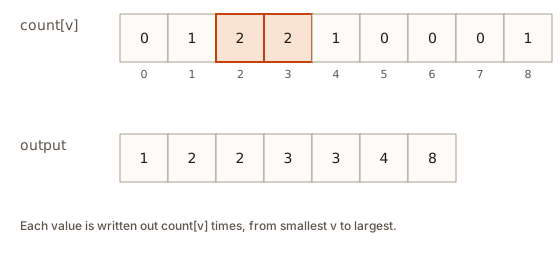 Nine count boxes for values 0 to 8 with counts 0 1 2 2 1 0 0 0 1, and the output row 1 2 2 3 3 4 8 below
The picture above shows the same two rows. The top row is the count array, and the bottom row is the output. Notice the highlighted piles. They hold the two 2s and the two 3s, which is why those values appear twice in the output.
Writing the code
The example above used values that start at 0. Real data often does not. Temperatures can be negative, and marks can start at 1. The fix is to shift the values so that the smallest one lands at index 0. Subtract the smallest value from every value when you choose a pile. A value of -5 with a smallest value of -5 goes to pile 0. A value of 3 goes to pile 8.
The program below does exactly that. It reads a count and then that many integers, and it handles negative numbers by using the smallest value as the offset.
Type these lines into the Input box, then press Run:
7
3 -2 0 3 -5 -2 1
The expected output is:
-5 -2 -2 0 1 3 3Look at the three big parts. The first loop finds the smallest and largest values, lo and hi. The count array has hi - lo + 1 piles, so it covers every value from lo to hi. The line count[x - lo]++ puts each value in its pile, using the offset. The nested loops at the end write the values out. The loop over k walks the piles, and the inner loop writes the value k + lo as many times as its count.
The code assumes at least one value. With n equal to 0, a[0] does not exist, and the program fails. Lesson 2's common mistakes section shows that failure and how to guard against it.
Sorting letters
Counting sort is at its best when the set of possible values is small and known. Lowercase letters are the classic example. There are 26 of them, so the count array needs only 26 piles, no matter how long the word is.
Two facts make the letter version short. A character in C++ is a small number underneath, so 'c' - 'a' is 2. That makes 'a' the pile 0, 'b' the pile 1, and so on. The second fact is that string(count, ch) builds a string made of count copies of the character ch. The program uses it to write out each letter.
Type banana into the Input box and press Run. The expected output is:
aaabnn
a:3 b:1 n:2
The first line is the sorted word. The second line shows the pile counts for the letters that appear. There is a trailing space after the last count, which the program prints on purpose, so every entry looks the same.
When counting sort works
Counting sort's running time has two parts. Scanning the input takes time proportional to n, the number of values. Walking the piles takes time proportional to k, the number of possible values. The total time is O(n + k). The extra space is the count array of size k, plus the output array of size n, so the space is also O(n + k).
That formula tells you when to use it. When k is small compared with n, the work is about n, which is linear. When k is much bigger than n, the piles dominate the work, and the algorithm becomes slower than a comparison sort.
- Good fit: a million ages between 0 and 120. The work is about a million plus 121, which is far less than n log n for a million values, and the memory for the piles is tiny.
- Good fit: marks out of 100 for a class of 60 students. The piles cost 101 slots, and the sort is done almost at once.
- Good fit: lowercase letters of a text. Twenty-six piles can sort any length of text.
- Poor fit: three numbers
7,2and2000000000. You would allocate two billion piles to sort three values. Memory runs out long before the sort finishes. - Poor fit: arbitrary decimal numbers such as
3.14159. The values are not whole numbers, so there is no pile for most of them.
When values have a large range but there are few of them, use a comparison sort. When the range is small, counting sort is often the fastest choice you can make.
A useful trick for a large range is to compress the values first. Sort the distinct values with a comparison sort, then assign each one a pile number from 0 up. That turns a range of two billion into a range of at most n, at the cost of an extra sort. You will recognise this as the same idea as a dictionary that maps values to positions.
Stability: keeping the order of ties
A sort is stable when two values that compare as equal keep the order they had before sorting. The word "equal" means equal by the sort key, not equal as whole records.
Picture a spreadsheet of students listed by name, A to Z. Now you sort by marks. Two students have 80 marks. With a stable sort, the student who was listed first by name is still listed first among the 80s. With an unstable sort, the two students may swap places. Nothing about the marks changed, but the order inside the tie has moved.
For plain integers, stability cannot be seen. Two 80s look identical, so swapping them changes nothing you can observe. Stability becomes visible only when the items carry extra information beyond the sort key. A record with a name and a mark is the usual example.
Here is the table of stability for the sorts in this module. Use it as a reference.
| Sort | Stable? |
|---|---|
| Bubble | Yes |
| Insertion | Yes |
| Selection | No |
| Merge | Yes |
| Quick (usual version) | No |
std::sort | No |
std::stable_sort | Yes |
| Counting sort (the version below) | Yes |
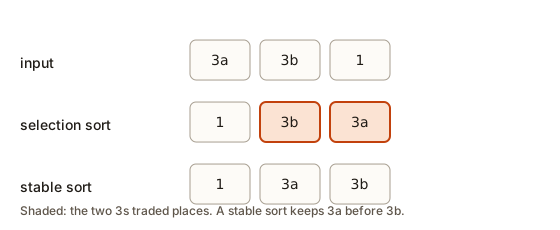 Three rows: the input 3a 3b 1, the result of selection sort 1 3b 3a with the two 3s shaded, and the stable result 1 3a 3b
Selection sort is unstable, and the reason is worth knowing. It finds the smallest value and swaps it into the front. That swap can jump a value over an equal one. The next program shows it on three items. The first two items have the same key, 3, and their tags tell you where each one came from.
Expected output:
after round 1: 1 3b 3a
after round 2: 1 3b 3a
Round 1 finds the 1, which sits at the end. It swaps the 1 with the item at the front, which is 3a. The item 3a jumps past 3b, so the two equal 3s change order. Round 2 finds nothing smaller than the 3s, so it changes nothing. The tie ended in the order 3b 3a, which is not the input order.
The fix is to use a sort that never jumps an item over an equal one. Insertion sort, bubble sort and merge sort all do this. In C++ the standard library provides stable_sort for the same guarantee, and lesson 4 covers it in depth.
A stable counting sort
Here is the question that matters for interviews. Can counting sort be made stable? Yes, and the change is small. The piles tell you how many items belong to each key. What you still need is a starting position for each key, so that items of the same key can be written in input order.
The idea is a running total. If there are 1 item with a key below 75, 2 items with key 80, and 2 with key 90, then the 75s start at position 0, the 80s start at position 1, and the 90s start at position 3. Each pile says how many slots the keys before it take up. Adding the counts up in order gives the start position of every key.
Let me trace the stable version on five records. The records are Asha 80, Ravi 90, Meera 80, Kiran 90 and Dev 75, in that input order. Marks go from 0 to 100, so there are 101 piles.
- Count the marks. There is one 75, two 80s and two 90s.
- Turn the counts into start positions. The start for 75 is 0, since no mark below 75 exists. The start for 80 is 1, since one mark (Dev's 75) comes before it. The start for 90 is 3, since three marks come before it.
- Place the records front to back. Asha has mark 80, so she goes to position 1, and the next 80 slot becomes 2. Ravi has mark 90, so he goes to position 3, and the next 90 slot becomes 4. Meera has mark 80, so she goes to position 2, which is the next free 80 slot. Kiran has mark 90, so he goes to position 4. Dev has mark 75 and goes to position 0.
- Read the output: Dev, Asha, Meera, Ravi, Kiran. Asha came before Meera in the input, and Ravi before Kiran, so the ties kept their order.
The code below does these steps. It reads a count and then name mark pairs.
Type these lines into the Input box:
5
Asha 80
Ravi 90
Meera 80
Kiran 90
Dev 75
Expected output:
Dev 75
Asha 80
Meera 80
Ravi 90
Kiran 90
Look at the middle of the program. The loop start[r.mark + 1]++ counts each mark one slot higher than its own, so that the running total after the prefix loop gives the number of marks that are strictly less than each mark. The loop out[start[r.mark]++] = r places each record and moves the slot pointer forward by one. Because the records are visited front to back, the first record with a given mark always takes the earlier slot. That is exactly what makes the sort stable.
Some textbooks walk the input from back to front and count down. That also gives a stable result. Either direction works, as long as the placement order matches the input order.
Sorting by several keys
Stability is the reason you can sort a table by one column and then by another, and get the result you want. The rule is simple. Sort by the least important key first, then by the more important key using a stable sort. Ties in the more important key keep the order from the earlier sort, which is the order of the less important key.
Suppose you want students sorted by marks, highest first. When two students have the same marks, you want them sorted by name, A to Z. Sort by name first. Then sort by marks with a stable sort. The name order survives among students with equal marks, because the stable sort keeps it.
The next program does exactly that, with the same five students as before.
Type the same five lines as in the previous program into the Input box. The expected output is:
Kiran 90
Ravi 90
Asha 80
Meera 80
Dev 75
Inside the 90s, Kiran comes before Ravi, because the name sort put them in that order and the mark sort did not move them. Inside the 80s, Asha comes before Meera for the same reason. This two-pass idea is the foundation of radix sort, which is covered in the variations section below.
What happens inside
Counting sort does its work in plain loops, with memory access in a predictable pattern. The count array is a block of consecutive integers. When the input scan adds to count[x], the processor jumps to one cell in the block. For small key ranges, the block fits in the processor's fast cache memory, so these jumps are quick.
The stable version adds one more array, the start positions, which is also of size k. It also needs an output array of size n, because the records cannot be written in place without a more careful method. The total extra memory is O(n + k). For records with large payloads, the output array is the expensive part, because each record is copied once.
The running count works like a fence post. Each pile says how many slots it needs, and the start of the next pile is the end of the last one. If you draw the output as a row of boxes, the start positions tell you where each group of equal keys begins. The algorithm simply fills each group from its beginning, one record at a time.
Common mistakes
Counting sort is short, so its mistakes tend to be about sizes and ranges. Each mistake below shows what you see.
Sizing the pile array one short
If the largest value is 8 and you write vector<int> count(8, 0), the piles run from index 0 to index 7. Writing count[8] then steps outside the vector. With g++ on this setup the message looks like the one from lesson 1.
/usr/include/c++/15/bits/stl_vector.h:1263: ... Assertion '__n < this->size()' failed.The fix is to make the array maxVal + 1 long, so index maxVal exists. A pile for every value from 0 to the maximum needs one more slot than the maximum itself.
Negative values without an offset
A value of -2 used directly as an index means count[-2], which is before the start of the vector. The result is the same kind of assertion failure, or a silent write to memory that belongs to something else when the check is not on. Use the offset from lo, as the program above does.
An empty input
When n is 0, the line int lo = a[0]; reads an element that does not exist. The program fails in the same way as the previous mistake. Add a guard at the start of the function.
if (n == 0) return;Put the guard before the minimum and maximum are computed. An empty input is a normal case, so the program should handle it without help from the operating system.
A huge range
Writing vector<int> count(2000000000, 0) asks for about eight gigabytes of memory for the count array alone. On many machines the program stops with a message like the following, which means the memory request failed.
terminate called after throwing an instance of 'std::bad_alloc'If you see this, the range is too big for counting sort. Switch to a comparison sort, or compress the values as described above.
Assuming std::sort keeps ties
Many students assume that sorting a list by one field keeps the old order for ties. std::sort does not promise that. Its order for equal keys can change when the library version changes. When order among ties matters, use std::stable_sort.
Mixing up the start position and the count
In the stable version, start[r.mark]++ moves the slot for that mark forward. If you accidentally write out[start[r.mark]] = r without the ++, every record with the same mark overwrites the one before it. The output then holds blank records, with an empty name and a mark of 0, where the overwritten records should be. Look for blank lines in the output whenever you change the placement loop.
Debugging walkthrough
Here is a debugging session on a counting sort that prints the wrong length. The output has six values where the input had seven.
- Check the output size first. A counting sort must produce exactly n values. A shorter output means the pile walk missed some counts, and a longer one means it wrote too many.
- Print the count array. Add a line after the scan that prints every pile. Add up the piles. The sum must equal n. If the sum is 6, the scan skipped an item, so look at the loop bounds.
- Print the pile walk. A pile that is never written but has a positive count points at the loop
for (int c = 0; c < count[k]; c++). Check that the condition uses the right array. - Test the smallest interesting input. Try
2 2for two equal values, then0for a single value, then the empty input. Each one tests a different boundary. - Check the offset. With negative values, the pile index is
x - lo. If you wrotexinstead, the program will either crash or give the wrong answer, depending on the numbers.
A simple habit prevents most of these bugs: write the count sum check as an assertion while you develop the code. It costs one line and catches a wrong count the moment it happens.
Variations and edge cases
Radix sort
Radix sort applies counting sort once per digit. It sorts numbers with three digits by first sorting on the ones digit, then on the tens digit, then on the hundreds digit. Each pass uses a stable counting sort with only 10 piles, one for each digit. Because each pass is stable, the earlier digit order is kept among numbers with the same later digit.
Here is a worked example with seven numbers: 329, 457, 657, 839, 436, 720 and 355. Pass one sorts on the ones digit. The result is 720, 355, 436, 457, 657, 329, 839. The two 7s keep their order: 457 was before 657 in the input, and it still is. Pass two sorts on the tens digit, which gives 720, 329, 436, 839, 355, 457, 657. Pass three sorts on the hundreds digit, which gives 329, 355, 436, 457, 657, 720, 839. The final list is sorted.
If the numbers had been unstable in pass two, the two 3s from pass one would have swapped, and pass three would have produced a wrong list. Stability is the whole point of radix sort.
Radix sort takes time proportional to d times (n + 10) for numbers with d digits. For 32-bit numbers with base 256, d is 4, and the work is linear in n. It is a real sort used in systems that handle huge batches of integers.
Empty and single values
An empty input does nothing when you add the guard. A single value sits in one pile and is written once. All values equal means one pile holds all of them, and the walk writes that value n times.
Keys with a range of zero
When every value is the same, the minimum and the maximum are equal, so the count array has one pile. The sort is correct, and it runs in O(n) time. It is a useful special case to check your code against.
Floats and negative zero
Counting sort needs whole numbers. Floating-point values such as 0.5 cannot index a pile directly. You would have to bucket them into ranges, which is the start of a different sort called bucket sort. Do not force floats into counting sort.
Interview patterns and questions
Interviewers often start with this question: "Can you sort faster than n log n?" The answer is yes, but only with extra information about the values. Explain the comparison limit from the start of this lesson, then describe counting sort as a sort that does not compare.
Other questions you may get:
- "Sort an array of ages from 0 to 120 in linear time." Counting sort with 121 piles. The time is O(n + 121), which is O(n).
- "Is counting sort stable?" The simple version that writes values is stable only in the sense that equal values are identical. The record version with start positions and front-to-back placement is stable.
- "Why is radix sort O(d times n)?" Each digit pass is one counting sort with a fixed number of piles, so it costs O(n) per digit.
- "What is the space cost?" O(n + k): the count array of size k and the output array of size n.
- "A list has 10 million values in the range 0 to 10 billion. Which sort would you pick?" A comparison sort, or radix sort with a few digit passes. Counting sort needs ten billion piles, which is too much memory.
The pattern to remember is simple. Look at the range of the values before you look at the number of values. If the range is small, counting sort wins. If the range is large, compare, or split the values into digits.
| Sort | Time | Extra space | Stable | Needs |
|---|---|---|---|---|
| Counting | O(n + k) | O(n + k) | Yes, in the record version | Small whole-number keys |
| Radix | O(d times (n + b)) | O(n + b) | Yes | Fixed-width keys, one digit at a time |
| Comparison (best known) | O(n log n) | Varies | Varies | Any keys you can compare |
Real-world uses
Counting sort is the engine behind histograms. A histogram counts how many pixels have each brightness from 0 to 255. Image software builds that table with a counting pass, and the same counts give the sorted brightness values if you need them.
Text processing uses counting sort on letters and on small alphabets. Counting the letters of a word is the first step of many anagram checks. Two words are anagrams when their letter counts match, and comparing 26 counts is faster than sorting the letters of both words.
Databases and big-data systems use radix sort and counting-based grouping when they sort large batches of numbers with a known width. A stable sort is essential there, because the database sorts by one column and then by another, and the stable passes keep the earlier order.
Practice
Try these in order. Write your own answer first, then check the hidden solution.
- Letter count. Change
l2r2so that it prints only the letters that appear more than once, in alphabetical order. Hint: check the count before you print.
Solution
Add the condition if (count[k] > 1) inside the final loop. For banana, only a (3) and n (2) print, giving a:3 n:2.
- Mark table. Write a program that reads n marks from 0 to 10 and prints a table of how many students got each mark, from 0 up to 10. Hint: the count array only needs 11 piles.
Solution
Create int count[11] = {0};, add one for each mark, then print each index and its count on its own line. For the marks 3 7 3 10, the table shows 3 with 2, 7 with 1 and 10 with 1, and every other mark with 0.
- Predict the output. Using the piles, predict the output of counting sort on
3 0 3 1with maxVal 3, before you run any code. Then check it. Hint: the count array is1 1 0 2.
Solution
The output is 0 1 3 3. The count of 0 is 1, of 1 is 1, of 2 is 0, and of 3 is 2. Writing each value its count of times gives 0, 1, 3, 3.
- Show that selection sort is unstable. Write down a small input of three records where a selection sort changes the order of two equal keys. Hint: the minimum must sit after the tie.
Solution
3a 3b 1 works, as shown in lesson 2. Another example is 2a 2b 1. Round 1 swaps 2a with 1, giving 1 2b 2a, so the two 2s switch.
- Stable by hand. Apply the stable placement to the records
x 2,y 1,z 2,w 1. Write the output. Hint: the 1s start at 0 and the 2s start at 2.
Solution
The start for key 1 is 0, and the start for key 2 is 2. Placing front to back gives y at 0, w at 1, x at 2 and z at 3. Output: y 1, w 1, x 2, z 2.
- Negative range. Modify
l2r1to sort values that are all between 1000 and 1010. Without changing the offset logic, how many piles does it use? Hint: the offset is the smallest value.
Solution
The program already works. The count array has hi - lo + 1 piles, which is 11 for the range 1000 to 1010, not 1011. The offset lo maps 1000 to pile 0. Nothing needs to change, which is the point of the offset.
- Two keys. Write the code for a sort that orders records by the score, highest first, and then by the name, A to Z, using two passes with
stable_sort. Hint: which sort runs first?
Solution
Sort by name first with sort and a comparator on name. Then run stable_sort with a comparator that returns a.score > b.score. The second pass keeps the name order among equal scores.
- Radix by hand. Apply radix sort with three passes to
512 81 230 19 307. Write the list after each pass. Hint: sort on the ones digit first, then the tens, then the hundreds, and keep ties in order each time.
Solution
The input order is 512, 81, 230, 19, 307. Ones digits: 512 has 2, 81 has 1, 230 has 0, 19 has 9, 307 has 7. Stable order by ones digit: 230 81 512 307 19. Tens digits in that new order: 230 has 3, 81 has 8, 512 has 1, 307 has 0, 19 has 1. Stable order by tens digit: 307 512 19 230 81, where 512 stays ahead of 19 because it was ahead in the previous list. Hundreds digits in that order: 307 has 3, 512 has 5, 19 has 0, 230 has 2, 81 has 0. Stable order by hundreds digit: 19 81 230 307 512. The final list is sorted.
- Why the guard matters. The guard
if (n == 0) return;is needed inl2r1. Explain what would happen without it, and why the count array does not cause the same problem. Hint: look at where the program first reads an element.
Solution
Without the guard, int lo = a[0]; reads an element of an empty vector, which fails with an assertion. The count array is built from hi - lo + 1, which is only computed after the minimum and maximum exist, so the guard must come before them.
What you now know
- Comparison sorts need about n log n comparisons in the worst case. Counting sort avoids comparing by counting the values.
- Counting sort runs in O(n + k) time, where k is the range of the values, so it fits small whole-number keys and letters.
- Shift negative values by their minimum before using them as indexes.
- A sort is stable when equal keys keep their input order. Selection sort is not stable, and the stable counting sort uses start positions filled front to back.
- Sorting by several keys works when you sort by the least important key first and then use a stable sort for the more important key.
- Radix sort applies a stable counting sort to each digit, starting from the least significant digit.