Why it matters
Sorting puts values in order. Once data is sorted, you can find a value by binary search, spot duplicates by looking at neighbours, and read the top ten scores from the end of the list. Almost every real program sorts something, even when the sort hides inside a library call.
The three sorts in this lesson are short and easy to trace by hand. They teach the two operations every sort is built from: comparing two values, and moving values into a new order. Interviewers ask about them because the answers show whether you can reason about nested loops, indexes and the cost of repeated work. Later in this module you will meet faster sorts. Those sorts reuse the same comparing and moving, so this lesson is the foundation for the rest of the module.
Sorting in C++ terms
Start with the data. A vector<int> is a row of boxes, and each box holds one value. The boxes are numbered from 0. Box 0 is the first element, and the last box has index size() - 1. Writing a[3] means "the value in box 3".
A sort rearranges the values in the boxes so that each value is less than or equal to the value after it. Nothing else changes. The same values must still be there, only in a new order.
Two words come up again and again in this lesson.
- A comparison looks at two values and asks which one should come first. In C++ you write it as
a[j] > a[j + 1], which means "the value in box j is bigger than the value in box j + 1". - A swap exchanges two values. The standard function
swap(a[i], a[j])does this for you. Under the hood it copies one value into a temporary spot, copies the second value into the first box, then copies the temporary value into the second box. Three copies, no lost values.
A sort is in place when it uses only a few extra variables, not a second array as big as the input. All three sorts in this lesson are in place. They change the values inside the original boxes and nothing else.
Think of a row of playing cards lying face up on a table. You want them in order from left to right. You can look at two neighbouring cards and swap them if they are wrong. You can also pick up one card, find its spot, and slide the others over to make room. Those two habits are bubble sort and insertion sort. Picking the smallest card from the pile and putting it at the front is selection sort. Every sort in this lesson is one of these three habits, written as a loop.
How we measure the work
We count two kinds of work: comparisons and moves. A move here is a swap or a shift, where a value is copied one box over. The total work depends on the number of values, which we call n. A sort of 10 values and a sort of 10,000 values are very different jobs.
Computer scientists describe work with Big-O notation. The letter O stands for "order of", and the expression inside says how the work grows when n grows. O(n) means that doubling n roughly doubles the work. O(n squared) means that doubling n makes the work about four times bigger. Big-O ignores constant factors and small terms, so it is a comparison of shapes, not an exact count.
Each sort has three cases.
- The best case is the easiest input the sort can get. For example, an array that is already sorted.
- The worst case is the hardest input of the same size. For example, an array sorted in exactly the reverse order.
- The average case is the typical input, averaged over all possible orders.
Keep these three words in mind. Interviewers ask about them every time you describe a sort.
Bubble sort
Think of bubbles rising in a glass of water. The big bubbles push up through the small ones. Bubble sort does the same with values. It walks along the array from left to right, comparing each pair of neighbours. When the left value is bigger than the right value, it swaps them. The big value keeps moving right, one step at a time, until it meets an even bigger value.
One full walk along the array is called a pass. After the first pass, the largest value has reached the last box, because it was carried all the way to the right. After the second pass, the second largest is in the second-last box. Each pass fixes one more box at the right end. Passes continue until no more fixing is needed.
Tracing one pass by hand
Take the array 5 2 9 1 6. Here is pass 1, one comparison at a time.
- Compare the values in boxes 0 and 1: 5 and 2. Five is bigger, so swap. The array is now
2 5 9 1 6. - Compare boxes 1 and 2: 5 and 9. Nine is bigger, so there is no swap. The array stays
2 5 9 1 6. - Compare boxes 2 and 3: 9 and 1. Nine is bigger, so swap. The array is now
2 5 1 9 6. - Compare boxes 3 and 4: 9 and 6. Nine is bigger, so swap. The array is now
2 5 1 6 9.
Pass 1 used four comparisons and three swaps. The value 9 is now in its final box, the last one. The array is not sorted yet, but the largest value is in place.
Pass 2 only needs to look at boxes 0 to 3, because box 4 is already settled. Its comparisons are (2, 5) with no swap, (5, 1) with a swap giving 2 1 5 6 9, and (5, 6) with no swap. Now 6 is in box 3 and 9 is in box 4, both in their final places.
Pass 3 looks at boxes 0 to 2. It compares (2, 1) with a swap, giving 1 2 5 6 9, and (2, 5) with no swap. Pass 4 compares (1, 2) and makes no swap at all. A pass with no swaps means every neighbour pair is in order, so the array is sorted and the sort can stop.
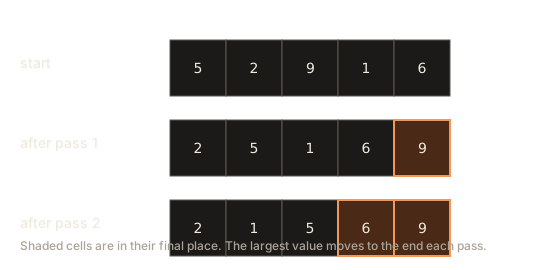
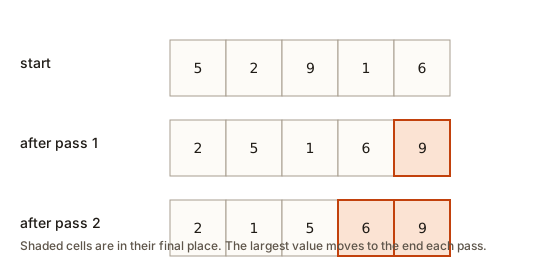 Three rows of five boxes: the start array, the array after pass 1 with 9 shaded at the end, and after pass 2 with 5 6 and 9 shaded
Watch the shrinking range. Pass number pass (counting from 0) only needs to check indexes from 0 up to n - 2 - pass. The loop in the code below uses that rule.
Outlined bars are being compared. Filled bars were just swapped or written. Bars with a dark border are in their final place. Faded bars are outside the part being worked on.
Compare neighbours and swap them when they are out of order.
Step through the animation above. Watch two things. First, the highlighted pair of neighbours: each step compares one pair. Second, the tail of the array: the boxes at the right end stop changing once they hold their final values.
The code
The program below runs bubble sort on a fixed array and prints the array after each pass, so you can check your trace against the real result. It needs no input. Type nothing in the Input box and press Run.
Expected output:
after pass 1: 2 5 1 6 9
after pass 2: 2 1 5 6 9
after pass 3: 1 2 5 6 9
after pass 4: 1 2 5 6 9
Pass 4 changes nothing. This program runs every pass to show the pattern. The version you would use in real code stops as soon as a pass makes no swap. Here is that version as a function you can drop into other programs. It is a fragment, so it does not run on its own.
void bubbleSortWithFlag(vector<int>& a) {
    int n = a.size();
    for (int pass = 0; pass < n - 1; pass++) {
        bool swapped = false;
        for (int i = 0; i < n - 1 - pass; i++) {
            if (a[i] > a[i + 1]) {
                swap(a[i], a[i + 1]);
                swapped = true;
            }
        }
        if (!swapped) break;
    }
}
The swapped flag is the early exit. On an array that is already sorted, the first pass makes no swaps, so the sort stops after n minus 1 comparisons. That is the best case: O(n).
How much work bubble sort does
Without the early exit, the comparisons are (n - 1) + (n - 2) + ... + 1, which adds up to n times (n - 1) divided by 2. For 5 values that is 10 comparisons. For 1,000 values it is 499,500. Multiply n by itself and you get the O(n squared) growth.
Each swap happens when a pair is in the wrong order. Every pair that is out of order gets swapped exactly once during the whole sort. So the number of swaps equals the number of out-of-order pairs. The reversed array has every pair out of order, which is why the worst case has the most swaps.
Selection sort
Imagine lining up students for a photo by height. You look over the whole group, find the shortest student, and send that student to the front. Then you look at the rest, find the shortest of them, and send that one to position two. Keep going until everyone is placed. Selection sort works exactly this way.
Each round of selection sort does three things. It scans the unsorted part of the array to find the smallest value. It remembers the index of that smallest value. Then it swaps that value with the value at the first unsorted box.
Tracing it by hand
Take the array 5 2 9 1 6 again. The unsorted part starts as the whole array.
- Round 1 scans all five boxes. The smallest value is 1, in box 3. Swap it with box 0. The array becomes
1 2 9 5 6. - Round 2 scans boxes 1 to 4. The smallest is 2, already in box 1, so no swap is needed. The array stays
1 2 9 5 6. - Round 3 scans boxes 2 to 4. The smallest is 5, in box 3. Swap it with box 2. The array becomes
1 2 5 9 6. - Round 4 scans boxes 3 and 4. The smallest is 6, in box 4. Swap it with box 3. The array becomes
1 2 5 6 9.
Four rounds for five values, and the array is sorted. Notice that the first box of each round is never touched again. That is the invariant of selection sort: the left part of the array holds the smallest values, in order, and the right part holds everything else.
Outlined bars are being compared. Filled bars were just swapped or written. Bars with a dark border are in their final place. A triangle marks the smallest item found so far. Faded bars are outside the part being worked on.
Repeatedly pick the smallest remaining item and put it at the front.
Use the animation above to watch the scanning. The highlighted box moves across the unsorted part, searching for the smallest value. Only at the end of each scan does a single swap happen.
Why it is always slow
Selection sort does not stop early. Even if the array is already sorted, round 1 still scans all five boxes to confirm that box 0 holds the smallest value. Round 2 scans four boxes, and so on. Every round scans the whole remaining unsorted part. For n values that is n minus 1 rounds, with a scan of length n, n minus 1, and so on down to 1.
The total comparisons are therefore the same as the bubble sort count without an early exit: n times (n - 1) divided by 2. Best, average and worst cases all cost O(n squared).
The benefit is the number of swaps. Selection sort swaps at most once per round, so it makes at most n minus 1 swaps, no matter how bad the input is. That matters when a write is expensive. Writing to some kinds of flash memory wears the memory out, and writing across a slow network link costs real time. Bubble sort could make hundreds of thousands of swaps on the same input.
The code below is selection sort with a counter for comparisons and swaps. It reads the input from the Input box, so you can try your own numbers.
To test it, press Run, then type these lines into the Input box, one after the other:
5
5 2 9 1 6
The first line is the count of numbers. The second line is the numbers themselves, separated by spaces. The expected output is:
1 2 5 6 9
comparisons: 10
swaps: 3
Ten comparisons match the formula for five values. Three swaps match the trace above, because round 2 found the value already in place and did not swap. The program only swaps when the minimum is not already in position, so its count is the real number of moves.
Insertion sort
Think of sorting a hand of playing cards. You pick up one card at a time from the table. The card in your hand is the one you are placing. The cards already in your hand are sorted. You slide the new card past every card that is bigger than it, and drop it into the gap. After each card, your hand is sorted again.
Insertion sort treats the array the same way. The first box counts as a sorted hand of one card. Then, for each later box, it takes the value out (this is the key), shifts the bigger sorted values one box to the right to make a gap, and puts the key in the gap.
Tracing it by hand
Take the array 4 3 7 1 6 2. The sorted part starts as box 0, which holds 4.
- The key is 3. Box 0 holds 4, which is bigger, so shift 4 right. Put 3 in box 0. The array is
3 4 7 1 6 2. One shift. - The key is 7. Box 1 holds 4, which is smaller, so 7 stays where it is. No shifts. The array is
3 4 7 1 6 2. - The key is 1. It is smaller than 7, 4 and 3, so shift all three right. Put 1 in box 0. The array is
1 3 4 7 6 2. Three shifts. - The key is 6. It is smaller than 7 but bigger than 4. Shift 7 right and put 6 in its place. The array is
1 3 4 6 7 2. One shift. - The key is 2. It is smaller than 7, 6, 4 and 3, so shift four values right. Put 2 in box 1, after the 1. The array is
1 2 3 4 6 7. Four shifts.
The total is 1 + 0 + 3 + 1 + 4 = 9 shifts. The key idea is that the left part of the array is always sorted, so each new key only needs to find its spot in that part.
Outlined bars are being compared. Filled bars were just swapped or written. Bars with a dark border are in their final place. A triangle marks the item being inserted. Faded bars are outside the part being worked on.
The first item alone is a sorted list. Insert each next item into it.
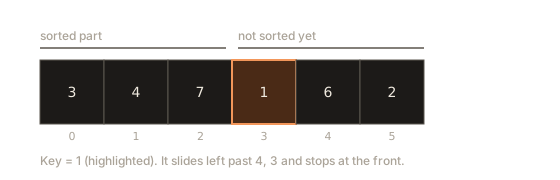
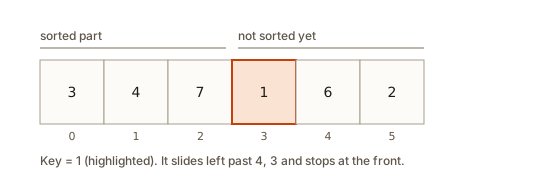 Six boxes holding 3 4 7 1 6 2, with the key 1 highlighted in box 3 and a label showing the sorted part on the left
Watch the sorted region on the left grow in the animation. Each step takes the next value and slides it left until it fits. The shifts are the copies you see as the bigger values move one box to the right.
Why the key must be saved first
Shifting copies values over one another. Box 2 gets the value from box 1, then box 1 gets the value from box 0, and so on. If the key were still sitting in its original box, the first shift would overwrite it. That is why the code copies the key into a separate variable before the loop starts. The variable holds the value safely while the boxes move around it.
The code
The program below is insertion sort with a line that prints the sorted part after each step. It reads its input from the Input box.
Type these lines into the Input box:
6
4 3 7 1 6 2
The expected output is:
step 1: 3 4
step 2: 3 4 7
step 3: 1 3 4 7
step 4: 1 3 4 6 7
step 5: 1 2 3 4 6 7
total shifts: 9
Each line shows the sorted part only, from box 0 up to the step's index. The total of 9 matches the trace above.
Why insertion sort is good on nearly sorted data
When an array is already sorted, the while loop stops at once for every key, because the value to the left is never bigger. The sort does one comparison per box, so the best case is O(n). When the data arrives almost in order, insertion sort is close to that best case. Its work is about n plus the number of out-of-order pairs. Real systems take advantage of this. A list where you add one new item at a time and keep it sorted is a case where insertion sort does exactly one small job per addition.
The worst case is a reversed array. Every key is smaller than everything before it, so every value shifts all the way to the front. That makes n times (n - 1) divided by 2 shifts, the same O(n squared) as the other two sorts.
Insertion sort is also stable, a property you will study in lesson 2. The shift loop stops when the left value is less than or equal to the key, so equal values never swap places.
Counting the work
The three sorts give the same answer but do different amounts of work. The next program runs each sort on the same two inputs and counts the comparisons. Each sort is written as a function that takes a copy of the array, so the original is not changed. The program needs no input.
Expected output:
sorted input, n = 1000
  bubble:    999
  selection: 499500
  insertion: 999
reversed input, n = 1000
  bubble:    499500
  selection: 499500
  insertion: 499500
Read the table slowly. On sorted input, bubble sort and insertion sort do about one comparison per value, so 999 for 1,000 values. Selection sort still does 499,500, because it always scans the rest of the array. On reversed input, all three sorts do 499,500 comparisons, the n times (n - 1) divided by 2 worst case.
The numbers show why the choice matters. Imagine you need to sort a million values that arrive in order and one value that is out of place. Insertion sort does about a million comparisons. Selection sort does about 500 billion. A computer doing a billion comparisons a second would need about eight minutes for selection sort and a thousandth of a second for insertion sort. Both sorts are correct, and the speed gap comes only from how many comparisons they make.
What happens inside
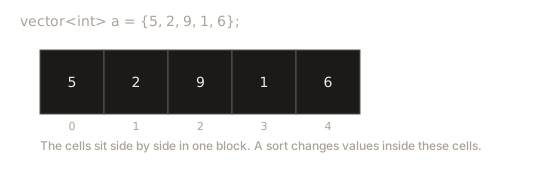
It helps to picture what the computer does with memory. A vector<int> stores its values in one block of memory. Each int takes four bytes, and the values sit next to each other, one after another. Box 0 is the first four bytes of the block, box 1 is the next four, and so on. The index is simply a distance from the start of the block. This is why reading a[j] is fast: the computer computes the address directly and reads it.
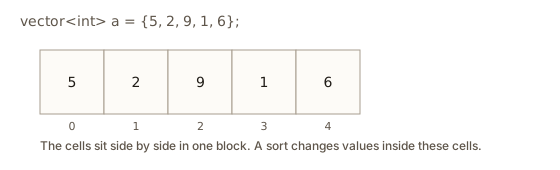 Five boxes in a row labelled with their indexes, holding 5 2 9 1 6
When bubble sort swaps a[i] and a[i + 1], it reads two addresses that sit side by side, compares them, and possibly writes them back in the other order. Each comparison touches only nearby memory, so the loops are quick. That is one reason simple sorts are fast on small arrays even though their Big-O is high.
Insertion sort's shift writes a[j + 1] = a[j] over and over. Each write copies one value into the box to its right. The key lives in a separate variable, which is a small piece of memory the processor can keep close by. When the loop finishes, the key is written into the last gap. At no point is a value lost.
The variable n is worth a note too. The function a.size() returns an unsigned number, which can never be negative. The code stores it in an ordinary int named n. That is safe for sizes up to about two billion, and it lets you write n - 1 without surprises. You will see the problems that unsigned numbers cause in the common mistakes section below.
Common mistakes
Beginners make the same few mistakes with these sorts. Each mistake below comes with what you see when it happens.
Reading one box past the end
The most common mistake in bubble sort is an inner loop that goes to n instead of n - 1 - pass. At the last index, a[i + 1] asks for a box that does not exist. C++ does not stop you from writing that code. Some compilers add checks, and with the g++ compiler used here, a vector check fails with a message like this one. The example below reads index 3 of a three-element vector.
/usr/include/c++/15/bits/stl_vector.h:1263: ... Assertion '__n < this->size()' failed.The text says that the index __n must be less than size(). The program then stops with exit code 134, which means it was aborted. The fix is to make the loop end one box early. Look at the condition i < n - 1 - pass in the code above. The - 1 keeps i + 1 inside the array, and the - pass skips the boxes already settled.
Without the checks, the same bad read may simply return garbage or crash later. A message that points to an index is a clue to look at every place that index is used.
Losing the key in insertion sort
If you forget to save the key and write a[j + 1] = a[j] before taking the key out, the key's box is overwritten. The output then shows a value appearing twice and another value missing. When you see a duplicate in the output of a sort that should keep all values, suspect a lost copy. Print the array after each step to find the first wrong step.
An unsigned index that never stops
This is a classic bug in the shift loop. Suppose you write size_t j = i - 1; and then loop while j >= 0. The type size_t is unsigned, so it can never be less than zero. When j reaches 0 and decreases once more, it wraps around to a huge number. The loop condition is still true, so the program reads memory far outside the vector and usually crashes. The fix is to use int for the index, as the examples do.
Using >= where you meant >
In bubble sort, the swap test a[i] > a[i + 1] swaps only when the left value is strictly bigger. With >=, equal neighbours would swap each time. The sort would still end with a sorted array, but it would do extra work and it would stop being stable, which matters in lesson 2. In insertion sort, the shift test a[j] > key stops at equal values. Replacing it with >= moves equal values past one another, which is not a mistake in the output but is a change in behaviour.
Forgetting the early exit
Adding the swapped flag does not change the correct answer. It changes the speed on sorted input from n squared to n. Forgetting it is not a bug, but a reviewer will ask about the best case.
Confusing the pass number with the index
The pass variable counts passes, and the index counts boxes. In the inner loop, n - 1 - pass mixes them. A quick check: on pass 0 the inner loop must run n minus 1 times, and on the last pass it must run once. If your loop runs n times on pass 0, you have read past the end on the final index.
Debugging walkthrough
Suppose a classmate writes bubble sort and reports that the output for 3 1 2 is 1 2 3, which is right, but the program crashes on 5 2 9 1 6. You can find the bug in five steps.
- Read the crash message first. An assertion about
size()points to an index problem, not a logic problem. - Find every index used inside the loops. In bubble sort there are two:
iandi + 1. Write down the range ofion the first pass and the last pass. - Check the first pass with the real numbers. For
5 2 9 1 6,ishould go from 0 to 3, which isn - 2. If the loop goes to 4, thena[i + 1]isa[5], which is one box past the end. - Fix the bound. Use
i < n - 1 - passfor the inner loop, and check the outer loop runspassfrom 0 ton - 2. - Run the program on the smallest input that breaks it, then on an empty input, then on a sorted input. Each one tests a different boundary.
A debugging habit that saves time is to print the array after every pass or step, as the runnable programs above do. A printed trace turns a vague "the answer is wrong" into a specific step where a value went missing or moved the wrong way.
Variations and edge cases
Here are the edge cases interviewers like to ask about. Test each one by hand before you trust the code.
- Empty array. With
int n = a.size(), n is 0. Bubble sort's outer loop conditionpass < n - 1ispass < -1, which is false, so nothing runs. Insertion sort starts ati = 1, and1 < 0is false. Both are safe becausenis a signedint. This is another reason to keepnsigned. - One value. Nothing needs to move. All three sorts do no swaps and no shifts.
- All values equal. Bubble sort with the flag finishes after one pass, with no swaps. Insertion sort does n minus 1 comparisons and no shifts. Selection sort still does the full n squared scans, because it does not check whether the array is sorted.
- Descending order. To sort from largest to smallest, reverse the comparison. In bubble sort, write
a[i] < a[i + 1]instead of>. In insertion sort, writea[j] < keyin the shift test. In selection sort, look for the largest value instead of the smallest. - Duplicates. All three sorts keep every copy of a value, so the count of each value stays the same. A test you can write quickly is to sort the array and then check that its length and the count of each value match the original.
- Strings. The same code works on
vector<string>, because strings can be compared with<and>. Strings compare letter by letter, so"apple"comes before"banana".
Interview patterns and questions
Interviewers use these sorts to check how you think, not whether you remember the code. Here are the questions you are likely to meet, with short answers.
- "Write bubble sort and tell me its best and worst case." The best case is O(n), when you add the early exit and the input is already sorted. The worst case is O(n squared), for a reversed array. Say why: n minus 1 passes, each with up to n minus 1 comparisons.
- "Which simple sort makes the fewest swaps?" Selection sort, with at most n minus 1 swaps. Mention that it still makes O(n squared) comparisons, so the trade is fewer writes for more reads.
- "Which simple sort is best on nearly sorted data?" Insertion sort. Its work is about n plus the number of out-of-order pairs, so a few misplaced values cost little.
- "Is insertion sort stable?" Yes, when the shift test uses a strict comparison. Equal values never pass each other.
- "Can you sort in place?" Yes, all three use O(1) extra space, which means a fixed number of variables no matter how large the array is.
The pattern behind most of these questions is simple. Two nested loops over the same array usually mean O(n squared). Ask whether the inner loop can stop early, whether the outer loop can skip settled boxes, and whether the input has a shape (sorted, nearly sorted, reversed) that changes the count.
Here is the comparison you should be able to write from memory.
| Sort | Best | Average | Worst | Extra space | Stable | Swaps or shifts |
|---|---|---|---|---|---|---|
| Bubble | O(n) with early exit | O(n squared) | O(n squared) | O(1) | Yes | Many |
| Selection | O(n squared) | O(n squared) | O(n squared) | O(1) | No | At most n minus 1 |
| Insertion | O(n) | O(n squared) | O(n squared) | O(1) | Yes | Shifts, about the number of out-of-order pairs |
Real-world uses
These sorts are rarely the main sort in a large system, but they show up in several useful places.
Standard libraries use insertion sort for small pieces of a bigger sort. The C++ standard library sort, which you will use in lesson 4, switches to insertion sort when a piece has only a dozen or so values, because the simple loop is faster there than the fancy machinery. Timsort, the sort used by Python and Java for objects, uses a binary variant of insertion sort on short runs.
Insertion sort also appears when data streams in. If you keep a list of scores in order and each new score arrives one at a time, inserting it into the right place is exactly one step of insertion sort.
Selection sort is worth knowing for the write-limited case. When each write to storage has a cost, a sort that makes at most n minus 1 writes can be the right choice, even though it makes many more comparisons. Comparisons are cheap in memory, and writes are not.
Bubble sort is mainly a teaching tool. Its one real advantage is that it is very easy to explain and check, which is why it appears in textbooks and interviews. Do not reach for it in production code.
Practice
Try these in order. Each exercise builds on the one before it. The solutions are hidden, so write your own answer first.
- Trace one pass. Take the array
3 1 2and write the array after each comparison of bubble sort's first pass. Hint: there are two comparisons, (3, 1) and (3, 2).
Solution
Start with 3 1 2. Compare boxes 0 and 1, which are 3 and 1. Swap, giving 1 3 2. Compare boxes 1 and 2, which are 3 and 2. Swap, giving 1 2 3. After pass 1 the array is 1 2 3.
- Count the swaps. How many swaps does bubble sort make on
4 3 2 1? Count the out-of-order pairs first. Hint: each pair that is out of order is swapped exactly once.
Solution
There are 6 pairs, (4,3), (4,2), (4,1), (3,2), (3,1), (2,1), and every one is out of order. Bubble sort makes exactly 6 swaps. You can check this by tracing: pass 1 makes 3 swaps, pass 2 makes 2, and pass 3 makes 1.
- Sort in descending order. Change one comparison in the bubble sort function so that it sorts from largest to smallest. Hint: only one symbol changes.
Solution
Change a[i] > a[i + 1] to a[i] < a[i + 1]. The bigger values now move to the front, and the early exit still works because a pass with no swaps means the array is in descending order.
- Selection from the top. Modify selection sort so that each round finds the largest value of the unsorted part and moves it to the right end of that part. Hint: work from the end of the array towards the front.
Solution
Scan the unsorted part from 0 to end, keep the index of the largest value, then swap that value with box end. Decrease end by one each round and stop when end is 0. The loop runs n minus 1 rounds, the same count as before.
- Insertion sort on strings. Write insertion sort for a
vector<string>and sort the names"ravi" "asha" "meera" "dev". Hint: change the type and keep the logic the same.
Solution
Replace int with string in the function signature, the key and the loop variable. The shift test a[j] > key still works, because strings compare letter by letter. The result is asha dev meera ravi.
- Does early exit help selection sort? Someone adds a
swappedflag to selection sort and stops when a round makes no swap. Explain whether this helps on a sorted array. Hint: think about what the round does before it decides whether to swap.
Solution
It does not help. A round must scan the whole unsorted part to find the minimum before it knows whether a swap is needed. On a sorted array the scan still runs every round, so the comparisons stay at n times (n - 1) divided by 2. Only bubble and insertion sort can stop early, because they check neighbours instead of searching.
- Brute force inversions. Write a function that counts pairs
i < jwherea[i] > a[j], using two nested loops. Give its time complexity. Hint: this count matches the swaps bubble sort makes.
Solution
long long countInversions(const vector<int>& a) {
    long long count = 0;
    int n = a.size();
    for (int i = 0; i < n; i++) {
        for (int j = i + 1; j < n; j++) {
            if (a[i] > a[j]) count++;
        }
    }
    return count;
}
The time is O(n squared). The count is long long because a reversed array of 100,000 values has about five billion pairs, which does not fit in a 32-bit int.
- Nearly sorted input. Each value in an array of n values is at most two boxes away from its sorted position. Show that insertion sort makes at most about 3n comparisons. Hint: how many shifts can one key make?
Solution
A key moves left by at most two boxes, so it causes at most two shifts. Each key also makes at most one extra comparison that stops the loop. That gives at most about 3 comparisons per value, so 3n in total, which is O(n).
- Predict the counts. Without running it, predict the three comparison counts in the counting program for n = 2000 on sorted and reversed input. Then run it to check. Hint: the formulas are n minus 1 and n times (n minus 1) divided by 2.
Solution
Sorted input: bubble 1999, selection 1999000, insertion 1999. Reversed input: bubble 1999000, selection 1999000, insertion 1999000. The program prints these numbers, because n times (n minus 1) divided by 2 is 1,999,000 for n = 2000.
- Find the unsigned bug. The function below does not work correctly for every input. Explain why, and fix it. Hint: think about what
j >= 0means whenjhas an unsigned type.
void insertionSortBroken(vector<int>& a) {
    for (size_t i = 1; i < a.size(); i++) {
        int key = a[i];
        size_t j = i - 1;
        while (j >= 0 && a[j] > key) {
            a[j + 1] = a[j];
            j--;
        }
        a[j + 1] = key;
    }
}
Solution
size_t is unsigned, so j >= 0 is always true. When j is 0 and the body runs, j-- wraps it to a huge number, and the loop keeps reading memory outside the vector. Use int j = i - 1; with int i as well, so j can become -1 and the loop stops.
What you now know
- A sort rearranges values so each one is less than or equal to the next, using comparisons and swaps or shifts.
- Bubble sort carries the largest value to the end each pass, and stops early on a pass with no swaps.
- Selection sort finds the minimum each round and makes at most n minus 1 swaps, but always scans the whole unsorted part.
- Insertion sort grows a sorted left part and slides each key into place, so it is fastest on nearly sorted data.
- All three are O(n squared) in the worst case and O(1) in extra space. Insertion and bubble sort are stable.
- Count the comparisons and the moves, and you can predict the cost before you run the code.