Why this matters
The row and column method stays the same for number and letter patterns. Two loops still visit every position, and you still write a table first. Only one step changes. Instead of always printing a star, you print a value that you work out from the row number i, the column number j, or a counter you keep yourself.
Interviewers like this step because it separates people who memorise shapes from people who understand what a position holds. If you can explain where each printed value comes from, you can solve almost any number pattern on the spot.
Words you need first
Some new words appear in this lesson. Here they are in plain language.
- Digit. One of the characters
0to9. The number 123 has three digits. - Character. One letter, digit, space or symbol. In C++ a single character is written in single quotes, like
'A'or'7'. char. The type that stores one character. Acharis a small whole number underneath. Every character has a code. The code for'A'is 65, the code for'B'is 66, and so on. This table of codes is called ASCII.- Cast. A way of telling the compiler to treat a value as a different type.
(char)says "treat this number as a character". The cast does not change the number. It only changes howcoutprints it. - Running counter. A variable that goes up by one after each thing you print. It is not tied to
iorj. It keeps its value between rows, which is what makes some patterns possible. - Modulo. The remainder after division. The symbol is
%.7 % 2is 1, and8 % 2is 0. A number is even whenn % 2is 0.
The one decision that matters
Look at what each position holds in a number pattern. It is always a function of something you already know. There are four common sources.
- The row number
i. Every value in rowiis the same, such as1 1 1in row 1 and2 2in row 2. - The column number
j. Each position in the row shows its own column, such as1 2 3 4. - Both
iandjtogether. A value such asi + jori * jchanges from cell to cell and from row to row. - A running counter. The value keeps growing across the whole picture, so each row starts where the previous one stopped.
When you look at a number pattern, ask which of the four sources matches. Then write the value in your table, next to the star count. The table below uses four rows and shows how you would fill it in for the first pattern in this lesson.
| Row i | Items in row | Value printed |
|---|---|---|
| 1 | 1 | the row number, 1 |
| 2 | 2 | the row number, 2 |
| 3 | 3 | the row number, 3 |
| 4 | 4 | the row number, 4 |
The value comes from i. The number of items comes from i too. So the inner loop prints i exactly i times.
Same number in every row
Here is the first pattern. Each row repeats its own row number.
1
22
333
4444
Row i prints the number i, repeated i times. The inner loop runs i times, and inside it you print i, not j. The value you print is the outer counter.
Type 4 into the Input box.
1
22
333
4444
Now change cout << i; to cout << j; in your head. The rows would read 1, 12, 123, 1234. The shape of the loops is identical. Only the printed value changes. This is the most important habit in number patterns: when two programs look almost the same, find the single word that differs and ask what it means in the picture.
Counting up in each row
The next pattern is a counting triangle where each row starts at 1.
1
12
123
1234
The values in row i run from 1 to i, so the value is the column number j. The inner loop prints j, which goes 1, 2, 3 and so on. For the first pattern you printed the row number. For this one you print the column number. Both are correct, and both come from the same two loops.
Counting down
Here is a pattern where each row counts down from its own length.
4321
321
21
1
The first row starts at n and counts down to 1. The second row starts at n - 1. So the row length shrinks by one each time, which means the outer loop counts down too. The inner loop starts at i (the current row length) and counts down to 1.
Type 4 into the Input box.
4321
321
21
1
Trace the first row. i starts at 4, so the inner loop starts with j = 4. It prints 4, then j becomes 3, and so on, until j becomes 0 and j >= 1 is false. The row is 4321. The second row starts with i = 3, so it prints 321. The loops reuse the same formulas as before, but they run in the other direction.
Notice that the inner loop goes down from i, not from n. If you wrote j = n, every row would print 4321. A common mistake is to use n where the picture needs the current row length.
A running counter
Now look at a pattern where the numbers keep growing from row to row.
1
2 3
4 5 6
7 8 9 10
This is called Floyd's triangle, after a name used in many textbooks. Look at the values in row 3. They are 4, 5 and 6. Are they a function of i and j? The row number is 3 and the column is 1, 2 and 3, but the value 4 is not a simple formula of those. The number 4 is the first value after the rows 1 and 2 are finished. A formula is possible, but a counter is much easier.
A counter is a variable that you declare before the loops. It starts at 1. Every time you print a value, you add one to the counter. Because the counter lives outside both loops, it keeps its value from row to row.
Type 4 into the Input box.
1
2 3
4 5 6
7 8 9 10
Trace the first three values. num starts at 1. The first row prints num, which is 1, then num becomes 2. Row 2 starts with num at 2 and prints 2, then 3. The counter did not reset when the row changed, so row 3 begins at 4.
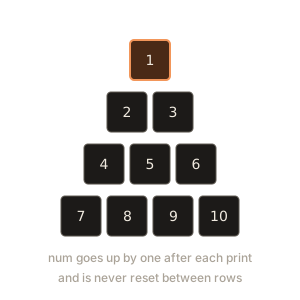
The diagram below shows the counter moving across the rows. Each box is one printed value, and the arrows show the order.
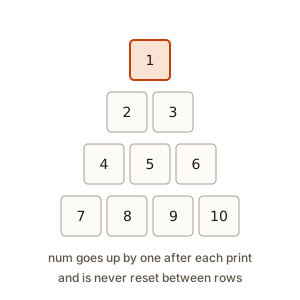 Floyd triangle values in rows, with a counter arrow going left to right and down from one row to the next
The space check if (j < i) is there so that the last number in each row has no space after it. Without the check, every row would end in a space. The output would look the same on a screen but would differ by one character, and a strict judge would reject it.
Keep the counter outside the loops
The counter must be declared before the outer loop, not inside it. If you write int num = 1; inside the outer loop, the counter restarts at 1 for every row. Your output would be 1, 1 2, 1 2 3, which is a different pattern.
The rule is simple. If a value must continue across rows, the variable that holds it must live outside the loops that repeat.
Letters are numbers underneath
A char holds one character, and the computer stores it as a small whole number. Look at the codes for the first few capital letters.
| Character | Code |
|---|---|
'A' | 65 |
'B' | 66 |
'C' | 67 |
'D' | 68 |
Because a char is a number, you can add to it. 'A' + 1 is 66, the code for 'B'. 'A' + 2 is 67, the code for 'C'. The sum is a plain number, and you need the cast (char) to turn it back into a letter.
cout << 'A' + 2;        // prints 67, the code, not a letter
cout << (char)('A' + 2); // prints C
The first line prints 67 because 'A' + 2 is an int. An int is a whole number, and cout prints numbers as digits. The second line casts the result to char first, so cout prints the letter.
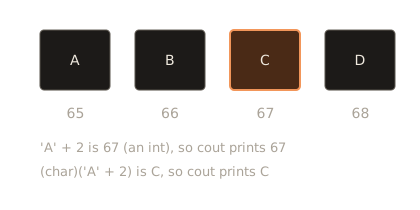
The diagram below shows the same idea as boxes. Each box holds one letter, and the number under it is its code.
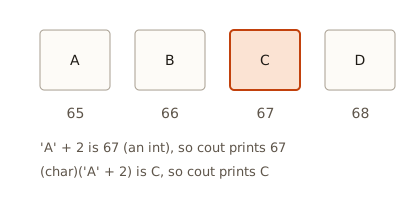 Four boxes holding A, B, C and D, with their ASCII codes 65, 66, 67 and 68 written below
Letter triangle
Now the letters form a triangle. Row i prints the first i letters.
A
AB
ABC
ABCD
The inner loop prints the letter at position j. If the letter is 'A' + j, then j has to start at 0, so that the first letter is 'A' + 0, which is 'A'. The inner loop runs while j < i, so row 1 prints one letter.
Type 4 into the Input box.
A
AB
ABC
ABCD
Compare the inner loop with the number pattern that counts up. The first version started j at 1 and printed j. This one starts j at 0 and prints 'A' + j. The change is needed because letters start at offset 0 from 'A'. If you start at 1, the first letter would be 'B'.
Letter per row
The next pattern repeats one letter in each row. Row 0 is A, row 1 is BB, row 2 is CCC, and so on. Each row has a different letter, and that letter comes from the row number.
A
BB
CCC
DDDD
Here the outer counter runs from 0, not 1. Row i (counting from 0) uses the letter 'A' + i. It prints that letter i + 1 times. The inner loop runs from 0 up to i, which is i + 1 times in all.
Type 4 into the Input box.
A
BB
CCC
DDDD
Count-from-zero loops are common in C++. They are natural when you index letters or positions in a string, because the first position is 0. When the picture starts at 1 and the letter starts at 'A', you can also write (char)('A' + i - 1). Both versions are correct. Pick the one that matches your table, and write the table with the same start you use in the loop.
A letter counter
Floyd's triangle used a number counter. The same idea works for letters. Here the letters keep going from row to row, starting at 'A'.
A
BC
DEF
GHIJ
Declare char ch = 'A'; before the loops. Print ch, then move it on with ch++. The ++ operator adds one to a char, so 'A' becomes 'B', then 'C', and so on. You do not need a cast here, because ch is already a char.
Type 4 into the Input box.
A
BC
DEF
GHIJ
If you have a running letter counter that goes past 'Z', it keeps going into '[' , '\' and so on, because those are the next codes in ASCII. For the patterns in this course, keep the total number of letters at or below 26, and you will never see a symbol.
Alternating digits
The last pattern in this lesson is made of 0s and 1s. The rows look like this.
1
01
101
0101
Each position holds 1 when i + j is even and 0 when i + j is odd. Moving one step to the right in a row adds one to j, so the parity of i + j flips each step. That is why the digits alternate.
To test whether a number is even, use %. The expression (i + j) % 2 == 0 is true when the sum is even. The ? : operator picks between two values: condition ? a : b gives a when the condition is true and b when it is false. Here (i + j) % 2 == 0 ? 1 : 0 gives 1 for even sums and 0 for odd sums.
Type 4 into the Input box.
1
01
101
0101
Check row 2 by hand. For j = 1 the sum is 3, which is odd, so the digit is 0. For j = 2 the sum is 4, which is even, so the digit is 1. The row is 01. Doing this check for one row is faster than trusting the picture.
What happens inside the computer
A char is stored in one byte of memory. A byte is eight bits, and it can hold a number from 0 to 255. The code 65 is stored as the bit pattern for 65 in that byte, and cout looks it up in the character table to show A. So the letter is only a way of showing the number.
An int usually takes four bytes and can hold much bigger numbers. When you write 'A' + 2, C++ reads the 'A' as the number 65, adds 2, and produces an int holding 67. The result is an int, not a char, so cout shows the digits 67. The cast (char) tells the compiler to take the low byte and show it as a character. In this program the number is small, so the cast gives the right letter.
A running counter like num lives in one place in memory. Its value changes each time num++ runs, and every print reads the current value. Nothing is copied or saved. So a counter declared before the loops is the same box for the whole run. This is why it keeps going across rows.
Time and space
These patterns still cost O(n squared) time for n rows, because each row has up to n values and each value is one print. The printed digits or letters are the work.
The space used is O(1). A number pattern needs a few integers, such as i, j and num. A letter pattern needs one char. None of these grows with n. The one caveat is the size of the number itself. In Floyd's triangle the largest value is about n * (n + 1) / 2. For n = 100 that is 5050, which fits easily in an int. For n = 1000 it is about 500,500, still fine. For n above about 65,000, the value passes the range of a 32-bit int, which is about 2 billion. Then you need long long. Mention this in an interview when the pattern grows large.
Edge cases
n = 1. Every pattern here prints a single value, usually1orA. Check that you did not start the counter at the wrong value, which would print2instead of1.n = 0. Withi <= nno row is printed at all, so the output is empty. For the letter-per-row pattern, the loop usesi < n, which also prints nothing.- Large letter counts. More than 26 rows of letters runs past
'Z'. That is an edge case worth naming in an interview. The limit is set by the alphabet, not by the loop. - Digits of 10 and more. A row that contains 10 prints two characters for that number. In Floyd's triangle the row
7 8 9 10looks uneven, and that is correct. If the picture must be neat, print each value with a fixed width, which you will learn about later.
Common mistakes
- Printing the row number when the picture needs the column number. The
cout << iandcout << jlines differ by one letter. Check which one the picture needs. - Forgetting the cast. If you print
'A' + jwithout(char), the output is65 66 67instead ofA B C. The linecout << 'A' + 1;prints66. - Resetting the running counter inside the outer loop. The rows then restart at 1, which is not Floyd's triangle.
- Starting the inner loop at 0 in one pattern and 1 in the next without changing the limit. In the letter triangle
jstarts at 0 and the limit isj < i. In the number trianglejstarts at 1 and the limit isj <= i. Both are correct. Mixing them is not. - Printing a space after every number. Your output then has trailing spaces, and the last column looks different in a strict check. Use
if (j < i)before the space, as in the Floyd program. - Mixing up
'A'and"A". Single quotes make a character. Double quotes make a string, which is a sequence of characters.coutprints both as the letter A, butchar c = "A";does not compile, because a string is not a single character.
Debugging walkthrough: the letters look like numbers
A learner wrote this program and wants letters, but the output has numbers.
#include <iostream>
using namespace std;

int main() {
    int n = 3;
    for (int i = 1; i <= n; i++) {
        for (int j = 0; j < i; j++) {
            cout << 'A' + j << " ";
        }
        cout << "\n";
    }
    return 0;
}
The output is:
65
65 66
65 66 67
Look at the expression 'A' + j. The 'A' is a character, and adding j turns it into an int with value 65 plus j. Since there is no cast, cout prints the number. The fix is (char)('A' + j), which turns each sum back into a letter. The output also shows a space after the last value in each row, which is another mistake. The fixed program prints A, A B, A B C with the spacing you want.
When the output looks wrong, read the expression that produces the bad value, and say its type in words. 'A' + j has type int. Once you know the type, the fix is usually one cast or one change to the declaration.
Interview thinking
Number and letter patterns are often the first pattern question in an interview. Here is what a strong answer sounds like.
- "The output has
nrows. Rowihasivalues." - "Each value is the row number, the column number, or a counter. Here it is the running counter, so I declare it before the loops."
- "For letters I add to
'A', and I cast the result tocharbefore printing." - "I test with
n = 1andn = 3, and I trace the first row by hand." - "Time is O(n squared), because I print about n squared values. Extra space is O(1)."
If you hear the question "what happens if n is 100", answer with the size of the output and the largest value. For Floyd's triangle that is about 5,050 values, so the numbers fit in an int.
Counter or formula: which one to choose
You can often solve a running-counter pattern in two ways. You can keep a counter that moves forward after each print, or you can compute each value directly from i and j. Both are correct, and an interviewer may ask you to compare them.
Take the letter triangle A, BC, DEF, GHIJ. The counter method declares char ch = 'A'; before the loops and calls ch++ after each print. It is short and close to the picture. Its weak point is that it relies on the order of the prints. If a row were printed twice, or skipped, the counter would be wrong for every row after it.
The formula method asks a different question: how many letters came before row i? Row 1 has one letter, row 2 has two, and row 3 has three. So the rows before row i hold 1 + 2 + ... + (i - 1) letters, which is (i - 1) * i / 2. The first letter of row i is therefore 'A' + i * (i - 1) / 2, and the letters of the row follow it. Check row 3: 3 * 2 / 2 is 3, and 'A' + 3 is 'D', which matches the picture. Check row 4: 4 * 3 / 2 is 6, and 'A' + 6 is 'G', which also matches.
The formula method does not depend on the order of the prints. Each row can be computed on its own, so you could print row 4 before row 3 and still get the right letters. That is a real advantage when the picture must be built in a different order, or when you want to test one row in isolation. The price is that you need to find the formula, and a wrong formula is harder to spot than a wrong counter.
In an interview, name both options and say which you chose and why. A short answer is enough: "I used a counter because it reads like the picture, and the rows are printed in order." That shows you know the trade-off.
Columns that line up: fixed width
Number patterns often look wrong for a simple reason. The numbers have different numbers of digits, so the columns do not line up. In Floyd's triangle, the value 9 takes one character and the value 10 takes two. A row such as 7 8 9 10 is correct, but the column under the 9 and the column under the 1 in the row above are not the same place on screen.
When a picture must line up, C++ gives you a tool called setw. It is in the <iomanip> header, which means "input and output manipulators". A manipulator is a small instruction that changes how the next value is printed. setw(3) sets the width of the next value to three characters. If the value is shorter than three characters, cout pads it with spaces on the left, so the value is right-aligned.
#include <iomanip>
// ...
cout << setw(3) << 5 << setw(3) << 10 << "\n";
That line prints 5 10. The first value is 5, padded to three characters, which is two spaces and a 5. The second value is 10, padded to three characters, which is one space and 10. The total line is five characters long, and every value ends in the same column.
There are two rules to remember. The width applies only to the next value, so you must call setw again for each value. And setw only pads. It never cuts a value. A value with four digits printed in a width of three still shows all four digits, and the column then moves to the right.
A fixed-width row is also the easiest way to print a number table, such as a multiplication table where the products go up to three digits. You choose a width that fits the largest value in the table, and every row lines up. If you do not know the largest value in advance, you can compute it first, count its digits, and use that count as the width.
Here is a short example of the reasoning. Suppose you print the squares from 1 to 12 in a column, and the largest square is 144. That has three digits, so the width is three. The square of 3 is 9, which prints as 9, and the square of 12 is 144, which prints with no padding. Every row is then exactly three characters wide, and the column is straight.
Fixed width is a formatting choice, not an algorithm. The time cost is the same as before, O(n squared) for an n by n table. The extra memory is still O(1), because setw does not store anything.
Splitting a number into digits
Some number patterns ask you to print the digits of a number, one by one. You do this with two integer operators that you already know: % for the remainder and / for division.
For the number 472, the last digit is the remainder after dividing by 10, and the rest of the number is the quotient. So 472 % 10 is 2, and 472 / 10 is 47 (integer division drops the fraction). Repeat with 47: 47 % 10 is 7, and 47 / 10 is 4. Repeat once more with 4: 4 % 10 is 4, and 4 / 10 is 0, which stops the process.
The digits come out from the right: 2, then 7, then 4. That is the digits in reverse order. To print them in the normal order, you store them, or you find the number of digits first and divide by the right power of 10.
int x = 472;
while (x > 0) {
    cout << x % 10;
    x = x / 10;
}
This prints 274. The loop is a while loop, which repeats while its condition is true. It runs three times for 472, once for each digit. A number with d digits takes d steps, so the cost is O(d), which is O(log n) in terms of the value n, because each step divides the value by ten.
Digit splitting matters for patterns such as a number pyramid whose rows must hold a digit sum, or a pattern that checks whether each digit is odd. It also explains why a row showing the value 10 is two characters wide. The program does not know about picture widths. It prints every digit that the number has.
Interview follow-ups for number patterns
Interviewers who ask a number pattern usually add a twist. Prepare for these.
What is the largest value in Floyd's triangle for n rows? The last value of row n is the count of all the values before it, which is n * (n + 1) / 2. For n = 100 that is 5,050. Say that the value grows with n squared, so the type must hold that size. For n above about 65,000 the value passes the range of a 32-bit int, so use long long.
Can you print the letter triangle with the row number instead of the letters? Yes. Replace (char)('A' + j) with i, and the same loops print the row number. The point is that the letter is computed from a number, so any number can become a letter.
What if the letters go past Z? For the alphabet, the limit is 26 letters. Past Z the codes become symbols, such as [. The interviewer may want you to wrap around, using 'A' + (k % 26), which goes back to A after Z. Mention this if the spec asks for it.
Why use % for alternating digits? The remainder of a number divided by 2 is 0 or 1, so it switches between two states. Any pattern that alternates between two values can use % 2, and any pattern that cycles through three values can use % 3.
How do you check your number pattern quickly? Compute the first row and the last row by hand, and compare them with the program. Two rows check the start and the end, and a middle row checks the formula.
Practice
- Print the pattern
1,22,333upside down, so the longest row comes first. Usen = 3. - Print the triangle
A,BC,DEF,GHIJwith a running letter, as in the letter counter section. Hint: keepchar ch = 'A';before the loops and doch++after each print. - Print a table where row
iholds the firstimultiples ofi. Fori = 3the row is3 6 9. Hint: printi * j, and put a space between values. - Print the triangle where row
iholds the numberirepeateditimes, with no spaces, forn = 12. Then explain why the rows for 10, 11 and 12 are much wider than the rest. Hint: a row number with two digits prints two characters each time. - Print a number pyramid with
n = 4where rowiholds the numbersiton, separated by spaces. The first row is1 2 3 4, the second is2 3 4. - Print a reversed letter triangle with
n = 4: row 1 isABCD, row 2 isABC, row 3 isABand row 4 isA. Work out the length of each row on paper first. - Print a 0-1 square of size
n, where the digit at(i, j)is(i * j) % 2. Test withn = 3. - Print the reversed Floyd's triangle with
n = 3: start with a counter at 6 and count down, so the rows are6,5 4,3 2 1. - Read
nand print the letters of the alphabet from'A'up to thenth letter, one per line. Forn = 3the lines areA,B,C. - Read
nand print a diamond of letters forn = 3. Hint: the widest row isABCBA. This is harder than the earlier problems, so work out the table first.
Solution
-
Use the same loop as the first pattern, but count the outer loop down from
nto 1 and printirepeateditimes. Output:333,22,1. -
Declare
char ch = 'A';before the loops. Rowiloopsjfrom 1 toi, printsch, then doesch++. The output isA,BC,DEF,GHIJforn = 4. -
Row
iprintsi * jforjfrom 1 toi, with a space before each value except the first:
for (int i = 1; i <= n; i++) {
    for (int j = 1; j <= i; j++) {
        if (j > 1) cout << " ";
        cout << i * j;
    }
    cout << "\n";
}-
Row
iprintscout << i;exactlyitimes. Rows 1 to 9 are one character per print, so row 9 is 9 characters. Row 10 prints10ten times, which is 20 characters, row 11 is 22 characters and row 12 is 24 characters. The rows are wider becausecoutprints every digit of the number. If the picture must keep one column per print, you have to change the design, for example by printing a fixed width for each value. -
Row
istarts atiand goes up ton. Loopjfromiton, and print a space before each value except the first:
for (int i = 1; i <= n; i++) {
    for (int j = i; j <= n; j++) {
        if (j > i) cout << " ";
        cout << j;
    }
    cout << "\n";
}-
Row
i(from 1 ton) printsn - i + 1letters, from'A'upward. Loopjfrom 0 ton - i, and print(char)('A' + j). Forn = 4the rows areABCD,ABC,AB,A. -
Print
(i * j) % 2for each cell withiandjfrom 1 ton, and newline after each row. Forn = 3the products are 1, 2, 3 in row 1, 2, 4, 6 in row 2, and 3, 6, 9 in row 3. The rows are101,000and101. -
Start
int num = 6;and count each row down. Row 1 has one value, row 2 has two, row 3 has three. The output is6,5 4,3 2 1if the counter goes down by one each time. Usenum--instead ofnum++. -
Use a
charcounter from'A'and loopifrom 1 ton, printingchand then a newline, withch++after each. Forn = 3:A,B,C. -
For
n = 3the output is:
  A
 ABA
ABCBA
 ABA
  A
Row i of the top half has n - i spaces, the letters from 'A' up to the ith letter, then the letters back down to 'A'. The bottom half repeats the top from row n - 1 down to row 1. The code for the top half is:
for (int i = 1; i <= n; i++) {
    for (int s = 1; s <= n - i; s++) cout << " ";
    for (int k = 0; k < i; k++) cout << (char)('A' + k);
    for (int k = i - 2; k >= 0; k--) cout << (char)('A' + k);
    cout << "\n";
}
The falling part starts at i - 2 so that the widest letter is not printed twice. Put the same loop, counting i down from n - 1 to 1, after the top half to finish the diamond.
What you now know
- A number pattern puts a value in each position. The value is the row number, the column number, a formula in both, or a counter.
- Declare a running counter before the outer loop when the values must keep going across rows.
- A
charis a small number.'A' + kgives a letter after you cast it with(char). ch++on acharmoves to the next letter, so it needs no cast.- Use
% 2and the? :operator for alternating digits. - Watch for two-digit numbers and trailing spaces, because they change the picture.
- Patterns still cost O(n squared) time and O(1) extra space.