Why this matters
Pattern questions are common in college exams, first programming tests and technical interviews. A pattern is a picture made of characters: stars, numbers or letters arranged in rows. The question looks like art, but it tests one skill that you will use for the rest of your programming life: controlling a loop that sits inside another loop.
Once you have a reliable method, you can solve a pattern you have never seen. You stop guessing and start reading the picture like a table of data.
Start from the picture
Imagine a cinema hall. The seats are fixed in rows. Row 1 is at the front, row 2 is behind it, and so on. Every row has seats, and the seats in one row are lined up from left to right. If someone asks you to count the seats, you do not count them one by one across the whole hall at once. You count the seats in row 1, then row 2, then row 3, and add the counts together.
A pattern works the same way. It is a grid. Each row has the same kind of content, and each position in a row holds one character. The character might be a star, a space, a digit or a letter. Your program must visit every position in the grid and print the right character there.
To visit every position, a program uses two loops. A loop is an instruction that repeats a block of code. The outer loop walks down the rows. For each row, the inner loop walks across the columns. The inner loop finishes before the outer loop moves on. This arrangement is called a nested loop, which means a loop inside another loop.
Here is the shape that almost every pattern program takes:
for each row i:
    for each column j in this row:
        print the character for (i, j)
    print a newline
The whole skill of pattern printing is in two places. The first is the limit of the inner loop, which tells you how many items the row has. The second is the rule that tells you what goes in each position. Everything else is copying this shape.
The four questions
Ask the same four questions every time you see a new pattern.
- How many rows are there? The answer becomes the limit of the outer loop. Usually it is
n, the number the user gives you. - How many items are in row
i? The answer becomes the limit of the inner loop. This is where you write a formula ini. Row 1 might have 1 item, row 2 might have 2, and so on. - What goes in each position? A star, a space, a number or a letter. Sometimes the answer depends on
iorj. Sometimes it depends on both. - What comes at the end of each row? A newline. Forgetting it is the most common single mistake in this topic.
Write the answers in plain words before you write any code. This takes a minute and saves an hour of debugging.
Define the terms you will see
Before the first example, here are the words this lesson uses. Each one is a plain idea, and you will meet them again and again.
- Variable. A named box in memory that holds a value.
int n = 4;creates a box callednthat holds the whole number 4. - Loop counter. A variable that a loop uses to count. In
for (int i = 1; i <= n; i++), the counter isi. - Increment. Adding one to a variable.
i++means "add one toi". The++is an operator, a symbol that does a job, here adding one. - Condition. A test that is true or false.
i <= nis a condition. The loop keeps running while the condition is true. - Newline. The character that moves the cursor to the start of the next line. You can write it as
"\n", or asendl, which does the same job and also flushes the output buffer. - Output buffer. A small holding area in memory where printed text waits before it is shown on screen. You do not need to manage it yet. It only matters for speed, which we discuss later.
- Input box. The box under each runnable example in this course. When a program asks for input with
cin, the text you type into this box is what the program reads.
Anatomy of a for loop
The for loop is the tool we use for every pattern. Its header has three parts separated by semicolons.
for (int i = 1; i <= n; i++) {
    // body: runs once for each value of i
}
Read the header from left to right:
int i = 1runs once, at the start. It creates the counter and sets it to 1.i <= nis checked before every pass. If it is false, the loop stops.- The body runs. The body is the code between the braces.
i++runs after the body. The counter goes up by one, and the check in step 2 happens again.
With n = 3, the counter takes the values 1, 2 and 3, and the body runs three times. When i becomes 4, the condition 4 <= 3 is false and the loop ends. Notice that the last value that runs is n, not n + 1. The <= sign includes the limit. If you write <, the last value is n - 1. This small choice causes many off-by-one errors, so check it every time.
A for loop inside another for loop works the same way, but the inner loop runs its full course for every single value of the outer counter. If the outer loop runs 4 times and the inner loop runs 4 times each time, the body runs 16 times in total.
Your first program, line by line
Every C++ program in this course has the same skeleton. Here is the smallest useful one:
#include <iostream>
using namespace std;

int main() {
    cout << "Hello" << "\n";
    return 0;
}
#include <iostream>loads the part of the C++ library that handles input and output. Without it,coutandcindo not exist.using namespace std;lets you writecoutinstead ofstd::cout. The standard library's names live in a group calledstd.int main()is the start of the program. The computer runs the code inside the braces, top to bottom.cout << "Hello"sends the text to the screen. The<<symbol points the text intocout.return 0;tells the operating system that the program finished without an error.
The programs in this lesson read one number from the user. That needs cin, which reads from the Input box. Here is the pattern you will see in most of the examples:
int n;
cin >> n;
The first line makes a box called n that can hold a whole number. The second line reads the next number from the input and stores it in n. The >> symbol points the input into the variable.
Example one: a square of stars
The first pattern is a square with four rows and four columns. Every row is the same, so the inner loop always runs n times. The table below shows the four questions answered for this picture.
| Question | Answer |
|---|---|
| How many rows? | n |
Items in row i? | n, the same in every row |
| What goes in each position? | a star |
| End of each row? | a newline |
Because the answer to question 2 does not depend on i, the inner loop limit is just n. The program is the most direct translation of the four questions.
Type 4 into the Input box and press Run.
****
****
****
****
Trace the first two rows by hand. The outer counter i is 1. The inner counter j runs 1, 2, 3, 4, and each pass prints one star. After the fourth star, j becomes 5, the condition 5 <= 4 is false, and the inner loop stops. The newline prints, and the outer counter moves to 2. The same thing happens again. After four rows, i becomes 5 and the outer loop stops.
Change the input to 2 and you get a two-by-two square. The program never needs to change. Only the number changes, and the pattern grows or shrinks with it. This is what it means to write a program that works for any n.
Example two: the right triangle
Now the rows are not all the same. Row 1 has one star, row 2 has two, row 3 has three, and so on. Row i has i stars. The table answers question 2 with a formula.
| Row i | Stars |
|---|---|
| 1 | 1 |
| 2 | 2 |
| 3 | 3 |
| 4 | 4 |
The formula is the number of stars equals the row number. So the inner loop must run while j is at most i. The inner limit is not n any more. It is i, and it changes every time the outer loop moves.
Type 4 into the Input box.
*
**
***
****
Compare this program with the square. The only change is j <= n became j <= i. That single change turns a square into a triangle. This is the central idea of the whole topic. The inner limit is a formula in the outer counter.
Look at what the inner loop does at each row. For i = 1, the condition j <= 1 is true once (for j = 1), and then false. So row 1 prints one star. For i = 3, j takes the values 1, 2 and 3, and the row prints three stars. The triangle grows because the inner limit grows.
Example three: the inverted triangle
The inverted triangle starts wide and gets narrower. Row 1 has n stars, row 2 has n - 1, and row i has n - i + 1. You can solve this in two ways.
The first way keeps the outer loop counting up and writes the inner limit as a formula: j <= n - i + 1. The second way is simpler to read. Let the outer counter count down from n to 1, and keep the same inner limit as the right triangle, j <= i. The outer counter then takes the values 4, 3, 2, 1, which is exactly the number of stars wanted in each row.
Type 4 into the Input box.
****
***
**
*
Both ways are correct. Choose the one that a reader can check quickly. Counting down with the same formula as the right triangle is easier to verify, because you only need to remember one rule.
When you count down, check the start and the stop. The start is n, the first row. The stop is i >= 1, so the last row is 1. If you wrote i > 1 by mistake, the last row would be missing.
Example four: the right-aligned triangle
This is where the pattern gets interesting. The picture has spaces on the left of each row, and the stars sit on the right. So each row has two kinds of content: spaces first, then stars.
   *
  **
 ***
****
Work out how many spaces each row has. Row 1 has 3 spaces, row 2 has 2, row 3 has 1 and row 4 has none. The number of spaces in row i is n - i. The number of stars is i. Every row has (n - i) + i = n characters in total, which is why the shape lines up on the right.
The solution uses two inner loops, one after the other. The first prints the spaces. The second prints the stars. Both loops are inside the outer loop, and the newline comes last.
Type 4 into the Input box.
   *
  **
 ***
****
The counter for spaces is called s, not j. Using a different name makes it clear that the loop prints spaces. A reader can see at a glance which loop does what. Good names are a free way to avoid bugs.
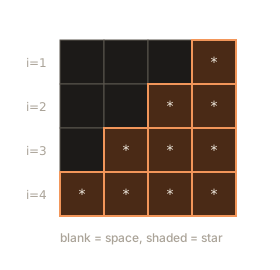
The diagram below shows the same shape as a grid. Each cell is one position. The shaded cells are the stars. Notice that every row has exactly four cells, and the stars always sit at the right end.
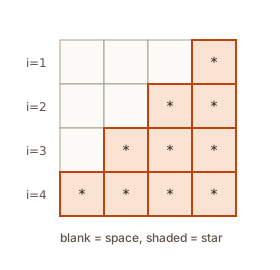 A four by four grid where the stars of a right-aligned triangle fill the right side of each row
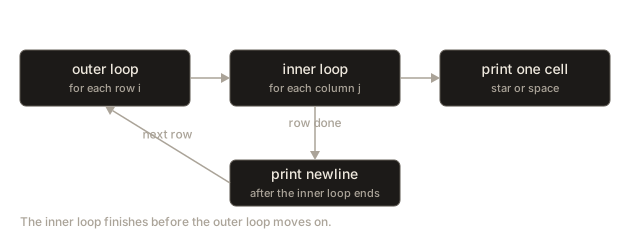
The second diagram shows the order the program follows. The outer loop runs once for each row, and each row runs two inner loops and then the newline.
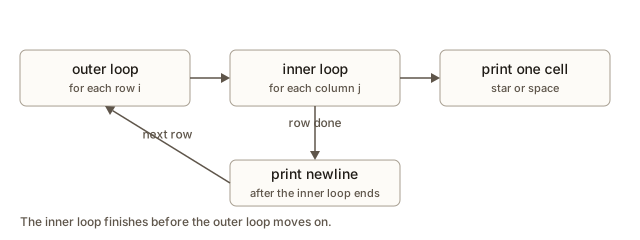 Flow of the nested loops: outer loop over rows, then the space loop, the star loop and the newline
Look inside: what the computer does
It helps to know what the computer does when it runs the right-aligned triangle. A program is a list of instructions. The computer does not see a picture. It executes one instruction at a time, and it keeps the current values of the variables in memory.
When the program starts, n is stored in a small piece of memory. The outer counter i is created and set to 1. The condition i <= n is checked, and because 1 <= 4 is true, the body of the outer loop begins. The first inner loop creates a counter s, sets it to 1, and checks s <= n - i, which is 1 <= 3. True. It prints a space, then adds one to s. This repeats until s is 4, when 4 <= 3 is false. The loop stops after three spaces.
The second inner loop then creates j, sets it to 1, and prints stars while j <= i. Row 1 has i = 1, so one star is printed. Then the newline is printed. The outer counter becomes 2, and the whole process starts again for row 2.
Here is what happens to the three variables for the first two rows of the example with n = 4:
| Step | Variable values | What is printed |
|---|---|---|
| Start of row 1 | i = 1 | nothing yet |
| Spaces | i = 1, s goes 1 to 3 | three spaces |
| Stars | i = 1, j goes 1 to 1 | one star |
| End of row 1 | i = 1 | newline |
| Start of row 2 | i = 2 | nothing yet |
| Spaces | i = 2, s goes 1 to 2 | two spaces |
| Stars | i = 2, j goes 1 to 2 | two stars |
| End of row 2 | i = 2 | newline |
The counters s and j are created again each time their loop starts. They do not carry over from one row to the next. This is why each inner loop starts at 1 for every row.
The output is stored in the output buffer. The text "\n" adds a newline character to the buffer. The endl manipulator does the same job and also empties the buffer right away. For normal pattern programs, "\n" is faster and just as correct. Use endl only when you need the output to appear at once, such as before a long calculation.
Time and space
Think about how much work a pattern program does. The program prints characters, and each character costs one step of work. Count the characters.
- The square prints
nrows ofnstars, which isn * ncharacters. The work is O(n squared). - The right triangle prints
1 + 2 + ... + nstars, which isn * (n + 1) / 2. That is still about n squared, so the work is O(n squared). - The right-aligned triangle prints
nrows ofncharacters, spaces and stars together. Again O(n squared).
The space used by the program is tiny. It only needs n and a few counters, no matter how big n is. So the space is O(1), which means constant space. The printed output is much bigger than the memory used. A pattern with n equal to 1000 prints about a million characters. The program uses only a few variables to do it.
Big-O notation is a way of saying how the work grows as the input grows. O(n squared) means that doubling n makes the work about four times bigger. You will meet this idea again in the next lessons on sorting and searching.
Edge cases you must check
An edge case is an input at the edge of the normal range. Interviewers ask about edge cases to see whether you think before you code. For every pattern, check these inputs.
n = 1. The square becomes a single star. The right triangle also prints one star. Many formulas break here, becausen - 1or2 * n - 2can be zero or negative.n = 0. Withi <= n, the outer loop never runs. The program prints nothing. This is usually the right answer, but you should say so in an interview.- Negative
n. Liken = 0, the outer loop does not run, so nothing is printed. A good solution may check the input and print an error message. Ask the interviewer which behaviour they want. - Very large
n. The output grows with n squared. A value of 100,000 would print 10 billion stars, which would take far too long and fill your disk. Real patterns in tests use small sizes, but in an interview you should mention the cost.
Run the square with n = 0. Nothing prints, and the program still ends with return 0. That is correct behaviour. The bug would be a program that prints one star for n = 0, which happens when a loop starts at 0 and uses <= in the wrong place.
Common mistakes
Here are the mistakes beginners make most often in this topic. Each one has a clue in the output that tells you what to look for.
- Putting the newline inside the inner loop. Every star goes on its own line. The picture looks like a column. Move the newline to after the inner loop, inside the outer loop.
- Forgetting the newline. All rows join into one long line, such as
*********with no breaks. Addcout << "\n";after the inner loop. - Hard-coding the number. You write
for (int j = 1; j <= 4; j++). It works forn = 4and fails for every other value. Always usenor a formula inn. - Mixing up
iandj. You writej <= jor use the outer counter where the inner one belongs. The result is a shape that looks almost right but is off in a row or column. - Starting the counter at 0 when the formula assumes 1. If you write
for (int j = 0; j <= i; j++)for the right triangle, row 1 prints two stars instead of one. Check the first value of each counter against the formula. - Leaving out a header. If you forget
#include <iostream>, the compiler stops with an error. Here is what it prints for a program that usescoutwithout the include:
int main() {
    cout << "*" << "\n";
    return 0;
}
The compiler reports an error like this:
main.cpp:2:5: error: ‘cout’ was not declared in this scope
    2 |     cout << "*" << "\n";
      |     ^~~~
Read the first line from left to right. main.cpp:2:5 is the file, line 2 and column 5, so the compiler points at the exact place it got confused. After error: comes the problem in words: the name cout is unknown. The lines underneath repeat your code and draw a ^ under the bad word. The fix is to add #include <iostream> and using namespace std; above main.
Debugging walkthrough: a triangle that is wrong
Debugging means finding why a program does not do what you expect. The best tool for a pattern is a second output that shows the loop variables. Suppose a friend wrote this program and says the right triangle prints the wrong number of stars in the last row.
#include <iostream>
using namespace std;

int main() {
    int n = 4;
    for (int i = 1; i <= n; i++) {
        for (int j = 1; j < i; j++) {
            cout << "*";
        }
        cout << "\n";
    }
    return 0;
}
Run it in your head with n = 4. Row 1 uses j < 1, which is false from the start, so it prints nothing. Row 2 prints one star. Row 4 prints three stars. The friend expects four stars in row 4, so the bug is the < sign in the inner loop. It must be <=. The fix is one character.
Pattern bugs often look like this: the picture is almost right, but one row or one column is off by one. The fastest way to find them is a table. Make a table with one row per loop run, and write down the values of i and j that you expect. Then add a line to the program that prints i and j, and compare. The program in the next box does exactly that. It prints each pair the loops visit, plus a running count.
Type 3 into the Input box.
row 1 col 1 count 1
row 2 col 1 count 2
row 2 col 2 count 3
row 3 col 1 count 4
row 3 col 2 count 5
row 3 col 3 count 6
total 6
The output is a map of the loop. It has six lines, one for each star in the triangle. The total is 6, which is 1 + 2 + 3. If your own pattern program prints a different total, you know the inner or outer limit is wrong, and you can see which row it first goes wrong in. Once you have found the bug, delete the debug line. The debug output is only for you.
Interview thinking
In an interview, a pattern question is a chance to show how you think, not only how you type. Here is a good sequence to follow.
- Restate the picture. Say "The output has
nrows. Rowihasistars and no spaces." This proves you understood the question. - Ask about edge cases. Ask what
n = 0should print. Ask whether a trailing space at the end of a line matters. Most judges compare output exactly, so a stray space can make a correct answer fail. - Write the table. Draw rows, spaces and stars for
n = 4. Say the formula out loud. - Write the loops. Use names that say what each loop prints.
- Test with small inputs. Try
n = 1,n = 2and thenn = 4, and trace one row by hand. - State the complexity. The program prints about n squared characters, so the time is O(n squared) and the extra space is O(1).
The interviewer is not only checking the answer. They want to see that you can reason about rows and columns, that you test your work, and that you notice when the output grows too fast.
One more pattern, solved from scratch
The best test of the method is a pattern you have never seen. Here is one. Each row starts with stars and ends with dots. A dot is just another character, so the program prints it the same way it prints a star.
*...
**..
***.
****
Work through the four questions in order.
- Rows. There are four rows, so the outer loop runs from 1 to
n. - Items in each row. Every row is
ncharacters long. Rowihasistars andn - idots. Fill in a table before you write any loop.
| Row i | Stars (i) | Dots (n - i) | Total |
|---|---|---|---|
| 1 | 1 | 3 | 4 |
| 2 | 2 | 2 | 4 |
| 3 | 3 | 1 | 4 |
| 4 | 4 | 0 | 4 |
- What goes in each position. The stars come first, and then the dots. So the program needs two inner loops, one for each part of the row.
- Newline. One newline after each row, as always.
The last column of the table is a check. Every row adds up to n. If your formulas for the stars and the dots did not add up to n for every row, one of them is wrong, and you would find it before you ever ran the code.
Type 4 into the Input box.
*...
**..
***.
****
The second inner loop starts at i + 1, not at 1. That start point is the formula for the dots. The first position of the dots is right after the last star, which is at position i + 1. The loop then runs to n, so it prints n - i dots. For row 4 the second loop starts at 5 and stops at 4 immediately, so it prints no dots. The row is exactly four stars.
This pattern is also a good example of why a table matters. A learner who skips the table might write the dots loop as for (int j = 1; j <= n - i; j++). That prints the right number of dots, but only if the stars loop above it also ends where you expect. The table makes both limits visible at once, so you can check them against each other before you run anything.
How a judge checks your output
When you submit a program to an automatic judge, the judge runs your program with a fixed input and compares what your program prints with the expected output, character by character. The judge does not look at the picture. It only sees the text.
That has three consequences. First, a space at the end of a line is a real character, so a line with a trailing space is not the same as a line without one. Two lines can look identical on a screen and still fail a strict check. Second, the number of newlines matters. Each row should end with exactly one newline, and an empty row needs its own newline. Third, the order of the rows matters. A judge will not forgive a row printed in the wrong place, even if all the right characters are present.
Many judges trim trailing spaces and ignore blank lines at the end, but you cannot rely on that. The safe habit is the one this course follows: print exactly what the spec shows, and never print a space you do not mean to print. In this lesson every program prints \n after each row, and the inner loops print spaces only where the picture has them.
If you want to see a hidden space, print the line with a marker after it, for example cout << "|" << "\n";, and compare the output with the expected output. A | that sits one character to the right of the last star shows the trailing space.
Follow-up questions interviewers ask
After you solve a pattern, an interviewer usually asks a follow-up. Being ready for these questions shows that you understand the method, not only one answer.
What if n is 100,000? The output would have about 10 billion characters for a square, which is far too much to print. Explain that the time is O(n squared), so the program would take far too long, and ask whether the interviewer really wants the full picture or only a count. If only a count is needed, you can answer with a formula, such as n * n for the square, and skip the loops entirely.
Can you print it with one loop? Yes, if you let one loop count all the characters and compute the row and column from the count. For a square with a counter k from 0 to n * n - 1, the row is k / n and the column is k % n. The two-loop version is clearer, and an interviewer will usually prefer it unless you have a reason to use one loop.
How would you print it in reverse? Count the outer loop down, as in the inverted triangle, and keep the inner formula. If the picture is not symmetric, check the table again, because the inner formula may need to change too.
Can you use recursion? Yes. A function can print one row and then call itself with a smaller n. That works, and you will meet it in later modules. For a pattern this small, two loops are simpler to read, and simpler is usually better in an interview.
How do you know the answer is right? Test n = 1, test a small case like n = 3 with the table, and test the largest case the spec allows. A passing test for n = 4 alone does not prove the formula for every n.
Practice
Try each exercise before you open the solution. Write the table first, then the loops. Each exercise asks for a complete program unless it says otherwise.
- Print a rectangle with 3 rows and 6 stars in each row. Use two fixed numbers, not an input.
- Read
nand print the rows1,12,123and so on up tondigits. Hint: the inner loop printsj, and the row length isi. - Read
nand print the inverted right-aligned triangle. Rowi(counting from 1) hasi - 1spaces, thenn - i + 1stars. - Read
nand print a hollow square: stars on the border, spaces inside. Hint: print a star wheniorjis 1 orn. - Read
nand print a right triangle made of the character#instead of*. Test withn = 5. - Read
nand print a multiplication table withnrows. Rowiholds the numbersi * 1toi * n, separated by single spaces, with no trailing space. - Read
nand print a checkerboard ofnrows andncolumns. Print1when(i + j)is even and0otherwise. Compare your output with the picture in your head forn = 3. - Read
nand print the count of stars in a right triangle of heightnwithout printing the triangle. Then check your formula forn = 10, which should print 55. - Read
nand print a triangle where rowiholds the firstiodd numbers, separated by spaces. Forn = 3, the rows are1,1 3,1 3 5. - Read
nand print a "stair" of widthn. Rowihasn - ispaces, then#, theni - 1spaces. Print the trailing spaces here, because they are part of the row. This is an edge-case test: forn = 1the output is a single#. Explain why the formula still works.
Solution
-
Use two nested loops with 3 rows and 6 columns. The outer loop runs
ifrom 1 to 3, the inner runsjfrom 1 to 6, and each pass prints*. Newline after each row. -
Row
iprints the numbers 1 toijoined with no spaces:
for (int i = 1; i <= n; i++) {
    for (int j = 1; j <= i; j++) cout << j;
    cout << "\n";
}- Spaces are
i - 1, stars aren - i + 1:
for (int i = 1; i <= n; i++) {
    for (int s = 1; s <= i - 1; s++) cout << " ";
    for (int j = 1; j <= n - i + 1; j++) cout << "*";
    cout << "\n";
}-
Print a star when
i == 1 || i == n || j == 1 || j == n, otherwise a space. Print every cell in the square, so the inner loop runsntimes for each row. -
Same as the right triangle, with
cout << "#";in the inner loop. -
Print
i * jforjfrom 1 ton. Print a space before each number except the first, so no trailing space appears:if (j > 1) cout << " ";beforecout << i * j;. -
Use the
iftest(i + j) % 2 == 0for each cell, print1or0, and put the newline after the inner loop. Forn = 3the rows are101,010,101. -
Row
ihasistars, so the total isn * (n + 1) / 2. Forn = 10that is10 * 11 / 2 = 55. Uselong longifncould be large, becausen * (n + 1)can pass the range of a 32-bit integer whennis above about 46,000. -
Row
iprints the odd numbers2 * j - 1forjfrom 1 toi. Print a space before each number except the first. Forn = 3the rows are1,1 3,1 3 5. -
The spaces before the
#aren - i, and the spaces after arei - 1. Forn = 1the outer loop runs once withi = 1, so it prints zero spaces,#, and zero spaces. The formula still works, because each part of the row is computed fromiandnthe same way for every row.
What you now know
- A pattern is a grid. Every position holds one character, and two nested loops visit every position.
- The outer loop counts rows. The inner loop counts the items in each row, and its limit is often a formula in
i. - Write the table of rows, spaces and stars before you write code.
- Count down with the outer loop when the rows shrink, and keep the same inner formula.
- Print spaces with their own loop when a row has both spaces and stars.
- The cost of a pattern is O(n squared) time and O(1) extra space.
- Check
n = 1,n = 0and the newline placement every time.