Why this matters
A program is only useful when it can choose. A login page must check the password. A shop must decide whether an order is big enough for free delivery. A game must decide whether the player has hit the wall. Every one of those choices needs an answer that is either yes or no. The relational operators ask a question about two values, and the logical operators combine several answers into one. In C++ the answers have a type of their own, called bool. This lesson teaches you to write those questions correctly, to read them quickly, and to avoid the traps that catch almost every beginner. The if statements and loops in the next modules are built on exactly these expressions, so getting them right here saves you time later.
Start with the idea: a question with two possible answers
A bool is a value that is either true or false. It is named after the mathematician George Boole, who developed the algebra of yes and no. A bool is the smallest possible type. It holds one bit of information, and it is the answer to a question.
Think of a light switch. It is on or off. A comparison is a question like "is the switch on?" The answer goes into a bool, and the program can then act on it. When the answer is true, the code inside an if runs. When the answer is false, the code is skipped.
There are two kinds of bool operators in C++.
- Relational operators compare two values. They ask questions such as "is
agreater thanb?" - Logical operators combine bools. They ask questions such as "are both conditions true?"
You will use them together almost all the time. For example, the test age >= 18 && hasId combines a relational comparison with a logical AND.
Relational operators
A relational operator compares two values and produces a bool. Here is the full set.
| Operator | Meaning | Example | Result |
|---|---|---|---|
== | equal to | 7 == 10 | false |
!= | not equal to | 7 != 10 | true |
< | less than | 7 < 10 | true |
> | greater than | 7 > 10 | false |
<= | less than or equal to | 10 <= 10 | true |
>= | greater than or equal to | 7 >= 10 | false |
Notice the two-character operators. == has two equals signs, and <= puts the equals sign after the less-than sign. The order of the characters matters. =< is not a valid operator in C++, and it will not mean "less than or equal".
Here is a program that prints the result of several comparisons.
The output is:
0
1
1
0
true
Trace the program. a is 7 and b is 10. The first line asks whether 7 equals 10. The answer is false, and cout prints a bool as 0 for false and 1 for true by default. The second line asks whether 7 is not equal to 10. The answer is true, which prints as 1. The third line asks whether 7 is less than 10, which is true. The fourth line asks whether 7 is at least 10, which is false. The last line first sends boolalpha to cout. That is a stream setting that tells cout to print true and false as words from then on. The result is true.
Two details in this program are worth attention. First, the brackets around each comparison are needed. The << operator is written in the same line, and it has a higher precedence than <. Without the brackets, cout << a < b would not do what you want. Second, boolalpha stays in effect for the rest of the stream, so the setting also changes later lines. You can switch it off again with noboolalpha.
Comparing different types
You can compare an int and a double directly. The integer is converted to a double first, and the comparison is then made on the two decimal values. So 3 < 3.5 is true, and 4 == 4.0 is true. The rules of promotion from the arithmetic lesson apply here too.
Comparing decimal numbers for equality is different. The most famous trap is this one.
The output is:
0
0.30000000000000004
The number 0.1 cannot be stored exactly in binary, and neither can 0.2 or 0.3. The sum is slightly more than 0.3, so the equality test is false. The setprecision(17) line asks cout to show 17 significant digits, which reveals the tiny error. In real programs, do not compare two double values with ==. Check that the difference is smaller than a small tolerance, such as 0.000001, instead. Money is safer as whole cents, as the arithmetic lesson showed.
Comparisons do not change the values they test
A comparison only reads its operands. The expression a < b leaves a and b as they were. Only the assignment operator changes a box, and that is the source of the next trap.
What happens inside the computer
A comparison such as a < b is carried out by the processor's comparison circuit. The circuit works out the difference between the two values internally and records a few facts about it, such as whether the result is negative or zero. The answer is a single yes or no. C++ stores it in a bool, which most compilers keep in one byte. You do not need the circuit details. What matters is that a comparison gives a plain answer, and the rest of the program branches on that answer.
Branching is where most of the time goes. A && or || becomes a jump in the compiled code. If the left answer already decides the result, the processor jumps past the right side. That jump is the short-circuit rule, seen from the inside. It also means that code on the right side runs only on some inputs, which is why side effects there are hard to follow.
Comparisons between different types are converted first, as the promotion rule in the arithmetic lesson describes. The int 5 becomes the double 5.0 when it meets a double. Signed and unsigned values are a separate trap. A negative int compared with an unsigned value is converted to a very large positive number first, so -1 < 0u is false. Keep signed and unsigned values out of the same comparison, and use int for everyday counts and values.
The big trap: = is not ==
The most famous beginner bug in C++ comes from mixing up the single equals sign and the double one. = stores a value. == compares two values. They look almost the same on the page, and the compiler accepts both in a condition, so the mistake may pass unnoticed.
Here is a short program that shows the difference.
The output is:
0
5
5
Trace it. x == 5 asks whether 3 equals 5, which is false, so the first line prints 0. Next, (x = 5) stores 5 in x, and the value of the whole assignment is the stored value, which is 5. So the second line prints 5. The third line prints x, which is now 5. The assignment changed the variable as a side effect of the expression.
In an if statement, the same mistake looks like this:
int x = 3;
if (x = 5) {
    cout << "yes" << endl;
}
The condition x = 5 stores 5 in x. The value 5 is not zero, so the condition is true, and the program prints yes even though x was 3 before. When we compiled this with -Wall, g++ gave the warning suggest parentheses around assignment used as truth value [-Wparentheses]. Read that warning as a request: if you really meant an assignment inside a condition, wrap it in an extra set of brackets. If you meant a comparison, change = to ==.
The habit that prevents this bug is simple. Always compile with warnings on, using g++ -std=c++17 -Wall file.cpp, and read every warning. A warning about an assignment in a condition is almost always a real bug.
Range checks and the chained comparison trap
Suppose you want to know whether x is between 1 and 10, including both ends. In mathematics you might write 1 <= x <= 10. In C++ this line compiles, but it does not check the range. The comparisons are read from left to right, and each one produces a bool. The left part 1 <= x produces a bool, which becomes 0 or 1. Then that number is compared with 10.
Here is a program that shows the wrong and right versions side by side. Type 50 in the Input box.
The output is:
wrong: 1
right: 0
Trace the wrong version when x is 50. First 1 <= 50 is true, which is 1. Then 1 <= 10 is true, so the whole thing is true and prints 1. The program claims 50 is between 1 and 10, which is false. The right version asks two separate questions: x >= 1 is true, and x <= 10 is false. Both must be true for AND, so the answer is false and prints 0.
The rule is simple. A range check needs two comparisons joined with &&. Write x >= 1 && x <= 10 every time.
Logical operators
A logical operator combines bools. There are three of them.
| Operator | Name | True when |
|---|---|---|
&& | AND | both sides are true |
|| | OR | at least one side is true |
! | NOT | the value is false (it flips the answer) |
A truth table lists every combination of inputs and the output. For two inputs there are four rows. Here is the table for AND, OR and NOT.
| A | B | A and B | A or B | not A |
|---|---|---|---|---|
| false | false | false | false | true |
| false | true | false | true | true |
| true | false | false | true | false |
| true | true | true | true | false |
Read the table row by row. AND is true only in the last row, where both inputs are true. OR is false only in the first row, where both inputs are false. NOT ignores B and flips A. Learn these three patterns and you can work out almost any logical expression by hand.
Think of a club door. The bouncer checks two things. AND is "you need a ticket and an ID". OR is "you may enter with a ticket or an invitation". NOT is "anyone who is not on the banned list". Each rule is a logical operator applied to two yes-or-no answers.
Here is the program that checks those ideas with numbers.
The output is:
true
true
false
true
Trace the first line. age >= 18 is true because 20 is at least 18. hasId is true. AND needs both, so the answer is true. The second line asks age < 18, which is false, OR hasId, which is true. OR needs one, so the answer is true. The third line is !(age >= 18). The inside is true, and NOT flips it to false. The last line tests 15. 15 % 3 is 0, so the first half is true. 15 % 5 is 0, so the second half is true. AND is true. The number 15 is divisible by both 3 and 5.
Notice the brackets around each comparison in (n % 3 == 0 && n % 5 == 0). The % operator binds more tightly than ==, and == binds more tightly than &&, so the brackets are not strictly needed. They make the test easy to read, and a reader should not need the precedence table to understand a line.
The order of precedence for logical operators
Logical operators have their own ranks. From highest to lowest, the rules are:
!(NOT), which binds to the thing directly after it.- Arithmetic, such as
+,*and%. - Comparisons, such as
<and==. &&(AND).||(OR).
So true || false && false means true || (false && false). The AND is done first, and the answer is true. A reader who expected (true || false) && false, which is false, will be surprised. Brackets remove the question. Write (a || b) && c when that is what you mean, and write a || (b && c) when you mean that.
The NOT operator also binds tightly. !a == b means (!a) == b, not !(a == b). Here is the example. Take a as 5 and b as 0. !a is false, which is 0. Then 0 == 0 is true. The expression is true, but the reader might have thought it meant "a is not equal to b", which is also true here. The two readings can disagree for other values, so use brackets to say exactly what you mean.
De Morgan's laws: moving a NOT inside
Interviewers often ask you to simplify a NOT that covers a whole condition. Two rules, named after the mathematician Augustus De Morgan, do the job.
!(A && B)is the same as!A || !B.!(A || B)is the same as!A && !B.
In words: negate the whole thing, change AND to OR or OR to AND, and negate each part. A condition such as "not (an adult with an ID)" becomes "not an adult, or no ID". In code, !(age >= 18 && hasId) is the same as age < 18 || !hasId. The second form is easier to read, because each part is a plain statement.
Here is a truth check on three cases. Read each line as a test of the two forms.
| age | hasId | !(age >= 18 && hasId) | age < 18 || !hasId |
|---|---|---|---|
| 16 | true | true | true |
| 20 | false | true | true |
| 20 | true | false | false |
The two columns match in every row. You do not need to run the code to check a rule like this. Build a small table for the inputs that matter, and see whether the two forms agree. That method works for any logical expression with a few variables.
De Morgan's laws are useful when a condition with NOT reads badly. Apply the rule, then check the result with the table. Do not apply it blindly. Each step must keep the same answer for every input.
Short-circuit evaluation
C++ does not always check both sides of && and ||. It stops as soon as the answer is known. This is called short-circuit evaluation.
false && anythingisfalseno matter whatanythingis, so the right side is skipped.true || anythingistrueno matter whatanythingis, so the right side is skipped.
Short-circuit evaluation is useful, because it lets you guard a dangerous operation. Here is the safe pattern.
The output is:
safe
0
Trace the first test. a != 0 is false, because a is 0. The AND is therefore false without looking at the right side. The division 10 / a never runs, so the program does not divide by zero. The if body is skipped, and the program prints safe.
Trace the second test. (a == 0) is true. The OR is therefore true without looking at the right side. The increment ++i is skipped, so i stays 0. The program prints 0.
Figure 1 shows the first test as a flow. The check comes first, and the dangerous division only runs when the check passes.
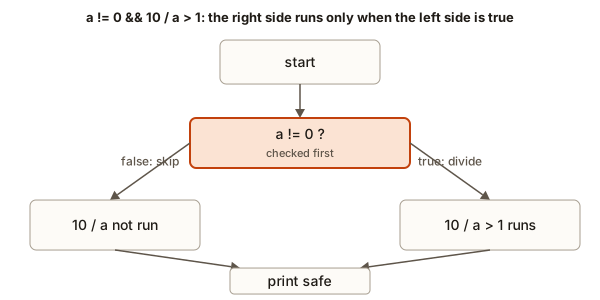 Short-circuit AND: the right side runs only when the left side is true, so the division is skipped when the divisor is zero
The lesson for your own code is simple. Put the safe check on the left. Write if (count != 0 && total / count > 2), not the other way round. The second version would divide by zero before the check, and the first version never does.
Side effects on the right side
The second test shows a danger. The increment ++i is on the right side of ||. Whether i changes depends on the left side. A reader who expects i to change every time will be wrong. A rule of thumb is this: keep changes such as ++, -- and = out of the right side of && and ||. Put them in their own statement. The code then says exactly what happens, and nobody has to think about short-circuit rules to read it.
Worked example: is a year a leap year?
Here is a real problem that needs logical operators. A calendar year is a leap year if it is divisible by 4, with two exceptions. A year divisible by 100 is not a leap year, unless it is also divisible by 400. In words, the rule is:
- divisible by 4 and not divisible by 100, or
- divisible by 400.
Translate it piece by piece. "Divisible by 4" is y % 4 == 0. "Not divisible by 100" is y % 100 != 0. "Divisible by 400" is y % 400 == 0. Join the first two with AND, join that with the third using OR, and add brackets so the grouping is obvious. Type 2024 in the Input box:
The output is:
2024 is a leap year: trueWork the three special cases by hand to check the rule. The year 1900 is divisible by 4, and it is also divisible by 100. The first bracket is true && false, which is false. The second part, 1900 % 400, is 300, so 1900 % 400 == 0 is false. The whole expression is false. The year 1900 was not a leap year. The year 2000 is divisible by 400, so the second part is true, and the answer is true. The year 2023 is not divisible by 4, so the first bracket is false. The second part is false, because 2023 % 400 is 23. The answer is false.
The brackets around the first bracket are important. Without them, the code would be (y % 4 == 0 && y % 100 != 0 || y % 400 == 0). That reads the same to a computer, because AND binds tighter than OR, so the meaning is still correct. For a human reader, the explicit brackets make the rule visible.
Trace of a short expression with several operators
Sometimes a long expression is hard to read. Here is a method you can use. Evaluate !(a > 3) || b == 2 && c < 5, with a = 2, b = 2 and c = 9. Follow the order: NOT, then comparisons, then AND, then OR.
Values: a = 2, b = 2, c = 9
1. a > 3            is false
2. !(a > 3)         is true (NOT flips false)
3. b == 2           is true
4. c < 5            is false
5. b == 2 && c < 5  is true && false, so false (AND needs both)
6. true || false    is true (OR needs one), so the whole expression is true
Step 5 is where people go wrong. They take the OR too early, which gives (!(a > 3) || b == 2) && c < 5, and the answer is false. Writing the brackets yourself, as the reader, is the safest way to protect against this.
Worked example: is a time of day valid?
A clock time has two parts. The hours must be from 0 to 23, and the minutes must be from 0 to 59. A time is valid only when both parts are valid. This is a range check twice, joined by AND, so it is a good test of everything in this lesson. The program prints each test on its own line, so you can see which part fails. Type 23 59 in the Input box.
The output is:
hours ok: true
minutes ok: true
valid time: true
Trace the input 23 59. The hours test is 23 >= 0, which is true, AND 23 <= 23, which is also true. The minutes test is 59 >= 0 and 59 <= 59, which are both true. The final line is true AND true, so the time is valid.
Now try two bad inputs by hand, so you can predict the output. For 24 15, the hours test is 24 <= 23, which is false. The hours line prints false, and the whole time is false. For 12 60, the hours test passes, but 60 <= 59 is false. The minutes line prints false. Each bad input breaks exactly one test, and the three lines show which one. Printing the parts is a good habit for any check with more than one condition.
The variables validHours and validMinutes make the program easier to read than one long line. Each one has a name that says what it means. This is a small example of a larger rule: a name for an intermediate answer costs nothing and saves the reader from working out the same expression twice.
Common mistakes
These are the mistakes the lesson is built to prevent. Each one is shown with the result it gives.
Mistake 1: = in place of ==. Covered above. The compiler warning is suggest parentheses around assignment used as truth value.
Mistake 2: writing a range as a chained comparison. 1 <= x <= 10 compiles and gives 1 for values like 50. Use x >= 1 && x <= 10.
Mistake 3: & or | in place of && or ||. The single symbols are bitwise operators, which work on the bits of numbers. They do not short-circuit, and for values other than 0 and 1 they give different answers. For example, 5 && 2 is true and prints 1, but 5 & 2 is 0, because 101 AND 010 is 000.
Mistake 4: forgetting that NOT binds tightly. !a == b means (!a) == b. Use brackets when you mean !(a == b).
Mistake 5: comparing decimals with ==. The example with 0.1 and 0.2 shows the result. Use a tolerance for doubles.
Mistake 6: expecting the right side of && to run when the left side is false. It does not run. This is the reason the division-guard pattern works, and it is also the reason a side effect on the right side can be skipped.
Mistake 7: comparing an int with true. Some beginners write if (count == true). The bool true converts to 1, so this test is only true when count is exactly 1. Write if (count != 0) for a number, and write if (flag) for a bool.
Debugging walkthrough: the free ticket that is not free
A cinema gives free entry to a child under 5, and to a member who is over 65. The rule in words is: free if the age is under 5, or if the age is over 65 and the person is a member. A developer writes this code:
#include <iostream>
using namespace std;

int main() {
    int age = 3;
    bool isMember = false;
    bool free = (age < 5 || age > 65) && isMember;
    cout << boolalpha << free << endl;
    return 0;
}
The output is false, but a child aged 3 should get free entry. Find the bug by tracing one case at a time. For age = 3 and isMember = false, the first bracket is (3 < 5 || 3 > 65), which is true || false, so true. The code then does true && false, because the member flag is false. The answer is false.
The bug is the brackets. The developer put the OR inside brackets and then applied AND to the whole thing, which requires a member for every free ticket. The rule needs the AND to be applied to the age part only. The correct code is:
bool free = (age < 5) || (age > 65 && isMember);Test the fix on three inputs: age 3 without membership is free, age 70 with membership is free, and age 70 without membership is not free. A good habit is to test every branch of a rule, not only the one you were thinking about.
Variations and edge cases
Interview questions often hide an edge case, so check each boundary.
- Inclusive and exclusive.
x < 10andx <= 10differ at exactly 10. Ask yourself whether the boundary belongs to the range. - Negative numbers.
x > 0excludes zero and all negative numbers. A test for "positive" isx > 0, notx >= 0. - Comparing with a bool.
5 == trueisfalse, becausetrueconverts to 1, and 5 is not 1. Comparisons with bools are a common source of confusion. - Empty ranges.
x >= 10 && x <= 5is never true. A range check with the bounds reversed will always fail, which can look like a logic error. - Double negatives.
!!xconvertsxto a bool. For any non-zeroxit istrue, and for zero it isfalse. - Negation of a comparison. For integers,
!(a < b)is the same asa >= b. This does not hold for decimal numbers when a value is not a number, which is a rare case you can ignore for now.
Interview questions
Question 1: is a && b the same as b && a? The truth value is the same, but the order of evaluation is not. The left side runs first. If the left side is a check and the right side is a division, the order matters a great deal. Good interview answers name short-circuit evaluation.
Question 2: what is wrong with if (x = 0)? The assignment stores 0 in x, and the condition is 0, which is false. The code never runs the body, and x is overwritten. The intention was almost certainly x == 0. A compiler with -Wall warns about this pattern.
Question 3: check if a number is in a range without using AND. You can write if (x >= lo) { if (x <= hi) { ... } }. That is the same as AND, written as nested checks. Interviewers like to see that you understand AND as a pair of checks, not as a magic keyword.
Question 4: why does a sanity check go before a division and before an array lookup? Because the check must run before the dangerous step. Short-circuit evaluation makes this easy with &&: if (index >= 0 && index < size && items[index] > 0). If index is out of range, the array is never touched.
Question 5: what is the result of true || (1 / 0 > 0)? The answer is true, and the right side is never evaluated, so there is no division by zero at run time. This is the same rule as the guard pattern, and the compiler may warn about the constant division anyway.
Real-world uses
The relational and logical operators sit behind almost every decision a program makes.
- Login. A check like
password == stored && !lockedlets a user in only when the password matches and the account is not locked. - Form validation. A sign-up form checks
age >= 13 && age <= 120andname != "". - Access control. A file is readable when
user == owner || user.role == admin. - Discounts and delivery. An order gets free shipping when
total >= 500 || member. - Retries. A program keeps trying while
attempts < 3 && !success. - Safe lookups. Code checks
i >= 0 && i < nbefore readingitems[i], so it never reads outside the array.
Practice
Try each exercise in a new program. Predict the output first, then run it. Some exercises ask for input. Type the value in the Input box.
- Read a number and print
trueif it is between 10 and 20 inclusive, andfalseotherwise. Test with10, then21.
Solution
#include <iostream>
using namespace std;

int main() {
    int n;
    cin >> n;
    cout << boolalpha << (n >= 10 && n <= 20) << endl;
    return 0;
}
For 10 the output is true. For 21 the output is false.
- Predict and then run:
cout << !(5 > 3 || 2 > 4);. Explain each step. Expected output:0.
Solution
The inside is 5 > 3 || 2 > 4. The first part is true, so OR is true without the right side. NOT flips true to false, which prints 0.
- Print whether a year is a leap year. Use the rule from this lesson. Test with
1900,2000and2024.
Solution
#include <iostream>
using namespace std;

int main() {
    int y;
    cin >> y;
    bool leap = (y % 4 == 0 && y % 100 != 0) || y % 400 == 0;
    cout << boolalpha << leap << endl;
    return 0;
}
The outputs are false, true and true.
- Predict the output of
int x = 4; if (x = 0) cout << "A"; else cout << "B";and explain it.
Solution
The output is B. The condition x = 0 stores 0 in x, and the value of the assignment is 0, which is false. The else branch runs. The variable x is now 0. The fix for the intended comparison is x == 0.
- Write a program that reads a number and prints
trueonly if it is even and positive. Test with-4,0,7and8.
Solution
#include <iostream>
using namespace std;

int main() {
    int n;
    cin >> n;
    cout << boolalpha << (n > 0 && n % 2 == 0) << endl;
    return 0;
}
The results are false, false, false and true.
- Predict the output of
cout << (3 < 5 < 2);, explain it, and then write the correct check for "5 is strictly between 3 and 2".
Solution
The output is 1. The left part 3 < 5 is true, which is 1. Then 1 < 2 is true, so the whole answer is 1. The chained form is not a range check, so it does not test what the words suggest. The correct form for "b is strictly between a and c" is a < b && b < c. Here 3 < 5 && 5 < 2 is false, so it prints 0.
- Write a logical expression for "a number is a multiple of 3 or a multiple of 5 but not both". Test with 3, 5, 15 and 7.
Solution
#include <iostream>
using namespace std;

int main() {
    int n;
    cin >> n;
    bool three = n % 3 == 0;
    bool five = n % 5 == 0;
    cout << boolalpha << (three != five) << endl;
    return 0;
}
The results are true, true, false and false. The != on two bools is the exclusive OR of the two answers.
- Write a guarded division: read
totalandcount. Printtotal / countonly when the quotient is positive. Otherwise printno data. Make the check safe forcountequal to zero. Test with10 0, then10 4.
Solution
#include <iostream>
using namespace std;

int main() {
    int total, count;
    cin >> total >> count;
    if (count != 0 && total / count > 0) {
        cout << total / count << endl;
    } else {
        cout << "no data" << endl;
    }
    return 0;
}
For 10 0 the left side is false, so the division is skipped and the output is no data. For 10 4 the quotient is 2, which is positive, so the output is 2. The division on the right of && is only reached when count is not zero.
- Fix the bug in this code, which should print
trueonly whenscoreis 100 or more:
int score = 80;
cout << (score = 100) << endl;
Solution
The single = stores 100 in score, and then prints 100, which is the stored value. The fix is cout << (score >= 100) << endl;, which prints 0 for 80. If you want to test the value and not change it, you must use a comparison.
- Explain the output of
int i = 0; bool b = (i > 5) && (++i > 0); cout << i;. Then rewrite the line so thatichanges on its own line and the code is easier to read.
Solution
The output is 0. The left side i > 5 is false, so AND skips the right side, and ++i never runs. The clearer version is:
int i = 0;
bool b = i > 5;
if (b) {
    i++;
}
Here the change to i is in its own statement. The output in this version is also 0, but the code shows the rule.
What you now know
- A relational operator compares two values and gives a
bool, which istrueorfalse. ==compares and=stores. A single equals sign inside a condition is almost always a bug.- A range needs two comparisons joined with
&&. The chained form1 <= x <= 10does not check a range. &&is true only when both sides are true,||needs one true side, and!flips the answer.- C++ stops early in
&&and||, which lets a check protect a division or an array lookup. - Use brackets to show the grouping you mean, and keep side effects out of the right side of logical operators.
In the next lesson you will meet the bit operators. They look similar to these logical operators, but they work on the bits of numbers, and the mistake of mixing them up is one of the most common in interview questions.