Why this matters
Programs spend most of their time changing values. A game adds points to a score. A shop subtracts stock when an order is placed. A search counts how many steps it has taken. A loop moves a counter from 0 to 10. Each of these changes is an assignment, and C++ gives you short forms that make the common changes quick to write and easy to read. The loops in the next modules use ++ and += in almost every line, so this lesson is the bridge to them. If you can predict what a line like x += 3 does to a value, you will be able to read most of the code in this course.
Start with the idea: a variable is a box with a value in it
A variable is a named place in memory that holds a value. You create one with a declaration, such as int score = 0;. The name score is a label on a box, and the box currently holds 0. The type int tells you what kind of values the box accepts.
An assignment puts a new value into a variable. In C++ the assignment operator is a single equals sign, =. Read it as "store the value on the right into the variable on the left". The word "store" is the important word. The equals sign in C++ does not describe a fact that is always true, the way it does in algebra. It describes an action that happens once, in order, from top to bottom.
Think of a whiteboard in a classroom. The teacher writes the score on it. When the score changes, the teacher erases the old number and writes the new one. The whiteboard always shows one number, the latest one. An assignment is the act of erasing and writing again.
Here is the simplest possible case. The declaration puts 5 in the box, then the assignment erases 5 and writes 9:
Line 1:  int x = 5;     box x holds 5
Line 2:  x = 9;         box x holds 9, the 5 is gone
The rest of this lesson builds on that picture. Each statement either writes a new value into a box or reads the value that is already there.
Assignment means store, not equal
Here is the line that confuses almost every beginner when they first meet C++:
x = x + 3;In algebra this equation has no solution, because no number equals itself plus 3. In C++ it is a normal and very common statement. The computer does it in two steps. First it reads the current value of x and adds 3 to it. Then it stores the answer back into x. If x held 8, the result is 11, and the box now holds 11.
Read the statement in a fixed order. The right side is worked out first, to a single value. The left side names the box that receives the value. So x = x + 3 means "take what is in x now, add 3, and store the total in x". Here is a trace of three such lines, with the value of x after each one:
Start:            x is not yet declared
int x = 5;        x is 5
x = x + 3;        right side is 5 + 3 = 8, so x is 8
x = x + 3;        right side is 8 + 3 = 11, so x is 11
Notice that the right side always uses the value before the statement runs, not the value it will produce. This is why the same line gives different results when you repeat it. Each time, the box holds a new number, and the next reading uses that number.
Assignment can be chained
The assignment operator produces a value, which is the value it stored. That lets you chain assignments on one line. The rule is right to left: the rightmost assignment happens first, then the one to its left uses its result.
The output is:
7 7 7The expression c = 7 stores 7 in c and produces 7. Then b = 7 stores 7 in b, and so on. Chained assignment is handy for setting several values to the same starting point. Some teams ban it because it can be hard to read in longer lines, so use it only when it makes the code simpler.
An uninitialized variable has no value you can rely on
Look at this declaration: int x;. It creates the box but does not put a value in it. The box now holds whatever bits were left there earlier in memory. That value is not 0 and not any value you chose. Reading it is a mistake. Compile with warnings turned on and g++ tells you so:
#include <iostream>
using namespace std;

int main() {
    int x;
    x += 3;
    cout << x << endl;
    return 0;
}
g++ prints warning: 'x' is used uninitialized [-Wuninitialized] for the line x += 3. The += reads the old value of x before it adds, so the printed result depends on the unknown starting value. It can be any number, and it can change from one run to the next. Give every variable a starting value when you declare it: int x = 0;.
Compound assignment: change and store in one step
Adding a number to a variable and storing the result back is so common that C++ has short forms. A compound assignment operator combines an arithmetic operator with =. The statement x += 3 means x = x + 3. The table shows the common ones.
| Short form | Same as | Meaning in words |
|---|---|---|
x += 3 | x = x + 3 | add 3 to x |
x -= 3 | x = x - 3 | subtract 3 from x |
x *= 3 | x = x * 3 | multiply x by 3 |
x /= 3 | x = x / 3 | divide x by 3 (integer division for int) |
x %= 3 | x = x % 3 | replace x by the remainder after dividing by 3 |
Here is a program that uses each of them on one variable. Trace it as you read. Each line changes the value that the previous line left behind.
The output is:
15
12
24
4
1
Trace each step. x starts at 10. After x += 5 it is 15. After x -= 3 it is 12. After x *= 2 it is 24. After x /= 5, the division is integer division, so 24 / 5 is 4, and x becomes 4. Finally x %= 3 gives 4 % 3, which is 1. The last value is 1.
The right side of a compound assignment is a whole expression
This is the most important detail about compound assignment, and it trips people up. The statement x *= a + 1 does not mean x = x * a + 1. It means x = x * (a + 1). C++ works out the right side first, as one value, and then applies the operator. So the right side behaves as if it were in brackets.
The output is:
12Read x *= 2 + 1 as x = x * (2 + 1). The right side is 2 + 1, which is 3, and then 4 * 3 is 12. If you read it as x * 2 + 1, you would get 9, and that is wrong. When you write a compound assignment with an expression on the right, the expression is always finished first.
Integer division inside a compound assignment
The same integer rule from the last lesson applies here. If x is an int, then x /= 2 throws away the fraction. Starting from 7, the result is 3, not 3.5. If you want decimal results, x must be a double before the division. Here is the rule in one line: the type of the variable on the left decides how the result is stored, but the type of the operands on the right decides how the division is done. For x /= 2, the operand on the right is the int 2, and the variable x is an int, so the division is integer division.
Increment and decrement: adding exactly one
Adding or subtracting exactly 1 is so common that C++ has two more operators for it. The increment operator ++ adds 1, and the decrement operator -- subtracts 1.
x++and++xboth add 1 tox.x--and--xboth subtract 1 fromx.
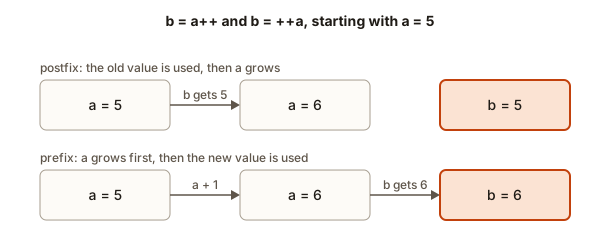
When you use the operator alone on a line, the two forms do the same thing. x++; and ++x; both leave x one bigger. The difference only shows up when you use the result inside a larger expression, which means in the middle of a bigger statement. There are two words for the two forms.
- Prefix means the operator comes before the variable, as in
++x. The change happens first, and the expression then uses the new value. - Postfix means the operator comes after the variable, as in
x++. The expression uses the old value, and the change happens afterwards.
Picture a ticket machine at a bakery counter. A machine with prefix behaviour moves its counter up first, then prints the ticket. The number on your ticket is the new count. A machine with postfix behaviour prints the ticket first, using the current count, and then moves the counter up. The number on your ticket is the old count. Both machines end up at the same counter value, but the ticket they hand out is different.
Here is a program that shows the difference:
The output is:
a=6 b=5
c=6 d=6
3
4
5
Trace the first case. Before the line int b = a++; runs, a is 5. The postfix form gives the expression the old value 5, so b becomes 5. Then a is increased to 6. The line prints a=6 b=5.
Trace the second case. int d = ++c; first increases c from 5 to 6, then gives the new value 6 to d. Both c and d are 6.
Trace the third case. cout << n++ << endl; sends the old value 3 to the screen, then n becomes 4. The next line prints n, which is now 4. The line cout << ++n << endl; increases n to 5 first, so it prints 5.
A table you can check against
Here is a table for the common forms. Use it to check your reasoning on any single line.
| Code | What the expression gives | What the variable is afterwards |
|---|---|---|
int b = a++; with a is 5 | 5 | a is 6 |
int b = ++a; with a is 5 | 6 | a is 6 |
int b = a--; with a is 5 | 5 | a is 4 |
int b = --a; with a is 5 | 4 | a is 4 |
The rule is the same for every row. The prefix forms change the variable first, and the expression sees the new value. The postfix forms give the expression the old value and change the variable after.
Do not change one variable twice in one statement
It is tempting to write a line like int r = i++ + i++;. Do not write it. The two increments of i have no defined order relative to each other in C++, so the result is undefined. A compiler may produce one answer today and another tomorrow. The same applies to i = i++ + 1; and similar lines. The safe rule is simple: change each variable at most once in a statement, and keep the increment on a line of its own when the code is hard to read.
Here is what g++ says when you combine several changes in one statement:
warning: operation on 'n' may be undefined [-Wsequence-point]A warning like this is a signal to split the line, not to ignore it.
What happens inside the computer
When C++ runs x += 3;, the processor reads the value stored for x in memory, adds 3, and writes the answer back into the same place. The compiler may keep x in a fast register while it works and store it back at the end. You do not see this, but it explains two useful facts.
First, x += 3 and x = x + 3 do the same work for a plain int variable. The compound form is shorter, and it makes the intent clear: the value changes, and the variable is still the same one.
Second, the compound form matters when the left side is more than a name. Suppose you write items[next()] += 5;, where next() is a function that returns the next index and moves on to the one after. The compound form calls next() once, because the left side is worked out once. The longer form, items[next()] = items[next()] + 5;, calls it twice, so it changes two different slots. The first version is the safe habit when the left side has a function call or a changing index.
The increment operators are cheap too. For a plain int, i++ usually compiles to one add instruction. Loops that count with i++ are fast for that reason. A postfix increment has to keep a copy of the old value, but when the value is not used, as in a loop header, the compiler removes that copy. So for a plain int, the choice between i++ and ++i is about meaning, not speed.
Trace tables: writing down the state line by line
When a program is longer than a few lines, you cannot keep every value in your head. A trace table solves that problem. Make one column for each variable and one row for each line that changes something. After each line, write down the value of every variable. The table is a photograph of the program state, taken after every step.
Here is a short program that changes one balance four times. The table shows the state after each line.
| Line | balance | What is printed |
|---|---|---|
int balance = 100; | 100 | nothing |
balance -= 30; | 70 | nothing |
balance *= 2; | 140 | nothing |
balance += 5; | 145 | nothing |
cout << balance; | 145 | 145 |
Writing a table takes a minute. It catches the mistakes that cost an hour when you debug by guessing. When a program prints a value you did not expect, find the first row where the table and your expectation disagree. That row is either the line with the bug, or the place where your reading of the line went wrong.
Use a trace table on every example in this course before you run it. Write it on paper, or as a comment in your code. Then run the program and compare. If the two match, you have checked your understanding. If they differ, you have found something worth knowing.
A worked example: a bank account across a day
A bank account starts with 250 units. During the day it has a withdrawal of 80, a deposit of 40, and then a fee of 2 percent of the balance. The program below works out each change with compound operators, and it prints the balance after each step. Trace it with the table method before you run it.
The output is:
after withdrawal: 170
after deposit: 210
after fee: 206
Trace it. The balance starts at 250. After the withdrawal of 80 it is 170, which is the first line of output. After the deposit of 40 it is 210. The fee line needs care. The right side balance * 2 / 100 is worked out first, from left to right: 210 * 2 is 420, and then 420 / 100 is 4. The compound assignment subtracts 4, which leaves 206. The fee is 4, not 4.2. Integer division drops the fraction, which is the rule from the first lesson. A real bank would have a written rounding rule, and the program must follow that rule.
The statement balance -= balance * 2 / 100; reads balance on the right and changes balance on the left in one line. That is allowed, because the right side is finished before the subtraction happens. It is still the kind of line this lesson warned about, so if you want it to read more clearly, work out the fee in its own variable first, as int fee = balance * 2 / 100;, and then subtract fee.
A swap: using a temporary variable
A classic task is to swap two variables. You have a = 10 and b = 25, and you want a = 25 and b = 10. The simple method uses a third variable, which is often called temp, as a holding place.
Type 10 25 in the Input box. The output is:
a=10 b=25
a=25 b=10
Trace it with three boxes. temp = a copies 10 into temp, so a and temp both hold 10. Then a = b copies 25 into a. At this point b still holds 25, and the 10 from the original a is safe in temp. Last, b = temp copies 10 into b. The swap is done.
The order matters. If you wrote a = b; first and then b = a;, both variables would end up with 25, because the original 10 would have been overwritten before it was saved. Always save a value before you overwrite it.
An accumulator: a running total
A running total, also called an accumulator, is a variable that collects a sum as the program goes along. You start it at 0 and use += each time you have a new value to add. The next program reads three prices and shows the total after each one.
Type 120 45 300 in the Input box. The output is:
Running total: 120
Running total: 165
Running total: 465
The variable price is reused. Each time it holds the newest value, and total += price adds it to the total. The three blocks look almost the same, which is the sign that a loop would help. You will write that loop in the next module, but the pattern itself is the same. Every running total in every program is a variable that starts at 0 and grows with +=.
A countdown with the decrement operator
Here is a short program that counts down from 5. It uses postfix decrement, so each line prints the current value and then lowers it.
The output is:
5
4
3
2
1
t is now 0
Each t-- sends the old value to cout and then lowers t by one. After the fifth line t is 0. The last line prints t is now 0. If you change the code to cout << --t << endl;, the first line prints 4, because the variable is lowered before it is printed. Both versions end at 0, but they print a different sequence.
Common mistakes
Each of these mistakes compiles or almost compiles, so the compiler error messages are the real evidence. Learn to read them.
Mistake 1: writing =+ instead of +=.
int x = 3;
x =+ 3;
cout << x << endl;
This compiles without any error, and the program prints 3. The compiler reads =+ 3 as "assign the value plus 3", which means x = +3. The sign + is a unary plus, and it does nothing to the number. The line overwrites x with 3 instead of adding 3 to it. The fix is x += 3;, with the plus before the equals sign. Make a habit of writing the operator and the equals sign next to each other.
Mistake 2: putting an increment on a literal.
5++;g++ rejects this with error: lvalue required as increment operand. An lvalue is something that names a box, such as a variable, and a literal such as 5 is not a box. You cannot change a constant. The same message appears for x + 1 = 7;, which gives error: lvalue required as left operand of assignment. The left side of an assignment must be a variable.
Mistake 3: thinking b = a++ gives b the new value.
The postfix form gives the old value, as the table above shows. If you expect b to be 6, you will print the wrong answer, and the bug may only show up later in a bigger program. When you are unsure, add a line that prints both values before and after the statement.
Mistake 4: writing x = x++;.
This line does not help. It changes x twice in one statement, which is the rule from earlier. The result is not something you can rely on. Replace it with x++; on its own, if you wanted to add 1.
Mistake 5: reading an uninitialized variable.
Declaring int total; and then writing total += price; is a bug. The += uses the old value of total, and that value is unknown. g++ reports 'total' is used uninitialized. Start every counter and total at 0 when you declare it.
Mistake 6: forgetting that a variable is changed by an assignment in an earlier line.
This is a reading mistake, not a compiler error. When you trace a program, keep a list of the variables and update it after each line. Many bugs come from using the value from an earlier line when the variable has already changed.
Debugging walkthrough: the total that is always one step behind
A student writes a program that adds three numbers and prints the running total after each one. The input is 4 6 10, and the expected output is 4, 10 and 20. The program prints 0, 4 and 10. Here is the code:
#include <iostream>
using namespace std;

int main() {
    int total = 0;
    int n;
    cin >> n;
    cout << total << endl;
    total += n;
    cin >> n;
    cout << total << endl;
    total += n;
    cin >> n;
    cout << total << endl;
    return 0;
}
The output is one step behind. The program prints the total before it adds the new value. The bug is the order of the lines. Each cout runs before the += for the same number. To find this kind of bug, read the program in the order it runs and write down the value of total after each line. You will see that the cout lines show the value from the previous round.
The fix moves each cout below its += line. Then the printed total includes the number just read. This is a small bug, but it is typical. Most wrong outputs in beginner code come from one line that runs in the wrong place. The fix is almost always to reorder two lines, not to change the operators.
Variations and edge cases
Here are the situations where compound and increment operators behave in a way that surprises people.
- Overflow.
inthas a limit. Iftotalis near 2 billion and you add a large value, the result overflows. Uselong longfor totals that can grow large, as you learned in the last lesson. - Decimal totals. If
totalis adouble,total += 0.1adds a value that is not exact in binary, so after many additions the result may differ slightly from the decimal answer. Compare decimal results with a tolerance, or store money in cents. - Division by zero.
x /= 0andx %= 0have the same problem as/and%alone. The result is undefined. - Negative numbers.
x %= 3on a negativexgives a negative or zero result. For example,-7 % 3is-1. The sign follows the left operand, as in the arithmetic lesson. - Increment on a
charor on abool. Both can be incremented, but the rules are unusual and you should avoid them in beginner code. - Postfix in a condition.
if (n++ > 5)checks the old value ofnand then increases it. It is correct, but it hides the change. Write the change on a separate line when it matters.
Interview questions about updating values
Question 1: swap two numbers without a third variable. One answer uses addition: a = a + b; b = a - b; a = a - b;. It works for int values, but it can overflow when the sum is too large. A safer answer uses the XOR operator, which you will meet in the bitwise lesson. A strong interview answer names both methods, explains the overflow risk of the sum method, and says that a temporary variable is the clearest choice in real code.
Question 2: what does i++ do to the value that a loop uses? It increases i by one after the expression finishes. In a loop header such as for (int i = 0; i < n; i++), the statement i++ runs once at the end of each pass. The postfix form is safe there because the value is not used.
Question 3: find a missing number in a list 1 to n with one number removed. Add the numbers you have, then subtract that sum from the total sum n * (n + 1) / 2. The running total uses +=. The formula gives the sum you expect. The difference is the missing number. Watch the overflow: for large n, the total sum can exceed the range of int, so use long long.
Question 4: why is count++ in a shared counter risky when two threads run? Two threads can read the same value, add 1 each, and store the same new value, so one increment is lost. That is a concurrency problem and beyond this module, but the answer shows why an increment is not one indivisible action in every setting. In a single-threaded program it is safe.
Real-world uses
The operators in this lesson appear in almost every program you will write.
- Scores and counters. A game adds points with
score += points. A quiz counts correct answers withcorrect++. - Money. A bank account changes with
balance -= amountwhen a payment leaves andbalance += amountwhen money arrives. The rule to protect the bank is that the value is changed only once per transaction. - Stock levels. A shop reduces the stock with
stock -= ordered. If the value is negative after the update, the program knows the shop has overpromised. - Pagination. A list shows 10 items per page. The starting index of the next page is
offset += 10. - Retries. A network program may try a request up to three times with
attempts++, and it stops whenattemptsreaches 3. - Loops. Almost every loop uses
i++to move to the next item. The next module shows this in full.
Practice
Try each exercise in a new program. Predict the output before you run it, and write the value of each variable after each line. Some exercises ask for input. Type the value in the Input box.
- Start with
int score = 100;. Subtract 30, then double the score, then add 5, using compound operators. Print the score after each step. Expected final value:145.
Solution
#include <iostream>
using namespace std;

int main() {
    int score = 100;
    score -= 30;
    cout << score << endl;
    score *= 2;
    cout << score << endl;
    score += 5;
    cout << score << endl;
    return 0;
}
The output is 70, 140 and 145.
- Predict what this prints, then run it:
int p = 2; cout << p++ * 3 << " " << p << endl;. Explain the second number.
Solution
The output is 6 3. The postfix p++ gives the old value 2, and 2 times 3 is 6. After that, p is 3, so the second number is 3.
- Read two numbers and swap them using a third variable. Print the values before and after. Test with
4 9.
Solution
#include <iostream>
using namespace std;

int main() {
    int a, b;
    cin >> a >> b;
    cout << a << " " << b << endl;
    int temp = a;
    a = b;
    b = temp;
    cout << a << " " << b << endl;
    return 0;
}
For 4 9 the output is 4 9 and then 9 4.
- Predict the output of
int x = 7; x /= 2; x *= 3;and then run it. Explain why the first step is not3.5.
Solution
x is an int, so 7 / 2 is integer division and gives 3. Then 3 * 3 is 9. The output is 9. The first step is not 3.5 because both operands of the division are int values.
- Explain the output of this code:
int a = 5; int b = a++ + 1; cout << a << " " << b;. Then rewrite it so thatachanges on its own line andbis 6 andais 6.
Solution
The postfix uses the old value 5, so b is 5 + 1 which is 6. Then a becomes 6. The output is 6 6. The code is already correct, but the statement changes a and reads it in one line. A clearer version is:
int a = 5;
int b = a + 1;
a++;
Both a and b are 6 at the end.
- Write a program that reads three numbers and prints the sum after each one, using
+=. Test with10 20 30, which should print10,30and60.
Solution
#include <iostream>
using namespace std;

int main() {
    int sum = 0;
    int x;
    cin >> x;
    sum += x;
    cout << sum << endl;
    cin >> x;
    sum += x;
    cout << sum << endl;
    cin >> x;
    sum += x;
    cout << sum << endl;
    return 0;
}
The output is 10, 30 and 60.
- Find and fix the bug in this code. It should print the number 5 and then the number 6:
int n = 5;
cout << n << endl;
n++;
cout << n++ << endl;
Solution
The code prints 5 and then 6, so it is already correct. The second line prints the old value of n and then increases it, so the output after the increment is 6. A reader could be confused, so a clearer version is:
int n = 5;
cout << n << endl;
n++;
cout << n << endl;
This prints 5 and then 6, and it does not depend on the postfix rule.
- Write a program that reads a number of seconds and counts how many full minutes it contains, using
/=. Test with250, which should print4.
Solution
#include <iostream>
using namespace std;

int main() {
    int seconds;
    cin >> seconds;
    seconds /= 60;
    cout << seconds << endl;
    return 0;
}
For 250 the integer division gives 4, because 4 minutes is 240 seconds.
- Explain why
int x; x += 1; cout << x;is unsafe. Then fix it.
Solution
x has no starting value, so the += adds 1 to an unknown number. The fix is to declare it with a value: int x = 0; x += 1; cout << x;, which prints 1.
- Predict the output of
int k = 4; k -= 1 + 2; cout << k;and run it to check.
Solution
The right side is 1 + 2, which is 3. Then 4 - 3 is 1. The output is 1. Compound assignment treats the whole right side as one value, so k -= 1 + 2 is k = k - (1 + 2).
- Write a program that prints the numbers 3, 2, 1 and then
Liftoff, using--on a single variable. Do not use any other variable.
Solution
#include <iostream>
using namespace std;

int main() {
    int t = 3;
    cout << t-- << endl;
    cout << t-- << endl;
    cout << t-- << endl;
    cout << "Liftoff" << endl;
    return 0;
}
The output is 3, 2, 1 and Liftoff, one per line.
What you now know
=stores the value on the right into the variable on the left. It is an action, not a statement of equality.- An uninitialized variable holds an unknown value, so give every variable a starting value.
+=,-=,*=,/=and%=change a variable in one step, and the whole right side is worked out first.++and--change a variable by one. The prefix form changes it before the value is used, and the postfix form uses the old value.- Never change the same variable twice in one statement, and never read an uninitialized variable.
- A running total is a variable that starts at 0 and grows with
+=.
In the next lesson you will compare values with ==, < and >=, and combine yes-or-no answers with &&, || and !. Those comparisons decide what your programs do next.
 Prefix and postfix: the same counter gives two different values depending on where the increment happens