Why this matters
Almost every program does arithmetic. It adds prices, counts steps, splits a list into pages, works out the time, and checks whether a number is even. The surprise for beginners is that C++ divides whole numbers in a different way from a calculator. A calculator shows 2.5 for 5 divided by 2. C++ shows 2 when both numbers are whole. If you do not know this rule, your program will give wrong answers without any error message. This lesson teaches you the rule, the tools for working around it, and the order in which C++ does the steps of a calculation.
Start with the idea
A program is a list of instructions. Some instructions move values around, some make decisions, and some do maths. The maths part is built from operators. An operator is a symbol such as + or * that does something to values. The values that an operator works on are called operands. In the expression 7 + 2, the symbol + is the operator, and 7 and 2 are its operands. An expression is any piece of code that produces a value. 7 + 2 is an expression with the value 9.
A value has a type. The type tells the computer how to store the value and which operations make sense for it. This lesson uses three types:
intholds whole numbers such as-4,0and250. On most current computers anintuses 32 bits and holds values from about -2 billion to +2 billion.long longalso holds whole numbers, but it uses 64 bits. It can hold values up to about 9 quintillion, which is about 9 with eighteen zeros. Competitive programming and interview problems often use it.doubleholds numbers with a decimal point, such as3.5. It stores an approximation, so very precise maths needs extra care, but for everyday use it is fine.
The type of the operands decides what the answer looks like. That is the key idea of the whole lesson. Two whole numbers give a whole number. Mix in a decimal number and the answer becomes a decimal number.
The five operators
Here are the five arithmetic operators. Read the table as a small dictionary.
| Operator | Name | Example | Result |
|---|---|---|---|
+ | add | 7 + 2 | 9 |
- | subtract | 7 - 2 | 5 |
* | multiply | 7 * 2 | 14 |
/ | divide | 7 / 2 | 3 (with two int operands) |
% | remainder, also called modulus | 7 % 2 | 1 |
The % symbol is read as "mod" or "remainder". It gives what is left over after division. Because 7 divided by 2 leaves 1 over, 7 % 2 is 1.
The / symbol is the division operator. With int operands it gives the quotient, which is the whole-number part of the answer. You will see the word quotient often, so keep it in mind.
Here is a complete program that uses all five. A complete program has the #include line, the main function, and a return at the end. Every runnable example in this course is a complete program like this one.
Press Run. The output is:
22
12
85
3
2
Let us trace the program one line at a time. The first line of main declares two int variables. A variable is a named box in memory that holds a value. a is a box holding 17 and b is a box holding 5. The line cout << a + b << endl; computes 17 + 5, which is 22, and sends it to the screen. The word cout is the standard output stream, << sends a value into it, and endl moves to a new line. The next line computes 17 - 5 and prints 12. Then 17 * 5 is 85. Then 17 / 5 is the quotient 3, because 5 fits into 17 three times. Last, 17 % 5 is the remainder 2, because 3 fives make 15 and 2 is left over.
Notice that the program never changes a or b. Each operator reads its operands and produces a new value. The original variables stay the same.
Integer division: the sweets example
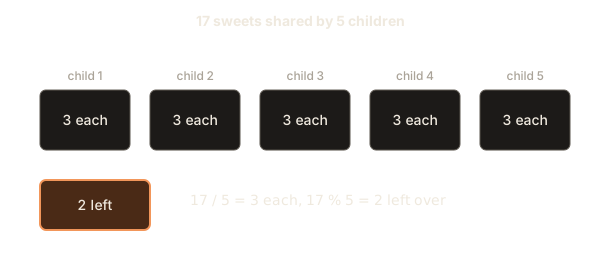
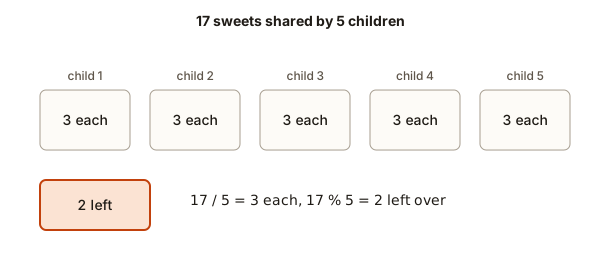
Think of sharing 17 sweets among 5 children. Each child gets as many whole sweets as possible. Every child gets 3 sweets, which is 15 sweets in total. That leaves 2 sweets in the bag. The quotient is the number each child gets, and the remainder is what is left over.
17 sweets, 5 children
  child 1: 3    child 2: 3    child 3: 3    child 4: 3    child 5: 3
  left over: 2
  17 / 5 = 3 each,  17 % 5 = 2 left over
This is exactly what C++ does when both numbers are int. The division does not produce 3.4. It throws away the fraction. Here is the next program, which prints the quotient and the remainder for a few cases. It also shows what happens when one of the operands is a double.
The output is:
3
3.4
3.4
-3
-2
The first line is int divided by int, so the answer is 3. The second line has the literal 5.0, which is a double. Now one operand is a decimal, so C++ turns the whole calculation into decimal maths and the answer is 3.4. The third line works the same way with the double on the left. The rule is simple: if either operand is a double, the result is a double.
The last two lines show negative numbers. We will look at them in the next section.
The precise rule
When both operands are int, C++ performs integer division. It divides, then drops everything after the decimal point. The word for "drop the fraction" is truncation. Truncation always moves toward zero. For positive numbers, that means rounding down. For negative numbers, it means rounding up toward zero.
So 17 / 5 is 3, because 3.4 is truncated to 3. And -17 / 5 is -3, because -3.4 is truncated toward zero to -3. A beginner often expects -4 here. C++ does not round down to the next lower integer. It cuts toward zero.
The remainder operator % follows a matching rule. C++ defines a % b so that (a / b) * b + a % b always equals a. You can check this with the numbers above. For -17 % 5, the quotient is -3, and -3 * 5 + r must equal -17. That makes r equal to -2. So the sign of the remainder follows the sign of the left operand. A remainder of -2 for a negative left side is correct under the rule.
The % operator works only on whole numbers. You cannot write 2.5 % 1. The compiler reports an error, because remainder on decimal numbers is not part of the language.
Dividing by zero
What if the divisor is zero? Division by zero has no answer in mathematics, and C++ does not define it for whole numbers. The result of 5 / 0 is undefined behaviour. That is a term for "the language makes no promise about what happens". In practice, on Linux, the program usually stops immediately. When we ran a small test with cout << 5 / 0, the compiler printed a warning about division by zero, and the program exited with code 136. Code 136 means the program was stopped by a floating point exception. The program did not print a friendly message.
The compiler warns you when it can see the zero in the code. It cannot always see it. A divisor that comes from user input or from a calculation might be zero at run time. So you should guard the division yourself:
if (count == 0) {
    cout << "No items, so no average" << endl;
} else {
    cout << total / count << endl;
}
The check comes before the division. That order matters. We will see the same idea in the next lesson about logical operators, where the check must come first.
What % is good for
The remainder operator looks minor, but it appears in a surprising number of problems. Here are the four uses you will meet most often.
- Even or odd.
n % 2is0for an even number and1for an odd number. The testn % 2 == 0means "n is even". - The last digit.
n % 10gives the last digit of a whole number.n % 100gives the last two digits. - Wrapping around. Clocks, days of the week and seats in a circle all wrap.
(hour + 5) % 24turns 22 o'clock plus 5 hours into 3 o'clock, which is the number 3 on a 24-hour clock. - Divisibility.
n % 7 == 0means that 7 divides n exactly, with nothing left over.
Division by 10 pairs with remainder by 10. Dividing by 10 removes the last digit. Taking the remainder by 10 gives the last digit. Together they let you take a number apart one digit at a time.
Here is a program that does that for a number typed in the Input box. Type 4729 and press Run.
The line cin >> n; reads one number from the Input box into the variable n. The input is 4729, so the output is:
Last digit: 9
Without last digit: 472
Second digit from the right: 2
Trace the third line. n / 10 is 472. Then 472 % 10 is 2. The brackets make sure the division happens first. Without brackets, n / 10 % 10 would also work here, because / and % have the same precedence and are read left to right. But the brackets make the order obvious to a reader.
Here is a worked example that uses the remainder for a clock. Suppose it is 22:00 and you want the hour 5 hours later. The sum 22 + 5 is 27, which is past the end of the day. The remainder by 24 gives 27 % 24, which is 3. So the answer is 03:00. The same trick works for days of the week, where you take the remainder by 7.
Precedence: which operator goes first
Look at this expression: 2 + 3 * 4. Should it be (2 + 3) * 4, which is 20, or 2 + (3 * 4), which is 14? School maths already has a rule: multiplication comes before addition. C++ uses the same rule. The rule is called precedence. It decides which operator is applied first when there is more than one in an expression.
Here are the arithmetic levels, highest first:
*,/and%(the multiplying group)+and-(the adding group)
Operators in the same group have the same precedence. For those, C++ uses left to right order, which is called associativity in the language specification. Read left to right, apply each operator as you meet it.
The output is:
14
20
10
2
Trace the lines. In 2 + 3 * 4, the multiplication runs first: 3 * 4 is 12, then 2 + 12 is 14. In (2 + 3) * 4, the brackets force the addition first: 5 * 4 is 20. In 20 / 4 * 2, both operators are in the multiplying group, so they run left to right. First 20 / 4 is 5, then 5 * 2 is 10. If the code had been read right to left, the answer would be 20 / 8, which is 2. The fourth line shows that answer, because the brackets force 4 * 2 first.
The left-to-right rule is the one people get wrong most often. Take 7 / 2 * 2.0. Read left to right, 7 / 2 is 3 (integer division), and then 3 * 2.0 is 6.0, which prints as 6. A beginner who expects 7 has forgotten that the division happens first and throws away the fraction before the multiplication. The quiz for this module includes this exact case.
The precedence table is not your memory test
C++ has a long precedence table that covers comparisons, bit operators and assignment as well. You will meet the rest of it in later lessons. For now, you need only remember two rules for arithmetic:
- multiplying operators run before adding operators, and
- equal-strength operators run left to right.
Use brackets whenever you have any doubt. Brackets cost nothing at run time, and they make your intention clear to the next person who reads the code. A line like total = price * quantity + tax; is clear. A line like total = price * quantity + price * quantity * rate / 100 - discount; is clearer with brackets around each part.
Mixed types: the answer follows the bigger type
Take the average of two int scores, 7 and 8. The mathematics says the answer is 7.5. But what does C++ say? Here is the program. Type 7 8 in the Input box.
The output is:
Integer average: 7
Real average: 7.5
In the first line, a + b is 15, an int. Then 15 / 2 is integer division, which gives 7. The fraction 0.5 is lost before the program prints anything. In the second line, 2.0 is a double. So 15 / 2.0 is decimal division, which gives 7.5.
This is the most common reason for a wrong average in beginner code. Writing double avg = (a + b) / 2; looks as if it should store 7.5, but the division has already happened with int operands. The value 7 is then stored in avg as 7.0. The fix is to make one operand a double before the division, for example (a + b) / 2.0, or to convert one operand with a cast, which we cover in a later module.
The general rule is called promotion. When an int meets a double in the same operation, C++ converts the int to a double first. The result is a double. Think of it like a mixed bag of coins. The bag takes the more precise unit, so the total has decimals.
Large numbers and the long long type
An int can hold up to about 2.1 billion. Some values are bigger than that. Suppose you multiply two numbers that are each one million. The answer is one trillion, and that does not fit in an int. The result of an int overflow is undefined behaviour. In practice, the value wraps around to a meaningless number. On one test machine, 1000000 * 1000000 with int operands gave -727379968. That number is not the answer to the sum, and the compiler may also warn you about it.
The fix is to use long long. A long long holds about 9 quintillion, which covers most problems that show up in interviews. Add the suffix LL to a literal to make it a long long constant, as in 1000000LL:
The output is:
1000000000000The number has thirteen digits. Both operands are long long, so the multiplication happens in 64 bits and the answer is correct.
You do not need LL if the variable is already long long and the other operand is an ordinary int literal. C++ converts the int to a long long in that case. Still, writing the suffix on large literals makes the intent clear to a reader. One rule is worth memorising: if a number might be bigger than about 2 billion, store it in a long long, and make sure every operand in the calculation is also a long long, or at least that the first operand is.
Worked example: minutes to hours
Here is a short program that you could write in your first week of learning. It converts a number of minutes into hours and minutes. The method uses / and %, and it works for any whole number of minutes.
Input:  500
Step 1: 500 / 60 = 8     (8 full hours)
Step 2: 500 % 60 = 20    (20 minutes left over)
Output: 8 hours and 20 minutes
Write it as a complete program, and check it with the input 500.
#include <iostream>
using namespace std;

int main() {
    int minutes;
    cin >> minutes;
    cout << minutes / 60 << " hours and " << minutes % 60 << " minutes" << endl;
    return 0;
}
This block is not marked run, so it is a normal code sample. Copy it into the course editor by hand if you want to run it. The method is what matters. Notice that the same pattern as the sweets example appears again. Division gives the number of whole groups, and the remainder gives what is left over. Whenever a problem asks "how many full groups, and how many left", you should think of / and % at once.
What happens inside the computer
Everything in a computer is stored as bits. A bit is a single 0 or 1. An int is a row of 32 bits, and each bit is a switch that is either off or on. The value of the row is the sum of the places that are on. Bit positions count as powers of two, so the row ...0101 means 4 plus 1, which is 5.
Negative numbers use a scheme called two's complement. You do not need to know the details for this lesson. What matters is the effect. The largest int is 2147483647, which is all bits set except the top one. Adding 1 to it flips the bits in a way that produces -2147483648, the smallest int. That is why overflow looks like a wrap-around in practice. The processor keeps only the 32 bits that fit, and the extra bits fall off the top. The C++ language does not promise this behaviour for signed int, so you must avoid it, but it explains why overflow bugs often produce strange negative numbers.
Multiplication and division are more work for the processor than addition. An adder can combine bits in parallel in a few steps. A divider usually works through the bits one after another, or uses a slower method. This is why compilers sometimes replace a division by a constant with a multiplication and a shift. You do not need to do that yourself. You need to know that / and % are both produced by the same division step. Many processors compute the quotient and the remainder together, and C++ hands you whichever one you ask for.
When you write int total = price * quantity;, the processor multiplies two 32-bit rows and keeps the result in a 32-bit place. If the true answer needs 33 bits, the top bit is lost. The long long type gives 64 bits, and the same multiplication then keeps the answer. This is the physical reason for the rule about big numbers in this lesson.
Doubles work differently. A double stores a sign, an exponent and a fraction part, so it can hold very large or very small values, but not every decimal exactly. For example, 0.1 is stored as the closest binary fraction, which is slightly off. Most of the time the difference is too small to see, but it can grow if you add many values. For money, use whole cents in an int or long long, as the next section shows.
A second debugging story: the tax that is one cent off
A shop stores each price in cents, so a price of 19.99 is stored as 1999. The shop charges 7 percent tax. The tax on 1999 cents should be 139.93 cents, which rounds to 140 cents. Here is a first attempt:
#include <iostream>
using namespace std;

int main() {
    int cents = 1999;
    int tax = cents * 0.07;
    cout << "Tax in cents: " << tax << endl;
    return 0;
}
The program prints Tax in cents: 139. The customer expects 140. The first step is to find where the value changes. The product cents * 0.07 is 139.93, which is a double. Storing a double in an int drops the fraction, so the stored value is 139. The truncation happened at the point of assignment, not in the multiplication.
There are two fixes. The first keeps everything as whole numbers by multiplying first and dividing last. Then cents * 7 is 13993, and 13993 / 100 is 139, so it still truncates. To round to the nearest cent, add half of the divisor before dividing: (cents * 7 + 50) / 100. Here 13993 + 50 is 14043, and 14043 / 100 is 140. The rule is: to round a division to the nearest whole number, add half the divisor first. This works only for positive numbers, so keep that in mind.
The second fix uses double and then rounds explicitly with a library function. It works, but it brings back the approximation problem, so the integer version is the usual choice for money. The lesson to take away is that the type of a variable only controls how the result is stored. The arithmetic follows the types of the operands on the right.
Interview questions about arithmetic
Interviewers often test your understanding of integer maths with short questions. Here are four that appear regularly, with the answers you should be able to give out loud.
Question 1: how many digits does a non-negative integer have? Repeatedly divide by 10 and count the divisions until the number becomes 0. Each division removes one digit. The number 0 is a special case, because it has one digit and the loop would count zero steps. A good answer mentions the special case before the code is written. The running time is proportional to the number of digits, which is about 19 for a long long, so you can say that the work is constant for any value that fits in a long long.
Question 2: why does -7 / 2 give -3 in C++ but -4 in Python? Both languages define division of whole numbers, but they choose different rounding. C++ truncates toward zero, so the answer is -3. Python's // operator rounds toward negative infinity, so the answer is -4. A strong answer names both rules, because interviewers want to see that you know the language definition rather than a guess.
Question 3: is (a + b) / 2 a safe midpoint for two large int values? Not always. If a and b are both near the top of the int range, the sum overflows before the division. A safer formula for a less than or equal to b is a + (b - a) / 2. The difference b - a is never larger than the range, so there is no overflow. This question appears in binary search problems, and it is a good example of why interviewers care about overflow.
Question 4: how do you round an integer division up instead of down? For non-negative a and positive b, the answer is (a + b - 1) / b. The idea is that adding b - 1 pushes any non-zero remainder over the next multiple of b, and then truncation drops the extra. For example, (17 + 5 - 1) / 5 is 21 / 5, which is 4. Page counts, box counts and time slots all use this formula.
Common mistakes
Here are the mistakes this lesson is designed to prevent. Each one is shown with the wrong code, the result, and the fix.
Mistake 1: expecting a decimal from two int values.
cout << 5 / 2 << endl;     // prints 2, not 2.5
cout << 5 / 2.0 << endl;   // prints 2.5
The first line uses two int values, so the answer is 2. The fix is to make one operand a double.
Mistake 2: using ^ for powers.
cout << (2 ^ 3) << endl; // prints 1, not 8This compiles without error. The caret ^ is the bitwise XOR operator, which you will meet in the bitwise lesson. To raise a number to a power, use pow from the <cmath> header, for example pow(2, 3), which returns the double 8.
Mistake 3: leaving out the multiplication sign.
int a = 3, b = 4;
cout << 2(a + b) << endl;
g++ rejects this line with the error expression cannot be used as a function. The compiler reads 2(a + b) as a function call on the number 2. The fix is 2 * (a + b). The error message sounds strange, but it points to the right place: the ( after 2.
Mistake 4: dividing by zero.
If the divisor is zero at run time, the program stops with exit code 136 on Linux. The compiler warns when it can see a constant zero, with a line such as warning: division by zero [-Wdiv-by-zero]. Always check the divisor before dividing when it comes from input or from a calculation.
Mistake 5: overflow in int.
A product or sum that is too big for int gives a wrong answer with no error. The fix is long long. Watch out for it in any problem where the input can be large, such as "sum of all the numbers up to one million", which is about 500 billion.
Mistake 6: forgetting the left-to-right rule.
Expressions like a / b * c do not mean a / (b * c). Work out the left operator first. If you want the other order, use brackets.
Debugging walkthrough: the average that is always whole
Here is a real debugging story. A student writes a program to average three test scores. The scores are 90, 85 and 88. The expected average is 87.66666... but the program prints 87. Here is the code:
#include <iostream>
using namespace std;

int main() {
    int a = 90, b = 85, c = 88;
    double average = (a + b + c) / 3;
    cout << average << endl;
    return 0;
}
The student is sure that average is a double, so the answer should be decimal. The program prints 87. How can you find the cause quickly?
Start by printing each part of the calculation. Add lines that print the intermediate values:
cout << "sum: " << (a + b + c) << endl;
cout << "sum / 3: " << (a + b + c) / 3 << endl;
The first line prints 263, which is correct. The second line prints 87. Now you can see the problem. The sum 263 is an int, and the divisor 3 is an int. So the division is integer division, and the fraction .666... is dropped before the answer is stored in the double. The variable average is a double, but it only receives the already-truncated 87.
The fix is to change one operand so the division is decimal. You can write (a + b + c) / 3.0, which prints 87.6667. The default precision of cout shows six significant digits. The lesson is that the type of the variable on the left does not change how the division happens. The division is decided by the operands on the right.
Debugging tip: when a result is surprisingly whole or surprisingly wrong, print the parts. That habit will save you hours later.
Variations and edge cases
Interview questions often hide an edge case, so it is worth checking the boundaries of every formula.
- Zero.
0 / 5is0.0 % 5is0. But5 / 0is undefined. Ask yourself whether zero can appear. - Negative numbers. Check the sign rules: division truncates toward zero, and the remainder takes the sign of the left operand. A program that checks
n % 2 == 1to find odd numbers fails for negative odd numbers, because-3 % 2is-1, not1. Usen % 2 != 0to catch both signs. - Numbers smaller than the divisor.
3 / 10is0, and3 % 10is3. The remainder is the whole number when the divisor is larger. - The largest values. For
int, the largest value is about 2.1 billion. Adding one to that value wraps around to a negative number in practice. Uselong longfor sums of many numbers. - Ceiling division. Suppose 17 items must go onto pages of 5, and you need the number of pages, not the number of full pages. Plain
17 / 5gives 3, which is too few. The usual trick is(17 + 5 - 1) / 5, which gives 4. You will meet this in the assignment at the end of the module.
Here is a second worked example, with the trace written out. Use it to check that you can follow a multi-step expression by hand. Evaluate 100 - 4 * 5 / 2 + 1 step by step.
Start:                     100 - 4 * 5 / 2 + 1
Step 1, * and / first, left to right:
  4 * 5 = 20               100 - 20 / 2 + 1
  20 / 2 = 10              100 - 10 + 1
Step 2, + and - left to right:
  100 - 10 = 90            90 + 1
  90 + 1 = 91              91
Result: 91
If you get a different answer, check which operator you applied first. Most errors come from doing - 4 before the multiplication, or from doing the addition too early.
Real-world uses
The operators in this lesson are used everywhere.
- Paging. A shop shows 10 products per page. The page for product number
p(counting from zero) isp / 10, and the position on the page isp % 10. Search engines, shopping sites and spreadsheets all use this trick. - Money in cents. Banks store amounts in whole cents, so
1999means 19.99. Division by 100 gives dollars and remainder by 100 gives cents. Storing money as whole cents avoids decimal rounding surprises. - Time. Seconds to minutes is
/ 60, and the leftover seconds is% 60. Clocks are built on the same idea. - Hashing and buckets. Programs often place an item into one of
kbuckets withkey % k. This is the heart of the hash tables you will meet in the DSA modules. - Random numbers in a range.
rand() % 6gives values from 0 to 5. You add 1 to get a die roll.
Practice
Try each exercise in a new program. The hidden solutions use plain code blocks, so you can compare your answer after you try. Some exercises ask for input. Type the value in the Input box.
- Read a three-digit number and print its hundreds digit, its tens digit and its units digit on three lines. Test it with
482.
Solution
#include <iostream>
using namespace std;

int main() {
    int n;
    cin >> n;
    cout << n / 100 << endl;
    cout << (n / 10) % 10 << endl;
    cout << n % 10 << endl;
    return 0;
}
Expected output for 482 is 4, 8 and 2, one per line.
- Read a number of minutes and print how many whole hours and how many minutes are left. Test with
500, then with59.
Solution
#include <iostream>
using namespace std;

int main() {
    int minutes;
    cin >> minutes;
    cout << minutes / 60 << " hours and " << minutes % 60 << " minutes" << endl;
    return 0;
}
For 500 the output is 8 hours and 20 minutes. For 59 the output is 0 hours and 59 minutes.
- Predict the output of
cout << 10 - 4 - 3 << " " << 100 / 10 / 5;before you run it. Then run it. Explain each number.
Solution
The output is 3 2. The subtraction group is left to right, so 10 - 4 is 6 and 6 - 3 is 3. The division group is also left to right, so 100 / 10 is 10 and 10 / 5 is 2.
- Read two whole numbers,
aandb, and printa / banda % b. Then printa / (double) b. Test with22and7. Explain why the last line shows a decimal.
Solution
#include <iostream>
using namespace std;

int main() {
    int a, b;
    cin >> a >> b;
    cout << a / b << endl;
    cout << a % b << endl;
    cout << a / (double)b << endl;
    return 0;
}
For 22 7 the output is 3, 1 and 3.14286. The cast (double)b makes the second operand a double, so the division is decimal. A cast is a way to convert a value to another type. You will use casts more in later modules.
- Check whether
(a + b) / 2and(a + b) / 2.0give different answers fora = 5andb = 6. Predict first, then run.
Solution
The first form gives 5, because 11 / 2 is 5 with integer division. The second gives 5.5. The answers differ because only the second form uses decimal division.
- Compute
1000000007 * 1000000007withlong longand print the result. Then explain why the same product withintoperands is wrong.
Solution
#include <iostream>
using namespace std;

int main() {
    long long x = 1000000007LL;
    cout << x * x << endl;
    return 0;
}
The output is 1000000014000000049. The product is about 10 to the power 18, which does not fit in an int. With int operands the answer would overflow, which is undefined behaviour.
- Write a program that reads one number
nand prints its digit sum for a number with exactly three digits. Test with908, which should print17.
Solution
#include <iostream>
using namespace std;

int main() {
    int n;
    cin >> n;
    int sum = n / 100 + (n / 10) % 10 + n % 10;
    cout << sum << endl;
    return 0;
}
For 908 the sum is 9 + 0 + 8, which is 17.
- Find the mistake in this code and fix it. It should print the average of
aandbas a decimal:
int a = 3, b = 6;
double avg = (a + b) / 2;
cout << avg << endl;
Solution
The division happens with int operands, so 9 / 2 is 4, and the program prints 4. The fix is double avg = (a + b) / 2.0;, which prints 4.5.
- Write a program that reads a number of seconds and prints it as hours, minutes and seconds, for example
3725becomes1 hours, 2 minutes, 5 seconds. Test with3725.
Solution
#include <iostream>
using namespace std;

int main() {
    int total;
    cin >> total;
    int hours = total / 3600;
    int minutes = (total % 3600) / 60;
    int seconds = total % 60;
    cout << hours << " hours, " << minutes << " minutes, " << seconds << " seconds" << endl;
    return 0;
}
For 3725 the output is 1 hours, 2 minutes, 5 seconds. The first division removes the full hours. The remainder by 3600 keeps only the seconds left after the hours, and the division by 60 gives minutes.
- Write one expression, using only
%, that is1if a year is even and0if it is odd. Then explain why it does not work for negative numbers if you test with-3.
Solution
The expression is year % 2. It gives 0 for even years and 1 for odd positive years. For -3 it gives -1, because the remainder takes the sign of the left operand. A test like year % 2 == 1 would miss negative odd years. The safe test is year % 2 != 0.
What you now know
- An operator works on operands, and the type of the operands decides the type of the answer.
- Two
intvalues divide to a whole number, with the fraction thrown away toward zero. %gives the remainder, and/and%together split a number into groups and leftovers.- Multiplying operators run before adding operators, and equal-strength operators run left to right. Brackets override both.
- If one operand is a
double, the whole division is decimal. Mixing types is a common source of wrong answers. - Use
long longwhen a value may be larger than about 2 billion, and check every divisor for zero.
In the next lesson you will change variables with =, += and ++, which you will use inside almost every loop you write.
 Sharing 17 sweets among 5 children: 3 each with 2 left over