Why this matters
Bitwise operators look strange on the first read, but they appear in real systems and in interview questions. File permissions on Linux are bit flags. Network addresses use bit masks to say which part is the network. Colours are often packed into one number, with a bit range for red, green and blue. Interviewers use bit puzzles to check whether you understand how numbers are stored. This lesson shows you the bits, the operators that work on them, and the tricks that make them useful. It ends with the precedence rules that decide what an expression means when several operators meet, because a surprising number of wrong programs come from that one topic.
Start with the idea: a number is a row of bits
Computers store whole numbers in binary, a system that uses only two digits, 0 and 1. A bit is one of those digits. Each position in a binary number is worth double the position on its right. Counting from the right, the place values are 1, 2, 4, 8, 16, 32, and so on.
Think of a row of light switches, each one worth a different amount when it is on. Switch 1 is worth 1, switch 2 is worth 2, switch 3 is worth 4, and switch 4 is worth 8. Turning on switches 3 and 4 gives 4 plus 8, which is 12. Turning on switches 1, 3 and 4 gives 1 plus 4 plus 8, which is 13.
The number 13 is written 1101 in binary, because 8 + 4 + 0 + 1 = 13. Reading from the left, the bits stand for the 8s place, the 4s place, the 2s place and the 1s place. The diagram below shows the same idea as a row of boxes.
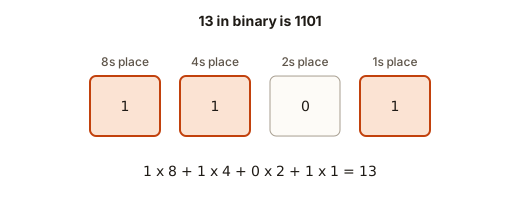 The number 13 as four bits: 1101, with place values 8, 4, 2 and 1
You can turn any decimal number into binary by repeated division by 2. Each division leaves a remainder of 0 or 1, and those remainders are the bits, read from the bottom up. Here is 13:
13 / 2 = 6, remainder 1   (the last bit, the 1s place)
 6 / 2 = 3, remainder 0
 3 / 2 = 1, remainder 1
 1 / 2 = 0, remainder 1   (the first bit, the 8s place)
Read the remainders from the bottom up: 1101
This uses the / and % operators from the first lesson. The remainder by 2 is always the last bit, and the division by 2 removes it. That is the same pattern as the last digit in base ten, but with 2 instead of 10.
An int on a current computer has 32 bits. That means 32 switches, each worth a power of two, from 1 up to 2 to the power 31. The bits are the only thing that the bit operators see. They do not see decimal digits, so the operators work the same way on every number that fits.
The bitwise operators
A bitwise operator works on each bit position separately. It takes the bit in position 0 of both operands, combines them, then takes the bit in position 1, and so on. The table lists the six operators.
| Operator | Name | Rule for each position |
|---|---|---|
& | AND | 1 only if both bits are 1 |
| | OR | 1 if either bit is 1 |
^ | XOR (exclusive OR) | 1 if the two bits differ |
~ | NOT | flips every bit |
<< | left shift | moves every bit to the left, which doubles the value for each step |
>> | right shift | moves every bit to the right, which halves the value for each step |
AND, OR and XOR take two operands. NOT takes one. The shifts take a value and a count of how many places to move.
Here is a program with a few of them. The comments show the binary, so you can check each line with your own columns.
The output is:
8
14
6
16
5
-6
Check the first three lines by columns. Write the two numbers one above the other, and go column by column from the right:
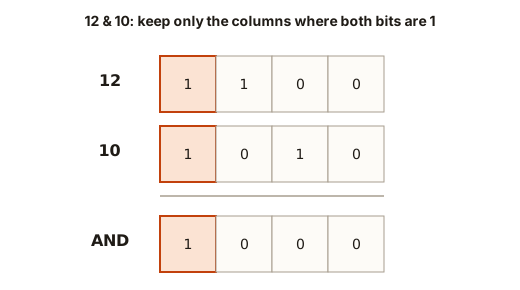 The bits of 12 and 10 in columns, with the AND, OR and XOR results underneath
The leftmost column is 1 in both numbers, so AND keeps a 1 there. The other columns are not both 1, so AND gives 0 there. The result is 1000, which is 8. For OR, a column is 1 when either number has a 1, which gives 1110, or 14. For XOR, a column is 1 when the two bits differ, which gives 0110, or 6.
The shift 1 << 4 moves the single 1 bit four places to the left. It was in the 1s place, and it moves to the 16s place. So the answer is 16. The shift 40 >> 3 moves all the bits three places to the right, which is the same as dividing by 8, and 40 divided by 8 is 5. The fraction is dropped, as with integer division.
The result of ~5 is -6, which needs a note. The NOT operator flips every one of the 32 bits. Since an int stores negative numbers in a system where the top bit is the sign, flipping all the bits of a number n gives -(n + 1). For 5 that is -6. You do not need the details of that scheme for this course. Just remember the rule: ~n is -n - 1 for an int.
Shifts: doubling and halving
A left shift by k places multiplies by 2 to the power k. The expression x << 3 is the same as x * 8, for values that do not overflow. A right shift by k places divides by 2 to the power k, dropping any remainder. The expression x >> 1 is the same as x / 2 for non-negative x.
Most programmers use shifts when the bits matter, not to double a number. A shift by a fixed count is a fast operation, but a compiler will usually do the same work for x * 8, so choose the form that reads more clearly for the problem.
There are three rules to remember for shifts, because the compiler warns about them and the results are not defined when they break.
- The shift count must not be negative.
5 >> -1is undefined. g++ saysright shift count is negative [-Wshift-count-negative]. - The shift count must be smaller than the width of the type. For
intthat means less than 32. g++ warnsleft shift count >= width of typefor1 << 40on anint. - Shifting a negative number to the right depends on the language version. Stay with non-negative numbers when you use shifts, unless you have checked the rules for your version.
For values bigger than an int, use a long long and write the literal as 1LL. For example, 1LL << 40 is about a trillion. Using 1 << 40 on an int is the bug the warning describes.
Useful bit tricks
Bit tricks are short expressions that answer a question about the bits in one step. Each one below is worth knowing well, because they come up in interviews. Here is a program that uses four of them.
The output is:
0
1
0
9 5
Here is what each trick does, one at a time.
Odd or even. The last bit of a number is its 1s place. An odd number has a 1 there, and an even number has a 0. So n & 1 is 1 for odd numbers and 0 for even numbers. For n = 16, the last bit is 0, so the answer is 0, which means even.
Power of two. A power of two has exactly one bit set, such as 1000 for 8. Subtracting 1 from it flips that bit to 0 and sets every bit below it to 1. For example, 8 - 1 is 7, which is 0111. The AND of 1000 and 0111 is 0000, which is 0. So n & (n - 1) is 0 exactly when n has one bit set. For n = 16, the answer is 1, which means true. This test is only valid for positive n, because zero and negative numbers need separate handling. Zero gives 0 & -1, which is 0, so zero would also pass this test. Always check for n > 0 first when zero matters.
Clear the lowest set bit. The same expression does more than test. It removes the lowest 1 bit of n. Take 12, which is 1100. Then 12 - 1 is 11, which is 1011. The AND is 1000, which is 8. The lowest set bit, the 4s place, is gone. Repeating this operation counts the 1 bits, because each step removes one. That is the standard way to count set bits in an interview.
Here is the count for 12, written as a trace table. Each row is one step of the process. The loop stops when the number reaches 0.
| Step | n in binary | n - 1 | n & (n - 1) | Count so far |
|---|---|---|---|---|
| start | 1100 (12) | 1011 (11) | 1000 (8) | 0 |
| 1 | 1000 (8) | 0111 (7) | 0000 (0) | 1 |
| 2 | 0000 (0) | stop | stop | 2 |
Each step removed one 1 bit. Step 1 removed the 4s place, and step 2 removed the 8s place. The count is 2, and 12 has two 1 bits. The table makes the idea clear, and it shows why the number of steps depends on the number of 1 bits, not on the size of the number.
Read bit k. Shift the bits right by k places, so the bit you want moves into the 1s place. Then mask with & 1 to keep only that bit. For n = 16, which is 10000, the bit in position 2 is 0. The shift 16 >> 2 is 4, which is 100, and 4 & 1 is 0.
Swap with XOR. XOR has a useful property: a ^ b ^ b is a. Doing XOR with the same value twice undoes it. The three lines swap x and y without a temporary variable. Start with x = 5 and y = 9. After the first line, x holds the XOR of both. After the second line, y holds the original x. After the third line, x holds the original y. The output is 9 5. The XOR swap is a classic puzzle. In real code, use a temporary variable. It is clearer and it does not fail when x and y are the same variable.
Masks: set, clear, toggle and test a bit
A mask is a number used to pick out or change certain bits. The common operations on one bit all follow one pattern: build a number with a single 1 at the bit you care about, then combine it with the number. Let n be the number and k the bit position.
- Set bit k:
n | (1 << k). The OR puts a 1 in that position and leaves the other bits alone. - Clear bit k:
n & ~(1 << k). The NOT of the mask has a 0 in that position and 1s everywhere else, so the AND clears only that bit. - Toggle bit k:
n ^ (1 << k). The XOR flips the bit and leaves the others alone. - Test bit k:
(n & (1 << k)) != 0. The AND keeps only that bit, which is 0 or the mask value.
Here is a program with the first three operations, on the number 5, which is 0101 in binary.
The output is:
13 4 7Trace the three results. Set bit 3: 1 << 3 is 8, and 5 | 8 is 1101, which is 13. Clear bit 0: 1 << 0 is 1, its NOT is ...1110, and 0101 & 1110 is 0100, which is 4. Toggle bit 1: 1 << 1 is 2, and 0101 ^ 0010 is 0111, which is 7.
Masks are very common in real programs. A Linux file permission such as rw- is three bits: 4 for read, 2 for write and 1 for execute. A permission value of 6 is 110, which means read and write. To check for write, use the test (perm & 2) != 0. Trying to write perm & 2 != 0 without brackets is a classic bug, which we will look at in the debugging walkthrough.
Packing two small numbers into one int
Bit operators let you store two small numbers in one int. This is common when memory or a network message has to be small. The idea is to give each number its own range of bits. Suppose the high number is 0 to 255 and the low number is also 0 to 255. Each number fits in 8 bits, so the high one can sit in bits 8 to 15 and the low one in bits 0 to 7.
To pack them, shift the high number left by 8 places and combine the low number with OR. To unpack them, shift right by 8 places to get the high number back, and use AND with 0xFF to get the low number back. The number 0xFF is hexadecimal, a base-16 notation, and it equals 255. In binary it is eight 1 bits, 11111111, so & 0xFF keeps only the lowest eight bits.
Type 3 200 in the Input box. The output is:
packed: 968
hi: 3
lo: 200
Trace the packing. 3 << 8 is 768, which is 1100000000 in binary, so the 3 sits in bits 8 and 9. The number 200 is 11001000, which fits in the low eight bits. The OR of the two is 768 + 200, which is 968. Unpacking reverses the steps. 968 >> 8 is 3, and the AND with 0xFF keeps the 3. For the low part, 968 & 0xFF keeps only the lowest eight bits, which is 200.
This pattern is worth remembering because it shows the main purpose of bit operators in practice. Each operation has one job. The shift moves a value to its place, OR combines values that do not overlap, and AND with a mask cuts out one part. If two values ever overlap, the OR loses information, so packing only works when each number really fits in its range. A value of 256 for the low part would spill into the high part, and the unpacked answers would be wrong.
Precedence: which operator goes first
Precedence decides which operator is applied first when more than one appears in an expression. In the first lesson you saw the two arithmetic levels. The full C++ rules have more levels, and the bitwise operators sit in the middle of them. The table below lists the levels from highest to lowest. Higher rows run first. Operators on the same row share a rank, and they are read left to right unless the row says otherwise.
| Level | Operators | Example |
|---|---|---|
| 1 | x++ x-- function call f() subscript a[i] | a[i]++ |
| 2 | ++x --x ! ~ unary - | !flag |
| 3 | * / % | 2 * 3 |
| 4 | + - | 2 + 3 |
| 5 | << >> | 1 << 3 |
| 6 | < <= > >= | a < b |
| 7 | == != | a == b |
| 8 | & (bitwise AND) | n & 1 |
| 9 | ^ (bitwise XOR) | x ^ y |
| 10 | | (bitwise OR) | a | b |
| 11 | && | a && b |
| 12 | || | a || b |
| 13 | ? : (conditional) | x ? a : b |
| 14 | = += -= and the other assignments | x += 1 |
| 15 | , (comma) | rarely used in beginner code |
Read the table as a set of rules, not as a list to memorise. Three things matter most for this course.
- Multiplication comes before addition, which comes before shifts, which come before comparisons, which come before
&,^and|, which come before&&and||. The bit operators sit below the arithmetic and above the logical operators. - Comparisons bind more tightly than the bitwise AND. This is the trap in the next section.
- Assignments are at the bottom, so they run last.
The reason the table has this shape is historical. The designers of the language wanted arithmetic to look like school maths, and they placed the bitwise operators below comparisons. Many programmers agree that this is an unfortunate choice, but you must learn it as it is.
The trap: comparison before AND
Look at n & 1 == 0. You might read it as "the bit 1 of n is zero". The table says that == runs before &. So the expression means n & (1 == 0). The comparison 1 == 0 is false, which is 0. Then n & 0 is always 0, whatever n is. The test never tells you anything about n.
Here is a program with the wrong form, the right form and a shift that needs brackets.
The output is:
0
1
24
Trace each line. Line one is n & (1 == 0), which is 6 & 0, which is 0. Line two has brackets, so the AND runs first: 6 & 1 is 0, and 0 == 0 is true, which prints 1. Line three is (1 + 2) << 3, because + is higher than <<. The result is 3 times 8, which is 24.
When g++ sees n & 1 == 0 with -Wall, it prints suggest parentheses around comparison in operand of '&' [-Wparentheses]. That warning is the compiler telling you the same thing as the table. Add the brackets and the warning goes away.
The precedence table is a reference. The brackets are the solution. Every time you mix bit operators with comparisons or shifts, write the brackets even when you are sure of the rule. Your reader will not have the table in front of them, and neither will you in six months.
Evaluating an expression in the right order
When you are not sure what an expression means, work out its order by hand. A good method is to find the operator with the highest precedence, apply it, replace that part with its value, and repeat. This is exactly how a computer evaluates an expression, and a stack is the tool that helps most when you write this kind of evaluator yourself.
A stack is a line of items where you can only add or remove the item on top. Adding is a push and removing is a pop. The last item pushed is the first item popped. The visualizer below shows that behaviour step by step. Watch what happens to the top item each time.
removed: nothing
The top is the box marked top. An outlined box was just pushed or peeked.
The stack is empty. The last item pushed is the first one popped.
Step through the animation above. Notice that the stack only ever changes at the top, and that the item you need most is always the last one you put in. An expression evaluator uses two stacks: one stack holds the numbers it has seen, and another holds the operators that are waiting for their right-hand number. When a lower-precedence operator arrives, the evaluator first finishes the waiting higher-precedence ones. That is how precedence is built into the code. You will write a version of this in the assignment at the end of the module.
For now, here is the order for 2 + 3 * 4 - 6 / 2, written as a list of steps:
Start:           2 + 3 * 4 - 6 / 2
1. 3 * 4 = 12    2 + 12 - 6 / 2
2. 6 / 2 = 3     2 + 12 - 3
3. 2 + 12 = 14   14 - 3
4. 14 - 3 = 11   11
The steps follow the precedence table exactly. The multiplication and the division run first, from left to right. The addition and subtraction run last, from left to right. The answer is 11.
The diagram below shows the same expression as a tree. The tree is a picture of the order of operations. The operator nearest the bottom runs first, and the root at the top runs last. The brackets in (2 + 3) * 4 change the shape of the tree, which is why they change the answer.
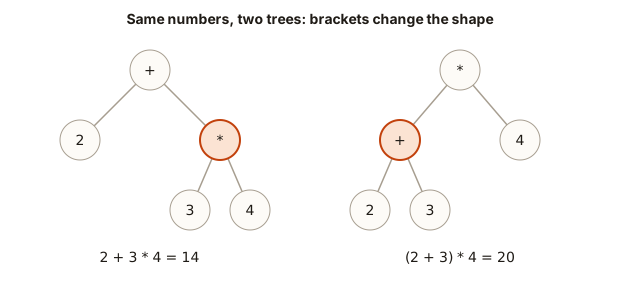 Expression trees: 2 + 3 * 4 has the multiplication at the bottom, while (2 + 3) * 4 has the addition at the bottom
Common mistakes
These mistakes are the ones that catch experienced programmers in real code. Each one is shown with its result.
Mistake 1: & where you meant &&. The bitwise AND works on bits. The logical AND works on truth values. For 5 && 2 the answer is true, which prints 1. For 5 & 2 the answer is 0, because 101 & 010 is 000. A condition like if (flags & 2) is correct when you want a bit test, and wrong when you meant two conditions.
Mistake 2: n & 1 == 0 without brackets. Covered above. Gives 0 whatever n is.
Mistake 3: shifting by a negative count or by the width of the type. 1 << 40 on an int triggers left shift count >= width of type. 1 << -1 triggers left shift count is negative. Both are undefined. Use 1LL for big shifts.
Mistake 4: using ^ as "to the power of". 2 ^ 3 is 1, not 8, because ^ is XOR. For a power of two, use 1 << k, or call pow for other bases.
Mistake 5: testing a bit with n & k as if it were a yes or no. The result of n & (1 << k) is either 0 or 1 << k. For bit 3 it is 0 or 8, not 0 or 1. Compare it with != 0, or shift it back down to get 0 or 1.
Mistake 6: expecting >> on a negative number to behave as division. Right shift of a negative number is not the same as division by 2 for every language version. Use division for negative values, and keep shifts for values you know are not negative.
Mistake 7: forgetting that ~ flips 32 bits, not one. ~5 is -6, not 10. The NOT flips the top bit too, which changes the sign. To clear one bit, combine ~ with a shifted 1, as the mask section showed.
Debugging walkthrough: the permission check that always says no
A small program checks whether a user has write permission. The permission value is a number whose bits stand for read (4), write (2) and execute (1). A user with read and write has the value 6, which is 110. The developer writes this check and expects 1 for a user with write permission:
The output is:
wrong: 0
right: 1
Press Run to see both lines. The wrong line is the one with no brackets. Find the bug by tracing the precedence. 2 == 2 is true, which is 1. Then perm & 1 is 6 & 1, which is 0. The check tests the wrong bit, the 1s place, and it reports no for a user who does have write permission. The right line puts brackets around the AND first, so perm & 2 is 2, and 2 == 2 is true.
The lesson for debugging is simple. When a bit test always gives the same answer, look at the precedence before you look at the logic. Print the intermediate values, as you learned in the first lesson. Here, perm & 2 printed as 2 would show that the AND is working, and the bug is in the comparison.
Variations and edge cases
- Unsigned numbers. The
unsignedtypes have no sign bit, and bit operations are much easier to reason about on them. The~of an unsigned zero is the largest value, not-1. Useunsignedfor bit puzzles when you can. - Numbers wider than 32 bits. A
long longhas 64 bits, and the masks work the same way with1LL. Anintmask like1 << 40is too big. - Zero.
n & (n - 1)is 0 for zero, so the power-of-two test needsn > 0. The XOR of a number with itself is 0, and the same test is useful for finding a single unpaired value. - Negative numbers. Bit tests on negative numbers are valid, but shifts and the power-of-two trick need care. Two's complement stores
-1as all bits set, so-1 & 1is 1. - Counting bits. The loop version uses
n & (n - 1)repeatedly, and it runs once for each 1 bit. A value with 30 one bits takes 30 steps, not 32.
Interview questions about bits
Question 1: how do you check if a number is a power of two? Use n > 0 && (n & (n - 1)) == 0. Explain why both parts are needed. The first part removes zero, and the second part checks that exactly one bit is set. A strong answer also notes that the expression is one operation shorter than the loop version.
Question 2: count the set bits in an integer. The simplest method checks the bottom bit and shifts right until the number is 0. The faster method uses n = n & (n - 1) and counts the steps. Name both and explain the difference: the first takes time proportional to the number of bits, and the second takes time proportional to the number of set bits.
Question 3: a list where every number appears twice except one. Find the one. XOR the whole list together. Pairs cancel, because x ^ x is 0, and 0 ^ y is y. The result is the unpaired number. This question is the most famous bit puzzle in interviews, and it works in one pass with one variable.
Question 4: swap two numbers without a temporary variable. Use XOR as shown above, and then say what goes wrong when x and y are the same variable. The answer becomes 0, because x ^ x is 0. A strong answer also says that the temporary variable version is clearer and safer in real code.
Question 5: how do you multiply by 10 with only shifts and adds? Note that 10 is 8 + 2. So x * 10 is (x << 3) + (x << 1). The question checks that you know shifts double a value and that you can build any multiplication from shifts and adds.
Real-world uses
- File permissions. The three permission bits for read, write and execute are stored as a small number. Tools such as
chmodset and clear them with the same masks as this lesson. - Network masks. An IP address and a subnet mask are combined with AND to find the network part of the address. Routers do this for every packet.
- Colours. A colour such as
0xFF8800packs three 8-bit numbers into one 24-bit value. The red part is(color >> 16) & 0xFF, and the green part is(color >> 8) & 0xFF. - Game flags. A character can have several states, such as poisoned, shielded and stunned, stored as separate bits in one number.
- Compression and hashing. Compressed data formats and many hash functions shift and mix bits to scramble values quickly.
Practice
Try each exercise in a new program. Predict the output first. Some exercises ask for input. Type the value in the Input box.
- Write the number 37 in binary by hand, using repeated division by 2. Then write a program that prints bit 0 through bit 5 of 37 on six lines, using
(n >> k) & 1. Check your hand answer against the program.
Solution
#include <iostream>
using namespace std;

int main() {
    int n = 37;
    cout << ((n >> 0) & 1) << endl;
    cout << ((n >> 1) & 1) << endl;
    cout << ((n >> 2) & 1) << endl;
    cout << ((n >> 3) & 1) << endl;
    cout << ((n >> 4) & 1) << endl;
    cout << ((n >> 5) & 1) << endl;
    return 0;
}
The output is 1, 0, 1, 0, 0, 1, one per line. The number 37 is 100101 in binary, which is 32 + 4 + 1. Reading the output from bit 0 upward gives the same bits in reverse.
- Read a number and print
trueif it is even, using&. Test with37and64.
Solution
#include <iostream>
using namespace std;

int main() {
    int n;
    cin >> n;
    cout << boolalpha << ((n & 1) == 0) << endl;
    return 0;
}
For 37 the output is false. For 64 the output is true.
- Check whether 64 and 100 are powers of two with the
n & (n - 1)trick. Printtrueorfalsefor each.
Solution
#include <iostream>
using namespace std;

int main() {
    int a = 64, b = 100;
    cout << boolalpha;
    cout << (a > 0 && (a & (a - 1)) == 0) << endl;
    cout << (b > 0 && (b & (b - 1)) == 0) << endl;
    return 0;
}
The output is true for 64 and false for 100. The number 100 is 1100100, which has three bits set, so it fails the test.
- Count the set bits of a number from 0 to 15 using only
&and>>, with four lines and no loops. Test with11, which is1011and should print3.
Solution
#include <iostream>
using namespace std;

int main() {
    int n;
    cin >> n;
    int count = (n & 1) + ((n >> 1) & 1) + ((n >> 2) & 1) + ((n >> 3) & 1);
    cout << count << endl;
    return 0;
}
For 11 the four bits are 1, 1, 0 and 1, so the count is 3.
- Read a number and set bit 2, clear bit 0 and toggle bit 4. Print each result on its own line. Test with
5.
Solution
#include <iostream>
using namespace std;

int main() {
    int n;
    cin >> n;
    cout << (n | (1 << 2)) << endl;
    cout << (n & ~(1 << 0)) << endl;
    cout << (n ^ (1 << 4)) << endl;
    return 0;
}
For 5 the outputs are 5 (bit 2 is already set), 4 and 21. Toggling bit 4 adds 16 because that bit was off.
- Predict and then run:
cout << (1LL << 40);. Explain why1 << 40would be wrong for anint.
Solution
The output is 1099511627776. The literal 1LL is a long long, which has 64 bits, so bit 40 fits. For int, the shift count 40 is bigger than the 32-bit width, which is undefined, and g++ warns about it.
- Predict the output of
cout << (2 + 6 & 3 | 8);and then check with a program. Explain the order.
Solution
The output is 8. The addition runs first, so 2 + 6 is 8. Then 8 & 3 is 0, because 1000 and 0011 share no 1 bits. Then 0 | 8 is 8. The brackets that make this clear are (((2 + 6) & 3) | 8).
- Read a count, then that many numbers. Every value appears twice except one. Print the value that is not paired, using XOR. Type
5in the Input box, then the line4 1 2 1 2. The expected output is4.
Solution
#include <iostream>
using namespace std;

int main() {
    int count;
    cin >> count;
    int answer = 0;
    int x;
    cin >> x;
    answer ^= x;
    cin >> x;
    answer ^= x;
    cin >> x;
    answer ^= x;
    cin >> x;
    answer ^= x;
    cin >> x;
    answer ^= x;
    cout << answer << endl;
    return 0;
}
The XOR of 4 1 2 1 2 is 4, because each pair of equal values cancels to 0. The program reads exactly five values, which matches the count of 5. Lessons on loops will let you write this without repeating the read five times.
- Explain why the XOR swap fails when you run
x ^= x;on the same variable twice, and what the value becomes.
Solution
A value XOR itself is 0 in every bit position. So x ^= x makes x equal to 0, and the swap sequence stops working, because the value is gone. A temporary variable does not have this problem.
- Write a program that reads a permission value from input, such as
5, and printsread: true,write: falseandexec: true. The bits are read 4, write 2 and exec 1. Use brackets in each test.
Solution
#include <iostream>
using namespace std;

int main() {
    int perm;
    cin >> perm;
    cout << boolalpha;
    cout << "read: " << ((perm & 4) != 0) << endl;
    cout << "write: " << ((perm & 2) != 0) << endl;
    cout << "exec: " << ((perm & 1) != 0) << endl;
    return 0;
}
For 5, which is 101, the output is read: true, write: false and exec: true.
Summary of this module
+ - * / %do arithmetic; whole-number division drops the fraction, and the type of the operands decides the answer.=stores,+=and++update; prefix changes first, postfix uses the old value.== != < > <= >=compare;&& || !combine; the right side of&&and||may be skipped.& | ^ ~ << >>work on bits; bracket them, because the precedence table surprises people.
The last lesson of the module asks you to build an expression calculator that uses the same ideas.