Why this matters
Most loops in real programs count something. You visit the first item, then the second, then the third, until you reach the end of a list. You print a table from 1 to 10. You try every position in a row of seats. The while loop can do all of this, but it spreads the counter across three separate places: the start is above the loop, the test is in the brackets, and the update hides inside the body. The for loop puts all three on one line, so you can see the whole shape of the loop before you read anything else.
You will write for loops more than any other kind of loop. Arrays, strings, sorting, searching and nearly every pattern in this module use them. Learn the three parts and the order they run in, and most of the module becomes easier.
Start from the first principle: a counter has three jobs
Any loop that counts needs three things. It needs a starting value, a place where the counter begins. It needs a test that decides whether to keep going. And it needs a step that moves the counter on after each pass. Without a start, the counter has no value. Without a test, the loop never stops. Without a step, the counter never changes and the test gives the same answer forever.
In the previous lesson you wrote all three parts yourself, each on a different line:
int i = 1;          // start, above the loop
while (i <= 5) {    // test, in the brackets
    cout << i;
    i++;            // step, inside the body
}
The for loop is the same three jobs written in one place:
for (int i = 1; i <= 5; i++) {
    cout << i;
}
Nothing new happens at run time. The computer does exactly the same work as the while version. The gain is for you, the reader. Your eye finds the start, the test and the step in one glance, and that is why the for loop is the standard way to count.
An everyday analogy: climbing stairs
Picture a staircase with ten steps. You stand at the bottom, which is step zero. Before each step, you ask: "am I at the top yet?" If not, you climb one step and ask again. When you reach the top, you stop.
The bottom of the stairs is the starting value. The question "am I at the top yet?" is the test. The climb of one step is the update. A for loop describes the whole climb on one line: where you start, what you ask before each step, and how far each step moves you.
The analogy also shows why loops that count from zero feel natural. The first step of a staircase is the one you stand on before you move. A loop that starts at 0 and stops before 10 climbs exactly ten steps and never asks for an eleventh. You will use this shape constantly, because arrays in C++ start at position 0.
The precise version
The general form of a for loop is:
for (start; condition; update) {
    body
}
The three parts are separated by semicolons, and they run in a fixed order:
- The start runs once, before anything else.
- The condition is checked. If it is false, the loop ends.
- The body runs once.
- The update runs, and the program goes back to step 2.
Study the picture below. It shows the same order as a flow, with the start above the loop and the update at the bottom of each pass.
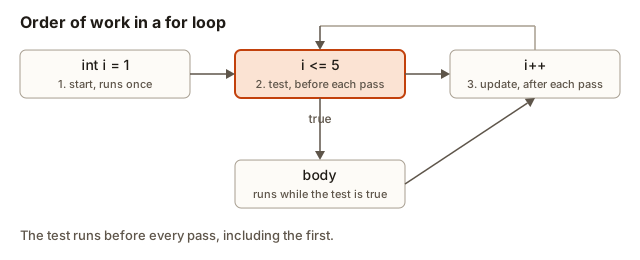 Diagram of a for loop: the start runs once, the test runs before every pass, the body runs while the test is true, and the update runs after each pass
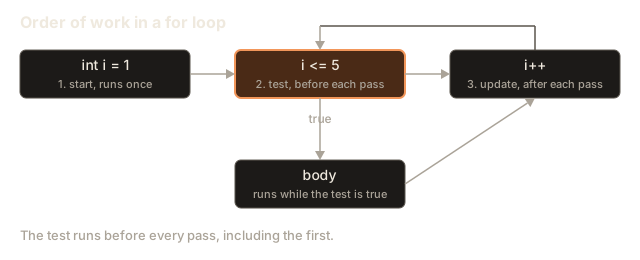
The start is the only part that runs exactly once. The condition runs before every pass, including the first and the one that ends the loop. The update runs after every pass but not after the final check that fails. These timing rules make a for loop predictable, and they are the first thing an interviewer checks when you write one.
A variable declared in the start, such as int i = 1, belongs to the loop. It exists while the loop runs, and it disappears when the loop ends. You will see this in the scope section below.
Worked example 1: count from 1 to 5
Here is the first complete program. It prints the numbers one to five on one line, each followed by a space. It needs no input, so press Run.
The output is:
1 2 3 4 5 The line ends with a space after the last number, because the body prints a space every time. That trailing space is part of the output, so do not be surprised by it.
Compare this with the while version from the previous lesson. The two programs do the same job. The for version keeps the counter i local to the loop. Let us trace it for the first three passes. Each step shows the start, the test and the update in order.
- The start sets
ito 1. This happens once. - The test
1 <= 5is true. The body prints1. The update makesi2. - The test
2 <= 5is true. The body prints2. The update makesi3. - The test
3 <= 5is true. The body prints3. The update makesi4.
The passes continue until i is 6. The test 6 <= 5 is false, so the loop ends without printing. The final cout << endl; runs after the loop and moves the cursor to a new line.
Worked example 2: a multiplication table from input
Counting loops are good for tables. The next program reads a number from the user and prints its table from 1 times to 10 times. Type 7 into the Input box before you run it.
With the input 7, the output is:
7 x 1 = 7
7 x 2 = 14
7 x 3 = 21
7 x 4 = 28
7 x 5 = 35
7 x 6 = 42
7 x 7 = 49
7 x 8 = 56
7 x 9 = 63
7 x 10 = 70
The loop variable i is the multiplier. The number typed by the user is n, and it stays the same for every row. The expression n * i is worked out again on each pass, so each row gets a new product. Notice that the loop runs ten times whatever number you type. The count is fixed by the test i <= 10, and the input only changes the values printed.
Here is a point to remember. Writing i < 10 instead of i <= 10 would print only nine rows, because the last value of i would be 9. This is the off-by-one error, and you will meet it in almost every counting loop you write. Always ask whether the last value should be included.
Worked example 3: counting down in steps
A for loop does not have to count up by one. The start, test and update are free choices. Here the loop starts at a number typed by the user, steps down by 3 each time, and stops before the number goes below 0.
Type 20 into the Input box.
The output for 20 is:
20 17 14 11 8 5 2 Trace the values of i: 20 passes the test 20 >= 0, then 17, 14, 11, 8, 5 and 2. The next value would be -1. The test -1 >= 0 is false, so the loop stops. The number -1 is never printed, even though the step produced it. The test is checked after the update, which is why the value -1 gets computed but not used.
Notice the update i -= 3. It is shorthand for i = i - 3. The C++ compound operators work in a for loop just as they do anywhere else: +=, -=, *= and /= all change the variable by the amount on the right. The step can be any expression you like, such as i *= 2 to double the counter each pass. A loop like that is the basis of the power-of-two search you may have seen in the previous lesson.
Common shapes you will write again and again
Some for loops appear so often that you should recognise them without thinking. Here are the four you will use most in this module.
Counting up from 1 to n, inclusive:
for (int i = 1; i <= n; i++) {
    // i takes the values 1, 2, ..., n
}
Counting from 0 to n minus one. This is the shape for arrays, because the first position of an array is 0 and the last is n - 1:
for (int i = 0; i < n; i++) {
    // i takes the values 0, 1, ..., n-1: exactly n passes
}
Counting down:
for (int i = n; i >= 1; i--) {
    // i takes the values n, n-1, ..., 1
}
Stepping by two, such as all the even numbers up to 10:
for (int i = 0; i <= 10; i += 2) {
    // i takes the values 0, 2, 4, 6, 8, 10
}
The second shape is the one to learn by heart. The rule is simple: starting at 0 with a test i < n runs the body exactly n times, and the counter never reaches n. You will use this shape whenever you walk through an array, a string or any list of items.
Worked example 4: walking through an array
An array is a fixed row of values of the same type, stored one after another in memory. Each value sits at a numbered position called an index. The first position has index 0, and the last has index n - 1, where n is the number of values. An array is the natural partner of a for loop, because the loop can visit every index in turn.
The next program stores five test scores in an array. It uses one loop to print each score with its index, and a second loop to find the total and the best score.
The output is:
scores[0] = 70
scores[1] = 85
scores[2] = 90
scores[3] = 64
scores[4] = 78
total 387
average 77.4
best 90
Read the first loop carefully. The test i < n stops the loop at 4, the last valid index. If you wrote i <= n, the loop would reach index 5, which does not exist in an array of five values. C++ does not check this for you. The program would read a value that belongs to some other part of memory and print a meaningless number, or crash. This is one of the most dangerous mistakes in C++, and it is covered in detail later in the course. For now, remember the rule: indices run from 0 to n - 1.
The second loop is a running total and a running best, combined. The total starts at 0, the best starts at the first score, and each pass adds the score and compares it. The average uses static_cast<double>(total) / n. Without the cast, total / n would divide two integers, and C++ would drop the fraction, printing 77 instead of 77.4. The cast converts total to a decimal number first. You will see casts again in the functions module.
The second loop could have been combined with the first. Separate loops are easier to read, and the cost is small. Experienced programmers still write clear separate loops when the work is different.
Worked example 5: two pointers moving toward each other
Sometimes a loop needs two counters at once. The most famous example is reversing an array in place. Instead of building a new array, you swap the first value with the last, the second with the second-to-last, and so on, until the two counters meet in the middle. Programmers call these two counters pointers. The word means something else in C++, where a pointer holds a memory address, and you will meet that meaning in a later module. Here a pointer is just a position in the array. This technique is called two pointers.
The for loop handles two counters with a comma. The start i = 0, j = n - 1 sets both at once. The update i++, j-- moves them together. The test i < j stops when they meet or pass each other.
The output is:
original: 3 8 1 9 4
reversed: 4 9 1 8 3
Work through the swap loop on paper. The start sets i to 0 and j to 4. The test 0 < 4 is true, so the body swaps a[0] (3) with a[4] (4). The array becomes 4 8 1 9 3. The update moves i to 1 and j to 3. The test 1 < 3 is true, so the body swaps a[1] (8) with a[3] (9). The array becomes 4 9 1 8 3. The update moves i to 2 and j to 2. The test 2 < 2 is false, and the loop ends. The middle value 1 never moves, which is correct, because a value in the middle of an odd-length array stays where it is.
Use the visualizer below to watch two pointers move toward each other. It is the same idea as the reversal above, and watching the pointers meet in the middle is the fastest way to fix the picture in your mind.
sum: not computed yet
The left and right pointers are labelled under the boxes. Outlined boxes are the pair being added, filled boxes are the pair that works.
Find two items that add up to 14. One pointer starts at each end.
The reversal uses one pass over half the array. Each pass does a constant amount of work, and there are about n divided by 2 passes, so the time is O(n). It needs only the temporary variable tmp, so the extra memory is O(1). Interviewers ask this question often. Give both numbers when you answer: linear time and constant extra space.
Worked example 6: counting vowels in a line of text
The last example reads a whole line of text and counts its vowels. It introduces string, the C++ type for text, and shows that a for loop can walk through the characters of a string just as it walks through an array. The type string comes from the <string> header, and getline reads a whole line, including spaces, from the input.
Type Loops repeat work into the Input box and press Run.
The output is:
vowels: 6The expression line[i] gives the character at position i, counting from 0, just like an array. The function line.size() returns how many characters the string holds. The loop test i < line.size() is the same shape as i < n from the array example, so the rule carries over: start at 0, stop before the length.
The loop variable has the type size_t. That is the unsigned integer type C++ uses for sizes and positions, and it is a common source of bugs, which the common mistakes section explains. For this loop it is safe, because the counter only goes up from 0.
Count the vowels by hand to be sure you understand the output: in Loops repeat work, the letters o and o in Loops, e, e and a in repeat, and o in work give 2 + 3 + 1, which is 6.
The scope of the loop variable
A variable declared inside the brackets of a for loop exists only inside the loop. This is called its scope, the region of code where a name can be used. Once the loop ends, the name is gone.
for (int i = 0; i < 3; i++) {
    cout << i << endl;
}
// cout << i << endl;   // error: i does not exist here
The compiler rejects the last line, with the message 'i' was not declared in this scope. Scope is a safety feature. You can reuse the name i in the next loop without worrying that the first loop changed it, which is exactly why the examples above could declare int i in each loop.
If you need the value after the loop, declare the variable before the loop, like this:
int i;
for (i = 0; i < 3; i++) {
    cout << i << endl;
}
cout << "stopped at " << i << endl;
This prints 0, 1 and 2, then stopped at 3. The variable i holds 3 after the loop, because the test failed on that value. Use this form only when you need the final value, such as when searching for the first match and reporting where it was.
Other forms of the for loop
Every part of a for loop is optional, but the semicolons must stay. The start, the condition and the update can each be left empty.
for (;;) {
    // no start, no test, no update: runs forever
}
An empty condition counts as true, so for (;;) is an infinite loop. You will meet a form like this in the next lesson, where break gives the loop an exit. The more common use of an empty part is in a loop that is driven by something else, such as a break that depends on input.
You can also run more than one variable at a time, with the comma operator. The earlier two-pointer example is one case. Here is another:
for (int i = 0, j = 10; i < j; i++, j--) {
    // i goes up, j goes down, and they stop when they meet
}
The comma separates two expressions in the start and in the update. The condition still has one test. Use the comma form only when two counters really belong together. Most loops need only one counter, and one counter reads more easily.
Comparing for with while
Both loops work. The choice is about what your code says to the reader.
Use for when you know how many times the loop should run, or when you count through a range such as the positions of an array. The reader can see the count in the header.
Use while when you repeat until something happens, and you cannot say in advance how many times it will be. Reading input until a sentinel, searching until a value is found and halving a number until it reaches zero are all while jobs.
A short test helps. Ask: can I write the number of passes as a formula before the loop starts? If yes, use for. If no, use while. The binary search in the previous lesson was a while loop, because it could not know the number of passes. The table in the multiplication example was a for loop, because it always had ten rows.
What happens inside
The computer does not have a special instruction for for. The compiler rewrites it into the same steps a while loop uses. A for loop behaves as if it were this:
{
    int i = 0;          // start, once
    while (i < n) {     // test, before every pass
        body
        i++;            // update, after every pass
    }
}
The outer braces show the scope. The variable i is created at the start and removed at the end, which is why it cannot be used after the loop. The compiler keeps i in a register or a memory slot, and the update is a single instruction that adds 1 to it.
This picture also explains one important detail for later. In a while loop, a continue that skips the update causes an infinite loop. In a for loop, the update belongs to the loop header, so continue still runs it. You will see that difference in the next lesson.
Reading a for loop you did not write
Most of your reading as a programmer will be code that someone else wrote. A quick method for understanding a for loop makes that much faster. Start with the header, and answer four questions before you read the body.
First, what is the starting value, and is it inside the range you expect? Second, what is the test, and does it include or exclude the last value? Third, what is the update, and how much does it move the counter? Fourth, does anything in the body change the counter or the bound? If the body changes the counter, the loop no longer does what the header says, and you must read every line of the body to know what it does.
Take the header for (int i = n - 1; i >= 0; i -= 2) as an example. The start is the last index, the test runs down to 0 inclusive, and the step moves two places each time. For n equal to 5, the counter takes 4, 2 and 0. The loop visits every second position counting from the end. Answering the four questions in order takes about ten seconds, and it prevents most mistakes when you change someone else's loop.
When you change a loop, change one part at a time. Edit the start, then run the program and check the first value. Edit the test, then check the last value. Edit the update, then check the middle. Changing all three at once makes it hard to tell which edit caused a new bug.
Common mistakes and the messages you will see
Most for loop errors are small. The compiler messages below are real output from GCC. Some systems show the quote marks as curly characters, but the words are the same.
Commas where semicolons belong. Writing commas between the three parts is a very common slip:
for (int i = 0, i < 5, i++) {
    cout << i << endl;
}
GCC reports several errors, starting with:
error: expected ';' before '<' tokenThe fix is to separate the three parts with semicolons. The comma belongs only between two starts or two updates.
Using the loop variable after the loop. The next fragment uses i after the loop that declared it:
for (int i = 0; i < 3; i++) {
    cout << i << endl;
}
cout << i << endl;
The error is:
error: 'i' was not declared in this scopeThe message is not saying the loop failed. It says the name does not exist outside the loop. Declare the variable before the loop if you need it afterwards.
A stray semicolon after the header. The semicolon after the closing bracket of the header makes the body empty:
for (int i = 0; i < 5; i++);
{
    cout << "once" << endl;
}
The braces below run once, after the loop has finished counting, and the message is printed a single time. With -Wall, GCC warns:
warning: this 'for' clause does not guard... [-Wmisleading-indentation]The warning exists because the indentation suggests the braces belong to the loop. They do not. Remove the semicolon.
An unsigned counter in a countdown. This is the classic trap. The next fragment is meant to print 2, 1 and 0:
int n = 3;
for (size_t i = n - 1; i >= 0; i--) {
    cout << i << endl;
    if (i == 0) break;
}
The counter has the unsigned type size_t. An unsigned number cannot be negative. When i is 0 and the update subtracts one, it wraps around to a very large positive number. The test i >= 0 is then always true, so without the break the loop would never stop. GCC warns:
warning: comparison of unsigned expression in '>= 0' is always true [-Wtype-limits]The fix is to use a signed type, such as int, for any counter that can reach below zero. Use size_t for sizes and positions that only go up.
Declaring the same name twice. A new variable inside the body with the same name as the loop variable clashes with it:
for (int i = 0; i < 3; i++) {
    int i = 10;
    cout << i;
}
GCC reports:
error: redeclaration of 'int i'Choose a different name inside the body. The loop variable belongs to the header, and the body should use its own names.
Changing the counter inside the body. The next loop is legal, but it is hard to read, and it prints values that surprise you:
for (int i = 0; i < 10; i++) {
    cout << i << " ";
    i += 2;
}
The body adds 2 to i, and then the update adds 1. The loop prints 0, 3, 6 and 9. You can write such a loop, but a reader will have to trace it to understand it. If the step is not one, put the step in the header.
Debugging walkthrough: a table that is one row short
Suppose you wanted the table of 3 from 3 x 1 to 3 x 5, and you wrote this:
for (int i = 1; i < 5; i++) {
    cout << 3 << " x " << i << " = " << 3 * i << endl;
}
The program prints only four rows, and the last row is 3 x 4 = 12. The row 3 x 5 = 15 is missing. Do not guess at the fix. Trace the test. The first value of i is 1, then 2, 3, 4. When i is 5, the test 5 < 5 is false, so the loop stops before printing 5.
The bug is the test. The loop needs to include 5, so the test must be i <= 5. This is the off-by-one error again. A useful habit is to run the loop with the smallest and largest values in your head. If the first value and the last value are both right, the loop is right.
If the bug were harder to see, you would print the state. Put a line such as cout << "debug i = " << i << endl; at the top of the body, run the program, and read the values it prints. Remove the line when you are done.
Variations and edge cases
A careful programmer tests the boundaries of every counting loop. Here are the cases to think about.
A zero count. The loop for (int i = 0; i < n; i++) runs zero times when n is 0. That is correct: an empty array has no values to visit. The multiplication table always prints ten rows, so it does not have this case. Think about zero every time the count comes from input.
A negative count. If n is negative, i < n is false at the start, so the loop does nothing. Usually that is what you want. Check whether the problem allows negative input before you assume.
A test that skips the value. The next loop looks like it prints 1, 4, 7 and 10, then stops:
for (int i = 1; i != 11; i += 3) {
    cout << i << " ";
}
The values are 1, 4, 7 and 10, and then i becomes 13. The test i != 11 is never false, because 11 is never reached. The loop goes on past 11 forever, and eventually the number overflows. The fix is to use <= or <, not !=, when the step can skip the end value. Use != only when you are sure the counter lands exactly on the target.
The step is zero. A loop with i += 0 never changes its counter, so it is infinite. This is rare, but it is an easy typo when a step comes from a variable that holds zero.
The loop body changes the bound. If the body changes n while the loop uses i < n, the loop may run a different number of times than you expected. When the bound must stay fixed, copy it into a separate variable before the loop.
Interview questions this lesson prepares you for
Interviewers use short array problems to test how you move through data. Three questions come up often.
Reverse an array in place. Use two pointers, as in the example above. The time is O(n), because each element is touched once, and the extra space is O(1), because only a temporary variable is needed. Say that you swap pairs, and that the middle element stays put.
Count the pairs of positions whose values add up to a target. The simplest answer uses two nested for loops. The outer loop picks i, and the inner loop starts at i + 1 and checks each j. That is O(n squared) time and O(1) space. Mention that a sorted array allows a faster two-pointer answer, which lesson 5 covers.
Find the largest value in an array. A single for loop from index 0 to n - 1 works. The time is O(n). Give the starting value as the first element, not 0, so the answer is right when every value is negative.
Real-world uses
Every table in a report, every row in a spreadsheet and every frame in an animation is produced by a counting loop. A bank statement lists transactions by looping over an array of them. A photo app applies a filter by looping over every pixel. A web server loops over the list of waiting requests. The shapes are the four from this lesson: count up, count down, step by a fixed amount, and walk an index from 0 to the end.
The two-pointer pattern appears in text editors, in palindrome checks, and in merging sorted lists. The counting pattern appears in almost every program you will ever write.
Practice
Write each program and run it. Predict the output before you press Run, and compare. Hidden solutions are under each exercise.
- Print the squares of the numbers from 1 to 10, one per line. Hint: compute
i * iinside the body.
Solution
#include <iostream>
using namespace std;

int main() {
    for (int i = 1; i <= 10; i++) {
        cout << i * i << endl;
    }
    return 0;
}
The loop runs ten times, and each pass prints the square of the counter. The first line is 1 and the last is 100.
- Print the sum of all even numbers from 2 to 50. Hint: step the counter by 2, starting at 2, and keep a running total that starts at 0. The answer is 650.
Solution
#include <iostream>
using namespace std;

int main() {
    int sum = 0;
    for (int i = 2; i <= 50; i += 2) {
        sum += i;
    }
    cout << sum << endl;
    return 0;
}
The step of 2 visits only the even numbers, so the body never has to test for evenness. The sum of 2 + 4 + ... + 50 is 650.
- Read one number
nfrom the input and print a row ofnstars. For the input5the output is*****. Hint: loop from 0 ton - 1and print a star each time.
Solution
#include <iostream>
using namespace std;

int main() {
    int n;
    cin >> n;
    for (int i = 0; i < n; i++) {
        cout << "*";
    }
    cout << endl;
    return 0;
}
The shape i = 0 with i < n runs exactly n times, which is why it prints exactly n stars.
- Read a number and print how many multiples of 3 lie between 1 and that number, inclusive. For
10the answer is 3, because 3, 6 and 9 qualify. Hint: test each number withi % 3 == 0.
Solution
#include <iostream>
using namespace std;

int main() {
    int n;
    cin >> n;
    int count = 0;
    for (int i = 1; i <= n; i++) {
        if (i % 3 == 0) {
            count++;
        }
    }
    cout << count << endl;
    return 0;
}
The loop checks every number from 1 to n. The test i % 3 == 0 is true exactly for the multiples of 3, and count records how many there are.
- Print the numbers from 100 down to 0, stepping by 10: 100, 90, and so on down to 0. Hint: the update is
i -= 10, and the test must allow 0 to be printed.
Solution
#include <iostream>
using namespace std;

int main() {
    for (int i = 100; i >= 0; i -= 10) {
        cout << i << " ";
    }
    cout << endl;
    return 0;
}
The test i >= 0 includes 0. The output is 100 90 80 70 60 50 40 30 20 10 0 .
- Given the array
int a[6] = {4, 7, 1, 9, 3, 8};, find and print the position (index) of the smallest value. For this array the answer is 2. Hint: keep the index of the best value so far, and update it whenever you find a smaller value.
Solution
#include <iostream>
using namespace std;

int main() {
    int a[6] = {4, 7, 1, 9, 3, 8};
    int n = 6;
    int best = 0;
    for (int i = 1; i < n; i++) {
        if (a[i] < a[best]) {
            best = i;
        }
    }
    cout << best << endl;
    return 0;
}
The search starts at index 0, which is the first candidate, and checks indices 1 to 5. The value 1 at index 2 is the smallest, so the program prints 2.
- Using two pointers, check whether a word is a palindrome. A palindrome reads the same forwards and backwards, such as
level. Read one word withcin >> word. Printyesorno. Hint: compare the first and last letters, then move inward.
Solution
#include <iostream>
#include <string>
using namespace std;

int main() {
    string word;
    cin >> word;
    bool palindrome = true;
    for (int i = 0, j = (int)word.size() - 1; i < j; i++, j--) {
        if (word[i] != word[j]) {
            palindrome = false;
        }
    }
    cout << (palindrome ? "yes" : "no") << endl;
    return 0;
}
The pointers start at both ends and move inward. A mismatch sets the flag to false. The cast (int)word.size() keeps the counter signed, so j can reach below zero without wrapping around. For level the answer is yes, and for hello it is no.
- Print a right-angled triangle of stars with 4 rows. Row 1 has one star, row 2 has two, and so on. Hint: put one loop inside another. The inner loop's limit depends on the outer counter. Lesson 4 covers this in depth, so try it now with what you know.
Solution
#include <iostream>
using namespace std;

int main() {
    for (int row = 1; row <= 4; row++) {
        for (int star = 1; star <= row; star++) {
            cout << "*";
        }
        cout << endl;
    }
    return 0;
}
The inner loop runs row times on each row, so the number of stars grows by one each time.
- Find and fix the bug in this loop, which should print the digits 9 down to 0 but prints only 9 to 1:
for (int d = 9; d > 0; d--) {
    cout << d << endl;
}
Hint: decide whether the last value must be included.
Solution
The test d > 0 stops before 0. The fix is d >= 0. The loop then prints 9 through 0, which is ten lines.
- Explain in one sentence why
for (int i = 0; i < n; i++)runs exactlyntimes, and say what would change if you wrotei <= ninstead.
Solution
The counter starts at 0 and climbs one at a time, and the loop stops at the first value that is not less than n, which is n itself. So the counter takes the values 0 to n - 1, which is n passes. With i <= n the counter also takes the value n, so the loop runs n + 1 times, and when the loop indexes an array of size n, it reads one position past the end.
What you now know
- A
forloop puts the start, the test and the update on one line, in that order. The start runs once. The test runs before every pass. The update runs after every pass. - The shape
for (int i = 0; i < n; i++)runs exactlyntimes and visits indices 0 ton - 1. Learn it by heart. - A counter can count down, step by any amount, or move two pointers toward each other with a comma.
- The loop variable declared in the header belongs only to the loop. Declare it earlier if you need its value afterwards.
- Choose
forwhen the number of passes is known in advance, andwhilewhen the loop runs until something happens. - Watch for commas instead of semicolons, a stray semicolon after the header, an unsigned counter that counts below zero, and tests that skip the end value.