Why this matters
Programs repeat work all the time. A payroll system pays every employee. A game checks every frame of animation. A search looks at each item in a list until it finds the one it wants. You cannot write the same line a thousand times, and you cannot know ahead of time how many times some work will be needed. C++ solves this with a loop, a piece of code that the computer runs again and again.
The while loop is the simplest loop. Once you can read one, write one and trace one on paper, the for loop, the nested loops and the sorting algorithms later in this module are only variations on the same idea. Spend the time here. Every other loop depends on it.
Start from the first principle
A C++ program runs from the first line of main to its closing brace. Each statement runs once, in order. That is enough for a program that adds two numbers. It is not enough for a program that must do something many times.
Suppose you want the computer to print the numbers 1 to 5. Without a loop you would write five lines:
cout << 1 << endl;
cout << 2 << endl;
cout << 3 << endl;
cout << 4 << endl;
cout << 5 << endl;
That works for five numbers. It does not work for a thousand numbers, and it does not work when the count is only known while the program runs, such as "keep asking until the user types 0". You need a way to say "do this again" and a way to say "stop when this test fails". That is what a loop gives you.
Each time the computer does the repeated part, we call that one iteration. A loop that prints five numbers runs five iterations. The code that repeats is called the body of the loop.
An everyday analogy: filling a bucket
Imagine filling a bucket from a tap with a cup. You do not count the cups in advance. You look at the bucket, pour one cup, and look again. You keep pouring while the bucket is not yet full. When the bucket is full, you stop.
That is exactly how a while loop works. The check ("is the bucket full?") comes first. The pouring is the body. Each time you finish a cup, you check again. The bucket is the state your program keeps in a variable, the check is the condition, and the cup of water is the work the body does.
The analogy also shows the most common bug. If you forget to look at the bucket after each cup, you never know when to stop. In a real loop, that means the body must change something that the condition looks at. You will see this again and again in this lesson.
The precise version
Here is the general shape of a while loop:
while (condition) {
    body
}
The parts have exact names:
whileis a keyword, a word that C++ reserves for this statement. You cannot use it as a variable name.- The condition sits in round brackets. It is an expression, a piece of code that produces a value. In a
whileloop, the value is either true or false. - The body is the code between the curly braces. It can hold any number of statements.
In C++, a condition counts as true when its value is not zero, and as false when its value is zero. The comparison 5 > 3 produces a true value. The number 0 is false. This means while (n) and while (n != 0) do the same thing, but while (n != 0) says what you mean, so use it while you are learning.
The computer runs a while loop in four steps:
- Evaluate the condition.
- If it is false, jump to the first line after the closing brace. The loop is finished.
- If it is true, run the body once. That is one iteration.
- Go back to step 1.
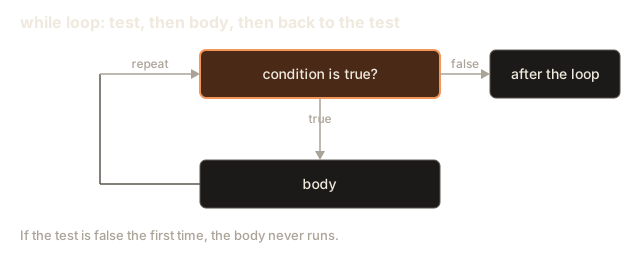
The picture below shows the same four steps as a flow.
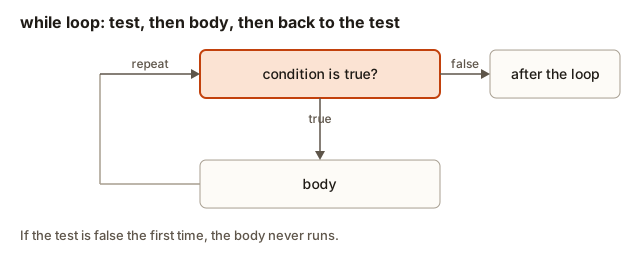 Flowchart of a while loop: the condition is tested first, a true result runs the body and returns to the test, a false result leaves the loop
Notice what is missing. A while loop has no place for an update, a statement that changes the counter after each pass. In a for loop, which you meet in the next lesson, the update has its own slot. In a while loop, you must put it in the body yourself. Forgetting it is the most common reason a while loop never ends.
What happens inside
You do not need to read machine code to understand a loop. You need a clear picture of what the computer keeps track of.
A variable such as int i = 1; reserves a small place in memory, a labelled slot that holds a number. Reading i means fetching the value in that slot. Writing i++ means fetching the value, adding one, and storing the result back in the same slot. Each pass of the loop reads and writes that slot again.
The computer also keeps a position marker that says which line it is running. A while loop makes that marker jump backward. When the body finishes, the marker jumps back up to the condition. When the condition is false, the marker jumps forward past the closing brace.
Here is a trace of the first loop in the next example, written as the computer might see it:
i is stored in a slot, currently 1
check: is i <= 5 ?  yes, continue into the body
body:  print the value of i (1)
body:  store i + 1 back into i, so i is now 2
jump back to check
check: is i <= 5 ?  yes, continue into the body
...
check: is i <= 5 ?  no, i is 6, jump past the loop
Two things matter here. The condition is checked before every pass, including the very first one. And the body must change i, or the check will give the same answer forever.
Worked example 1: count from 1 to 5
This first program is complete. You can run it as it is. It needs no input.
Click Run. The program prints:
1
2
3
4
5
Done
Read the program in three parts. The line int i = 1; gives the counter its starting value before the loop begins. The condition i <= 5 decides whether the body runs. The line i++; is the update: it adds one to i at the end of each pass. The ++ operator means "add one to this variable". Writing i += 1 or i = i + 1 does exactly the same thing.
Trace it one pass at a time. Each row shows the state before the condition is checked.
| Check number | Value of i | Is i <= 5? | What the body does |
|---|---|---|---|
| 1 | 1 | true | prints 1, then i becomes 2 |
| 2 | 2 | true | prints 2, then i becomes 3 |
| 3 | 3 | true | prints 3, then i becomes 4 |
| 4 | 4 | true | prints 4, then i becomes 5 |
| 5 | 5 | true | prints 5, then i becomes 6 |
| 6 | 6 | false | nothing; the loop ends |
Five passes ran the body. The sixth check failed, and the loop stopped without running the body. So the loop body ran five times, even though the condition was checked six times. That difference between checks and passes is a frequent source of confusion, so keep it in mind.
Worked example 2: add numbers from 1 to n
A while loop is useful when you want to build up a result. A running total is a variable that starts at zero and gains a little more each pass. The next program reads a number n from the user and adds up all the whole numbers from 1 to n.
To run it, type 100 into the Input box before you press Run.
With the input 100, the output is:
Sum of 1 to 100 is 5050The line cin >> n; reads one whole number from the input and stores it in n. The statement sum += i; is shorthand for sum = sum + i;. It adds the current value of i to the running total.
Trace the first three passes with n equal to 100:
- Before the first check,
sumis 0 andiis 1. The check1 <= 100is true. The body makessum1 andi2. - The second check
2 <= 100is true. The body makessum3 andi3. - The third check
3 <= 100is true. The body makessum6 andi4.
The pattern is clear now. After pass k, sum holds the total of 1 through k. The loop stops after pass 100, when i has become 101 and the check 101 <= 100 is false. At that moment sum holds the total of 1 through 100.
Two notes about this program. The variable sum must start at 0. If it started at 1, the answer would be 5051. The second note is about size: the answer 5050 fits easily in an int, but if you asked for the sum up to 100000, the answer would be about five billion, which is too big for an int. Lesson 5 explains how to choose a larger type when the numbers grow.
Worked example 3: how many times can a number be halved?
The next program has a different kind of condition. The loop does not count up to a fixed limit. Instead it keeps going while the number is still above zero. You cannot know in advance how many times to repeat, so while is the right tool.
Type 1000 into the Input box.
The output for the input 1000 is:
Halvings until zero: 10The division n / 2 on integers drops any remainder, so 1000 becomes 500, then 250, 125, 62, 31, 15, 7, 3, 1 and finally 0. Count the steps: that is ten halvings. The loop body ran ten times. The eleventh check found n equal to 0 and stopped the loop.
This pattern matters later. Every time you cut a problem in half, you need about this many steps. Binary search, which you will meet at the end of this lesson, cuts its search range in half at each step, which is why it is so fast on large lists. Lesson 5 turns this counting idea into a formula.
The program uses long long for n because the input may be large. The type is explained in lesson 2, and for now you only need to know that it holds much bigger whole numbers than int.
Worked example 4: count the digits of a number
Here is another loop with a condition that depends on a changing value. A number has digits, and to count them you can remove the last digit one at a time. Removing the last digit is a division by 10. The number 90210 becomes 9021, then 902, 90, 9 and 0. Each division is one step, and the number of steps is the number of digits.
Type 90210 into the Input box.
The output is:
90210 has 5 digitsThe program copies n into t before the loop. The loop destroys t as it runs, so the original n must survive for the final message. This habit of working on a copy is important in every loop that changes its input.
Notice a subtle result. For the input 0, the loop never runs, because t > 0 is false at the start, and the program prints 0 has 0 digits. Zero has one digit, so this answer is wrong. The fix uses a loop that runs at least once. You will write that fix in the next lesson, on do-while.
Worked example 5: read until a sentinel
Often you do not know how many values the user will type. A common approach is to pick a special value that means "stop", called a sentinel. A sentinel must be a value that can never be a real data item. For example, if you read positive test scores, the sentinel can be 0.
The program below reads whole numbers until it sees a 0. It counts the numbers and adds them up.
Type 3 8 2 0 into the Input box, with the numbers separated by spaces. The input is read left to right, so the program sees 3, then 8, then 2, then 0.
The output is:
count 3, sum 13Look at the structure. Before the loop, the program reads the first value. The condition checks that value. The body handles it and then reads the next value. This is called a priming read, because the first read starts the loop off. The body's last line reads the next value, so the condition always has a fresh value to check.
Trace the input 3 8 2 0:
- The first read gives
x = 3. The check3 != 0is true. The body makescount1 andsum3, then reads 8. - The check
8 != 0is true. The body makescount2 andsum11, then reads 2. - The check
2 != 0is true. The body makescount3 andsum13, then reads 0. - The check
0 != 0is false. The loop ends. The sentinel 0 is never counted or added.
The sentinel is never counted, because the check runs before the body. If the body ran first and the check came after it, as it does in the do-while loop of the next lesson, the 0 would be added to the total. The order of the check and the body decides what gets counted.
C++ also offers a shorter way to write this loop: while (cin >> x) keeps going as long as a read succeeds. That form stops at the end of the input instead of at a sentinel. It is worth knowing because you will see it in real code, but the sentinel version is clearer when the task says "stop at 0".
Worked example 6: binary search, the loop that halves a range
Now the halving idea becomes a real algorithm. Binary search looks for a value in a sorted list. A sorted list has its values from smallest to largest, so you can tell which half a value must be in by comparing it with the middle. Binary search checks the middle, then throws away the half that cannot contain the value. It repeats this on what is left. Each step halves the range, exactly like the halving program above.
The list must be sorted. If it is not, the comparison with the middle tells you nothing about the other half, and binary search gives wrong answers. Keep this rule in mind, because it is the most common mistake when people first use binary search.
The program below keeps three values in variables: lo is the first index still in play, hi is the last index still in play, and mid is the index in the middle. The loop runs while lo is not past hi. The program stops early when it finds the value, so the condition also checks the found variable.
Type 23 into the Input box.
For the input 23, the output is:
found 23 at index 5 after 3 checksHere is what happened. The first middle index is (0 + 9) / 2, which is 4. The value there is 16. That is smaller than 23, so the value must be to the right, and lo moves to 5. The second middle is (5 + 9) / 2, which is 7. The value there is 56, too big, so hi moves to 6. The third middle is (5 + 6) / 2, which is 5. The value there is 23. The program stops with found set to 5.
Now try a value that is not in the list. Type 40 and run again. The output is:
40 is not in the list, checked 4 timesThe search narrowed the range to nothing: lo became 7 and hi stayed at 6, so lo <= hi became false. The loop ended without finding the value. This is the only way a binary search can say "not here", so always handle that case.
Step through the search below. Pick the same values and watch the shaded range shrink. Notice that each pass cuts the remaining range roughly in half, which is why ten items need about four checks and a million items need about twenty.
lo, mid and hi are labelled under the boxes. An outlined box is the middle, a dashed faint box is outside the search range, a filled box is the found item.
Look for 23 in the sorted list. The search range is the whole list.
Compare the number of checks with a simple scan from the start. A scan of ten items may take ten checks. Binary search takes at most four. On a list of a million sorted items, a scan may take a million checks while binary search takes at most twenty. This gap is why interviewers ask about binary search so often.
Looping forever: the infinite loop
An infinite loop is a loop whose condition never becomes false. The program keeps running the body and never reaches the code after the loop. You will meet this bug early in your programming life, so learn to recognise it now.
The most common cause is a missing update. The next snippet is a fragment, so it has no main and is not meant to run:
int i = 1;
while (i <= 5) {
    cout << i << endl;
    // forgot i++
}
The variable i never changes. The check 1 <= 5 is true on every pass, so the loop prints 1 forever. Nothing in the body moves the loop toward its end.
When you run a program like this in the browser, the runner stops it after a few seconds and reports that it ran too long. On your own computer, press Ctrl+C in the terminal to stop it. Either way, fix the program, not the symptom.
To avoid this bug, ask one question whenever you write a while loop: what changes inside the body that will eventually make the condition false? If you cannot answer, the loop will not end.
Some loops are infinite on purpose. A while (true) loop runs until a break statement exits it. You will use that form in the next lesson. The difference is that the purpose is written in the code, and the loop has a clear exit.
A method for writing any while loop
Beginners often stare at an empty file and do not know where to start. The method below works for every while loop in this module. Follow the steps in order, and write them down as comments before you write any C++.
Step 1: say the job in one sentence. For example, "add up the numbers typed by the user until the user types 0". A clear sentence tells you what the loop must produce and when it stops.
Step 2: decide what the loop remembers. Name the variables that carry the state from one pass to the next, such as sum and count. Give each one a starting value before the loop. Ask what each variable should hold before the first pass. For a running total that is 0. For a running product it is 1. For a position in a list it is usually the first position.
Step 3: write the condition as a question. The condition should answer "should I do another pass?" with yes or no. Write it in words first: "keep going while the value is not the sentinel", then turn the words into code: x != 0. Check whether the condition is about the right value. A common error is to test a copy of the value that the body never changes.
Step 4: write the body as one pass. Forget the loop for a moment. Pretend you have one value and write only the work that happens for that value. Then make sure the body also moves the state toward the end. Something in the body must change a variable in the condition, or the loop will not end.
Step 5: trace it with small input. Choose an input with two or three values, and write a table with one row per pass, just like the table above. Compare the table with the answer you expect. If they differ, the bug is in the condition, the update or the starting value, and the table tells you which.
Step 6: test the edges. Try an empty input, a single value, the largest value and the sentinel by itself. Most loop bugs show up at the edges, not in the middle.
This method looks slow the first few times. After a few loops it becomes quick, because the steps are the same each time. When a loop fails, go back to the step that matches the symptom. A loop that never ends needs step 4. A loop that gives an answer one too high needs step 3. A loop that gives the wrong starting answer needs step 2.
Common mistakes and the messages you will see
Most mistakes with while fall into five groups. Each group shows a message or a symptom that you can recognise. GCC may print the quote marks around names as curly characters on some systems. The words are the same.
A missing semicolon after a line. The compiler reads the first error it finds and points near it. This program has no semicolon after int i = 1:
#include <iostream>
using namespace std;

int main() {
    int i = 1
    while (i <= 5) {
        cout << i << endl;
        i++;
    }
    return 0;
}
The compiler reports:
error: expected ',' or ';' before 'while'The message points at while, but the mistake is one line above, on int i = 1. The rule: when a message points at a line that looks correct, check the line before it.
Missing brackets around the condition. Writing while i <= 5 { instead of while (i <= 5) { gives:
error: expected '(' before 'i'
error: expected ')' before '{' token
Both messages say the same thing: the condition must be inside round brackets.
A semicolon right after the condition. This is valid C++, so there is no error. The semicolon becomes an empty body:
int i = 0;
while (i < 3);
{
    cout << i;
    i++;
}
Because the body is only the semicolon, the loop checks i < 3 forever, and the braces below it run only after the loop ends, which never happens. Compiling with warnings turned on shows the problem:
warning: this 'while' clause does not guard... [-Wmisleading-indentation]Enable warnings with -Wall when you compile on your own computer. A warning is the compiler telling you that the code does not look like what it does.
Assignment instead of comparison. A single = stores a value. It does not compare. The condition x = 5 stores 5 in x and then tests 5, which is true. So the loop never stops:
int x = 5;
while (x = 5) {
    cout << "x";
    x--;
}
GCC accepts this, but with warnings enabled it reports:
warning: suggest parentheses around assignment used as truth value [-Wparentheses]If you mean "equal to", write ==. The double equals sign compares; the single one stores.
Using a variable before it has a value. The next fragment declares count but never sets it:
int count;
cout << count << endl;
With -Wall, GCC reports warning: 'count' is used uninitialized. The program prints whatever random value was already in that memory slot. Always give a variable a starting value, such as int count = 0;.
Debugging walkthrough: a loop that stops one step early
Here is a bug you will meet soon. The goal is to print the numbers from 1 to 5. The program below prints only 1 to 4:
int i = 1;
while (i < 5) {
    cout << i << endl;
    i++;
}
Do not guess. Trace the program on paper, or add a line that prints the state of the loop. The check happens before each pass, so the body runs while i is 1, 2, 3 and 4. When i becomes 5, the check 5 < 5 is false, and the loop stops before printing 5.
The fix is to change < to <=. The condition must include the last value you want. This is a classic off-by-one error: the loop is one step short or one step long.
A useful habit is to add a temporary print inside the loop while you debug:
cout << "debug i = " << i << endl;Once the program does what you expect, delete the debug line. Printing the state takes a minute, and it shows what the program really does, even when reading the code does not.
Variations and edge cases
A careful programmer tests the edges of a loop, not just the middle. Here are the cases to check for any while loop.
The condition is false the first time. The body never runs. If n is 0 in the sum program, the loop adds nothing, and sum stays at 0. That is correct. If you want the body to run at least once, use do-while, which you meet in the next lesson.
The condition uses a value that does not change in the body. Suppose n is set to 5 and the body only changes i. The loop is infinite if the condition compares against n but nothing changes n. This is less common than the missing update, but it looks very similar.
The input is empty. If the program reads a number and there is no number to read, cin >> n fails and leaves n with a value that is not set. In the sentinel program, a missing 0 at the end of the input causes the loop to keep waiting for data. Programs that read input should always give the user a clear end, either a sentinel or the end of the input.
Negative numbers. In the digit count program, a negative input makes t > 0 false at the start, so the program reports 0 digits. A real program would take the absolute value first. Test negatives whenever the problem allows them.
Large numbers. Repeating a multiplication or addition makes the numbers grow. The sum program with an int total is safe for n up to about 65,000, and it overflows once the sum passes about two billion. The fix is a bigger type such as long long, which lesson 5 explains in full.
Interview questions this lesson prepares you for
Interviewers use short loop problems to see how you think. Here are three you should be able to answer in a minute each.
How many steps does it take to halve a number until it reaches zero? The answer is about log base 2 of the number. For 1000 it is 10, as the program showed. Say the reason aloud: each step divides the value by two, so you need as many steps as the number of times two fits into it.
What is the time complexity of counting the digits of a number? It is proportional to the number of digits, which is O(log n) when n is the value. Explain that the loop runs once per digit, and a number with twice as many digits takes twice as many steps. The memory used is fixed, so the space complexity is O(1).
Why is binary search faster than a scan? Each comparison removes half of the remaining values, so the number of comparisons grows with the logarithm of the list size. Mention the precondition: the list must be sorted. An interviewer who hears you name the sorted precondition knows you understand the algorithm and not just its name.
Real-world uses
Every program that handles input uses a loop like the sentinel program. A command-line tool reads lines until the user types quit. A download manager keeps reading packets until the file is complete. A game keeps the main loop running until the player closes the window. In each case, the condition is the question "should we keep going?" and the body does one unit of work.
Binary search is used wherever a sorted collection must be searched fast: a dictionary lookup, a list of version numbers, a table of prices sorted by date. Many standard libraries provide it, but knowing how the loop works lets you adapt it. For example, you can find the first value greater than a target instead of an exact match, which is the version the module assignment asks you to build.
Practice
Work through these in order. Write each program, run it, and compare the output with what you predicted. Hidden solutions are under each exercise.
- Print the numbers from 10 down to 1, one per line, using a
whileloop. Hint: start the counter at 10 and subtract one each pass.
Solution
#include <iostream>
using namespace std;

int main() {
    int i = 10;
    while (i >= 1) {
        cout << i << endl;
        i--;
    }
    return 0;
}
The counter starts at 10, and the condition keeps the loop going while it is at least 1. The update i-- moves it down by one each pass.
- Print the first five multiples of 7: 7, 14, 21, 28 and 35. Hint: keep a variable that starts at 7 and grows by 7 on each pass.
Solution
#include <iostream>
using namespace std;

int main() {
    int m = 7;
    int count = 0;
    while (count < 5) {
        cout << m << " ";
        m += 7;
        count++;
    }
    cout << endl;
    return 0;
}
The loop counts passes with count and prints the multiple held in m. The output is 7 14 21 28 35 on one line. The trailing space is harmless.
- Read a whole number and print the sum of its digits. For the input
9075the answer is 21. Hint: the last digit ofnisn % 10, andn / 10removes it.
Solution
#include <iostream>
using namespace std;

int main() {
    int n;
    cin >> n;
    int sum = 0;
    while (n > 0) {
        sum += n % 10;
        n = n / 10;
    }
    cout << sum << endl;
    return 0;
}
Each pass adds the last digit and then removes it. For 9075 the digits added are 5, 7, 0 and 9, which is 21. This program assumes a non-negative input.
- Read a whole number and print how many times 3 divides it evenly. For the input
5400the answer is 3, because 5400 is 3 times 1800, 600 and 200 in turn. Hint: keep dividing while the remainder after dividing by 3 is zero.
Solution
#include <iostream>
using namespace std;

int main() {
    int n;
    cin >> n;
    int count = 0;
    while (n > 0 && n % 3 == 0) {
        n = n / 3;
        count++;
    }
    cout << count << endl;
    return 0;
}
The check n > 0 is there because an input of 0 would divide forever: 0 % 3 is always 0. Lesson 3 shows how break handles this kind of stopping rule more clearly.
- Read a whole number
nand print the smallest power of 2 that is greater thann. For 100 the answer is 128, and for 64 it is 128. Hint: keep doubling a variable that starts at 1 while it is not greater thann.
Solution
#include <iostream>
using namespace std;

int main() {
    int n;
    cin >> n;
    int p = 1;
    while (p <= n) {
        p = p * 2;
    }
    cout << p << endl;
    return 0;
}
For 64, the loop stops at 128 because 64 is not greater than 64. The answer 128 is the first power of two that is strictly greater than 64.
- Read numbers until the user types -1, then print the largest number read. You can assume at least one number comes before -1. For the input
4 9 2 -1the answer is 9. Hint: start the largest value at the first number, then compare each new number with it.
Solution
#include <iostream>
using namespace std;

int main() {
    int x;
    cin >> x;
    int largest = x;
    cin >> x;
    while (x != -1) {
        if (x > largest) {
            largest = x;
        }
        cin >> x;
    }
    cout << largest << endl;
    return 0;
}
The first number is read before the loop, so largest starts from a real value rather than a guess. Starting largest at 0 would be wrong for input made only of negative numbers.
- Find out how many checks binary search takes for the values 2 and 91 in the list from worked example 6. Change the target in the program, run it twice, and write both counts. Hint: 2 is near the start of the list, and 91 is at the end.
Solution
The target 2 takes 3 checks. The first middle is 16, too big, so the range becomes indices 0 to 3. The second middle is 5, also too big, so the range becomes indices 0 to 1. The third middle is 2, found.
The target 91 takes 4 checks. The middles are 16, 56, 72 and 91, moving the range right each time until 91 is found.
- Write a
whileloop that prints the digits of a positive number from the last digit to the first, one per line. For the input305the output is5,0,3. Hint:n % 10gives the last digit, and printing it before you divide keeps the order.
Solution
#include <iostream>
using namespace std;

int main() {
    int n;
    cin >> n;
    while (n > 0) {
        cout << n % 10 << endl;
        n = n / 10;
    }
    return 0;
}
Each pass prints the last digit of the current value and then removes it. The digits come out in reverse order because the last digit is always the one that is removed first.
- The snippet below was meant to add the numbers from 1 to 10. It loops forever. Find the bug and fix it. Hint: look for a variable the body never changes.
int i = 1;
int sum = 0;
while (i <= 10) {
    sum += i;
}
cout << sum << endl;
Solution
The body never changes i, so the check i <= 10 stays true forever. The fix is to add i++; as the last line of the body. After the fix, sum is 55 and the program prints 55.
- Write a program that reads a number and prints
primeif it has no divisor other than 1 and itself, ornot primeotherwise. Use awhileloop that tries divisors 2, 3, 4 and so on. Test it with 2, 9 and 97. Hint: stop as soon as a divisor is found, or when the divisor grows so large that it cannot divide the number.
Solution
#include <iostream>
using namespace std;

int main() {
    int n;
    cin >> n;
    bool prime = n > 1;
    int d = 2;
    while (d * d <= n && prime) {
        if (n % d == 0) {
            prime = false;
        }
        d++;
    }
    if (prime) {
        cout << "prime" << endl;
    } else {
        cout << "not prime" << endl;
    }
    return 0;
}
The condition d * d <= n stops the loop once the divisor passes the square root of n, because any larger divisor pairs with a smaller one that was already tested. The check prime in the condition stops the loop early after a divisor is found.
What you now know
- A
whileloop repeats its body as long as its condition is true, and it checks the condition before every pass, including the first. - The body must change something the condition depends on, or the loop never ends.
- A running total starts at 0, and a running product starts at 1.
- A sentinel is a special value that means "stop". A priming read gets the first value before the loop starts.
- Binary search is a
whileloop that halves a sorted range at each step, and it needs the list to be sorted. - Watch for the common errors: a missing update, a semicolon after the condition,
=used where==was meant, and an off-by-one limit.