Why this matters
The first two loops in this module always check their condition before the body. Real programs need more control than that. A program that asks for a password must ask at least once, before it can know whether the answer is right. A program that searches a list should stop the moment it finds the item, not after it has looked at everything. A program that processes records should skip the bad ones and keep going. Three tools handle these cases: do-while runs the body first, break leaves the loop at once, and continue skips to the next pass.
These tools are short, and they are easy to misuse. Each one changes the normal path through a loop, so each one can create a bug that is hard to see by reading. This lesson shows what each tool does, what the computer does with it, and how to use it without losing track of the loop.
Start from the first principle: where the check happens
A loop has two decisions in it. One is the test, which says whether to start or continue a pass. The other is the exit, which is the point where the loop finishes. In a while loop and a for loop, the test sits at the top, so the loop always checks before doing any work. The body runs only if the test passes.
Sometimes the body must run before the first test can be made. Suppose the test needs a value that only the body can produce, such as a value typed by the user. A while loop cannot help here, because it needs the value before the first test. The usual workaround is to read the value once above the loop, which duplicates code. A do-while loop solves this by placing the test at the bottom.
Other times the test is not enough. The loop may need to stop in the middle of a pass, because it found what it wanted, or because the current item must be skipped. The break and continue statements give the body the power to change the path for that one pass.
An everyday analogy: asking for a password
Think about a bank cash machine that asks for your PIN. It must show the question first. Only after you type something can it check whether the PIN is right. If the PIN is wrong, it asks again. It never asks zero times, because it cannot know whether you need to type anything until it asks.
That is a do-while loop. The body is "ask and read the PIN", and the test is "is the PIN valid?" The body runs first, and the test decides whether to ask again.
Now think about a librarian looking for a book on a shelf. She starts at the first shelf and scans each book. When she finds the one she wants, she takes it and stops. She does not keep scanning the rest of the shelves. That early stop is break.
Last, think about a teacher marking exam papers. She reads each paper. If a paper is blank, she writes "absent" and moves to the next paper without marking it. The rest of the work for that paper is skipped, but the teacher does not stop marking. That skip is continue.
The do-while loop
The general form of a do-while loop is:
do {
    body
} while (condition);
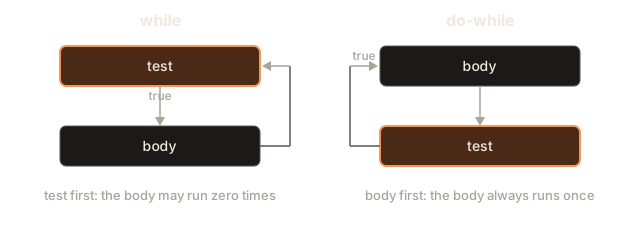
The body comes first. Then the condition is checked at the bottom. If the condition is true, the body runs again. If it is false, the loop ends. The body therefore runs at least once, whatever the condition says.
Two details differ from a while loop. First, the condition sits after the closing brace, and it ends with a semicolon. Forgetting that semicolon is the most common error with do-while. Second, the body always runs before the first check, so a condition that is false at the start still allows one pass.
The picture below shows the two loops side by side. The while loop tests first, so a false start skips the body entirely. The do-while loop runs the body first and tests after.
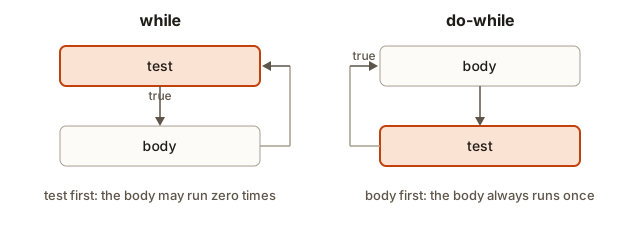 Two flow diagrams: a while loop tests first and may skip the body, while a do-while loop runs the body first and then tests
Here is a small program that shows the difference. It has a condition that is false from the start, so the two loops should behave differently.
#include <iostream>
using namespace std;

int main() {
    int n = 10;
    do {
        cout << "do-while printed n = " << n << endl;
        n++;
    } while (n < 5);

    n = 10;
    while (n < 5) {
        cout << "while printed n = " << n << endl;
        n++;
    }
    cout << "finished" << endl;
    return 0;
}
The output is:
do-while printed n = 10
finished
The do-while loop printed once, even though 10 < 5 is false. The while loop printed nothing. The body of a do-while always runs at least once, and that single guaranteed pass is the whole point of the form.
Worked example 1: validating input
The most common use of do-while is checking input. The program asks for a value, checks it, and asks again if it is wrong. Here is an age check that accepts only values from 1 to 120. The first question must be asked before anything can be checked, which is exactly the job do-while does.
Type these three lines into the Input box, one on each line: -4, then 200, then 34.
The output is:
Enter age (1-120): That is not a valid age.
Enter age (1-120): That is not a valid age.
Enter age (1-120): Accepted: 34
Trace the three passes. In the first pass, the prompt is printed and -4 is read. The test age < 1 is true, so the message is printed and the test at the bottom decides to repeat. In the second pass, 200 is read and fails age > 120, so the loop repeats again. In the third pass, 34 is read. Both parts of the test are false, so the loop ends, and the program prints the accepted age.
Notice the placement of the test. The variable age must be read before the test can use it. A while loop would need the read to happen above the loop, and then again inside the body. The do-while loop keeps the read in one place.
The condition age < 1 || age > 120 uses ||, the logical OR operator, which is true when either side is true. An age is invalid if it is below the range or above it. You will meet these operators in the operators module, but you can already read the test in words: "keep asking while the age is outside the range".
Worked example 2: stopping early with break
break leaves the innermost loop at once. The code after the break inside the loop is skipped, and the code after the loop runs next. This makes break the right tool for a search: as soon as you find the item, you have the answer, and continuing to look wastes time.
The next program searches an array for a target value. It reports the first position where the value appears, and how many values it looked at before it stopped. Type 42 into the Input box.
The output for the input 42 is:
first match at index 2, looked at 3 valuesThe loop reaches index 2 and finds 42. It records the index, runs break, and leaves the loop. The second 42, at index 4, is never examined. That is what break is for: the answer is known, and the rest of the array does not matter for the first match.
The program keeps two counts. The looked variable shows how much work the search did. Counting work this way is a good habit, because it connects directly to the time complexity you will learn in the complexity module. For an array of n values, a search that finds a match early looks at few values, while a search that finds nothing looks at all n. The worst case is the one that matters for interviews, and it is still O(n).
Try an input that is not in the array, such as 5. The loop runs to the end without a break, found stays at -1, and the program prints 5 is not in the array. Check that you can predict this output before you run it.
Worked example 3: stopping on a divisor
The next program uses break to stop at the first divisor it finds. A number is prime when it has no divisor other than 1 and itself. To find out, you test each candidate divisor, and once you find one that divides the number evenly, the answer is known. break makes the loop stop there.
Type 91 into the Input box.
The output for 91 is:
91 is divisible by 7The loop tries 2, then 3, then 4, and so on. At 7, the test 91 % 7 == 0 is true, so divisor becomes 7 and the loop stops. The program never tries 8 through 90. For a number that really is prime, such as 29, the loop finds no divisor and divisor stays 0, so the program prints 29 is prime. Try 29 to see it.
The program has a flaw that you should see. For n equal to 1, the loop does not run, and the program says 1 is prime. The number 1 is not prime by definition. Real code adds a check for n < 2 first. Always think about the smallest legal input when you use a search loop.
Worked example 4: skipping with continue
continue skips the rest of the current pass and moves to the next one. The loop itself keeps going. Use it when some values should be ignored, and the rest of the body would be wasted or wrong for them.
The next program prints the numbers from 1 to 20, but leaves out the multiples of 3.
The output is:
1 2 4 5 7 8 10 11 13 14 16 17 19 20 For each value, the test i % 3 == 0 decides whether to skip. When it is true, continue jumps straight to the update i++ and the loop test. The cout line is skipped for 3, 6, 9 and the rest. Every other value reaches the cout and is printed.
Here is the important detail for for loops. The update belongs to the loop header, so continue still runs it. The loop moves on correctly, and no value is repeated or lost. This is one reason the for loop is safer than a while loop when you use continue.
continue in a while loop: the trap
In a while loop, the update is usually written in the body. If a continue appears before that update, the update is skipped on that pass. The counter never changes, and the loop repeats the same pass forever. The next fragment is an infinite loop, and it is shown only to illustrate the trap:
int i = 0;
while (i < 5) {
    if (i == 2) {
        continue;   // skips i++ below, so i stays 2 forever
    }
    i++;
}
When i reaches 2, the continue jumps back to the test. The test sees i still equal to 2, and the continue runs again. The loop never escapes. The fix is to put the update before the continue, or to move it to a place the continue cannot skip:
int i = 0;
while (i < 5) {
    i++;
    if (i == 3) {
        continue;
    }
    cout << i << " ";
}
This program prints 1 2 4 5 . The update happens first, so continue cannot leave the counter stuck. When you use continue in a while loop, check where the update sits.
Worked example 5: skipping bad records
Real data is messy. A list of readings may contain values that must not count, such as a zero from a sensor that was switched off. The usual approach is to check each value at the top of the body. When the value is bad, continue skips the rest of that pass. The rest of the body then handles only good values, and it does not need an if wrapped around every line.
The next program reads a count and then that many readings. It adds the positive readings and skips the others, counting how many it skipped. Type 5, then 4 -2 7 0 9, each on its own line in the Input box.
The output is:
sum 20, skipped 2Trace the five readings. The 4 is positive, so it is added. The -2 fails reading <= 0, so the program counts it as skipped and continue jumps to the update i++. The 7 is added. The 0 is skipped, and the 9 is added. The sum is 4 + 7 + 9, which is 20, and two values were skipped.
Two details matter here. First, the loop reads exactly n values, even when some are skipped, because the counter i still moves on every pass. If the continue skipped the read itself, the loop would fall out of step with the input. Second, int reading is declared inside the body. The computer creates that variable again on every pass and removes it at the end of the pass, so no value from one pass leaks into the next. A variable declared in the body always starts fresh.
What the computer does with break and continue
The compiler turns break and continue into jumps. A jump is an instruction that moves the position marker to a new line of code without running the lines in between. break jumps to the first instruction after the loop, and the loop's test is not checked again. continue jumps to the update in a for loop, or to the test in a while or do-while loop. In both cases, the work that comes after the jump in the same pass is skipped.
Variables declared inside the body follow the same rule as the body itself. When the pass ends, by reaching the closing brace or by a continue or break, the variables declared in that pass are removed. A break removes them and leaves the loop. Nothing else is copied or saved, so the cost of a jump is small. The real cost of a wrong jump is a wrong answer or a loop that never ends.
A quick reading test helps when a loop has these words in it. For a break, ask: where does the loop exit, and what is the value of the variables at that moment? For a continue, ask: what statements in this same pass are now skipped, and is the update still reached? If you can answer both questions, you understand the loop. If you cannot, trace it on paper with three or four values before you trust it.
Choosing between the three tools
Each tool answers a different question, and choosing the right one keeps the code readable.
Use do-while when the first check needs a value that the body must read, or when the body must run once for its own sake, such as printing a menu before asking for a choice. Use break when the loop has a clear stopping event in the middle of its work, such as a search that found its target. Use continue when some values should be ignored, and the rest of the body would otherwise need extra nesting.
A common mistake is to use all three at once, which makes the flow hard to follow. A loop with a break, a continue and a do-while is almost always easier to read as two loops or as a loop with a helper function. When you feel the need to add a third control word, stop and ask whether the structure can be simpler.
while (true) with break
Some loops have no natural stopping test. The loop runs until something inside it says to stop, such as a running total passing a limit, or a special value arriving. For these, write the condition as while (true), which is always true, and place a break where the stopping test belongs.
The program below keeps adding numbers from the input until the total goes above 20. The test is in the middle of the body, not at the top, which is why the loop is written this way.
Type 5 7 4 9 2 into the Input box.
The output is:
stopped after 4 numbers with total 25Trace the totals: 5, then 12, then 16, then 25. After the fourth number, the total is 25, which is greater than 20. The break runs, and the loop ends. The fifth number, 2, is never read.
The while (true) form is clear when the stopping test is naturally in the middle. Before you use it, make sure the loop can really stop. If the break is never reached, the loop is infinite, and that is the usual bug. Count your exits. Every while (true) should have at least one break, or a return from the function, that can run.
A related form is for (;;), which has no start, test or update. It behaves exactly like while (true). Use whichever reads better in the situation. Most programmers prefer while (true) because the word while is easier to recognise.
break inside nested loops
break leaves only the innermost loop. It does not stop the outer loop. This surprises many beginners, and it matters when you search a grid or a pair of lists.
Here is a search for the first pair of positions whose values add up to a target. The outer loop picks the first value, and the inner loop tries every partner. Without help, a break in the inner loop would stop only the inner loop, and the outer loop would carry on looking. A flag variable fixes that: the inner loop sets it, and the outer loop checks it.
Type 16 into the Input box.
The output for 16 is:
pair at 2 and 3The inner loop finds the pair 5 and 11 and records it. Its break leaves the inner loop. The outer loop's test !found is now false, so the outer loop stops too. The ! operator means "not", so !found is true when found is false. Without the flag in the outer test, the program would keep scanning the other values after the answer was known.
Another way to leave both loops is to put them in a function and use return. Functions come later in the course, so the flag is the tool to know now.
Common mistakes and the messages you will see
The mistakes in this lesson fall into a few groups. The messages are real GCC output.
A missing semicolon after the do-while condition. The next program forgets the semicolon after while (n < 5):
#include <iostream>
using namespace std;

int main() {
    int n = 10;
    do {
        cout << n;
        n++;
    } while (n < 5)
    return 0;
}
GCC reports:
error: expected ';' before 'return'The message points at return, the line after the mistake. The do-while needs the semicolon, because the whole loop is one statement that ends there. Add the semicolon and the error goes away.
break or continue outside a loop. Both words only make sense inside a loop or a switch. This fragment uses break inside an if that is not in any loop:
int n = 3;
if (n > 2) {
    break;
}
GCC reports:
error: break statement not within loop or switchThe same thing happens with continue, which reports error: continue statement not within a loop. If you see one of these messages, look for the loop that should surround the word. A common cause is a closing brace in the wrong place, which ends the loop before the break line.
An infinite loop caused by continue. The while-loop trap above produces no compiler message at all. The program compiles, runs and then hangs. The symptom is a program that never prints its final line. Check the placement of the update relative to every continue.
A while (true) without a break. The compiler does not warn about a loop that cannot exit, so this is also silent:
int total = 0;
while (true) {
    total++;
}
The program runs forever. The fix is to add a break that depends on the data, and to test that it is reached. A while (true) loop without any break is almost always a mistake.
A break that exits the wrong loop. When you have nested loops and a break seems to do nothing, check which loop it belongs to. The innermost loop is the one that stops. The outer loop keeps going, as the flag example showed.
A do-while that reads a value the body never sets. If the body does not read the value that the condition checks, the test sees whatever was in memory before, which is a bug. In the age example, the read cin >> age is inside the body. Keep the read in the body, not after the loop.
Debugging walkthrough: a loop that never prints the total
Here is a program that should add the numbers 1 to 5 and print the total. It prints nothing after the loop, and the program hangs:
int i = 1;
int sum = 0;
while (i <= 5) {
    if (i % 2 == 0) {
        continue;
    }
    sum += i;
    i++;
}
cout << sum << endl;
Trace the program. When i is 2, the continue runs before i++. The counter stays at 2, the test stays true, and the continue runs again on every pass. The loop is stuck on the even value 2.
The fix is to move i++ above the continue, so every pass advances the counter:
int i = 0;
int sum = 0;
while (i < 5) {
    i++;
    if (i % 2 == 0) {
        continue;
    }
    sum += i;
}
cout << sum << endl;
Now the counter moves on every pass. The odd values 1, 3 and 5 are added, and the program prints 9. Notice the change to the starting value and the test. The counter now starts at 0 and runs while i < 5, so it visits 1 through 5 after the update. Whenever you change the update, check the start and the test again, because the three parts depend on each other.
A for loop would have avoided the trap, because the update would sit in the header and continue would still run it. That is a good reason to choose for when you can.
Variations and edge cases
A do-while with a value that must be checked before use. The do-while is the right tool whenever the first test needs a value that the body produces. If you do not need that, a while loop is simpler to read.
A do-while when the first question should not be asked. A do-while always asks at least once. If the input is optional, and asking once would be wrong, use a while loop with the read above it.
Early exit and the worst case. A break can make a search stop early, but the worst case stays the same. If the item is missing, the loop still looks at every value. Interviewers ask for the worst case, not the lucky case, so state that a linear search is O(n) even when it sometimes stops early.
break in a switch. You may see break inside a switch statement, which chooses between several cases. There break ends the switch, not a loop. The rule to remember is that break always leaves the nearest enclosing loop or switch.
continue with a loop that has no update. If a for loop has an empty update and the body changes the counter after the continue, the same trap appears. Keep the update in the header whenever you can.
A break on the first pass. A break before any work is done is still valid. The loop does nothing, and the code after it runs. Check that your variables hold sensible values in that case.
A break that skips the update. If the body does total += x after a break in the same pass, that addition never happens on the pass that breaks. Put the work that must always happen before the break, or accept that the break ends the work at that point.
A break inside a do-while. The break leaves before the test at the bottom is reached, so the condition is not checked on that pass. That is what you want when the break is the real exit, as in a menu where the user chooses to quit.
Two exits from one loop. A loop with a break and a test in the header has two ways out. Both must leave the variables in a state the code after the loop can use. Check each exit separately, with its own input, before you trust the loop.
Interview questions this lesson prepares you for
Why is a linear search O(n) even though it can stop early? Because the worst case is when the item is last or missing. Explain that break improves the average case but not the worst case. Interviewers listen for the difference between the two.
How do you stop two nested loops at once? Use a flag, a return from a function, or a labelled break in languages that support it. C++ has no labelled break, so the flag or the function is the standard answer. Say which one you would choose and why.
Write a loop that runs until the user enters a valid positive number. The expected answer is a do-while with the read inside the body and the test at the bottom. Mention that a while loop would need a duplicate read above it.
Real-world uses
A login form uses do-while logic: it asks for a password until the password is right or the attempts run out. A search in a contact list uses break to stop at the first match. A log reader uses continue to skip blank lines and comments, so only real entries are processed. A game uses while (true) with a break to run the main loop until the player quits. Each of these is a small, common pattern, and each has a clear exit.
The skill to build is choosing the form that matches the problem. Use do-while when the body must run first. Use break when the answer is known before the loop ends. Use continue when a value should be skipped. Use while (true) when the stopping test belongs in the middle of the body.
Practice
Write each program, predict its output, then run it. Hidden solutions are under each exercise.
- Print the numbers from 1 to 20, skipping the multiples of 3, using
continue. This is the same output as worked example 4. Hint: the test for a multiple of 3 isi % 3 == 0.
Solution
This is the program from worked example 4. The continue skips the print when i % 3 == 0, and the rest of the loop runs as usual.
- Read numbers until the user types 0, then print their sum. Use
while (true)andbreak. Hint: check for 0 before you add it to the sum.
Solution
#include <iostream>
using namespace std;

int main() {
    int sum = 0;
    int x;
    while (true) {
        cin >> x;
        if (x == 0) {
            break;
        }
        sum += x;
    }
    cout << sum << endl;
    return 0;
}
The check for 0 comes before the addition, so the sentinel is never added. For the input 4 5 6 0 the output is 15.
- Find the first number between 1 and 100 that is divisible by both 7 and 9, print it, and stop. Hint: the answer is 63, and
breakis the right way to stop.
Solution
#include <iostream>
using namespace std;

int main() {
    for (int n = 1; n <= 100; n++) {
        if (n % 7 == 0 && n % 9 == 0) {
            cout << n << endl;
            break;
        }
    }
    return 0;
}
The first number that is a multiple of both 7 and 9 is 63. The loop stops after printing it, so the rest of the range is never tested.
- Read a word with
cin >> wordand print the position of the firstzin it, or-1if there is none. Forpizzathe answer is 2. Hint: loop over the characters and usebreakwhen you find az.
Solution
#include <iostream>
#include <string>
using namespace std;

int main() {
    string word;
    cin >> word;
    int pos = -1;
    for (size_t i = 0; i < word.size(); i++) {
        if (word[i] == 'z') {
            pos = (int)i;
            break;
        }
    }
    cout << pos << endl;
    return 0;
}
The position is stored as an int so that -1 can mean "not found". The size_t counter is safe here, because it only goes up.
- Read an integer
nand printnonly if it is between 10 and 99. If it is not, printinvalid, and keep asking until a valid number is entered. Hint: use ado-whileloop with the read inside the body.
Solution
#include <iostream>
using namespace std;

int main() {
    int n;
    do {
        cin >> n;
        if (n < 10 || n > 99) {
            cout << "invalid" << endl;
        }
    } while (n < 10 || n > 99);
    cout << n << endl;
    return 0;
}
For the input 5, 120, 42 the output is invalid, invalid, then 42.
- Explain the difference between
breakandcontinuein your own words, using a loop that counts from 1 to 10. Then write a loop that prints 1 to 10 but stops completely at 6. Hint:breakends the loop, whilecontinueonly ends the current pass.
Solution
break ends the whole loop at once. continue ends only the current pass, and the loop starts its next pass. A loop that prints 1 to 10 but stops completely at 6 uses break when i == 6:
for (int i = 1; i <= 10; i++) {
    if (i == 6) {
        break;
    }
    cout << i << " ";
}
The output is 1 2 3 4 5 .
- The following loop should print the odd numbers from 1 to 9, but it hangs. Fix it without changing what it prints. Hint: look at where the update sits relative to the
continue.
int i = 0;
while (i < 9) {
    if (i % 2 == 0) {
        continue;
    }
    cout << i << " ";
}
Solution
The update is missing altogether, so i stays 0 and the continue repeats forever. The fix is to start at 1 and move i forward before the test, or to put i++ before the continue. One correct version is:
int i = 0;
while (i < 9) {
    i++;
    if (i % 2 == 0) {
        continue;
    }
    cout << i << " ";
}
The output is 1 3 5 7 9 .
- Read a number and print the number of digits it has, using a
do-whileloop so that the input0gives1. Hint:do-whileruns once even when the number is 0. Thewhileversion in the previous lesson got this case wrong.
Solution
#include <iostream>
using namespace std;

int main() {
    int n;
    cin >> n;
    int digits = 0;
    int t = n;
    do {
        t = t / 10;
        digits++;
    } while (t > 0);
    cout << digits << endl;
    return 0;
}
The body runs before the test, so the first digit is always counted. For 0 the output is 1, and for 90210 it is 5.
- Read integers until two zeros appear in a row. Print how many numbers you read in total, including the two zeros. For the input
3 0 5 0 0the answer is 5. Hint: keep track of the previous number, and stop when both the current and the previous number are zero.
Solution
#include <iostream>
using namespace std;

int main() {
    int prev = -1;
    int x;
    int count = 0;
    while (true) {
        cin >> x;
        count++;
        if (x == 0 && prev == 0) {
            break;
        }
        prev = x;
    }
    cout << count << endl;
    return 0;
}
The prev variable holds the value of the number before the current one. The loop stops when two zeros in a row arrive. For 3 0 5 0 0 the count is 5, because the stop happens on the fifth number, and the count includes the two zeros.
- Write a program that finds the largest number entered before the user types a negative number, using
while (true)andbreak. You can assume at least one non-negative number comes first. For the input3 9 4 -1the answer is 9. Hint: start the largest value at the first number.
Solution
#include <iostream>
using namespace std;

int main() {
    int x;
    int largest = -1;
    while (true) {
        cin >> x;
        if (x < 0) {
            break;
        }
        if (x > largest) {
            largest = x;
        }
    }
    cout << largest << endl;
    return 0;
}
The starting value -1 is safe here, because every number before the stop is non-negative. The break on a negative value ends the loop, and the negative number itself is never compared.
What you now know
- A
do-whileloop runs its body at least once and tests the condition after each pass. Forgetting the semicolon after the condition is a common error. breakleaves the innermost loop at once. In nested loops it leaves only the inner loop, so use a flag to stop the outer loop too.continueskips the rest of the current pass and moves to the next one. In awhileloop, check that the update runs before anycontinue.while (true)with abreakis the form for loops whose stopping test sits in the middle of the body. Make sure thebreakcan be reached.- Early exit improves the average case, but the worst case of a search is still O(n) when the item is last or missing.