Why this matters
Two functions can both have a variable called count or i without clashing. A loop can use i and a later loop can use i again. You rarely think about this, because it just works. But when it fails, the failure is confusing. A variable seems to ignore your assignment, a name is "not declared" even though you typed it above, or a counter keeps its value when you expected it to reset. Each of these comes from one of two ideas: scope, which is where a name can be used, and lifetime, which is how long the variable's memory exists.
This lesson defines both ideas, shows how braces create new scopes, explains globals and shadowing, and introduces static local variables. Interviewers ask about these topics often, usually as "what does this print?" questions, so the lesson ends with a method for predicting output.
The idea: rooms with walls
Start from first principles. A program has many names: variables, functions and parameters. If every name were visible everywhere, two programmers could not use the same name in different parts of one program without a clash. C++ solves this by dividing the program into regions, and a name only means something inside the region where it was declared.
Think of a meeting room. Whatever is written on the whiteboard is visible to people in that room. A person in the next room cannot read it, and they can write their own note on their own whiteboard with the same title. The room is the scope. A variable declared in a room is local to that room.
In C++, the rooms are blocks, which are the regions between a pair of braces { and }. A function body is a block. An if body is a block. A loop body is a block. Even a bare pair of braces by itself makes a block.
Scope: where a name can be used
The scope of a variable is the part of the program where its name can be used. In C++ a variable's scope starts at its declaration and ends at the closing brace of the block it was declared in. Before the declaration, the name does not exist. After the closing brace, the name no longer exists.
Here is a function with a local variable. The variable x is created inside show, and it cannot be used anywhere else.
Press Run. No input is needed. The output is:
10If you add the line cout << x; inside main, the program stops compiling. The compiler reports:
error: 'x' was not declared in this scopeThe message means that the name x is not visible at that point. It is not saying that x is misspelled. It is saying that x lives in another room.
A variable declared inside a function is a local variable. It is created when the function starts and destroyed when the function ends. The span of time from creation to destruction is its lifetime. Scope is about where a name works. Lifetime is about when the memory exists. For a plain local variable, the two end at the same closing brace.
How the compiler finds a name
When the compiler meets a name such as size, it must decide which variable the name means. It searches in a fixed order. It starts in the innermost block where the name appears. If it finds a declaration there, it stops. If not, it moves to the block around that one, and so on outward, until it reaches the file itself. If the search reaches the file without a match, the compiler reports 'size' was not declared in this scope.
Think of looking for a pen in your home. You check the desk drawer first. If it is not there, you check the room, then the rest of the house. The first match wins, even if another pen exists further away. The compiler behaves the same way, and it never looks back at a room it has already left.
The next program shows the search at work. It has the same name in three places, and each cout finds a different one.
Press Run. No input is needed. The output is:
1
10
The first cout is inside the if block. The search starts there, and it finds the int size = 1; declared in that block, so it prints 1. The second cout is in main, after the if block has closed. Its search finds int size = 10; in main, so it prints 10. The global size with the value 100 is never used, because two closer declarations exist. A reader must follow the same search to know which value a name means, and that is the reason to choose clear names.
Block scope: every pair of braces is a room
Braces create scope everywhere, not only in functions. Consider this program. It has an if block and a for loop.
Press Run. No input is needed. The output is:
3
0 1
Trace the scopes.
int a = 1;createsain the body ofmain. Its scope is the whole ofmain, from this line to the closing brace.- The
ifopens a new block. Inside it,int b = 2;createsb. Its scope is that block only. cout << a + bprints 1 + 2, which is 3. Both names are visible here, becauseais in an outer room andbis in the current room.- The block ends, and
bis gone. Any mention ofbafter the closing brace would be an error. - The
forloop declaresint i = 0in its own header. The variableibelongs to the loop. It exists while the loop runs and disappears at the end of the loop. - Each pass prints
iand a space. The loop prints0 1, with a space after each number, and thenendlends the line.
The rule to remember is simple. A name is visible in its own block and in every block nested inside that one. It is not visible in the block around it. The reverse is not true. Inner names do not leak out.
The output line 0 1 has a trailing space, because the loop prints a space after each number. That space is invisible in most views, but it is part of the output. If an online judge compares output exactly, the trailing space matters. Most judges ignore trailing spaces, but do not rely on that.
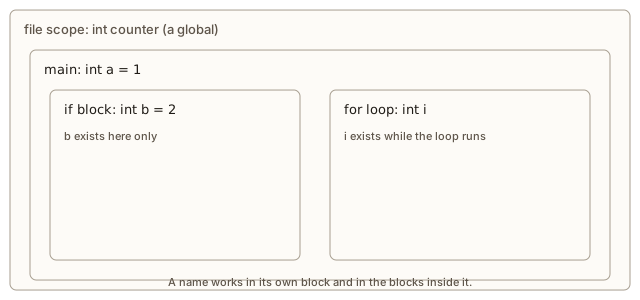 Nested rectangles: the file-level room holds main, and main holds an if block and a for loop, each with its own names
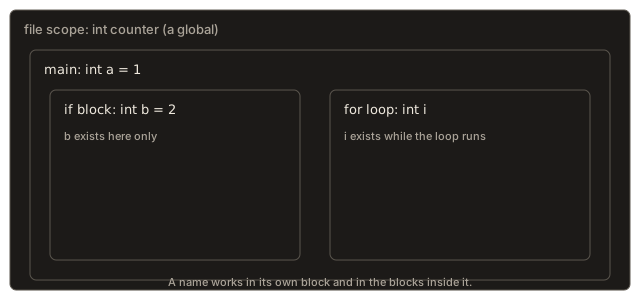
Why the for loop variable disappears
Beginners often want to read i after a loop. In C++, if you declare i in the loop header, it is not visible after the loop. If you need the value afterwards, declare it before the loop:
int i;
for (i = 0; i < 3; i++) {
    // work
}
cout << i << endl;   // prints 3
Declaring the variable outside the loop keeps it in the outer room, so it survives. The compiler error for the mistake is:
error: 'i' was not declared in this scopeThe fix is one of the two forms above. Choose the one that matches how you need the variable. If you only need it inside the loop, declare it in the header, which keeps the name small and tidy.
Scope in if, else and while
Each branch of an if and each else is its own block. A variable declared in one branch cannot be seen in the other, so the two branches may use the same name without any clash:
if (score > 50) {
    int bonus = 5;          // exists only inside this branch
    cout << score + bonus;
} else {
    int bonus = 0;          // a different variable, also local to its branch
    cout << score + bonus;
}
// bonus is not visible here
A while loop body is a block as well. A variable declared inside it is created on each pass and destroyed at the end of that pass. If you want a value to survive from one pass to the next, declare it before the loop. This is the same lesson as the total example later in this lesson, and it appears in almost every loop you will write.
Global variables
A variable declared outside every function is a global variable. Its scope is the whole file after its declaration, and its lifetime is the whole run of the program. Any function written after it can read it and change it.
Press Run. No input is needed. The output is:
3The function tick does not declare counter, yet it uses it. The name is found in the outer room, the file itself. Each call adds 1, so after three calls the value is 3.
Globals are convenient, and they are also risky. Any function can change them, and any line in the program can be the one that set the wrong value. When a global holds a wrong value, you must search the whole program to find the culprit. A function that takes its input through parameters and gives its output through a return value is easier to test and to reason about, because everything it depends on is written in its signature.
A good habit is this: keep globals out of your code unless the value truly belongs to the whole program and never changes, such as a fixed number like pi. A global const is safe, because it cannot be changed, so it cannot cause the bugs that globals usually cause.
const double PI = 3.14159; // safe: a fixed value that no function can changeGlobals and the order of declaration
A global must be declared before the code that uses it. This follows the top-to-bottom rule from the first lesson. If tick came above the declaration int counter = 0;, the compiler would say 'counter' was not declared in this scope.
Globals versus parameters
Here is the same small task written two ways. The task adds a bonus to a score.
int bonus = 0;                      // global: any function can change it

int applyBonus(int score) {
    return score + bonus;
}int applyBonus(int score, int bonus) { // the bonus comes in as a parameter
return score + bonus;
}The first version depends on a value that any line of the program could change. If another function sets bonus to 50 by mistake, applyBonus returns a wrong answer, and nothing in its own code looks wrong. The second version states all its inputs in the signature. You can test it with any bonus you like, and no other function can affect its result.
Real programs do use global values. A setting that is read once when the program starts, such as the name of a data file, is often kept in a global const, because nothing changes it after that. The rule is that a global should be fixed, and it should never be a hidden channel for passing data between functions. When in doubt, pass the value in as a parameter. It costs one extra word in the call, and it saves you from searching the whole program when the value goes wrong.
Shadowing: a new name hides an old one
Inside a block, you may declare a variable with the same name as one in an outer block. The inner variable then shadows the outer one. Inside the inner block, the name means the inner variable. The outer variable still exists, but the name does not reach it from there.
Press Run. No input is needed. The output is:
100
5
9
5
100
Trace each line.
- The first
xis the global, declared with value 100 abovemain. Insidemain, no localxexists yet, so the name means the global. The output is 100. int x = 5;declares a new localxinmain. From this point on, the namexmeans the local. The output is 5.- The inner braces open a new block.
int x = 9;declares a thirdx, which shadows the local. The output is 9. - The inner block ends, and the inner
xis gone. The namexmeans the local again, so the output is 5. ::xis the scope operator with nothing before it. It means "the name in the global scope," so it reaches the globalx. The output is 100.
Shadowing is legal, but it confuses readers and it is a common source of bugs. A typical bug looks like this: a programmer writes a loop that declares a new total inside the loop body, adds numbers to it, and expects the outer total to change. The inner total vanishes at the end of each pass, and the outer one never changes. The fix is to use one name for one variable, or to remove the inner declaration.
Interviewers use this to test whether you understand scope. A useful answer names the room each x lives in, and says which one the name refers to at each line.
Shadowing, step by step
Shadowing is easiest to follow as a table of rooms. Here is the shadowing program from earlier, with the rooms open at each line and the value the name x means there.
| Line | Rooms open | x means |
|---|---|---|
cout << x before any local | file | the global, 100 |
int x = 5; and then cout << x | main, file | the local in main, 5 |
inner block with int x = 9; | inner block, main, file | the inner variable, 9 |
| after the inner block closes | main, file | the local in main, 5 |
::x | file (asked for by name) | the global, 100 |
For an interview answer, say this: the name means the innermost declaration that is still in scope at that line. That one sentence covers every case in this lesson.
Lifetime and the reference trap
The lifetime of a local variable ends with its block. This creates a danger when a function returns a reference to one of its own locals. The local is destroyed when the function returns, so the reference points at nothing. Here is the warning GCC prints for this code:
int &bad() {
    int x = 5;
    return x;
}warning: reference to local variable 'x' returned [-Wreturn-local-addr]The program may still compile and run. Using the reference after the function returns is undefined behaviour, which means the result can be anything. Treat this warning as an error. The fix is to return the value, not a reference, as in int bad() { ... return x; }.
Static local variables
A normal local variable is created fresh on every call, and it is destroyed at the end of the call. So a counter declared as a normal local always starts from its initial value.
A static local variable is different. It is created once, the first time the function runs, and it keeps its value between calls. It is still visible only inside its function, so the name does not leak out. This gives you a counter that belongs to one function, without a global.
Press Run. No input is needed. The output is:
1 2 3
1 1 1
Trace the first three calls.
- The first call to
nextIdreachesstatic int id = 0;. This line runs only once, soidis created and set to 0. Thenid++makes it 1, and the function returns 1. - The second call skips the declaration, because the static variable already exists.
idis still 1, soid++makes it 2, and the function returns 2. - The third call makes
id3 and returns 3.
Now the normal function. Each call creates a fresh v set to 0. v++ makes it 1, and the function returns 1. The variable is destroyed. The next call creates a new v, starts from 0 again, and returns 1 again. Every call gives the same answer.
The difference is the lifetime. A static local lives for the whole run of the program. A normal local lives for one call. You may have seen the words "static" in a class or in a list of keywords. In this lesson it means only "keeps its value between calls, and is visible only in its function."
I wrote the three calls as separate statements in this program, and I did not put them in one long cout chain. A chain such as cout << nextId() << " " << nextId() also works in modern C++, because since C++17 the operands of << are evaluated from left to right. Separate statements are clearer, and they make the order obvious to any reader. Use them when the order of calls matters.
A static counter that reads input
A static local is useful for any value that must survive between calls to the same function. Here is a function that records numbers as they arrive. It keeps a running count and a running sum, both static, so main does not have to store them.
To run it, type 4 10 -3 0 in the Input box, then press Run.
Input: 4 10 -3 0
Expected output:
entry 1, running sum 4
entry 2, running sum 14
entry 3, running sum 11
done
Trace the input.
mainreads 4. The loop test4 != 0is true, sorecord(4)runs. The staticcountbecomes 1 andsumbecomes 4. The output isentry 1, running sum 4.- The loop reads 10 and calls
record(10).countbecomes 2 andsumbecomes 14. - The loop reads -3.
countbecomes 3 andsumbecomes 11. - The loop reads 0. The test
0 != 0is false, so the loop stops without callingrecord. mainprintsdone.
The count and sum variables are not visible to main. Only record can change them. That is the benefit of a static local: the state is private to the function. A global would work, but any other function could also change it.
Shadowing a parameter
A parameter is a local variable, so the same rules apply. A parameter can shadow a global with the same name. Inside the function, the parameter wins. This is legal, and it is one more reason to avoid the same name for two things.
int total = 0;

void add(int total) {        // the parameter shadows the global total
    total = total + 1;       // changes the parameter, not the global
}
After add(5) returns, the global total is still 0. A reader who sees total inside add may think it means the global, so pick different names.
When a static surprises you
A static local is created the first time execution reaches its declaration, not when the program starts. If a function with static int count = 0; is never called, the variable is never created. Its initial value is also used only once. In a line such as static int start = readStartValue();, the call runs on the first pass only, and every later call keeps the value from that first pass. A reader who expects the initialiser to run each time will be surprised, so put a comment next to any static whose initial value comes from a function call.
What happens inside: where the memory lives
You do not need to manage memory in this lesson, but a picture helps. A program's memory is divided into regions for different lifetimes. Global variables and static variables go into a region that exists for the whole run. Local variables go onto the stack, a region that grows when a function starts and shrinks when it returns. Each function call gets its own space on the stack, which is why two calls never share a normal local.
The static variable in nextId is kept in the whole-run region, but its name is only visible inside nextId. That is why it keeps its value. The compiler handles the name, and the memory region keeps the value.
The next lesson explains the stack in detail, including how the call stack relates to these local spaces.
Complexity and cost
Scope and lifetime cost nothing in time. The compiler decides every name's meaning before the program runs. Creating a local variable costs a small constant amount, and destroying it costs the same. A static local is created once, so a function that uses one does not pay the creation cost on every call.
For space, a local takes a constant amount of stack memory for each call that is active. A global or static takes memory once for the whole run. So a global used by a recursive function is shared by every recursive call, which is different from the local space each call gets.
Scope and naming in a larger program
In a program with a few hundred lines, scope rules are a safety net. In a program with many files and many people, they become the main way to keep names from colliding. A function's locals are invisible to every other function, so a teammate can rename a local without breaking anything. A global is visible to every file that includes its declaration, so a rename there can break code you never opened.
For this reason, the habit to build is to keep each name as local as it can be. Declare a variable in the innermost block that needs it, and declare it at the point of first use rather than at the top of the function. When a value must be shared, pass it as a parameter. Keep globals to values that are truly fixed, as the global const example showed. These habits cost nothing, and they make every later change easier to check.
Common mistakes
- Using a variable outside the braces where it was declared. The compiler says
error: 'x' was not declared in this scope. Move the declaration up or move the use inside. - Declaring a new variable inside a loop with the name of the outer one. You changed a copy that vanishes after the block. The compiler does not warn, so read your declarations carefully.
- Overusing globals. Your functions then depend on hidden state, and bugs are hard to trace. Pass values in as parameters.
- Expecting a plain local to keep its value between calls. A normal local starts fresh each call. Use
staticif the value must survive. - Returning a reference to a local variable. The warning is
reference to local variable 'x' returned [-Wreturn-local-addr]. Return the value instead. - Using a name before its declaration. A global declared at the bottom of the file is invisible to functions above it.
Debugging walkthrough: a counter that never changes
A counter in your program stays at 0, even though you expect it to grow. Work through these steps.
- Find every declaration of the name. Search the file for the name. If there is a local with the same name in the function, the local shadows the global, and your increment changes the local.
- Check the room. Ask which block the increment is in. If it is in a block that is inside a loop, the variable may be declared inside the loop, and it resets each pass.
- Check the lifetime. If the variable is a normal local in a function that is called many times, it starts from its initial value each time. Make it
static, or pass it in from outside. - Print the value at each stage. Print the counter before and after the change, and print the address with
&counterif you need to confirm which variable you are touching.
A real case: a student writes a loop that declares int total = 0; inside its body and adds numbers to total. The printed total after the loop is 0. Step 2 shows that total lives in the loop body. Each pass creates a new one, adds to it, and destroys it. The fix is to declare total before the loop.
Variations and edge cases
staticat file level. A global declared withstaticis visible only within its own file. In a single-file program, this changes nothing. You will meet it when you split code into several files.- Nested functions do not exist. C++ does not allow one function inside another, so there is no scope between two function bodies. Each function's rooms are its own blocks.
- A name in a
forheader. The name exists only for the loop, as shown above. An older style declared the variable outside the loop, and both styles still compile. - Global
constvalues. A globalconst int MAX = 100;can be read anywhere after it, and it cannot be changed, so it does not cause the usual global bugs. - Lifetime of a static inside a recursive function. A static local is shared by every recursive call, because there is only one copy. A normal local is separate for each call. This difference matters in recursion, and the next lesson uses it.
Real-world uses
- Configuration values. A program often reads a setting once at start-up and keeps it in a global
constor in a static, so every function uses the same value. - Counters and IDs. A function that creates objects can use a static counter to give each one a unique number. The
nextIdexample is the simplest form. - Caches. A function that computes an expensive value may keep the result in a static variable, so repeated calls return it without repeating the work.
Interview questions on this topic
What does static do to a local variable? It creates the variable once, keeps its value between calls, and limits its name to the function. It does not make the variable visible to other functions.
Given a global x and a local x, which one does the name x refer to inside the function? The local, because the local is in the inner room and shadows the global. Use ::x to reach the global.
Why does a function that returns a reference to a local fail? The local is destroyed when the function returns, so the reference points at memory that no longer belongs to the variable. Using it is undefined behaviour.
Practice
- Write a function
countCalls()that returns how many times it has been called, using astaticlocal. Call it three times inmainand print the results. The output should be1,2and3, on separate lines.
Solution
#include <iostream>
using namespace std;

int countCalls() {
    static int calls = 0;
    calls++;
    return calls;
}

int main() {
    cout << countCalls() << endl;
    cout << countCalls() << endl;
    cout << countCalls() << endl;
    return 0;
}
The static variable starts at 0 once, and each call adds 1.
- Predict the output of a program that declares
int n = 1;inmain, then opens anifblock that declaresint n = 2;and printsn, and then printsnagain after the block. Write the two numbers in order before you run it.
Solution
The output is 2, then 1. Inside the if block, the inner n shadows the outer one, so the print shows 2. After the block closes, the inner n is gone, and the name refers to the outer n, which is 1.
- Replace a global counter in this program with a
staticlocal. The functiontick()should keep the count, andmainshould not need the variable.
#include <iostream>
using namespace std;

int counter = 0;
void tick() { counter++; }
int main() { tick(); tick(); cout << counter; }
Solution
#include <iostream>
using namespace std;

void tick() {
    static int counter = 0;
    counter++;
    cout << counter << endl;
}

int main() {
    tick();
    tick();
    return 0;
}
The count now lives inside tick. The output is 1 and 2, because tick prints its count each time. If main needs the final value, tick should return it instead.
- Explain why this loop prints 0, and fix it so it prints the total of 1 to 5.
for (int i = 1; i <= 5; i++) {
    int total = 0;
    total = total + i;
}
cout << total;
Solution
total is declared inside the loop body, so it is destroyed at the end of each pass, and the name does not exist after the loop. The fix is to declare total before the loop, then add to it inside:
int total = 0;
for (int i = 1; i <= 5; i++) {
    total = total + i;
}
cout << total << endl;
The output is 15.
- Write a global
const int LIMIT = 3;and a functionbool underLimit(int n)that returns true whennis less thanLIMIT. Test it with 2 and with 3.
Solution
#include <iostream>
using namespace std;

const int LIMIT = 3;

bool underLimit(int n) {
    return n < LIMIT;
}

int main() {
    cout << underLimit(2) << endl;
    cout << underLimit(3) << endl;
    return 0;
}
The output is 1 and then 0.
- Write
int next()that returns 1 the first time it is called, 2 the second time, and so on. Then write a second functionint fresh()that always returns 1. Explain the difference in one sentence.
Solution
next has a static counter, so it remembers the previous calls. fresh has a normal local that starts at 0 each call, so it returns 1 every time. Use static for state that must survive between calls, and a normal local for values that belong to one call.
- Predict the output. A function declares
static int a = 10;and changes it by adding 5.maincalls it twice and prints both results.
Solution
The first call makes a 15 and returns 15. The second call makes it 20 and returns 20. The output is 15 and 20. The initial value 10 is used only once, when the static is created.
- A function returns a reference to its local. Describe what happens and how to fix it.
Solution
The local is destroyed when the function returns, so the reference points at memory that is no longer valid. The compiler warns reference to local variable returned. Using the reference is undefined behaviour. The fix is to return the value, or to return a reference to something that outlives the call, such as a parameter the caller owns.
- Write a program that declares a variable
xglobally with the value 7, and insidemaindeclares a localxwith the value 3. Print both, using::xfor the global.
Solution
#include <iostream>
using namespace std;

int x = 7;

int main() {
    int x = 3;
    cout << x << " " << ::x << endl;
    return 0;
}
The output is 3 7.
- Write a function
int addToRunning(int value)that keeps a running total in a static local and returns the total so far. Call it with 4, then 6, then -2. The outputs should be4,10and8.
Solution
#include <iostream>
using namespace std;

int addToRunning(int value) {
    static int total = 0;
    total += value;
    return total;
}

int main() {
    cout << addToRunning(4) << endl;
    cout << addToRunning(6) << endl;
    cout << addToRunning(-2) << endl;
    return 0;
}
The static total keeps the running sum between calls.
- Look at this code and name the scope in which each use of
yis valid.int y = 1; { int y = 2; } cout << y;
Solution
The first y lives in the outer block, and it is valid from its declaration to the closing brace of the enclosing block. The second y lives only in the inner braces. The cout line is outside the inner braces, so it sees the first y, and prints 1.
What you now know
- Scope is where a name can be used. Lifetime is how long its memory exists. For a plain local, both end at the closing brace.
- Every pair of braces is a block with its own scope. Names declared in a block are not visible after it closes.
- A variable declared in a
forheader belongs to the loop. Declare it before the loop if you need it afterwards. - A global variable is visible to every function after it, and it lives for the whole run. Use globals sparingly, and prefer a global
constfor fixed values. - Shadowing means an inner name hides an outer one with the same name. Use
::nameto reach a global. - A
staticlocal is created once, keeps its value between calls, and is visible only in its function. - Never return a reference to a local variable. The local is destroyed when the function returns.