Why this matters
A beginner writes a swap function, calls it, and nothing changes. The code looks right, the function runs without an error, and the numbers stay where they were. This is one of the most common surprises in C++, and it is one of the most common interview questions on functions. The answer is about how values travel into a function. Once you understand that, you can predict what any function will do to the variables you pass to it.
This lesson explains the two ways a value can reach a function, why one of them leaves the caller alone, and how a small symbol, the ampersand &, changes the behaviour. It also covers the const keyword, which lets a function read large data without copying it and without the risk of changing it by accident.
The idea: a copy or the original
Start from first principles. When you call a function, the computer must give the function the values it needs. There are two broad ways to do that. The computer can make a copy of each value and hand over the copy. Or it can hand over access to the original value itself.
Think about homework. Suppose a teacher wants you to check a friend's answers. The teacher can give you a photocopy of the sheet. You can write all over the copy, cross out answers and rewrite them, and the original sheet in the teacher's folder is not touched. Or the teacher can hand you the original sheet. Now your changes are real, and the teacher's copy has changed too.
C++ offers both options, and you pick one for each parameter. The photocopy is pass by value. The original is pass by reference.
Pass by value: the default
By default, C++ passes a copy of each argument. The function's parameter is a new variable that starts with the same value as the argument. The function works on that new variable. When the function ends, the new variable is destroyed, and the caller's variable has never been touched.
Press Run. No input is needed. The output is:
inside: 15
outside: 5
Trace the program line by line.
int x = 5;creates a variable calledxinmainand stores 5 in it.addTen(x)starts a call. The compiler creates a new variable calledninsideaddTen. It copies the value ofxinton, sonis 5. The two variables are separate boxes in memory that happen to hold the same number.n = n + 10;changesnto 15. This changes only the box calledn.cout << "inside: " << nprints 15.- The function ends, and
nis destroyed. cout << "outside: " << xprints the box calledx, which still holds 5.
The most important step is step 2. Once you see the copy, you know why the caller is unchanged.
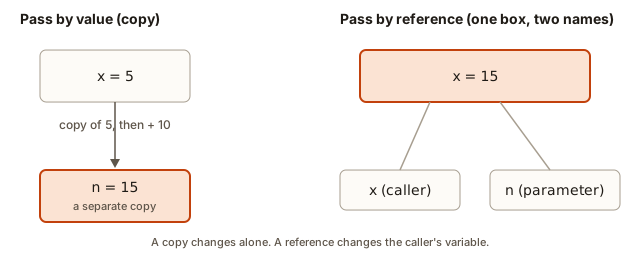 Two boxes for x and n: the parameter is a copy, so changing n leaves x at 5
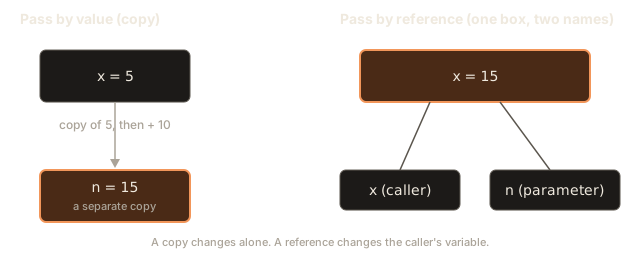
The failed swap
Now the classic example. A swap exchanges the values of two variables. Here is the naive version, with two value parameters and a temporary variable called temp.
void swapBad(int a, int b) {
    int temp = a;
    a = b;
    b = temp;
}
The body is correct. If a held 1 and b held 2, the three lines leave a holding 2 and b holding 1. The mistake is that a and b are copies. The swap happens to the copies, and the copies disappear when the function ends.
Both halves of the program show it. The next program calls the bad swap, prints the result, and then calls the fixed swap, which you will meet in the next section.
Press Run. No input is needed. The output is:
1 2
2 1
The first line is the failed swap. swapBad changed its copies, so x and y still hold 1 and 2. The second line is after swapGood, which works, so x and y now hold 2 and 1. Read on to see how swapGood differs.
Pass by reference: the same box under two names
A reference is another name for an existing variable. You write & after the type in the parameter list, as in int &a. The function does not receive a copy. The name a inside the function refers to the caller's variable, so every change made through a is a change to the caller's variable.
Back to the homework example: this is the teacher handing you the original sheet. Writing on it changes the real sheet.
In swapGood(int &a, int &b), the name a is a second name for x, and the name b is a second name for y. The body is the same as before. When it writes a = b;, it is writing into x, and when it writes b = temp;, it is writing into y.
The call looks exactly like a value call: swapGood(x, y). The caller does not need to write &. Only the function's parameter list has the &. This is a common point of confusion, so note it now. The ampersand tells the compiler how to receive the argument. The caller just passes the variable.
A reference must name a real variable
A non-const reference must be bound to a variable that can be changed. A plain number such as 1 is not such a variable, so the call swapGood(1, 2) is refused. Here is the message GCC prints for that call:
error: cannot bind non-const lvalue reference of type 'int&' to an rvalue of type 'int'The message is long, but the two key words are "lvalue" and "rvalue." An lvalue is something with a name and a place in memory, such as a variable. An rvalue is a temporary value, such as the number 1 written in the call. You cannot give a temporary value a second name for changing, because there is nowhere for the change to be kept. The message is telling you the argument must be a variable.
Later in the module you will meet const references, which do accept literals. They are for reading, not writing.
Tracing a swap, line by line
Here is swapGood traced with a table. Each row shows the line that runs and the values after it. The names a and b are other names for x and y, so the table tracks x, y and temp.
| Step | Line that runs | x | y | temp |
|---|---|---|---|---|
| start | none yet | 1 | 2 | not declared |
| 1 | int temp = a; | 1 | 2 | 1 |
| 2 | a = b; | 2 | 2 | 1 |
| 3 | b = temp; | 2 | 1 | 1 |
Step 2 is the moment the first value is overwritten, which is why temp is needed. Without temp, the line a = b; would destroy the original value of a before it was saved. A common interview follow-up asks why three lines are needed and why two are not enough. The answer: the second line loses the original value of a, and temp keeps a copy of it while that happens.
Getting more than one result
A function can return only one value. Sometimes you need two or three results from the same work. A reference parameter lets the function write into several variables that the caller owns.
The next program divides one integer by another and returns both the quotient and the remainder. The division is done once, and both answers are written into the caller's variables.
To run it, type 17 5 in the Input box, then press Run.
Input: 17 5
Expected output:
3 2Trace it.
cin >> a >> breads 17 intoaand 5 intob.int q, r;declares two variables. They have no useful values yet.divide(a, b, q, r)passesaandbby value, because they are only read. It passesqandrby reference, because the function must write into them.- Inside
divide,quotientis another name forq, andremainderis another name forr. The linequotient = a / b;computes 17 / 5, which is 3 in integer division, and writes it intoq. - The line
remainder = a % b;computes 17 % 5, which is 2, and writes it intor. mainprintsqandr, which hold 3 and 2.
The / and % operators both come from the operators module. / keeps the whole part and % keeps the remainder. Together they give the quotient and remainder.
Another way to return two values
A reference is not the only option. You can return a struct, which is a small named bundle of values. Many programmers prefer that for two or three results, because the function signature shows what it gives back. The reference version is common in older code and in interview questions about parameters, so you need to know both forms.
Returning a reference
A function can also return a reference. The result is then another name for a variable that already exists, and the caller can assign to it. This is an advanced tool, so use it with care.
Press Run. No input is needed. The output is:
4 0Trace the program.
larger(x, y)bindsatoxandbtoy. Their values are 4 and 9.- The test
a >= bis 4 >= 9, which is false. The function runsreturn b;, which returns a reference toy, not a copy of its value. - The statement
larger(x, y) = 0;assigns 0 to the returned reference. That reference isy, soybecomes 0. xis still 4, so the last line prints4 0.
A returned reference must refer to something that outlives the call, such as one of the parameters or a global. A reference to a local variable is the danger covered in the scope lesson. Most functions should return a value, and you should reach for a reference return only when the caller really needs to write to the result.
const references for large data
Copying an int is cheap. It is one small number. Copying a long string, or a large collection, costs time proportional to its length. If you pass a large value by value to a function that is called often, the copies add up.
A reference avoids the copy, because the function works on the caller's value directly. But a plain reference also allows changes. If the function only needs to read the data, you should say so with const. A const reference is a reference that the function is not allowed to change. The compiler checks that rule for you.
Here is a function that counts the letter a in a word. The parameter is const string &.
Input: banana
Expected output:
3Trace the function.
cin >> wordreads the textbananainto the stringword. Thecinform stops at a space, so it reads one word.countA(word)binds the parametersas a const reference toword. No copy of the six letters is made.int count = 0;starts a counter.for (char c : s)is a range loop. It takes each character ofsin order and stores it inc. The six characters areb,a,n,a,n,a.- Each time
cis'a', theifis true andcountgoes up. This happens at the second, fourth and sixth letters, socountbecomes 3. return count;sends 3 back, andmainprints it.
The const keyword is a promise checked by the compiler. Try to change s inside countA, for example by writing s = "x";, and the program will not compile. GCC reports:
error: no match for 'operator=' (operand types are 'const std::string' and 'const char [2]')Read the message as "you tried to assign to something that is const." The const protects the caller's string. The same error would happen if you wrote s[0] = 'z';, because that changes the string as well.
The const string & form is the standard way to pass a large value that the function only reads. You will use it constantly in the rest of the course, so learn the shape: const, the type, &, then the name.
Why const references accept literals
A const reference can be bound to a literal or a temporary. So countA("banana") compiles, because the compiler creates a temporary string for the call and the function only reads it. A non-const reference cannot do that, because it would allow a change to a temporary. The const is what makes the difference, and this is why swapGood(1, 2) fails while countA("banana") works.
Changing the caller's total
Here is a short example that uses a non-const reference for a running total. Each call adds a number to a score that belongs to main.
Press Run. No input is needed. The output is:
30The first parameter is a reference, so total is another name for score. The second parameter is a value, because amount is only read. The three calls change score in turn: 0 + 10 is 10, then 10 + 25 is 35, then 35 - 5 is 30.
Notice the operator +=. It is short for total = total + amount. Both forms are correct, and you will see both in real code.
Parameter naming and the cost of copies
Good code makes the direction of data clear. A parameter that only goes in should be a value, or a const reference for large data. A parameter that comes back changed should be a non-const reference. A parameter that is both read and changed should have a name that says so, such as balance in void deposit(int &balance, int amount). A reader can then see which values the function will touch just by reading the signature.
Copies are the other cost. Suppose a string holds one million characters, and a loop calls a function one thousand times with that string passed by value. Every call copies a million characters, so the program copies one billion characters in total. Changing the parameter to const string & removes all of that copying, and the function still reads the same data. Measure before you optimise, but for large data a const reference is almost always the right first choice.
You may wonder why this course does not use pointers for the same job. A pointer holds the address of a variable, and it can be empty. A reference always names a real variable, so it is simpler and safer for function parameters. You will meet pointers in the memory module, where they are the right tool for some jobs.
A checklist for every parameter
Use this checklist when you write or review a function. For each parameter, ask four questions.
- Does the function change this value? If not, use a value, or a const reference for large data.
- Should the caller see the change? If yes, use a non-const reference, and name the parameter so the change is clear.
- Could the caller pass a literal, such as
5or"text"? If yes, the parameter must be a value or a const reference, because a literal is not a variable that can be changed. - Is the value cheap to copy? A number is cheap. A long string or a large collection is not.
Applying the checklist to countA gives const string &. It does not change the text, it can receive a literal, and the text may be long. Applying it to swapGood gives two non-const references. The function must change both values, and the caller must pass variables, not literals.
Which should I choose?
Use this table when you write a parameter. Read the row that matches your situation, and pick the form.
| Situation | Parameter | Example |
|---|---|---|
| Small value, read only | by value | int n |
| Function must change the caller's variable | by reference | int &n |
| Large value, read only | const reference | const string &s |
| Function needs several results | reference parameters, or return a struct | int &q, int &r |
Here is the reasoning behind each row. A small value, such as an int, char, bool or double, is cheap to copy, and a copy protects the caller from mistakes. Pass it by value. A parameter that the function must change needs a non-const reference, and the caller must see the change. A large value that is only read is best passed as a const reference, because it avoids the copy and it cannot be changed. A function that needs several results can take several references, or return a struct, whichever keeps the code clearer.
A rule of thumb: start with a value. Switch to a reference only when you have a reason, such as a need to change the caller's data or a measured problem with copying.
What happens inside: the copy and the alias
When the compiler sees a value parameter, it generates code that copies the argument into a new memory location for the parameter. The copy costs time roughly proportional to the size of the value. For an int, that is a few bytes, so the cost is negligible. For a string with a million characters, the copy touches a million characters.
When the compiler sees a reference parameter, it generates code that passes the address of the caller's variable, but you do not write the address yourself. Inside the function, every use of the parameter name means the same memory as the caller's variable. The reference is an alias, a second name for one box. No copy happens, and no new box is created.
The difference is visible in a diagram. A value parameter is a new box with a copy of the number. A reference is no new box at all, only a second label on the old one.
Complexity and cost
Passing a value costs a copy, so the cost is proportional to the size of the value. Passing a reference costs a constant amount, because only the location is handed over. For a single call, the difference is small. In a loop that calls a function many times with a large value, the difference matters.
Consider a function that counts the letter a in a string of length n. Its time is O(n), because it looks at each character once. If you pass the string by value, each call also copies n characters, so the total time is still O(n) for that one call, but the call uses extra memory of O(n) for the copy. With const string &, the extra memory is O(1), and the time stays O(n). Interviewers like to ask about this difference, and it is a good example of why const & matters.
What the compiler does with a reference
A reference costs nothing extra at run time, and it does not need its own box in memory for the function to use. The compiler records the parameter name as an alias of the caller's variable. Every read or write through the name is compiled as a read or write of that same storage. The reference is therefore a naming decision made at compile time, and the program runs with the same instructions it would use for a direct access to the caller's variable.
A value parameter, on the other hand, really does create storage. The function's frame holds the copy, and the copy is filled with the caller's value when the call starts. When the call ends, the storage is released. The difference is easy to see in a debugger: a reference prints the same address as the caller's variable, and a value parameter prints a different address.
This is why a reference parameter is the right tool for a function that must see the caller's data, and why a value parameter is the right tool for a function that works on its own private copy. The choice is about what the function is allowed to see, and the compiler enforces that choice for you.
A review checklist in practice
When a colleague sends you a function to review, read its parameters before its body. For each one, check the four questions from the checklist above, and compare the answer with the signature. A value parameter that the body writes to is a sign that the author meant a reference and forgot the &. A non-const reference that the body only reads is a sign that the author should have added const. A string passed by value into a loop is a performance concern, and the fix is the same const & you learned in this lesson.
Reviewers also check the call sites. A call that passes a literal to a non-const reference will not compile, so you will not find it by reading the function alone. Search for calls to the function, and check that each argument is a variable where a reference is expected.
Common mistakes
- Writing
swapwith value parameters and wondering why nothing changed. The function changed copies. Add&to each parameter that must change, as inswapGood. - Passing a literal to a non-const reference. The call
swapGood(1, 2)giveserror: cannot bind non-const lvalue reference of type 'int&' to an rvalue of type 'int'. Pass variables. - Forgetting
conston a reference the function should not change. The function can then change the caller's data by mistake. Addconstfor read-only parameters. - Putting the
&in the call instead of the parameter list. WritingswapGood(&x, &y)is a different thing. It passes addresses, which is a pointer feature. WriteswapGood(x, y)and put&in the parameter list only. - Using references when a return value is simpler. A function that computes one result should return it. References are for extra results or for changing the caller's data.
- Returning a reference to a local variable. The local variable is destroyed when the function ends, so the reference points at nothing. GCC warns:
warning: reference to local variable 'x' returned [-Wreturn-local-addr]Using that reference is undefined behaviour. The program may print garbage, crash, or appear to work. Return the value instead, or return a reference only to something that outlives the call, such as a parameter the caller owns.
Debugging walkthrough: the change did not happen
A function is supposed to change a variable, and the caller still sees the old value. Use these steps.
- Look at the parameter. Find the parameter in the function's signature. If it is
int nwith no&, the function received a copy, and the caller cannot see any change. This is the most common cause. - Check the call. Make sure the caller passes the variable you expect. Passing a copy of it, such as
f(x + 0), produces a temporary value, notx. - Print the address of the variable. Print
&xinmainand&ninside the function. A reference shows the same address. A copy shows a different one. The printed numbers are hexadecimal, and they vary between runs, but the match or mismatch is the important part. - Confirm the change. Print the value right after the change in the function, and print it again in the caller after the call.
A real case: a student writes void reset(int score) { score = 0; } and calls reset(points). Step 1 shows int score with no &. The function reset a copy. The fix is void reset(int &score).
Variations and edge cases
- Arrays passed by reference. A function can take an array by reference, and you will meet that in the arrays module. The reference makes the function work on the caller's array, and the array is not copied.
- Reference parameters with default values. A reference parameter can have a default only if it is a const reference, because a default is a temporary value. You may write
void show(const string &s = "none"). - A reference that does not change the caller. A const reference lets the function read the caller's data directly. The caller's variable stays unchanged.
- Swapping two objects. The idea scales. Swapping two strings or two larger values uses the same pattern: two non-const references and a temporary.
- Passing by value to avoid mistakes. Some programmers pass small values by value even when they could use references, because the copy protects the caller from accidental changes. That is a legitimate choice, and it is safe for small types.
Real-world uses
- Input parsing. A function that reads a line into a string takes a non-const reference, so the caller's string holds the result.
- Search results. A function that finds the best match returns one value, and it may also take a reference to an error flag, so the caller can tell whether anything was found.
- Reports on large documents. A function that counts words in a document takes a const reference, because the document may be large and the function does not change it.
Interview questions on this topic
What is the output of swap(a, b) if swap takes value parameters? The caller's variables are unchanged, because the function swapped copies. Explain that the parameters are separate variables, and then describe how references fix it.
Why is const string & better than string for a read-only parameter? It avoids copying the string on every call, so it saves time and memory. The const promises the function will not change the caller's string.
Can you pass a literal to a const int & parameter? Yes. A const reference can bind to a temporary, so f(5) works. A non-const int & cannot, because the compiler would allow a change to a temporary.
Practice
- Write
void doubleIt(int &n)that doubles the caller's variable. Test it withint x = 7;and printxafter the call. The output should be14.
Solution
#include <iostream>
using namespace std;

void doubleIt(int &n) {
    n = n * 2;
}

int main() {
    int x = 7;
    doubleIt(x);
    cout << x << endl;
    return 0;
}
The parameter is a reference, so n is another name for x.
- Write
void minMax(int a, int b, int &lo, int &hi)that setsloto the smaller ofaandb, andhito the larger. Test it with 9 and 4. The output should be4 9.
Solution
#include <iostream>
using namespace std;

void minMax(int a, int b, int &lo, int &hi) {
    if (a < b) {
        lo = a;
        hi = b;
    } else {
        lo = b;
        hi = a;
    }
}

int main() {
    int lo, hi;
    minMax(9, 4, lo, hi);
    cout << lo << " " << hi << endl;
    return 0;
}
The output is 4 9.
- Write
bool hasSpace(const string &s)that returns true when the string contains a space. Test it with"Hello world"and with"Hello". The outputs should be1and0.
Solution
#include <iostream>
#include <string>
using namespace std;

bool hasSpace(const string &s) {
    for (char c : s) {
        if (c == ' ') {
            return true;
        }
    }
    return false;
}

int main() {
    cout << hasSpace("Hello world") << endl;
    cout << hasSpace("Hello") << endl;
    return 0;
}
The output is 1 and then 0. The const reference lets the literal be passed directly.
- Write
void addOne(int n)and call it withx = 5inmain. Predict whatxis after the call. Then fix the function so the caller sees the change.
Solution
x is still 5, because n is a copy. Fix it by changing the parameter to void addOne(int &n). The body n = n + 1; then changes x, and x becomes 6.
- Write
void swapStrings(string &a, string &b)that swaps two strings. Test it with"left"and"right"and print both. The output should beright left.
Solution
#include <iostream>
#include <string>
using namespace std;

void swapStrings(string &a, string &b) {
    string temp = a;
    a = b;
    b = temp;
}

int main() {
    string left = "left";
    string right = "right";
    swapStrings(left, right);
    cout << left << " " << right << endl;
    return 0;
}
The output is right left. The same three-line pattern works for any type.
- Write
int sumOf(const vector<int> &v). Hint: this needs#include <vector>. Explain whyconstis useful here. You do not need to run it, but write the body.
Solution
#include <vector>
using namespace std;

int sumOf(const vector<int> &v) {
    int total = 0;
    for (int x : v) {
        total += x;
    }
    return total;
}
The const makes the function read-only on the vector, and the reference avoids a copy of every element. Vectors come in the arrays module, but the parameter pattern is the same.
- Write a function
void resetAll(int &a, int &b)that sets both to zero. Call it with two variables holding 8 and 3. Print both after the call. The output should be0 0.
Solution
#include <iostream>
using namespace std;

void resetAll(int &a, int &b) {
    a = 0;
    b = 0;
}

int main() {
    int p = 8, q = 3;
    resetAll(p, q);
    cout << p << " " << q << endl;
    return 0;
}- Look at this code and say what it prints:
void f(int n) { n = 99; } int main() { int a = 1; f(a); cout << a; }.
Solution
It prints 1. The parameter n is a copy, so setting it to 99 changes only the copy.
- Explain in two sentences why
swapGood(1, 2)is refused, butcountA("banana")works, whencountAtakesconst string &.
Solution
swapGood needs to change its arguments, and the literal 1 is not a variable, so there is nothing to change. countA takes a const reference, which promises not to change its argument, so the compiler accepts a temporary string built from the literal.
- Write
void printTwice(const string &s)that printsson one line and then again on the next line. Call it with"ok". The output should be two lines readingok.
Solution
#include <iostream>
#include <string>
using namespace std;

void printTwice(const string &s) {
    cout << s << endl;
    cout << s << endl;
}

int main() {
    printTwice("ok");
    return 0;
}- Write
void clamp(int &x, int low, int high)that limitsxto the range fromlowtohigh. Ifxis belowlow, set it tolow. If it is abovehigh, set it tohigh. Test withx = 15,low = 0,high = 10. The output should be10.
Solution
#include <iostream>
using namespace std;

void clamp(int &x, int low, int high) {
    if (x < low) {
        x = low;
    }
    if (x > high) {
        x = high;
    }
}

int main() {
    int x = 15;
    clamp(x, 0, 10);
    cout << x << endl;
    return 0;
}
The first if does not apply to 15, and the second sets x to 10.
What you now know
- By default, C++ passes a copy of each argument. Changes inside the function do not reach the caller.
- A reference parameter, written with
&in the parameter list, is another name for the caller's variable. Changes inside the function are real changes. - The caller passes the variable as normal. The
&belongs only in the function's parameter list. - A non-const reference needs a variable to bind to, so a literal is refused.
- A reference parameter lets a function return several values by writing into the caller's variables.
- A
constreference avoids copying a large value and promises the function will not change it. It accepts literals and temporaries. - Use a value for small read-only data, a reference when the function must change the caller's data, and a const reference for large read-only data.
- Never return a reference to a local variable. The local is destroyed when the function ends.