Why this matters
You now know three ways to make a decision: if with else, the else if ladder, and switch. C++ has a fourth form, the ternary operator, which makes a choice inside a single expression and gives you back a value. It is very common in real code, in function calls, and in interview answers. Used well it makes a line shorter and clearer. Used badly it is the hardest line in the file to read. This lesson shows you both sides, and it ends with a guide for choosing between all four tools, because knowing the options is only half of writing good decisions. The other half is picking the right one.
The idea in everyday words
Think about a sign at a car park that reads "Full, or Free spaces: 12." It is a choice between two pieces of text, based on a test. The sign does not run a whole procedure. It shows one of two short values, and the value depends on the test.
The ternary operator works the same way. It takes three parts. The first part is a condition. The second part is the value to give back when the condition is true. The third part is the value to give back when it is false. The three parts are separated by a question mark and a colon:
condition ? value_if_true : value_if_falseHere "ternary" means "made of three parts", and it is the only operator in C++ that takes three operands. The whole expression produces one value, which you can store in a variable, print, or pass to a function. An if statement, by contrast, does not produce a value. It only decides which statements to run.
Your first ternary
Here is the smallest useful example. It picks the larger of two numbers and prints it.
The output is:
9Read the expression inside the brackets as a sentence. "Is a greater than b? If so, give a. Otherwise give b." The test a > b is 4 > 9, which is false. So the ternary gives back b, which is 9. The cout then prints 9. The expression had a value, and that value went straight into the output.
Notice the round brackets around the whole ternary. They are not strictly required in this case, but without them the line does not compile. That is the subject of the next section.
Compare the same logic written as an if statement. It needs a separate variable and four lines:
int largest;
if (a > b) {
    largest = a;
} else {
    largest = b;
}
cout << largest << endl;
Both versions are correct. The ternary is shorter, and it puts the value in one place. The if version is easier to extend, because it can run several statements in each branch. A good rule is that the ternary is for choosing a value, and the if is for choosing actions.
Precedence: why the brackets matter
Operators have a precedence, which decides the order in which parts of a line are worked out. The ternary has a low precedence, which means it is worked out after most other operators. The shift operator <<, used with cout, binds more tightly than the comparison > and more tightly than the ternary. So this line does not mean what it looks like:
cout << a > b ? a : b;C++ reads it as (cout << a) > b ? a : b. It first sends a to the output stream, which gives the stream back. Then it tries to compare the stream with b. No such comparison exists, so the compiler stops:
error: no match for 'operator>' (operand types are 'std::basic_ostream<char>' and 'int')The fix is to put the whole ternary in round brackets, as the first program did: cout << (a > b ? a : b). Brackets make the grouping explicit, and they are the single most useful habit for ternaries. When you put a ternary inside any larger expression, wrap it. The reader should never have to remember the precedence table to understand your line.
A related trap is the assignment. The ternary binds more tightly than =, so int m = a > b ? a : b; stores the chosen value in m, which is what you want. You do not need extra brackets there, but many people add them for clarity.
Both branches must have compatible types
The two values after ? and : must have types that the compiler can make into one type. If they cannot, the program does not compile. Here is a program that gives a string in one branch and a number in the other.
#include <iostream>
using namespace std;

int main() {
    int n = 2;
    int r = n > 1 ? "many" : 5;
    cout << r;
    return 0;
}
The compiler reports:
error: operands to '?:' have different types 'const char*' and 'int'The phrase "operands to '?:'" names the ternary by its symbol. The two types it names are the text and the number. The ternary must produce a value with one type, so it cannot give back text in one case and a number in the other. The fix depends on what you meant. If you wanted a message, make both sides text. If you wanted a number, make both sides numbers.
The types can differ in a useful way too. When one side is an int and the other is a double, C++ converts to the double, which can hold both. That is an everyday rule, but it has a surprise. The next program shows it.
The output is:
1
2.5
In both lines, the two values are converted to double, because one branch is a double. The first line picks the 1, which is converted to 1.0. The output shows 1, because cout does not print trailing zeros in a double. The second line picks 2.5. The point is that the type of the whole ternary is decided by both branches together, not by the branch that happens to run. Keep the branches the same type, unless you know the conversion you want.
Using the ternary to set a value
The most common ternary in working code sets a variable from a test, without a separate if. It is useful when you need a name for a value that depends on one condition. Here is a program that prints a message with the right word for the count.
Type 1 into the Input box. The output is:
1 itemType 4 instead, and the output is 4 items. The ternary chooses the word, and the rest of the line stays the same. This is the everyday use of the operator: the rule is one word, and writing a whole if for it would be heavier than the job.
A second common use is a default value. Suppose a program reads a name, but a blank name should become "guest". Reading a blank name is a separate topic, so imagine the value comes from a function. The ternary name.empty() ? "guest" : name gives the default in one line. You will meet empty() when you learn strings.
Guarding a division with a ternary
The ternary has one property that the if statement does not share in the same way. Only the chosen value is worked out. The other side is not evaluated. That makes it a good tool for avoiding a crash when a division could be by zero.
Type 0 into the Input box. The condition d != 0 is false, so the ternary gives -1 without computing 100 / d. The output is -1. Type 7 and the condition is true, so 100 / 7 is computed, which is 14 with the fraction dropped. The output is 14.
This is the same short-circuit idea you met with && in the first lesson. A ternary does only the work for the branch it takes. Use this to avoid crashes and wasted work, and remember that -1 is a sentinel: a special value that means "no answer". Choose sentinels that cannot be real answers, and document them.
Nested ternaries and why to be careful
A ternary can sit inside another ternary, in either branch. The result is a chain that works like a ladder. Here is a clamp, which keeps a number inside a range. Values below 0 become 0, values above 100 become 100, and everything else stays the same.
Type 150 into the Input box. The first test 150 < 0 is false, so the program takes the second part, which is (150 > 100 ? 100 : 150). That test is true, so it gives 100. The output is:
100Try -8 and you get 0. Try 42 and the value stays 42. The nested form is correct and short, but it asks the reader to follow two tests in one line. For a clamp that is acceptable, because the shape is familiar. For anything with three or more levels, switch to an if ladder. A line that needs a comment to explain it is a line to rewrite.
Here is the same job done with the standard library. The std::clamp function, from the <algorithm> header, takes a value and a low and high bound, and returns the value limited to that range. It was added in C++17, so it is available in the standard this course uses.
Type 150 again, and the output is 100. Type -8, and the output is 0. The library version says what it does in its name, which is why most programmers prefer it. Knowing the ternary version still matters, because interviewers often ask you to write clamp yourself, and the ternary is the answer they expect.
Minimum and maximum of several values
The same reasoning applies to choosing the smallest or largest value. The standard library provides std::min and std::max in <algorithm>. They take two values and return the smaller or larger. For three values, you call one of them twice. The next program reads three numbers and prints the smallest and largest.
Type 4 9 2 into the Input box. The inner min(b, c) is 2, and the outer min(a, 2) is 2. The inner max(b, c) is 9, and max(a, 9) is 9. The output is:
smallest 2
largest 9
Interviewers sometimes ask you to write min without the library. A ternary does it in one line: int m = a < b ? a : b;. The library is the better choice in production code, because it is tested, it is clear, and a reader does not need to think about the ordering of the test. Knowing how to build it yourself shows that you understand the choice it makes.
Choosing the right tool
You now know four ways to decide, and each one has a best use. The table below lists them with their strengths and their limits. Read it once now, and return to it whenever you are unsure which to write.
| Tool | Best for | Can test ranges | Can produce a value | Can run several statements |
|---|---|---|---|---|
if and else | One yes-or-no choice, or actions with side effects | Yes | No | Yes |
| else if ladder | Ranges and bands, tested in order | Yes | No | Yes |
switch | Exact matches against a set of integers or characters | No | No | Yes |
ternary ? : | Choosing one value from two, inside an expression | Yes | Yes | No |
The last column is the one people forget. A ternary chooses a value, and only a value. If you need to print two things, update two variables, or call two functions, a ternary is the wrong tool. The if statement and the switch are for choosing actions.
Here is a short decision guide. Start at the top and follow the first question that matches your problem.
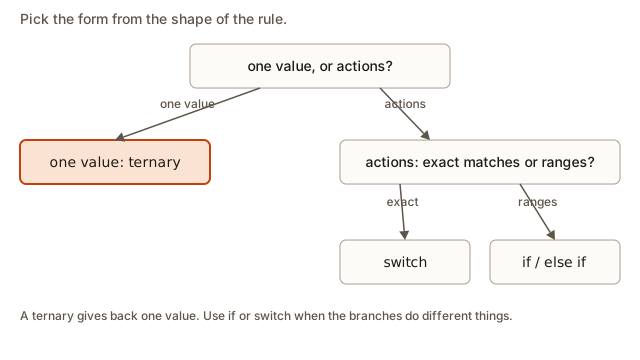 A decision guide that asks whether the choice is one value or actions, then whether it is exact matches or ranges, and names if, else if ladder, switch or ternary at the end of each route
Read the guide with a real example. The grade letter is a set of ranges, so it is a ladder. The operator symbol in a calculator is an exact match, so it is a switch. A message that changes one word is one value from two, so it is a ternary. A rule that prints a warning and also stops the program has actions to run, so it is an if.
The ternary also shows the difference between a choice of value and a choice of action in one picture. The next diagram shows the ternary as one box that produces one result, with the untaken branch greyed out.
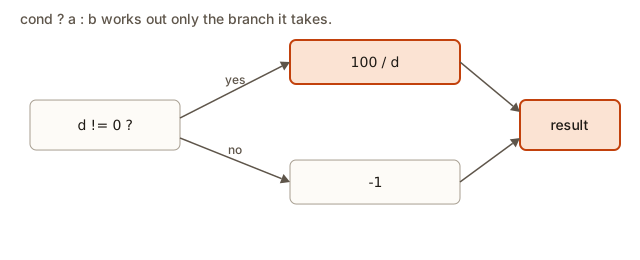 A ternary as a single expression with a test on the left and two possible values on the right, where only the value on the chosen path is worked out and returned
Five rules and the tool for each
The guide is easier to trust after you have applied it to real rules. The table below takes five rules that a program might need, and for each one it names the tool, the reason, and what would go wrong with a different tool. Read the last column carefully, because a wrong choice often still compiles.
| The rule | Tool | Why this tool | What goes wrong with another tool |
|---|---|---|---|
| Show the word "item" or "items" after a count | ternary | one word chosen from two | an if works, but it takes four lines for one word |
| Give a letter grade for a score | else if ladder | ranges such as >= 90 | a switch cannot test ranges, so it cannot be written at all |
| Map a menu key to an action | switch | exact characters, several actions | a ladder works, but the reader must check each line for the same variable |
| Print a warning and stop the program | if with a block | actions, not a value | a ternary cannot run two statements, so the return would be lost |
| Print a quotient, or "no division" when the divisor is zero | if with else | one branch prints a number and the other prints a message | a ternary cannot give back a number in one branch and text in the other |
Look at the third row. A ladder of == tests is correct for a menu, but a switch states the intent: one key, many named actions. Look at the fourth row. A ternary would tempt you to write cout inside both branches, and that is not a value, so the operator is the wrong tool. Look at the fifth row. A ternary can guard a division, as you saw earlier, when both branches produce numbers. When the zero case prints a message, use an if.
When you are unsure, write the rule out as the table would: what is the input, what is the output, and is the output one value or a set of actions? Most of the time the answer tells you the tool. The rest of the time, write the simplest version, and let a reader tell you whether it is clear.
Interview example: sign and absolute value
Two common interview questions use the ternary naturally. The first asks for the sign of a number: 1 if it is positive, -1 if it is negative, and 0 if it is zero. A correct answer is a ladder, but it can be written as nested ternaries. The point is that you say the rule for each case and handle zero explicitly.
Type -12 into the Input box. The first test -12 > 0 is false. The second part (-12 < 0 ? -1 : 0) is true, so it gives -1. The output is sign -1. For 0 the output is sign 0, and for 5 it is sign 1. Interviewers look for zero handled on its own, because a common mistake is to treat zero as negative.
The second question asks for the absolute value, which is the distance from zero. It is n when n is zero or positive, and -n otherwise. The ternary is n < 0 ? -n : n. Stating the time and space cost is the last step: both are constant, O(1) time and O(1) space, because each answer comes from one test and one negation. The interviewer also wants to hear about the most negative int. Negating the smallest int overflows, because its positive counterpart does not fit. That is undefined behaviour in C++, so a careful answer mentions it. You will see overflow in the variables module.
What happens inside
The compiler turns a ternary into the same kind of comparison and jump you saw for an if. The test runs first. Then the processor jumps to the code that computes the chosen value, and skips the other one. The result is stored in a register or a temporary location, and then used. A ternary is therefore not faster than the matching if. It is only shorter to write for a single value. Choose it for clarity, not for speed.
The other practical point is that the ternary can contain a side effect, such as an increment, but you should not use that. A line like x = y > 0 ? y++ : y--; is correct, but it changes y as part of choosing x. Readers have to work out both things at once. Keep side effects in their own statements, and use the ternary only for values.
Writing ternaries a team can read
A ternary is only as good as the reader's ability to follow it at a glance. Most of the time, a line with one ternary is easy to read, and a line with two is still fine. Past that point, the cost of each new level grows quickly. Some habits keep ternaries readable.
Give the test a name when it is not obvious. Compare these two lines:
cout << (n % 4 == 0 && (n % 100 != 0 || n % 400 == 0) ? "leap" : "common") << endl;
cout << (isLeap ? "leap" : "common") << endl;
The second line reads as a sentence, and the first makes the reader rebuild the rule. Compute bool isLeap = ...; on its own line, with the rule written once, and then use the name. The ternary becomes trivial, and the rule has a label that other code can refer to.
When a ternary runs over one line, break it at the question mark and the colon, and indent the continuation. Put the two values on their own lines so each one is easy to see:
string label = count == 1
                   ? "item"
                   : "items";
Keep the same style everywhere in one program. Some teams prefer a plain if for anything that spans two lines, and that is a good rule too. The choice of style matters less than being consistent.
Avoid ternaries that have side effects. A line such as x = (y > 0) ? y++ : y--; is correct, but a reader has to work out what happens to y and to x in one pass. Put the change on its own line, and let the ternary only choose the value.
Finally, avoid the ternary as a way to write a longer rule. If the value you want depends on three conditions with different answers, a ladder that sets one variable is usually clearer than three nested ternaries. The point of the ternary is to say one thing in one line. When the line stops saying one thing, it has outgrown the operator.
Ternary or switch for a set of values
Sometimes both a ternary and a switch could choose a value. Take a function-free example: a program maps a single-letter size code to a price. The code S is small, M is medium and L is large. Any other letter is an error with price 0.
A switch with one case per size is the most direct form when there are several options. Each label is an exact code, and the default covers the error. A ternary chain would work for two sizes, but it becomes a line that the reader has to unpack for three or four.
For a single yes-or-no question, the ternary is better. Consider a price that is 10 more for large sizes, and 0 otherwise. The rule is one question with two values, so size == 'L' ? 10 : 0 says it in one line, and a switch would be heavier than the rule.
The general rule is simple to state. The more options there are, and the more they are exact values, the more a switch helps. The fewer options there are, and the more the choice reads as one question, the more a ternary helps. The break-even point depends on the reader, but two options usually favour the ternary and four or more favour the switch.
Reading a ternary aloud
A useful test for any ternary is to read it aloud as a sentence. Start with the test, then the value for yes, then the value for no. The line cout << (n == 1 ? "item" : "items") reads as "if n is one, say item, otherwise say items". If you cannot read a line that way in one breath, the line is too complicated, and you should split it.
The reading test also finds the common mistake of swapping the two values. Read the line aloud and check that the yes value is the one you meant for the yes case. A swapped pair compiles, and it gives the opposite answer for every input, so the bug is silent. Testing both sides of the boundary, as you did in the earlier examples, catches it at once.
Common mistakes
Each of these mistakes has a clear symptom and a clear fix.
Forgetting the brackets around a ternary inside cout. The symptom is no match for 'operator>'. The fix is to wrap the whole ternary in round brackets, as cout << (a > b ? a : b).
Mismatched branch types. The symptom is operands to '?:' have different types. Make both branches the same type, or convert one explicitly.
A missing colon or missing else part. A ternary always has three parts. Writing int r = n > 1 ? 10; gives:
error: expected ':' before ';' tokenIf you only need the if part, write an if statement instead.
Nesting too deeply. A ternary inside a ternary inside a ternary is hard to read. The symptom is that you cannot say what the line does without working it out on paper. Switch to an if ladder, or name the intermediate values.
Using a ternary for actions. A ternary whose branches print messages is misusing the operator. It can produce one value, not run two sets of statements. If you find yourself writing cout inside both branches, write an if.
Treating the sentinel as real data. Using -1 to mean "no answer" is fine until a real answer is also -1. Pick a sentinel that is outside the range of real answers, and say so in a comment.
Choosing the tool by habit. A beginner who has learned the ternary may use it for everything. The symptom is a line that is hard to read because it is doing too much. Use the decision guide, and pick the form that makes the rule clearest.
Reading a complex decision
When a decision gets complicated, the way to read it is the same as the way to write it. Start with the rule in words. Then identify the tool: is this a value or an action, a range or an exact match? Then write the simplest correct form. Here is a small problem to practise that routine. A parking fee is charged as follows: the first two hours are free, then each hour costs 3 units, up to a maximum of 20 units per day. Hours beyond 24 are invalid. The question is which tools to use.
The rule has actions? No, it produces one number, the fee. So a ternary or an if that sets a variable. The rule has ranges? Yes, the free hours, the cost per hour, the cap and the invalid range. So the bands call for an if ladder. A reasonable structure is an if for invalid input, then a ladder for the free time, then a computed fee capped with a ternary. The ternary is a good fit for the cap, because it chooses one value from two. Each part uses the tool that matches its shape. That is the skill this module is trying to build: not memorising syntax, but matching the form to the problem.
A worked example: from a rule to code
This example combines all four tools on one realistic rule. A car park charges as follows. The first two hours are free. After that each hour costs 3 units, and the fee for one day never goes above 20 units. A stay longer than 24 hours is not a valid entry, so the program must refuse it.
Start with the plain-English rule and sort each part by its shape. The refusal of a stay longer than 24 hours is an action: print a message and stop. So it is an if. The free two hours is a range, from 0 to 2, so it is a rung of a ladder. The charge after two hours is one value computed from the stay. The cap is a choice between two values: the fee or 20, whichever is smaller. That is a ternary.
Here is the program that follows that plan:
#include <iostream>
using namespace std;

int main() {
    int hours;
    cin >> hours;
    if (hours < 0 || hours > 24) {
        cout << "invalid" << endl;
    } else {
        int fee;
        if (hours <= 2) {
            fee = 0;
        } else {
            fee = (hours - 2) * 3;
        }
        fee = fee > 20 ? 20 : fee;
        cout << "fee " << fee << endl;
    }
    return 0;
}
Trace three inputs. For 5, the outer test passes, the first two hours are not charged in the ladder, so the program takes the else, and computes (5 - 2) * 3, which is 9. The cap test 9 > 20 is false, so the fee stays 9. The output is fee 9. For 10, the computed fee is 8 * 3, which is 24. The cap test 24 > 20 is true, so the ternary gives 20. The output is fee 20. For 25, the outer test catches it at once, and the output is invalid, with no fee computed at all.
Trace the boundary too. For 2, the ladder's first branch runs and the fee is 0, so the output is fee 0. For 3, the fee is 1 * 3, which is 3. The boundary between free and charged is exactly two hours, and that is the value a tester should check first.
Now compare with the wrong choices. Writing the whole program as one ternary chain would be hard to follow. It would test the invalid range, the free range and the cap all in one expression, with values of different kinds mixed together. Writing the cap as an if would be just as correct, but it would take four lines to choose between two numbers, and the one-line ternary says the same thing more directly. Each part of the program uses the tool whose shape matches it. That is the skill the module is meant to build.
The program also shows the order of the checks. The invalid case is tested first, so no later line has to worry about a stay longer than 24 hours. The free ladder comes next. The cap comes last, because it applies only to a fee that has already been computed. Reading the program from the top gives the rule in the same order as the plain-English description.
Real-world uses
The ternary appears most often in configuration and formatting code. A log line uses level == 1 ? "verbose" : "normal". A page uses count == 1 ? "" : "s" to pluralise a word. A graphics routine picks a colour with a condition on brightness. In each case the result is a single value, and the test decides which one. Once you recognise that shape, the ternary is the natural tool.
Ladders and switches appear in the same programs, but for different jobs. A parser uses a switch on each character. A tax calculator uses a ladder on the income bands. The mix is normal. Real code is rarely one form only, and the best code uses each form where its shape fits.
A checklist for choosing and writing a decision
Before you move on, check the following for every decision you write:
- Am I choosing a value, or running actions? A value suggests a ternary, and actions suggest an
ifor a switch. - Am I testing exact matches or ranges? Exact matches suggest a switch, and ranges suggest a ladder.
- Is every ternary inside a larger expression wrapped in round brackets?
- Do both branches of every ternary have the same type?
- Is the nesting shallow enough to read at a glance?
- Have I handled zero, negative numbers and the boundary explicitly?
- Would a named variable make the line easier to understand?
Practice
Write each program, compile it with -Wall -Wextra, and test the boundaries. Write the expected output on paper before you run it.
- Read two integers and print the smaller one using a ternary. Test
3 8and8 3.
Solution
#include <iostream>
using namespace std;

int main() {
    int a, b;
    cin >> a >> b;
    cout << (a < b ? a : b) << endl;
    return 0;
}
For 3 8 the test is true and the output is 3. For 8 3 the test is false and the output is 3.
- Read an integer
nand printzero,evenoroddusing one ternary expression that chooses the word. Test 0, 4 and 7. Explain why a single nested ternary is acceptable here.
Solution
#include <iostream>
using namespace std;

int main() {
    int n;
    cin >> n;
    cout << (n == 0 ? "zero" : (n % 2 == 0 ? "even" : "odd")) << endl;
    return 0;
}
The nesting is two levels and the shape is familiar. Each test answers one question about n, so a reader can follow it. The round brackets around the whole expression are required inside cout.
- Read an integer
hrepresenting hours. Print1 hourif it is 1, andN hoursotherwise, where N is the number. Test 1, 2 and 0.
Solution
#include <iostream>
using namespace std;

int main() {
    int h;
    cin >> h;
    cout << h << (h == 1 ? " hour" : " hours") << endl;
    return 0;
}
The input 0 gives 0 hours, which matches English usage for zero.
- Read two integers
aandb. Printa / bwhenbis not zero andno divisionotherwise. Make sure the division is never computed whenbis zero. Test10 0and10 4.
Solution
#include <iostream>
using namespace std;

int main() {
    int a, b;
    cin >> a >> b;
    if (b != 0) {
        cout << a / b << endl;
    } else {
        cout << "no division" << endl;
    }
    return 0;
}
An if is clearer here, because the two branches do different things: one prints a number and the other prints a message. A ternary can only pick one value, so the zero case would have to produce a number too, and a text message cannot be that number. When the branches are actions, choose the if.
- Read an integer and print its absolute value using a ternary. Then explain what the answer should be for the smallest
int, and what the risk is.
Solution
#include <iostream>
using namespace std;

int main() {
    int n;
    cin >> n;
    cout << (n < 0 ? -n : n) << endl;
    return 0;
}
For -12 the output is 12, and for 7 it is 7. For the smallest int, the negation overflows, because the matching positive number does not fit in an int. In C++ that is undefined behaviour, so a careful answer says so and, where it matters, uses a wider type such as long long.
- Read one integer
nand print its sign as-1,0or1, using nested ternaries. Test -5, 0 and 9. Say which value needs its own branch, and why.
Solution
#include <iostream>
using namespace std;

int main() {
    int n;
    cin >> n;
    cout << (n > 0 ? 1 : (n < 0 ? -1 : 0)) << endl;
    return 0;
}
Zero needs its own branch, because it is neither positive nor negative. Treating zero as negative or positive would give a wrong answer for one of the three inputs.
- Use
std::minandstd::maxfrom<algorithm>to read four integers and print the range they span, asrange N, where N is the largest minus the smallest. Test4 9 2 7and5 5 5 5.
Solution
#include <algorithm>
#include <iostream>
using namespace std;

int main() {
    int a, b, c, d;
    cin >> a >> b >> c >> d;
    int lo = min(min(a, b), min(c, d));
    int hi = max(max(a, b), max(c, d));
    cout << "range " << hi - lo << endl;
    return 0;
}
For 4 9 2 7 the smallest is 2 and the largest is 9, so the range is 7. For 5 5 5 5 the range is 0.
- Read a letter grade
gas a character and use a ternary to printpassforA,BorC, andfailfor any other character. Then explain why the ternary is a good fit even though a switch would also work.
Solution
#include <iostream>
using namespace std;

int main() {
    char g;
    cin >> g;
    cout << ((g == 'A' || g == 'B' || g == 'C') ? "pass" : "fail") << endl;
    return 0;
}
The result is one word from two, so a ternary expresses it directly. A switch would also work with stacked labels, and either is correct. The ternary wins on brevity here, because the rule is a single yes or no with one answer.
What you now know
- The ternary
condition ? a : bgives back one value, and it has three parts. - Wrap every ternary inside a larger expression in round brackets, because
<<and>have a precedence that surprises beginners. - Both branches of a ternary must have types the compiler can convert to one type.
- A ternary works out only the branch it takes, which makes it useful for guarding a division.
- Use
std::clamp,std::minandstd::maxfrom<algorithm>for ranges and extremes, and know the ternary version for interviews. - Choose the tool by shape: a value from two options suggests a ternary, an action suggests an
if, ranges suggest a ladder and exact matches suggest a switch.
The next lesson is the module assignment. It asks you to build one program that uses all four tools to route support tickets, and it checks that you can choose the right form for each rule.