Why this matters
Many decisions compare one value against a list of exact options. A menu has options 1 to 5. A calculator has operators +, -, * and /. A keyboard command is s for save, q for quit, and so on. You can write each of these as an else if ladder, and you should be able to. But when every test is "is the value equal to this one?", C++ has a tool made for exactly that job, called switch. It is shorter to read, it states the intent clearly, and it has a few rules that trip up almost every beginner. This lesson explains those rules with worked programs and the exact compiler messages you will see when you break them.
The idea in everyday words
Picture a vending machine with a row of numbered buttons. You press one button, and the machine looks at the number and dispenses the matching item. It does not ask "is this button greater than 5?" or "is it between 3 and 7?". It asks one question only: which button was pressed? Then it goes straight to that row.
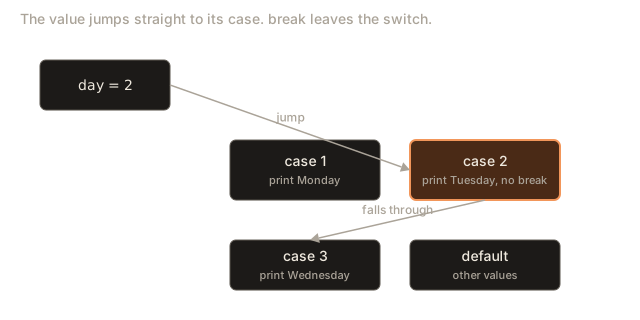
A switch works the same way. You give it one value, and it jumps straight to the case label that matches that value. A case label is the word case followed by a constant value and a colon. The code under that label runs, until the program meets a break, which says "stop here and leave the switch".
If no label matches, the program goes to the optional default label, which works like the final else in a ladder. If there is no default and nothing matches, nothing inside the switch runs.
The idea that matters most is that switch compares for exact equality. It cannot say "greater than 50". That single limit decides when you use it and when you use an else if ladder, and we will come back to it.
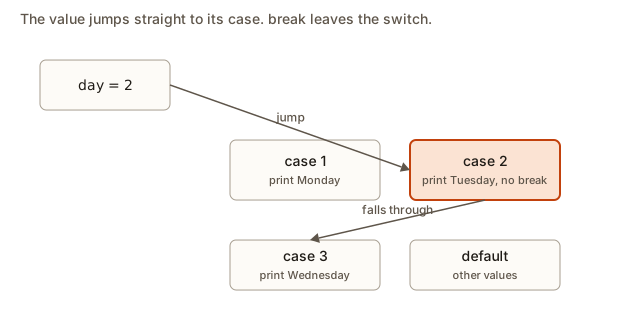 A value entering a switch and jumping straight to its matching case, with break ending each case and default catching any value no case matches
The syntax
Here is the general form, written with placeholders rather than real values:
switch (value) {
    case first:
        // statements for first
        break;
    case second:
        // statements for second
        break;
    default:
        // statements when nothing matched
        break;
}
A few details are fixed by the language:
- The value in brackets after
switchis evaluated once. - Each
casemust have a constant that the compiler can work out before the program runs, such as1,'a'or a named constant. - The labels are followed by a colon, not a semicolon.
- The whole set of cases sits inside one pair of braces.
- The
defaultlabel is optional, and it can appear in any position. By convention it goes last.
Only some types are allowed in the brackets. The value must be an integer type, such as int or char, or an enumeration. You cannot switch on a double, a float or a std::string. Here is a short example that shows the first case working, followed by the error for the forbidden type.
Type 3 into the Input box. The switch jumps to case 3, prints Wednesday, and then reaches break, which leaves the switch. The output is:
WednesdayEach case here is on one line, with the statements and the break together. That layout is common for short cases. For longer cases, put each statement on its own line and indent it under the label. Either style is correct. Be consistent within one program.
Now the forbidden type. This program tries to switch on a std::string:
#include <iostream>
#include <string>
using namespace std;

int main() {
    string s = "B";
    switch (s) {
        case "A": cout << "a"; break;
        default: cout << "other";
    }
    return 0;
}
The compiler stops with this message:
error: switch quantity not an integerThe message says the value in brackets is not an integer. A text value is not one. To choose on text, use an if and else if ladder with == comparisons. Strings compare correctly with ==, because std::string defines what equality means for text.
break: where the branch ends
Each case runs its statements, and then the program keeps reading down the list of cases. It does not stop at the next label. This is called fall-through. The break statement ends the switch, so the cases below it are skipped.
Forgetting a break is the most common switch bug. This program has one:
Type 2 into the Input box. The switch jumps to case 2 and prints Tuesday. There is no break there, so the program keeps going and runs the code under case 3. It prints Wednesday and then reaches the break. The output is:
Tuesday
Wednesday
Nothing in the program reports an error. The compiler accepts it, and with -Wall -Wextra g++ warns about the possible fall-through. The bug only shows as wrong output, so a reader who expects one line can be surprised by two. Remember the rule: every case that should end needs its own break, and when you do not want a break, say so on purpose.
Deliberate fall-through
Sometimes you do want one case to run into the next. A common use is a set of benefits that stack. A higher level gets everything a lower level gets, plus more. The [[fallthrough]] attribute tells the compiler and the reader that the missing break is intended. It was added in C++17, so it is available in the standard that this course uses.
Type 3. The switch jumps to case 3 and prints express shipping. The [[fallthrough]] line marks the missing break as intended, so the program runs into case 2, prints tracking, falls through again, prints insurance and breaks. The output is:
express shipping
tracking
insurance
With the input 2, the switch starts at case 2, so the output is tracking and then insurance. With 1, only insurance prints. With 0, default runs and prints no benefits. The layout reads as a list of levels, and each level includes the ones below it. That is exactly what fall-through is good for.
Use [[fallthrough]] only when you intend it. Without the attribute, a missing break looks like an accident, and a reader cannot tell which one it is. The attribute is the difference between a bug and a design.
Stacking labels: several values, one action
When several values should do the same thing, you can stack their labels without any code between them. An empty case falls straight into the next label, and that is the normal use of fall-through. It needs no attribute, because nothing is being skipped.
Type e into the Input box. The output is vowel. The empty labels for a, i, o and u each fall into the code under the label for u, and that code runs once. Type x instead, and the default branch prints not a vowel.
This pattern is far clearer than five separate if statements. It also makes it easy to add a sixth vowel later, such as y for a particular purpose: add one line, and nothing else changes.
Characters need a practical warning. 'a' and 'A' are different values, so this program does not treat an uppercase E as a vowel. If your input may be in either case, convert it first, or list both forms. A quick way to handle this is to list the uppercase labels as well, as in case 'A':.
Upper and lower case input
The vowel program above treated E and e as different letters. Real programs usually want a command such as s for save to work whether the user types s or S. There are two common answers. You can list both forms as labels, which is safe but doubles the list. Or you can convert the input to lower case before the switch, which keeps one label per command.
The standard header <cctype> provides tolower, which takes a character and returns its lower-case form. It leaves characters that have no lower-case form, such as digits and punctuation, unchanged. Here is a command reader that uses it.
Type S into the Input box. tolower('S') returns the code for s, so the switch jumps to the save case and prints save. Type q and the output is quit. Type x and the default prints unknown command.
Notice that the switch now has one label per command, and the conversion is written once, in the header of the switch. A reader sees the rule at a glance: the input is folded to lower case, then matched. That is clearer than a list of uppercase and lowercase labels for every command.
There is one subtle point. tolower returns an int, not a char. That is why the switch works: an int value is allowed in a switch, and the case labels 's' and 'q' are characters that the compiler converts to their integer codes. If you pass a value that is not a letter, tolower gives it back unchanged, so the default case still catches it.
A calculator with a switch
The calculator is the textbook use of switch. The operator is a single character, and each operator is an exact match. This version reads an expression of the form number operator number, such as 12 * 4.
Type 12 * 4 into the Input box. The cin line reads three values: the first number, the character * and the second number. Spaces separate the values, because cin skips whitespace. The switch jumps to the '*' case. It prints 48 and breaks.
Notice the division case. It contains an if inside the case, to check that the divisor is not zero. Dividing an integer by zero is undefined behaviour in C++, which means the program may crash or print nonsense. Checking first costs one comparison and prevents that. Try 12 / 0 and the program prints cannot divide by zero.
The default case handles any operator the program does not know. Without it, 12 % 4 would print nothing at all, which hides the mistake from the user. Always give a switch a default that says something when a value is unexpected, unless you have a clear reason not to.
Declarations inside a case
A variable declared inside a case has a scope that covers the whole switch, not only that case. That creates a trap. Jumping to a later case would skip the declaration, but the variable would still be in scope there, so C++ forbids the jump. Here is the broken program.
#include <iostream>
using namespace std;

int main() {
    int n = 3;
    switch (n) {
        case 1:
            int total = 5;
            cout << total;
            break;
        case 2:
            cout << "two";
            break;
    }
    return 0;
}
The compiler stops with these lines:
error: jump to case label
note:   crosses initialization of 'int total'
The fix is to wrap the statements of the case in braces, which gives the variable its own block:
Type 2 into the Input box. The second case has its own price and tax, separate from the first case, so the two names do not clash. Tax is 35 divided by 10, which is 3 in integer arithmetic, so the total is 38. The output is:
Total: 38Braces around a case give the case its own scope. Use them whenever a case declares a variable. Even when a case does not need braces yet, adding them early saves you from this error later.
Choosing between switch and else if
A switch and an else if ladder can often solve the same problem. The choice comes down to what each one can test. This table lists the differences that matter in practice.
| Question | Switch | Else if ladder |
|---|---|---|
| Can it test equality with a value? | Yes, and it is the natural fit | Yes, but more verbose |
Can it test a range such as score >= 90? | No | Yes |
Can it test a std::string? | No | Yes |
Can it test a double? | No | Yes |
| Can several values share one action? | Yes, by stacking labels | Only with || in each test |
| Can it run a default for unmatched values? | Yes, with default | Yes, with a final else |
| Can the value be evaluated only once? | Yes, it is read once | Each test may read the variable again |
| Are the cases easy to read as a list? | Yes | Less so for many cases |
The rule of thumb follows from the table. When the question is "which of these exact values is it?", use a switch. When the question is "which range does it fall in?", use an else if ladder. Many real programs use both.
The last row of the table matters less than it looks, because a single variable is cheap to read. But a switch states the intent: one value, several named outcomes. A reader sees the shape at a glance. A ladder of == tests makes the reader check each line to be sure the values are all compared to the same thing.
The same rule written both ways
It helps to see one rule written as a switch and as a ladder, side by side, before you choose between them. Take a set of postal zones, where zone 1 is the city centre, zone 2 is the suburbs and zone 3 is the outer ring. Each zone has a delivery charge. Zone 1 costs 20, zone 2 costs 35 and zone 3 costs 50. Any other zone is not served.
With a switch, the rule reads as a table:
switch (zone) {
    case 1: charge = 20; break;
    case 2: charge = 35; break;
    case 3: charge = 50; break;
    default: charge = -1; break;
}
With an else if ladder, the same rule reads as a chain of equality tests:
if (zone == 1) {
    charge = 20;
} else if (zone == 2) {
    charge = 35;
} else if (zone == 3) {
    charge = 50;
} else {
    charge = -1;
}
Both forms give the same charge for every zone. Trace zone 2 through each. In the switch, the value jumps to case 2, sets the charge to 35, and breaks. In the ladder, the first test zone == 1 is false, the second zone == 2 is true, so the charge is set to 35 and the rest of the chain is skipped. The two versions are equally correct, and the choice comes down to style.
The switch is easier to scan, because the zones and charges line up as a table, and the reader sees the whole rule at once. The ladder is more flexible. If the rule later becomes "zones 4 and above cost 65", the ladder can say zone >= 4, while the switch would need a new label for every zone. That is the deciding question: are the cases a fixed list of exact values, or could they become ranges later? A list of exact values suits a switch. A rule that might grow into ranges suits a ladder.
Enumerations and named cases
A switch becomes clearer still when the values have names. An enumeration, written with enum class, defines a set of named values. Each value is a constant that the switch can use. The next program is a short sketch of the idea. You do not need it for the rest of this lesson, but you will see it in real code.
enum class Level { Low, Medium, High };

switch (level) {
    case Level::Low:
        // ...
        break;
    case Level::Medium:
        // ...
        break;
    case Level::High:
        // ...
        break;
}
An enumeration makes the cases self-describing, and the compiler can warn if you forget one of the values. The number behind each name is an integer internally, which is why a switch on an enumeration is allowed. Enumerations are covered again in the object-oriented module.
A complete example with an enumeration
The next program puts the enumeration idea into a full, working piece of code. It models a traffic light. The light is one of three named states, and the program prints what a driver should do. The switch uses the names of the states, so the cases read like the rule itself.
#include <iostream>
using namespace std;

enum class Light { Red, Amber, Green };

int main() {
    Light now = Light::Amber;
    switch (now) {
        case Light::Red:
            cout << "stop" << endl;
            break;
        case Light::Amber:
            cout << "prepare to stop" << endl;
            break;
        case Light::Green:
            cout << "go" << endl;
            break;
    }
    return 0;
}
This program prints prepare to stop, because now is Light::Amber. To see another state, change the value on the line that starts with Light now. The enumeration gives each state a name, and the compiler knows all three states. If you add a fourth state later, such as a flashing light, a compiler with warnings turned on reports the switch as incomplete. That is a useful safety net that an else if ladder does not give you.
Notice that the cases in this program have no default. With an enumeration that covers every value, the compiler can check completeness, so a default is optional. Many style guides still ask for one, because a value added later would otherwise be ignored silently. Decide which rule your team follows, and apply it consistently.
What happens inside
The compiler can translate a switch in two broad ways. For a few widely spaced values, it may build a chain of comparisons, much like an else if ladder. For many values close together, it may build a jump table. A jump table is an array of addresses, one per possible value. The program reads the value, looks up its address in the table, and jumps there in a single step. The compiler chooses the method, and you do not control it.
What you do control is the meaning. The processor does the same thing whichever method is used: it lands on the matching case, runs the statements, and stops at a break or moves into the next case. That is why fall-through is a property of the code layout and not of the processor. If the code has no break between two cases, the processor simply runs the next block of statements.
The cost of a switch is therefore small and roughly constant for a jump table, and grows with the number of cases for a chain of comparisons. For the number of cases in this course, the difference never matters. Choose the form that is easiest for a reader to check.
Interview example: Roman numeral digits
A common interview question asks you to convert a Roman numeral digit to its value. The digits are I, V, X, L, C, D and M, worth 1, 5, 10, 50, 100, 500 and 1000. The interview test is whether you can map exact characters to values and handle unknown characters. A switch is a natural fit.
Type D into the Input box, and the output is 500. Type Q, and it prints invalid. A complete Roman numeral converter also has to subtract a smaller value that comes before a larger one, as in IV for 4. That needs a loop and a comparison between neighbours, which belongs to the next module. The switch in this program is the building block.
The interview point is that a switch makes the mapping visible. Interviewers want to see that you name the default, and that you can say the running time. Here it is O(1) per character, because each lookup is a fixed number of steps, and the extra space is O(1).
Testing every case of a switch
A switch is easy to test if you think in cases. For every label, there should be one test that enters it. For the default, there should be one test that enters it. And for every break, there should be one test that shows the break works. The test list is short, and it is the best protection against the two bugs this lesson has covered most: missing breaks and missing defaults.
Here is the test list for the day-name switch from the start of this lesson. Each row gives the input, the expected output and the reason the row is there.
| Input | Expected output | Why this row exists |
|---|---|---|
1 | Monday | the first label |
7 | Sunday | the last label |
4 | Thursday | a label in the middle |
0 | invalid day | just below the first label |
8 | invalid day | just above the last label |
-3 | invalid day | a negative value that no label matches |
Notice that the first and last labels, and the values just outside them, are the boundary tests. They are the same boundary idea you met with ladders. A switch has no ranges, so its boundaries are simply the first label, the last label and the values that fall between or outside them.
For a switch with fall-through, add one row for each case that falls into the next, and check that the output contains both lines. A case that should stop and does not is the bug the row will catch. For a switch on a character, add a row for the uppercase form of each letter if the input might contain it, and a row for a digit, so the default is exercised.
Run the test list once after you write the switch, and again after every change. A switch changes its meaning when a single break is added or removed, so a short list catches that quickly.
Common mistakes
Here are the switch mistakes that cost beginners the most time, with the symptom and the fix for each.
Forgetting break. The symptom is that more than one case prints. The fix is a break at the end of each case, unless you mean to fall through, in which case write [[fallthrough]].
Switching on a string or a double. The symptom is the message switch quantity not an integer. The fix is an else if ladder with ==, or a switch on a character or an enumeration instead.
A non-constant case label. If you write case lim: with lim a variable, the compiler refuses. The message is:
error: the value of 'lim' is not usable in a constant expressionCase labels must be constants known at compile time. Use a const value or a literal number. If you need to compare with a variable, use an else if ladder.
A declaration that jumps over an initialization. The symptom is the jump to case label error shown earlier. The fix is braces around the case.
Mixing up characters and numbers. case 1: matches the integer 1. case '1': matches the character with code 49, which is the character you type on the keyboard. A user who types 1 into a char gets '1', and it does not match case 1:. Be sure your labels match the type of the switch value.
Missing default. Without a default, an unexpected value prints nothing. The symptom is silence where you expected a message. Add a default that says something useful, even if it is only "invalid".
Expecting case ranges. C++ does not support case 1 to 5:. For a range, use an else if ladder, or list each value. Some compilers offer a range extension, but it is not standard C++ and should not be relied on.
Forgetting the break in the default. The last branch does not need a break, because nothing follows it. Still, write one. It costs nothing, and it protects you when someone later adds a case below the default.
Debugging a switch
When a switch does the wrong thing, start by printing the value you switch on. A surprising branch almost always comes from a value that is not what you thought. For a character, print its code as a number, because that shows whether a space or a newline is hiding in the input. Add a line before the switch:
cout << "value = [" << c << "] code = " << int(c) << endl;The int(c) converts the character to its numeric code, and the brackets show any spaces. A lowercase e prints as 101 and a space prints as 32, so the numbers tell you exactly what the program read. cin >> c skips leading spaces, so a space is never read this way, but a program that reads a whole line with getline does keep them, and the code makes that visible.
When the wrong case runs, check each break, starting from the top. A case that falls through into the next one is the usual reason for two lines of output. Walk down the switch with the input value and write the line that runs next, until you hit a break. That walk is the same as the trace you learned for an if.
Input that the switch never sees
A switch can only react to what your program reads. If the input is not what you expected, the switch may never get a useful value, and the default is the only branch that runs. Two input habits cause this often.
The first is reading a character with cin. The extraction operator >> skips spaces and line breaks before it reads a char. So if a user types a space and then q, the program reads q, and it never sees the space. That is usually what you want. But if you need to react to a space, you must read the input differently, for example with cin.get, which returns the next character exactly as typed, including spaces and line breaks.
The second is typing more than one character when the program expects one. If the input is qq and the program reads a single char, it reads the first q and leaves the second in the input. The next read then sees that second q. Programs that run once per input often ignore this leftover, which can produce confusing results on the next run. A robust program reads a whole line with getline and then checks its length, before it sends the first character to the switch.
Both habits lead to the same lesson. The switch decides on the value it is given, and a value that arrives in an unexpected shape is a decision you must plan for. Test with the exact inputs a user might type, including extra spaces, and check that the default reports the problem rather than hiding it.
Reviewing a switch written by someone else
When you read another person's switch, or review your own code after a day away, check the same few things in the same order. Reviewers in working teams look at these points first, and you will find that the list catches most real problems.
Start with the value in brackets. Is it an integer, a character or an enumeration? If the code switches on a value whose type you are not sure of, look at its declaration before you trust the labels. A char and an int look the same in a switch, but case '1': and case 1: are different labels, and a mismatch silently never matches.
Next, read down the breaks. Every case should end with a break, or with a [[fallthrough]] that is clearly intended. A case with neither is a bug until proven otherwise. Make sure a break is inside each case, and not after the closing brace of the whole switch, where it would belong to nothing useful.
Then look at the default. Is there one? If not, what happens to an unexpected value? A silent switch can hide a whole class of input errors, so either add a default that reports the value, or write a comment that says why no default is needed.
Finally, look for declarations. A case that declares a variable needs braces around it. A reviewer who sees int total = 5; directly under a case label should ask for braces at once, because the next case may fail to compile in a confusing way.
A short review comment for a switch might read: "Case 3 has no break and no fall-through attribute. Add break; or mark it with [[fallthrough]]." That form is precise, it names the line, and it says how to fix it. Write your own review comments in the same shape.
Real-world uses
Switches appear wherever a program reacts to a named command or a code. A text editor maps key codes to actions. A network library maps status codes such as 200, 404 and 500 to messages. A parser maps the characters in a file to tokens. A state machine maps its current state and an input to the next state. In each case the value is an integer or a character, and each option is an exact match. That is the sweet spot for switch.
In the real world, a switch is also how you handle a set of known options that the user chooses from a menu. The menu is easy to read, the default catches a wrong key, and adding a new option means adding one case.
A checklist for every switch
Run through this list before you move on:
- Is the value in brackets an integer or a character, and not a string or a double?
- Does every case that should end have a
break, or a[[fallthrough]]if you mean it? - Does each case that declares a variable use braces?
- Are the case labels constants, and do they match the type of the value?
- Is there a
defaultthat reports an unexpected value? - Would an else if ladder be clearer, because you need ranges or text?
Practice
Write each program, compile it with -Wall -Wextra, and test every case before you look at the solution. Write the expected output first.
- Read an integer from 1 to 12 and print the name of the month, for example
Marchfor 3. For any other number printinvalid month. Include abreakafter every case.
Solution
#include <iostream>
using namespace std;

int main() {
    int m;
    cin >> m;
    switch (m) {
        case 1: cout << "January" << endl; break;
        case 2: cout << "February" << endl; break;
        case 3: cout << "March" << endl; break;
        case 4: cout << "April" << endl; break;
        case 5: cout << "May" << endl; break;
        case 6: cout << "June" << endl; break;
        case 7: cout << "July" << endl; break;
        case 8: cout << "August" << endl; break;
        case 9: cout << "September" << endl; break;
        case 10: cout << "October" << endl; break;
        case 11: cout << "November" << endl; break;
        case 12: cout << "December" << endl; break;
        default: cout << "invalid month" << endl; break;
    }
    return 0;
}
The default covers 0, 13 and any other number.
- Read a character. Print
digitif it is a digit from'0'to'9',letterforatozorAtoZ, andotherotherwise. Use stacked labels. Hint: stacking ten digit labels is shorter than tenifstatements.
Solution
#include <iostream>
using namespace std;

int main() {
    char c;
    cin >> c;
    switch (c) {
        case '0': case '1': case '2': case '3': case '4':
        case '5': case '6': case '7': case '8': case '9':
            cout << "digit" << endl;
            break;
        case 'a': case 'b': case 'c': case 'd': case 'e':
        case 'f': case 'g': case 'h': case 'i': case 'j':
        case 'k': case 'l': case 'm': case 'n': case 'o':
        case 'p': case 'q': case 'r': case 's': case 't':
        case 'u': case 'v': case 'w': case 'x': case 'y':
        case 'z':
        case 'A': case 'B': case 'C': case 'D': case 'E':
        case 'F': case 'G': case 'H': case 'I': case 'J':
        case 'K': case 'L': case 'M': case 'N': case 'O':
        case 'P': case 'Q': case 'R': case 'S': case 'T':
        case 'U': case 'V': case 'W': case 'X': case 'Y':
        case 'Z':
            cout << "letter" << endl;
            break;
        default:
            cout << "other" << endl;
            break;
    }
    return 0;
}
Listing 52 letter labels is long but direct. A range check with if is shorter for letters, and you should be able to say which is better here.
- Read a number of stars from 1 to 5. Print the rating words using fall-through so that a rating of 3 prints
good,fairandpoor, and 5 prints all five lines. Use[[fallthrough]]on every intended fall-through. Start the list at 5 and go down.
Solution
#include <iostream>
using namespace std;

int main() {
    int stars;
    cin >> stars;
    switch (stars) {
        case 5:
            cout << "excellent" << endl;
            [[fallthrough]];
        case 4:
            cout << "very good" << endl;
            [[fallthrough]];
        case 3:
            cout << "good" << endl;
            [[fallthrough]];
        case 2:
            cout << "fair" << endl;
            [[fallthrough]];
        case 1:
            cout << "poor" << endl;
            break;
        default:
            cout << "no rating" << endl;
            break;
    }
    return 0;
}
Each lower rating prints its own line and every line below it, so 3 prints good, fair and poor.
- Read two integers and a character
op, in the forma op b. Support+,-,*,/and%. Division and remainder by zero must printundefined. Test7 % 0,7 % 3and8 / 0.
Solution
#include <iostream>
using namespace std;

int main() {
    int a, b;
    char op;
    cin >> a >> op >> b;
    switch (op) {
        case '+': cout << a + b << endl; break;
        case '-': cout << a - b << endl; break;
        case '*': cout << a * b << endl; break;
        case '/':
            if (b == 0) {
                cout << "undefined" << endl;
            } else {
                cout << a / b << endl;
            }
            break;
        case '%':
            if (b == 0) {
                cout << "undefined" << endl;
            } else {
                cout << a % b << endl;
            }
            break;
        default:
            cout << "unknown operator" << endl;
            break;
    }
    return 0;
}
The two zero checks are needed because both / and % divide by b.
- Find the bug. The program below should print
weekdayfor days 1 to 5 andweekendfor 6 and 7. It prints both words for 5. Fix it, and explain the fix in one sentence.
#include <iostream>
using namespace std;

int main() {
    int day;
    cin >> day;
    switch (day) {
        case 1:
        case 2:
        case 3:
        case 4:
        case 5:
            cout << "weekday" << endl;
        case 6:
        case 7:
            cout << "weekend" << endl;
            break;
        default:
            cout << "invalid" << endl;
            break;
    }
    return 0;
}
Solution
The weekday group falls through into the weekend group because there is no break after cout << "weekday". Add break; after that line. The fixed block then prints only weekday for days 1 to 5, and only weekend for 6 and 7.
- Read an integer and print
hotif it is above 30, andcoldif it is below 10, andmildotherwise. Explain why you cannot write this with a switch alone, and then write the program using an else if ladder.
Solution
A switch compares for exact equality, so it cannot say "above 30" unless it lists every value. The else if ladder tests ranges:
#include <iostream>
using namespace std;

int main() {
    int t;
    cin >> t;
    if (t > 30) {
        cout << "hot" << endl;
    } else if (t < 10) {
        cout << "cold" << endl;
    } else {
        cout << "mild" << endl;
    }
    return 0;
}
Listing every integer from 31 upward would be absurd, which is why the ladder is the right tool.
- Read a character
gradethat isA,B,C,DorF. Use a switch to print the meaning:excellent,good,satisfactory,poororfailed, andunknown gradefor anything else. Then test with a lowercaseband explain the output.
Solution
#include <iostream>
using namespace std;

int main() {
    char grade;
    cin >> grade;
    switch (grade) {
        case 'A': cout << "excellent" << endl; break;
        case 'B': cout << "good" << endl; break;
        case 'C': cout << "satisfactory" << endl; break;
        case 'D': cout << "poor" << endl; break;
        case 'F': cout << "failed" << endl; break;
        default: cout << "unknown grade" << endl; break;
    }
    return 0;
}
The lowercase b is a different character from B, so it prints unknown grade. A fix is to add lowercase labels, or to convert the input first.
- Write a switch that reads a day number from 1 to 7 and prints
workfor days 1 to 5 andrestfor 6 and 7. Use stacked labels. Then say which is the better fit here, a switch or an else if ladder, and why.
Solution
#include <iostream>
using namespace std;

int main() {
    int day;
    cin >> day;
    switch (day) {
        case 1: case 2: case 3: case 4: case 5:
            cout << "work" << endl;
            break;
        case 6: case 7:
            cout << "rest" << endl;
            break;
        default:
            cout << "invalid" << endl;
            break;
    }
    return 0;
}
Either tool works. A switch fits better because each input is an exact day number and the groups are listed clearly. An else if ladder with day <= 5 would be equally correct and shorter, so the choice is about how you want a reader to see the groups.
What you now know
- A switch jumps to the case whose label equals the value. It works only on integers, characters and enumerations, and it tests for exact equality.
- Each case needs a
break, or a deliberate[[fallthrough]]. A missing break runs the next case too. - Stacked labels such as
case 'a': case 'e':share one action with no code in between. - A case that declares a variable needs braces around it, or the compiler reports a jump over an initialization.
- Case labels must be constants, and they must match the type of the value.
- Use an else if ladder for ranges and for strings, and a switch for a fixed set of exact values.
The next lesson looks at the ternary operator, a one-line form of a choice, and at how to pick the right tool from the four you now know.