Why it matters
In the last lesson you managed a char array by hand. You counted boxes, wrote terminators and hoped the destination was big enough. std::string removes that work. It keeps its own size, grows when you add text, frees its memory when it goes out of scope and compares letters instead of addresses. It is the default text type in modern C++, and most interview answers you write will use it.
It is still worth knowing what sits underneath. Many library functions return a string, some take a char*, and interviewers often ask how a string works inside. This lesson gives you the day-to-day toolkit first, then explains what the object does for you and where it can still fail.
The idea: a text object that manages its own memory
A std::string is an object. An object is a bundle of data plus the functions that work on that data. A string keeps three things inside it: a pointer to a block of characters, the number of characters it holds (its size), and the amount of room it has reserved (its capacity). You do not see these three pieces directly. You use them through functions, called member functions, such as s.size() or s.append(...).
Think of a string as a moving box that holds letters. The box has a label that says how many letters are inside and how many spaces are free. When you add letters and the free space runs out, the box is replaced by a bigger one, the letters are moved across, and the old box is thrown away. You do not do any of this yourself. The string does it, and it does it only when it has to.
The block of characters a string uses is usually stored on the heap, the region of memory that a program can request while it runs. The heap is different from the stack, where local variables live. A local string has its object part on the stack, and its characters on the heap. When the variable goes out of scope, the destructor, a function the object runs automatically at the end of its life, releases the heap memory. You never call delete or free.
Many standard library implementations keep very short text inside the object itself, with no heap block at all. That detail is an optimisation. The rules you use do not change: the string still knows its size, grows as needed and frees its memory on its own.
The main header is <string>. The name string is shorthand for std::string once you write using namespace std;, which the examples in this course do. Real projects often write std::string to avoid name clashes, and you should get used to reading both.
Ways to create a string
The table below lists the most common ways to create a string. All of them are constructors, the special functions that set up a new object.
| Code | Result |
|---|---|
string s; | An empty string, size 0 |
string s = "hello"; | A copy of the literal, size 5 |
string s("hello"); | The same thing, with parentheses |
string s(3, 'x'); | Three copies of x, which is xxx |
string t = s; | An independent copy of s |
string t(s, 2, 3); | Three characters of s starting at index 2 |
string t(line.begin(), line.end()); | A copy of everything between two iterators (positions) |
Assignment and copying work on the whole text. string u = t; makes a new object with its own characters. Change u later and t stays the same. Passing a string by value to a function also copies it, which is cheap for short strings and costly for long ones. Use const string& for read-only parameters to avoid copying. You will see that in every example from here on.
Size and capacity
The two functions for size are s.size() and s.length(). They do the same thing: both return the number of characters. Use whichever your team uses. s.empty() returns true when the size is 0, and it reads better than s.size() == 0.
The capacity is the room reserved in the box. s.capacity() tells you how many characters the string can hold before it must grow. You rarely need to read it. When you already know how much text you will add, s.reserve(n) asks for room in one step, which avoids repeated growing. s.clear() removes all characters but keeps the capacity, which is useful when you reuse a buffer in a loop.
There is a type trap here. size() returns an unsigned type, size_t, which cannot be negative. Look at this loop:
string s = "";
for (int i = 0; i < s.size() - 1; i++) {
    // never runs as intended
}
For an empty string, s.size() - 1 is not -1. An unsigned type wraps around, so the result is the largest possible size_t, and the loop tries to run for an enormous number of steps. The fix is to check empty() first, or to convert the size to int once, as in (int)s.size(). The next section uses the second approach.
Reading characters
s[i] returns the character at index i. It does not check the index. Passing an index past the end is undefined behaviour, and the program may print junk or crash later. s.at(i) does the same job but throws an exception, a signal that an error happened, when the index is out of range. For beginners, at is the safer default while you learn. Experienced programmers use [] in tight loops where the index is already known to be safe.
s.front() and s.back() return the first and last characters. Calling either on an empty string is also undefined. Check empty() first.
s.c_str() returns the text as a const char*, with the terminator, which some older functions need. s.data() does the same in modern C++. Use these when you must pass a string to a function that takes a char array. Do not store the pointer for later, because it becomes invalid when the string changes.
Changing text
These functions change the string itself. They return the string (or nothing), and the change happens in place.
s += "text"ands.append("text")add to the end.s.push_back('c')adds one character to the end.s.insert(pos, "text")inserts before indexpos.s.erase(pos, len)removeslencharacters starting atpos. If you omitlen, everything fromposto the end is removed.s.replace(pos, len, "text")removeslencharacters atposand putstextin their place.s.pop_back()removes the last character. It exists since C++11 and does nothing useful on an empty string, so check first.s.clear()empties the string.
The + operator makes a new string without changing the operands. string c = a + b; is correct. The next lesson on palindromes shows why building a long string with + in a loop is slow. Use += inside loops.
Searching
s.find(x) returns the index of the first match of x, where x can be a character, a literal or another string. If there is no match, it returns string::npos. This is a special value, the largest possible size_t, that means "not found". It is not -1.
size_t pos = s.find("needle");
if (pos == string::npos) {
    cout << "not found" << endl;
}
Store the result in a size_t or with auto. A common bug is writing if (!s.find("x")). That test is true when the match is at index 0, because !0 is true. Compare with npos every time.
s.rfind(x) searches from the end. s.find(x, start) starts at index start, which lets you find every occurrence in a loop. s.find_first_of("aeiou") returns the first character that belongs to a set, and s.find_first_not_of(" ") returns the first character that is not a space. Both are useful for trimming and tokenising.
Taking a slice
s.substr(pos, len) returns a new string with len characters starting at pos. If you leave out len, you get everything from pos to the end. substr is the only one of these functions that returns a new string and leaves the original alone.
Two edge cases matter. pos equal to s.size() is allowed and returns an empty string. pos greater than s.size() throws std::out_of_range. Also, len that runs past the end is cut short, not an error. So "hello".substr(3, 100) returns lo.
Converting between text and numbers
to_string(42) returns "42". It works for every integer and floating-point type. stoi, stol, stoll and stod do the reverse: they parse the text at the start of a string and return a number. stoi(" 12abc") returns 12, because it skips leading spaces and stops at the first character that cannot be part of a number. It throws std::invalid_argument if no number is found at all, and std::out_of_range if the number is too big for the type.
When the input is a whole line of numbers, combine getline with an istringstream, a stream that reads from a string the same way cin reads from the keyboard. The example below does this.
Comparing and iterating
==, !=, <, >, <= and >= compare two strings. The comparison is alphabetical, letter by letter. Uppercase and lowercase are different: "Apple" is less than "apple", because uppercase letters have smaller codes. To compare without case, convert both to one case first.
Use a range-based loop when you need every character: for (char c : s). Use for (char& c : s) when you want to change the characters. The standard algorithms in <algorithm> also work on strings, using s.begin() and s.end(). Examples are sort, reverse, count and find. s.rbegin() and s.rend() iterate backwards.
Example 1: A tour of the common methods
The first program combines the most used methods. Run it with no input. Read the output against the code and check each line.
The output is:
hello world size=11 length=11
first=h last=d
substr(6,5)=world
find(wor)=6
missing? 1
hello, world
hello world
dlrow olleh
Trace it. s += " world" appends a space and world, so the text is hello world. That is 5 letters, one space and 5 letters, 11 characters in total, so both size and length are 11. s[0] is h and s.back() is d. substr(6, 5) starts at index 6, which is the w, and takes five characters: world. find("wor") gives 6, because the w of world is at index 6. find("xyz") returns npos, so the comparison with npos is true, and cout prints 1.
insert(5, ",") puts a comma at index 5, which is just after hello. erase(5, 1) removes the one character at index 5, which is that same comma, so the text returns to hello world. Finally, reverse from <algorithm> swaps characters from both ends until the middle, which gives dlrow olleh.
The example shows that each function changes the string or returns a value, and that npos is the way to report "not found".
Example 2: Counting letters
Reading a whole line is the most common input task. getline(cin, line) reads everything up to the end of the line into a string. Unlike cin >> word, it keeps spaces. Type hello world in the Input box and press Run.
The output for hello world is:
letters: 10
l appears 3 times
o appears 2 times
Work through the counting. counts has 26 boxes, one for each letter, and all start at zero because of = {}. The range-based loop visits every character. A lowercase letter such as l has the code 108, but c - 'a' gives 11, which is its position in the alphabet. That number is the index into counts. Characters that are not lowercase letters, such as the space, are skipped by the if. The total is 10 letters: the five in hello and the five in world.
The second loop goes through the alphabet in order, so the output is alphabetical. The letter l appears three times, once in hello (two ls) and once in world. The letter o appears twice, once in each word. The cast (char)('a' + i) turns the index back into a letter. Without the cast, cout would print a number.
Example 3: Parsing numbers and handling errors
Text from a user is not always a valid number. The next program reads a line of tokens, converts each one with stoi and catches the two exceptions that stoi can throw. Type 12 7 abc -4 99999999999 in the Input box.
The output is:
12 -> 12
7 -> 7
abc is not a number
-4 -> -4
99999999999 is too big
total = 15
istringstream in(line) makes a stream that reads from line. The expression in >> token reads one word at a time, skipping spaces, and returns false when no words are left. That is what ends the while loop.
Each token goes through stoi. For abc, no digits are found, so stoi throws invalid_argument, and the first catch prints the message. For 99999999999, the digits form a number larger than the largest int, which is about 2.1 billion on most systems. stoi throws out_of_range, and the second catch handles it. Note that the sum uses long long. The sum of the valid numbers is 15, which fits easily, but a sum of many large numbers would not.
Exceptions in C++ are a way to say "this call could not do its job". If you do not catch one, the program stops and prints a message. You will see that message in the common mistakes section.
Example 4: Splitting text on a separator
Many file formats use a separator, such as a comma. The standard library has no simple split function, so you write one with find and substr. The idea is to search for the separator from a starting index, cut out the piece before it, and move the start past it. Type apple,,banana,cherry, in the Input box.
The output is:
count = 5
[apple]
[]
[banana]
[cherry]
[]
Trace the input apple,,banana,cherry,. The first find looks for a comma from index 0 and finds it at index 5. The piece from 0 with length 5 is apple, and start moves to 6. From index 6, the next comma is at index 6 itself, so the piece has length 0 and is the empty string. That is the second part. Then banana comes out, then cherry, and the text ends with a comma. The last find from just after that comma finds nothing, so the code pushes the rest of the text, which is empty. That gives five parts.
This is the edge case that matters most when you split text. A separator with nothing between two of them, or at the very end, creates an empty part. Real CSV parsers have to decide what to do with those, and interviewers ask about it. The function split keeps them, which matches the rule "n separators give n plus one parts".
The line size_t pos = text.find(sep, start); uses the version of find that starts at a given index. Without the start index, the loop would find the same comma every time.
Example 5: Sorting letters to compare words
Sorting the letters of a word gives a signature that two anagrams share. The next program reads two words, sorts copies of them with std::sort from <algorithm>, and compares the results. Type listen silent in the Input box.
The output is:
sorted a: eilnst
sorted b: eilnst
anagrams
a < b: 1
sort takes two iterators, the start and the end of the range to sort. It rearranges the characters in place, so the code makes copies sa and sb first. The original words stay available for the comparison at the end.
sa == sb compares the letters of two strings. That is correct here, and it would be false for two char arrays holding the same letters. The conditional operator ? : picks one of two texts. It is a short form of if and else for one value.
The last comparison uses <. The rule is alphabetical order, letter by letter. The first letters are l and s, and l comes first in the alphabet, so listen is less than silent, and the result is 1. Sorting is O(n log n) for n characters, so this method is slower than the 26-counter method from the last lesson. It is still simple, and you will use it in interviews when you want clean code first.
Example 6: Changing case and shifting letters
Characters are numbers, so you can do arithmetic on them. This program converts a line to uppercase with toupper and shifts each lowercase letter one place forward in the alphabet. Type Hi, zoo! in the Input box.
The output is:
HI, ZOO!
shifted: Hj, app!
length 8 chars
The first loop uses char&, a reference, so c is the real character inside upper and changing it changes the string. toupper takes an int that must fit in an unsigned char, which is why the code casts the character first, as the previous lesson explained.
In the second loop, c - 'a' gives the letter's position, from 0 for a to 25 for z. Adding 1 moves it forward, and % 26 wraps z back to a. The capital H is outside the lowercase range, so it is printed unchanged. The i is lowercase, so it becomes j, which gives Hj. The z becomes a and the two os become p.
The last line converts the number 8 to text with to_string and adds " chars". The + joins two strings. This works because to_string returns a std::string. A literal on its own could not be added to another literal, a mistake shown in the next section.
What happens inside a string
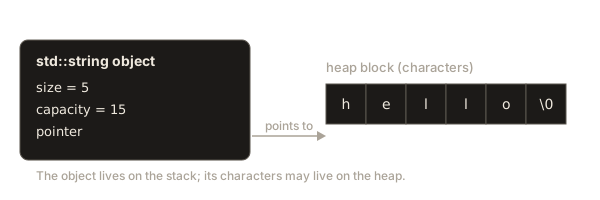
Consider string s = "hello"; in a function. The string object lives on the stack. It contains a pointer, a size and a capacity. For hello, the size is 5. The capacity may be 15 in a typical implementation, if the library keeps short text inside the object. For longer text, the characters are in a heap block, and the pointer points to it.
The diagram below shows the object and its heap block.
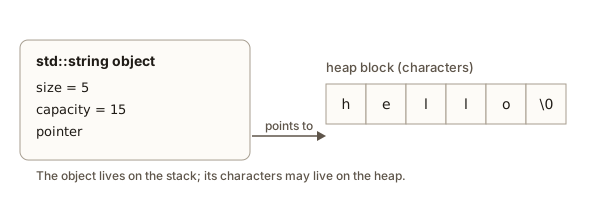 A std::string object with its size, capacity and pointer to a block of characters
When you call s += " world", the string checks whether the capacity can hold 11 characters. If it can, it copies the new letters into the existing block and updates the size. If it cannot, it allocates a larger block, copies the old characters across, adds the new ones, frees the old block and updates the pointer. Growth is done in large steps, so most appends cost very little. The terms for this are amortised constant time per append, which means the cost averaged over many appends is constant.
Copying a string copies the characters. string t = s; allocates a new block for t (or copies the short text) and copies everything across. The two objects then have nothing in common. Moving a string, which C++11 introduced with the std::move function and move constructors, transfers the block without copying the characters. You do not need to write moves yourself for this course, but a function that returns a string by value is usually fast for this reason.
The cost of building text with + is different. The expression s = s + "x" creates a new string each time, copies all of s into it and then throws the old one away. Doing that 10,000 times copies roughly 50 million characters. The expression s += "x" adds to the existing block, so it stays fast. A simple rule: inside a loop, use +=, append or push_back.
Complexity of the common operations
| Operation | Typical time | Notes |
|---|---|---|
size(), empty(), back() | O(1) | Read stored values |
s[i], at(i) | O(1) | Direct index into the block |
push_back(c), += x | O(1) amortised | Growth happens rarely |
insert, erase at index i | O(n) | Later characters move |
find(x) | O(n times m) worst case | n is the text length, m the pattern length |
substr(pos, len) | O(len) | Copies the slice |
s + t, copying | O(n + m) | Builds a new string |
to_string, stoi | O(digits) | Work on the digits |
The table above gives the costs for typical implementations. The exact constant factors differ, but the big-O categories are the ones interviewers expect.
Reading input without losing lines
Input from the keyboard arrives as one stream, and two reading styles share it. cin >> value reads one token and stops at the first space or newline, leaving the newline in the stream. getline(cin, line) reads up to the newline and removes it. Mixing the two causes a bug that surprises almost every beginner.
Suppose the input is a count on one line and a sentence on the next. After cin >> n, the stream still holds the newline that ended the count line. The next getline(cin, sentence) sees that newline first and returns an empty string. The sentence arrives one call later, so every answer looks shifted by one.
The fix is to discard the leftover newline before the first getline. Use cin.ignore(), which skips one character, or call getline once and throw away what it returns. The assignment in this module uses the second way, because it reads the rest of the line as a whole. Use cin.ignore(numeric_limits<streamsize>::max(), '\n') when a line may contain extra characters you do not want. That call needs the headers <limits> and <ios>.
Always check whether a read worked. while (getline(cin, line)) stops when the input ends, and if (!(cin >> n)) catches a number that is not one. A program that skips this check keeps running on empty values and prints answers for nothing.
Common mistakes
The errors below come from real programs. Each one shows what you see, so you can recognise it quickly.
1. Joining two literals with +. The following line does not compile:
string a = "ab" + "cd";g++ reports this error:
error: invalid operands of types ‘const char [3]’ and ‘const char [3]’ to binary ‘operator+’Read it as: the + operator was given two plain text literals, and it does not know how to add them. The fix is to make one side a string: string a = string("ab") + "cd";, or string a = "ab"; a += "cd";.
2. Calling at with a bad index. This program compiles and then stops:
string s = "abc";
cout << s.at(10) << endl;
It prints this message to the error stream and exits with status 134:
terminate called after throwing an instance of 'std::out_of_range'
  what():  basic_string::at: __n (which is 10) >= this->size() (which is 3)
The first line says an exception was thrown and never caught. The what() line is the message the library wrote. It names the function, the index and the size, so you can go straight to the bad call. Wrap the risky part in try and catch if the input can be wrong, or check the index first.
3. Converting bad text with stoi. The call stoi("abc") produces this message:
terminate called after throwing an instance of 'std::invalid_argument'
  what():  stoi
Here what() says only stoi, because the library has no more detail. Check the text first, or catch the exception as the example did.
4. Using size() - 1 on an empty string. As shown earlier, the unsigned result wraps to a huge number. Test empty() before you subtract, or cast the size to int.
5. Testing find against -1 or as a boolean. The check if (s.find("x") == -1) only works by accident, because the comparison converts -1 to the same unsigned value as npos. The check if (!s.find("x")) is wrong for any match at index 0. Always compare with string::npos, and store the result in a size_t or auto.
6. Editing a string while looping over it with a range-based loop. The loop for (char c : s) { s += c; } may add characters while it is reading the same string, which can invalidate the loop. Build a second string instead, or loop with an index that stops at the original size.
Debugging walkthrough: the program that stopped
A classmate sends this program. It was supposed to print the words of a sentence, one per line. It prints three pieces of text, the last one cut short, and then stops with terminate called.
#include <iostream>
#include <string>
using namespace std;

int main() {
    string line = "one two three";
    size_t start = 0;
    for (int k = 0; k < 3; k++) {
        string part = line.substr(start, 3);
        cout << part << endl;
        start += 4;
    }
    string tail = line.substr(line.size() + 1);
    cout << tail << endl;
    return 0;
}
Work through it as a debugger would. The text has 13 characters. The loop prints one, two and thr, which are three-character slices starting at 0, 4 and 8, so the first three lines look right. The problem is the last line, line.substr(line.size() + 1). The position 14 is past the end, which is 13, so substr throws std::out_of_range. The program stops, and the message reports an uncaught exception.
The method is the important part. Look at the last thing the program printed, which tells you which code ran. Find the calls that can throw, which are at, substr and the sto functions. Check each argument against the size of its string. In this case, substr(pos) with pos equal to the size is allowed, so the intended fix is line.substr(line.size()), which returns an empty string and prints a blank line. A reliable habit when you debug is to print the sizes and positions before the risky call, so that the bad value shows up on screen.
Variations and edge cases
The empty string has size 0, empty() is true, front() and back() are not allowed, and substr(0) is allowed and gives an empty string again. Test your functions on empty input first. It is the case that breaks most string code.
A string can contain characters that are not letters, including digits, spaces, punctuation and tabs. Each of these is one char. If you read a line containing a tab, the tab is part of the string and it counts toward the size.
string can hold a zero character inside it. Unlike a char array, the zero is just another character and does not end the text. string s("a\0b", 3); has size 3. This is why string is safe for binary data. Be careful, however, when you pass it to a function that expects a char*, because that function may stop at the zero.
Comparing a string with a char array uses == and works by content, because the string's operator== compares letters. Comparing two char arrays with == compares addresses. This is the contrast the previous lesson set up.
std::string_view, added in C++17, is a light view of text that someone else owns. It holds a pointer and a size, and it never copies or frees the characters. A function that only reads text can take a string_view and avoid copies, which matters in loops over large inputs. The catch is lifetime: the view is valid only while its owner lives, so a view into a temporary string is a bug waiting to happen. For this course, const string& is simpler and safe.
Interview and real-world use
Interviewers expect you to choose std::string by default and to mention when a char array is needed, for example when calling an older C API. They will often ask you to avoid + inside a loop, so mention += or reserve if you build a long result.
For parsing, you should be able to split on a delimiter, trim spaces from both ends, and convert numbers safely. Trimming is find_first_not_of(" \t") for the start and find_last_not_of(" \t") for the end, then substr between them. Splitting is the pattern from example 4. Converting is stoi in a try block or a manual digit check.
In production code, strings often hold user input, file contents or network messages. The main risks are out-of-range indexes, unexpected empty input, numbers too big for their type and text with unusual characters. Most of the fixes are one check before the call. Get into the habit of asking "what if this string is empty?" before you write a line.
Practice
Exercise 1: Uppercase a whole line
Write a program that reads a line with getline and prints it in uppercase. Use toupper with an unsigned char cast. Type Mixed Case 123! as input. The output is MIXED CASE 123!.
Solution
Make a copy of the line, then loop over the copy with char& and replace each character with its uppercase form. The digits and punctuation pass through toupper unchanged.
#include <cctype>
#include <iostream>
#include <string>
using namespace std;

int main() {
    string line;
    getline(cin, line);
    for (char& c : line) {
        c = toupper((unsigned char)c);
    }
    cout << line << endl;
    return 0;
}
Exercise 2: Count each letter in a word
Write a program that reads one lowercase word with cin >> word and prints each letter that appears, with its count, in alphabetical order. Type banana as input. The output is a 3, b 1 and n 2, one per line.
Solution
Use the 26-box counter from example 2. After counting, loop over the boxes in order and print the ones that are not zero.
#include <iostream>
#include <string>
using namespace std;

int main() {
    string word;
    cin >> word;
    int counts[26] = {};
    for (char c : word) {
        counts[c - 'a']++;
    }
    for (int i = 0; i < 26; i++) {
        if (counts[i] > 0) {
            cout << (char)('a' + i) << " " << counts[i] << endl;
        }
    }
    return 0;
}
Exercise 3: Remove spaces
Write a function string removeSpaces(const string& s) that returns a copy of s with every space removed. Test it on a b c and print the result. The output is abc.
Solution
Build a new string and append every character that is not a space.
#include <string>
using namespace std;

string removeSpaces(const string& s) {
    string out;
    for (char c : s) {
        if (c != ' ') out += c;
    }
    return out;
}
The += inside the loop is the fast form. The function returns the new string by value, which the caller receives without an extra copy in modern compilers.
Exercise 4: Find every occurrence
Write a program that reads a text line and a word, and prints every index where the word starts in the text. Use find with a start index in a loop. Type abracadabra and then abra, on two lines. The output is 0 and 7.
Solution
Start the search at 0. Each time you find a match, print it and continue from one place after the match, so overlapping matches are also found.
#include <iostream>
#include <string>
using namespace std;

int main() {
    string text, word;
    getline(cin, text);
    getline(cin, word);
    size_t pos = text.find(word, 0);
    while (pos != string::npos) {
        cout << pos << endl;
        pos = text.find(word, pos + 1);
    }
    return 0;
}
Starting at pos + 1 lets abra match at 0 and then at 7. For abracadabra, the second match starts at index 7 (abra in abracadabra, counted from zero). A search that starts at pos + word.size() would miss overlaps such as aa in aaa.
Exercise 5: Safe first character
Write a function char firstOr(const string& s, char fallback) that returns the first character of s, or fallback if the string is empty. Explain why s[0] alone is not enough.
Solution
#include <string>
using namespace std;

char firstOr(const string& s, char fallback) {
    if (s.empty()) return fallback;
    return s[0];
}
s[0] on an empty string does not check the index. The result is undefined behaviour, which can look like it works and fail later. Checking empty() first avoids that. The same check guards back() and front().
Exercise 6: Predict the output
What does this program print? Work it out before you check.
string s = "abcdef";
cout << s.substr(4) << " " << s.substr(6).size() << endl;
Solution
It prints ef 0. The first call starts at index 4, which is e, and takes the rest, ef. The second call starts at index 6, which equals the size, so it is allowed and returns an empty string. Its size is 0. Starting one place further, at 7, would throw std::out_of_range.
Exercise 7: Reverse the words
Write a program that reads one line and prints its words in reverse order, separated by single spaces. Use find and substr, not a string stream. Type the sky is blue and the output is blue is sky the.
Solution
Split the line into words the way example 4 does, skipping empty pieces so repeated spaces are harmless. Then print the words from last to first.
#include <iostream>
#include <string>
#include <vector>
using namespace std;

int main() {
    string line;
    getline(cin, line);
    vector<string> words;
    size_t start = 0;
    while (start < line.size()) {
        size_t end = line.find(' ', start);
        if (end == string::npos) end = line.size();
        if (end > start) words.push_back(line.substr(start, end - start));
        start = end + 1;
    }
    for (int i = (int)words.size() - 1; i >= 0; i--) {
        cout << words[i];
        if (i > 0) cout << " ";
    }
    cout << endl;
    return 0;
}
The check end > start skips empty pieces that come from repeated spaces. The loop uses int for the index so it can go down to 0 and stop, which avoids the unsigned wrap-around from the common mistakes section.
Exercise 8: Parse a list of numbers
Write a program that reads one line of numbers separated by spaces and prints their sum. If a token is not a number, print bad token: X for that token and skip it. Type 4 10 x -3 and the output is bad token: x then sum = 11.
Solution
#include <iostream>
#include <sstream>
#include <string>
using namespace std;

int main() {
    string line;
    getline(cin, line);
    istringstream in(line);
    string token;
    long long sum = 0;
    while (in >> token) {
        try {
            sum += stoi(token);
        } catch (const invalid_argument&) {
            cout << "bad token: " << token << endl;
        }
    }
    cout << "sum = " << sum << endl;
    return 0;
}
For 4 10 x -3, the sum is 4 + 10 - 3 = 11. The try block contains only the stoi call, so the exception is caught at the place that can cause it.
Exercise 9: Check whether a string is a valid identifier
Write a function bool isIdentifier(const string& s) that returns true when the first character is a letter or underscore and every other character is a letter, digit or underscore. An empty string is not an identifier. Test abc_1 (true), 1abc (false) and an empty string (false).
Solution
#include <cctype>
#include <string>
using namespace std;

bool isIdentifier(const string& s) {
    if (s.empty()) return false;
    unsigned char first = s[0];
    if (!isalpha(first) && first != '_') return false;
    for (char c : s) {
        unsigned char u = c;
        if (!isalnum(u) && u != '_') return false;
    }
    return true;
}
The empty check comes first, so s[0] is never read from an empty string. Each character is converted to unsigned char before the <cctype> calls.
Exercise 10: Trim both ends
Write string trim(const string& s) that removes leading and trailing spaces without changing the middle. Use find_first_not_of and find_last_not_of. Test it on hi there and print [hi there]. Also make sure an all-space string returns an empty string.
Solution
#include <string>
using namespace std;

string trim(const string& s) {
    size_t first = s.find_first_not_of(" ");
    if (first == string::npos) return "";
    size_t last = s.find_last_not_of(" ");
    return s.substr(first, last - first + 1);
}
If every character is a space, find_first_not_of returns npos, and the function returns an empty string before it uses the value. Otherwise last - first + 1 is the length of the trimmed text.
What you now know
std::stringis an object with a size, a capacity and a block of characters. It frees its memory automatically.- Use
size(),empty(),at()andsubstr()for everyday work. Know that[]does not check the index. findreturnsstring::nposwhen nothing matches. Compare withnpos, never with a boolean test.substrthrows when the start is past the end.stoithrows when text is not a number or the number is too big.- Use
getlineto read a line andistringstreamto split it into words. - Use
+=orpush_backinside loops. The+operator makes a new string each time. ==and<on strings compare letters, unlike==on char arrays.- The next lesson uses these tools to solve palindrome and anagram problems.