Why it matters
Before C++ had std::string, all text lived in plain arrays of characters. That style is still everywhere. You will meet it in older code, in operating system interfaces, in network protocols and in interview questions that say "do this without library help". If you understand the raw version first, the friendlier std::string in the next lesson will make sense, and you will know exactly what it does for you behind the scenes.
This lesson starts from the smallest possible piece, a single character, and builds up to whole words stored in memory. You will type a few programs into the Input box, watch what they print, and learn the mistakes that cause the most damage in C++ text code.
Start with one character
A computer stores everything as numbers. A character such as the letter A is also a number. The most common table that maps letters to numbers is called ASCII. In ASCII, the uppercase letter A is 65, the lowercase letter a is 97, the digit 0 is 48, and a space is 32.
In C++, a value of type char holds one of these small numbers. The type is usually one byte, which is eight bits, so it can hold values from 0 to 255 when treated as unsigned. You write a character value in single quotes:
char letter = 'A';
cout << letter << endl;      // prints A
cout << (int)letter << endl; // prints 65
The (int) in front of letter tells the compiler to show the number instead of the letter. This is called a cast: you ask for a value to be treated as a different type. Use it when you want to see the numeric code.
Single quotes and double quotes mean different things. 'A' is one character, a single char value. "A" is a piece of text with two characters: the letter and an invisible end marker that we will meet soon. Mixing them up is one of the first errors beginners make, and the compiler message for it is covered later in this lesson.
Text is a row of character boxes
To store a word, you need several characters in a row. The simplest way is an array. An array is a fixed number of boxes of the same type, placed side by side in memory. Each box has a number called an index, starting at 0 for the first box.
Here is the word hello in an array of characters:
| Index | 0 | 1 | 2 | 3 | 4 | 5 |
|---|---|---|---|---|---|---|
| Box holds | h | e | l | l | o | \0 |
There are five letters, so you might expect five boxes. But the sixth box is required. It holds a character with the value 0, written '\0' in code. This character is called the null terminator. It is not a letter and it does not print anything. It marks where the text ends.
The reason is simple. An array does not remember its own size. If you pass an array to a function, the function receives only the address of the first box. It has no idea whether the array has 6 boxes or 600. The only way it can find the end of the text is to look for the marker. This is why C++ text in arrays uses the null terminator.
An everyday comparison helps. Imagine a train where each carriage holds one letter, and the last carriage has a sign that says "THE END". A person reading the train walks from the front and stops when they see the sign. They do not need to count carriages first. The null terminator is that sign.
This rule creates a hard requirement: every char array holding text needs room for the terminator. The word hello needs six boxes, not five.
Three ways to declare a char array
You can create a text array in three common ways. Each one has the same result in memory, but they differ in how much you write yourself.
char word[6] = {'h', 'e', 'l', 'l', 'o', '\0'};
char name[] = "Anisha";
char buffer[20] = "cat";
The first form lists every character and the terminator by hand. It is the most explicit and the most tedious. You will rarely write it in real code, but it shows exactly what is stored.
The second form uses a string literal, which is text in double quotes. The compiler counts the letters, adds the terminator, and makes the array just big enough. For Anisha (six letters) it creates seven boxes. You do not write the size yourself.
The third form gives a size of 20 and starts the text with "cat". The first four boxes hold c, a, t and the terminator. The remaining 16 boxes are filled with zero. This is a useful rule: when you initialise an array with fewer values than its size, the leftover boxes become zero. For character arrays, zero is the terminator, so the text still ends after cat.
If you write char small[5] = "hello";, the text needs six boxes and only five are available. The compiler refuses. Section 10 shows the exact error message.
The size inside the brackets must be known when the program is compiled. A size read from the keyboard is not allowed in standard C++. If you need a size chosen at runtime, use std::string or std::vector, which the next lesson introduces.
What sizeof and strlen really count
Two numbers keep getting confused by beginners: the size of an array and the length of its text.
sizeof(name)gives the number of bytes the array occupies. For achararray, that is the number of boxes. It counts the terminator.strlen(name)gives the length of the text. It counts characters up to, but not including, the terminator.
For char name[] = "Anisha";, sizeof(name) is 7 and strlen(name) is 6. The difference is exactly the terminator.
There is a trap here. sizeof is computed by the compiler when the array is a real array in the same function. If you pass the array into a function and then call sizeof on the parameter, you get the size of a pointer instead, usually 8 on a 64-bit system. The function does not know the array size anymore. This is the second reason the terminator matters: it is the only size information the function can rely on.
strlen is a function that walks the array and counts boxes until it finds the terminator. That walk takes time proportional to the length of the text. In complexity terms, it is O(n), where n is the number of characters. Calling strlen again inside a loop means walking the text again on every pass. The examples below show how to avoid that.
How cout prints text
When you write cout << name, C++ does not print one box at a time because it cannot know how many boxes there are. Instead, the output function starts at the first box and prints each character until it reads the terminator. Then it stops. If a terminator is missing, the output function keeps reading into memory that does not belong to the text, and prints garbage or crashes.
You can see the mechanics in the following program. You type a name in the Input box, and the program prints each box with its index and numeric code. It stops when it sees the terminator and shows that value too.
Type Anisha in the Input box and press Run. The program prints:
Type your first name:
0: A (code 65)
1: n (code 110)
2: i (code 105)
3: s (code 115)
4: h (code 104)
5: a (code 97)
text ends at index 6, terminator code 0
Trace the loop by hand. The first time through, i is 0 and name[0] is A, which is not the terminator, so the body runs and prints. Each pass moves i one step right. When i reaches 6, name[6] is the terminator, the condition name[i] != '\0' becomes false, and the loop ends. The index where it stopped, 6, equals strlen("Anisha"). The loop counted the characters by itself, the same way strlen does.
Notice what cin >> name does. It reads one word, skipping leading spaces, and stops at the next space or the end of the line. It also writes the terminator after the word. You did not have to add it. This is a convenience of cin >> name, but it has a danger we will return to in the common mistakes section: it does not know the size of name, so a very long word writes past the end of the array.
The cstring functions
The header <cstring> provides functions that work on char arrays. All of them rely on the terminator. If the terminator is missing or the destination is too small, they write or read past the end of the array, and the program has undefined behaviour. Undefined behaviour means the C++ standard does not say what happens. The program may print wrong text, crash, or appear to work until a later change breaks it.
| Function | What it does | Safety note |
|---|---|---|
strlen(s) | Returns the number of characters before the terminator | O(n) walk; store the result if you need it many times |
strcpy(dst, src) | Copies src into dst, including the terminator | Does not check the size of dst |
strncpy(dst, src, n) | Copies at most n characters from src | Does not always add a terminator |
strcat(dst, src) | Appends src to the end of dst | Does not check the size of dst |
strncat(dst, src, n) | Appends at most n characters, then adds a terminator | Still needs room for n plus one more box |
strcmp(a, b) | Compares two texts in dictionary-like order | Returns 0 when equal; check the sign, not an exact value |
strncmp(a, b, n) | Compares at most the first n characters | Useful for prefix checks |
strchr(s, c) | Returns a pointer to the first c in s, or nullptr | Returns a position, not an index |
strstr(s, t) | Returns a pointer to the first place t appears in s, or nullptr | Same kind of return value as strchr |
Three details matter most.
First, strcpy and strcat trust you to make the destination large enough. They do not look at its size. If you copy a 10-letter word into an array of 8 boxes, the extra 3 letters and the terminator land in memory after the array, which may belong to another variable. This is a classic source of security bugs, because an attacker who controls the input can overwrite whatever comes next in memory.
Second, strncpy is a trap. It copies at most n characters, but if the source is longer than n, it does not write a terminator. The destination then has no end marker. To be safe, put the terminator in yourself, as the fourth example below shows.
Third, strcmp returns a number that is zero for equal texts, negative when the first text comes earlier in dictionary order, and positive when it comes later. The exact value is not promised by the standard. Some systems return -1 and 1, others return the difference of the first pair of different characters. Only the sign is reliable. Write strcmp(a, b) == 0, not strcmp(a, b) == -1.
Later programs in C++ use snprintf, which takes the size of the buffer as an argument and always writes a terminator. It is outside this lesson. For most interview tasks you will write the loops yourself, and that is good practice anyway.
Example 1: Copying by hand
Before you trust a library function, it helps to write one yourself. The following program defines myLength and myCopy, then uses them next to the library functions. The loops are the same ideas strlen and strcpy use internally.
Run it with no input. The output is:
copied: copy me
myLength = 7
strlen   = 7
Hello, world (12 chars)
strcmp(apple, banana) < 0: 1
strcmp(cat, cat) = 0
Walk through myCopy with src equal to "copy me". The text has seven letters, so the source array has eight boxes including the terminator. The loop copies boxes 0 to 6 one at a time. Each time, i goes up by one and src[i] is written into dst[i]. When i is 7, src[7] is the terminator, so the condition is false and the loop stops. The last line, dst[i] = '\0';, writes the terminator at index 7 of the destination. Without that line, target would have no end marker, and cout << target would read beyond the text.
Now look at greeting. It is declared with 30 boxes and starts as Hello, which uses six boxes. The first strcat moves to the terminator at index 5 and writes , after it. The second strcat does the same with world. There is room, because the total of 12 letters plus the terminator needs only 13 boxes out of 30. This is what the rule "destination must be large enough" means in practice. The program is correct here because we chose the size, not because the library checks it.
Finally, strcmp("apple", "banana") < 0 is true, because a comes before b. The comparison result is inside a parenthesis, so cout prints 1 for true and 0 for false. The equal-texts case returns exactly 0 in this program, but the rule you should rely on is only that 0 means equal.
Example 2: Comparing text the right way
The most common surprise in this topic is that == does not compare text in a char array. The next program shows why, and what to write instead.
Run it with no input. The output is:
a == b: 0
strcmp(a, b) == 0: 1
truncated: abcde
Why is a == b false? In most expressions, an array name turns into the address of its first box. So a == b compares two addresses. The two arrays are separate objects in memory. Their addresses differ, so the answer is 0, even though both hold hi. The rule is simple: == on two char arrays asks "are these the same boxes?", and the answer is almost always no. strcmp asks "do these boxes hold the same letters?", which is what you want.
The second part shows safe truncation. The destination small has six boxes. sizeof(small) - 1 is 5, so strncpy copies at most five characters. The source has eight letters, so the copy stops after abcde and writes no terminator. The next line writes '\0' into the last box, index 5, which closes the text. Printing gives abcde.
This is a pattern worth memorising: copy with a limit that leaves room for the terminator, then write the terminator yourself. In an interview, a reviewer will be looking for exactly this.
Example 3: Reading a whole line
cin >> name reads one word. A line such as the quick brown fox needs cin.getline, which reads everything up to the end of the line into a char array. You give the array's size so the function stops before the buffer is full. The following program reads a line and counts the letters, spaces and other characters.
Type the quick brown fox into the Input box and press Run. The output is:
Enter a line:
length: 19
letters: 16
spaces: 3
other: 0
Count by hand. the has 3 letters, quick 5, brown 5 and fox 3, which is 16 letters. There are three spaces between the four words. The total is 16 + 3 = 19. getline stored the text and the terminator, so strlen returns 19.
Look at the loop condition, i < (int)strlen(line). The strlen call happens again on every pass, so the program walks the text about 20 times for a 19-letter line. For a short line this does not matter. For a text of a million characters, it adds up, and the fix is to call strlen once and store the result in a variable. The cast (int) makes i and the length the same signed type, which avoids a compiler warning about comparing signed and unsigned numbers.
The variable c is declared as unsigned char. The functions in <cctype> such as isalpha expect a value that is either between 0 and 255 or equal to a special negative value called EOF. A plain char may be negative for characters outside ASCII on some systems. Converting to unsigned char first avoids undefined behaviour. The rule is that you should always convert a char to unsigned char before passing it to these functions.
What the compiler and runtime do
When you write char name[] = "Anisha";, the compiler reserves seven boxes in the memory of the current function. For a local array, that memory is on the stack, the region used for local variables and function calls. The boxes are filled with the letters and the terminator when the program starts that part of the code.
When you pass the array to a function, the function receives the address of box 0, not a copy of the whole array. The parameter type char* means "a pointer to a char", which is the address of the first box. This is why sizeof returns the size of a pointer inside the function.
A string literal, such as "hi" written directly in the code, lives in a read-only part of the program. The array char b[] = "hi"; makes a writable copy. A pointer declared as const char* p = "hi"; points to the literal and must not be used to change it. Writing through such a pointer is undefined behaviour. The const in const char* is a promise that the function will not write to the text. Use const char* for parameters that only read text, as myLength does above.
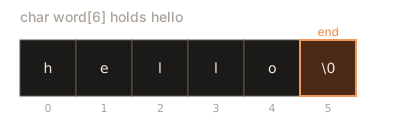
The diagram below shows the array hello with its six boxes, the indexes under each box, and the terminator highlighted. Compare it with the table earlier in the lesson.
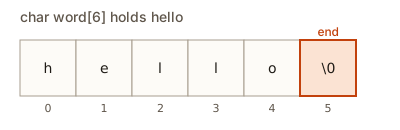 Character array holding hello, with the null terminator in box 5
Common mistakes
Most real bugs in this topic come from one of six mistakes. Each one is shown with the message you will see or the behaviour you will notice.
1. Forgetting the room for the terminator. Try this fragment:
char small[5] = "hello";g++ refuses to compile it and prints:
error: initializer-string for ‘char [5]’ is too long [-fpermissive]Read the message from the inside out. initializer-string means the text you wrote to fill the array. char [5] is the array type with five boxes. "is too long" means the text, which needs six boxes, does not fit. The fix is either char small[6] or no size at all, as in char small[] = "hello";.
2. Overfilling a destination. The next fragment compiles, which is the dangerous part:
char a[4] = "cat";
strcat(a, "dog");
The array has four boxes, but the result catdog needs seven. Running this program under the AddressSanitizer checker, which you can enable with g++ -fsanitize=address, prints this first line:
ERROR: AddressSanitizer: stack-buffer-overflowWithout the checker, the program may print catdog and appear to work. The overflow writes into memory that belongs to something else. Some compilers and some systems do not notice at all. That silence is what makes this bug so hard to catch. The fix is to choose a large enough array, or to use std::string from the next lesson, which grows by itself.
3. Comparing with ==. As the earlier example showed, if (a == b) on two char arrays compares addresses. The fix is if (strcmp(a, b) == 0). g++ often gives no error for this, so it is a mistake a reviewer will find, not the compiler.
4. Reading the sign of strcmp as an exact value. Writing if (strcmp(a, b) == -1) works on some systems and fails on others, because the exact value is not guaranteed. Write < 0, == 0 or > 0.
5. Printing a text without a terminator. If you fill an array by hand and forget '\0', then cout prints the letters and keeps going into the memory after the array. The output is the text followed by random characters, and the exact junk changes from run to run. This is hard to debug because the bad part is past the end of the array.
6. Using sizeof on a parameter. This function is wrong:
void show(char text[]) {
    cout << sizeof(text) << endl; // prints 8 on a 64-bit system, not the array size
}
The parameter is a pointer, so sizeof gives the size of a pointer. Pass the length separately, or use strlen on the text.
Debugging walkthrough: a missing terminator
Suppose a teammate wrote this program and asks why the output sometimes shows extra letters. You have only the code and the output.
#include <iostream>
using namespace std;

int main() {
    char word[5];
    word[0] = 'c';
    word[1] = 'a';
    word[2] = 't';
    word[3] = '\0';
    cout << word << endl;
    return 0;
}
Read it line by line and check each box. word has five boxes. Boxes 0, 1 and 2 hold c, a and t. Box 3 holds the terminator. Box 4 was never written, so its value is whatever was in that memory before. The output function stops at box 3, so the program prints cat and is correct.
Now change the terminator line to word[4] = 'x';, with the same five boxes. There is still no terminator, because box 3 is still unset. The output function reads box 3, which holds garbage, and it may keep reading past the array. The behaviour is undefined, so the program may print cat followed by random characters, or crash.
The fastest way to find this kind of bug is to run the program under the sanitizer. Compile with g++ -std=c++17 -g -fsanitize=address and run it. A stack overflow or a read beyond a stack array is reported with the line number. The message names the line that wrote or read past the end, so you go straight to the array.
A checklist for any char array bug:
- Is there room for the text plus one box for the terminator?
- Does every path that fills the array write the terminator?
- Is the destination big enough for every function call that writes into it?
- Are comparisons using
strcmp, not==? - Are characters converted to
unsigned charbefore the<cctype>functions?
Testing a function that works on text
A function that takes a char array is easy to get almost right, so test it on a small set of inputs that each target one risk. Write the test list before you finish the function, and keep it in the same file, so you can rerun it after each change.
For a copy function, use four inputs: a normal word such as hello, a single character such as x, the empty string, and a source that exactly fills its destination including the terminator. Check each result by printing it with cout and by printing strlen of the destination. The two checks catch the usual errors. A missing terminator shows up as extra characters in the printout, and a wrong length shows up in the number.
For a comparison function, add pairs where one text is a prefix of the other, such as ab and abc, and pairs that differ only in case, such as Ab and ab. The result for ab against abc is negative, which is the sign rule at work. Test only the sign, never the exact value.
Finally, compile with -fsanitize=address and run each test. A function can pass every printed check and still write one box past the end of its array. The sanitizer reports that write even when the printed output looks correct.
Variations and edge cases
The empty string is a valid text. In a char array, it is one box holding the terminator. char empty[] = ""; makes an array of size 1. strlen(empty) is 0, and cout << empty prints nothing. Any function you write for text should handle this case, because interview tests often use it.
The same counting rule applies to a literal. The text "hello" has six characters with the terminator, so sizeof("hello") is 6, while strlen("hello") is 5. For a declared array, sizeof counts every box, including the boxes after the terminator. So char word[20] = "cat"; gives sizeof(word) of 20, even though strlen(word) is 3.
The character 'a' and the string "a" are different. 'a' is one char with the value 97. "a" is an array of two boxes: the letter and the terminator. Passing 'a' to a function that expects text is a type error, and passing "a" where a single character is expected is also an error.
A text can contain an embedded zero only if you put one there on purpose. Once the output function sees a zero, it stops. So if you write char s[] = {'a', '\0', 'b', '\0'};, then cout << s prints only a, while the array still holds two letters. This is a useful trick for storing several strings in one buffer, but it confuses people who expect the array size to tell them the length.
Text may be longer than you expect. A line from a file can be thousands of characters. If you read it into char line[80], use cin.getline(line, sizeof(line)) so the reading stops before the end. The function then leaves a terminator in place. If the line is longer than the buffer, getline sets an error flag on cin and the rest of the line stays in the input for the next read. Checking cin.fail() after a read is a good habit.
Characters above 127 are not standard ASCII. Some are stored as negative values in a plain char. Using unsigned char for the loop variable, as in the line example, keeps the <cctype> calls safe. The lessons in this module assume ASCII text.
Interview and real-world use
Interviewers ask you to implement strlen, strcpy or strcmp from scratch because those three functions show whether you understand the terminator, the bounds and the return value. A good answer does three things: it walks the text until it sees '\0', it does not write past the destination, and it returns the value the caller expects. Mention that strcpy is unsafe and say what you would use instead.
In real systems, char arrays appear at the boundary with C libraries, file formats and network protocols. Many APIs take const char* and a length. Your job is to keep those two values in agreement. When a function receives a pointer and a length, do not assume the text is terminated unless the API says so.
Many interviewers also ask why C++ kept these rules alive. The reason is compatibility. A great deal of working software calls functions written in C decades ago, and those functions expect a pointer and a terminator. A std::string can hand over its characters through c_str(), so the two styles meet at one boundary. Keep that boundary small, convert once, and say so in your answer.
Security reviews often look for strcpy, strcat and sprintf in old code, because each one can write past a buffer. The usual replacements are std::string, snprintf with an explicit size, or strncpy followed by a manual terminator, as in example 2.
Before you finish any function that works on text, decide who owns the memory. A function that receives a pointer does not own the array. It may read and change the boxes it was given, but it must not write past the length the caller promised. The usual convention is to pass the size next to the pointer, as safeCopy does in exercise 9, or to require a terminator and say so in a comment. Writing that rule down in the first lines of the function prevents most of the disagreements between two people who each wrote half of a program.
Practice
Exercise 1: Reverse a text in place
Write void reverseText(char* s) that reverses the characters of a char array in place. Use myLength-style logic to find the length, then swap characters from both ends until the middle. Test it on hello and on an empty string.
Solution
Find the length by walking to the terminator. Set i to 0 and j to length minus one. While i is less than j, swap s[i] and s[j], then move both indexes toward the middle. The terminator stays where it is because the swapping only touches the first length boxes.
void reverseText(char* s) {
    int n = 0;
    while (s[n] != '\0') n++;
    for (int i = 0, j = n - 1; i < j; i++, j--) {
        char t = s[i];
        s[i] = s[j];
        s[j] = t;
    }
}
For hello, the result is olleh. For an empty string, n is 0, so j is -1 and the loop never runs.
Exercise 2: Count spaces
Write int countSpaces(const char* s) that returns how many space characters a text contains. Use a loop that stops at the terminator and does not call strlen inside the loop condition.
Solution
int countSpaces(const char* s) {
    int count = 0;
    for (int i = 0; s[i] != '\0'; i++) {
        if (s[i] == ' ') count++;
    }
    return count;
}
The loop condition checks the current box each time. It reads the text once, which is O(n). Calling strlen(s) in the condition would walk the text again on every pass, giving O(n squared) work.
Exercise 3: Write your own strcpy
Write void myStrcpy(char* dst, const char* src) that behaves like strcpy, including writing the terminator. Test it by copying copy me into a 20-box array and printing the result.
Solution
The copy loop from example 1 is the answer. Copy each character while the source is not the terminator, then write the terminator at the end of the destination.
void myStrcpy(char* dst, const char* src) {
    int i = 0;
    while (src[i] != '\0') {
        dst[i] = src[i];
        i++;
    }
    dst[i] = '\0';
}
The function does not check the size of dst. It is the caller's job to provide enough room, as the note on strcpy explains.
Exercise 4: Print the length without strlen
Write a program that reads one word with cin >> word into a char word[50] array and prints its length without calling strlen. Type Anisha as input. The output should be 6.
Solution
#include <iostream>
using namespace std;

int main() {
    char word[50];
    cin >> word;
    int n = 0;
    while (word[n] != '\0') n++;
    cout << n << endl;
    return 0;
}
The loop stops at the terminator that cin >> word wrote. For Anisha the loop runs six times and n ends at 6.
Exercise 5: Predict sizeof
For each declaration, predict the value of sizeof and strlen before you check, then write the answer as two numbers: char a[] = "dog";, char b[10] = "dog";, char c[] = "";. Answer for all three.
Solution
For a, sizeof is 4 (three letters plus the terminator) and strlen is 3. For b, sizeof is 10 (the declared size) and strlen is 3, because the leftover boxes are zero and do not count as text. For c, sizeof is 1 (just the terminator) and strlen is 0. The third case is the one people miss: an empty string still takes one box.
Exercise 6: Find the bug in a copy
The following function is meant to copy src into dst. Explain why it is wrong, then fix it.
void copyText(char* dst, const char* src) {
    int i = 0;
    while (src[i] != '\0') {
        dst[i] = src[i];
        i++;
    }
}
Solution
The function never writes the terminator into dst. The copy has the letters but no end marker, so printing dst reads past the end of the copied text. The fix is one line after the loop: dst[i] = '\0';. A good test is to copy into an array that was first filled with x characters. Without the terminator, cout prints the letters followed by the leftover x characters.
Exercise 7: Compare two words ignoring nothing
Write a program that reads two words with cin >> a >> b, each into a char array of 30 boxes, and prints same if strcmp returns 0 and different otherwise. Type hello hello and then hello world in two runs.
Solution
#include <cstring>
#include <iostream>
using namespace std;

int main() {
    char a[30], b[30];
    cin >> a >> b;
    if (strcmp(a, b) == 0) {
        cout << "same" << endl;
    } else {
        cout << "different" << endl;
    }
    return 0;
}
With hello hello the output is same. With hello world the output is different.
Exercise 8: Count words
Write a program that reads one line with cin.getline into a 200-box array and prints the number of words, where a word is a run of non-space characters. Type the sky is blue (with the extra spaces) and check that the answer is 4.
Solution
Walk the text with a flag inWord. When you see a non-space character and inWord is false, add one word and set the flag. When you see a space, clear the flag.
#include <cstring>
#include <iostream>
using namespace std;

int main() {
    char line[200];
    cin.getline(line, sizeof(line));
    int words = 0;
    bool inWord = false;
    for (int i = 0; line[i] != '\0'; i++) {
        if (line[i] == ' ') {
            inWord = false;
        } else if (!inWord) {
            words++;
            inWord = true;
        }
    }
    cout << words << endl;
    return 0;
}
The extra spaces do not matter because a space only ends a word. The program prints 4.
Exercise 9: Safe copy with a limit
Write void safeCopy(char* dst, int dstSize, const char* src) that copies src into dst and never writes more than dstSize boxes, always leaving a terminator. Test it with a 6-box destination and the source abcdefgh. The result should be abcde.
Solution
void safeCopy(char* dst, int dstSize, const char* src) {
    if (dstSize <= 0) return;
    int i = 0;
    while (i < dstSize - 1 && src[i] != '\0') {
        dst[i] = src[i];
        i++;
    }
    dst[i] = '\0';
}
The loop stops at dstSize - 1 so one box is always left for the terminator. The final line writes the terminator at index i, which is at most dstSize - 1. The check on dstSize <= 0 prevents a write to an invalid index.
Exercise 10: Find the first letter of each word
Write a program that reads a line with cin.getline and prints the first character of each word on one line, with no spaces between them. Type the quick brown fox and the output should be tqbf.
Solution
#include <iostream>
using namespace std;

int main() {
    char line[200];
    cin.getline(line, sizeof(line));
    bool startOfWord = true;
    for (int i = 0; line[i] != '\0'; i++) {
        if (line[i] == ' ') {
            startOfWord = true;
        } else {
            if (startOfWord) cout << line[i];
            startOfWord = false;
        }
    }
    cout << endl;
    return 0;
}
The variable startOfWord is true at the beginning, so the first letter of each word is printed. It is set to false after printing so the rest of the word is skipped.
What you now know
- A char is a small number, and a text is a row of chars ending with the terminator
'\0'. - A char array must have room for the text plus the terminator, and its size is fixed when it is declared.
sizeofcounts boxes including the terminator.strlencounts characters before it.==compares addresses for char arrays. Usestrcmpto compare content, and check only the sign of the result.strcpyandstrcatdo not check the destination size. Choose sizes carefully, use the length-limited versions, and write the terminator yourself.cin >> wordreads one word, andcin.getlinereads a whole line into a sized buffer.- The next lesson replaces most of this work with
std::string, which manages its own size and memory.