Why it matters
Real programs rarely know their data size before they run. A chat app does not know how many messages a user will send. A quiz does not know how many answers a student will type. A plain array makes you guess a maximum in advance, and then you waste memory or run out of room. The C++ standard library solves this with std::vector, a container that holds a row of values of one type and grows when you add to it. Most real C++ code uses vectors instead of plain arrays, and most interview answers in C++ use them too.
This lesson teaches you to create a vector, add and remove values, read and change them, copy them safely, and avoid the four or five mistakes that trip up nearly every beginner. It also shows why the vector is still built on the same locker idea you met in the last lesson.
The idea: a coat rack that a shop can extend
Imagine a shop with a coat rack. The rack has hooks in a row, numbered from 0. When a customer hangs a coat on the next free hook, the rack needs no change. When every hook is full and a new coat arrives, the shop does not refuse it. It buys a longer rack, moves every coat across, and hangs the new one at the end. The customers never see this happen. They just find their coats where they left them.
A vector works the same way. It keeps its values in one row of memory, with indexes starting at 0, just like a plain array. When you add a value at the end and the row is full, the vector asks the computer for a bigger block, copies every value across, frees the old block, and then adds the new value. The step that copies everything is the expensive part, and it does not happen often, because each new block is much bigger than the last.
Here is how you create one:
#include <vector>
using namespace std;

vector<int> scores;          // an empty vector of ints
vector<int> ten(10, 0);      // ten zeros
vector<int> primes = {2, 3, 5, 7, 11};  // the values you list
The angle brackets after vector name the type of each value. vector<int> holds ints, vector<double> holds decimal numbers, and vector<string> holds text. The type cannot be mixed. A vector<int> cannot hold a double without the value being rounded, and the compiler will tell you when a conversion would lose information.
The name vector lives in the <vector> header, so you must write #include <vector> above your program. This is a rule for every standard container. Forgetting the header gives an error that names the missing type, and the fix is always to add the include.
Size and capacity: two numbers that are not the same
A vector has two numbers you should know well. The size is how many values it holds right now. You read it with v.size(). The capacity is how many values it can hold before it must grow. You read it with v.capacity(). The capacity is always at least as big as the size.
Adding a value with push_back increases the size by one. If the size was smaller than the capacity, nothing else happens, and the operation is very fast. If the size was equal to the capacity, the vector first grows. The C++ standard does not fix how much it grows by. The GCC library, which you use in this course, doubles the capacity each time: 1, then 2, then 4, then 8, and so on. The next figure shows five values pushed into an empty vector.
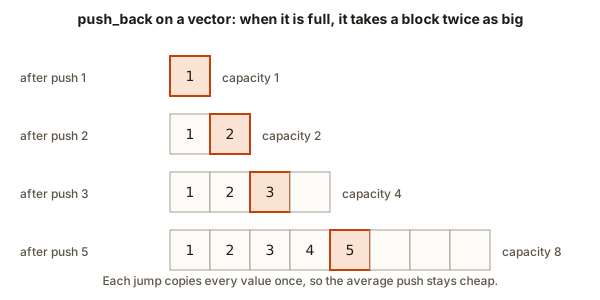 Four rows showing a vector with capacities 1, 2, 4 and 8 as five values are pushed
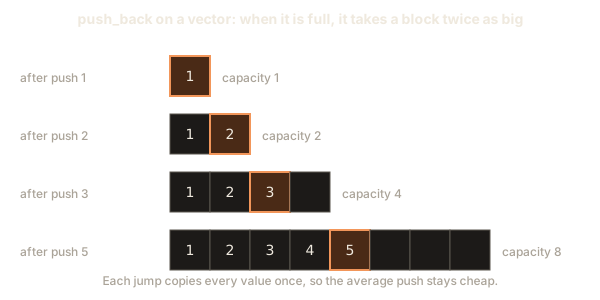
Look at the rows. After the first push the size is 1 and the capacity is 1. The second push finds the vector full, so the capacity doubles to 2, and the value is copied across. The third push doubles again to 4. The fourth push fits without growing. The fifth push doubles to 8. Five pushes caused only three copies, and the copies move 1, 2 and 4 values. In total the vector moved 7 values to add 5, which is about one copy per push on average.
This is why the cost of push_back is called amortised constant time, written O(1) amortised. The occasional expensive copy is spread across the many cheap pushes around it. For an interview answer, you can say "push_back is constant time on average, because the capacity doubles". That is the sentence the interviewer wants.
reserve lets you ask for room ahead of time. If you know the vector will hold about 1000 values, call v.reserve(1000); at the start. The capacity becomes at least 1000, and no copies happen until you pass that mark. reserve does not change the size. A vector that has been reserved but not filled still has size 0, so v[0] on it is still an error.
Adding and removing at the end
The end of a vector is where most work happens, because adding and removing there is cheap. The four operations you need are these.
push_back(x) adds the value x after the last value. pop_back() removes the last value, and returns nothing. back() gives you a reference to the last value, and front() gives you a reference to the first. A reference is a name for the same stored value, so v.back() = 9; changes the last locker.
These operations work like a stack of plates. You put a plate on the top, and you take the top plate off. The last plate in is the first plate out. The visualizer below shows this. Watch what happens to the top as values go in and out.
removed: nothing
The top is the box marked top. An outlined box was just pushed or peeked.
The stack is empty. The last item pushed is the first one popped.
Step through the operations above and notice that the vector never removes from the front. Removing the first value is possible, but every value after it must move one place left, which takes time proportional to the size. Stacks and queues come back later in the course, and the vector is a common way to build both.
Here is a small program that uses the four operations and prints the size as it changes.
No input is needed. The program prints:
size at start: 0
size after 3 pushes: 3
first = 72, last = 90
ten has 10 items, each 0
size still 3, room for 100: 1
after pop_back, last = 85
Trace the program. The first cout shows size 0, because the vector is empty. Three push_back calls make the size 3, and the last value is 90. The line vector<int> ten(10, 0); creates a second vector with ten zeros. Its size is 10, so ten[9] is the last locker and holds 0. The reserve(100) call makes room, but the size stays 3. The expression scores.capacity() >= 100 is a comparison that gives true or false. When printed, C++ shows true as 1 and false as 0. The output is 1, which means the capacity is now at least 100. The pop_back removes 90, so the new last value is 85.
Notice that the program never reads scores[3]. The valid indexes of a vector with three values are 0, 1 and 2. The room that reserve made is not visible to indexing. Only the size counts for reading.
Making a vector from a list of values
You can start a vector with values you already know. The braces form a list, just as they do for arrays:
vector<int> primes = {2, 3, 5, 7, 11};
cout << primes.size() << endl;   // prints 5
A vector made this way has a size of exactly the number of values in the list. It is the most readable way to write test data in a program, because the values are visible at a glance.
Reading and changing values
A vector gives you two ways to read a value by index. The first is the square-bracket form, v[i]. It is fast and does no checking. The second is the at form, v.at(i). It checks the index first and throws an error if the index is outside the valid range. The error is called an exception, which is C++'s way of reporting a problem that the program can catch and handle.
For a value you already know is valid, v[i] is the normal choice in tight loops. For input that comes from outside, such as a number the user typed, at is safer, because a wrong index becomes an error you can report instead of silent undefined behaviour.
Both forms return a reference, so you can assign through them. v[2] = 40; changes the third locker. v.at(2) = 40; does the same and checks the index first.
The loops from the last lesson work for vectors too. The index form uses v.size() as the bound:
for (size_t i = 0; i < v.size(); i++) {
    cout << v[i] << " ";
}
Notice the type size_t on the counter. The size() function returns an unsigned type, and comparing a signed int with it makes the compiler warn, as you saw last lesson. Using size_t for the counter avoids the warning. The range-based form also works and needs no index:
for (int x : v) {
    cout << x << " ";
}
If you need to change the values in a range loop, write int &x so that x is a reference to the stored value. Writing int x changes only a copy.
Copies and references
A vector copies its values when you assign it. This is the biggest difference from a plain array, where = does not compile. Copying is safe: after vector<int> b = a;, the two vectors are separate, and changing b leaves a alone. The program below shows the difference between a copy and a reference, which is the thing that trips up most learners.
The program prints:
a[0] = 1, b[0] = 100
after addOneToCopy, a[0] = 1
after addOneToOriginal, a[0] = 2
a == c? 1
The first output line shows that b is a separate copy: changing b[0] left a[0] at 1. The function addOneToCopy takes its parameter by value, which means the function gets a copy of the whole vector. Its loop adds one to every copy, and when the function ends, the copy is thrown away. The original a is unchanged, which is why the output still says 1.
The function addOneToOriginal takes its parameter as vector<int> &v. The & makes v a reference, so the function works on the caller's vector directly. The output says 2, because the change reached a.
The comparison a == c checks whether two vectors have the same size and the same values in the same order. It prints 1 for true. Vectors support the usual comparison operators, which is another reason to prefer them to plain arrays.
What a copy costs
A copy takes time proportional to the size, because every value is duplicated. Copying a vector of one million values costs one million steps and needs memory for another million values. This makes a careless copy in a loop a common source of slow programs. When you pass a large vector to a function, prefer a reference when the function only reads the data. Write const vector<int> &v for a read-only parameter. The const promises the function will not change it, and the & avoids the copy.
Reading input and removing values
Most real vector programs fill the vector from input, then transform it. The next program reads a list, removes every copy of a value the user chooses, and prints what is left. It introduces the standard way to delete from a vector.
Type this into the Input box, one line per item:
7
4 9 4 1 4 7 9
4
The program prints:
kept 4 values: 9 1 7 9The line vector<int> v(n); creates a vector of n zeros, which the loop then overwrites. This is a good pattern when the size is read first. The loop uses v[i] as the target of cin, so each value lands in its own locker.
The removal line needs careful reading, because it has two steps joined together. The function remove from <algorithm> walks the vector and moves every value that is not the target toward the front. It returns an iterator, which is a position marker, pointing one past the last kept value. The values after that marker are left over and still exist, but they are no longer part of the meaningful list. The call to erase then removes everything from that marker to the end. The two steps together are called the erase-remove idiom. You will meet it in almost every C++ program that deletes by value.
Why does remove not shrink the vector itself? Because remove only knows about iterators, not about the vector object. It works on any range of values, including plain arrays, so it cannot change the size of a container. The erase call, which is a member function of the vector, does the actual shrinking.
Deleting one value at a known position is simpler. v.erase(v.begin() + 2); removes the value at index 2. The begin() function returns an iterator to the first value, and adding a number moves the marker along. The vector then moves every later value one place left, which costs time proportional to the size after the deleted position.
Inserting in the middle
Adding a value at the end is cheap. Adding it in the middle is more work, because every value after the new position must move one place to the right. The insert function does this for you. The next program inserts a value, then reads a position safely with at.
The program prints:
10 15 20 30
20
caught an out-of-range index
The insert call places 15 at index 1, so the three values become four and every later value moves one place right. The v.at(2) call prints 20, which is correct. Then v.at(10) throws out_of_range. Control jumps straight to the catch block, and the line not printed never runs. The catch block handles the error by printing a message.
The try and catch pair is the standard way to handle errors that can happen at run time. The try block holds the code that might fail. The catch block says which kind of error to handle, and what to do. The const out_of_range &e names the error object, which you can print with e.what() if you want the library's own message. We print our own message here, to keep the output the same on every machine.
Use at when the index comes from outside your program, and use [] when your own loop has already checked the bound. A vector accessed with [] and a bad index is undefined behaviour, which means the program may print garbage, crash later, or appear to work. The at version turns the same bug into a clear error at the exact line that caused it.
What happens inside a vector
A vector is three pointers into one block of memory. One pointer marks the start of the block. A second marks the end of the values in use, which tells you the size. A third marks the end of the whole block, which tells you the capacity. Indexing with v[i] is the address of the start plus i times the element size, just like a plain array. The vector does not add any work to reading a value. It adds work to growing, because growing means allocating a new block, copying every value, and freeing the old block.
Allocating memory is handled by the computer's memory manager, and the vector asks it for a block of a specific size. The manager finds a free stretch large enough, and the vector takes it. This is why a vector can grow to any size the computer has room for, and why it is slower to create than a plain array on the stack. For small, fixed sizes a plain array is fine. For sizes you do not know in advance, the vector's flexibility is worth the small extra cost.
Destroying a vector frees its block. When a vector goes out of scope, which means the end of the block where it was declared, its destructor runs and gives the memory back. You do not have to free the memory yourself, and you must never try. This automatic cleanup is one of the main reasons C++ programs use vectors instead of raw arrays with manual allocation.
Looping over a vector safely
Every loop over a vector has a bound, and every bound has a boundary case. The most important one is the empty vector. If v is empty, v.size() is 0, the loop body does not run, and the loop is safe. But a line such as v[0] on an empty vector reads an element that does not exist, which is undefined behaviour.
Be careful with expressions like v.size() - 1. Because size() is unsigned, subtracting one from zero does not give negative one. It wraps around to the largest unsigned number, which is a huge positive value. A loop such as for (int i = 0; i < v.size() - 1; i++) on an empty vector runs far past the end. The safe way is to check if (!v.empty()) first, or to write the loop as for (size_t i = 0; i + 1 < v.size(); i++), which never subtracts.
When you need the index of the last value, use v.size() - 1 only after you know the vector is not empty. When you need the last value itself, use v.back() after the same check. Both are common interview points, and the empty case is where most answers lose marks.
Choosing between an array and a vector
A plain array and a vector hold the same kind of values in the same kind of row, so the choice is about size and flexibility, not about how fast you can read a value. Use a plain array when the problem fixes a small size, such as the seven days of a week or the rows of a fixed lookup table. Its size is known when the program is compiled, it costs nothing to create, and it has no hidden memory allocation. Use a vector when the size depends on the input, when values are added or removed, or when a function must return a list of unknown length. A vector also gives you size, empty, push_back, at, and the copy and comparison operators, which a plain array does not.
The cost of the vector's flexibility is a small amount of work. Creating a vector may allocate memory, and growing it may copy the values. For a hot loop that runs millions of times on a fixed size, a plain array may be faster. std::array is a fixed-size wrapper with the same syntax as a vector, and it is a good middle ground when the size is known but you want the vector's interface. You will meet it again in the standard library module.
A useful rule for interviews is this. Use a vector by default, because it is safer and it fits most problems. Switch to a plain array when the problem gives you a fixed size that the compiler should know, or when the question asks for an array. Say your choice and the reason in one sentence, and the interviewer knows you thought about it.
Common mistakes and the messages they produce
These are the mistakes you are most likely to make with vectors. Each one has a message or a symptom, and the fix is short.
Indexing an empty vector
This program builds a vector with no values and then writes to its first position:
#include <iostream>
#include <vector>
int main() {
    std::vector<int> v;
    v[0] = 5;
    std::cout << v[0] << "\n";
}
The compiler accepts it, and in a normal run it may even print 5, because the memory happens to be writable. That is the danger. Compiled with the library's assertions turned on (-D_GLIBCXX_ASSERTIONS), the program stops with a message like this:
/usr/include/c++/15/bits/stl_vector.h:1263: std::vector<_Tp, _Alloc>::reference std::vector<_Tp, _Alloc>::operator[](size_type) [with _Tp = int; _Alloc = std::allocator<int>; reference = int&; size_type = long unsigned int]: Assertion '__n < this->size()' failed.The line that matters is the last part: Assertion '__n < this->size()' failed. It says the index was not less than the size. The fix is to push a value first, or to use v.push_back(5); to create the locker.
Assigning a plain array to a vector
A vector cannot be built from a plain array with = in the same way a vector is copied from another vector:
#include <vector>
int main() {
    int a[3] = {1, 2, 3};
    std::vector<int> v = a;
    return 0;
}
g++ reports:
e6.cpp:4:26: error: conversion from 'int [3]' to non-scalar type 'std::vector<int>' requested
    4 |     std::vector<int> v = a;
      |                          ^
The fix is to list the values, vector<int> v(a, a + 3);, or to write vector<int> v = {1, 2, 3};. The first form copies three values from the array, using pointer arithmetic. The second form is clearer when you know the values.
Forgetting that remove does not shrink
A common error is to call remove alone and then print v.size(). The size does not change, because remove only moves values. The output still counts the leftover values at the end. Always pair remove with erase, as in the program above.
Deleting inside a loop
This mistake is so common it has its own section in the debugging walkthrough below. Erasing from a vector while you loop forward over it skips values, because every erase moves the later values one place left, and the loop then moves past them.
Holding a reference across a push
A reference to a vector's value can become invalid after a push_back, because the push may move the whole block to a new place. The old reference then points at memory that is no longer used. This is a subtle error. The safe habit is to read the value into an ordinary variable before you push, or to use the index form, which never caches a pointer.
Debugging walkthrough: the loop that skips values
Here is a function that tries to remove every copy of a value by erasing inside a loop. It looks reasonable, and it is wrong.
void removeAll(vector<int> &v, int target) {
    for (size_t i = 0; i < v.size(); i++) {
        if (v[i] == target) {
            v.erase(v.begin() + i);
        }
    }
}
Test it with {4, 4, 1} and target 4. The expected result is {1}. Trace the loop with a table. Start with i equal to 0 and the vector 4 4 1.
| step | i | size before | v[i] | action | vector after |
|---|---|---|---|---|---|
| 1 | 0 | 3 | 4 | erase index 0 | 4 1 |
| 2 | 1 | 2 | 1 | not 4, do nothing | 4 1 |
| 3 | 2 | 2 | stop | i is not less than size | 4 1 |
The result is 4 1, which still has a 4. The bug is in step 2. After the erase in step 1, the second 4 moved into index 0. The loop then moved on to index 1, which holds the 1, and never looked at the 4 that had moved. The erase shifted the values, and the loop did not account for the shift.
There are two fixes. The first is to move the index forward only when you did not erase: write the i++ inside an else branch. The second, which is simpler and faster, uses the erase-remove idiom from earlier. Both produce {1}. The lesson is general. Whenever you change a container while you walk through it, ask what the change does to the positions you have not visited yet.
Variations and edge cases
Vector questions in interviews test the edges. Try each of these cases on your own before you trust a solution.
The empty vector. Every loop should do nothing, and every access to v[0] or v.back() should be guarded. Test your function with {} first.
One value. Removing the only copy of a value leaves an empty vector. Check that the size is 0 afterward and that the program does not read index 0.
Every value is the target. Removing all copies gives an empty result. The erase-remove idiom handles this case without a special branch.
Duplicates at the start and the end. Algorithms that skip or merge values often fail here, because the boundary elements are the ones that get skipped. Test {5, 5, 1, 5} for removal, and make sure the last 5 is removed too.
Growing a vector while iterating. A push_back can move the block, which invalidates any iterator or reference you hold. Finish the loop before you push, or collect the new values in a second vector.
resize versus reserve. resize(n) changes the size to n and fills any new lockers with zeros. reserve(n) changes only the capacity. Mixing them up is a frequent bug: a vector that was only reserved still has size 0, so v[0] on it is undefined.
Interview-style questions
Question: implement a dynamic array. Keep a block of memory, a size and a capacity. When the size reaches the capacity, allocate a block twice as big, copy every value, and free the old block. Explain why doubling gives amortised constant time for push, and why a fixed increment (for example, adding 10 each time) would make the total cost quadratic.
Question: remove all occurrences of a value in place. Use one pass with a write position. Walk through the vector with a read index. Copy each value that is not the target to the write position, and advance the write position only on a copy. At the end, erase from the write position to the end. This is the same as the erase-remove idiom, written by hand, and it runs in O(n) time with O(1) extra space.
Question: why is insert in the middle slow? Every later value must move one place. The cost is proportional to the number of values after the insert point. If the insertions are frequent and the order matters, a different structure such as a linked list may be better, and the course covers that later.
When you answer, state the time for the common operations and the extra space you use. Those are the two numbers reviewers check.
Real-world uses
Vectors are the default container in modern C++ code. A game keeps its list of enemies in a vector and removes the defeated ones with erase-remove. A web server keeps incoming requests in a vector used as a queue, though a deque is often better for that job. A data pipeline reads a file into a vector of records, sorts it and writes it out. A graphics program stores the vertices of a model in a vector and passes it to the graphics card as a plain block of memory, because a vector's values sit in one continuous row.
Many standard algorithms take a range of values, and a vector gives them one. You will see sort, find, count and reverse used with vectors throughout the course. Learning to pass a vector by reference and to read its size safely pays off in every later module.
Practice
Try each exercise before you open the solution. Use the Run box to check your work. The first three are easy, the next four are medium, and the last is harder.
- Create a vector, push the numbers 1 to 5 into it, and print its size and its last value. The output should be
5 5.
Solution
vector<int> v;
for (int i = 1; i <= 5; i++) {
    v.push_back(i);
}
cout << v.size() << " " << v.back() << endl;
The loop adds 1, 2, 3, 4 and 5 in order, so the size is 5 and the last value is 5.
- Read
nandnintegers into a vector, then print them in reverse order on one line, separated by spaces. Test with4followed by7 8 9 10. The output is10 9 8 7.
Solution
Loop from v.size() - 1 down to 0, printing v[i] and a space between values. Because n is at least 1 in this test, the subtraction is safe. A safer version uses for (int i = (int)v.size() - 1; i >= 0; i--), where the cast stops the unsigned wrap.
- Show the difference between
reserveandresize. Create one vector withreserve(10)and one withresize(10), then print the size of each. The output is0then10.
Solution
reserve only makes room, so the size stays 0. resize(10) makes ten lockers filled with zeros, so the size is 10. Print v.size() for each vector on its own line.
- Write a function
bool contains(const vector<int> &v, int target)that returns true when the target is in the vector. Test it with{3, 8, 1}and the targets 8 and 5.
Solution
Loop over the vector with a range-based for. Return true as soon as x == target. After the loop, return false. The const and & mean the function reads the vector without copying it. The C++ standard library also has find, which does the same job, and you may use it once you have written this version.
- Write a program that reads
nandnvalues and prints the same values with every duplicate removed, keeping the first copy of each value, in the original order. Test with6followed by3 1 3 2 1 5. The output is3 1 2 5.
Solution
Use a second vector called result. For each value, check whether result already contains it with a loop. If not, push it. This is O(n squared) and simple to explain. A set of seen values gives O(n) time, and you will meet the set in the prefix sums lesson.
- Write a function
vector<int> evensOnly(const vector<int> &v)that returns a new vector with only the even values, in order. Test with{1, 2, 3, 4, 6}. The result is{2, 4, 6}.
Solution
Create an empty result vector. Loop over v with a range-based for, and push any value whose remainder by 2 is 0. Return result. Returning a vector by value is safe in modern C++, because the compiler moves the result rather than copying it.
- Write a program that reads
nandnintegers, then reads a positionpand prints the value at that position withat, or printsout of rangeif the position is invalid. Test with3followed by5 6 7, and the position5. The output isout of range.
Solution
Put the at call inside a try block. Catch out_of_range and print out of range. The position must be checked with at rather than [], because [] would not throw.
- Use
insertto put the value 0 at the front of a vector, then useeraseto remove the last value. Start with{5, 6, 7}. The result is{0, 5, 6}.
Solution
Call v.insert(v.begin(), 0); to add at the front. Then call v.pop_back(); to remove the last value. Print the vector with a range-based loop to check the result.
- Write a function that takes a vector and returns the number of times the largest value appears. Handle the empty vector by returning 0. Test with
{2, 9, 4, 9}, which should return 2, and with{}, which should return 0.
Solution
Check v.empty() first and return 0. Otherwise find the largest value in one pass, then count values equal to it in a second pass. The empty check is the step most answers forget, so write it first.
- Explain why
for (int i = 0; i < v.size() - 1; i++)runs too often on an empty vector, and write a loop that is safe. Describe the output of the unsafe loop in one sentence.
Solution
v.size() is unsigned, so 0 - 1 wraps to a very large value, and the comparison is true for every i. The loop then reads far outside the vector. A safe version checks if (!v.empty()) first, or uses for (size_t i = 0; i + 1 < v.size(); i++), which never subtracts from zero.
What you now know
- A vector holds values of one type in a row, and grows when you push more values into it.
- The size is how many values are in use, and the capacity is how much room is ready.
reservechanges only the capacity. push_backandpop_backare the cheap operations at the end, and they work like a stack of plates.v[i]is fast and unchecked, andv.at(i)checks the index and throws an error when it is wrong.- Assigning a vector copies it. Use
&for parameters that must change the caller's data, andconst &for read-only parameters that are large. - Remove by value with the erase-remove idiom, and never erase inside a forward loop without adjusting the index.
- Guard every access to the first or last value with an empty check, and remember that
size() - 1wraps when the size is zero.