Why it matters
Almost every program keeps many values of the same kind. A game keeps the scores of ten players. A shop keeps the prices of its products. A weather app keeps the temperature for each hour of the day. The simplest tool for this job is the array, and most of the coding interview problems you will meet start from one. If you can read an array, change it, and reason about how long your loop takes, you have the base for everything else in this course.
This lesson covers the plain C++ array, the int a[5] form that the language inherited from C. You will write real programs, read numbers from the keyboard, and trace each step by hand. The next lesson moves to vector, the version that grows on its own. You need the plain array first, because the vector is built on top of the same idea.
The idea: a row of numbered lockers
Picture a corridor with a row of lockers. Every locker is the same size, every locker holds one thing of the same kind, and every locker has a number on its door. The first locker is number 0, the next is number 1, and so on. If someone tells you "look in locker 3", you walk straight to that door and open it. You do not need to open lockers 0, 1 and 2 first.
An array is that row of lockers, built in computer memory. Each locker is called an element. The number on the door is the index. In C++ the first index is always 0, not 1. This is the single most common source of confusion for beginners, so keep it in mind from the start. If an array has five elements, the valid indexes are 0, 1, 2, 3 and 4.
Here is the simplest declaration:
int marks[5] = {72, 85, 90, 64, 78};Read it in pieces. int says every element holds a whole number. marks is the name you use to refer to the whole row. [5] says there are five lockers, and that number is fixed when you write the program. The {...} part fills the lockers in order, so marks[0] is 72, marks[1] is 85, marks[2] is 90, marks[3] is 64 and marks[4] is 78. To read one element, write its name and its index in square brackets. To change one element, put the same expression on the left side of an = sign.
marks[3] = 70;   // the locker at index 3 now holds 70
int x = marks[0] + marks[4];   // x is 72 + 78 = 150
The size of a plain array never changes. You cannot add a sixth locker to a five-locker array. The next lesson shows the tool that does allow growth, but the plain array is fixed for the life of the variable. That fixed size is one reason plain arrays are fast: the computer knows exactly how much room to set aside.
The size must be a fixed number
In standard C++, the size inside the brackets must be known when the program is compiled. A literal such as 5 works, and so does a const value. A value that the user types at run time does not, in standard code. Some compilers accept a run-time size as an extension, but the standard does not allow it, and the g++ compiler can be told to reject it. You will see that error later in this lesson. Later in the course you will learn how to choose a size at run time with vector, which is the normal answer.
Partial and empty initialisation
If you give fewer values than the size, the rest of the lockers are filled with zero. This is a rule of the language and you can depend on it:
int b[4] = {};          // all four lockers hold 0
int c[5] = {7, 1};      // lockers 0 and 1 hold 7 and 1, the rest hold 0
int d[] = {10, 20, 30}; // leaving out the size counts the values for you
Be careful here. A local array with no initialiser at all, such as int a[4]; written inside a function, is not zero-filled. Its lockers hold whatever bits happened to be in that part of memory. The value looks random, and the same program can print different numbers on different runs. The safe habit is to always give an initialiser, even if it is only {}.
What happens in memory
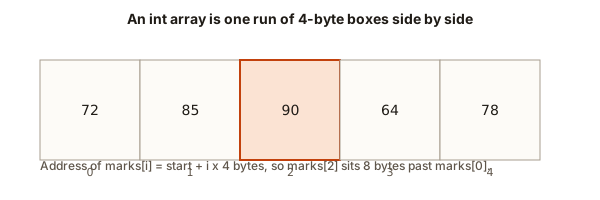
It helps to see where the numbers live. An int takes 4 bytes on the compilers you will use for this course. The lockers of an array sit next to each other in one continuous block of memory. Locker 0 starts at some address, call it the base address. Locker 1 starts 4 bytes later, locker 2 starts 8 bytes later, and so on. The address of locker i is the base address plus i times 4.
 Five int boxes in a row with index 2 highlighted and its address computed from the base
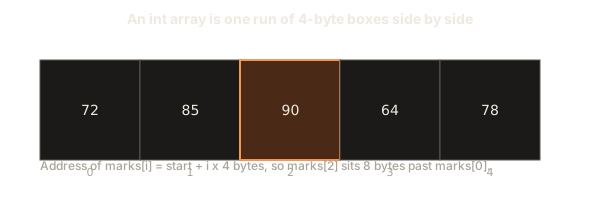
This rule is why indexing is fast. To read marks[3], the computer does one multiplication and one addition, then reads 4 bytes from that spot. It does not walk through lockers 0, 1 and 2. The time to read any element is the same whether the array has five elements or five million. Computer scientists call this constant time, written O(1).
The same rule explains a danger. The computer does not know the size of your array. It only knows the base address and the element size. If you ask for marks[7] in a five-locker array, it computes an address that is 28 bytes past the start, and it reads whatever is there. C++ does not check this for you. The result is undefined behaviour, a term that means the language standard gives no promise about what happens. The program might print a random number, print the right number by luck, overwrite some other variable, or crash. A bug like this can hide for months, which is why you should always keep your indexes inside the range from 0 to size minus 1.
Arrays also tell you something about the variable name. The name marks refers to the whole block. In most expressions, the name turns into the address of its first locker. That is why you cannot copy an array with =, and why a function that receives an array gets only the address, not the whole list. You will see both facts in the mistakes section.
Traversal: visiting every element
Traversal means visiting each element once, in order. It is the most common loop in array code. There are two ways to write it.
The index form uses a counter that runs from 0 up to the size minus 1:
for (int i = 0; i < n; i++) {
    // use marks[i]
}
The condition is i < n, not i <= n. If n is 5, the loop runs for i equal to 0, 1, 2, 3 and 4, which are the valid indexes. If you wrote i <= n, the last pass would use index 5, which is one past the end. This off-by-one mistake is so common that interviewers use it as a test. When you see <= in an array loop, stop and check the bound.
The range-based form gives you each value in turn, without an index:
for (int x : marks) {
    // x is a copy of each element, in order
}
Use the range form when you only need the values. Use the index form when you need the position, when you want to change an element, or when you need to look at two positions at once. A change inside a range loop has no effect on the array unless you write int &x instead of int x, because int x is a copy. The & makes x a reference, which is another name for the same locker. You will use that form in the vector lesson.
Every traversal has a cost. A loop that touches each element once takes time proportional to the number of elements. Programmers write this as O(n), where n is the size. Keep this habit from the first program on, because complexity questions in interviews start with exactly this sentence: "How many times does the loop touch each element?"
Your first real program: statistics from input
The programs in this lesson read numbers from the keyboard, so you can change the data and see the result change. In the browser, a box labelled Input sits next to the program. Type the numbers there before you press Run. The program reads them in the same order a person would read them, one at a time.
This first program reads how many marks there are, reads the marks, then prints the total, the largest, the smallest and the average.
To run it, type this into the Input box, on separate lines:
5
72 85 90 64 78
The program prints:
sum = 389
max = 90
min = 64
average = 77.80
Take the program apart line by line. #include <iostream> brings in the tools for reading from the keyboard (cin) and printing to the screen (cout). #include <iomanip> brings in setprecision, which controls how many digits follow the decimal point. using namespace std; saves you from writing std:: in front of every name. int main() is where the program starts. Everything between the outer braces runs in order.
int marks[100]; makes room for up to 100 values. The program only uses the first n of them. This is the standard trick when the user chooses the count at run time: make the array big enough for the largest count you expect, then use only part of it. The vector lesson removes the need for this trick.
The first loop reads n values, storing each one in the next locker. The second loop makes one pass over the first n lockers, and does three jobs at once: it adds each value to sum, and it updates best and worst when it finds a bigger or smaller value.
The lines int best = marks[0]; and int worst = marks[0]; are important. They start both trackers at the first real value. A common beginner choice is to start best at 0. That works only when every mark is positive. If every value were negative, the answer would wrongly be 0, a number that is not even in the array. Starting from the first element works for any values.
The average line casts sum to double before dividing. Without the cast, sum / n would divide two whole numbers, and C++ would throw away the fraction. The average of 389 and 5 is 77.8, but integer division would print 77.
Tracing the second loop by hand
Trace the loop with the real numbers, because this is how you check any array program. Start with best equal to 72 and worst equal to 72.
| index | value | sum after | best after | worst after |
|---|---|---|---|---|
| 0 | 72 | 72 | 72 | 72 |
| 1 | 85 | 157 | 85 | 72 |
| 2 | 90 | 247 | 90 | 72 |
| 3 | 64 | 311 | 90 | 64 |
| 4 | 78 | 389 | 90 | 64 |
The last row gives the answers: sum 389, largest 90, smallest 64. A trace like this takes two minutes and catches most logic errors. When your program prints a wrong number, make a table like this on paper, with one row per loop step. You will usually spot the row where the numbers stop matching your idea.
Filling and printing an array
Many programs first fill an array with values from a formula, and then print it. Here is the pattern in its plainest form. It uses the same reading style as the first program, so you can see the same ideas in a different setting.
int squares[6];
for (int i = 0; i < 6; i++) {
    squares[i] = i * i;
}
for (int i = 0; i < 6; i++) {
    cout << squares[i] << " ";
}
cout << endl;
The first loop writes 0, 1, 4, 9, 16 and 25 into the six lockers. The second loop prints them with a space after each one. The output line is 0 1 4 9 16 25 . Notice the space after the last number. Most judges and teachers accept it, but some do not, so the later lessons print a space only between numbers when the format asks for exactly that.
Notice that the loop writes squares[i] with i as the index. Each pass fills the next locker. This is the same index trick you used when reading. Whenever you fill an array, decide what the index means before you write the loop. Here it means "the number whose square we store". Keeping that meaning in mind stops you from mixing up the value with its position.
Example: finding the size of an array
C++ gives you a way to ask how many bytes an array uses, with the sizeof operator. Dividing that by the size of one element gives the number of elements. This program shows the idea.
No input is needed. The program prints:
0 0 0 0
7 1 0 0 0
d has 3 elements
d uses 12 bytes
Walk through it. int b[4] = {}; has four zeros, so the first line of output has four zeros. int c[5] = {7, 1}; has two values and three zeros. The line int d[] = {10, 20, 30}; leaves the size empty, so the compiler counts three values and makes the array three elements long. sizeof(d) is 12 because three ints of 4 bytes each take 12 bytes. sizeof(d[0]) is 4, the size of one int. Dividing 12 by 4 gives 3.
This trick has a limit that matters a lot in real programs. It works only in the function where the array was declared. When you pass the array to another function, the function receives a pointer, and sizeof then reports the size of the pointer, not of the array. You will see this in the mistakes section, where the program prints 8 instead of 20. For that reason, most programs pass the size as a separate int next to the array.
Example: reversing in place
To reverse an array in place means to rearrange its own lockers so the values run in the opposite order, without making a second array. This is one of the classic interview questions, and it is a good place to practise the two-pointer pattern. Two indexes start at the two ends and walk toward the middle. At each step they swap the values at their positions.
sum: not computed yet
The left and right pointers are labelled under the boxes. Outlined boxes are the pair being added, filled boxes are the pair that works.
Find two items that add up to 14. One pointer starts at each end.
Step through the reversal above. Watch the two markers meet in the middle. Each swap uses one extra variable, tmp, to hold a value while the other one is copied across. The loop stops when the two indexes meet or pass each other, because every pair has already been swapped.
Here is the program. It reads the count and the values, reverses them, and prints the result.
Type this into the Input box:
6
1 2 3 4 5 6
The program prints:
6 5 4 3 2 1The loop header for (int i = 0, j = n - 1; i < j; i++, j--) does three things in one line. It sets i to the first index and j to the last. It keeps going only while i is less than j. After each pass it moves i one step right and j one step left. Both changes happen in the update part, separated by a comma.
The condition i < j is the one you should check carefully. With six values the pairs are (0, 5), (1, 4) and (2, 3). After the pair (2, 3) is swapped, i becomes 3 and j becomes 2, so i < j is false and the loop stops. If the array had an odd number of values, the middle element would meet itself and need no swap, and the loop would stop when i equals j.
The output loop uses the expression (i + 1 < n ? " " : "\n"). This is the conditional operator, which reads as "if this is true, use the first value, otherwise use the second". It prints a space after every number except the last, and then a newline. The result has no trailing space, which some judges require.
Try the input 1 followed by 9 on the next line. The output is just 9, because the loop never runs when i starts at 0 and j starts at 0. A one-element array is already reversed. Testing the smallest case is part of the routine, and you should do it for every array problem.
The reverse uses O(n) time, because each element is touched once in a swap, and O(1) extra space, because it needs only i, j and tmp. Interviewers often ask for exactly this pair of numbers. Say both when you answer.
Example: rotating left by k positions
To rotate an array left by one position means to shift every value one locker to the left, and move the first value to the last locker. A left rotation by k means doing that k times. The values stay the same, but the starting point changes. Rotating 1 2 3 4 5 left by two gives 3 4 5 1 2.
The simplest correct version repeats the one-step rotation k times. This is easy to read and correct, and it takes O(n times k) time. A faster method exists, using a reversal trick, but the simple version teaches the idea clearly first.
Type this into the Input box:
5 2
1 2 3 4 5
The program prints:
3 4 5 1 2 Trace one step by hand. Start with 1 2 3 4 5. Save first as 1. Shift the values: locker 0 gets the value from locker 1 (2), locker 1 gets 3, locker 2 gets 4, and locker 3 gets 5. Now the array is 2 3 4 5 5, because locker 4 still holds its old 5. Put first into the last locker, and the array becomes 2 3 4 5 1. One step is done. The second step gives 3 4 5 1 2.
The line k = k % n; is worth a comment. If k is 7 and n is 5, rotating seven times is the same as rotating twice, because five rotations bring the array back to where it began. The remainder operator % gives the number of real steps. Forgetting this line does not break the program for small k, but it makes it slow for large k, and it is the kind of detail a reviewer notices.
The inner shift loop has the condition i + 1 < n. Its last pass copies from index n - 1 into index n - 2. It must not try to read index n. Writing i < n here would read one locker past the end on the last pass, which is undefined behaviour again. Read each loop bound against the index it uses, not against the size of the array.
What happens inside the loops
It helps to know what the processor does when you write a loop. Each pass through a loop body is a few instructions: compare the counter to the bound, read a value from an address that the counter selects, do the work, and add one to the counter. Because the locker addresses are regular, the processor reads memory in a steady stream. Modern processors are very good at this, so a plain array loop is one of the fastest things a program can do.
The cost is in the number of passes, not in the work of each pass. A loop over one million integers does about one million reads and a few million cheap instructions. On a typical laptop that takes a few milliseconds. This is why complexity analysis counts passes, and ignores the cost of each simple addition. When you explain a solution, say "one pass over the array" or "a pass inside a pass", because those phrases tell the listener the shape of the cost at once.
Nested loops multiply. A loop of n passes that runs another loop of n passes does n times n work, which is O(n squared). You will see this in the two-dimensional lesson, and you will learn to avoid it when a single pass with a bit of extra memory is enough. Keep an eye on the loop inside a loop, because that is where slow programs usually hide.
Common mistakes and the messages they produce
Most array bugs fall into a small set of patterns. The list below uses real messages from the g++ compiler and from a memory checker called AddressSanitizer. You will see the same messages when you make these mistakes.
Reading past the end
This is the most dangerous mistake, because the program may still seem to work. Consider this code:
int a[5] = {1, 2, 3, 4, 5};
int i = 5;
cout << a[i] << endl;
The compiler does not complain, because it cannot know the value of i in general. When you compile with a memory checker, the program stops with a message like this:
==2031972==ERROR: AddressSanitizer: stack-buffer-overflow on address 0x700b4fdf0034
READ of size 4 at 0x700b4fdf0034 thread T0
    #0 0x59f3033bd48a in main e3.cpp:5
The key words are stack-buffer-overflow and READ of size 4. The memory checker says you read 4 bytes just past a local array. The line number after the file name points to the bad read. The checker is not part of the normal browser run, so in the course you will rely on your own care: keep every index between 0 and n - 1, and use the loop bounds shown in this lesson.
Assigning one array to another
Arrays cannot be copied with =. This code fails to compile:
int a[3] = {1, 2, 3};
int b[3] = {4, 5, 6};
a = b;
The error from g++ is:
e1.cpp:4:7: error: invalid array assignment
    4 |     a = b;
      |     ~~^~~
To copy an array, copy each element in a loop, or use a vector, which copies on =. The vector lesson shows both.
Using the size of a parameter
When a function receives an array, it gets a pointer. This code prints two different numbers for the same array:
#include <iostream>
void show(int a[]) { cout << sizeof(a) << "\n"; }
int main() {
    int a[5] = {};
    cout << sizeof(a) << "\n";
    show(a);
}
On a typical 64-bit system the output is 20 then 8. The first number is the size of the whole array in bytes. The second is the size of one pointer. g++ warns you with 'sizeof' on array function parameter 'a' will return size of 'int*'. The fix is to pass the count as a separate argument, such as void show(int a[], int n).
Forgetting to give the size a fixed value
A size that is only known at run time is not standard C++. This code compiles only if you turn off the standard checks:
int n = 5;
int a[n];
a[0] = 1;
Compiled with -std=c++17 -pedantic-errors, g++ stops with:
e7.cpp:3:9: error: ISO C++ forbids variable length array 'a' [-Wvla]
    3 |     int a[n];
      |         ^
The safe fix in this course is a vector, which accepts a run-time size.
Using a value before it is set
A local array without an initialiser, or a local variable with no starting value, holds garbage. This snippet adds to a variable that was never set:
int total;
for (int i = 0; i < 3; i++) total += i;
cout << total << endl;
The result is unpredictable. Compiled with -O2 -Wall, g++ warns about it:
e4b.cpp:4:39: warning: 'total' is used uninitialized [-Wuninitialized]
    4 |     for (int i = 0; i < 3; i++) total += i;
      |                                 ~~~~~~^~~~
The warning appears only with optimisation turned on, which is why a plain -Wall build can stay silent. The fix is int total = 0;. Give every accumulator a starting value, and use {} for arrays whose values you do not write yourself.
The off-by-one loop bound
A loop written with i <= n runs one extra time and reads one locker past the end. Some programs survive this by luck, because the memory after the array happens to be harmless. Others print a wrong number or crash on a different machine. Make it a habit: read each loop bound, and say aloud the first and last index it uses.
The sign of a size
The size() function of a vector returns an unsigned number. A comparison between an int counter and that number triggers a warning. This snippet compiles with the warning:
#include <iostream>
#include <vector>
int main() {
    std::vector<int> v;
    for (int i = 0; i < v.size() - 1; i++) std::cout << i;
}
g++ with -Wall -Wextra reports:
e5.cpp:5:23: warning: comparison of integer expressions of different signedness: 'int' and 'std::vector<int>::size_type' {aka 'long unsigned int'} [-Wsign-compare]For an empty vector, v.size() - 1 wraps around to a huge number, so the loop runs far too often. The vector lesson explains the fix. For a plain array, the danger does not appear, because the size is an int you control.
Debugging walkthrough: a max function that returns zero
Here is a function a student wrote to find the largest value of an array. It is wrong, and the mistake is a good example of how to debug an array program.
int largest(int a[], int n) {
    int best = 0;
    for (int i = 0; i < n; i++) {
        if (a[i] > best) best = a[i];
    }
    return best;
}
The student tests it with {-8, -3, -6} and gets 0. The first step of debugging is to ask what the output should be. The largest of those three values is -3, so 0 is wrong. The second step is to ask what the program believes at each stage. Start with best equal to 0. Compare -8 to 0: not greater, so best stays 0. Compare -3 to 0: not greater, so best stays 0. The same happens with -6. The function returns 0 because 0 is the starting value and no element beats it.
The fix is to start best at a[0], the first real value. Now best begins at -8, and -3 beats it, so best becomes -3. The final answer is -3. Starting from the first element is also correct when the array has positive values, so the fix never breaks a case that worked before. The lesson for debugging is that a starting value must belong to the data, not to a guess about it. Zero is a number too, and it can be wrong.
The general method is the same for every array bug. Write the expected output for a small input. Make a table of the variables at each step. Find the first row where the table disagrees with what you expected. The bug lives on that row, or in the step that produced it. Print variables with cout while you work, and remove the prints afterward. A short run with five numbers is almost always enough to find the problem.
Variations and edge cases
An interviewer rarely asks for the simplest case. They ask about the edges, so practise them on purpose. For every array routine, ask yourself what happens in each of these situations.
An empty array. If n is 0, most loops never run, and the result is an empty sum, 0. But a line such as int best = a[0]; reads an element that does not exist. In standard C++ you cannot declare a zero-size array, so the empty case usually shows up as a count of 0 that you check before you touch index 0. The program in this lesson's first example assumes at least one mark. A stricter version would print a message and stop.
One element. A single value is a good test because many loops skip their body. Reversing one element changes nothing. Rotating one element by any amount changes nothing. The formula k % n with n equal to 1 is always 0.
All negative values. The largest value is then negative, and starting from 0 gives the wrong answer. This is the same bug you debugged above, and it is why the test "all negative" belongs on every list of cases.
Repeated values. Duplicates break a few algorithms. The removal of duplicates in a sorted array, covered in the next lesson, depends on the fact that equal values sit next to each other. Test an array of all equal values, such as 5 5 5 5, and check the answer by hand.
Large values. A sum of many int values can overflow. An int holds about plus or minus two billion. Adding one million values of one thousand each gives one billion, which fits, but adding one million values of two thousand each does not. Use long long for sums over large inputs. The Kadane lesson uses it for that reason.
Interview-style questions and answers
Interviewers use arrays to test your reasoning, more than your memory of syntax. Here are four questions in the form they usually take, with the answer you should give out loud.
Question: find the second largest value in one pass. Keep two variables, first and second. Start both at the lowest possible value, or at the first two elements in order. For each value, if it is larger than first, move first into second and store the value in first. Otherwise, if it is larger than second and not equal to first, store it in second. One pass, O(n) time, O(1) extra space. The phrase "not equal to first" matters when duplicates exist.
Question: are there two equal values? A sorted copy with a scan finds it in O(n log n). A set of seen values finds it in O(n) time and O(n) space. Name both options and say which one you would choose for a large input. The trade-off between time and memory is what interviewers want to hear.
Question: reverse an array without extra space. Use the two-pointer swap from this lesson. O(n) time and O(1) extra space.
Question: rotate by k positions in O(n) time and O(1) space. The reversal trick does it. Reverse the first k values, reverse the rest, then reverse the whole array. The next lesson does not cover this, but if you want to try it, it is a good exercise, and it appears in the practice list below.
When you answer any of these, say three things: the approach, the time, and the extra space. Those three items show that you understand the cost of your answer, and they are what a reviewer scores.
Real-world uses
Arrays sit underneath much of the software you use. A video stores its frames in arrays of pixel values. A music player stores the samples of a song in an array and plays them in order. A spreadsheet stores each column as a list. A sorting routine, a search routine and a database index each rely on arrays of records. When you write a loop over a list of prices or a list of sensor readings, you are using the same tool that drives those systems.
The fixed-size array you have learnt here is rarely used alone in large programs, because most real data grows and shrinks. But the ideas carry over. Indexing, traversal, the boundary checks and the two-pointer swap all appear in the vector and in the more advanced structures. If you can read this lesson's code slowly and predict each line, the rest of the course will feel familiar.
Practice
Try each exercise before you open the solution. Use the Run box to check your work, and when you are stuck, make a table of the variables on paper. The first three are easy, the next four are medium, and the last is harder.
- Write a program that reads
nand thennintegers, and prints how many of them are even. Test it with5followed by2 4 7 9 10. The answer is 3.
Solution
Use a counter that starts at 0 and adds one for each value whose remainder after division by 2 is 0. The check is if (x % 2 == 0) count++;. For the input above the counter goes 1, 2, 2, 2, 3, so the answer is 3.
- Find the second largest value in one pass. Read
nand the values, and print the second largest. Test with6followed by3 9 2 9 7 4. The answer is 7, because the largest is 9 and the next value below it is 7. Do not sort the array.
Solution
Keep first and second, both starting at the smallest possible value (-2000000000 works for this course). For each value x, if x > first, set second = first and then first = x. Otherwise, if x > second and x < first, set second = x. The condition x < first skips the duplicate 9. The answer for the test is 7.
- Read
nand the values, and print the array with its minimum moved to the front and the maximum moved to the end, keeping the other values in their original order. This is harder than it looks. Test with5followed by4 1 9 3 6. The answer is1 4 3 6 9.
Solution
Find the index of the minimum and the index of the maximum in one pass. Move the minimum to the front by shifting the values before it one place right. Then do the same for the maximum at the end. A simpler check is to build a new array of the remaining values in order, then write the minimum first and the maximum last. Test your answer on one element and on equal values.
- Write a program that reads
nand the values, and prints the number of times the largest value appears. Test with6followed by5 2 5 1 5 3. The answer is 3.
Solution
Find the largest value in one pass, then count the values equal to it in a second pass. Two passes are still O(n). A single pass that resets the count whenever a bigger value appears also works, and it is a nice interview point to name.
- Write a program that reads
nand the values, and printsYESif the array is a palindrome (it reads the same forwards and backwards), otherwiseNO. Test with5followed by1 2 3 2 1, then with4followed by1 2 2 3.
Solution
Use the two-pointer idea from this lesson. Start i at 0 and j at n - 1. While i is less than j, if a[i] differs from a[j], print NO and stop. Otherwise move the pointers inward. If the loop finishes, print YES. The first test gives YES and the second gives NO.
- Write a program that reads
n, thennintegers, and prints every value that appears more than once, one per line, in the order of their first appearance. Test with7followed by4 1 4 2 1 4 9. The answer is4then1.
Solution
A simple solution compares every pair, which takes O(n squared) time. Count each value with a nested loop and print the value when its count is above 1 and it is the first occurrence. The first occurrence check is a loop back over earlier positions. Sorting first (in the next lesson) or a set (in the prefix sums lesson) gives a faster answer.
- Write a function
void rotateRight(int a[], int n)that rotates the array one place to the right. Show it working on1 2 3 4 5, which becomes5 1 2 3 4. Passnseparately, as the lesson explains.
Solution
Save the last value. Shift every value one place to the right, starting from the end and moving left. Put the saved value at index 0. Shifting from the end is the key step. Going from the start would overwrite values you still need.
- Write a program that reads
nandk, thennvalues, and prints the array rotated left byk. Use the reversal method: reverse the firstkvalues, reverse the rest, then reverse the whole array. Test with5 2and1 2 3 4 5. The answer is3 4 5 1 2.
Solution
Write a small reverseRange(a, from, to) function that swaps pairs inward between two indexes. Call it three times: (0, k - 1), (k, n - 1) and (0, n - 1). Take k = k % n first. The method uses O(n) time and O(1) extra space, which is the answer interviewers want.
- Find the longest run of equal values in an array, and print its length. Test with
8followed by1 1 2 2 2 3 3 1. The answer is 3.
Solution
Keep a current run length and a best run length. Start both at 1. For each index from 1 on, if a[i] equals a[i - 1], add one to the current run. Otherwise reset the current run to 1. After each step, update the best run. The answer for the test is 3, from the three 2s.
- Explain in three sentences why the first version of the statistics program, which started
bestat 0, gives wrong answers for an input of all negative values. Then write the input and the wrong output.
Solution
Starting at 0 means the program believes 0 is in the array, and no negative value can beat it. For the input 3 then -4 -9 -2, the wrong output for the largest is 0, and the correct output is -2. Starting from marks[0] fixes it, because the first value is always a real member of the array.
What you now know
- An array is a fixed row of same-type lockers numbered from 0, and
a[i]reads or writes lockeri. - The address of
a[i]is the base address plusitimes the element size, so reads take constant time. - Loops over an array must stay between index 0 and index
n - 1. A bad index is undefined behaviour, and no compiler will catch it for you. - Arrays cannot be assigned with
=, and a function receives only a pointer, so pass the size as a separate argument. - Reverse in place and rotate use two pointers or three reversals, in O(n) time with O(1) extra space.
- Start running totals and best values from a value that belongs to the data, not from 0 by habit.
- The next lesson replaces the fixed size with a
vectorthat grows as you add values.