Why this matters
AI assistants can explain code, find bugs and answer questions at any hour, and you will use them throughout your career. Used badly, they let you finish an exercise without learning anything, and they fail you in an interview, where nobody hands you an answer. Used well, they work like a patient tutor who never gets tired of the same question.
This lesson gives you five rules, each with worked examples you can run, plus a section on what an assistant actually is, so that its strengths and its failures make sense. By the end you will be able to write a question that gets a useful reply, test an answer before you trust it, spot the signs of an invented answer, and keep private data out of the conversation.
What an assistant is
An AI assistant is a program trained on very large amounts of text and code. You type a request in ordinary language, and it produces a reply that is likely to be useful. The kind of model behind most chat assistants is called a large language model. Here is a plain description of how it works, without the mathematics.
During training, the model reads a huge number of examples and learns patterns: which words and symbols tend to follow which. When you ask a question, it builds its answer one small piece at a time, each piece chosen because it fits the pieces so far and your request. It does not look the answer up in a table of facts. It generates text that has the shape of a good answer.
The analogy: a well-read friend with no internet
Imagine a friend who has read a library's worth of programming books and forum posts, and who answers from memory without checking anything. Ask them how to reverse a list, and they will explain it fluently and usually correctly, because the pattern is everywhere in what they read. Ask them for the exact name of a function in a small library they skimmed once, and they will give you a name that sounds right. It may not exist. They are not lying. They simply have no way to feel the difference between remembering and making a plausible guess, and they sound just as sure either way.
That is the right mental picture. It explains both why assistants are useful (they have seen your problem's shape many times) and why you must check them (a fluent answer is not a verified answer).
What follows from this
- It can be wrong, and it sounds equally confident when it is wrong. These wrong answers are called hallucinations: statements that look plausible and are invented, such as a function that does not exist.
- It does not see your computer unless you show it. It has not run your program, does not know your files and cannot see your error unless you paste it. Some assistants are connected to tools that can run code or search the web, and some are not. Never assume. If you need to know whether a piece of code works, run it yourself.
- Its knowledge has an end date. It was trained up to some point. Libraries change after that. Commands, versions and options that were right at training time may have changed.
- It tends to agree with you. If you say "this is the problem, right?" it will often find a way to say yes. Ask neutral questions: "What could be the cause?" gets more honest answers than "Is the cause X?"
- Wording changes the answer. A vague question gets a generic answer. An exact question gets an exact answer. This is the reason for the rules below.
Two ways to use it, and what they cost
There are two very different ways to use an assistant, and the lesson depends on which one you pick.
| The answer machine | The tutor | |
|---|---|---|
| You ask | "Write the program" | "Give me a hint" |
| You get | Code you did not write | Questions and explanations |
| Effort from you | Almost none | The thinking |
| After an hour | The exercise is done and you cannot do it again | You can do it again, alone |
| Interview | You freeze | You explain |
The answer machine feels faster, and today it is. Over weeks it is slower, because the skill never forms. Nine months of this course are meant to produce a person who can write code. If the assistant did the writing, the person is not there at the end.
You can see the difference in an everyday case. Take the exercise "print the average of three scores". The answer-machine route copies a full function. The tutor route asks: "I think I need to add all the scores and divide. How do I add numbers in a list one by one?" and gets back a short explanation of a loop, after which you write the loop yourself. The second takes ten minutes longer and leaves you with something you own.
Rule 1: try first
Spend 15 to 30 minutes on a problem before you ask. The struggle is where learning happens. If you ask instantly, you skip the part that builds the skill. The previous lessons gave you a way to work alone: read the error, print values, shrink the problem. Use them first.
There is a second reason. When you have tried, your question is better. You can say what you checked, and the answer you receive is aimed at the gap you have, not at the whole topic. Having tried is also what makes the reply stick: your brain was already looking for it.
If you are stuck beyond 30 minutes, asking is correct. The rule does not forbid asking. It sets an order.
Rule 2: ask good questions
A weak question:
My code doesn't work. Fix it.The assistant has to guess the language, the goal, the code and the problem. The reply will be generic or wrong, and you have learned nothing.
A strong question has five parts.
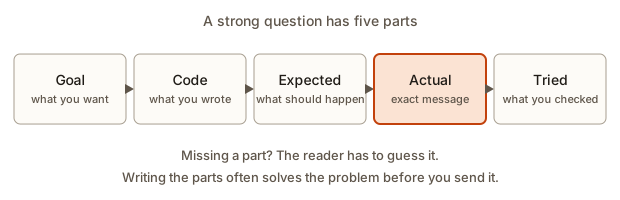 The five parts of a good question: goal, code, expected, actual and tried
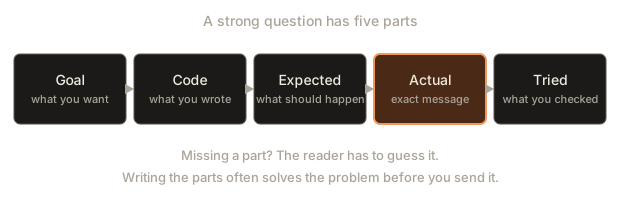
- Goal: what you are trying to achieve.
- Code: the relevant code, pasted as text, not described.
- Expected: what you thought would happen.
- Actual: what happened, with the exact error message or output.
- Tried: what you have already checked.
Add a sixth line, the request: what kind of help you want (a hint, an explanation, a review).
Here is the weak question rewritten:
I am learning JavaScript. I want average() to return the mean of
[80, 90, 100], which should be 90. It prints 63.333333333333336.
Here is the function: (paste code).
I tried printing i inside the loop. It shows only 1 and 2.
Can you give me a hint, without the full answer?
The strong version gets a better reply, and writing it often solves the problem before you send it. Saying the problem aloud, or writing it for someone else, makes you notice the thing you skipped. In the example, writing "it shows only 1 and 2" is almost enough to see that the first score is never visited. Programmers call this the rubber duck effect, after the practice of explaining a bug to a rubber duck on the desk.
A program that builds the question for you
The next program turns six short answers into a well-formed question. It is a template, but filling the template is the point: if you cannot answer one of the six lines, you are not ready to ask yet. Type these six lines in the Input box, each on its own line:
average of three scores
total / len(scores)
90
63.333333333333336
printed i, saw only 1 and 2
a hint, not the full answerThe output is:
I am learning Python.
Goal: average of three scores
Code: total / len(scores)
I expected: 90
What happened: 63.333333333333336
I already tried: printed i, saw only 1 and 2
Request: a hint, not the full answer
Try it with an empty line for one of the answers, and notice how the question looks incomplete. In real use, paste the whole function and the full error text, not one line. Small, complete code is best: if the program is 200 lines, cut it down to the part that still shows the problem. Shrinking the problem is a skill from Lesson 1, and it makes the reply better.
Worked example: weak against strong
Imagine two learners with the same bug. Both wrote a function that should count how many times a letter appears in a word, and it returns 0 for "banana" and "a".
Learner A writes: "my count function is broken". The assistant has no code, so it replies with a general explanation of counting characters and a full working function. Learner A copies it. The exercise is ticked. The bug in the original was never found.
Learner B writes the five parts: the goal (count the letter a in banana, expect 3), the code (a loop comparing each character), the actual (prints 0), and what was tried (printed the character in each step, it prints b, a, n, a, n, a). The assistant replies with a question: "You print the characters correctly. How do you compare each one with the letter? What type is the letter you are comparing?" Learner B notices that the loop compares each character with the whole word, not with the letter, fixes it and understands why.
The same assistant, a better question, a different lesson.
Rule 3: ask for understanding, not just answers
The reply you get depends on what you ask for. Useful prompts:
- "Explain this error like I am a beginner."
- "Give me a hint, not the solution."
- "Explain this line by line."
- "What is the difference between X and Y? Give a small example."
- "Quiz me on this topic with three questions, one at a time, and wait for my answer."
- "What are other ways to write this, and when would I pick each?"
- "Ask me questions until you find what I am missing."
- "Here is my summary of the idea. What did I get wrong?"
Weak prompts: "Write the whole program", "Do my exercise". You would get an answer you cannot explain.
A few extra habits improve results.
- Say your level. "I started programming two weeks ago" changes the vocabulary of the reply.
- Ask for one step at a time on a large task. A long answer to a vague big request usually contains hidden mistakes. Small steps are easier to check.
- Ask for a hint ladder. Say: "Give me the smallest possible hint. If I ask again, give a bigger one." You control how much help you take.
- Ask for a test. "Give me three inputs I can use to check my function, and say what each should return" makes the reply something you can verify.
- Start fresh when the thread goes wrong. In a long conversation, early mistakes can carry on. If answers become strange, open a new conversation and paste a short, correct summary of where you are.
- Do not take offence at corrections. If you say "that gave an error", paste the error. The assistant cannot see it.
Rule 4: never paste what you do not understand
If an assistant gives you code, you must be able to say what every line does before it goes into your project. Ask it to explain anything unclear. If you cannot explain a line, you cannot fix it later, and an interviewer will ask.
A useful test is to cover the code and explain it aloud to a friend. If you stall, you do not yet own it. Another good habit is to retype the code yourself, from the explanation, in your own words and names. Retyping from a copy-paste still teaches little. Typing from understanding teaches a lot.
Here is a concrete case. Suppose an assistant replies to a question about counting words with this one-liner:
counts = {w: text.split().count(w) for w in set(text.split())}If you do not know dictionary comprehensions, set, split and count, do not paste this. Ask: "Explain this line piece by piece. Then show me the same thing written with a plain loop." Compare the two. The one-liner is shorter, and the loop is something you may be able to read today. You can choose the loop, and it is a perfectly good answer.
Rule 5: verify
Do not trust. Check.
- Run the code. Does it print what the assistant said? Does it handle your real input?
- Read the official documentation for any function you are unsure of.
- Test edge cases: empty input, zero, a negative number, a very large number, one item.
- Ask a second time, or ask for a source, if a fact is surprising.
- Be extra careful with versions, library names and commands that change files, such as
rmorsudo.
Worked example 1: a ten-second check
An assistant claims that [1, 2, 3].at(-1) returns the last item, and that there is also a .last() method. Check both claims by running them.
The output is:
3
TypeError: list.last is not a function
function undefined
The first claim is right: at(-1) counts from the end. The second claim is a hallucination: arrays in JavaScript have no .last() method. Checking took ten seconds, and the error message told you immediately, using what you learned in the last lesson (is not a function, a TypeError). Notice the last line: typeof shows that at is a function and last is undefined. Asking the language itself is the most reliable check.
Worked example 2: a check across many names
When an assistant suggests a library function, you can check whether it exists before you build on it. This Python program takes names in the form module.name and reports whether each exists. Type these five lines in the Input box:
math.isqrt
math.clamp
statistics.median
statistics.mode_all
fastmath.sumThe output is:
math.isqrt: exists
math.clamp: NOT FOUND
statistics.median: exists
statistics.mode_all: NOT FOUND
fastmath.sum: module fastmath not found
isqrt and median are real. math.clamp and statistics.mode_all sound reasonable and do not exist in the standard library, and fastmath is not a module at all. This check says only that a name exists. It does not tell you that the function does what the assistant claimed, so the next step is always the documentation page for the function. The docs also say which version of the language introduced it, which matters if your machine is older.
Worked example 3: code that looks right and is wrong
Assistants often give code that looks entirely reasonable and breaks in a case you did not think of. Here is a function for the median, the middle value of a sorted list. It is the kind of answer an assistant might give. Read it and decide whether you trust it.
def median(numbers):
    numbers.sort()
    return numbers[len(numbers) // 2]
It looks right: sort, take the middle. Now test it with cases where you know the answer. This program does so, with one odd case, one single item, an even count and negative numbers.
The output is:
odd count    input=[5, 1, 3] expected=3 got=3 ok
one item     input=[7] expected=7 got=7 ok
even count   input=[4, 1, 3, 2] expected=2.5 got=3 WRONG
negatives    input=[-5, -1, -3, -2] expected=-2.5 got=-2 WRONG
Two cases fail. The median of an even number of values is the average of the two middle ones, and the function returns only one of them. The tests also reveal a second, quieter problem: numbers.sort() sorts the caller's list in place, so after the call the list you passed in has changed. The helper check made a copy first to print the original order, which is why the input column looks unsorted. A function that silently reorders its input can cause bugs far away.
Here is a corrected version, and the same tests:
odd count    expected=3 got=3 ok
one item     expected=7 got=7 ok
even count   expected=2.5 got=2.5 ok
negatives    expected=-2.5 got=-2.5 ok
empty list -> median of empty list
sorted(numbers) makes a new sorted list and leaves the original alone. An even count averages the two middle values. An empty list raises a clear error instead of crashing with an index message. The lesson is not that assistants are bad at medians. It is that a short test with edge cases found two problems in under a minute. The habit that finds them is yours.
Commands that change things
Code that only prints is safe to try. Commands that delete, install or change settings are different. Treat these with extra care:
- Read the command before you run it. If you do not know what a flag does, look it up.
- Be suspicious of
rm -rf, which deletes folders without asking, and anything that begins withsudo, which runs a command with full system rights. - Be suspicious of commands that download a script and run it in one line.
- Run unknown commands in a throwaway folder first, never in your home folder.
- When a command depends on versions, check your version against the official instructions of the tool.
An assistant can give you a command that was correct for an older version, or one that deletes more than you meant. A thirty-second read is cheap compared with a lost folder.
Spotting a hallucination
Learn the signs.
- A function, method or option you cannot find in the documentation. The
last()example above. - Very specific details with no source: version numbers, dates, URLs, statistics, book titles, names of papers. These are the details the model is most likely to invent. A link that looks right can lead nowhere.
- A very neat explanation of something that is actually messy. If a topic is known to be disputed, a smooth confident answer is a warning.
- Answers that change when you ask again. Ask the same question in a fresh conversation. If the replies disagree, at least one is wrong.
- Agreement that arrives too fast. If you propose a wrong idea and the reply starts "Yes, exactly", ask the neutral version of the question.
When you spot one, say so: "I cannot find list.last() in the documentation. Does it exist? Which version added it?" A good assistant corrects itself. A better habit is to look at the documentation first, and use the assistant for the explanation.
Privacy
Never paste passwords, API keys, personal data or private company code into an assistant. A conversation may be stored, and you may not control where it goes. Replace secrets with fake values before you paste. Your future employer will have rules about this, and breaking them can end a job.
What counts as a secret:
- Passwords, tokens and API keys. They often start with a recognisable prefix and look like a long random string.
- Personal data: names, email addresses, phone numbers, addresses, anything about customers or classmates.
- Private code and internal documents from an employer or client.
- Connection strings for databases.
Here is a small program that looks for four kinds of secrets and replaces them with a marker. It uses regular expressions, a compact way of describing text patterns, which you will meet in a later module. Type the four lines below in the Input box.
API_KEY = "sk-abc12345XYZ"
db password: hunter2
contact anisha@example.com or 9876543210
print("hello")The output is:
line 1: possible api key
  safe: API_KEY = "<hidden>"
line 2: possible password
  safe: db <hidden>
line 3: possible email
line 3: possible phone
  safe: contact <hidden> or <hidden>
  safe: print("hello")
4 possible secrets found
This scanner is a teaching toy, and it will miss many secrets, so do not rely on it. The habit it teaches is the useful part: read what you are about to paste and look for anything private. Real projects keep secrets in separate configuration files that are never committed, and you will learn that in the Git and project modules.
Honesty and your own learning
Using an assistant on practice work in this course is your decision, and it only hurts you if it replaces the work. A rule that keeps it honest: you must be able to redo the exercise alone, later, with nothing open. Test that one day later. If you cannot, the exercise did not teach you, no matter what the tick says.
In a job, the standard is higher. Developers use assistants every day, and the code they ship is still theirs. A teammate will ask why you wrote something, and "the assistant wrote it" is not an acceptable answer. Reviewing, testing and understanding generated code is a real part of the job, and the habits in this lesson are that skill. In interviews and timed tests, you will often have no assistant, so practise without one.
A debugging walkthrough: when the assistant is wrong
Here is a short story that puts the rules together.
Meena is stuck on an exercise. She tries for 25 minutes (Rule 1), then writes a five-part question (Rule 2) and asks for a hint, not the solution (Rule 3). The assistant explains that she needs the median of a list, and offers the short function with numbers.sort() and the middle index.
Meena does not paste it. She reads each line and can explain it (Rule 4): sort, then pick the middle position. She runs it on her real data, which has an even number of items, and the result looks too small (Rule 5). She tests four cases as in the example above and finds the two failures.
She goes back: "Your function returns 3 for [4, 1, 3, 2]. I expected 2.5. Why?" The assistant corrects itself and explains the even case. She writes the fix herself, using the explanation, and adds the four checks to her own file as a record. The whole thing took more time than pasting, and she now understands the median, the in-place sort and why edge cases matter.
At no point did she need to know in advance that the answer would be wrong. She only needed the habit of testing.
Common mistakes
- Asking before trying. The struggle is the learning.
- Pasting the whole assignment and submitting the answer. You cannot explain it, and it does not teach.
- Believing it because it sounds sure. Fluency is not evidence.
- Giving no error text or code. The assistant has to guess, and you get a guess back.
- Asking leading questions. "It is a loop problem, right?" gets a yes. Ask "What could cause this?"
- Never starting a new conversation. Old mistakes pile up in a long thread.
- Pasting secrets. Passwords, keys and private data stay out.
- Running a command you did not read.
- Skipping the documentation because the assistant gave a confident summary.
- Using the assistant for the final check of a fact it also supplied. Ask a different source.
Variations and edge cases
- Autocomplete in your editor. Some editors suggest the next line as you type. Treat each suggestion like an assistant answer: read it, understand it, and accept only what you could have written. For the first months, consider turning it off while you practise typing.
- An assistant that can run code. It can test its own answer, which helps, but you still read the result. It may test only the cases it thought of.
- An assistant that can browse the web. It can fetch current documentation, but it can also quote a poor page. Open the source it cites.
- Two assistants disagree. Neither is the referee. Run the code or open the documentation.
- The reply is too advanced. Say so: "Explain that with a simpler example, and define each new word."
- The reply is too long. Ask for "three sentences" or "a hint of one sentence".
- A different language than yours. Say the language every time: assistants may answer in another one.
- Code that works but you do not like. Ask for alternatives and the trade-offs.
How this appears in interviews and real work
Interviewers now ask about AI use directly. Common questions are "How do you use AI tools when you code?" and "Tell me about a time an AI tool was wrong." A strong answer describes the habits above: I try first, I give context, I test what I receive with edge cases, I check the documentation for anything surprising, and I never paste private data. The median story is exactly the kind of answer they want, with a real bug caught by a real test.
In real teams, generated code goes through the same code review as any other code, and tests decide whether it is accepted. The person who commits the code is responsible for it. Reading a function you did not write and judging whether it is right is a core skill, and this course trains it in every exercise.
Practice
- Take an error from the previous lesson and write a strong question for it using the five parts. Do not send it until you have tried for 15 minutes.
Solution
A good answer has all five parts, the exact error message copied as text, and the request line. For example: "I am learning Python. Goal: print each item of a list with its position. Code: (the loop). Expected: three lines. Actual: IndexError: list index out of range on line 3. Tried: printed len(items) and saw 3. Request: a hint, not the solution." If any part is vague, such as "it does not work", rewrite it with the real output.
- Ask an assistant to explain
forloops, then write a one-paragraph summary in your own words without looking.
Solution
The summary is yours, so there is no exact text. Check it against these points: a loop repeats a block of code, a for loop does so once for each item or each number in a range, the variable takes a new value each time, and the loop ends when the items run out. Then run one small loop to see it. If your summary missed a point, that is the part to review tomorrow.
- Ask for a fact about JavaScript and verify it by running code or reading the official docs.
Solution
For example, ask "What does [3, 1, 2].toSorted() do?" and verify with console.log([3, 1, 2].toSorted()), which prints [ 1, 2, 3 ]. Then read the MDN page for toSorted and note whether it changes the original (it does not). The site developer.mozilla.org is a trustworthy reference. The skill is to separate "the assistant said it" from "I saw it run".
- Rewrite this weak question into a strong one, inventing realistic details: "my loop does not work".
Solution
One good rewrite: "I am learning JavaScript. I want to print the numbers 1 to 5. My code is for (let i = 1; i < 5; i++) { console.log(i); }. I expected 1 2 3 4 5 and got 1 2 3 4. I tried changing the start to 0 and got 0 1 2 3 4. Can you explain why the last number is missing, without rewriting my code?" It names the language, the goal, the code, expected, actual, what was tried and the kind of help wanted. The cause is the < where <= is needed.
- Use the name-existence program on five names an assistant gave you, or on these:
os.getcwd,os.current_folder,json.loads,json.parse,random.choice. Which are hallucinations?
Solution
os.getcwd, json.loads and random.choice exist. os.current_folder and json.parse do not exist in Python (json.parse belongs to JavaScript, where it is JSON.parse). The program prints exists for the first three and NOT FOUND for the other two. A name that exists in another language is a classic hallucination: the assistant mixed two languages.
- Write four test cases, with expected answers worked out by hand, for a function
is_even(n). Include zero and a negative number.
Solution
Examples: is_even(4) is True, is_even(7) is False, is_even(0) is True (zero is even), and is_even(-3) is False. Add is_even(-4) as True if you like. The cases worth having are the edges: zero and negatives, because a function written as n % 2 == 1 for "odd" gives the wrong answer for negative numbers in some languages (in JavaScript -3 % 2 is -1, so n % 2 === 1 is false for -3).
- This function was suggested for the average of a list. Find two problems by testing, and fix them.
def average(numbers):
    return sum(numbers) / len(numbers) + 1
Solution
Test with [80, 90, 100] and the result is 91.0, not 90: the + 1 is wrong, so remove it. Test with an empty list and Python raises ZeroDivisionError. Decide what should happen: raise a clear error or return 0. A fixed version:
def average(numbers):
    if not numbers:
        raise ValueError("average of empty list")
    return sum(numbers) / len(numbers)
Now average([80, 90, 100]) is 90.0, and an empty list gives a clear message.
- Take the secret scanner and add a fifth rule that finds a 4-digit PIN written as
pin: 1234orpin = 1234. Test it on two lines.
Solution
Add one entry to RULES:
("pin", re.compile(r"(?i)pin\s*[=:]\s*\d{4}")),Test with pin: 1234 and my PIN = 9876 ok. Each line should print possible pin and the text becomes <hidden>. Also test a line that should not match, such as pinned = 5, and make sure it does not trigger. A pattern is only trustworthy after you test lines it should not match.
- Pick one thing an assistant told you recently (or ask for one claim about a language feature). Write down how you verified it, using at least two different sources.
Solution
A good record has the claim, source 1 (you ran code and saw the output), source 2 (the official documentation page, with the version), and the verdict: confirmed, wrong or partly right. If the two sources disagree, note which one you trust and why. Documentation of the version you use beats an answer from memory.
- Write a one-page personal policy for how you will use AI assistants in this course: when you will try alone first, what you will never paste, and how you will check answers. Keep it where you can see it.
Solution
A good policy is short and testable. Example: "1. I try for 20 minutes before asking. 2. I write the five parts first. 3. I ask for a hint before an answer. 4. I never paste keys, passwords or private data. 5. I run every piece of code I receive and test an edge case. 6. I retype anything I keep, and can explain each line. 7. Each week I redo two exercises with no assistant." Review it after a month and change what did not work.
What you now know
- An AI assistant generates likely-looking text from patterns. It is fluent, it can be wrong, and it does not signal when it is.
- Use it as a tutor: try first, ask with five parts (goal, code, expected, actual, tried) and ask for hints and explanations.
- Never paste code you cannot explain line by line.
- Verify by running the code, testing edge cases, reading the official documentation and asking a neutral question twice.
- Signs of a hallucination: names you cannot find, specific details with no source and answers that change on a second asking.
- Keep secrets and private data out of every conversation, and read commands before you run them.