Why this matters
Beginners often see a block of red text and freeze. But an error message is the computer telling you what went wrong and where, in as much detail as it has. Reading it carefully solves most problems before you ever need to ask anyone. It also decides how fast you will grow: a developer who reads errors well fixes a bug in two minutes, and one who does not can lose an afternoon.
This lesson teaches a fixed routine for reading any error, in two languages (JavaScript and Python), with the real messages you will see on your screen. By the end you will be able to name the three kinds of problem, read a stack trace from either end, tell a message that is wrong about the cause from one that is right, and write a search that finds help.
Errors are normal
Every programmer, including people with 20 years of experience, sees errors all day. An error is information, not a verdict on you. Think of the warning light on a car dashboard. It does not mean the car is bad. It means: look at the engine, here. The computer is doing the same: it stopped because it could not continue, and it left you a note about where.
There is one more way to see it. If a program had no errors but did the wrong thing, you would have no clue where to look. Errors are the helpful case. The unhelpful case comes later in this lesson.
Three kinds of problems
Before you read any message, it helps to know which of three kinds of problem you have, because each one shows up at a different moment and is handled in a different way.
| Kind | When it shows up | Example |
|---|---|---|
| Syntax error | Before the code runs. You broke the grammar | A missing bracket or quote |
| Runtime error | While running. The code is valid but fails at a certain moment | Asking for something that does not exist |
| Logic error | Never reported. The code runs but gives wrong answers | An average that adds the wrong numbers |
The first two give you a message. The third gives you nothing, which is why it is the hardest to find.
What happens inside: two phases
To see why the first two differ, you need a picture of what the interpreter does with your file. It works in two phases.
- Reading phase (parsing). The interpreter reads all of your text and checks that it forms valid code, as a spell-checker checks grammar. If a quote is missing or a bracket is unbalanced, it stops here and reports a syntax error. Not one line has run yet. This is why a syntax error stops everything, even code that comes before the mistake: nothing began.
- Running phase. If the text is valid, the interpreter starts at the first statement and carries out each in order. If one statement asks for something impossible, such as dividing by zero or reading a property of nothing, it stops at that statement and reports a runtime error. The lines before it have already run, so their output has already appeared.
That gives you a useful clue. If your program printed some output and then crashed, the error is a runtime error and the last printed line is how far it got. If it printed nothing at all and shows an error, it is probably a syntax error.
The third kind, the logic error, means both phases succeeded. The code was valid and it ran without being stopped, but it did something other than what you meant. The computer cannot detect that, because it does not know what you meant.
Anatomy of a runtime error
Save this as e.js and run it with node e.js:
function greet(user) {
  return "Hello, " + user.name;
}

console.log(greet());
The first lines of the output are these. The folder path before e.js will be different on your machine, and Node prints several more lines of internal calls below the ones shown.
e.js:2
return "Hello, " + user.name;
^
TypeError: Cannot read properties of undefined (reading 'name')
at greet (e.js:2:27)
at Object.<anonymous> (e.js:5:13)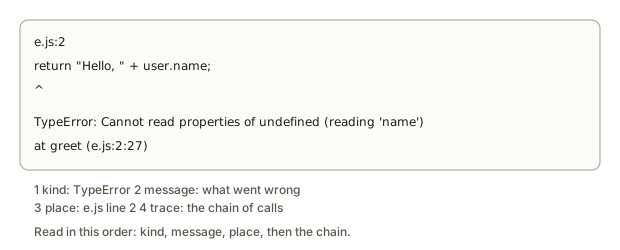 A JavaScript error message with its parts labelled
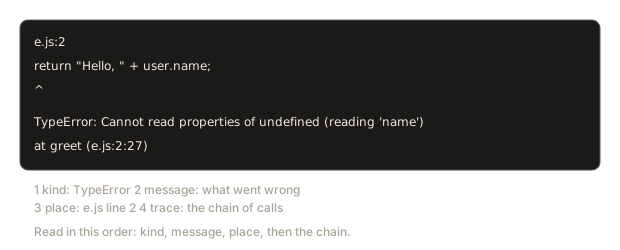
Read it in this order, every time.
- The kind:
TypeError. A type error means you used a value in a way that its type does not allow. - The message:
Cannot read properties of undefined (reading 'name'). In plain words: "you asked for.nameof something, but that something isundefined". The wordundefinedis how JavaScript says "no value here". - The place:
e.js:2is filee.js, line 2. The^points at the spot in the line. Ine.js:2:27the numbers are file, line and column. - The call chain, called the stack trace: line 2 inside
greetwas called from line 5. Start with the top line of the chain, which is the closest to the problem.
The trace says the failure is in greet, but the real cause is in line 5: the code called greet() with no argument, so user was undefined. The fix is in the caller:
console.log(greet({ name: "Anisha" }));Hello, AnishaThe top line shows where it broke. The real cause can be one step earlier in the chain.
The same mistake in Python
Here is the Python version of the same bug, saved as e1.py.
def greet(user):
    return "Hello, " + user["name"]

print(greet())Traceback (most recent call last):
File "e1.py", line 4, in <module>
print(greet())
~~~~~^^
TypeError: greet() missing 1 required positional argument: 'user'Python reads the call before running the function body, and notices that the function needs one argument and got none. The message is more direct than JavaScript's, which only found out when it tried to use the missing value. Two things to learn from the comparison.
- The order is reversed. Python prints the oldest call first and the error last, so you read it from the bottom. JavaScript prints the error first and the newest call next. Whichever language you use, find the error line first, then walk the chain.
- The same mistake gives different messages in different languages. The skill is not memorising messages. It is the routine: kind, message, place, chain.
The error zoo
The best way to become calm about errors is to meet many of them in a safe place. The program below causes ten different runtime errors on purpose and catches each one so the program can continue. The try and except parts are explained in the box below the output.
The output is:
add text and number -> TypeError: can only concatenate str (not "int") to str
missing key -> KeyError: 'b'
bad index -> IndexError: list index out of range
not a number -> ValueError: invalid literal for int() with base 10: '12abc'
divide by zero -> ZeroDivisionError: division by zero
unknown name -> NameError: name 'totl' is not defined
wrong method -> AttributeError: 'str' object has no attribute 'push'
none value -> AttributeError: 'NoneType' object has no attribute 'upper'
too many args -> TypeError: len() takes exactly one argument (2 given)
About the code: a try block says "attempt this". If the attempt raises an error, the except block runs instead of crashing the program, and err holds the error object. type(err).__name__ is the name of the error's kind. A lambda is a tiny function written in one line, used here so that each risky action can be handed to run and attempted inside the try. You will learn all of this properly in the Python module. For now, treat run as a safe cage for experiments.
Now go through the table of messages.
| Error | What it means in plain words | A typical cause |
|---|---|---|
TypeError | A value of the wrong type for this action | Adding text and a number, calling with the wrong number of arguments |
KeyError | A dictionary does not have that key | A typo in a key, or the key was never added |
IndexError | A list has no item at that position | Using the length as an index; the last valid position is length minus one |
ValueError | The type is right, the content is not | Turning "12abc" into a number |
ZeroDivisionError | You divided by zero | An empty list's length used as a divisor |
NameError | The name was never created | A typo, or using a variable before you made it |
AttributeError | The thing has no such property or method | A method from another language or type, such as push on a string |
The last one repeats the lesson about reading: 'NoneType' object has no attribute 'upper' does not say you did anything silly with upper. It says the thing you called it on is None, which means "no value". The real question is why the value is missing. A function that did not return anything, a search that found nothing, a dictionary lookup with .get that came back empty: these are the usual causes.
The zoo in JavaScript
JavaScript has its own set of messages, and they differ in wording. This second program runs ten actions and catches each error in the same way.
The output is:
undefined property -> TypeError: Cannot read properties of undefined (reading 'name')
null property -> TypeError: Cannot read properties of null (reading 'length')
unknown name -> ReferenceError: totl is not defined
not a function -> TypeError: "abc".push is not a function
call a number -> TypeError: n is not a function
bad JSON -> SyntaxError: Expected property name or '}' in JSON at position 1 (line 1 column 2)
bad array length -> RangeError: Invalid array length
const assign -> TypeError: Assignment to constant variable.
typo property -> undefined
number to string -> age: 30
Look at the last two lines. They are not errors at all. The typo lenght quietly gave undefined, and adding a number to text quietly gave the text age: 30, where Python raised an error for the same thing. JavaScript is more forgiving, and that forgiveness is the reason a whole class of mistakes get through unnoticed. The silent mistakes section below deals with them.
Also notice that the message for bad JSON mentions a SyntaxError, even though no file was malformed. JSON is a text format, and the parser used the same error kind for text it could not read. Wording in messages sometimes comes from the part of the system that raised them. Read the message, not only the kind.
Syntax errors in detail
A syntax error is reported before anything runs, and the message describes what the parser saw when it got confused. The place shown is where the parser noticed, which may be after the real mistake. Here are the common ones in Python, each shown with the line that causes it and the real message.
A missing closing bracket:
print("hi" File "s1.py", line 1
print("hi"
^
SyntaxError: '(' was never closedModern Python points at the opening bracket that never got closed, which is very direct.
A missing colon after an if:
x = 5
if x > 3
print("big") File "s2.py", line 2
if x > 3
^
SyntaxError: expected ':'A missing indent. Python uses spaces at the start of a line to show which lines belong inside a block.
def f():
print("a") File "s3.py", line 2
print("a")
^^^^^
IndentationError: expected an indented block after function definition on line 1An unclosed string:
name = "Anisha
print(name) File "s4.py", line 1
name = "Anisha
^
SyntaxError: unterminated string literal (detected at line 1)An extra indent:
print("a")
print("b") File "s5.py", line 2
print("b")
IndentationError: unexpected indentNow the JavaScript equivalents. A missing bracket:
console.log("hi";SyntaxError: missing ) after argument listA name declared twice:
const x = 1;
const x = 2;SyntaxError: Identifier 'x' has already been declaredA missing closing brace at the end of the file:
let t = 0;
for (let i = 0; i <= 3; i++) {
t += i;SyntaxError: Unexpected end of inputThat last one is the hardest of the three. The interpreter reached the end of the file while it was still waiting for a }. It cannot tell you where the missing brace belongs, because from its point of view the code was fine all the way down. The line number points at the end of the file. Your job is to look at the opening brace of each block and find the one without a partner. A code editor that highlights matching brackets, and one that fixes your indentation automatically, makes this almost easy. That is one reason to use the editor you installed earlier in the course, and not a plain notepad.
Rules of thumb for syntax errors:
- The error is at the reported line, or one line before it. If the line looks fine, look above.
- Read the message literally. "was never closed", "expected ':'" and "unterminated" tell you what is missing.
- Fix only the first error. Later ones are often caused by the first one, and they disappear when it is fixed.
Following the call chain
Real programs have functions that call functions. When an error happens deep inside, the stack trace lists the chain. The next program has four levels, and the data that causes the problem comes in at the top. It prints the chain itself, so you can see it with the line numbers. Run it.
The output is:
Error: ValueError - invalid literal for int() with base 10: 'n/a'
Call chain, innermost last:
line 18 in <module>: print(report(people))
line 13 in report: return "Total age: " + str(total_age(records))
line 9 in total_age: total += read_age(record)
line 4 in read_age: return int(record["age"])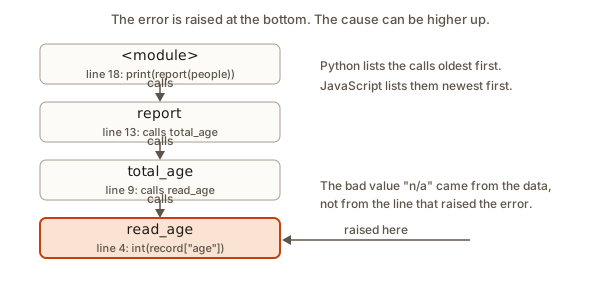 Four nested function calls ending at the line that raised the error
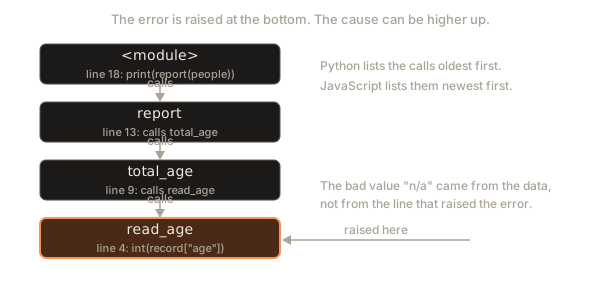
Walk it from the bottom, since in Python the last entry is closest to the failure.
- The error is raised in
read_age, line 4, whereint("n/a")fails. That is the place of the crash. - It was called from
total_age, line 9, in the loop, with the third record. - Which was called from
report, line 13, and that from the main program, line 18.
Where would you fix it? The line that raised the error, int(record["age"]), is perfectly reasonable code. The cause is that the data contained "n/a". You have a choice: clean the data, or make read_age handle bad values, perhaps by skipping the record. This is the second lesson of the stack trace: the line that fails is where the problem was noticed, and the cause can be in the data or the caller. A good habit is to ask two questions, not one. What went wrong here? And who sent it?
Do not forget that the chain contains your code only at the top. A long trace in JavaScript often has many lines that start with node:internal or mention libraries. Skip those and find the first line that names your own file. That is your entry point.
Silent mistakes and the third kind of problem
Some mistakes raise no error at all. The earlier zoo showed one. Here is the same JavaScript typo in a small program with a safety check added.
The output is:
undefined
2
no property named lenght
2
The first line shows the problem: reading a property that does not exist gives undefined, not an error. The checkedGet function turns that silence into a loud error with throw, by checking whether the name is in the object (the in operator does that). You will not write this in everyday code, but it shows the idea that you can ask the computer to be strict.
A second set of silent surprises comes from the way JavaScript mixes types. Predict the output of these lines before you run them.
The output is:
53
2
string
false
[ 1, 10, 9 ]
Explanation, one by one. The plus sign joins text, so "5" + 3 becomes the text 53. The minus sign has no meaning for text, so JavaScript converts "5" to a number and gets 2. The type of the first result is string. Computers store decimal fractions in binary and cannot store 0.1 exactly, so 0.1 + 0.2 is 0.30000000000000004, not 0.3, and the comparison is false. And sort with no argument sorts items as text, in dictionary order, so 10 comes before 9 because "1" comes before "9". None of these raised an error. Each gave an answer that looks plausible and is not what a beginner expects.
The lesson is to test your output. When you finish a program, run it with a case where you know the answer: average([80, 90, 100]) should be 90. If it is not, you have a logic error, and the next section shows how to chase it.
A debugging walkthrough
A logic error gives no message, so you create your own evidence. The most useful tool is the humble print statement. Here is a function that should compute the average of a list. It has a bug.
The output is:
i = 1 total = 90
i = 2 total = 190
63.333333333333336
Follow the method in five steps.
- State the facts. Expected 90. Got 63.333333333333336.
- Look at the evidence. The prints show that
iis 1 and then 2. The total after the loop is 190. The three scores add up to 270. - Find the first place the evidence is wrong. The first total printed is 90, but the first score is 80. So 80 was never added. The loop starts at 1.
- Fix it. In Python the first item is at position 0, so the loop must start at 0. Change
range(1, len(scores))torange(len(scores)). - Check again. The total is 270, and 270 divided by 3 is 90. Then try other inputs: one score, and an empty list.
Never trust a fix you did not test. Notice also that the evidence came from a print, and that the program gave no hint of a problem. Printing values at suspicious points is the first debugging tool in every language. The debugging lesson in the editor module covers a stronger tool, the step debugger.
Worked example: three problems in one small program
Real fixing is rarely one error. It is usually a queue of them, each hiding behind the one before. Here is a program that should print a numbered list of names in capital letters: #1. ASHA, #2. RAVI, #3. MEENA. The first draft has three mistakes of the three different kinds.
const names = ["Asha", "Ravi", "Meena"];
for (let i = 0; i <= names.length; i++) {
  console.log("#" + i + 1 + ". " + names[i].toUpperCase();
}
Run 1. Nothing prints, only this:
SyntaxError: missing ) after argument listNo output at all, so this is a reading-phase error and the code never began. The message says a ) is missing. Look at the line the error points to, the console.log line, and count brackets: console.log( opens one, toUpperCase( opens a second and ) closes it, and nothing closes the first. Add the final ) before the semicolon.
Run 2. Now the code is valid, so the running phase starts and output appears:
#01. ASHA
#11. RAVI
#21. MEENA
and then the program stops with:
TypeError: Cannot read properties of undefined (reading 'toUpperCase')Two facts come out of this. Three lines printed before the crash, so the loop worked for a while. And the message says toUpperCase was read from undefined, so one name did not exist. Which one? The loop condition is i <= names.length. The list has three names at positions 0, 1 and 2, but <= lets i reach 3, and names[3] is undefined. Change <= to <.
Run 3. No error appears, and this is the output:
#01. ASHA
#11. RAVI
#21. MEENA
The program finishes, and it is wrong. This is a logic error. The expected first line is #1. ASHA, and we got #01. ASHA. The text "#" + i + 1 joins pieces from left to right: "#" plus 0 makes the text #0, and then plus 1 makes #01. The number 1 is added as text, not added to i. Brackets force the arithmetic first: "#" + (i + 1) + ". ".
Run 4. The program is now:
const names = ["Asha", "Ravi", "Meena"];
for (let i = 0; i < names.length; i++) {
  console.log("#" + (i + 1) + ". " + names[i].toUpperCase());
}#1. ASHA
#2. RAVI
#3. MEENALook at what the queue taught. The syntax error was reported first because it blocks everything. The runtime error was reported second, and it came with partial output, which was a clue about where the loop broke. The logic error was reported by nobody: only a person who compared the output with the expected first line could notice. Fix them in that order, one at a time, and rerun after each change.
Reading errors somewhere else
The same routine works outside your editor. Errors appear in many places.
- The terminal: as in this lesson, with a file name and line.
- The browser console: JavaScript on a web page shows errors in a red line in the Console tab of the developer tools (usually opened with F12). They start with
Uncaughtand name the file and line of the page. - Test output: a failing test prints the expected value and the actual one side by side. That is a logic error made visible.
- Logs from a server: the same stack trace, written to a file.
The skill transfers. The words differ and the shape does not: kind, message, place, chain.
A routine for any error
- Read the last line and the first lines of the message, depending on the language: Python puts the error last, JavaScript first.
- Note the file name and line number. Ignore the lines of internal library code.
- Open that line, and the line above it, and look at the exact spot.
- Say the error in your own words, out loud if you can.
- Search the key part of the message in a search engine, without your own file names or variable names. Put the language in the search:
python IndexError list index out of range. - Make one change and run again. Check whether the message changed, because a new message means progress.
Using the error classifier
The next program takes error lines, splits each into a kind and a message, and prints a plain meaning. It is a toy, but writing a classifier yourself makes the structure of messages stick: a name, a colon, and a description. Type these three lines in the Input box.
KeyError: b
IndexError: list index out of range
OSError: disk fullThe output is:
kind:    KeyError
message: b
meaning: You asked a dictionary for a key it does not have.

kind:    IndexError
message: list index out of range
meaning: You asked a list for a position past its end.

kind:    OSError
message: disk full
meaning: Unknown kind. Search the message text.
The third case is the honest one. There are hundreds of error kinds, and no table covers them all. When the kind is new, the message still tells you the rest, and a search finds the explanation.
How to search for an error well
Searching is part of reading. A few rules give much better results.
- Search the message, not your code.
TypeError: Cannot read properties of undefined (reading 'name')has thousands of existing answers. Your own variable names have none. - Remove the parts that belong to you: file paths, your variable names, line numbers. Replace a specific name by a plain word, or drop it:
Cannot read properties of undefined (readingfinds the same pages as the full text. - Add the language or tool:
python,node,git. - Prefer official documentation and well-known sources. The language's own documentation explains each built-in error. For JavaScript the MDN site is reliable, and the Python documentation has a list of built-in exceptions.
- Check the date and version. An answer from ten years ago may describe an old version of the language. Messages also change: Python 3.10 and later give friendlier syntax messages than older answers show.
- Read the answer, not just the code. Understand why it works before you paste anything. The next lesson covers this habit.
Common mistakes
- Not reading it. The most common error of all. Read the whole message before you ask for help. Most beginners' questions are answered by the second line.
- Fixing the line number blindly. The real cause may be earlier. A syntax error is often the line above. A runtime error may come from data passed in from the caller.
- Changing five things at once. You will never know which change helped. One change, one run.
- Searching with your whole pasted code. Search the error message text only.
- Fixing the second error before the first. Fix errors from the top. A single mistake can cause a string of messages.
- Treating a warning as an error, or the opposite. A warning, such as the Python
SyntaxWarningyou may meet when you write[1, 2][1.0], is advice, and the program still runs. An error stops it. - Assuming the message is about what you meant. It is about what the computer saw. "Missing closing bracket" can really mean "the bracket you opened three lines up".
Variations and edge cases
- Errors with no line number. Some errors, such as a missing module or a permission problem, name a file or an action instead of a line. Read the message for the thing that is missing.
- An error inside a library. If the trace has many lines in files you did not write, look for the last line that mentions your own file. The problem is almost always how you called the library.
- A very long trace. The trace can be hundreds of lines when a function calls itself endlessly, ending in
RecursionErrorin Python orRangeError: Maximum call stack size exceededin JavaScript. The first lines and the last lines are enough: the same few lines repeat. - Two errors in a row. If you fix one and a new one appears, that is progress. The program is getting further.
- The error disappears when you add a print. This happens with timing problems you meet later. Note it and ask for help.
- No file name at all. In an interactive shell, errors say
<stdin>or<module>. Treat it as the file you are working in.
How this appears in interviews and real work
Interviewers like to hand you a program that crashes and ask you to explain the message. They are not testing memory of every error name. They want to see the routine: you read the kind, read the message aloud in plain words, find the line, form a guess, and change one thing. Saying "the trace points at line 4, but I think the cause is the data in the caller" shows more skill than fixing it quickly by luck.
In real work, a large share of a developer's day is reading traces from tests, servers and tools. A good trace read can turn a vague report like "the app crashed" into a one-line fix.
Practice
- Make the three errors from this lesson on purpose in your own files, and note each message.
Solution
For example: delete a closing bracket (SyntaxError), call a function with a missing argument (TypeError), and use a variable name you never created (NameError in Python, ReferenceError in JavaScript). For each, write the kind, the message and the line number. Compare with the tables above.
- Break a working program by deleting one quote, and find the line the message points to.
Solution
Python says SyntaxError: unterminated string literal (detected at line 1) and Node says SyntaxError: Invalid or unexpected token. The line is where the string starts. For a missing closing bracket the line may be the one after the mistake, so check the line above if the reported one looks fine.
- Write one plain-language sentence for the message
Cannot read properties of undefined.
Solution
"I asked for a property of something that does not exist (it is undefined), so I should find out why the value is missing before this line." The sentence should say what was missing and suggest where to look next, which is the code that should have supplied the value.
- Run the Python error zoo and, for each of the nine lines, write which kind of error it is and one way a real program would trigger it.
Solution
Example answers. TypeError from adding text and a number: building a message with "age: " + age where age is a number. KeyError: a typo in a dictionary key. IndexError: using len(items) as the last index. ValueError: converting user input that is not a number. ZeroDivisionError: averaging an empty list. NameError: misspelling a variable. AttributeError for push: using a JavaScript method on a Python string. AttributeError for None.upper: a function that forgot to return a value. TypeError for len("a", "b"): calling a function with the wrong number of arguments.
- This Python code crashes. Without running it, say the error kind and which line is blamed. Then run it and check.
scores = [70, 80, 90]
for i in range(4):
    print(scores[i])
Solution
The loop prints 70, 80 and 90, then asks for scores[3]. The error is IndexError: list index out of range and the blamed line is line 3, the print. The cause is the 4 in range(4) on line 2: the list has three items, so the valid positions are 0, 1 and 2. Use range(len(scores)).
- Here is a JavaScript program that prints
NaNfor the average of an empty list. Explain why there is no error, and change the function so that it prints a clear message for an empty list.
function average(scores) {
  let total = 0;
  for (let i = 0; i < scores.length; i++) {
    total += scores[i];
  }
  return total / scores.length;
}
console.log(average([]));
Solution
With no scores, total is 0 and scores.length is 0, so the result is 0 divided by 0, which JavaScript reports as NaN ("not a number") instead of raising an error. Python would raise ZeroDivisionError here. A fix is to check first:
function average(scores) {
  if (scores.length === 0) {
    throw new Error("average of an empty list");
  }
  let total = 0;
  for (let i = 0; i < scores.length; i++) {
    total += scores[i];
  }
  return total / scores.length;
}
Now an empty list gives Error: average of an empty list and the average of [80, 90, 100] is still 90.
- Look at this stack trace and say which function contains the bug, where the bad value probably came from, and which line you would open first.
Traceback (most recent call last):
  File "shop.py", line 20, in <module>
    print(receipt(cart))
  File "shop.py", line 14, in receipt
    return format_total(total(cart))
  File "shop.py", line 9, in total
    return sum(item["price"] for item in cart)
KeyError: 'price'
Solution
The error is raised in total, line 9, because some item in the cart has no key "price". That is the line where the problem is noticed. The cause is probably in the data: an item was added to cart without a price, or with the key spelled differently, such as "cost". Open line 9 to see what is being read, then look at the code that builds cart (reached from line 20). Print the items to find the one without price.
- Use the error classifier program. Add support for
AttributeErrorandRecursionError, with a one-sentence meaning each. Run it on a line for each.
Solution
Add two entries to the KNOWN dictionary:
    "AttributeError": "The thing has no such property or method. Check its type and spelling.",
    "RecursionError": "A function called itself too many times. Check its stopping condition.",
Then type AttributeError: 'str' object has no attribute 'push' and RecursionError: maximum recursion depth exceeded in the Input box. Each now prints your sentence as the meaning, instead of the fallback line.
- Write a program that reads a traceback's last line, splits at the first colon, and prints the kind in capital letters and the message length in characters.
Solution
line = input()
kind, _, message = line.partition(":")
message = message.strip()
print(kind.upper())
print(len(message))
For IndexError: list index out of range it prints INDEXERROR and 23. The partition method splits at the first colon only, which matters because some messages contain more colons. strip removes the space after the colon.
- Write a small program with a bug of your own (an off-by-one in a loop is a good one), give it to a friend or to the course tutor, and ask them to find it using only the output and one print statement. Then write down what the printed value told you.
Solution
There is no fixed answer. A good write-up has the expected output, the actual output, the print line that was added and what its value showed. For example: expected 90, got 63.33; printed i inside the loop; saw only 1 and 2; so the first item was skipped. If the print did not help, say where you would move it. The point is to practise showing evidence and not guessing.
What you now know
- There are three kinds of problems: syntax errors before the run, runtime errors during it, and logic errors that give no message.
- Read an error in order: the kind, the message, the place, then the call chain.
- Python prints the error last, and JavaScript prints it first. In both, find the error line and then walk the chain.
- The line that fails is where the problem was noticed. The cause can be the data or the caller.
- A syntax error is at the reported line or the line before. Fix the first error first.
- A silent mistake, such as a misspelled property, needs a test with a known answer. A print statement gives you evidence.
- Search the message without your own names, add the language and prefer official documentation.