Why this matters
Nine months is enough time to become job-ready, but only if the hours are spent in the right way. Most beginners who quit do not lack talent. They read and watch a great deal and type very little. Then the first blank file arrives, nothing comes out of their fingers, and they decide that programming is not for them.
This lesson is about the learning itself. It comes before the details of any language because it changes how every later lesson works. By the end you will know what to do with a lesson after reading it, how to tell whether you really know something, how long to stay stuck, and how to spread your effort across the weeks so that old topics do not fade.
Starting from the first principle: what learning is
Learning is a change in your brain that lasts. You read that console.log prints text, and a few days later you can still use it without looking it up. Something was stored, and it can be found again when you need it.
Two facts about that storage drive everything in this lesson.
- Memory is built by use. The brain keeps what it uses and drops what it does not. A fact you met once and never needed again is treated as unimportant, and it fades.
- Retrieving a memory strengthens it more than receiving it. Pulling an idea out of your head, with effort, makes it easier to pull out next time. Looking at the same idea again makes it feel familiar, but does little for your ability to produce it.
Programming is the skill of producing: you start with an empty file and a goal, and you have to create code. So the practice that matches the skill is producing code, again and again, with the lesson closed.
The analogy: learning to cook
Imagine you want to learn to cook. You could watch a hundred cooking videos. You would learn the names of dishes, the order of steps and what a good result looks like. Then you stand in a kitchen with raw vegetables and a hot pan, and you discover that you cannot tell when the oil is hot enough, you cut too slowly, and the onions burn while you look for the salt.
Watching gave you recognition: you know it when you see it. Cooking gave you recall and production: you can do it from nothing. A restaurant hires for production.
Programming works exactly this way. A job interview, a work task and a project all begin from nothing. This is why the course keeps telling you to type, change, break and rebuild.
Three levels of knowing
It helps to name three levels, because beginners often confuse them.
| Level | What it feels like | Example with a for loop |
|---|---|---|
| Recognition | "I have seen this and it looks right" | You read a loop and nod |
| Recall | "I can remember how it goes if I try" | You write a loop with the lesson closed |
| Production | "I can build something new with it" | You choose a loop to solve a problem nobody told you to solve |
Reading a lesson gives you recognition. Doing exercises gives you recall. Building projects gives you production. All three are needed, and each one rests on the one before. The danger is that recognition feels exactly like knowing. After reading a good explanation you feel confident, and the feeling is real, but it is the feeling of recognition. Psychologists call this the illusion of competence: the smooth feeling of reading something clear is mistaken for the ability to produce it.
The test is simple. Close the lesson and try to do the thing. If you can, you know it. If you cannot, you were recognising it, and the gap you just discovered is the most useful information you have had all day.
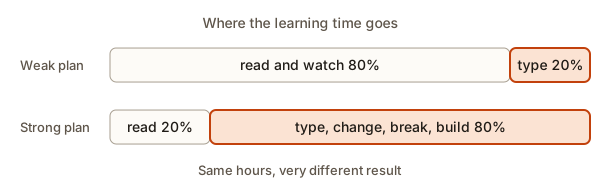 Two study plans compared by share of reading and typing time
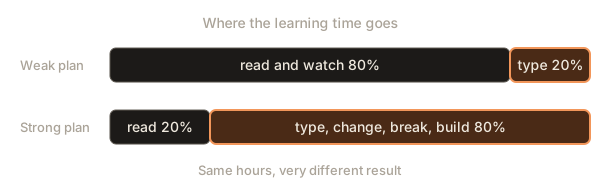
The diagram shows two plans for the same number of hours. The weak plan spends most of its time reading and watching. The strong plan flips that: a short reading step, then most of the time typing, changing, breaking and building. The numbers are a guide, not a law, but the direction is firm. Reading a lesson is about 20 percent of the work.
Type everything yourself
When you copy and paste an example, your eyes see it but your brain does little. When you type it, you have to look at each bracket and each word, and you notice things that reading skipped: that a line ends with a semicolon, that a string sits between quotes, that one word is capitalised.
Typing also gives you the first small errors. A typo is not a failure of the lesson, it is the lesson. Fixing your own typo teaches you what an error message looks like and what the cure feels like.
Here is the full cycle for one example. You will use this cycle for every example in the course. Try it now with the program below, which is complete and runnable. Press Run, then change it.
The output is:
Name: Anisha
City: Pune
Goal: become a developer
Now go through the cycle.
- Predict. Before you run anything, say what you expect to see. Here you already know, because the three lines are simple.
- Run. Press Run and compare the output with your prediction. If they differ, your mental model of the code is wrong somewhere, and that is the useful moment.
- Investigate. Ask why. Which line produced which output line? What would happen if you reordered the lines?
- Modify. Change the program in small ways: use your own name, add a fourth line, remove a line.
- Make. Write a new, slightly different program from memory: a business card with your phone number and email.
The cycle takes five minutes for a three-line example and you use the same idea six times. A learner who only reads the example uses it once.
What happens inside the computer
When you press Run, the text you typed is sent to a program called an interpreter. For JavaScript here it is Node.js, and for Python it is the Python interpreter. The interpreter reads your code from top to bottom, one statement at a time. The first line asks it to print a piece of text, so it sends the text Name: Anisha to the output area, then moves to the next line. Nothing is hidden: if you can read the lines in order, you can predict the output. This is why predicting is a real skill and not a guess. You are playing the part of the interpreter in your head.
What happens inside your head
While you predict, you are retrieving what you know about console.log. When the output matches, that memory is reinforced. When it does not match, your brain flags the surprise, and surprise is a strong signal that tells memory to pay attention. This is why running code and seeing it differ from your guess teaches more than seeing it match.
Worked example 1: break it on purpose
Beginners fear errors, so the best way to remove the fear is to cause them deliberately in a safe place. Take the program above and delete the closing quote on one line, so it reads this way:
console.log("Name: Anisha);Run it. Node prints something like this (the file path before the line will be different on your machine):
m2.js:1
console.log("Name: Anisha);
            ^^^^^^^^^^^^^^^

SyntaxError: Invalid or unexpected token
Read it in order. The kind is SyntaxError, which means the grammar of the language was broken. The line is 1. The carets show where the interpreter got confused: it saw an opening quote and never found the matching closing one. You now know what a missing quote looks like. The next time you see Invalid or unexpected token, the first thing you will check is quotes.
Now try a different break: remove the quotes entirely.
console.log(Name: Anisha);SyntaxError: missing ) after argument listA different mistake, a different message. The interpreter hoped for a closing bracket after Name and found a colon. Notice that the message does not say "you forgot the quotes". Messages describe what the interpreter saw, not what you meant. Learning to translate between those two is a skill, and the next lesson spends its whole length on it.
One more: use a name that does not exist.
console.log(Goal);ReferenceError: Goal is not definedThree small breaks, three different messages, and you have used the same one-line program in five minutes. A learner who never broke it would meet these messages for the first time in the middle of a real project, at the worst moment.
Worked example 2: predict first
The habit of predicting is the single most valuable one in this module, so practise it on a slightly bigger program. Read this code and write down what it prints before you run it.
Trace it line by line the way the interpreter would.
let count = 3;creates a named box calledcountand puts3in it.count = count + 2;reads the box (3), adds 2, and puts the result (5) back in the same box.console.log(count);prints the value in the box:5.console.log(count * 2);multiplies 5 by 2 and prints10. The box still holds 5, because nothing stored the result.console.log("count is " + count);joins the text and the number:count is 5.
Run it. The output matches:
5
10
count is 5
If you predicted 5, 10, count is 5 you were right, and you now have evidence that your mental model of variables works. If you predicted that the second line would print 10 and also change the box to 10, that is a very common mistake, and finding it by prediction costs nothing. A prediction that fails is not a loss. It is a free lesson.
Why it feels hard
Learning programming has a normal shape. It helps to know it in advance so that it does not scare you.
- You read an idea and it seems simple.
- You try it alone and it does not work.
- You feel stuck and wonder whether you are not smart enough.
- After an hour, or after a night's sleep, it suddenly makes sense.
Step 3 is not a sign of failure. It is the learning happening. Researchers use the term desirable difficulty for effort that feels uncomfortable but builds lasting memory. When something is easy you are using what you already know and storing little new. When something is a little hard you are building new connections.
There are two ways to get this wrong.
- Too easy. You only read and copy. It feels pleasant, and nothing is stored.
- Too hard. You are lost for hours with no idea where to look. This is not desirable. It is just frustrating, and it ends in giving up.
The target is the middle: hard enough that you have to think, easy enough that progress is possible. The rest of this lesson, and the next two, give you tools to stay in the middle.
The dip that surprises everyone
Many learners progress quickly in the first two weeks, because the first ideas are simple, and then hit a stretch where everything seems harder. Variables were easy. Loops are confusing. Functions seem impossible. This is not you getting worse. The ideas do get harder, and they now depend on each other, so a weak spot in an early idea hurts the later one. When a new topic feels too hard, the cause is very often a gap two lessons back. Go back, retype the earlier example, and return. This costs twenty minutes and often fixes the problem.
How much stuck is right
You need a rule for how long to struggle. A good rule for beginners is the 15 to 30 minute rule.
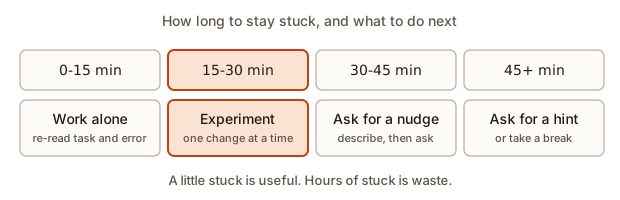 Four time zones of being stuck and the action for each
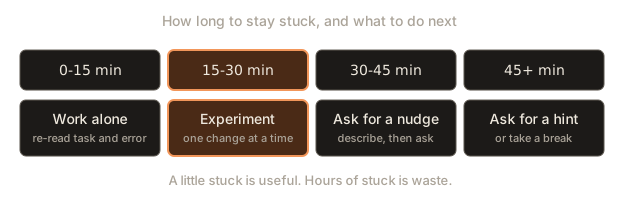
- 0 to 15 minutes: work alone. Re-read the task. Re-read the error. Check your spelling. Print values to see what is really happening.
- 15 to 30 minutes: run experiments. Change one thing at a time and see what happens. Shrink the problem: delete everything that is not needed to show the problem.
- 30 to 45 minutes: ask for a nudge. A nudge is a question that points you at where to look, not the answer. Write the question down first. The later lessons in this module show how.
- 45 minutes and more: ask for a hint, or take a break. A hint names the idea you are missing. A walk and a glass of water also count as tools: many problems dissolve after a rest.
The numbers are not exact, and on a tired day you may want to move them. What matters is that you decide on a limit before you start, because stuck feels like it has no end while you are inside it.
Worked example 3: shrinking a stuck problem
Suppose an exercise asks you to print each word of a list with its position, and your program crashes at the end. You have been stuck for twenty minutes. Instead of staring at the whole program, shrink it. Here is the program, ready to run:
The output is:
0 loop 4
1 index 5
2 string 6
Traceback (most recent call last):
  File "main.py", line 4, in <module>
    print(words[3])
          ~~~~~^^^
IndexError: list index out of range
The file name in the traceback may differ on your screen. The first three lines are exactly what you wanted. The crash comes from the last line, which asks for words[3]. The list has three items at positions 0, 1 and 2, so position 3 does not exist. Shrinking the program showed that the loop was never the problem: the extra line was. In a bigger program you might have blamed the loop for twenty minutes. This is the strongest general technique for being stuck: remove code until the problem is small enough to see.
Memory fades, and review fixes it
Everything you learn starts to fade as soon as you stop using it. This is normal and it is not a flaw to be ashamed of. The useful question is how to slow the fading down.
The answer is spaced review: come back to the idea after a gap, and try to recall it before looking. Each successful recall makes the memory last longer before it fades again. So a topic you review on day 1, day 3 and day 7 can last for weeks, while a topic you saw once is mostly gone in a week.
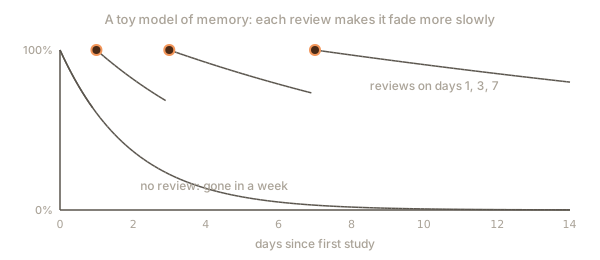
The program below is a toy model of this. It uses a made-up number for how fast memory fades and a made-up boost for each review, so do not read the percentages as measurements of your own brain. What it shows is the shape: without review the line falls to nothing, and with reviews it stays high. A review resets recall to full strength, and the curve afterwards is flatter.
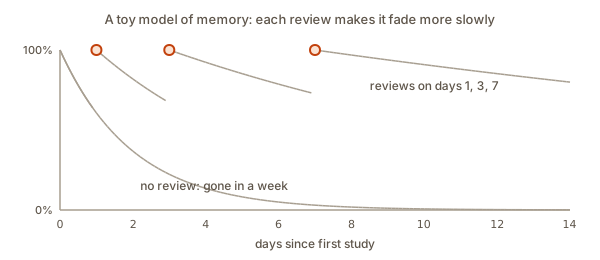 Memory fading with and without reviews on days one, three and seven
The output is:
day  no review  with reviews
  0       100%          100%
  1        61%          100%
  2        37%           82%
  3        22%          100%
  4        14%           92%
  5         8%           85%
  6         5%           79%
  7         3%          100%
  8         2%           97%
  9         1%           94%
 10         1%           91%
 11         0%           88%
 12         0%           85%
 13         0%           83%
 14         0%           80%
Walk through it. On days 1, 3 and 7 the model multiplies the stability by 2.5, which means the memory now fades more slowly. After the review on day 1, one day later the "with reviews" column shows 82 percent instead of the 37 percent that the no-review column shows two days after the first study. After day 7 it takes a whole week for the reviewed memory to drop to around 80 percent. Try changing the review days and the factor and look at the table. If you remove the review on day 3, how low does the curve go by day 7?
The real lesson is the schedule: 1 day, 3 days, 7 days, then 3 weeks. Here is a tiny program that gives you the dates for a topic you studied on a given day. Type a start date in the Input box, for example 2026-11-05.
With the input 2026-11-05 it prints:
review after  1 days: 2026-11-06
review after  3 days: 2026-11-08
review after  7 days: 2026-11-12
review after 21 days: 2026-11-26
Each review is short. Ten minutes is enough: close the notes and try to write the key example from memory, then compare. If you can, the review is done. If you cannot, look, fix and review again tomorrow.
Retrieval: the habit that beats re-reading
Re-reading is the study method most people use and the one with the weakest effect. It feels productive because the page looks familiar. Retrieval practice means testing yourself without looking: close the lesson, write the code from memory, or answer a question, and then check.
You can use retrieval in many small ways.
- After a lesson, close it and write the main example in a new file.
- Before a lesson, spend two minutes writing what you remember of the previous one.
- Use the module quiz at the end of each module without notes. Take it again a week later.
- Explain an idea aloud as if you were teaching a friend. Where you stumble is where you do not yet know it.
The score you get is not a grade. It is a map of what to review. The next program turns quiz results into a review list. Give it lines in the form topic,right,asked. Type this into the Input box:
git,7,10
terminal,9,10
paths,4,8The output is:
git        7/10  70.0%  ok
terminal   9/10  90.0%  ok
paths      4/8  50.0%  review soon
overall 71.4%
Look at what the overall score hides: 71.4 percent looks fine, but paths is at 50 percent. A single number averages away the weak spot, so always read the per-topic line. The program uses __import__("sys") to read standard input in one line; you will meet the normal import sys form in the Python module.
Tutorial hell
Tutorial hell is the trap of watching tutorial after tutorial, feeling you understand each one, and then being unable to start a program from a blank file. It is the cooking-video problem again. The signs are easy to spot: you have finished many courses and have built nothing, or you can follow along but freeze when nobody tells you the next step.
The cure is to build something on your own after each lesson, even if it is small and ugly. A useful way to check yourself is to measure how your time splits between passive work (reading and watching) and hands-on work (typing, building). The next program does that. Type minutes in the form kind minutes, where kind is read, watch, type or build:
read 40
watch 30
type 20
build 10The output is:
passive 70 min, hands-on 30 min
hands-on share: 30%
type more
The 60 percent line is a rule of thumb, not a rule from research. Treat it as a prompt to ask a question about your own week: did I type more than I read?
A ladder of small projects
After each module, build something that uses only what you know. A ladder that works for most beginners:
| After you learn | Build |
|---|---|
| Printing and variables | A business card printer with your own details |
| Conditions | A program that says whether a number is even, odd or negative |
| Loops | A multiplication table for any number |
| Functions | A tip calculator with a function for each step |
| Lists | A shopping list that adds, removes and counts items |
| Files | A program that reads a text file and counts the words |
Each project is small enough to finish in a single sitting. Finishing matters more than size. A finished tiny program teaches you how an idea is used from start to end. An unfinished big one teaches you how it feels to give up.
Make the idea stick with a small change
One more principle makes every example more valuable: change one thing at a time. Take a working program and alter a single detail. Predict what changes. Run it. If your prediction was right, make a bigger change. If it was wrong, work out why.
Here is an example. The program below prints a short profile through a function, so the same code can describe many people.
The output is:
Name: Anisha
City: Pune
Goal: become a developer
---
Name: Ravi
City: Jaipur
Goal: build a mobile app
You have not met functions yet, and that is fine. The idea in this example is only that you can use the same code twice with different values. Now modify it. Change the order of the three lines inside the function. Add a fourth parameter called age. Call describe with only two values and look at what appears for the missing one. (In JavaScript it prints undefined, which is the language's way of saying "nothing was given". The next lesson looks at why that matters.) Each of these takes a minute and teaches you something that reading cannot.
The nine-month budget
A plan is easier to keep when you can see it. If you study 10 hours a week for 39 weeks (about nine months), that is 390 hours. Weeks will be missed through illness, travel or exams, and the total drops. The next program makes the cost of missed weeks visible. It is runnable in Lesson 5, so here it is only for reading, with 10 hours a week as the input.
hours_per_week = float(input())
weeks = 39
for label, share in (("every week", 1.0), ("3 weeks missed", (weeks - 3) / weeks), ("8 weeks missed", (weeks - 8) / weeks)):
    print(f"{label:<15} {hours_per_week * weeks * share:>7.0f} hours")
The output is:
every week          390 hours
3 weeks missed      360 hours
8 weeks missed      310 hours
Even with eight weeks missed you would still have 310 hours, which is far more than most people spend on programming before applying for a job. So a bad month does not end the plan. The danger is not a missed week. The danger is quitting after it. Lesson 5 gives you the rule for coming back.
Common mistakes
Each of these has a symptom you can notice in yourself.
- Passive study. Symptom: you finish a lesson and could not write one line of it. Cure: type everything, then close the lesson and retype the main example.
- Comparing yourself with experts. Symptom: you see someone's polished project and feel behind. Cure: compare yourself with last month's you. Experts also forgot how hard the start was.
- Skipping the boring basics to get to the cool parts. Symptom: you can follow a game tutorial but cannot explain a loop. Cure: the cool parts are made of the basics. A gap in the basics shows up as a mystery bug later.
- Quitting after a bad day. Symptom: one hard exercise turns into "I cannot do this". Cure: note where you got stuck, sleep, and try again. Progress is uneven.
- Only studying when motivated. Motivation is unreliable. Habit is not. Lesson 5 builds the habit.
- Never reviewing. Symptom: you studied a topic in week 2 and it feels new in week 6. Cure: use the review dates.
- Copying a solution to make the exercise "done". Symptom: the exercise is ticked and you could not do it again. Cure: close the solution and retype from memory.
A debugging walkthrough: fixing a study plan
Debugging is not only for code. Here is a worked example of finding the bug in a study plan.
Ravi studies 10 hours a week. After six weeks he says: "I understand every lesson while I read, but I cannot do the exercises, and old topics feel new again." Treat that as a bug report: expected, I can do the exercises; actual, I cannot.
Step 1: gather facts. Ravi tracks one week of time. It comes out as 5 hours of reading and watching, 2 hours of typing the examples, 1 hour of exercises and 2 hours on the next lesson. Hands-on is about 30 percent.
Step 2: form a hypothesis. He is spending most of his time on recognition. That explains why every lesson feels clear while reading, and why exercises fail: the skill of producing was never practised.
Step 3: test. He changes one thing for a week. He reads each lesson once, then spends the same number of minutes on typing, changes and exercises, and he closes the lesson before starting the first exercise.
Step 4: observe. At the end of the week he can write the main examples from memory, though he still needs hints for the harder exercises.
Step 5: second bug. Old topics still feel new. The hypothesis: no review. He adds a 10-minute warm-up at the start of each session, using the review dates from the log (Lesson 5), and retakes the module quiz after a week.
That is the same loop you use for code: observe, guess the cause, change one thing, check. When a plan is not working, look for the cause as you would in a program, instead of deciding that the programmer is broken.
Variations and edge cases
- Only 30 minutes a day. Shorter sessions work. Skip the long reading step: read for ten minutes, spend twenty on typing and one exercise. Do not skip the review.
- You have studied before. Skim the lesson, then go straight to the practice exercises. If you cannot do them, you were recognising and not producing. Go back to the lesson.
- You are stuck on the maths in an exercise. Separate the two problems. Solve the maths on paper with a tiny example (for instance, three numbers), then write the code for that example, then generalise.
- You learn better by watching. Videos are fine as a first look. The rule is only that watching never replaces typing. Pause the video and type the code before the presenter does.
- You feel you are behind. The course has no clock. Finishing a module with understanding is better than finishing quickly with gaps.
- You study with a friend. Pair on exercises: one types, one explains. Switch every 15 minutes. Explaining is retrieval for both of you.
How this appears in interviews and real work
Working developers do not know everything. They look things up all day. What they have is a trained way to learn: read the error, make a small experiment, check the documentation, test a guess. Interviewers know this and often ask questions such as "tell me about something you learned recently" and "describe a bug you were stuck on". A learner who has used this module can answer with a real story: what I tried, how long I stayed stuck, what I changed, what I learned. The learning log you will build in Lesson 5 is the source of those stories.
A practical habit from real teams: when a new tool arrives, developers build a tiny throw-away project with it before using it in real work. That is exactly the "make" step of the cycle above.
Practice
Do these in order. Try each for at least 10 minutes before opening the solution.
- Take the last code example you read in this course and rewrite it from memory in a new file. Run it and note any difference from the original.
Solution
There is no single correct file. Success means the program runs and gives the same output as the lesson. List the differences you made, such as a missing quote or a wrong word. Each one is a topic to review tomorrow. If you could not start at all, that tells you the example was recognised and not recalled, and you should retype it from the lesson twice before trying again.
- Write down the three things you want to build by the end of the course, each in one sentence.
Solution
Any three concrete things work, for example: "a website for my family recipes", "a program that tracks my expenses", "a bot that posts the weather". Check that each is a thing you could show somebody. "Learn Java" is a topic, not a project. Keep the list; you will revisit it at the end of the foundations phase.
- Pick a time of day for study and put it in your calendar for the next seven days.
Solution
Choose a slot you can keep even on a tired day, such as straight after dinner or before breakfast, and tie it to something that already happens ("after tea"). A fixed slot beats a good intention. The solution is the calendar entry itself.
- Predict the output of this program before you run it, then run it.
let n = 4;
n = n * 2;
n = n - 3;
console.log(n);
console.log(n + 1);
Solution
n starts at 4, becomes 8, then becomes 5. The first print is 5. The second line adds 1 only for printing and does not store it, so it prints 6. Output:
5
6- Break the program in exercise 4 on purpose in three different ways. For each one, write down the kind of error, the message and the line number.
Solution
Three possible breaks and what Node prints:
- Remove the closing bracket,
console.log(n;, and you getSyntaxError: missing ) after argument list. - Rename the variable on one line,
console.log(m);, and you getReferenceError: m is not defined. - Write
let n = 4;twice and you getSyntaxError: Identifier 'n' has already been declared.
Your breaks may differ. What matters is that you named the kind (syntax or reference), read the message and matched it to the line shown.
- Run the review-date program with your own start date. Put the four dates in your calendar with the title of the topic you studied today.
Solution
Type your date as YYYY-MM-DD in the Input box. The program prints four dates. The solution is that the calendar now holds four short reminders, each about ten minutes long. At each one, close the notes and write the key example from memory first.
- Use the hands-on share program with a real log of your last study session (minutes of reading, watching, typing, building). What is the share? Write one sentence on what you will change.
Solution
Example: you read 30, typed 15 and built 0. The input is read 30, type 15, build 0 and the share is 33 percent, so the program prints type more. A fair plan: next session read 15 minutes, type 20, build 10 and close the lesson before the build step. The answer depends on your numbers, but the change must be specific and measurable.
- Modify the forgetting model so that the review multiplier is 1.5 instead of 2.5. What is the percentage on day 14? Explain in two sentences why it changed.
Solution
Change stability *= 2.5 to stability *= 1.5 and run it. The stability after three reviews is 2.0 × 1.5 × 1.5 × 1.5 = 6.75 instead of 31.25, and day 14 is seven days after the last review, so the value is exp(-7 / 6.75), about 35 percent. A smaller boost per review means the memory still fades faster, so you would need to review more often. This is a made-up model, so the point is the direction of the change, not the exact number.
- Write a program that reads
kind minuteslines like the hands-on share program but also prints the minutes spent on each kind separately, one line per kind, in the orderread,watch,type,build.
Solution
import sys

totals = {"read": 0, "watch": 0, "type": 0, "build": 0}
for line in sys.stdin:
    parts = line.split()
    if len(parts) != 2:
        continue
    kind, minutes = parts
    totals[kind] += int(minutes)

for kind in ("read", "watch", "type", "build"):
    print(f"{kind:<6} {totals[kind]} min")
With the input read 40, watch 30, type 20, build 10 it prints four lines: read 40 min, watch 30 min, type 20 min, build 10 min. A dictionary keeps one running total per kind. A kind that is not in the dictionary raises a KeyError, which is a reasonable response to bad input for now.
- Write a Python program that reads a start date and prints the review dates for days 1, 3, 7 and 21, but skips any date that falls on a Sunday. Say what happens when a date is skipped and whether that is a good idea.
Solution
from datetime import date, timedelta

start = date.fromisoformat(input().strip())
for gap in (1, 3, 7, 21):
    day = start + timedelta(days=gap)
    if day.weekday() == 6:
        print(f"review after {gap:>2} days: {day} (Sunday, skipped)")
    else:
        print(f"review after {gap:>2} days: {day}")
weekday() returns 0 for Monday and 6 for Sunday. Starting on 2026-11-05 the first review lands on Friday, the second on Sunday 2026-11-08, so that one is marked as skipped. Skipping a review is usually a poor idea: a better rule is to move it to the next day, because spaced review works through the gap, and a day more or less barely matters. The point of the exercise is to see how rules turn into code, and then to judge the rule.
What you now know
- Learning is memory built by use, and retrieving is stronger than re-reading.
- Reading gives recognition. Typing gives recall. Building gives production. You need all three.
- The cycle for every example is predict, run, investigate, modify, make.
- A little useful struggle is good. A rule of 15 to 30 minutes alone, then ask for a nudge, keeps you in the useful zone.
- Spaced review on day 1, 3, 7 and 21 slows forgetting, and quizzes tell you where to review.
- Tutorial hell is cured by building small things after every lesson.
- When a study plan fails, debug it like code: observe, guess the cause, change one thing, check.