Why this matters
Each lesson page has a tutor box where you can ask questions about what you are reading. Because the tutor sits next to the lesson, it knows which lesson you are on, and you do not need to explain the whole background every time. That saves time and gives sharper answers.
Saving time is not the main benefit. The tutor can be the difference between a learner who gets unstuck in ten minutes and one who gives up after two hours. It can also be the difference between a learner who learns and one who finishes exercises without learning anything. Both results come from the same box. What decides which one you get is how you use it, and this lesson teaches that.
By the end you will know what to ask and what not to ask, how to climb a ladder of help from a nudge to a walkthrough, how to run a full session from stuck to understood, and how to turn every reply into your own words and your own notes.
What the tutor is, and what it can see
The tutor is an AI assistant, so everything in the previous lesson applies: it can be wrong, it sounds equally sure either way, and you check what matters. It differs from a general chat assistant in one way that helps you. It is placed on the lesson page, so it knows which lesson you are reading, and questions like "what does this line mean?" or "explain the second example again" have something to refer to.
It helps to be careful about what it cannot see. Do not assume that it can see your editor, your files or the output on your screen. If it needs your code or your error, paste it as text, just as you would for any assistant. A question that depends on something you did not show forces the tutor to guess, and a guess is the weakest kind of help. The same is true of what you tried: if you do not say that you already checked the spelling, you may be told to check the spelling.
Think of the tutor as a teaching assistant who has read the lesson and who sits next to you, but who cannot see your screen. You would not say "why doesn't it work?" to that person. You would turn the laptop around, or read the error aloud. The paste is the laptop turned around.
What happens when you press Enter
It helps to picture what the tutor receives, because that explains why some questions work and others do not. When you send a question, the tutor gets a bundle of text: the instructions it was set up with, the lesson you are on, the earlier messages of your conversation and your new question. It reads all of that and writes a reply. It does not remember you from last week, and it does not keep your learning log unless you paste it. Every conversation starts from the page and your words.
Three things follow.
- The lesson is shared ground. When you say "the second example" or "the table in the middle", the tutor can find it. That is why a short question can work. Still, name the thing exactly: the heading, the example number or the line you mean.
- Your words are the only window into your head. If you write "I do not get it", the tutor must guess which part. If you write "I get that a function runs code, but I do not get why it needs a name", the tutor can answer exactly that. Naming the gap is half of closing it.
- Earlier messages count. A long conversation carries everything said before, including a wrong turn. If you steered the tutor into a muddle on message three, message twelve is still shaped by it. A fresh conversation with a clean summary is often better than a fifth try in a tangled one.
This is also why the three-step habit works. Try, describe and decide are all steps that make your question carry more information.
What the tutor is good for
| Use it for | Example question |
|---|---|
| Explaining a term | "What is a working directory? Give me an everyday example." |
| Restating an idea | "Explain DNS again, using a different analogy." |
| Checking your understanding | "Here is my summary of HTTP. What did I get wrong?" |
| Hints on a practice task | "Give me a hint for exercise 2, not the answer." |
| Reading an error | "I get this error: (paste). What does it mean?" |
| Extra practice | "Give me three more exercises like this one." |
| Comparing | "What is the difference between a list and a tuple? Show a tiny example of each." |
| Reviewing your code | "Here is my solution. It works. What would a more experienced developer change, and why?" |
| Quizzing | "Quiz me on this lesson, one question at a time, and wait for my answer." |
Notice that every question in the table asks for explanation, a check or a nudge. None asks the tutor to do your work.
What not to use it for
- Getting the full solution of a practice task. That skips the part that teaches you. If you want to see a solution, try for 15 minutes, ask for a hint, and look at the written solution in the lesson only after your own attempt.
- Questions with no context. "Why is it not working?" gets a generic reply. The more exact your question, the better the answer.
- Final truth on important facts. Verify as you learned in the previous lesson, especially for version numbers, commands that change files and anything surprising.
- Replacing the lesson. If you have not read the lesson, the tutor cannot make up for it. The lesson text is built to teach, in order, with tested examples.
- Secrets and private data. The privacy rule from the last lesson holds here too.
The ladder of help
Help comes in levels. Each level gives more than the one before, and each takes away a bit more of the thinking you need to do. A good habit is to start at the lowest level and move up one step only if you are still stuck.
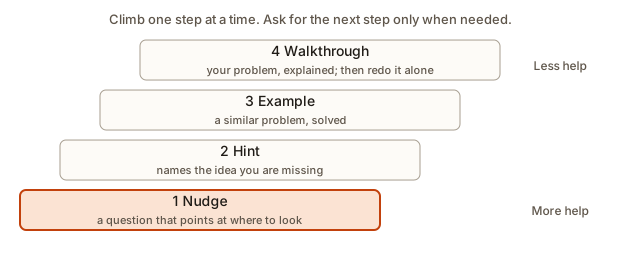 A ladder of four help levels from a nudge to a full walkthrough
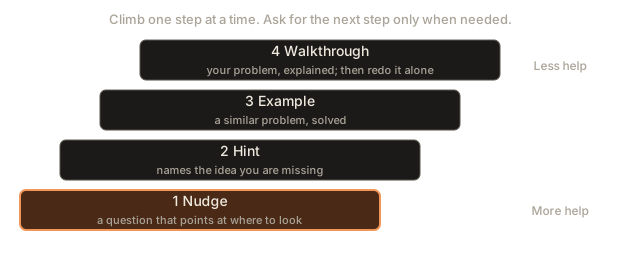
- A nudge. A question that points to where to look. "Which line produces the wrong number?"
- A hint. A statement of the idea you are missing, with no code. "A string and a single letter are not the same thing: compare each letter with each vowel."
- A similar example. A solved problem that is not yours. You study the pattern and apply it.
- A walkthrough. Your own problem, explained step by step. After reading it, close it and redo the exercise alone.
You can ask for the level directly: "Give me only a nudge." "Give me a hint but no code." "Show me a different example that uses the same idea, and then I will try mine."
A worked example through all four levels
The exercise is: write a function count_vowels(word) that returns how many vowels (a, e, i, o, u) a word has. You wrote this and it prints 0 for "banana", which should be 3.
def count_vowels(word):
    count = 0
    for letter in word:
        if letter == "aeiou":
            count += 1
    return count

print(count_vowels("banana"))0Level 1, a nudge. You ask: "My function returns 0 for banana. Give me a nudge only." The tutor might reply: "Look at the if line. What two things are being compared on each pass?" You look. On the left is one letter. On the right is the whole text "aeiou". A single letter can never equal a five-letter text. You may already see it. If so, stop here and fix it yourself.
Level 2, a hint. Suppose you did not see it. You ask for a hint. The tutor says: "You need to test whether the letter is one of the vowels, not whether it equals the whole group. Python has a word for 'is inside'." You think: in. You try if letter in "aeiou":.
Level 3, a similar example. If the in word did not come to you, you ask for an example. The tutor shows a different problem: counting how many digits a text contains, with if ch in "0123456789":. You read it, see the pattern, and apply it to the vowels.
Level 4, a walkthrough. If you were still lost, the tutor would trace your function with "banana" step by step: first letter b, is b equal to aeiou? No. Then a: equal to aeiou? No, again, because one letter is not five. That is why the count never moves.
Here is the corrected function, with a few words as tests. Run it.
The output is:
'banana' 3
'rhythm' 0
'Education' 5
'' 0
The .lower() call makes the capital E and A in "Education" count, and the tests include a word with no vowels and an empty word, the edge cases from the last lesson. You now have a function that works, and you reached it with the least help that did the job. Notice that most learners would never need level 3 or 4 for this one. Levels exist so that you choose, not so that you use them all.
A helper that suggests the level
The program below turns the 15-to-30 minute rule into a decision. It reads the minutes you have been stuck and the number of different things you have tried, then recommends a level. The rule is a rough guide that you can bend, but writing it down makes the ladder concrete. Run it three times with different inputs, typing two lines each time, for example 10 and 1, then 25 and 4, then 50 and 6.
The three runs print:
stuck 10 min, 1 attempts
Keep trying alone. Re-read the task and the error.
stuck 25 min, 4 attempts
Ask for a nudge: a question that points at where to look.
stuck 50 min, 6 attempts
Ask for a worked example of a similar problem, then redo yours.
Two things are worth noticing. The program asks about attempts as well as time: 25 minutes of staring at one line is not the same as 25 minutes with four experiments, and the program treats them differently (try 20 and 2 and read the answer). And the thresholds are yours to change. Learners who find the tutor too helpful can move them up. If you are too tired to think, a lower threshold is kinder to yourself.
A good session, from start to finish
Here is a model conversation for a learner stuck on a loop exercise. It uses the average function from earlier lessons.
First, say where you are and what you tried:
I am on the debugging lesson. My average function prints
63.333333333333336 instead of 90. I printed i and saw 1 and 2.
What should I look at next?
A good tutor reply nudges you without solving it. For example, it may ask: "Which index holds the first score, 80? Does your loop ever visit it?"
You answer in your own words:
The first score is at position 0, but my loop starts at 1.Then you make the fix yourself and run the code. Here is the buggy version, with the prints that the learner added:
function average(scores) {
  let total = 0;
  for (let i = 1; i < scores.length; i++) {
    console.log("i =", i, "score =", scores[i]);
    total += scores[i];
  }
  return total / scores.length;
}

console.log(average([80, 90, 100]));i = 1 score = 90
i = 2 score = 100
63.333333333333336The prints show the problem: the first score is never visited. The learner changes let i = 1 to let i = 0, removes the print and tests it:
90
70
NaN
The first two results are right. The third is the edge case from the error-reading lesson: an empty list gives 0 divided by 0, which JavaScript reports as NaN instead of raising an error. The learner now asks a follow-up:
Did I understand that correctly? Can you give me a similar bug to find?The tutor can respond with a new, small buggy program (a loop that stops one early, for example) for the learner to debug. In that session, the tutor gave you questions, and you did the thinking. That is the pattern to aim for.
Measuring who did the thinking
You can measure the difference between a good session and a poor one with a surprisingly simple count: how many words did you write, and how many did the tutor write? A session where you write most of the words is one where you are doing the thinking. The program below reads a transcript where each line starts with T: for the tutor or L: for the learner, and reports the learner's share of words.
Here are two transcripts. The first one is the good session above, shortened:
L: My average function prints 63.33 instead of 90. I printed i and saw 1 and 2.
T: Which index holds the first score, 80? Does your loop ever visit it?
L: The first score is at position 0 but my loop starts at 1.
T: Right. What would you change?
L: Start at 0. Then the total is 270 and 270 / 3 is 90.
Type it in the Input box and run this program:
tutor words:   18
learner words: 43
learner share: 70%
The second transcript is the poor session:
L: My average function is wrong. Fix it.
T: The loop starts at index 1, so it skips the first score. Change the loop to start at 0. Here is the full corrected function, which sums every score and divides by the count. Then you can test it with three numbers and with a list of one number. Run it and compare with 90.
L: oktutor words: 55
learner words: 8
learner share: 13%The share is not a scientific measure of learning, and a short reply from you is not always bad. But as a mirror it is honest. In the first session the learner found the cause. In the second the learner typed "ok" and received everything. If your share is regularly below 30 percent, you are using the tutor as an answer machine.
Worked session 1: a concept that will not click
Not every session is about a bug. A very common one is a word that you have read five times and still cannot picture. Take the word variable. Here is how a good session might go, and what the learner does at each step.
The learner starts with the gap, not with "explain variables":
In the lesson it says a variable is a "named box". I can say that
sentence, but I cannot picture what is in the computer when I write
let count = 3. What actually happens?
The tutor explains that the computer sets aside a small place in memory, labels it count, and stores the number 3 there. The learner restates it: "So the name is a label stuck on a place in memory, and the value sits in the place." That is a good restatement. The learner then tests it with a question the tutor did not ask:
If I write count = count + 2, does the label move, or does the value
in the place change?
The tutor says the value in the place changes, and the label stays. The learner checks this in code, as in Lesson 1: print count before and after, and see 3 and then 5. The learner then asks for a trap:
Can you give me a short program where I would probably predict the
wrong output about variables? Do not tell me the answer yet.
Notice what the learner did. A vague term became a picture. The picture was restated. The restatement was tested with code. And the tutor was asked to find a place where the learner's understanding might break, which is the best use of a teacher there is. The whole session took about fifteen minutes and produced one idea that will stick.
Compare it with the weak version, which is "explain variables", followed by reading a long reply and typing "ok". The reply may be the same words. The learning is not.
Worked session 2: reading an error together
The second common session is about an error you cannot read. Use the cart program, a Python program that adds up prices. The learner wrote it and it crashes:
prices = {"apple": 40, "mango": 90}
cart = ["apple", "mango", "banana"]
total = 0
for name in cart:
    total += prices[name]
print(total)Traceback (most recent call last):
File "cart.py", line 5, in <module>
total += prices[name]
~~~~~~^^^^^^
KeyError: 'banana'A weak question is "my code crashes, why?" and a strong one follows the five parts:
I am learning Python. I want the total price of everything in cart.
I expected 130 plus something for the banana. I got
KeyError: 'banana' on line 5 (total += prices[name]).
I tried printing name and it stopped when name was "banana".
Please give me a nudge, not the fix.
The tutor can now reply with a question: "What does prices[name] do when name is a key the dictionary does not have? Does the dictionary have a price for banana?" The learner reads the dictionary and sees that there is no banana in it. That is the cause: the data has an item with no price, the same pattern as the data problem in the error-reading lesson.
The learner now has a choice about the fix, and a good follow-up question is: "What are two ways to handle an item with no price?" The tutor can list options, and the learner picks one. Here is one possible fix, which reports the missing item and carries on. Run it.
prices = {"apple": 40, "mango": 90}
cart = ["apple", "mango", "banana"]
total = 0
for name in cart:
    if name in prices:
        total += prices[name]
    else:
        print("no price for", name)
print(total)
The output is:
no price for banana
130
The program no longer crashes. Whether this is the right behaviour is a different question, and a good one for the tutor: "Is it better to skip the item or to stop the program? What would a shop do?" The answer depends on what the program is for. The tutor can explain the trade-off. You make the decision, because you know what you want to build.
Worked session 3: when the tutor is wrong
The tutor is an AI assistant, so sometimes it will say something false. Here is how to catch it without drama.
Suppose you ask: "What does range(1, 5) give me?" and the reply says: "It gives the numbers 1, 2, 3, 4 and 5." Something feels off, because you remember that range(5) stops before 5. Do not argue from memory. Test it:
print(list(range(1, 5)))
print(list(range(5)))
print(len(range(1, 5)))
for n in range(1, 5):
    print(n, end=" ")
print()
print(sum(range(1, 5)))
The output is:
[1, 2, 3, 4]
[0, 1, 2, 3, 4]
4
1 2 3 4
10
The range starts at 1 and stops before 5, so the 5 is not included. The length is 4 and the sum is 10, not 15. Now tell the tutor, with the evidence: "I ran it and list(range(1, 5)) gives [1, 2, 3, 4]. Your reply said 5 is included. Can you explain the rule?" A good tutor corrects itself and states the rule: the start is included, the end is not. You have learned the rule twice, once from your own test and once from the explanation, and you have also learned that a confident reply deserves a test.
This is also a good moment to recall why such rules exist. A range that stops before the end makes range(len(items)) visit exactly the valid positions of a list, which is the point of counting from zero. Keep that connection in your log.
Why hints beat answers
There is a reason that this lesson keeps asking for the smaller help. Researchers on learning use the term generation effect for the finding that you remember something better when you produce it yourself, even if you first got it wrong, than when you are only shown it. A hint leaves a gap for you to fill, and filling it is the production. A full answer fills the gap for you.
There is a second reason, which is about confidence. When the tutor gives you a nudge and you find the cause, you learn something about yourself: you can find causes. That belief is the most useful thing a beginner can build, because bugs never stop. A learner who has only ever received answers does not have that evidence.
None of this means you should suffer. If you have genuinely used all the lower levels and you are tired, a walkthrough is a sensible choice. The rule is only to climb, and not to jump to the top by habit.
A debugging walkthrough: a full session on the clock
Here is a complete session with times, to show how the pieces fit together. The learner is working on the vowel-counting exercise, with the broken if letter == "aeiou" line.
- 0 to 12 minutes, alone. The learner runs the program, sees
0, re-reads the task and checks the spelling. Nothing changes. The program has no error message, so this is a logic problem, as in the error-reading lesson. - 12 to 20 minutes, experiments. The learner adds
print(letter)inside the loop and seesb,a,n,a,n,a. The loop works. So the problem is in theif. The learner is still stuck, but the problem is now one line long. - 20 minutes, ask. The learner writes the five-part question, including the print output, and asks for a nudge.
- 22 minutes, nudge. The tutor asks what two values the
ifcompares. The learner types the answer in the box: "a letter and the text aeiou". Seeing the sentence written out, the cause is clear. - 24 minutes, fix. The learner changes the line to
if letter in "aeiou":, runs it and gets 3. - 26 minutes, test. The learner adds the words
"rhythm"and"", and uppercase"Education". The uppercase word gives the wrong answer at first, so the learner adds.lower(). - 30 minutes, close the loop. The learner restates the cause in two sentences, asks the tutor to check the restatement, and writes three lines in the log: the bug, the cause and the lesson, "compare one letter with a group using
in".
The total time is 30 minutes. Of those, 20 were spent alone, and the tutor's part was a single question. The bug is understood, and the learner has also found and fixed a second bug (the uppercase vowels) without any help, because testing edge cases had become a habit.
Before and after every question
Before you press Enter
The three-step habit:
- Try: did I try for at least 15 minutes?
- Describe: did I write the goal, what I expected, what happened and what I tried?
- Decide: do I want a hint, an explanation or a check?
The program below scores a draft question against the five parts using keyword matching. Keywords are a crude test, and real questions can contain the information in other words, so treat the result as a checklist. Run it first with a one-line question, and then with a two-line one:
it does not work, helpI want average() to return 90. The function is below.
I expected 90 but it printed 63.33. I tried printing i.The first question gives:
goal      MISSING
code      MISSING
expected  MISSING
actual    MISSING
tried     MISSING
0 of 5 parts
The second gives:
goal      yes
code      yes
expected  yes
actual    yes
tried     yes
5 of 5 parts
The checker would be fooled by a question that contains the words and no real content, which is why it is a checklist for you and not a judge. Writing a checker is also a good lesson in what a "good question" is made of.
After the reply
- Restate it in your own words. Without looking, write two sentences of what the reply said.
- Test it by running code or by predicting then running.
- Note it in your learning log (next lesson).
The restate step is the one most learners skip, and it matters most. Restating is retrieval, the technique from Lesson 1: it moves the idea from the tutor's words into yours. Here is a small program that checks a restatement against the key terms of the average-bug lesson. Type this text in the Input box: Index counting starts at zero, so my loop skipped the first score. The total was too small.
covered: index, zero, loop, start, total
missing: divide
5 of 6 key terms
The restatement covered five of six key terms. The missing term, divide, points at the other half of the idea: the total divided by the count gives the average, and a total that is too small gives an average that is too small. A more complete restatement would say that. A program cannot judge meaning, so the point of this tool is only to show you a gap to think about. If you want a real judge, ask the tutor: "Here is my restatement. What is missing or wrong?"
Session patterns for common situations
Different situations need different openings. Here are six that cover most cases.
You do not understand a term. Say which term, where it appeared and what you think it means.
In the Git lesson, it says a commit is a "snapshot". I think that
means a copy of all my files at one moment, but then why does Git
say it stores "changes"? Which is it?
You understand the lesson but cannot do the exercise. Say which exercise, what you tried and ask for a nudge.
Exercise 3 in this lesson. I tried a loop but it prints the list
twice. Here is my code: (paste). Please give me a nudge, no code.
You got an error. Use the five parts, with the message copied exactly.
You want to check that you understood. Write the summary first, then ask.
In my words: a function is a named block of code that I can run
many times with different inputs. What is missing or wrong?
You want more practice. Ask for exercises, and attempt them before asking for answers.
Give me three exercises like exercise 2, in increasing difficulty.
Do not show answers until I ask.
You finished and want to go deeper. Ask for one next step, not a lecture.
I understand loops now. What is one thing I should learn next that
builds directly on this, and why?
Each pattern includes what you already know and what you want. That is the whole secret.
Quizzing yourself with the tutor
The tutor can be a very good quiz partner, because it can ask questions about exactly the lesson you just read. A session that works:
- Ask: "Ask me three questions about this lesson, one at a time. Wait for my answer before the next. Do not give hints unless I ask."
- Answer each one in your own words, before you look back.
- After the third, ask: "Which of my answers were weakest, and what should I review?"
- Write the weak topics in your log and plan a review (Lesson 5).
Do the course's own module quiz as well. The tutor's questions are free-form, and the module quiz is fixed. Together they cover each other's blind spots. If the tutor says you are right and the quiz says you are wrong, believe the quiz and ask the tutor about the question.
When the tutor does not help
Sometimes a reply is not what you need. There are several reasons, and each has a remedy.
- The reply is too advanced. Say so: "That was too advanced. Explain it with a simpler example, and define any new word."
- The reply is too long. "Answer in three sentences."
- The reply seems wrong. Check it by running code or reading the documentation, and tell the tutor what you found: "I ran it and got an error. Here it is."
- The reply keeps missing your question. Rewrite the question from scratch with the five parts. A confused question gets a confused answer.
- The conversation has become a mess. Start a new one with a short, correct summary.
If it still does not help, you can also ask in the community or look at the official documentation. A tutor is one tool among several, and a person who has met your problem before may help faster. Explaining your problem to another learner also helps you, as the rubber duck effect did in the previous lesson.
Keeping what the tutor taught you
A reply that disappears into a chat window is a reply that you will ask for again. Keep the useful part. For each session that taught you something, write three lines in your learning log. The program below formats an entry. Type the three lines in the Input box.
what a relative path is
cd with spaces in a name
practice mv and cp--------------------
Learned: what a relative path is
Stuck on: cd with spaces in a name
Next: practice mv and cpThe log gets its own full treatment in Lesson 5. The point here is that "Learned" is in your words, "Stuck on" records the question you asked, and "Next" turns the session into a task. The log also becomes the source of your review dates.
Worked session 4: asking for a review of working code
When your code works, the learning is not over. The tutor is useful for the step that most learners skip: asking what could be better. Suppose your vowel counter works, and you wrote it like this:
def count_vowels(word):
    count = 0
    for letter in word.lower():
        if letter == "a" or letter == "e" or letter == "i" or letter == "o" or letter == "u":
            count = count + 1
    return count

print(count_vowels("Education"))5A good question is specific about what you want to hear:
This works. I want to learn style, not just correctness. What would
an experienced developer change, and why? Please explain each change
in a sentence and do not rewrite the whole thing.
A reply may suggest three changes. First, the long chain of or can be replaced by the in test you met earlier, which is shorter and easier to extend. Second, count = count + 1 can be written count += 1, which is the common form. Third, the list of vowels deserves a name, so that a reader sees what it is and so that you can change it in one place. A compact version that applies the ideas, and uses a tool you have not met yet, a sum over a generator, is below. Run it.
'Education' 5
'rhythm' 0
'' 0
'Sky' 0
Now the important part: you are not obliged to adopt it. The one-line sum version is shorter, but you may find the loop easier to read today, and in a job readability is often worth more than shortness. A good use of the tutor here is to ask about this trade-off: "When is the compact form better than the loop?" Whatever you choose, you should be able to explain it. The review taught you two small things (the in test and naming a constant) that you can use in every program from now on, and it cost five minutes.
Notice that the outputs are the same. When you accept a change from a review, run the old tests again. A change that keeps every output equal is called a refactor, and the tests are what prove it is safe.
Reading a reply with a critical eye
Not every reply deserves the same trust, and a quick routine helps you sort them. When a reply arrives, run through these questions before you act on it.
- Did it answer my question? Replies sometimes answer a nearby, easier question. If you asked why, and you got how, ask again.
- Does it match the lesson? The lesson is a tested source. If the reply disagrees with it, find out which is right by running code.
- Does it use things I do not know? A reply that relies on three features you have not met is an unusable answer for now. Ask for a version that uses only what you know.
- Are there specific claims I can check? Names of functions, version numbers, outputs. Check one or two. If they hold, trust the rest a little more. If one is invented, trust it a lot less.
- Does it say what it assumed? Good replies say "assuming a list of numbers". A reply that hides its assumptions fails quietly on your data.
- What would break it? Think of the empty case and the one-item case. Ask the tutor the same question.
Over time you will do this in seconds. It is the same skill that a code reviewer uses on a teammate's work, and an interviewer values it.
When it gets frustrating
Some sessions go badly. You have asked four times, the replies are close but not right, and you are annoyed. This is the most dangerous moment for a beginner, because it is when learners decide the subject is too hard, or when they give up and paste a full solution.
There is a practical way through. First, notice the feeling and name it: "I am frustrated and I am stuck for 40 minutes." A named feeling is easier to handle. Second, stop asking and take a short break, ten minutes away from the screen, with water and a walk. Many bugs are solved in the shower. Third, come back and write the problem once more from the beginning, in the five parts. In about half of the cases the act of writing shows you the cause. Fourth, if it still fails, switch the level: ask for a similar example, and then try yours again with the pattern in mind.
If you are frustrated every day, look at the plan, not at yourself. Check whether you are skipping the basics (the exercise may need an idea from two lessons earlier), whether you are studying too tired, or whether the problem is too big for one step. Break the task into three smaller ones and do them one at a time. Lesson 5 has more on this. The feeling is normal. The way through it is a short list of steps that you can follow even when you do not feel like it.
A routine for each lesson
You can use the tutor at three moments around a lesson, and each has a different job.
Before the lesson (two minutes). Look at the title and ask yourself what you expect to learn. If you want, ask the tutor: "What is the one idea I should be able to explain after this lesson?" This does not replace reading, it gives your brain a hook to hang things on.
During the lesson. Read and type. When a sentence blocks you, ask a narrow question about it: "What does 'argument' mean in this sentence?" Do not ask the tutor to summarise the whole lesson as a shortcut: the summary is not a substitute for the practice, and the examples are where the skill grows.
After the lesson. Close it. Write what you remember. Then ask the tutor to check your summary, or to quiz you on the lesson. Do the practice exercises with the hint rule. Add the log entry. Set the review dates from Lesson 1: 1 day, 3 days, 7 days.
Over a whole module, this routine means that the tutor appears about two or three times per lesson, and each time with a specific purpose. If you find yourself in the tutor box twenty times in an hour, something is wrong with the pattern: most likely you are asking before trying, or you are asking too broadly. Stop, write your question in the five parts and try again.
Common mistakes
- Asking "what is the answer?" Ask for a hint first, then the next level only if needed.
- Copying the reply into your file without reading it. Read each line. If you cannot explain it, ask.
- Skipping the lesson text and asking the tutor to teach everything. The lesson is the main source. It is organised, tested and complete. The tutor fills gaps.
- Not saying which lesson or exercise you mean. Even though the tutor knows the page, name the exercise number or the line you mean.
- Answering "ok" to everything. If you do not understand, say so. If you do, prove it with a restatement.
- Not pasting the error. The tutor cannot see your screen.
- Treating the first reply as final. Ask the follow-up: "Why does that work?" and "What happens if the list is empty?"
- Using the tutor when tired and stuck for hours. Rest first. A fresh brain often solves it alone.
- Never closing the loop. After a reply, run the code and restate the idea. Otherwise it will be forgotten.
Variations and edge cases
- You have a question that is not about the lesson. Say that it is a general question. The tutor can still help, but check the answer more carefully, because the lesson no longer anchors it.
- You disagree with the lesson. Ask the tutor to explain the lesson's claim and to give an example. If you believe the lesson is wrong, test it with code. Lessons can contain mistakes, and a tested correction is valuable.
- You are working offline or the tutor is down. Use the written solutions, the documentation and your own experiments. The earlier lessons give you everything to continue.
- You are tempted to ask the tutor during a quiz. Do not. A quiz is a measurement. A tutor-assisted score measures the tutor.
- A very long reply. Ask for a summary, then ask about one part.
- You get a different answer on the second try. This is normal. Treat disagreement as a signal to check the facts.
- The tutor asks you a question. Answer it. A question from the tutor is the nudge level doing its work.
How this appears in interviews and real work
Learning to ask for help well is a job skill. Senior developers answer questions every day, and they notice at once who has tried, who has narrowed the problem and who has pasted a screenshot with "it broke". The five parts are the same in a team chat or a pull request: what I want, what I did, what I expected, what I got, what I tried. A message built that way often gets an answer in minutes. One that lacks them gets questions back.
Interviewers also like the question "Describe how you get unstuck". An answer that follows the ladder of help is a strong one: I read the error, I shrink the problem, I print values, I look at the docs, I write down my question, I ask for a nudge before a solution, and I restate what I learn. You have just practised every one of these steps.
Practice
- Open any lesson and ask the tutor to explain one term in it using an everyday example. Restate the answer in your own words.
Solution
The solution is your own restatement. Check it: does it use your words and not the tutor's? Could a friend who has never heard the term understand it? Write the example in your log. If you could not restate it, ask a follow-up: "Explain it again with a different example."
- Pick a practice exercise, try it alone for 15 minutes, then ask for a hint, not the solution.
Solution
Compare your question with the five parts. A good one names the exercise, says what you tried and what happened, and asks for "a hint, no code". After the hint, close the tutor and try again for at least ten minutes before asking for more. Write down which level of help you needed.
- Ask the tutor to quiz you with three questions about this module and answer them without looking back.
Solution
A good session has questions asked one at a time, your answers written before you check, and feedback on each. Afterwards, note which question you got wrong and what the correct idea was. If all three were right, ask for three harder ones.
- Take the
count_vowelsexercise with the brokenif letter == "aeiou"line. Ask for a nudge only. Write down the nudge you got, and whether it was enough.
Solution
The ideal nudge is a question, such as "What two values are being compared on that line?". If the tutor gave you code instead, reply: "Please do not give code. Give a question I can think about." The nudge is enough if you can say what the mistake is in your own words: a single letter cannot equal a text of five letters, so use in.
- Use the help-level program with three inputs of your own choosing (minutes and attempts). For each one, say whether you agree with its advice. Change one threshold to suit you.
Solution
There is no single answer. For example, with 20 minutes and 2 attempts the program says to try more experiments, which is probably right: two attempts is not enough to know the problem. If you think it should suggest a nudge at 20 minutes, change minutes < 30 in the third branch to minutes < 20 or reorder the checks. The aim is to make the rule fit how you work.
- Write the question you would ask for this situation: your
forloop prints each name twice and you do not know why. Use all five parts, and ask for a nudge.
Solution
One good version: "I am learning JavaScript. Goal: print each name in a list once. Code: (paste the loop). Expected: Asha, Ravi, Meena, one per line. Actual: each name appears twice. Tried: I printed the index and it goes 0, 0, 1, 1, 2, 2. Please give me a nudge, not the fix." The detail about the index is the evidence that makes the nudge possible. A likely cause is two console.log calls in the loop, or an index that increases twice per pass.
- Run the share-of-words program on a real session you had (copy it into the
T:andL:format). What was your share? Write one change for next time.
Solution
Compute it, then look at the number. If it is below 30 percent, a useful change is "I will write my own guess before every follow-up question". If it is above 60 percent, you are doing the thinking, and the change could be "ask for a harder follow-up exercise". The number itself matters less than the action you set.
- Write a restatement of the average bug (off by one in the loop start) in three sentences. Run it through the key-terms program and fix any missing term.
Solution
Example: "The loop started at index 1, but lists start at index 0, so the first score was skipped. The total was 190 instead of 270. I divided by the count and got 63.3 instead of 90." Run it in the program: it covers index, loop, start, total and divide, and zero is missing, because the text says "index 0" with a digit. Adding the word "zero" ("lists start at index zero") covers all six terms. A key-term check is crude, and it shows how wording matters.
- Extend the question-scoring program so that it prints a final line telling you to improve the question when fewer than four parts are present, and to send it otherwise.
Solution
Add this after the final print:
if score < 4:
    print("Improve the question before sending it.")
else:
    print("Good to send.")
With the one-line question the output ends with 0 of 5 parts and Improve the question before sending it.. With the two-line question it ends with 5 of 5 parts and Good to send.. The threshold of four allows one part to be missing, such as the code in a pure concept question.
- Write a program that reads a learning-log style list of tutor sessions (one topic per line) and prints each topic with a number and the date for a review after seven days, given a start date on the first line.
Solution
import sys
from datetime import date, timedelta

lines = [line.strip() for line in sys.stdin if line.strip()]
start = date.fromisoformat(lines[0])
review = start + timedelta(days=7)
for number, topic in enumerate(lines[1:], start=1):
    print(f"{number}. {topic} - review on {review}")
With the input 2026-11-05, relative paths and git commit it prints 1. relative paths - review on 2026-11-12 and 2. git commit - review on 2026-11-12. The first line is the start date and the rest are topics, so lines[1:] skips the date.
What you now know
- The tutor knows which lesson you are on and cannot see your screen, so paste code and errors as text.
- Use it for explanations, hints, checks, extra practice and quizzes, and not for solutions to your practice tasks.
- Climb the ladder of help: a nudge, a hint, a similar example, a walkthrough. Start low.
- Before you ask: try, describe with the five parts, decide the kind of help. After the reply: restate, test and note.
- A good session is one where you write most of the words and find the cause yourself.
- Keep three lines in your learning log for each useful session, and use the log for spaced review.