Why this matters
Motivation comes and goes. A routine carries you through the weeks when you do not feel like it. Nine months is a long time, and what decides the result is not how brilliant any single week is, but how often you turn up.
This lesson turns the ideas of the module into a plan you can put in your calendar. It covers how much time to plan, what a week and a session look like, how to keep a learning log, how to schedule reviews, what to do when you miss days, and how to stay connected to other people. By the end you will have a written plan with real times and a log file with its first entry. Those two files do more for your future than any single lesson.
The first principle: small and regular beats big and rare
Two hours every day works better than fourteen hours on Sunday, even though the total is the same. There are three reasons, all of which you have met.
- Memory needs gaps. As Lesson 1 showed, a topic you meet on several different days sticks better than one you meet for many hours on one day. Spacing is built into a daily plan and absent from a weekend plan.
- Sleep builds memory. Your brain sorts what you did during the day while you sleep. A short session in the evening followed by a night's sleep is stored better than a long session that ends at 3 a.m.
- Attention is limited. After about an hour and a half of hard thinking, quality falls. The tenth hour of a marathon is mostly sitting.
The analogy is watering a plant. A little water every day keeps it alive, and a bucket once a month floods it and leaves it dry for weeks. Small, regular contact is also kinder to your life: a daily session of an hour fits between other duties more easily than a whole free Sunday that never arrives.
The second principle is that the plan you keep beats the plan you drop. A plan of 1 hour a day that you keep for nine months is 270 hours. A plan of 4 hours a day that you drop after a week is 28. Be honest about what a normal, slightly tired day allows, and plan for that.
How much time do you really have
Before you write a plan, find out what your week looks like. Spend one week noting where your hours go. Write down the fixed things: classes or work, travel, meals, sleep, family duties. What is left is the pool for study, and you will probably find it smaller than you hoped and bigger than you feared.
A practical way to choose a number:
- List the hours free in each day, after fixed things.
- Mark the ones where you have energy: for many people that is morning or early evening.
- Choose blocks of 45 to 90 minutes in those hours.
- Take two thirds of what you found. Life will take the rest.
The last step is important. Plans fail in the gap between a free hour and a usable hour. A friend calls, a task runs long, you are tired. If you plan to use everything you will fail every week, and failure is demotivating. Planning to use two thirds means that you succeed on most weeks, and a good week is a bonus.
What the hours add up to
The course is built for roughly nine months. Suppose you do 10 hours a week. The next program multiplies it out and shows what a few missed weeks cost. Type 10 in the Input box.
every week          390 hours
3 weeks missed      360 hours
8 weeks missed      310 hours
The point of the numbers is that missed weeks are survivable. You can lose a month and still finish with more than 300 hours. What you cannot survive is deciding that a missed month means the end.
A weekly rhythm
Here is a model plan of about 10 hours per week. Adjust it to your life.
| Day | Time | Activity |
|---|---|---|
| Mon | 1.5 h | New lesson, type every example |
| Tue | 1.5 h | Second lesson and practice tasks |
| Wed | 1.5 h | Practice and a small project |
| Thu | 1.5 h | New lesson, type every example |
| Fri | 1 h | Review and retry past exercises from memory |
| Sat | 2.5 h | Build something and take the module quiz |
| Sun | rest | Rest completely |
The table adds up to 9.5 hours, which is "about 10". The next program checks a plan like this one. It reads a day and a number of hours per line, draws a bar for each day, and totals the week. Type the seven lines below in the Input box.
Mon 1.5
Tue 1.5
Wed 1.5
Thu 1.5
Fri 1
Sat 2.5
Sun 0Mon 1.5 h ######
Tue 1.5 h ######
Wed 1.5 h ######
Thu 1.5 h ######
Fri 1.0 h ####
Sat 2.5 h ##########
Sun 0.0 h
week total: 9.5 h over 6 study days
average per study day: 1.58 h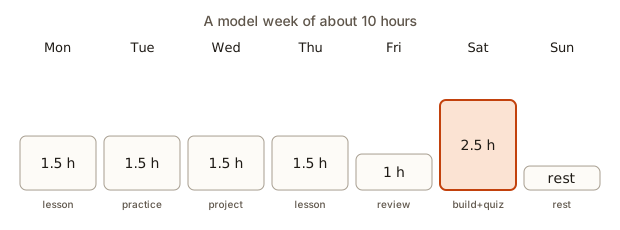 Bars for study hours on each day of a model week
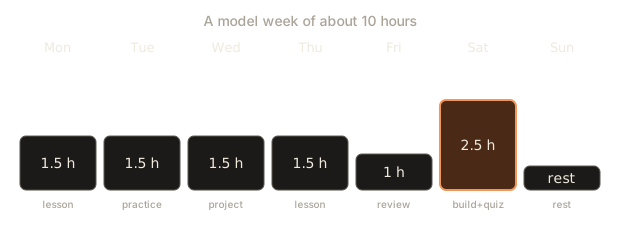
Look at the shape. Study happens on six days, so there are six chances to review, which is what spacing needs. The week has a rest day, and the plan puts the long, creative session (building something) on the day with the most free time. The shorter Friday is for review, which is light work at the end of a tired week.
Rest days are part of the plan. Tired brains learn badly, and one full day without screens each week repays itself in better sleep and fresher Mondays. If you cannot rest a whole day, take a half day.
Two more example weeks
Your week will not look like the model. Two more shapes show how the principles adapt.
5 hours a week, with a full-time job. Study for 45 minutes on five weekday evenings (3.75 hours) and add 75 minutes on Saturday morning. Because the amount is small, each session does one thing: Monday and Wednesday are for new lessons, Tuesday and Thursday for practice, Friday for review, Saturday for building. The course takes longer, perhaps 18 months at this pace, and that is fine. Regularity matters more than speed.
15 hours a week, as a student on a break. Study two sessions a day of 90 minutes with a long gap between them, morning and late afternoon, on five days (15 hours), and rest on the remaining two. The gap between the two sessions is useful: the afternoon session begins with a warm-up recalling the morning one, which is spacing at a scale of a few hours.
The shape of a session
Each study session can follow the same steps, so that you do not waste energy deciding what to do.
- Warm up (5 min): recall yesterday's idea without notes.
- Learn (30 to 40 min): read and type.
- Practice (30 to 40 min): do exercises with no help for the first 15 minutes.
- Wrap up (5 min): write your learning log.
The program below lays out a session for you. Give it the total minutes and a start time, and it prints the clock times of each block. Type 90 and 19:30, on two lines.
19:30-19:35 Warm up (5 min)
19:35-20:15 Learn (40 min)
20:15-20:55 Practice (40 min)
20:55-21:00 Wrap up (5 min)
How it works: the warm-up and the wrap-up are fixed at 5 minutes each, the remaining 80 minutes are split in half, and a running clock in minutes since midnight is turned into hours and minutes by integer division and remainder. Try 45 minutes and see how short a session can still keep the same shape: the learn and practice blocks become 17 and 18 minutes.
Why each step is there
- The warm-up is retrieval (Lesson 1). Starting a session by recalling the last one is the cheapest review you can do, and it tells you what has faded.
- Learn is where you read and type. Keep it short. If a lesson is longer than your block, stop at a natural break and finish it in the next session.
- Practice is where the skill forms. The first 15 minutes of each exercise are alone, by the rule from Lesson 3.
- The wrap-up turns the session into a record. Five minutes of writing saves an hour of confusion next week, because you can pick up where you stopped.
Blocks and breaks
Work in blocks of 25 to 45 minutes with a 5 to 10 minute break between them. In the break, stand up, drink water, look out of a window. Do not use the break to scroll a phone, which refills your head with other things. Phones stay in another room while you study, or at least face down and silent. Close other tabs. A study session with the phone beside you is a different session from one without it, and the difference is large.
Prepare the next session before you finish the current one: leave the editor open at the file you will continue with, or write a line in the log saying exactly where to start. Starting is the hardest part of any session, and a prepared start removes most of the resistance.
The learning log
A learning log is a plain text file or notebook where you write what you learned. After each session, add three lines:
2026-11-05
Learned: what a relative path is, and that .. means the parent folder
Stuck on: cd with a space in the folder name; fixed it with quotes
Next: practice mv and cp
The log has several jobs.
- It shows your progress on bad days. When you feel you have learned nothing, you can scroll up and read forty entries.
- It tells you what to review. Anything under "Stuck on" is a topic that needs another look.
- It gives you material for interviews. "Tell me about a time you were stuck" is easy to answer with a real entry.
- It makes the next session start quickly, through the "Next" line.
You can keep it in a folder inside your project, in a Git repository like the one from the Git module, and commit once a day. A history of daily commits is also a record that you showed up. A text file named log.md is enough: no special tool is needed, and a plain file will outlive any app.
Here is a small program that builds an entry from three answers. It is a toy, because typing in a text file is just as fast, but writing the helper is a good way to see that a log entry is data with a fixed shape. Type the three lines in the Input box.
what a relative path is
cd with spaces in a name
practice mv and cp--------------------
Learned: what a relative path is
Stuck on: cd with spaces in a name
Next: practice mv and cpTips for a log that you will keep:
- Write in your own words, not the lesson's.
- Be specific. "Learned loops" is useless a month later. "A for loop repeats once per item; the loop variable takes each item in turn" is useful.
- Record the stuck points honestly. They are the most valuable part.
- Keep it short. Three lines is better than a page that you stop writing.
- Date every entry. The dates drive the review schedule.
Review with spacing
Mark new topics in your log. Return to them after 1 day, 3 days and 7 days. Each time, try to answer from memory first, then check. The module quizzes are made for this: take a quiz once right after the module, and again a week later.
Turning the log into reminders by hand is tedious, so here is a program that does it. It reads today's date and then a list of topics, and prints the dates for each review, grouped by day. Type the three lines below in the Input box.
2026-11-05
relative paths
git commitFri 2026-11-06 -> relative paths, git commit
Sun 2026-11-08 -> relative paths, git commit
Thu 2026-11-12 -> relative paths, git commitTwo ideas in this program matter. A dictionary maps each date to the list of topics due that day, and setdefault creates the empty list the first time a date appears. And the program does not try to avoid Sundays or busy days, which a real plan might. If a review falls on a rest day, move it to the next day, because a day or two of delay costs very little.
A review is short. Ten minutes at the start of a session is typical: close the notes, write the key example from memory, then compare. If you can, the topic is secure for a while. If you cannot, look at the lesson, retype it and review again tomorrow. Do not read the lesson again from the top. Read only the part that you could not produce.
When you fall off
You will miss days. That is normal. The rule is never miss twice: if you skipped yesterday, do even a 15 minute session today. Do not try to make up the lost hours, just restart.
Why this rule works: one missed day is an accident and two is the start of a new habit. After a second missed day the effort needed to restart grows each day, and it is easy to drift into a month of nothing. The rule keeps every gap to a single day. A 15 minute session is enough, because its job is not to teach much. Its job is to keep the thread.
The next program checks a list of study dates and tells you where you broke the rule. Type these dates, one per line.
2026-11-02
2026-11-03
2026-11-05
2026-11-06
2026-11-10
2026-11-11study days: 6
longest run in a row: 2
missed 3 days in a row between 2026-11-06 and 2026-11-10Walk through the logic. zip(days, days[1:]) pairs each date with the next one. A gap of 1 means consecutive days. A gap of 2 means one day was skipped, which is allowed by the rule. A gap greater than 2 means two or more days in a row were skipped, and the program reports gap - 1 missed days. In the example, 3 November to 5 November skips one day (fine) and 6 November to 10 November skips three (a break of the rule).
When you find a break in your own dates, do not scold yourself. Look for the reason. Was there an exam, an illness, a trip, or was the plan too heavy? Change the plan if the reason will come back.
After a longer break
If you were away for two weeks or more, restart gently, not heroically.
- Do not start with new material. Spend the first two or three sessions on review: retype old examples and retake the last quiz.
- Shorten the sessions to 30 minutes for a few days, then build up.
- Lower the weekly target for two weeks, then restore it.
- Say so. Tell the friend who knows your goal. Saying "I restart today" makes it real.
You will find that the old material comes back faster than it came the first time. Memory that has faded is easier to rebuild than memory that never existed, and this is one more reason that a break is not a disaster.
Protecting the habit
A routine survives when it is easy to start and hard to skip.
- Attach it to something that already happens. "After dinner" or "when I get home" is better than "at 7:30". An anchor is a trigger that does not need a clock.
- Fix the place. The same desk, the same chair. The place becomes a signal.
- Make the first step tiny. "Open the editor and run yesterday's file" takes one minute, and once you have started, continuing is easy.
- Remove the obstacles. Install and test your tools before the session. Keep the course and your editor in one place.
- Plan for bad days. Decide in advance the minimum that counts as a study day: one exercise, or 15 minutes.
- Look after the body. Sleep, water and a short walk make a tired afternoon workable. A short walk before a session can restore focus faster than a coffee.
- Reward finishing, not feeling. After the session, do something you like. The reward belongs to the habit, not to the mood.
Choosing what to study when time is short
Some days you have less time than the plan assumes. Without a rule you will spend the short session deciding, and the decision will eat the time. Use a fixed order of priorities.
- Review first, for ten minutes. It is the cheapest way to protect what you already learned, and it needs no energy to start.
- One exercise next. Pick the exercise that you could not finish last time. A finished exercise gives a clear stop and a feeling of progress.
- New material last. New lessons need the most attention. If the time is gone, a new lesson half read and half forgotten is worth little, and you lose nothing by starting it tomorrow.
- Always write the log. Even one line. The log is what lets tomorrow's session continue where today's ended.
The same order works for a low-energy day, even when you have the time. Tired minds are bad at new ideas and fine at review.
A monthly check-in
A routine needs a small repair every now and then, and a monthly check-in makes the repair a habit and not a crisis. Once a month, choose a quiet half hour and answer five questions in your log.
- How many hours did I really study, against the plan? Count them from the log.
- Which days were skipped, and why? Look for a cause that repeats.
- What did I build this month? If the answer is nothing, plan one small project for next month.
- Which topics keep appearing under "Stuck on"? Those are your review list for the coming weeks.
- What one thing will I change? Pick exactly one: a time of day, a length, a place, a habit. One change is easy to test. Five changes at once tell you nothing, which is the lesson from debugging.
The check-in is also where you update the projection from the earlier program with your real hours, and decide whether to keep the finish date or move it. A finish date that moves a little is normal. A plan that is never looked at is how people drift for months without noticing.
Tracking progress
The log tells you what you did. A few milestones tell you how far you have come. A simple set for the course: a list of modules with a tick when you finish the lesson, the quiz and the assignment. You can also keep a list of projects that you built, with a one-line description and the date.
When you plan ahead, a rough projection helps you notice whether you are on track. The next program takes the number of modules left, the hours each module takes, your weekly hours and a start date. It prints the expected finish. Type these four lines: 30, 12, 10 and 2026-11-05.
360 hours of work
36 weeks at 10 hours a week
finish around 2027-07-15
The numbers here (30 modules of 12 hours) are an example, not a measurement of the course, so use your own. The program rounds up with math.ceil, because a part week is still a week. Try 5 hours a week and see the date move. A projection is a guide, not a promise: update it every month with your real hours, and do not treat a slipped date as a failure.
Stay connected
Learning alone is hard. Tell a friend your goal. Share a small project each week. Ask questions in the community, and answer others' questions when you can, because teaching is a strong way to learn: to explain an idea you have to retrieve and organise it, which is exactly the effect that Lesson 1 described.
A few ways to do this in practice:
- A study partner. Meet once a week for 30 minutes. Each of you shows one thing you built and explains one thing you were stuck on.
- A public log. Posting a short weekly note ("this week I learned loops and built a times table") creates a light commitment.
- Answering questions. When someone asks something you solved last week, answer it. You will remember the idea better, and you will notice how far you have come.
- Asking questions well. The five parts from Lesson 3 work on people too, and a good question is noticed and answered.
Be a little careful with comparison. Other people's highlights are not their whole story. Compare yourself with last month's you, not with a stranger's finished project.
A debugging walkthrough: a plan that fails
Debugging a routine works like debugging code. Here is a worked example.
Asha plans 6 hours a day, seven days a week, for the course. By the end of week two she has quit. Treat that as a bug report: expected, nine months of study; actual, stopped after two weeks.
Gather the facts. Her log shows that days 1 to 4 were 6 hours each, day 5 was 2 hours, and days 6 to 14 were zero. A pattern is visible: a strong start, a decline and a stop.
Form a hypothesis. The plan was larger than what a normal week allows, so it worked only while energy and novelty lasted. When she missed day 5's target, she felt behind, and a missed day turned into more missed days. That is the "never miss twice" rule broken, with no plan for how to restart.
Change one thing. She resets the plan to 1.5 hours on six days, with a rest day, a 15 minute minimum for bad days, and the never-miss-twice rule.
Observe. Over the next six weeks she misses two days, each time restarting the next day with 15 minutes. By week eight her total hours exceed what the original plan achieved, and she is still studying.
The lesson is the same as the one from Lesson 1: look for the cause in the plan, not in the person. Plans have bugs, and the fix is usually to make them smaller and more forgiving.
Common mistakes
- Planning 6 hours a day and quitting in week two.
- Studying only when motivated. Motivation follows action more often than it leads it. Start for five minutes and see.
- No rest. A seven-day week with no break ends in burnout, and the cost is weeks.
- Never reviewing. Old topics fade. Put the review dates in the calendar.
- Keeping no log, so every bad day feels like no progress.
- Making up missed hours. Doubling up the next day creates a bad day that causes the next miss. Restart at the normal level.
- Studying in a distracting place, with a phone and a television.
- Skipping the wrap-up. Without it the next session begins with confusion.
- Treating the plan as fixed. Review the plan every month: what worked, what did not, what to change.
Variations and edge cases
- Exams or a busy season. Drop to the minimum plan (15 minutes a day) and keep the thread. Then go back up.
- Night shift or irregular work. Anchor study to an event, such as "after my first meal", and not to a clock time.
- Shared space or noisy home. Use headphones, or study at a library. Make the first 10 minutes a ritual that tells your brain it is study time.
- You study in a different time zone from your friends. Pick a weekly meeting time in advance and keep it.
- You feel you are not progressing. Reread your log from a month ago. Run an old exercise. Progress is hard to see from the inside.
- You get bored. Add a small project on something you care about. Interest is a legitimate fuel.
- You finish a module early. Use the extra time for review and a project, not for rushing ahead.
How this appears in interviews and real work
Employers value people who are consistent. A history of regular, small contributions, such as daily commits in a Git repository, is evidence of a person who shows up. Your learning log and your commit history together are a record of nine months of steady work. When an interviewer asks "how do you keep your skills current?", you can describe a real system: a weekly plan, a log, spaced review and a community.
The same habits carry into work. Developers keep notes of what they learned and where they were stuck, plan their week, and review old code. The routine you build now is the one you will use on the job.
Practice
- Fill in your own weekly table with real times and put it in your calendar.
Solution
A good table has a day, a start time, a length and an activity for each study day, plus a marked rest day. Check that the total is about two thirds of the free hours you found, and that Friday or Sunday is light. The solution is the calendar entries themselves. Run the weekly-hours program on your plan and check the total.
- Start your learning log file today and write your first entry.
Solution
Create a text file such as log.md and write today's date and three lines: Learned:, Stuck on: and Next:. For example: Learned: how to ask a question with five parts, Stuck on: what counts as "tried", Next: write a question for exercise 2 of lesson 2. Three lines are enough.
- Set a reminder to retake the quiz of this module in one week.
Solution
Put a calendar entry seven days from today titled "Retake Learning with AI quiz, no notes". Add the date to your log. Run the review-date program with today's date to see the other review dates (1 and 3 days) and add those too.
- Use the session planner for a 60 minute session starting at 18:00. How long is each block? Does the shape still work?
Solution
The fixed blocks are 5 minutes each, leaving 50 minutes, which splits into 25 and 25. The output is 18:00-18:05 Warm up, 18:05-18:30 Learn, 18:30-18:55 Practice and 18:55-19:00 Wrap up. The shape works, though 25 minutes of practice is enough for about two exercises. If a lesson is longer than 25 minutes, finish it in the next session.
- Run the never-miss-twice checker with your own last two weeks of study dates (or made-up ones). Where did you break the rule, and what was the cause?
Solution
The program prints the number of study days, the longest run and any break in the rule. For your own data, write a sentence per break: "missed 3 days between the 6th and the 10th because of a trip". If the same cause appears twice, change the plan, for example by adding a 15 minute minimum for travel days.
- Change the review gaps in the schedule program to 2, 5 and 14 days. Run it for a date and compare the output with the 1, 3, 7 version. Which would you use, and why?
Solution
Change GAPS = [1, 3, 7] to GAPS = [2, 5, 14]. For 2026-11-05 the dates are 2026-11-07, 2026-11-10 and 2026-11-19. The longer gaps mean fewer reviews and each one is harder, since more has faded. The 1, 3, 7 pattern is a safe default for beginners because early reviews are cheap and catch the fastest fading. A reasonable answer picks one and says why, and notes that you can adjust it after you see how many topics you fail to recall.
- Use the projection program with your own hours per week. Write down the date and put a note in your calendar to recheck it in a month.
Solution
Enter the modules left, hours per module, your real weekly hours and today's date. For 30 modules of 12 hours at 6 hours a week the program prints 360 hours, 60 weeks and a date about 14 months ahead. If the date is too far for you, you can raise the weekly hours (only if the plan stays realistic), or accept the timeline. The point is to make a decision with the number in front of you.
- Modify the weekly-hours program so that it also prints the day with the most hours.
Solution
Keep the best day while looping:
import sys

best_day, best_hours = "", -1.0
for line in sys.stdin:
    parts = line.split()
    if len(parts) != 2:
        continue
    day, hours = parts[0], float(parts[1])
    if hours > best_hours:
        best_day, best_hours = day, hours
print(f"longest day: {best_day} with {best_hours:g} h")
For the model week the output is longest day: Sat with 2.5 h. The variable starts at -1.0 so that even a day with 0 hours can win when the whole week is empty. If two days tie, the first one in the input stays, because > is not true for an equal value.
- Write a plan for a week when you are ill or travelling: the minimum that still counts as a study day, and how you will restart the day after.
Solution
An example: "Minimum: 15 minutes, any one of: retype one example, answer one quiz question aloud, write the log entry. If I miss a day, the next day I do the minimum before anything else and I do not try to catch up." The test is whether the plan is small enough to do on your worst day. If it needs a desk and an hour, it is too big.
- Write a program that reads study dates (one per line) and prints the total number of study days in each calendar week (Monday to Sunday), in order. Use the dates from the checker as a test.
Solution
import sys
from datetime import date, timedelta

weeks = {}
for line in sys.stdin:
    if not line.strip():
        continue
    day = date.fromisoformat(line.strip())
    monday = day - timedelta(days=day.weekday())
    weeks[monday] = weeks.get(monday, 0) + 1

for monday in sorted(weeks):
    print(f"week of {monday}: {weeks[monday]} days")
For the dates 2026-11-02, 03, 05, 06, 10 and 11 it prints week of 2026-11-02: 4 days and week of 2026-11-09: 2 days. weekday() is 0 for Monday, so subtracting it gives the Monday of that week. A dictionary counts the days per Monday. This is the first piece of the module assignment.
What you now know
- Small, regular study beats large, rare study, because memory needs gaps and sleep.
- Plan about two thirds of your free hours, with a rest day, and keep a minimum for bad days.
- A session has a shape: warm up, learn, practice, wrap up.
- A learning log of three lines after each session shows progress, lists what to review and gives interview stories.
- Review on day 1, 3 and 7, and retake quizzes after a week.
- Never miss twice. After a break, restart gently with review and shorter sessions.
- Stay connected: a friend, a community, and teaching what you learn.
- Treat a failing routine as a bug in the plan and fix it with a smaller, more forgiving one.
Module summary
- Learn by typing, changing and building, not by watching.
- An error message gives the kind, the message and the place: read it first.
- Ask AI precise questions, try first, verify, and never paste what you do not understand.
- Use the tutor box for hints and explanations, then restate in your own words.
- A steady routine, a learning log and spaced review get you to the end.