Why this matters
A URL is the one piece of text that tells a browser everything it needs to start a conversation with a server: how to talk, whom to talk to, and what to ask for. Every link you click, every API call you write, every route in every web framework you will use is built around URLs. Bugs in them are common and silly (a missing slash, an unescaped &, http where https was meant), and after this lesson you will spot them in seconds.
The idea: a full postal address
When you want a parcel delivered, you write a full address: the country, the city, the street, the building number, the flat. Each part narrows the target and a postal worker reads them in a fixed order.
A URL (Uniform Resource Locator) is the same thing for a resource on the internet. A resource is anything you can ask for: a web page, an image, a video, a data record. The word locator is the point: the URL says where it is and how to get it.
Here is one URL with every part present:
https://shop.example.com:8443/products/shoes?color=red&size=42#reviews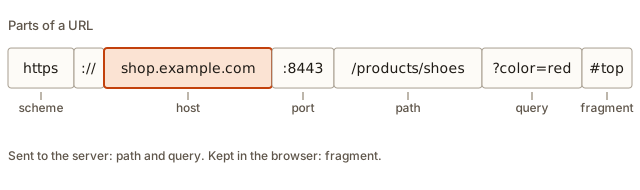 A URL split into scheme, host, port, path, query and fragment
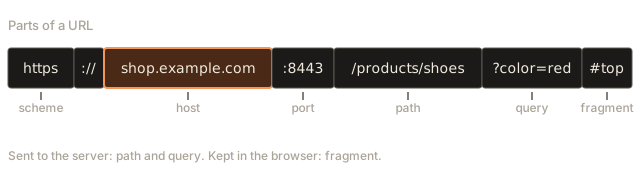
Break it into pieces, left to right:
| Part | In this URL | What it means |
|---|---|---|
| Scheme | https | The protocol: the rules for how to talk. |
| Host | shop.example.com | Which computer to talk to (a name that DNS resolves, or an IP address). |
| Port | 8443 | Which door on that computer. Optional. |
| Path | /products/shoes | Which resource on that server. |
| Query | color=red&size=42 | Extra details for the request, after a ?. |
| Fragment | reviews | A position inside the page, after a #. |
The separators carry the structure. :// ends the scheme. : before digits starts the port. The first / after the host starts the path. ? starts the query and # starts the fragment. Memorise those four symbols and you can read any URL.
Python has a parser built in. Run this and compare the output with the table:
Output:
scheme  : https
host    : shop.example.com
port    : 8443
path    : /products/shoes
query   : color=red&size=42
fragment: reviews
Now each part in detail.
Scheme
The scheme comes first and ends at the first colon. It tells the client which protocol to use.
httpandhttpsare the web. HTTP is the language browsers and servers speak (the next lesson), and HTTPS is the same language wrapped in encryption (lesson 5).filepoints at a file on your own computer, such asfile:///home/you/notes.txt. Note the three slashes:file://followed by an empty host and then the path.mailto:opens an email program:mailto:hello@example.com. It has no//because it has no host.ftpis an older file-transfer protocol.data:holds the content inside the URL itself, such as a tiny embedded image.javascript:runs code. Browsers still honour it in some places, and attackers abuse it, so never put user-supplied text into a link without checking the scheme first.
A scheme is case-insensitive, but everyone writes it in lowercase.
Host
The host says which server. It is either a domain name (shop.example.com), resolved by DNS into an address as you saw in the last lesson, or an IP address directly (93.184.216.34 or 127.0.0.1). An IPv6 address is written in square brackets, such as http://[::1]:3000/, because it contains colons that would confuse the port separator.
Host names are not case-sensitive: Example.COM and example.com are the same place. Browsers lower-case them for you.
Non-English names are allowed through a scheme called internationalised domain names. A name such as münchen.de is turned into an all-ASCII form (xn--mnchen-3ya.de) before DNS ever sees it. You will see that xn-- prefix when you inspect such URLs.
The userinfo trap
Old URL syntax allows https://username@host/. The part before the @ is a user name, and the real host comes after it. Attackers use this to build links like https://yourbank.com@evil.example/login, which a quick glance reads as your bank but actually goes to evil.example. The rule for reading a URL: find the first single / after the //; the host is the text between there and the last @ before it. Everything before the @ is decoration.
Port
The port is a number after the host, preceded by a colon: shop.example.com:8443. From the first lesson, it names the program on that computer. If you leave it out, the browser uses the default for the scheme:
| Scheme | Default port |
|---|---|
http | 80 |
https | 443 |
So https://example.com and https://example.com:443 are the same. And https://example.com:8443 is different: it targets port 8443, probably a different program or at least a different configuration. In local development you will constantly write http://localhost:3000, because your own server picked a free number above 1024.
Path
The path starts at the first / after the host. It names the resource within that server.
/products/shoes/42In the early web, the path was literally a folder and file name on the server's disk: /images/logo.png was the file logo.png inside the images folder. That is still true for static files. In modern apps, the path is often a route: a pattern that code on the server matches to decide what to do. /users/42 means "run the code for showing a user, with 42 as the user id". There need not be a file called 42 anywhere.
Details worth knowing:
- The path always begins with
/. If a URL has no path,/is assumed.https://example.comandhttps://example.com/are the same request. - Paths are case-sensitive on most servers.
/Aboutand/aboutcan be two different pages, and one of them may return "not found". - A trailing slash can matter.
/blogand/blog/may be treated as different by some servers (one might redirect to the other). .and..mean "this folder" and "up one folder", the same as in your terminal./a/b/../cis cleaned up to/a/c.- Pretty paths are good practice.
/blog/how-dns-workstells a reader what is behind it, while/index.php?id=4821does not. The readable last piece is called a slug.
Query string
The query starts after ? and holds a list of name=value pairs separated by &. It lets a request carry extra detail without changing the path: a search term, a page number, a filter.
/search?q=red+shoes&page=2&tag=sale&tag=newRules and facts:
- Each pair is
key=value. Pairs are joined with&. - A key can repeat (
tag=sale&tag=new). Servers treat that as a list. - Everything in a query is text, even
page=2. The program receiving it must convert"2"to the number 2. - Order is usually irrelevant but sometimes preserved.
Parse one and build one in Python:
Output:
raw   : q=red+shoes&page=2&tag=sale&tag=new
parsed: {'q': ['red shoes'], 'page': ['2'], 'tag': ['sale', 'new']}
q     : red shoes
tags  : ['sale', 'new']
built : q=blue+jacket&max=50&city=Z%C3%BCrich
Look at three things. parse_qs always returns lists, because any key might repeat, so params["q"][0] takes the first item. The + in red+shoes was turned back into a space. And urlencode turned the space into + and the letter ü into %C3%BC. That last transformation is the next topic.
A strong rule: never put secrets in a URL. A password or an access token in a query ends up in browser history, in server logs, in the "referrer" information sent to other sites, and in anything you paste into a chat. Secrets belong in request headers or bodies, which the next lesson covers.
Fragment
The fragment starts after #. It names a spot inside the page, such as a heading with a matching id. The browser scrolls there after loading.
The surprising fact about fragments: they are never sent to the server. The browser keeps them to itself. The server cannot tell whether you asked for /guide#chapter-2 or /guide#chapter-9. Single-page apps use that fact to track in-page state without reloading.
# What the browser sends is only part of the URL. The fragment never leaves your computer.
from urllib.parse import urlparse

url = "https://example.com/guide?lang=en#chapter-2"
p = urlparse(url)
target = p.path + ("?" + p.query if p.query else "")
print("request line target:", target)
print("Host header        :", p.netloc)
print("kept in the browser:", "#" + p.fragment)
Output:
request line target: /guide?lang=en
Host header        : example.com
kept in the browser: #chapter-2
The "request line" and the "Host header" are parts of an HTTP request. The next lesson explains them. For now, see that the host goes in one place, the path and query in another, and the fragment in none.
Percent-encoding: special characters
URLs may only contain a limited set of characters: letters, digits and a few symbols like -, ., _ and ~. Others have special jobs (/ ? # & = :). So what if your data contains a space, an ampersand or a letter like é? You must encode it: replace it with a percent sign followed by two hexadecimal digits that give its byte value. A space becomes %20.
For non-ASCII characters the browser first converts the character to bytes using the UTF-8 encoding, then percent-encodes each byte. That is why ü becomes two bytes, %C3%BC.
from urllib.parse import quote, unquote

for text in ["hello world", "a&b=c", "100% sure", "naïve café", "a/b"]:
    encoded = quote(text, safe="")
    print(f"{text!r:14} -> {encoded:22} -> {unquote(encoded)!r}")

print(quote("/docs/my file.txt"))
Output:
'hello world'  -> hello%20world          -> 'hello world'
'a&b=c'        -> a%26b%3Dc              -> 'a&b=c'
'100% sure'    -> 100%25%20sure          -> '100% sure'
'naïve café'   -> na%C3%AFve%20caf%C3%A9 -> 'naïve café'
'a/b'          -> a%2Fb                  -> 'a/b'
The final print shows /docs/my%20file.txt. With the default setting, quote keeps / as it is, because in a whole path the slash is a separator. With safe="" (the first loop) every special character is encoded, which is what you want for a single value that might contain a slash.
Notice 100% became 100%25. The percent sign itself must be encoded, since % starts every escape. That is why encoding must happen exactly once.
A related quirk: inside a query string, a space is sometimes written as + rather than %20 (an older convention for HTML forms). Both are understood in queries. In the path, only %20 is valid.
Doing it in JavaScript
JavaScript has a built-in URL class and a helper called URLSearchParams. This is the safe way to build URLs in code, because it encodes for you. Gluing strings by hand is where bugs breed.
Output:
q=salt+%26+pepper&page=2&tag=a%2Fb&tag=100%25
https://shop.example.com/search?q=salt+%26+pepper&page=2&tag=a%2Fb&tag=100%25
a%26b%3Dc%20d
%2520
₹100
set replaces a key and append adds another value for the same key. The ampersand inside "salt & pepper" became %26, so it cannot be mistaken for a separator. encodeURIComponent("%20") gives %2520, which is the percent sign encoded again, a mistake you will meet below as "double encoding". The last line decodes the bytes E2 82 B9, which UTF-8 reads as the rupee sign.
Taking a URL apart in JavaScript
The URL class also parses. It is available in browsers and in Node.js.
Output:
protocol: https:
host    : example.com:8080
hostname: example.com
port    : 8080
pathname: /a/b/c.html
search  : ?x=1&y=two
hash    : #top
origin  : https://example.com:8080
param x = 1
param y = two
default port is empty: ""
Watch the names. host includes the port, hostname does not. protocol includes the colon. search and hash keep their ? and #. And port is an empty string, not 443, when the URL uses the default port. Mixing up host and hostname is a classic bug.
Writing a parser by hand
Libraries do this for you, but writing a small parser once makes the grammar stick. The trick is to peel the pieces off from the end: fragment first, then the query, then the scheme, and what is left is host, port and path.
Output:
https://example.com
   scheme   'https'
   host     'example.com'
   port     443
   path     '/'
   query    ''
   fragment ''
http://localhost:3000/api/users?id=7
   scheme   'http'
   host     'localhost'
   port     3000
   path     '/api/users'
   query    'id=7'
   fragment ''
https://a.dev/x/y#top
   scheme   'https'
   host     'a.dev'
   port     443
   path     '/x/y'
   query    ''
   fragment 'top'
Trace the middle URL. There is no #, so the fragment stays empty. The ? splits off id=7. rest.split("://", 1) gives http and localhost:3000/api/users. The first / separates localhost:3000 from api/users, and the path gets its slash back. The : splits host and port, and int("3000") turns the text into a number. Note why the query is split off before the slash: a query can contain a / (for example ?next=/home), and splitting on / first would cut in the wrong place. The order of operations is the whole trick.
This parser skips many edge cases (user names, IPv6, missing scheme). That is the reason real code uses the library.
Absolute and relative URLs
A URL with a scheme and host is absolute: it stands on its own. Inside a web page you often see relative URLs, which leave things out and borrow them from the URL of the page that contains them. It is like saying "the room next door" instead of the full address.
Suppose the page is https://example.com/blog/2026/post.html. This table shows what different link texts mean:
Output:
other.html                 -> https://example.com/blog/2026/other.html
/about                     -> https://example.com/about
../2025/old.html           -> https://example.com/blog/2025/old.html
?page=2                    -> https://example.com/blog/2026/post.html?page=2
#comments                  -> https://example.com/blog/2026/post.html#comments
//cdn.example.org/lib.js   -> https://cdn.example.org/lib.js
https://other.com/x        -> https://other.com/x
Rules from the output:
- A plain name (
other.html) replaces the last segment of the current path, staying in the same folder. - A leading
/(/about) starts again from the site root. ../goes up one folder.- A leading
?or#keeps the path and changes only the query or fragment. - A leading
//keeps the scheme, replacing everything else (a "protocol-relative" URL, rare today). - A full URL ignores the base.
Relative links make a site portable: the same pages work on localhost and on the real domain. Root-relative (/about) is usually the least confusing choice, since it does not depend on how deep the current page is.
Origin
Browsers draw a security border around the triple of scheme, host and port. That triple is called an origin. https://app.example.com and https://api.example.com are different origins, and so are http versus https, and the same host on port 3000 versus 4000. By default one origin's code cannot read another's data. You will hit this wall as a "CORS error" the first time your front end calls your own API on a different port. For now remember the definition. An origin is scheme plus host plus port, with no path.
What happens inside the browser
When you press Enter on a typed address, the browser does several things before any network call:
- Decides if it is a URL or a search. If the text does not look like a host name (for example it contains spaces), the address bar treats it as a search term.
- Parses the URL with rules like the ones you just wrote.
- Normalises it. It lower-cases the scheme and host, drops a default port, removes dot segments and encodes any illegal characters. Try it:
Output:
HTTPS://Example.COM:443/a/b/../c//d.html?x=1
  -> https://example.com/a/c//d.html?x=1
http://example.com:80/
  -> http://example.com/
https://münchen.de/straße
  -> https://xn--mnchen-3ya.de/stra%C3%9Fe
https://example.com/a b?q=a b&r=1+2#frag ment
  -> https://example.com/a%20b?q=a%20b&r=1+2#frag%20ment
TypeError: Invalid URL (ERR_INVALID_URL)
https://example.com/page
Read the first result: the scheme and host went to lower case, :443 vanished because it is the default, and b/.. cancelled out. The double slash in c//d.html survived, because an empty segment is legal and servers may care. In the third, the domain became xn--mnchen-3ya.de and the ß in the path was percent-encoded. In the fourth, spaces became %20 in the path, query and fragment. The error shows what happens when a scheme is missing: example.com/page is not a valid absolute URL, so the constructor refuses. The final line shows the fix, giving a base so the relative form can be completed.
- Looks up the host (DNS, as in the last lesson) and picks the port.
- Connects, sends a request containing the path and query, and receives a response. The fragment is applied only once the page has loaded.
Designing good URLs
When you build your own sites and APIs, you will choose URLs. A good URL is something a person can read, guess and trust. These guidelines come from many years of web projects.
Use nouns in paths, and let the method be the verb. An API for a bookstore might expose:
GET    /books            list books
GET    /books/42         read book 42
POST   /books            create a book
PUT    /books/42         replace book 42
DELETE /books/42         remove book 42
GET    /books/42/reviews list the reviews of book 42
The pattern is a collection (/books), then one item inside it (/books/42), then things that belong to that item (/books/42/reviews). Compare it with /getBook?id=42 and /deleteBook?id=42: the second style puts the verb in the path, which duplicates what the HTTP method already says and invites unsafe GET links.
Use the path to identify a thing, and the query to shape a list. Which book? Path. Which books, in what order, and how many at a time? Query:
/books?author=orwell&sort=year&page=2&limit=20If you remove a query parameter, you should still get a valid answer (maybe a longer list). If you remove a path segment, you get a different thing or an error. That test tells you where a value belongs.
Keep URLs stable. People bookmark and link to them. If you must move a page, leave a permanent redirect (301) at the old address. A site that breaks its own old links loses visitors and search ranking at once.
Prefer lower case, hyphens and readable slugs. /blog/how-dns-works is better than /Blog/HowDNSWorks or /blog/post_8821. Since paths are usually case-sensitive, mixed case invites 404 errors when someone types it differently.
Put a version in an API when you expect it to change. /v1/books lets you ship /v2/books later without breaking old clients.
Do not put secrets or personal details in a URL. Names, emails and tokens leak through history, logs and sharing.
Here is a quick exercise in reading URLs from a made-up shop. Decide in each case what is the thing and what is the filter, before you read the answer below the list.
https://shop.example/men/shoes
https://shop.example/men/shoes?size=42&colour=black&sort=price-asc
https://shop.example/products/8812-trail-runner-black
https://shop.example/cart?promo=SPRING10
The first lists a category. The second is the same category narrowed by size and colour and sorted by price, so everything after the ? is a filter, and removing it still shows a valid page. The third is one product: the number 8812 is the id that the server really uses, and the words after it are a slug for people and for search engines. The fourth is the cart, with a promotion code as a modifier. Notice that the cart address does not say which cart it is. The server learns that from a cookie (previous lesson), not from the URL.
Reading messy URLs from the wild
Real-world URLs get long, because tools add tracking data. Take this one:
https://news.example/story/dns-outage?utm_source=newsletter&utm_medium=email&utm_campaign=week-44&ref=%2Fhome#commentsRead it with the method you now have. The scheme is https, the host is news.example, and there is no port, so 443. The path is /story/dns-outage, which names the article. The query holds four pairs. Three of them, utm_source, utm_medium and utm_campaign, are standard analytics labels: they say the click came from a newsletter, by email, in the campaign called week-44. They never change what the page shows. The fourth, ref=%2Fhome, is percent-encoded: %2F is a slash, so the value is /home, probably the page the visitor came from. The fragment comments makes the browser scroll to the comments section once the page has loaded, and the server never sees it.
If you share this link, the tracking pairs go along with it. Many people trim them off before posting, and the page loads exactly the same.
Now a suspicious one:
https://secure-login.example.com.accounts-verify.test/signinApply the rule for reading a host: take everything between // and the first /, then read it from the right. The registrable domain is the last two labels, accounts-verify.test. Everything to the left, including the reassuring secure-login.example.com, is just subdomains chosen by whoever owns accounts-verify.test. This is a classic phishing trick: put the brand name at the start of a long host name and hope the reader stops there. Reading right to left, as DNS does, defeats it.
Open redirects and unsafe URLs
Many sites send you back to where you were after login, using a query such as /login?next=/dashboard. If the server blindly redirects to whatever next says, an attacker can send victims a link such as /login?next=https://evil.test/fake-login. The victim sees the genuine site's name in the link, logs in and is then bounced to the attacker's lookalike page. The defence is to accept only relative paths that start with a single slash (or to compare the host against an allowed list), and to reject anything with a scheme or a second slash at the start.
A related rule for links you build from user input: check the scheme. A link with javascript: or data: in front can run code or show attacker content. Only allow http, https and (when you mean it) mailto.
from urllib.parse import urlparse

def safe_next(target):
    p = urlparse(target)
    return target.startswith("/") and not target.startswith("//") and not p.scheme and not p.netloc

for t in ["/dashboard", "/profile?tab=2", "https://evil.test/x", "//evil.test/x", "javascript:alert(1)", "dashboard"]:
    print(f"{t:24} {safe_next(t)}")
This prints:
/dashboard               True
/profile?tab=2           True
https://evil.test/x      False
//evil.test/x            False
javascript:alert(1)      False
dashboard                False
//evil.test/x begins with a slash, which looks harmless, but browsers read a leading // as "same scheme, new host", so it must be refused explicitly. A bare dashboard is refused because it is not a root-relative path. The function is a sketch rather than a complete defence, but it shows the shape of the check: decide what is allowed and reject the rest.
Common mistakes
1. Leaving out the scheme. Typing example.com in the address bar works, because the browser fills in the scheme. Writing example.com inside code or inside an href does not:
<a href="example.com">Visit</a>The browser treats that as a relative path, so the link goes to https://yoursite.com/current/folder/example.com. In Node, new URL("example.com") throws TypeError: Invalid URL. Always include https:// for external links.
2. Not encoding user input. If a user searches for salt&pepper and you build the query by hand, the & splits the value in two. See what the server would receive:
Output:
50%25%20off 50%2525%2520off
{'q': ['salt']}
https://example.com/search?q=salt%26pepper
{'q': ['salt&pepper']}
The first line also shows double encoding: encoding an already-encoded string turns %25 into %2525, and a server that decodes once sees the wrong text. The second output line shows the damage of not encoding: pepper has no = so it is dropped, and the search is for salt only. The fix is to let a library build the query, always.
3. Encoding twice. The symptom is %2520 or %2525 in a URL. You encoded something that was already encoded. Encode once, at the moment you assemble the URL.
4. Mixing up http and https. A page served over HTTPS that loads a script over http:// is blocked by the browser as "mixed content". Use https everywhere, or relative URLs.
5. Forgetting the port. Your app runs at http://localhost:3000. A link written as http://localhost/api goes to port 80 and fails with ERR_CONNECTION_REFUSED.
6. Case and trailing-slash surprises. /Contact gives a 404 but /contact works. Pick one style (lower case, no trailing slash is common) and keep to it.
7. Treating the query as secure or private. Anyone with the URL has the data. Never put passwords or tokens in it.
8. Reading host and hostname as the same. In JavaScript, host includes the port. Comparing u.host === "example.com" fails on example.com:8080 when you meant to compare names only.
A debugging walkthrough
Scenario: your page has a link <a href="products/shoes">. On the home page https://example.com/ it works. On https://example.com/blog/post it gives "404 Not Found". Why?
- Write down the full URL the browser actually requested. Open the browser's developer tools, then the Network tab, then click the failing request. Suppose it shows
https://example.com/blog/products/shoes. - Compare with what you meant. You meant
https://example.com/products/shoes. Where didblog/come from? From the base: relative paths replace only the last segment of the current path, so from/blog/postthe linkproducts/shoesbecomes/blog/products/shoes. - Apply the rule. A root-relative link starts with
/. Changing it tohref="/products/shoes"always resolves from the site root. - Check the other layers. If the URL is now right but still 404s, the problem is on the server (no route for that path), not in the link. The URL work is done.
The method is to always inspect the URL the browser actually built, not the one you think you wrote.
Variations and edge cases
- Very long URLs. Browsers and servers limit length, commonly in the range of a few thousand characters. Don't encode large data into a query. Send it in a request body instead.
- Fragments in single-page apps. Some older apps use
#/profilefor routing, because changing the fragment does not reload the page. Modern ones use the History API to change the real path. - Tracking parameters. Marketing links carry things like
?utm_source=newsletter. They do not change the page, and analytics tools read them. - Canonical URLs. One page can be reached through several URLs (
/post?id=4,/post/4, with and withoutwww). Search engines want one preferred form, declared in the page. - URL vs URI. You will see both. A URI is any identifier. A URL is a URI that says where to find the thing. In daily work, people say URL for web addresses.
- Data URLs.
data:text/plain;base64,SGVsbG8=contains the content inside the URL: here the text "Hello". Useful for tiny assets, bad for large ones. - API paths. Web APIs use the path for nouns and the HTTP method (next lesson) for verbs:
GET /users/42reads,DELETE /users/42removes.
Where this shows up in real work and interviews
- Every web framework you will use has a router: a table from path patterns to code. Express, Next.js, Flask and Django all share this idea. You now know what part of the URL they match.
- Pagination, filtering and search are done with query parameters:
/products?category=shoes&sort=price&page=3. Designing good ones is common in interviews. - "What is the difference between a path parameter and a query parameter?" A path parameter identifies one resource (
/users/42). A query parameter filters or tunes the request (/users?role=admin). - "Why is the fragment not sent to the server?" Because it is purely an instruction to the browser about where to scroll or what state to show.
- Security reviews check for URL injection, open redirects (
/login?next=https://evil.example) and secrets in query strings. - When something "works locally but not in production" the URL is often the cause: a hard-coded
localhost, a missinghttps, or a wrong base path.
Practice
1. (Easy) Label each part of https://docs.example.org:8080/guide/intro?lang=en#setup.
Solution
Scheme https, host docs.example.org, port 8080, path /guide/intro, query lang=en, fragment setup.
2. (Easy) What port does http://example.com use, and what port does https://example.com use?
Solution
80 for http and 443 for https. They are defaults that the browser fills in when the URL has no port.
3. (Easy) Which part of a URL is never sent to the server?
Solution
The fragment, the part after #. The browser keeps it and uses it to scroll or restore state.
4. (Easy) What is the percent-encoded form of a single space in a path?
Solution
%20. In a query string, + also stands for a space.
5. (Medium) The page is https://example.com/shop/men/shoes.html. Write the absolute URL for each link: socks.html, /cart, ../women/shoes.html, ?sort=price.
Solution
socks.html becomes https://example.com/shop/men/socks.html. /cart becomes https://example.com/cart. ../women/shoes.html goes up from men to shop, giving https://example.com/shop/women/shoes.html. ?sort=price becomes https://example.com/shop/men/shoes.html?sort=price.
6. (Medium) Using the URL class, write JavaScript that prints the value of the page parameter of https://example.com/list?page=3&size=20 as a number, plus 1.
Solution
const u = new URL("https://example.com/list?page=3&size=20");
const page = Number(u.searchParams.get("page"));
console.log(page + 1);
It prints 4. The get method returns the text "3", so you must convert it with Number before adding. Without the conversion, "3" + 1 would give the text "31".
7. (Medium) A user searches for rock & roll on your site. Write the correct query string for q, and say what goes wrong if you write ?q=rock & roll by hand.
Solution
The correct form is ?q=rock+%26+roll (or rock%20%26%20roll). Written by hand, the space is illegal and the & ends the value of q, so the server receives q=rock and a second parameter roll with no value. The search runs for the wrong term.
8. (Medium) https://bank.example@evil.test/login. Which host will the browser contact? Explain.
Solution
evil.test. The text before the @ is user information, and the host is what follows. Attackers use this to make a link look as if it goes to bank.example. Always read the host as the text between // (or the last @) and the next /, : or ?.
9. (Hard) Explain why this link is broken and how to fix it: you deploy your site under https://example.com/app/, and a page contains <img src="/logo.png"> which gives a 404, although logo.png sits inside the app folder.
Solution
A root-relative URL starts at the site root, so the browser asks for https://example.com/logo.png, not https://example.com/app/logo.png. Fix it by either using a path relative to the current page (logo.png or ./logo.png, as long as the page sits in /app/), by writing the full path /app/logo.png, or by setting a base path in your build tool so it adds the prefix for you.
10. (Hard) Write a Python function add_param(url, key, value) that returns the URL with a new query parameter added and correctly encoded, keeping any existing query and fragment. Test with add_param("https://example.com/p?a=1#top", "q", "x y").
Solution
from urllib.parse import urlparse, urlunparse, urlencode

def add_param(url, key, value):
    p = urlparse(url)
    extra = urlencode({key: value})
    query = p.query + "&" + extra if p.query else extra
    return urlunparse(p._replace(query=query))

print(add_param("https://example.com/p?a=1#top", "q", "x y"))
It prints https://example.com/p?a=1&q=x+y#top. The existing query a=1 is kept, the new pair is encoded by urlencode, and urlunparse puts all parts back in order with the fragment last.
11. (Hard) A colleague's link works in Chrome but the server logs show GET /search?q=caf%25C3%25A9. What went wrong and what should the log show?
Solution
The query was encoded twice. The word café becomes caf%C3%A9 after one correct encoding, and encoding that string again turns each % into %25, giving caf%25C3%25A9. The server decodes once and sees the text caf%C3%A9 instead of café. The log should show /search?q=caf%C3%A9. Find where the code encodes (a helper function and then again a library call, for example) and make it happen exactly once.
What you now know
- A URL has a scheme, host, optional port, path, optional query and optional fragment, separated by
://,:,/,?and#. - Default ports are 80 for
httpand 443 forhttps. Paths often match routes in code and are usually case-sensitive. - Queries are
key=valuepairs joined by&. All values are text, and secrets do not belong there. - The fragment stays in the browser and is never sent to the server.
- Special characters are percent-encoded: a space is
%20, and non-ASCII characters are encoded as UTF-8 bytes. Encode exactly once, and let a library do it. - Relative URLs borrow from the page they appear on. A leading slash starts from the site root.
- An origin is scheme plus host plus port.
- When a link misbehaves, find the URL the browser actually requested, and compare it with the one you meant.