Why this matters
People remember names. Computers route by numbers. Something has to translate between the two every time you open a site, and when that something fails, the site vanishes even though the server is fine. DNS is also behind a huge share of "it works for me but not for you" problems: stale caches, records that have not spread yet, a typo in one record. If you learn how it works once, those problems become routine to fix.
The idea: a phone book for the internet
In the last lesson you saw that to reach a server your computer needs its IP address, such as 93.184.216.34. You will never type that. You type example.com. The system that turns a name into an address is the Domain Name System, or DNS.
The classic analogy is a phone book. You know your friend's name, not their number. You look the name up and get the number. DNS does that for computers, with three important differences from a paper book:
- There is no single book. The data is split across millions of servers, each responsible for a small part.
- The "book" changes all the time, because owners move their sites.
- Lookups happen billions of times a day, so answers are remembered (cached) at many levels so the system is not flooded.
A domain name is the human-friendly name, such as www.example.com. Resolving a name means finding the address that belongs to it. A server that can answer "what is the address for this name?" is a name server.
Reading a name from right to left
A domain name is made of labels separated by dots. The part furthest to the right is the most general and the part furthest to the left is the most specific. This is the opposite of a postal address, which starts with the most specific item (the flat) and ends with the most general (the country). Think of a name as a path in a tree, written backwards.
Output:
labels, left to right: ['www', 'shop', 'example', 'co', 'uk']
read right to left   :
  level 1: uk       -> uk
  level 2: co       -> co.uk
  level 3: example  -> example.co.uk
  level 4: shop     -> shop.example.co.uk
  level 5: www      -> www.shop.example.co.uk
The names for the levels:
- Top-level domain (TLD): the last label.
com,org,net,dev,io, and country codes likeuk,deandin. - Second-level domain: the label just before the TLD. In
example.comthat isexample. This is the part a person or company registers. - Subdomain: anything to the left. In
www.example.com,wwwis a subdomain ofexample.com. The owner of a domain can create as many subdomains as they like (blog.,api.,mail.) for free.
A small wrinkle: co.uk behaves like a TLD even though it has two labels, because the UK registry lets people register names directly under co.uk. So example.co.uk is a registrable domain. There is a public list of these "public suffixes", and browsers use it. You do not need to learn it. Just know that "the part you buy" is not always the last two labels.
There is one more level hidden at the very end. A full name technically ends with a dot: www.example.com.. That final dot stands for the root, the top of the tree. We drop it in everyday life.
Who knows what: the hierarchy
No server knows every name. DNS works like a company directory with levels: reception knows which floor a department is on, the floor desk knows which room, and the room knows the person. Three kinds of server cooperate.
- Root servers. They sit at the top. They do not know where
www.example.comis. They only know who is in charge of each TLD: "for anything ending in.com, ask these servers." There are 13 named root server identities (called A to M), but each is really hundreds of machines spread around the world answering to the same address. - TLD servers. The servers for
.comknow every registered.comdomain and who runs its name servers: "forexample.com, askns1.example-dns.net." They do not know the actual address ofwww.example.com. - Authoritative servers. The domain's own name servers, run by the owner or by a DNS hosting company. They hold the real records and give the final answer: "
www.example.comis93.184.216.34." Authoritative means "the official source for this name".
Your computer does not ask these in turn itself. It asks a helper called a recursive resolver (usually just "the resolver"). The resolver is run by your internet provider, or is a public one such as Google's 8.8.8.8 or Cloudflare's 1.1.1.1. The resolver does the legwork, then hands back the final answer. Recursive means "I will go and find the whole answer for you", as opposed to "I will point you to someone who knows more", which is what root and TLD servers do.
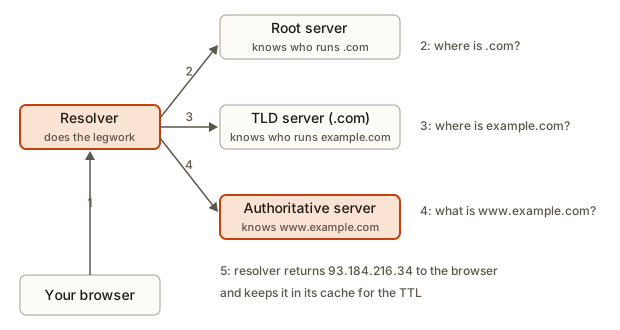 A resolver asking root, TLD and authoritative servers in turn
Here is the same walk as a runnable toy. Three dictionaries stand in for the root, the TLD servers and the authoritative servers. Each one only knows its own level, exactly as in real DNS.
Output:
question: www.example.com
  root says: ask tld-com-server
  TLD server says: ask ns1.example-dns.net
  authoritative server says: 93.184.216.34
question: www.charity.org
  root says: ask tld-org-server
  TLD server says: ask ns.charity-dns.net
  authoritative server says: 198.51.100.7
Trace the first question. labels[-1] is com, so the code asks the root dictionary and gets tld-com-server. It then looks in that server's table for example.com and gets the authoritative server's name. Finally it asks that server for the full name. Each step narrows the question, and each server only had to know one small table. That is why DNS can scale to the whole world.
(The addresses in these examples come from ranges reserved for documentation, plus 93.184.216.34, which has long been used as an example address. Real sites change addresses, so do not treat them as live.)
Caching: why DNS is fast
If every page view caused three trips (root, TLD, authoritative), the root servers would melt. So every answer is remembered. Each record in an answer carries a TTL (time to live): the number of seconds anyone may keep the answer before asking again.
Caching happens at several levels:
- Your browser keeps recent lookups for a short time.
- Your operating system keeps its own cache.
- The resolver keeps answers for everyone who uses it. If a thousand customers of one internet provider all visit
example.com, the resolver asks the authoritative server once.
The root and TLD answers also have long TTLs (often a day or two), so in practice the resolver rarely bothers the root at all. Most lookups finish with one fast step to a nearby resolver that already knows.
Here is a resolver cache with a fake clock, so the output is the same every time. The record has a TTL of 300 seconds (five minutes).
Output:
t=   0s  www.example.com -> 93.184.216.34  (asked the DNS servers, ttl 300)
t=  10s  www.example.com -> 93.184.216.34  (from cache)
t= 299s  www.example.com -> 93.184.216.34  (from cache)
t= 300s  cache entry expired
t= 300s  www.example.com -> 93.184.216.34  (asked the DNS servers, ttl 300)
t= 450s  www.example.com -> 93.184.216.34  (from cache)
t= 700s  cache entry expired
t= 700s  www.example.com -> 93.184.216.34  (asked the DNS servers, ttl 300)
real lookups: 3 out of 6 requests
Follow it line by line. At time 0 the cache is empty, so a real lookup happens and the entry is stored with an expiry time of 0 plus 300. At 10 and 299 seconds the entry is still fresh. At exactly 300 the check now < expires is false (300 is not less than 300), so the entry counts as expired and a new lookup runs, storing a new expiry of 600. At 450 it is fresh again. At 700 it is past 600, so another lookup. Six requests, three real lookups.
TTL has a trade-off that matters in real work:
- Long TTL (a day): fewer lookups, faster pages, less load. But when you move your site to a new server, some people keep going to the old address for up to a day.
- Short TTL (60 seconds): changes spread quickly. But more lookups and more dependence on your DNS provider being fast.
A common practice before a planned server move is to lower the TTL to 60 seconds a day in advance, make the switch, and then raise it again.
DNS records
An authoritative server stores records: small entries that tie a name to some data. Each has a type. These are the ones you will meet in your first year.
| Type | What it holds | Example |
|---|---|---|
| A | The IPv4 address of a name | www.example.com is 93.184.216.34 |
| AAAA | The IPv6 address of a name | www.example.com is 2001:db8::1 |
| CNAME | "This name is an alias of that other name" | blog.example.com is an alias of example.com |
| MX | The mail server that receives email for the domain | mail for example.com goes to mail.example.com |
| TXT | Free text, used to prove you own a domain and for email security | "v=spf1 include:..." |
| NS | Which name servers are authoritative for the domain | ns1.example-dns.net |
A CNAME is the one beginners find strange. It does not contain an address. It points to another name, and the resolver then looks that name up. Chains are allowed, one alias pointing at another.
Output:
blog.example.com is an alias for www.example.com
  www.example.com is an alias for example.com
blog.example.com -> 93.184.216.34
example.com -> 93.184.216.34
nope.example.com -> null
The function calls itself with the alias target. That is a technique called recursion, and you will study it properly later. For now just read it as "if this name is an alias, resolve the name it points to instead". The console.log lines inside print first because they run while the lookup is still in progress. The line that starts with blog.example.com -> prints last because it needs the final value before it can print. The last call returns null because the name has no records at all.
Why use a CNAME instead of copying the address? Because addresses change. If www.example.com is an alias for example.com, you update the address in one place and both names follow. Hosting companies often give you a name such as my-app.hosting-provider.com and ask you to point your domain at it with a CNAME. That lets them move your app between machines without telling you.
One rule to remember: the bare domain itself (example.com, called the apex or root domain) cannot normally be a CNAME because it must also carry NS and other records. Many DNS hosts offer a special alias record for that case, and the hosting guide for your provider will say which to use.
Many addresses for one name
A name can have several A records. Large sites list several addresses, and resolvers often rotate the order of the list between answers. This is called round-robin DNS, a cheap way to spread visitors across servers.
Output:
request 0: ['203.0.113.10', '203.0.113.11', '203.0.113.12']  browser tries 203.0.113.10 first
request 1: ['203.0.113.11', '203.0.113.12', '203.0.113.10']  browser tries 203.0.113.11 first
request 2: ['203.0.113.12', '203.0.113.10', '203.0.113.11']  browser tries 203.0.113.12 first
request 3: ['203.0.113.10', '203.0.113.11', '203.0.113.12']  browser tries 203.0.113.10 first
The list slicing a_records[k:] + a_records[:k] rotates a list: take everything from position k onward, then glue on everything before it. After three requests it wraps around, because n % 3 goes 0, 1, 2, 0.
Round-robin has a weakness: DNS does not know whether a server is healthy. If one of the three is down, a third of visitors still get its address. Serious setups add health checks or put a load balancer behind one address.
What happens inside your computer
When a program wants an address, the operating system follows a fixed order of places to look. Before it asks any DNS server, it checks local sources.
- The hosts file: a plain text file on your computer that maps names to addresses by hand. On macOS and Linux it is
/etc/hosts. On Windows it isC:\Windows\System32\drivers\etc\hosts. A line looks like127.0.0.1 myapp.test. Developers use it to point a test name at their own machine. It beats DNS. - The operating system's cache from earlier lookups.
- The DNS resolver configured for your network (often the router, which forwards to the provider's resolver).
Output:
myapp.test         -> 127.0.0.1       from hosts file
www.example.com    -> 93.184.216.34   from local cache
api.example.com    -> 203.0.113.9     from DNS server
api.example.com    -> 203.0.113.9     from local cache
typo.example.com   -> None            from not found (NXDOMAIN)
Look at the two api.example.com lines. The first has to ask the DNS server and then stores the result. The second finds it in the cache. Look at the last line: when no source knows the name, the result is the famous "does not exist" answer.
NXDOMAIN means "non-existent domain": the authoritative server said, definitively, that no such name exists. That is different from a timeout, where nobody answered.
DNS messages themselves are small. They usually travel over UDP (the fast, no-fuss protocol from the last lesson) to port 53 of the resolver. A question and an answer each fit in a packet or two.
Looking at DNS yourself
You can ask DNS questions from a terminal. On macOS and Linux (and in Windows with the right tools installed) the main tool is dig. Windows and others also have nslookup. These are not runnable in the browser, so try them on your own computer.
nslookup example.com
dig example.com
dig example.com MX
dig +short example.com
nslookup example.com prints which resolver answered and the addresses it found. dig example.com MX asks specifically for the mail records. dig +short prints only the answer. The full dig output also shows the TTL, which counts down on repeated asks if the answer came from a cache. Run the same dig twice a few seconds apart and watch the number drop. That is the cache in action.
Who runs what: registrar, registry and DNS host
Three different organisations are involved in one domain, and mixing them up causes a large share of beginner DNS trouble.
- The registry runs a whole TLD. One organisation runs
.com, another runs.org, and each country has its own for its country code. The registry keeps the master list of every name under that TLD and which name servers belong to each. You never deal with a registry directly. - A registrar is the shop where you rent a name. You pay it a yearly fee, and it tells the registry "the domain
example.combelongs to this customer, and its name servers are these". Examples of registrars are the big domain-selling companies that advertise on every site. - A DNS host (or DNS provider) runs the authoritative name servers that hold your records. Many registrars also host DNS for you by default. You can also leave the domain at one registrar and use a different company for DNS, perhaps because your hosting platform or CDN wants to manage the records.
The glue between them is the NS records. At the registrar you tell the registry which name servers answer for your domain. Those servers hold your A, CNAME and MX records. So when you edit a record in a dashboard, you must be editing it at the provider that your NS records actually point to. If the NS records name provider B but you edit the zone at provider A, nothing changes, and it can take an hour to realise why.
You can check who is in charge with one command: dig NS example.com +short prints the name servers that the world believes are authoritative.
A worked example: pointing a domain at a deployed app
Here is a job you will do within your first months. You built a site, and your hosting platform gave it the address my-portfolio.hosting-provider.example. You bought asha-dev.example and want www.asha-dev.example and the bare domain to show the site.
- Find where the DNS is managed. In the registrar dashboard, look at the name servers. If they say
ns1.registrar-dns.example, then DNS is at the registrar. That is where you edit. - Add the www record. The hosting platform's guide says: create a CNAME. Name
www, valuemy-portfolio.hosting-provider.example. Nowwww.asha-dev.exampleis an alias. - Add the bare-domain record. A CNAME cannot sit at the bare domain, so the platform gives you an address,
203.0.113.40. Create an A record: name@(the dashboard's shorthand for the bare domain), value203.0.113.40. - Choose a TTL. Leave the default (often 3600). If you are still experimenting, set 300.
- Verify from outside. Run
dig +short www.asha-dev.exampleand expect to see the alias and then the address. Rundig +short asha-dev.exampleand expect203.0.113.40. - Tell the platform. Most platforms need you to add the custom domain in their settings, so they know which site to serve for requests whose
Hostheader sayswww.asha-dev.example. They then issue an HTTPS certificate for that name (lesson 5).
In zone-file notation, which is how many providers display records, the result looks like this:
asha-dev.example.      3600  IN  A      203.0.113.40
www.asha-dev.example.  3600  IN  CNAME  my-portfolio.hosting-provider.example.
Each line reads: name, TTL, the class IN (for "internet", always the same), the type, and the value. Once you can read this format, you can read any DNS guide.
Email and DNS: MX, SPF and friends
Email has no connection to the web, but it depends on DNS in the same way. When someone sends a message to hello@asha-dev.example, their mail server asks DNS for the MX records of asha-dev.example. Each MX record names a mail server and carries a priority number. The sender tries the lowest number first and falls back to the next if it does not answer. A domain without MX records cannot receive mail, which is why a freshly bought domain has no working addresses until you add them.
Spam is so common that receiving servers also look up TXT records to decide whether a message really comes from you. An SPF record lists which servers may send mail for the domain. A DKIM record publishes a public key that proves the message was signed by the domain. A DMARC record says what to do when a check fails. You do not need the details now. Remember that all three are plain TXT entries in DNS, so a wrong or missing one is a common reason for mail landing in spam.
Security: when DNS lies
DNS began in an era when everyone on the network was trusted, and answers travel as small plain packets. That makes two attacks possible.
- Spoofing and cache poisoning. An attacker tries to slip a false answer ("the bank's address is my server") into a resolver's cache. If it works, every customer of that resolver is sent to the attacker's server until the TTL expires. Modern resolvers use random port numbers and request identifiers to make guessing hard, and DNSSEC adds digital signatures to records so that a resolver can check an answer really came from the zone's owner.
- Eavesdropping and tampering on the path. Plain DNS questions are readable by anyone on the network. DNS over HTTPS and DNS over TLS wrap the question in encryption between you and the resolver.
Notice how the HTTPS lesson later closes the gap: even if an attacker tricks DNS into sending you to the wrong address, the fake server cannot present a valid certificate for the real name, so the browser warns you. DNS and certificates cover for each other's weaknesses.
Common mistakes and the errors you will see
1. A typo in the name. The error depends on the tool, but they all mean "this name does not resolve". In Chrome:
This site can't be reached
Check if there is a typo in typo.example.com.
DNS_PROBE_FINISHED_NXDOMAIN
In curl:
curl: (6) Could not resolve host: typo.example.comIn Node.js:
Error: getaddrinfo ENOTFOUND typo.example.comgetaddrinfo is the operating system function that resolves names. ENOTFOUND is "not found". In Python on Linux, the matching error is socket.gaierror: [Errno -2] Name or service not known. In all four, read it as: the lookup failed before any connection started. Do not look at the server. Check the spelling.
2. Mixing up "name does not resolve" and "server not reachable". If ping 93.184.216.34 works but ping example.com fails, DNS is broken and the network is fine. If both fail, look at the network.
3. "I changed my DNS record but nothing changed." The old answer is still cached somewhere, for up to its TTL. People call this DNS propagation, though nothing is really spreading. Old cached copies simply expire at different times. Wait for the old TTL, or test with a fresh resolver. You can flush your own computer's cache (ipconfig /flushdns on Windows) but you cannot flush the world's.
4. Editing the wrong place. The place you bought the domain (the registrar) and the place that hosts its DNS records may be different companies. If you change records at the registrar but the domain's NS records point to another provider, your edit does nothing. Check where the NS records point and edit there.
5. A CNAME at the bare domain. Entering a CNAME for example.com itself is usually rejected or breaks email, as explained above. Use the alias or ANAME option your DNS host offers, or an A record.
6. A forgotten dot. Some DNS dashboards want a trailing dot on target names (target.example.net.). Without it, the dashboard may append your own domain, giving target.example.net.example.com. If a CNAME is mysteriously wrong, look for this.
7. Using the IP address everywhere instead of the name. Hard-coding an address in your app means that when the server moves, your app breaks, and HTTPS certificates are issued for names, not for addresses. Use names.
8. Underscores and spaces in hostnames. Hostnames only allow letters, digits and hyphens. A label must not start or end with a hyphen and has a maximum of 63 characters. The whole name has a maximum of 253.
Output:
example.com                    True
my-site.dev                    True
-bad.com                       False
two..dots.com                  False
under_score.com                False
aaaaaaaaaaaaaaaaaaaaaaaaaaaaaa False
two..dots.com splits into two, an empty string, dots and com. The empty label has length 0, which fails 1 <= len(label) <= 63. The last name is cut to 30 characters only for printing; its first label has 64 characters, one too many.
A debugging walkthrough
Scenario: you moved your portfolio from one host to another and updated the A record. Your friend still sees the old site, and you see the new one.
- Confirm it is DNS and not the browser. Open the site in a private window on your own machine. Same result as before? Then it is not a browser cache.
- Ask a specific resolver. Run
dig +short yourdomain.com @8.8.8.8and thendig +short yourdomain.com @1.1.1.1. The part after the@tellsdigwhich resolver to ask. If both give the new address, the record is correct and the world mostly knows. - Ask the authoritative server directly. Find it with
dig NS yourdomain.com +short, thendig +short yourdomain.com @ns1.that-server.net. If this shows the new address, the record is right and what remains is caching. - Look at the TTL.
dig yourdomain.comshows it. If it was 86400 (a day) when you made the change, some resolvers will hold the old address for up to 24 hours. - Check your friend's side. Their router or provider resolver is probably still holding the old record. Waiting, or switching their resolver, fixes it.
The method: separate the source of truth (the authoritative server) from the copies (caches). Query the source first. If it is right, the problem is only time.
Variations and edge cases
- Public resolvers and privacy. The resolver sees every name you look up. Some people use
1.1.1.1or8.8.8.8instead of the provider's. Encrypted DNS (DNS over HTTPS) hides lookups from anyone watching the network, though not from the resolver itself. - Anycast. Root servers and big public resolvers share one address across many machines in many cities. Your packets go to the nearest. That is how 13 root addresses survive heavy traffic.
- Email depends on DNS. MX records route mail, and TXT records hold anti-spam proofs. A wrong MX record loses email silently.
- Domain ownership proofs. Services often ask you to add a particular TXT record to prove you control a domain. That works because only the owner can edit its DNS.
- Subdomain takeover. If a CNAME still points at a hosting service you cancelled, someone else can claim that hosting name and serve content on your subdomain. Delete records you no longer use.
- Wildcards. A wildcard record
*.example.comanswers for any subdomain that has no record of its own. - DNS is not only for the web. Games, databases and apps all resolve names the same way.
Where this shows up in real work and interviews
- "How do you point a custom domain at your deployed app?" You add an A record (or a CNAME, as the host instructs) at the DNS provider. Every deployment you do from here on includes this step.
- "Why did my change not show up?" TTL and caching.
- "What happens when you type google.com in a browser?" A strong answer includes the resolver, the root, TLD and authoritative servers, and the caches.
- "What is the difference between an A record and a CNAME?" An A record maps a name to an address. A CNAME maps a name to another name.
- "What is a TTL and what are the trade-offs?" Long TTL means speed and slow changes, short TTL means quick changes and more lookups.
- On-call engineers say "it's always DNS" half as a joke. Many large outages have started with a bad DNS change, because everything else depends on names resolving.
Practice
1. (Easy) In docs.python.org, name the TLD and the subdomain.
Solution
The TLD is org. The subdomain is docs, a subdomain of python.org. The second-level domain is python.
2. (Easy) What problem does DNS solve?
Solution
People use names that are easy to remember, but network routing uses IP addresses. DNS translates a name into the address of the server, so you can type example.com instead of a number.
3. (Easy) Match the record type to its job: A, CNAME, MX, TXT. Jobs: mail server; alias to another name; free-form text; IPv4 address.
Solution
A is the IPv4 address. CNAME is the alias to another name. MX is the mail server. TXT is free-form text (used for ownership proofs and email security).
4. (Easy) You type a URL and the browser says DNS_PROBE_FINISHED_NXDOMAIN. What does it tell you, and what is the first thing you check?
Solution
It means the name could not be resolved because no such domain exists in DNS. The failure happened before any connection to a server. Check the spelling of the name first, then whether the domain has expired or lacks records.
5. (Medium) A record has TTL 600. A resolver stored it at time 1000 seconds. At which times is the cached answer still used: 1200, 1599, 1600, 1700?
Solution
The entry expires at 1000 plus 600, which is 1600. It is used at 1200 and 1599, because those are less than 1600. At 1600 and 1700 it is expired, and a new lookup happens. (Exactly at 1600 it counts as expired, as in the lesson's code. Real resolvers count TTL down to zero in whole seconds, which gives the same effect.)
6. (Medium) www.example.com is a CNAME to example.com, and example.com has A record 203.0.113.7. Write the steps a resolver takes to answer a request for www.example.com.
Solution
The resolver asks for the A record of www.example.com and receives the CNAME example.com instead. It then asks for the A record of example.com and receives 203.0.113.7. It returns that address (usually along with the CNAME chain) to the client. Often the authoritative server includes the final A record in the same reply, so there is only one trip.
7. (Medium) Write a Python function labels_from_right(name) that returns the labels of a domain from the TLD down to the subdomain, as a list. Test it on a.b.example.com.
Solution
def labels_from_right(name):
    return name.split(".")[::-1]

print(labels_from_right("a.b.example.com"))
It prints ['com', 'example', 'b', 'a']. Splitting on dots gives the labels left to right, and the slice [::-1] reverses the list. That is the order in which DNS servers are asked.
8. (Medium) You changed the A record for shop.example.com an hour ago. The TTL was 3600 when you changed it. Your phone still shows the old site, but your laptop shows the new one. Give two possible reasons.
Solution
The phone's network resolver (or the phone itself) may have cached the old answer just before your change and keep it until the 3600 seconds are over. A second possibility: the phone is on mobile data using a different resolver than the laptop's Wi-Fi, and that resolver is still holding an older copy. A third: the phone's browser has its own cache. Waiting an hour or toggling flight mode usually settles it.
9. (Hard) Your site works by name but fails when a colleague uses the address from a hosts file entry you gave them. They report "connected, but the browser shows a certificate warning". Explain what is happening using what you know about names and addresses.
Solution
A hosts file entry makes the name resolve to the address you gave, so the connection itself works. The warning comes from HTTPS, which you will meet in lesson 5: certificates are issued for names, and the browser checks that the name in the URL matches the name on the certificate. If the colleague typed the raw IP address into the browser, or the entry pointed a different name at the server, the names do not match, so the browser warns. The fix is to use the real domain name in the URL and let the hosts entry point it at the right machine.
10. (Hard) Design the DNS records for a small company: the website at example.com and www.example.com on a server with address 203.0.113.50, and email handled by mail.example.com at 203.0.113.60. List the records.
Solution
example.com.       A      203.0.113.50
www.example.com.   CNAME  example.com.
mail.example.com.  A      203.0.113.60
example.com.       MX 10  mail.example.com.
The A record gives the bare domain its address. The CNAME makes www follow it. The mail server gets its own A record, and the MX record tells the world to deliver mail for example.com there (the 10 is a priority number, lower is tried first). In practice you would add TXT records for email security too.
11. (Hard) Why are the root servers not overwhelmed, even though every lookup in the world could in theory start with them?
Solution
Caching. Resolvers remember which servers handle each TLD for a long time (often a day or more), so they only need the root rarely. In addition, each root address is served by hundreds of machines worldwide via anycast, so the load is shared. Most lookups never reach the root at all, because the resolver already has the TLD server cached or even the final answer.
What you now know
- DNS turns names into IP addresses. A name is read right to left: TLD, domain, subdomain.
- A recursive resolver asks the root, then the TLD servers, then the domain's authoritative servers, and returns the answer to you.
- Every answer carries a TTL. Caches in the browser, the operating system and the resolver reuse it until it expires, which is why changes take time to show.
- A records give IPv4 addresses, AAAA give IPv6, CNAME makes an alias, MX routes mail, TXT holds text and NS names the authoritative servers.
- The hosts file on your computer beats DNS, and developers use it for test names.
NXDOMAIN,ENOTFOUNDandCould not resolve hostmean the name did not resolve, so check spelling and records before blaming the server.- To debug a record change, ask the authoritative server first, and treat the rest as caching.