Why this matters
Once a client has an address, it still has to say something. The language of the web is HTTP, and every web app, every API and every mobile app that talks to a server speaks it. When your code "calls an API", it is sending an HTTP request and reading an HTTP response. Every error number you will ever debug in web development (404, 401, 500) comes from this lesson. If you can read a raw request and response, you can find out in minutes what a framework is doing behind your back.
The idea: a form with fixed boxes
HTTP stands for HyperText Transfer Protocol. A protocol, as you know, is an agreed set of rules. HTTP's rules are simple and very regular, like a paper form with fixed boxes:
- The client sends one request message.
- The server sends back one response message.
- That is the whole exchange. Then the server forgets about you.
Think of ordering by letter from a catalogue. You write a letter in a fixed layout: first line says what you want, then lines with extra details, then a blank line, then (if needed) an attachment. The shop replies in a similar layout: first line says how it went, then detail lines, a blank line, then the goods. Because both sides follow the layout exactly, a shop in one country can serve a customer using a completely different kind of computer.
Two properties define HTTP:
- Request-response. The client always asks first. The server only replies.
- Stateless. Each request stands alone. The server does not automatically remember who you were a moment ago. (Cookies, later in this lesson, are the workaround.)
HTTP is text-based in its classic form (version 1.1). That is a gift for learners: you can read the actual messages with your own eyes. Newer versions (HTTP/2 and HTTP/3) pack the same messages into a faster binary format, but the ideas, the methods, the status codes and the headers are the same. Your code and your browser's developer tools show them in the familiar form.
HTTP rides on top of TCP, which you met in the first lesson. First the client opens a TCP connection to the server's port (80 for http, 443 for https), then it writes the request text onto the connection, and the server writes the response back.
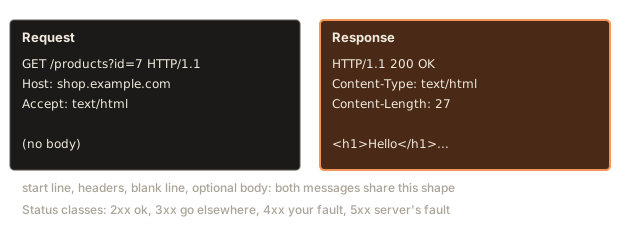
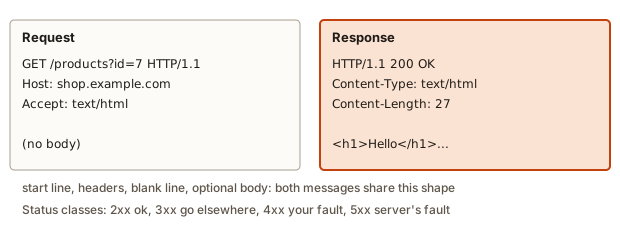 An HTTP request and its response side by side
Anatomy of a request
A request has four parts, always in this order:
- The request line: method, target, version.
- Headers: one
Name: valueper line. - A blank line. It marks the end of the headers.
- An optional body: data sent along (for example the contents of a form).
Lines end with two invisible characters, carriage return and line feed, written \r\n. That is the formal line ending of HTTP.
GET /products?id=7 HTTP/1.1
Host: shop.example.com
User-Agent: demo-client/1.0
Accept: text/html
The parts on the first line:
- Method:
GET. The verb. What the client wants to do. - Target:
/products?id=7. The path and query from the URL (the scheme, host and fragment are not here). - Version:
HTTP/1.1.
Here is a request written as a Python string, and a few lines of code that take it apart. This is what every web server does with the bytes it receives, just more carefully.
Output:
method : GET
target : /products?id=7
version: HTTP/1.1
headers: {'host': 'shop.example.com', 'user-agent': 'demo-client/1.0', 'accept': 'text/html'}
body   : ''
Walk through the code. raw.partition("\r\n\r\n") cuts the message at the first blank line into a head and a body. Here the body is empty, because a GET request normally has none. The first line of the head is split on spaces into three parts. Each later line is split on the first colon only (split(":", 1)), because a header value may itself contain colons, like a time or a URL. The names are lower-cased so that later lookups are not case-sensitive.
Why is there a Host header when the connection already went to the right address? Because one server address can host many sites. The Host header says which site this request is for. Without it a server with three websites would not know which to answer. HTTP/1.1 makes it required.
Anatomy of a response
The response has the same shape: a status line, headers, a blank line and an optional body.
HTTP/1.1 200 OK
Content-Type: text/html; charset=utf-8
Content-Length: 27

<h1>Hello</h1><p>World</p>!
The status line holds the version, a three-digit status code (200) and a short human reason phrase (OK). The code is what programs read. The phrase is only a hint for people.
Output:
version: HTTP/1.1 | code: 200 | reason: OK
{'Content-Type': 'text/html; charset=utf-8', 'Content-Length': '27'}
declared length: 27
actual length  : 27
Two details. The status line is split with maxsplit=2 (split(" ", 2)), because the reason phrase can contain spaces ("Not Found", "Internal Server Error") and must stay in one piece. And Content-Length counts bytes, not characters. For plain English text they are equal. With accented letters or emoji they are not, as you will see below.
Methods: what the client wants to do
The method is the verb of the request. The common ones:
| Method | Meaning | Has a body? | Example |
|---|---|---|---|
GET | Read a resource | No | Load a page, fetch a list of users |
POST | Send data to be processed, usually creating something | Yes | Submit a sign-up form |
PUT | Replace a resource with the one you send | Yes | Overwrite a profile |
PATCH | Change part of a resource | Yes | Update just the email address |
DELETE | Remove a resource | Usually no | Delete a comment |
HEAD | Like GET, but return only headers | No | Check whether a file exists and how big it is |
OPTIONS | Ask what is allowed | No | Used by browsers before some cross-site calls |
Two ideas help you pick the right one.
A method is safe if it should not change anything on the server. GET and HEAD are safe. This is why a search engine or a link preview can request any URL without breaking anything, and why deleting something through a GET link is a serious design error: a crawler following links would wipe your data.
A method is idempotent if doing it twice has the same effect as doing it once. PUT, DELETE, GET and HEAD are idempotent. Deleting user 5 twice leaves the same world as deleting it once (user 5 is gone). POST is not: posting an order twice creates two orders. This matters for retries. If a network hiccup makes the client unsure whether a request arrived, it can safely repeat a PUT, but repeating a POST risks a duplicate (a reason payment pages say "do not press back or refresh").
Status codes: how it went
The first digit of the status code gives the class. Learn the classes first, the individual numbers second.
| Class | Meaning | Common codes |
|---|---|---|
| 1xx | Informational | 100 Continue |
| 2xx | Success | 200 OK, 201 Created, 204 No Content |
| 3xx | Redirect: look somewhere else | 301 Moved Permanently, 302 Found, 304 Not Modified |
| 4xx | Client error: the request is wrong | 400 Bad Request, 401 Unauthorized, 403 Forbidden, 404 Not Found, 405 Method Not Allowed, 429 Too Many Requests |
| 5xx | Server error: the server failed | 500 Internal Server Error, 502 Bad Gateway, 503 Service Unavailable, 504 Gateway Timeout |
Output:
200 -> success
201 -> success
204 -> success
301 -> redirect: look somewhere else
304 -> redirect: look somewhere else
400 -> client error: your request is wrong
401 -> client error: your request is wrong
403 -> client error: your request is wrong
404 -> client error: your request is wrong
429 -> client error: your request is wrong
500 -> server error: the server failed
503 -> server error: the server failed
700 -> not an HTTP status
Many people in web work check only the class: "it's a 4xx, so I sent something wrong" or "it's a 5xx, so it is not my fault, the server broke". That split decides where to look first.
The codes you will meet daily, in plain language:
- 200 OK: it worked, and the body is the answer.
- 201 Created: it worked and something new now exists (the usual answer to a successful POST that creates).
- 204 No Content: it worked, and there is nothing to send back (typical for DELETE).
- 301 Moved Permanently and 302 Found: the resource lives at another URL, given in the
Locationheader. 301 says "update your bookmarks, it moved for good"; 302 says "use this other URL for now". - 304 Not Modified: you already have the latest copy in your cache, use it.
- 400 Bad Request: the server cannot understand your request (broken JSON, a missing field).
- 401 Unauthorized: you have not proven who you are. (The name is misleading. It really means "unauthenticated".)
- 403 Forbidden: the server knows who you are and says you may not do this.
- 404 Not Found: nothing at this path. Also used on purpose to hide that something exists.
- 405 Method Not Allowed: the path exists but not for this method, for example POST to a page that only supports GET.
- 429 Too Many Requests: you are being rate-limited. Slow down.
- 500 Internal Server Error: the server's code crashed.
- 502 Bad Gateway and 504 Gateway Timeout: a server in the middle (such as a load balancer) got a bad or no answer from the server behind it.
- 503 Service Unavailable: the server is overloaded or down for maintenance.
A toy web server
To see how a server decides, here is a small router. It takes the method, path and optional body, and returns a status code and a text. Real frameworks do exactly this, only larger. Read the code before you run it and try to predict each line of output.
Output:
GET    /          -> 200 home page
POST   /          -> 405 Method Not Allowed
GET    /users     -> 200 Asha, Ben
POST   /users     -> 201 created user 3
POST   /users     -> 400 name is required
GET    /users/3   -> 200 Chen
DELETE /users/1   -> 204
GET    /users/1   -> 404 no such user
GET    /nothing   -> 404 Not Found
Trace the state changes, which is the important part. The first GET /users lists Asha and Ben. POST /users with the body Chen adds a third user with id 3 (the largest existing id plus one) and answers 201. The next POST has an empty body, so the server refuses with 400 and changes nothing. GET /users/3 now finds Chen. DELETE /users/1 removes Asha and answers 204 with an empty body. The later GET /users/1 is 404, because the delete took effect. Notice how every outcome is chosen by the server's logic, and each status code has a clear reason.
The 405 branch is a good design detail: when the path exists but the method does not fit, the right answer is 405, not 404. A 404 would wrongly tell the client the path itself is missing.
Headers
Headers are extra information about the request or response, in Name: value form. Header names are case-insensitive: Content-Type, content-type and CONTENT-TYPE mean the same. HTTP/2 even requires lower case. Here is a tiny class that gets this right, next to a plain dictionary that gets it wrong.
Output:
text/html
text/html
(not sent)
None
The plain dictionary returns None because it treats the two spellings as different keys. Many real bugs come from that, so libraries wrap headers in a case-insensitive structure.
The headers you need to know first:
In requests:
Host: which site (required in HTTP/1.1).User-Agent: what kind of client this is (browser name and version).Accept: what formats the client can handle, such astext/htmlorapplication/json.Content-Type: the format of the body being sent, such asapplication/json.Content-Length: the body size in bytes.Authorization: credentials, such asBearer abc123.Cookie: the cookies the browser is sending back.
In responses:
Content-Type: the format of the body, such astext/html; charset=utf-8orapplication/json. The browser decides how to treat the body based on this. HTML gets rendered, an image gets drawn, and an unknown type gets downloaded.Content-Length: body size in bytes.Location: where to go next, used with 3xx redirects (and with 201).Set-Cookie: please store this cookie.Cache-Control: how long this may be reused without asking again (the next lesson covers caching).
You will also see Server, Date, ETag, Access-Control-Allow-Origin and many more, but the list above covers most of what you read.
Media types
The value of Content-Type is a media type (also called MIME type): a type/subtype label. text/html, text/css, application/json, image/png, application/pdf. For text it can carry a character set (charset=utf-8), which tells the receiver how to turn bytes into letters. A wrong Content-Type is a classic reason for a browser to show raw code instead of a page, or for a server to refuse your data.
The body and Content-Length
For methods that send data, the body carries it. The most common format for APIs is JSON, text that looks like {"name":"Zoë"}. The sender sets Content-Type: application/json so the receiver knows to parse it, and Content-Length so the receiver knows where the body ends.
Here the length is computed in JavaScript. Look at the difference between characters and bytes.
Output:
{"name":"Zoë","tags":["a","b"]}
characters: 31
bytes     : 32
POST /users HTTP/1.1\r\n
Host: api.example.com\r\n
Content-Type: application/json\r\n
Content-Length: 32\r\n
\r\n
{"name":"Zoë","tags":["a","b"]}
The letter ë is one character but two bytes in UTF-8, so the body has 31 characters and 32 bytes. The header must say 32. If it said 31, the server would read one byte too few and cut the last } off, then fail to parse the JSON. In practice your library computes this for you. The point is to know where the number comes from, so a "Content-Length mismatch" error makes sense. The last print uses replaceAll to make the invisible line endings visible, which is a good trick for debugging.
Redirects
A redirect is a response that says "not here, go there". The status is 3xx and a Location header gives the new URL. A client then makes a second request. Browsers do this silently, and you only see the address bar change.
Output:
GET /old -> 301
GET /new -> 302
GET /final -> 200
You arrived
The limit guards against a redirect loop. If /a redirects to /b and /b back to /a, an unguarded client would circle forever. Browsers stop after about 20 hops and show ERR_TOO_MANY_REDIRECTS. Typical uses: forcing http to https, moving a page to a new address, and sending you to a login page.
Four related codes are worth separating. 301 and 308 are permanent and 302 and 307 are temporary. The older 301 and 302 let a browser change a POST into a GET on the second request, while 307 and 308 require the same method to be kept.
Cookies: memory for a stateless protocol
Since HTTP forgets you between requests, how does a shop remember your cart, or a site remember you are logged in? With a cookie: a small piece of text the server asks the browser to store and send back with every later request to that site.
- You log in. The server responds with
Set-Cookie: session=abc123; HttpOnly; Path=/; Max-Age=3600. - The browser saves it.
- On every later request to that site, the browser adds
Cookie: session=abc123. - The server looks up
abc123in its records and knows it is you.
Output:
Set-Cookie: session=abc123; HttpOnly; Max-Age=3600; Path=/
session = abc123
theme = dark
The attributes after the value are instructions to the browser. HttpOnly hides the cookie from JavaScript on the page, which makes it harder to steal. Max-Age=3600 says to keep it for 3600 seconds. Path=/ says it applies to the whole site. You will also meet Secure (send only over HTTPS) and SameSite (limits sending on cross-site requests). Note that the cookie travels in a header, so it is visible in the developer tools, and treating its value as a secret means it must only travel over HTTPS.
The sensible design is to store only a random session id in the cookie and keep the real data on the server. Never store a password in a cookie.
Seeing real HTTP
You do not have to take any of this on trust. Two tools show the real messages.
The browser's developer tools. Open any site, press F12 (or Cmd+Option+I on a Mac), choose the Network tab and reload. Every row is one request-response pair. Click one and open "Headers" to see the request line, request headers, status and response headers. "Response" or "Preview" shows the body. This will be your most-used debugging window for the next year.
curl, a command-line client. Run these in your terminal:
curl -i https://example.com
curl -v https://example.com
curl -X POST -H "Content-Type: application/json" -d '{"name":"Asha"}' https://api.example.com/users
curl -I https://example.com
-i prints the response headers together with the body. -v (verbose) also shows the request that curl sent, with lines starting with > for what you sent and < for what came back. -X POST sets the method, -H adds a header and -d supplies the body. -I sends a HEAD request. The start of a typical curl -i answer looks like this (the exact headers vary from server to server):
HTTP/2 200
content-type: text/html
content-length: 1256
cache-control: max-age=604800

<!doctype html>
...
Notice HTTP/2 and the lower-case header names. That is the newer protocol version, shown in a text form for readability. The fields, the status code and the body are exactly what you have learned.
Your own code does the same with a few lines. In JavaScript the standard call is fetch:
const response = await fetch("https://api.example.com/users", {
  method: "POST",
  headers: { "Content-Type": "application/json" },
  body: JSON.stringify({ name: "Asha" }),
});
console.log(response.status);
const data = await response.json();
Everything in the object is a piece of the request you have just studied: the method, the headers, the body. The status is the number from the response's first line.
What happens inside a server
When the server's TCP connection receives bytes, a loop like this runs:
- Read bytes until the blank line (
\r\n\r\n). That is the end of the head. - Parse the request line and headers.
- If a
Content-Lengthheader exists, read exactly that many more bytes as the body. (Another option isTransfer-Encoding: chunked, where the body arrives in pieces with sizes, used when the sender does not know the total length in advance.) - Find the route that matches the method and path, and run its code.
- Write the status line, headers, blank line and body back.
- Either keep the TCP connection open for the next request (keep-alive, the default in HTTP/1.1, because opening connections is slow) or close it.
A framework like Express, Flask or Spring does steps 1 to 3 and 5 for you, and you write step 4. Knowing the steps explains odd behaviours, such as why a server hangs forever when a client promises a Content-Length of 100 and sends only 50 bytes: the server is faithfully waiting for the other 50.
HTTP/2 and HTTP/3 send many requests at once over one connection and compress the headers. This is why modern pages, which fetch dozens of files, load faster. Your code does not change.
Designing responses: a worked example
Putting methods and status codes together is the daily work of anyone who builds an API. Take a small notes service and decide what each request should answer.
| Request | Situation | Response |
|---|---|---|
GET /notes | Anyone logged in | 200 with a list in the body |
GET /notes | No credentials | 401 |
POST /notes with a valid JSON body | Logged in | 201, a Location: /notes/17 header and the new note in the body |
POST /notes with broken JSON | Logged in | 400, with a message saying what is wrong |
POST /notes with valid JSON but an empty title | Logged in | 422 (or 400, depending on the team's convention) with the field named |
GET /notes/17 | Note exists, belongs to you | 200 |
GET /notes/17 | Note belongs to someone else | 403 (or 404, to avoid admitting that it exists) |
GET /notes/9999 | No such note | 404 |
DELETE /notes/17 | Succeeds | 204, no body |
PUT /notes | Collection does not accept PUT | 405 with an Allow: GET, POST header |
| Any request | Database is down | 503, ideally with Retry-After |
| Any request | Bug in the handler | 500 |
Read the table as a set of questions to ask for every endpoint: who may call it, what can be wrong with the input, what happens when the thing does not exist, and what happens when our own code fails. Each question maps to a status class. Nothing here needs more than the codes you already know, plus 422 ("I understood your request, but its content is not acceptable"), which many teams use for validation failures.
Two habits make an API pleasant to use. First, give errors a consistent body, such as {"error": "title is required", "field": "title"}, so that front-end code can show it. Second, never leak internals in a 500: log the stack trace on the server and send the client a short, harmless message.
Seen from the client side, the same table drives the code you write after a fetch: branch on the class of response.status first, then on the specific code where it matters. A 401 sends the user to the login page, a 404 shows "not found", a 429 waits and retries, and a 5xx shows a "try again" message.
Common mistakes
1. Confusing 401 and 403. 401 means "I do not know who you are" (log in). 403 means "I know who you are and the answer is no". If a logged-in user hits 403, logging in again will not help.
2. Returning 404 when 405 is right (or 200 for errors). Some beginners reply 200 with a body {"error": "not found"}. Clients and tools that look at the status code assume success. Use the status code to carry the outcome.
3. Sending JSON without Content-Type. Your server framework may then not parse the body, and your handler sees an empty or missing value. In Express, req.body is undefined if the JSON-parsing step is missing or the header is not application/json. In fetch, set the header explicitly, as in the example above.
4. Putting a body on a GET. Many servers and proxies ignore or reject it. Use query parameters for GET and a body for POST.
5. Using GET for actions that change data. Browsers prefetch links, search engines crawl them, and caches repeat them. A link /delete?id=3 will eventually be followed by something that is not a person. Use POST or DELETE.
6. Reading Content-Length as characters. It counts bytes. A mismatch gives hangs (too large) or cut-off bodies and parse errors (too small).
7. Treating a 500 as the client's fault. It means the server's own code threw an error. Look at the server's logs, not at the request, though the request tells you how to reproduce it.
8. Believing that "no error in the browser" means "it worked". fetch does not throw on 404 or 500. It only throws when the network fails. You must check response.ok or response.status yourself:
const res = await fetch("/api/users/999");
if (!res.ok) {
  throw new Error("Request failed with status " + res.status);
}
9. Forgetting that cookies and headers are visible. Anyone who can see the traffic or the developer tools sees them. Only HTTPS protects them on the wire.
10. The CORS error. In the browser console you will meet:
Access to fetch at 'http://localhost:4000/api' from origin 'http://localhost:3000'
has been blocked by CORS policy: No 'Access-Control-Allow-Origin' header is present
on the requested resource.
It does not mean your request was wrong. The browser sent it, the server answered, and the browser then refused to let your page read the answer, because the two addresses are different origins (from the URL lesson) and the server did not say it is okay. The fix is on the server: add the Access-Control-Allow-Origin header for your front end's origin.
A debugging walkthrough
Scenario: your sign-up form sends a POST to /api/users. The server answers 400 Bad Request. Find out why.
- See the exact request. In the Network tab, click the failing request. Check the method (POST?), the URL, the
Content-Typerequest header, and the "Payload" (the body). - See the exact response. Open the Response tab. Well-built servers explain the 400 in the body:
{"error": "email is required"}. Read the body before anything else. - Compare with what the server expects. The body shows
{"Email": "a@b.com"}but the server wantsemail, in lower case. JSON keys are case-sensitive, so the field is missing. - Reproduce with
curl.curl -i -X POST -H "Content-Type: application/json" -d '{"email":"a@b.com"}' http://localhost:3000/api/users. A 201 here confirms that the server is fine and your front end sent the wrong key. - Fix and re-check the Network tab.
The process works for nearly every API problem: look at the real request, look at the real response, compare with the documentation, reproduce outside your app, change one thing. For a 5xx, the same method applies, but step 2 moves to the server logs.
Variations and edge cases
- Query versus body. Search filters go in the query of a GET. Passwords and large payloads go in the body of a POST.
- Content negotiation. The
Acceptheader lets one URL return HTML to a browser and JSON to an API client. - Conditional requests. A client can send
If-None-Matchwith a storedETagvalue. If nothing changed, the server replies304 Not Modifiedwith no body and saves bandwidth. - Range requests. Video players ask for only part of a file with
Range: bytes=0-999999and get206 Partial Content. - Compression.
Accept-Encoding: gzip, brlets the server shrink text before sending. The response carriesContent-Encoding: gzip. - Long-lived connections. WebSockets start as an HTTP request, then upgrade to a two-way channel where the server can push messages. It is how live chats work.
- Timeouts and retries. Clients give up after a set time. Retrying a safe or idempotent request is fine. Retrying a POST needs care.
- Idempotency keys. Payment APIs let you send a unique key with a POST so a repeated request does not charge twice.
Where this shows up in real work and interviews
- Building an API means choosing methods, paths and status codes well. The popular style, called REST, maps nouns to paths and verbs to methods:
GET /users,POST /users,DELETE /users/42. - "What is the difference between GET and POST?" A good answer covers safety, bodies, caching, and the fact that data in a GET goes into the URL, which is logged and visible.
- "What is the difference between PUT and PATCH?" PUT replaces a whole resource, PATCH changes part of it.
- "What does a 401 mean versus a 403?" Unauthenticated versus unauthorised.
- "What is the difference between a 301 and a 302?" Permanent versus temporary, which changes how browsers and search engines cache the move.
- "Is HTTP stateful?" No, and cookies and tokens add state on top.
- Production alerts are often phrased in status codes: "5xx rate above 1 percent". You now know what is being counted.
Practice
1. (Easy) In GET /cart HTTP/1.1, name the method, the target and the version.
Solution
Method GET, target /cart, version HTTP/1.1.
2. (Easy) Which status class means "the client made a mistake" and which means "the server failed"?
Solution
4xx means the client made a mistake (a bad request). 5xx means the server failed.
3. (Easy) Which method would you use to read a list of products? To create an order? To remove a comment?
Solution
GET to read the list, POST to create an order, DELETE to remove a comment.
4. (Easy) What does the blank line in an HTTP message mean?
Solution
It ends the headers. Anything after it is the body, which may be empty.
5. (Medium) A user is logged in but gets 403 when they open /admin. A logged-out visitor gets 401 on /account. Explain both.
Solution
The visitor on /account has not proven who they are, so the server says 401 (unauthenticated). The user on /admin is known, but their account lacks permission, so the server says 403 (forbidden). Logging in fixes the first. Only a change in permissions fixes the second.
6. (Medium) Write the full raw text of a POST request to /login on host app.example.com with the JSON body {"user":"asha"}. Compute the Content-Length.
Solution
The body {"user":"asha"} has 15 characters, all ASCII, so 15 bytes: braces 2, "user" 6, colon 1, "asha" 6, which sums to 15.
POST /login HTTP/1.1
Host: app.example.com
Content-Type: application/json
Content-Length: 15

{"user":"asha"}
7. (Medium) Explain why DELETE /users/5 sent twice is idempotent but POST /orders sent twice is not.
Solution
After the first DELETE, user 5 no longer exists. The second DELETE finds nothing to remove, so the state of the server is the same (the response may be 404, but nothing else changes). Two POST /orders create two separate orders, so the state differs from sending one.
8. (Medium) Your front end shows "Something went wrong", but the Network tab shows the request returned 200 with the body {"error":"user not found"}. What is wrong with the server and why is it a problem?
Solution
The server reports a failure but with a success status. Clients, monitoring tools, caches and your own code (response.ok) treat 200 as success. The server should answer 404 Not Found (or another fitting 4xx) with the error message in the body. Fix the server's status code, not just the front end.
9. (Hard) Write a Python function parse_request(raw) that returns a dictionary with method, path, query (as a dictionary of first values) and headers (lower-cased names) and test it on a request with a query string.
Solution
from urllib.parse import urlparse, parse_qs

def parse_request(raw):
    head, _, body = raw.partition("\r\n\r\n")
    lines = head.split("\r\n")
    method, target, _version = lines[0].split(" ")
    url = urlparse(target)
    query = {k: v[0] for k, v in parse_qs(url.query).items()}
    headers = {}
    for line in lines[1:]:
        name, value = line.split(":", 1)
        headers[name.strip().lower()] = value.strip()
    return {"method": method, "path": url.path, "query": query,
            "headers": headers, "body": body}

raw = "GET /search?q=shoes&page=2 HTTP/1.1\r\nHost: shop.example.com\r\n\r\n"
print(parse_request(raw))
It prints {'method': 'GET', 'path': '/search', 'query': {'q': 'shoes', 'page': '2'}, 'headers': {'host': 'shop.example.com'}, 'body': ''}. The key points: split the head from the body, split the target into path and query, take the first value of each query key, and split headers on the first colon only.
10. (Hard) A page loads, but its stylesheet shows up as plain text instead of being applied. The request for /style.css returned 200. Name a likely header problem and how you would confirm it.
Solution
The response probably has a wrong Content-Type, such as text/plain or text/html, instead of text/css. Browsers use that header to decide what to do with a body, and some refuse to apply a stylesheet with the wrong type. Confirm by opening the Network tab, clicking /style.css and reading the response headers, or by running curl -I https://yoursite.example/style.css. Fix it in the server or static-file configuration.
11. (Hard) A client sends Content-Length: 120 with a body of only 100 bytes, and the server stops responding. Explain, and say what the client sees.
Solution
The server follows the header: it reads exactly 120 bytes. After 100 bytes it is still waiting for the other 20, which never come, so it does not run the handler. The client, waiting for a response, sees a hanging request until a timeout fires, usually reported as a timeout error or 408 Request Timeout from the server. The fix is to make Content-Length match the real byte count, which libraries do automatically.
What you now know
- HTTP is a text protocol where the client sends one request and the server sends one response. It is stateless.
- A request is a request line (method, target, version), headers, a blank line and an optional body. A response is a status line, headers, a blank line and an optional body.
- Methods say what to do:
GETreads,POSTcreates,PUTreplaces,PATCHchanges part,DELETEremoves. Safe and idempotent methods can be retried safely. - Status code classes: 2xx success, 3xx redirect, 4xx client error, 5xx server error. Know 200, 201, 204, 301, 302, 304, 400, 401, 403, 404, 405, 429, 500 and 503 by heart.
- Headers carry the details:
Host,Content-Type,Content-Length,Authorization,Cookie,Set-CookieandLocation. Names are case-insensitive andContent-Lengthcounts bytes. - Cookies give a stateless protocol a memory: the server sets one and the browser sends it back.
- To debug, read the real request and response in the Network tab or with
curl -i.