Why it matters
Every program you will ever write is an algorithm written in a programming language. Programmers who jump straight to typing code often get stuck, because they have not yet decided what the steps are. Programmers who first state the steps in plain words find that the code is mostly translation.
This is also the skill that interviews test. When an interviewer says "find the largest value in a list" or "check whether a word is a palindrome", the first thing they listen for is whether you can describe a precise sequence of steps. The syntax of the language comes second.
This lesson builds the idea from nothing. You will learn what a computer can and cannot do, what an algorithm is, which five properties a real algorithm must have, and how to design, test and compare algorithms. Along the way you will run small Python programs. You do not need to know Python yet. Each program is short, each one is explained line by line, and the language reads almost like English. By the end of the module you will be comfortable reading and writing this style.
Start with a machine that cannot guess
A computer is fast, tireless and completely literal. It does exactly what you tell it, in exactly the order you tell it, and it never fills in a gap by guessing what you probably meant.
Imagine hiring a helper who has never cooked, never seen a kitchen and does not know what any word means unless you define it. You say "make me some tea". The helper stands still. You say "boil some water". The helper asks: how much, in what, on what, for how long? Every question you would answer without thinking is a question the helper cannot answer for itself.
A computer is that helper, with two differences. It will never ask you a question. It will either do something you did not intend, or stop with an error message. And it can do millions of steps per second, so a small mistake in your instructions gets repeated millions of times before you notice.
This is why the first skill of programming is not typing code. It is writing instructions so precise that a literal-minded helper could follow them without any understanding at all.
A recipe, and then the precise definition
A cooking recipe is the everyday version of an algorithm. It has ingredients that go in (the input), a dish that comes out (the output), and numbered steps in between. A good recipe says "add 2 teaspoons of salt", not "add some salt". A good recipe also ends: there is a last step, after which you eat.
Here is the precise version.
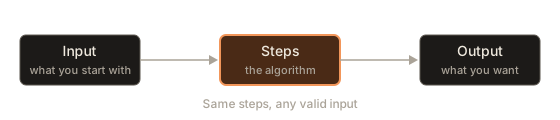
An algorithm is a finite list of precise steps that turns some input into a wanted output.
Each word in that sentence does work:
- Finite list. You can write it down and it has an end. It is not a vague intention.
- Precise steps. Each step has exactly one meaning.
- Input. The values the algorithm starts with. Different inputs give different outputs, but the same steps are used for all of them.
- Output. The answer, which is what you wanted in the first place.
The picture below is the whole idea in one frame.
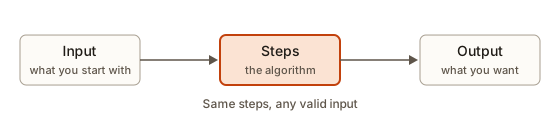 An algorithm turns input into output through a fixed list of steps
The word comes from the name of a ninth-century mathematician, al-Khwarizmi, whose books taught people step-by-step methods for arithmetic. You already know several algorithms. Long multiplication on paper is one. Looking up a word in a dictionary is another. Crossing a road safely (look right, look left, look right again, cross if clear, otherwise wait and repeat) is a third, and it even contains a decision and a loop, which you will meet shortly.
The five properties
Not every list of instructions counts as an algorithm. A proper algorithm has five properties. Computer scientists use these as a checklist, and so will you.
| Property | What it means | Fails when |
|---|---|---|
| Input | Zero or more values it starts with | It depends on a value nobody gave it |
| Output | At least one result | It does work but never reports an answer |
| Definiteness | Each step is unambiguous | A step says "some", "a bit", "a good number" |
| Finiteness | It stops after a limited number of steps | A loop never reaches its exit |
| Effectiveness | Each step is simple enough to actually carry out | A step says "find the best answer" with no method |
Take each in turn.
Input. Some algorithms take no input at all. "Print the numbers 1 to 10" starts with nothing and always does the same thing. Most useful algorithms take at least one value, because they are meant to be reused.
Output. An algorithm that computes an answer and keeps it to itself is useless. The output may be printed, returned or stored, but it must exist.
Definiteness. Compare these two instructions for making tea: "add some sugar" and "add 2 spoons of sugar". The first fails because two different people would do two different things. The second passes. In a program, vague steps are impossible to write, since the language forces you to be exact, so definiteness is the property that you meet as soon as you start translating.
Finiteness. An algorithm must stop. Consider "keep subtracting 3 from the number until it becomes 0". If you start at 9 this works: 9, 6, 3, 0. If you start at 10 it goes 10, 7, 4, 1, -2, -5, and it never lands exactly on 0, so it never stops. The steps are definite, but they are not an algorithm for every input. You will see this run in a moment.
Effectiveness. Every step has to be something a person with a pencil could actually do in a limited time. "Sort the list" is not an effective step inside an algorithm whose job is to sort a list, because it hides the entire problem. "Compare the first two items and swap them if they are in the wrong order" is effective.
Notice that correctness is not on the list. The five properties describe what makes something an algorithm. Whether it gives the right answer is a separate question, and we will spend much of the course on it. A set of steps that always stops and always prints 42 is a valid algorithm. It is just a poor one for most problems.
Variables: labelled boxes
Before the first worked example you need one more tool. Algorithms remember things while they run, and they do it with variables.
A variable is a named box that holds one value. The name is the label on the box. You can look at what is in the box, and you can replace the contents with something new. When you replace the contents, the old value is gone.
Writing largest = 4 means: put the value 4 into the box labelled largest. Later, writing largest = 9 means: throw away what is in that box and put 9 there instead. The box is the same box. Only its contents changed.
The single = in programming is not the equals sign from mathematics. In mathematics, x = 5 states that two things are equal. In most programming languages, x = 5 is a command: make x hold 5. You can read it aloud as "x becomes 5" or "set x to 5". Because it is a command, a line such as count = count + 1 is perfectly sensible even though it would be nonsense as mathematics. It means: take the current value in count, add 1, and put the result back in count.
The picture below shows three input boxes that never change and one box, largest, whose contents change as an algorithm runs.
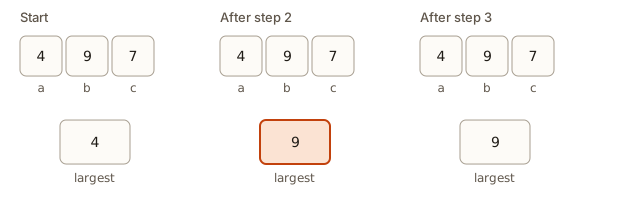 The variable largest holds 4, then 9, then stays 9 while a, b and c never change
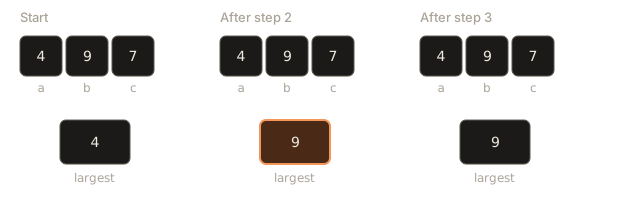
Keep this picture in mind. Most of the trace tables later in this module are just a record of what is in each box after each step.
Three building blocks
Surprisingly, every algorithm you will meet in this course is built from just three kinds of structure.
Sequence means steps run one after another, top to bottom. "Boil water, then add the tea bag, then wait three minutes." The order matters. Adding the tea bag after you have already poured away the water gives a different result.
Selection means choosing between paths based on a yes/no question. "If the cup is empty, refill it; otherwise carry on." Selection is also called branching, and in code it is the if statement.
Iteration means repeating steps. "Keep stirring until the sugar has dissolved." Iteration is also called looping, and in code it is for and while.
That is the full list. A huge sorting algorithm, a search engine and a video game are all arrangements of sequences, selections and iterations. If you can follow those three, you can follow any algorithm, and that is why this module spends its time on them.
Worked example 1: the largest of three numbers
Problem. Input: three numbers a, b and c. Output: the largest of them.
A good first move is to solve one case by hand and watch what you do. Take 4, 9 and 7. You look at them and say 9. But "I look and see" is not an algorithm. A computer cannot look at all three at once and just see. It can only compare two numbers at a time. So what steps did your eyes really perform?
One honest description: you held a "best so far" in mind, and you compared the others against it.
- Start with
largest = a. (The first number is the best we have seen so far.) - If
bis bigger thanlargest, setlargest = b. - If
cis bigger thanlargest, setlargest = c. - Output
largest.
Trace it by hand for a = 4, b = 9, c = 7, writing down what largest holds after each step.
Start:    largest = 4          (copied from a)
Step 2:   is 9 > 4?  Yes.      largest = 9
Step 3:   is 7 > 9?  No.       largest stays 9
Output:   9
Now run it. The program below is a direct translation of the four steps. The word if asks a yes/no question, the colon ends the question, and the indented line underneath runs only when the answer is yes. print is the output step.
Output:
largest: 9Change the three numbers at the top and run it again. Try putting the largest first (a = 9, b = 4, c = 7), then last (a = 4, b = 7, c = 9), and then all equal (5, 5, 5). The steps give the right answer each time. That is the point of an algorithm: it solves a whole family of inputs, not only the one you traced.
Test the awkward case on purpose. For 5, 5, 5, step 2 asks "is 5 greater than 5?" The answer is no, so largest stays 5, and so on. The output is 5, which is correct, because the largest of three equal numbers is that number. Strictly greater was the right comparison here. If you had written "greater than or equal" the result would be the same, but the program would do pointless extra assignments. Either way, notice that you checked a tie. Ties are where algorithms most often go wrong.
Worked example 2: counting a letter
Problem. Input: a word and a single letter. Output: how many times the letter appears in the word.
Think about how you would do this on paper for the word banana and the letter a. You would read the word from left to right, one letter at a time, and keep a tally. Each time you see the letter, you add a stroke to the tally.
- Set
count = 0. - For each character
chin the word, from first to last:- If
chis the same as the given letter, add 1 tocount.
- If
- Output
count.
Step 2 is a loop (iteration), and inside it is a decision (selection). The tally starts at 0 before the loop, which is important: if you forgot that step, the first count = count + 1 would have nothing to add to.
word = "banana", letter = "a"

ch   same as "a"?   count
-    -              0
b    no             0
a    yes            1
n    no             1
a    yes            2
n    no             2
a    yes            3

Output: 3
The program below reads the word and the letter from the Input box. Type banana on the first line and a on the second line, then press Run. The function input() reads one line that the user typed.
Output for the input banana then a:
3Notice == with two equal signs. A single = stores a value. A double == asks a question: are these two things equal? Mixing them up is one of the most common beginner errors, and we will return to it in the mistakes section.
Worked example 3: adding up the digits of a number
Problem. Input: a positive whole number. Output: the sum of its digits. For 4729 the answer is 4 + 7 + 2 + 9 = 22.
This one is more interesting because a number is not a list of digits. The computer holds 4729 as one value. You need a way to peel digits off. Two arithmetic tools do it:
- The remainder after division by 10 is the last digit. In Python, the remainder operator is
%, so4729 % 10is 9. - Whole-number division by 10 removes the last digit. In Python,
//divides and throws away the fraction, so4729 // 10is 472.
The algorithm peels the last digit, adds it to a running total, removes it from the number, and repeats until nothing is left.
- Set
total = 0. - While
nis greater than 0:- Add
n % 10tototal. - Replace
nwithn // 10.
- Add
- Output
total.
Here is the trace. Each row is one pass through the loop.
n      digit (n % 10)   total after   n after (n // 10)
4729   9                9             472
472    2                11            47
47     7                18            4
4      4                22            0
0 loop stopsOutput:
digit 9 total 9 n left 472
digit 2 total 11 n left 47
digit 7 total 18 n left 4
digit 4 total 22 n left 0
sum of digits: 22
The program prints a line per pass, which is exactly your trace table coming out of the machine. Printing the variables inside a loop is the cheapest tracing tool there is, and Lesson 4 returns to it.
Why does this stop? Finiteness again. Each pass divides n by 10 and discards the fraction, so n gets smaller every time, and a positive whole number cannot shrink forever. Eventually it reaches 0 and the test n > 0 fails. Whenever you write a loop, ask yourself the same question: what makes this loop run out?
Worked example 4: Euclid's greatest common divisor
Problem. Input: two positive whole numbers. Output: the largest whole number that divides both with nothing left over. For 48 and 18 the answer is 6.
A slow method would try every number from the smaller one downwards until one divides both. About 2,300 years ago, Euclid described a much faster method that is still used in cryptography today. It rests on one fact: the greatest common divisor of a and b is the same as that of b and the remainder of a divided by b. Replace the pair, and repeat until the remainder is 0. The last non-zero number is the answer.
- While
bis not 0:- Set
remaindertoa % b. - Set
atob. - Set
btoremainder.
- Set
- Output
a.
Notice the order of the three lines inside the loop. If you wrote a = b first and then remainder = a % b, the new a would already have been overwritten and you would compute the wrong remainder. Order within a sequence matters, which is the first of the three building blocks doing its job.
Output:
48 18
18 12
12 6
gcd: 6
Walk through the pairs. 48 % 18 is 12, so the pair becomes (18, 12). Then 18 % 12 is 6, so the pair becomes (12, 6). Then 12 % 6 is 0, so the pair becomes (6, 0), b is now 0, and the loop ends with a = 6.
This algorithm is finite for a clear reason: the remainder is always smaller than b, so the second number strictly decreases, and a whole number that keeps decreasing must reach 0. It is also effective, since each step is a simple division. And it needed only three passes where the slow method would have tried 18, 17, 16 and so on down to 6.
Worked example 5: guessing a secret number
Problem. Your friend thinks of a secret whole number from 1 to 1000. For each guess you make, they say whether it is correct. Find the number.
The simplest algorithm guesses 1, then 2, then 3, and so on until the friend says "correct". This is called linear search, because you walk along the possible answers in a line. It is definite, finite (at most 1000 guesses) and effective. It is also slow: if the secret is 1000, you need 1000 guesses.
Now change the rules slightly. After every wrong guess your friend also says "too low" or "too high". That extra information is valuable, and a clever algorithm will use it. Guess the middle, 500. If the friend says "too low", the secret must be in 501 to 1000, so half the possibilities are gone in one guess. Guess the middle of what remains, and keep halving. This is binary search.
Here is a smaller game, with numbers from 1 to 15 and a secret of 11, to see the shape.
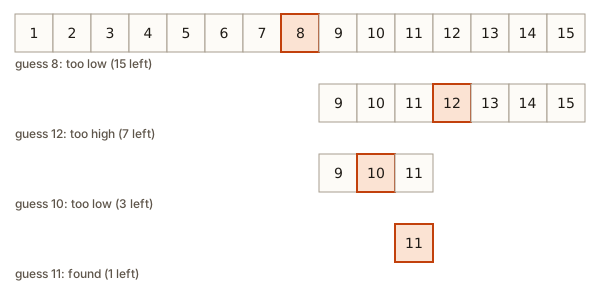 Guessing a number from 1 to 15 in four guesses by always picking the middle of what is left
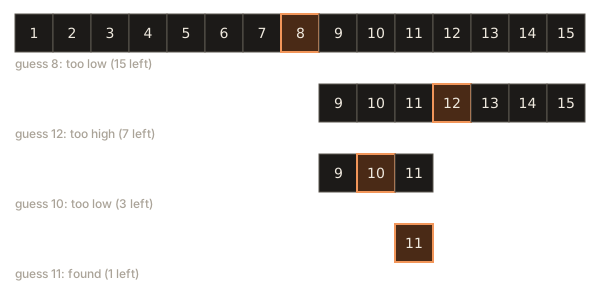
Each row shows the numbers still possible. The highlighted cell is the guess. Row one has 15 possibilities and guess 8 is too low, so row two keeps only 9 to 15. Guess 12 is too high, so row three keeps 9 to 11. Guess 10 is too low, so row four keeps only 11, and the next guess finds it. Four guesses, against eleven for linear search.
Step through the same idea in the visualizer below. Press the step button and watch two things: the shaded range shrinks to roughly half on every step, and the middle position is recomputed from the new range each time.
lo, mid and hi are labelled under the boxes. An outlined box is the middle, a dashed faint box is outside the search range, a filled box is the found item.
Look for 23 in the sorted list. The search range is the whole list.
What to watch: the algorithm never looks at the numbers it has ruled out, and it never needs to. The range is the whole state of the algorithm. As long as the range still contains the secret, the algorithm is correct, and each guess makes the range smaller, so it must finish.
Now compare the two algorithms by counting guesses. The program below plays both strategies against several secrets in the range 1 to 1000. The function name linear_guesses returns how many guesses linear search needed, and binary_guesses returns how many binary search needed. The // operator again means whole-number division, so (low + high) // 2 is the middle, rounded down.
Output:
1 1 9
500 500 1
999 999 9
1000 1000 10
worst case for binary search: 10
Read the table. Linear search needed as many guesses as the secret's value. Binary search never needed more than 10, and 10 is no accident. Halving 1000 repeatedly (1000, 500, 250, 125, 62, 31, 15, 7, 3, 1) takes about ten steps. If the range doubled to 2000, binary search would need just one more guess. This difference, between steps that grow in lockstep with the input and steps that barely grow at all, is the central theme of the whole programming-and-DSA phase. Here you only need to feel it: two correct algorithms for the same problem can differ enormously in cost.
Finiteness, made visible
Earlier we said that "subtract 3 until you reach exactly 0" is not an algorithm for every input. Here it is as a program. To keep your browser safe, the loop has a second condition that stops it after 8 passes. Real programs that loop forever do not have this safety net, and you would have to stop them by hand.
Output:
7
4
1
-2
-5
-8
-11
-14
The value of n steps over 0 without ever equalling it. The test n != 0 is always true, so without the passes < 8 guard the loop would never end. The fix is a better condition. If the goal is "keep subtracting while there is something left", write while n > 0. Then the loop ends once n is 1 or lower, for every starting value.
Whenever a loop stops depends on a condition that must eventually become false. A useful habit is to ask two things about every loop you write: what changes each pass, and does that change always move the condition towards false?
Correct is not the same as good
Many problems have several correct algorithms. Which is better depends on what you measure. Usually you measure time (how many steps it takes) and space (how much memory it uses). A third quality is plain clarity: an algorithm nobody can read is an algorithm nobody can trust.
Consider the problem "does this list of numbers contain a duplicate?" For the list [3, 9, 4, 7, 1, 8] the answer is no.
Algorithm A. Compare every item with every item after it. With 6 items that is 5 + 4 + 3 + 2 + 1 = 15 comparisons. If any pair matches, the answer is yes.
Algorithm B. Sort the list first, so equal numbers end up side by side. Then compare each item only with its right-hand neighbour. That is 5 comparisons for 6 items (plus the sorting work, which we are ignoring for now).
Run both and count the comparisons.
Output:
A found a duplicate: False after 15 comparisons
B found a duplicate: False after 5 comparisons
Both are right. For 6 items the difference is small. For a million items, Algorithm A makes about 500 billion comparisons, which is hours of work, while Algorithm B makes a million comparisons after sorting. Later in the phase you will learn exactly how to count this, using a notation called Big O. For now, remember the principle: when you finish an algorithm, ask whether a smarter idea exists.
How to design an algorithm
When a problem looks too big, follow a fixed routine. It works for beginners and for professionals.
- Restate the problem in your own words. Write the input and the output explicitly. "Given a list of marks, return their average" is better than "do something with marks".
- Solve one small example by hand. Pick a case with 3 or 4 values, solve it, and pay attention to what you actually did.
- Write down what you did as numbered steps. Replace every "I just see" with a rule a literal-minded helper could follow.
- Look for the three building blocks. Which steps happen in order? Where do you choose? What repeats?
- Test it on awkward inputs. Try the smallest possible input, equal values, negative numbers, and an input that is already in the best or worst order.
- Ask whether it can be simpler or faster. Only after it is correct.
Apply this routine to a slightly bigger problem. Problem: a teacher takes four test marks, drops the lowest, and reports the average of the other three.
Step 1. Input: four numbers. Output: one number, the average of the three highest.
Step 2. Marks 72, 55, 90, 81. The lowest is 55. The other three add up to 72 + 90 + 81 = 243. Divide by 3 to get 81.
Step 3. What did you do? You found the lowest, you removed its contribution, and you averaged the rest. An easier equivalent: add all four marks (298), subtract the lowest (55) to get 243, and divide by 3. This avoids having to delete anything from a list.
Step 4. Finding the lowest is the same "best so far" pattern as the largest of three, with the comparison reversed. That part is a loop with a decision. The rest is a sequence.
Step 5. What if the lowest mark appears twice, such as 55, 55, 90, 81? Only one of them is dropped. Subtracting the lowest value once handles that correctly: 281 - 55 = 226, and 226 / 3 is 75.33. And what if all four are equal, say 60? Total 240, minus 60 is 180, divided by 3 is 60. Fine.
Output:
lowest: 55
average of the best three: 81.0
A note on /. In Python, / divides and gives a number that can have a fraction, so the result is printed as 81.0. The // from earlier discards the fraction. You choose the one that matches your problem.
Notice how little of the work was typing. Almost all of it was deciding the steps. Once the steps were clear, the program was a short list of lines that followed them one by one.
What happens inside when the steps run
It helps to know what the machine does, so that the strict rules do not feel arbitrary.
When a Python program runs, an interpreter (a program that reads your program) starts at the first line and executes one line at a time. It keeps a table of variable names and their current values. A line like largest = b looks up the current value of b, then stores that value under the name largest, replacing whatever was stored there before. An if line evaluates its condition, which produces either true or false, and either runs the indented block or skips past it. A while line does the same test, runs the block and returns to the test, over and over.
This is why the programs in this lesson look exactly like the algorithms. The machine really does what the trace table says: update the boxes in order. The trace table is not a simplification. It is a faithful picture of the process, one line at a time.
It also explains the errors. A computer cannot interpret "some sugar", so a program with a vague step does not exist: the language will not let you write one. What you can write is a step that is precise but wrong. The machine will run it without complaint and give you the wrong answer. The difference between the two failures is worth remembering. A syntax error is a sentence the language cannot parse at all, and the program refuses to start. A logic error is a perfectly well-formed instruction that does not do what you wanted, and the program happily gives a wrong answer. Syntax errors announce themselves. Logic errors do not, which is why you need to trace and test.
Algorithm, program, pseudocode, flowchart
These four words are easy to mix up.
- An algorithm is the idea: the method, independent of any language or notation.
- A program is the algorithm written in a particular programming language so that a computer can run it.
- A flowchart draws the algorithm as boxes and arrows. Lesson 2 covers the symbols.
- Pseudocode writes the algorithm in compact, code-like lines with no strict grammar. Lesson 3 covers the conventions.
The same algorithm can be shown in all four forms. Euclid's method is one idea, and it can be drawn as a flowchart, written as pseudocode, or typed as a Python or C++ program. Interviews usually accept pseudocode or any language you pick, so what matters is the clarity of the idea.
Common mistakes
Vague steps. Writing "pick a good number" or "check the list". Replace each with a rule. If you cannot say how, you have not solved that part yet.
Forgetting to initialize. In the letter-counting example, count = 0 must come before the loop. If you leave it out, Python stops with an error like this:
NameError: name 'count' is not definedA NameError means you used a name that has no value yet. The fix is to give the variable its starting value first. A misspelt name gives the same error. For example, print(largst) prints NameError: name 'largst' is not defined.
Mixing up = and ==. = stores, == compares. Writing if ch = letter: is a syntax error. Writing ch == letter on a line by itself compares and throws the answer away, doing nothing useful.
Forgetting that input() gives text. Whatever the user types arrives as text, even digits. Comparing text to a number fails:
TypeError: '>' not supported between instances of 'str' and 'int'The fix is to convert: x = int(input()). You will use int() often.
Wrong indentation. The indented lines under if, for and while are the body. If you forget to indent, Python reports:
IndentationError: expected an indented block after 'if' statement on line 1A loop that cannot end. If a loop's condition never becomes false, the program runs forever. In a terminal you stop it with Ctrl+C. In the run box here, the page will time the program out. Check that something inside the loop moves the condition towards false.
Testing only one friendly input. An algorithm that works for 4, 9, 7 may fail for ties, negative numbers or a single item. Always try a smallest case, a tie and an unusual case.
Confusing the idea with the notation. If your algorithm is wrong, no amount of beautiful flowchart or tidy code will fix it. Fix the idea first.
A debugging walkthrough
Here is a program that is supposed to print the largest of three numbers. A beginner wrote it:
a = 4
b = 9
c = 7

largest = 0
if a > largest:
    largest = a
if b > largest:
    largest = b
if c > largest:
    largest = c
print(largest)
It prints 9, so it looks fine. Do not stop there. Apply the "awkward input" rule. What if all three numbers are negative, say a = -4, b = -9, c = -7?
Trace it:
Start:                largest = 0
if -4 > 0?  No.       largest stays 0
if -9 > 0?  No.       largest stays 0
if -7 > 0?  No.       largest stays 0
Output: 0
The program prints 0, which is not even one of the inputs. The right answer is -4. The trace shows exactly where the idea is wrong: starting largest at 0 assumes at least one number is bigger than 0. The fix is to start from one of the inputs, as the earlier version did with largest = a.
Look at what happened. The program passed the happy test and failed a different one. No error message appeared. Only the trace revealed the hidden assumption. This is the whole case for tracing and for choosing tests deliberately, and Lesson 4 builds on it.
Where algorithms show up
Once you learn to see them, algorithms are everywhere.
- A map application finds the shortest route between two places. That is a graph algorithm, and you will meet it in a later module.
- A search engine finds the pages that match your words among billions, in a fraction of a second. It relies on clever searching, close in spirit to binary search.
- Your phone's contact list keeps names in sorted order so that finding a name takes a few guesses instead of a long scan.
- Online payments use Euclid's method (in an extended form) inside the cryptography that keeps card numbers safe.
- A spell checker, a recommendation feed, a spreadsheet formula and a video game's enemy movement are all algorithms.
In interviews, the pattern repeats. You are given a small problem. You are expected to restate it, work an example, state the steps, say what happens on an edge case, and say roughly how long it takes. That is precisely the routine from this lesson.
Practice
Do each exercise on paper before you check the solution. Where an exercise says to run code, type it into a Python run box.
- Write an algorithm to find the smaller of two numbers. State the input and output first.
Solution
Input: two numbers a and b. Output: the smaller one.
- If
ais less thanb, outputa. - Otherwise output
b.
One comparison is enough. If a and b are equal, step 2 outputs b, which equals a, so the answer is still right. Tracing a = 7, b = 3: is 7 less than 3? No, so output 3.
- Write an algorithm that counts how many times a given letter appears in a word, then trace it for
"level"and the letter"l".
Solution
Set count = 0. For each character in the word, if it equals the letter, add 1 to count. Output count.
Trace for level and l: l is a match (count 1), e no, v no, e no, l match (count 2). Output 2.
- Run your largest-of-three steps on
5, 5, 5. What is the output, and is it correct?
Solution
largest starts at 5. Is 5 greater than 5? No. Is 5 greater than 5? No. Output 5. It is correct: when all values are equal, that value is the largest.
- Which of the five properties does each step break? (a) "Add a pinch of salt." (b) "Repeat the next step forever." (c) "Find the best move." (d) A recipe that begins "Take the flour" without saying how much flour or where it comes from.
Solution
(a) Definiteness: "a pinch" is not exact. (b) Finiteness: it never ends. (c) Effectiveness: it hides the whole problem and gives no method that can be carried out. (d) Input: the algorithm needs a quantity of flour it was never given, so the input is missing or underspecified.
- Trace the digit-sum algorithm on
n = 305by hand. What is the total, and why does the middle 0 not cause trouble?
Solution
Pass 1: digit is 5, total 5, n becomes 30. Pass 2: digit is 0, total stays 5, n becomes 3. Pass 3: digit is 3, total 8, n becomes 0. The loop stops. Total 8.
The 0 digit adds nothing, and n is still 30, which is greater than 0, so the loop keeps going. The loop stops only when n reaches 0, not when a digit is 0.
- Modify the digit-sum program so it also counts how many digits the number has. For 4729 it should print 22 and 4.
Solution
Add a second variable that starts at 0 and goes up by 1 on every pass.
n = 4729
total = 0
digits = 0

while n > 0:
    total = total + n % 10
    digits = digits + 1
    n = n // 10

print(total, digits)
Output: 22 4.
- Use Euclid's method by hand to find the gcd of 84 and 36. Write down each pair.
Solution
84 % 36 = 12, so the pair becomes (36, 12). 36 % 12 = 0, so the pair becomes (12, 0). The loop stops and the answer is 12. Check: 12 divides 84 (7 times) and 36 (3 times), and no bigger number divides both.
- In the guessing game from 1 to 100, with "too low" and "too high" answers, what is the largest number of guesses binary search could need? Work it out by halving 100 repeatedly.
Solution
Halve the range and count: 100, 50, 25, 12, 6, 3, 1. That is 7 halvings, so at most 7 guesses. You can confirm with binary_guesses from this lesson by running it for every secret from 1 to 100 and taking the maximum, which is 7.
- The following steps are meant to find how many numbers in a list are bigger than 10. Find the bug by tracing the list
[12, 3, 15]. Steps: setcount = 1; for each numberxin the list, ifx > 10then add 1 tocount; outputcount.
Solution
Trace: count starts at 1 (the bug). 12 is bigger than 10, so count is 2. 3 is not, so count stays 2. 15 is bigger, so count is 3. The output is 3, but only two numbers are bigger than 10. The counter must start at 0. Starting a tally at the wrong value is an initialization bug, and it shifts every answer by the same amount.
- Design an algorithm that takes a list of numbers and outputs the second smallest value, assuming at least two different values. Describe the steps, then say what edge cases you would test.
Solution
One approach: keep two variables, smallest and second. Start smallest as the first item and second as "nothing yet". For each other item x: if x is smaller than smallest, move smallest into second, then set smallest = x. Otherwise, if x is different from smallest and (second is nothing yet or x is smaller than second), set second = x. Output second.
The "move the old value first" step is the important one. Without it you lose the old smallest, which is the bug from the second-largest example in Lesson 4.
Edge cases: two items only; the smallest appearing twice ([1, 1, 2] should give 2 if "second smallest" means the second distinct value); a list already in ascending order; a list in descending order; negative numbers.
What you now know
- An algorithm is a finite list of precise steps from input to output, and the same steps solve every valid input.
- It must have input, output, definiteness, finiteness and effectiveness. Correctness is a separate question.
- Variables are labelled boxes that hold one value, and
=in code means "store", not "is equal to". - Every algorithm is built from sequence, selection and iteration.
- You can design one by solving a small example by hand, writing down what you did, and testing awkward inputs.
- Two correct algorithms can differ enormously in cost, as linear search and binary search showed.
- A logic error gives a wrong answer with no warning, which is why you trace and test on purpose.