Why this matters
Writing the same loop again and again is slow, and every hand-written loop is a chance for an off-by-one error. The STL solves this with two ideas that work together. Iterators describe positions inside a container, and algorithms do the common work, such as sorting, searching, counting and reversing, on any range that those positions describe. The algorithm does not care whether the range is a vector, a list or a deque. It only needs the iterators, so one sort call can sort any container that supports it.
Interviewers ask about this lesson's ideas in a very direct way. Binary search on a sorted array, the two-pointer walk on a sorted array, and the sort-then-scan pattern are among the most common solutions in the interview room. This lesson teaches the iterator rules those solutions depend on, then shows each algorithm in a working program.
Start with a bookmark
An iterator is a bookmark. It marks one item inside a container, and you can move it along. A book with a bookmark still has its pages, and the bookmark tells you where you stopped. An iterator works the same way. It does not copy the item. It points at the item in the container.
Three operations make up almost all the iterator work you will do:
*itreads or writes the item the iterator points at.++itmoves the iterator to the next item. Most containers also allow--itto move back.it == otherorit != othertells you whether two iterators point at the same place.
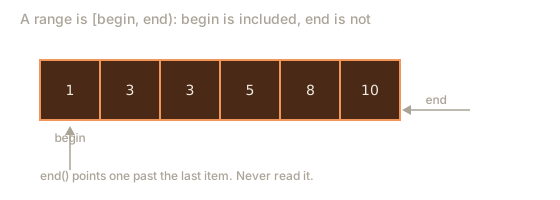
Every container gives you two special iterators. begin() points at the first item. end() points one past the last item. The end iterator is a stop sign, not a real item. You must never read *end(), because there is nothing there to read.
This pair of markers is the half-open range [begin, end). The first marker is included and the second is not. The picture below shows the range for a sorted vector, with the first item inside and the end marker outside.
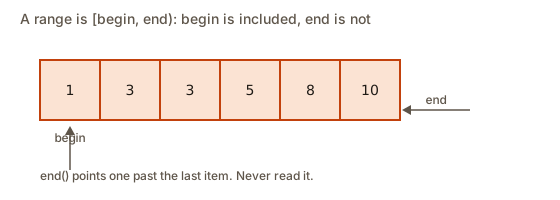 A half-open range: begin points at the first item and end points one past the last, so the stop sign is not an item
Half-open ranges have three advantages that explain why the STL uses them everywhere:
- The length of the range is
end - begin. You do not need a special case for the empty range, becausebeginandendare equal then, and the length is 0. - A loop is written as
for (it = begin; it != end; ++it), which works for every range, including the empty one. - Two ranges that touch, such as
[a, b)and[b, c), cover the whole of[a, c)with no overlap and no gap.
Iterators come in kinds. A random access iterator, which vectors and deques provide, can jump forward or back by any number of steps with it + k in O(1). A bidirectional iterator, which lists, sets and maps provide, can move one step at a time in either direction. Some algorithms need random access. For example, sort requires random access, so it does not work on a list, as the common mistakes section shows. That is why a list has its own sort member and why you usually sort a vector.
Iterators have a cost you must respect. An iterator stays valid only while its container keeps the same layout. Lesson one showed that growing a vector can move every item to a new block. Changing a set or a map does not move other items, but erasing the item an iterator points at makes that iterator invalid. Always take a fresh iterator after a change, unless the container's documentation says the old one stays valid.
Algorithms: the tools you call
An algorithm is a function in the <algorithm> header, or in <numeric> for arithmetic like sums. It takes iterators, runs in a loop internally, and does one job. You call it with a range and sometimes a value or a rule.
| Algorithm | What it does | Cost |
|---|---|---|
sort(b, e) | Sorts ascending | O(n log n) |
reverse(b, e) | Reverses the order | O(n) |
*max_element(b, e), *min_element(b, e) | Largest or smallest value | O(n) |
accumulate(b, e, init) | Sum, from <numeric> | O(n) |
count(b, e, x) | How many values equal x | O(n) |
find(b, e, x) | Iterator to the first x, or e | O(n) |
unique(b, e) | Moves repeats of neighbours to the end | O(n) |
binary_search(b, e, x) | Is x present? | O(log n), needs a sorted range |
lower_bound(b, e, x) | First value not less than x | O(log n), needs a sorted range |
upper_bound(b, e, x) | First value greater than x | O(log n), needs a sorted range |
next_permutation(b, e) | The next arrangement in dictionary order | O(n) |
Notice the phrase "needs a sorted range" on the search rows. Binary search depends on the order, and it gives no error on unsorted input. It simply returns the wrong answer. The next section shows how wrong.
The algorithms that return an iterator do not return an index. find gives you an iterator, and lower_bound gives you an iterator. To turn an iterator into an index, subtract the start: it - v.begin(). That works only for random access iterators, and it gives the number of steps between them.
A note on the names
count in <algorithm> takes a range and a value. The vector member size() gives the total number of items, and it does not take a value. Mixing up the two is a common slip. The member is v.size() and the algorithm is count(v.begin(), v.end(), x).
Sorting: the step most problems need
sort(v.begin(), v.end()) sorts a vector in ascending order using the usual comparison <. That covers numbers, strings and pairs. For a different order, pass a third argument: a comparator, which is a rule that says whether one item should come before another. A comparator returns true when the first argument should come first.
The usual form is a lambda, which is an unnamed function written where it is used. A lambda starts with square brackets, lists its parameters in round brackets, and has a body in curly brackets:
sort(v.begin(), v.end(), [](int a, int b) { return a > b; }); // largest firstA comparator must be a strict weak ordering. That is a technical phrase with a plain meaning: it must never say that an item comes before itself, and for equal items it must say neither comes first. A common bug is <= in a comparator. It can crash sort on some inputs, because the algorithm relies on the rule that equal items are not less than each other.
Sorting costs O(n log n). The sort does not know the values, so it compares them, and it needs about n log n comparisons in the worst case. The STL's sort is an introsort, which combines quicksort and heapsort so the worst case stays O(n log n). You can rely on that bound in an interview.
Worked example 1: the algorithms in action
This program uses the most common algorithms on one vector. It needs no input.
The output is:
has 5: 1
has 6: 0
3 starts at 1, stops before 3
copies of 3: 2 2
sum 30
max 10
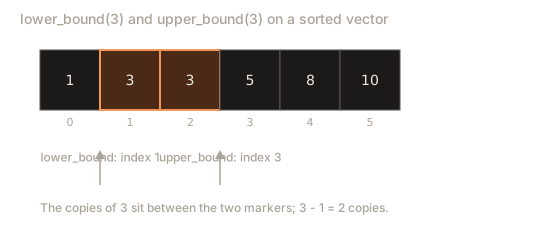
The vector is already sorted, which the three search algorithms require. binary_search returns a plain true or false, so it prints 1 for 5 and 0 for 6. The next two lines use lower_bound and upper_bound to find where the copies of 3 begin and end. lower_bound gives the first position where 3 could go without breaking the order, which is the first copy, at index 1. upper_bound gives the first position after the last copy, at index 3. The difference, 2, is the number of copies. The count call gives the same answer by scanning, which costs O(n) instead of O(log n). Both answers agree, and the search version is the faster one on large data.
The sum is 30, which accumulate computes by adding each value to a running total that starts at the third argument, 0. The max_element call returns an iterator, so the star reads the value it points at. It is 10.
Binary search: halving the range
Binary search is the algorithm behind all three search functions. It works on a sorted range. It looks at the middle item. If the middle equals the target, the search is done. If the target is smaller, the search keeps the left half. If larger, it keeps the right half. Each step halves the range, so a range of a million values needs about 20 steps.
The animation below shows the halving on a sorted array. Watch how the window gets smaller at each step.
lo, mid and hi are labelled under the boxes. An outlined box is the middle, a dashed faint box is outside the search range, a filled box is the found item.
Look for 23 in the sorted list. The search range is the whole list.
Here is the key point. Binary search depends on the sorted order. If the order is broken, the search throws half the range away for the wrong reason, and it may miss values that are present. That is exactly what happens with unsorted data, and the next program shows it. It calls binary_search on the vector 5 2 9 1 6 without sorting, and then sorts it and tries again.
The output is:
find 9: 1
find 1: 0
find 6: 0
find 5: 0
after sort, find 9: 1
The three values 1, 5 and 6 are all in the vector, and the search says they are missing. The value 9 is found only by luck, because the search happened to look at it. Once the vector is sorted, the search is correct, and 9 is found for the right reason. The program gives no warning on the unsorted call, so the only defence is to know when the data is sorted. Sort first, or prove that the input is already in order, before you search.
Trace the unsorted search for 1. The range is 5 2 9 1 6, of size 5. The middle index is 2, which holds 9. Since 1 is less than 9, the search keeps the left half, indexes 0 and 1, which hold 5 and 2. Neither is 1, so the search says no. The 1 sits at index 3, in the half that was thrown away. The halving was wrong because the left half does not contain the smaller values, so the search could never find the 1.
The lower bound and the upper bound
lower_bound and upper_bound are the most useful of the three, because they answer questions the plain search cannot. Given a sorted range and a value x:
lower_boundreturns the first position where a value that is not less thanxappears. Ifxis missing, the answer is the position wherexwould be inserted to keep the order.upper_boundreturns the first position where a value greater thanxappears.
Together they give you the count of x in O(log n), and they give you the count of values in any range [lo, hi] with two calls, one for lower_bound(lo) and one for upper_bound(hi). The picture below marks the two positions for the value 3 in a sorted vector.
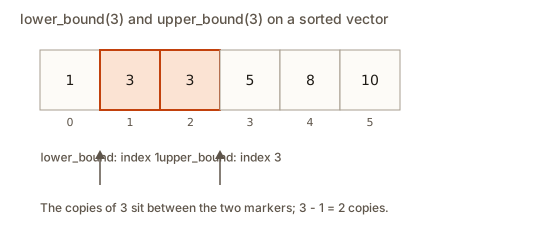 A sorted vector with markers at the lower bound and upper bound of the value 3, showing the two copies between them
Worked example 2: range counting with binary search
A shop stores its prices in no order. Customers ask many times how many prices fall between a low value and a high value, both included. The efficient plan is to sort the prices once, then answer each question with two binary searches. Sorting costs O(n log n) once, and each query costs O(log n). Scanning the whole list for each query would cost O(n) per query, which is too slow when there are many queries.
Type this into the Input box. The first line holds the count of prices, the second line holds the prices, then the number of queries, then one line with lo hi for each query.
7
14 3 9 21 9 5 30
3
5 9
10 20
40 50The output is:
3
1
0
After sorting, the prices are 3, 5, 9, 9, 14, 21, 30. The first query asks for prices from 5 to 9. The lower_bound of 5 is at index 1, the value 5 itself. The upper_bound of 9 is at index 4, the value 14, which is the first value greater than 9. The difference is 3, which covers the values 5, 9 and 9. The second query asks for 10 to 20. The lower bound of 10 is the value 14 at index 4. The upper bound of 20 is the value 21 at index 5, so the answer is 1. The third query, from 40 to 50, has nothing in range. Both bounds are the end of the vector, index 7, so the difference is 0.
Notice that the code never writes a[lower] or any other index that might be out of range. The bounds always return a valid position, including end(), and the subtraction of two positions in the same vector is safe.
Writing your own lower bound
Knowing how the library works is the best defence against misusing it. Here is a version of lower_bound written by hand, for a sorted vector of ints. It keeps a half-open range of possible answers, from lo up to hi without including hi, and it stops when the range is empty.
int lowerBoundIndex(const vector<int>& a, int x) {
    int lo = 0, hi = (int)a.size();
    while (lo < hi) {
        int mid = lo + (hi - lo) / 2;
        if (a[mid] < x) lo = mid + 1;
        else hi = mid;
    }
    return lo;
}
The loop keeps one promise. Every position before lo holds a value less than x, and the answer lies somewhere in the range from lo to hi. When the middle value is less than x, the answer must come after the middle, so lo moves to mid + 1. When the middle value is not less than x, the middle might be the answer, so hi moves to mid, which keeps it inside the range. When lo and hi meet, the range is one point, and that point is the answer.
Trace the vector 1 3 5 8 with x equal to 5. The range starts as [0, 4). The middle index is 2, which holds 5. Since 5 is not less than 5, hi becomes 2. The range is now [0, 2), with middle index 1, which holds 3. Since 3 is less than 5, lo becomes 2. The range is empty, so the function returns 2, the index of the first 5. For x equal to 4, the same steps happen, and the function returns 2 as well, which is where 4 would be inserted. For x equal to 9, every middle value is less than 9, so lo climbs to 4, which is the size of the vector. The three results are 2, 2 and 4, and the snippet in the next paragraph prints them.
Two details prevent common bugs. The middle is written as lo + (hi - lo) / 2, not (lo + hi) / 2, because adding two large indexes can overflow an int before the division. The branch that sets hi = mid must not subtract one, because the middle may be the answer. A version that writes hi = mid - 1 skips the answer whenever the value at the middle is exactly equal to x.
Compile the function with the library call to see that both give the same answer:
vector<int> a = {1, 3, 5, 8};
cout << lowerBoundIndex(a, 5) << " " << lowerBoundIndex(a, 4) << " " << lowerBoundIndex(a, 9) << endl;
cout << (lower_bound(a.begin(), a.end(), 5) - a.begin()) << endl;
These print 2 2 4 and then 2. The hand-written version and the library agree.
Two pointers: walking from both ends
The two-pointer technique is a pattern that solves many interview problems in one pass. It is used on a sorted array. Put one pointer, called lo, at the start, and another, called hi, at the end. Compare the sum of the two values at the pointers with the target. If the sum is too small, move lo forward, because a larger value is needed. If it is too big, move hi backward, because a smaller value is needed. Each step moves one pointer, so the walk takes O(n) steps.
The animation below shows the walk on a sorted array, with the two pointers closing in on each other.
sum: not computed yet
The left and right pointers are labelled under the boxes. Outlined boxes are the pair being added, filled boxes are the pair that works.
Find two items that add up to 14. One pointer starts at each end.
Why does this work? When the sum is too small, the current lo value cannot pair with any value at or before hi, because every such pairing gives an even smaller sum. So moving lo forward discards nothing that could have worked. The same reasoning applies when the sum is too big and hi moves backward. Sorting is what makes this argument hold.
Worked example 3: counting pairs that add to a target
The next program reads a list of numbers and a target. It sorts the list, then uses two pointers to find every pair of different positions whose values add to the target. It prints the first pair it finds and the total count of pairs. Type this into the Input box:
6 10
9 1 6 3 7 4The output is:
1 9
pairs 3
After sorting, the list is 1, 3, 4, 6, 7, 9. The pointers start at 1 and 9. Their sum is 10, which matches, so the program prints 1 9, counts one pair, and moves both pointers inward. The next pair is 3 and 7, which also sums to 10, so the count goes to 2. Then the pointers sit on 4 and 6, another match, and the count is 3. After that lo and hi cross, and the loop ends.
Two details matter. First, the walk moves both pointers after a match, because each value can pair only once in this version. Second, the program uses lo < hi as the loop condition, so a single value never pairs with itself. If a value appears twice and the target is double it, the pointers would still need care, and the practice questions explore that case.
The total cost is O(n log n) for the sort plus O(n) for the walk, so the whole job is O(n log n). Without sorting, a hash map would solve the same question in O(n) on average, as lesson three showed. Pick the tool by what the problem already gives you.
Permutations: every arrangement once
A permutation is an arrangement of the items in a range. next_permutation changes the range into the next arrangement in dictionary order, and it returns true. When the range is already in its last arrangement, it wraps back to the first and returns false. If you start from the sorted order, repeated calls list every arrangement exactly once.
The loop shape matters. A do ... while loop prints the current arrangement first, then asks for the next one. A plain while checks first and would skip the starting arrangement. The next program prints every distinct arrangement of a list that may contain duplicates. Sorting first, and letting next_permutation handle duplicates, avoids repeats.
Type this into the Input box:
3
2 1 2The output is:
1 2 2
2 1 2
2 2 1
total 3
The values sorted are 1, 2, 2. The first arrangement is the sorted one. next_permutation moves to 2 1 2, which is the next arrangement in dictionary order, and then to 2 2 1. After that the range wraps, the function returns false, and the loop ends. The count is 3, not 6, because the two 2s are identical and next_permutation skips arrangements that look the same. Without sorting, the function would begin in the middle of the order and miss some arrangements.
The number of distinct arrangements of n items with no repeats is n factorial, written n!. For n equal to 10 that is about 3.6 million, so a permutation search is only practical for small inputs. Interviewers use permutations to test whether you can explain why the cost explodes.
Sorting with a comparator and erasing duplicates
Sorting and then removing repeats is a pattern you will use constantly. The STL calls the combination the erase-remove idiom. unique moves each run of equal neighbouring values to the end of the range, and it returns an iterator to the start of the leftover tail. erase then cuts the tail off. Because unique only compares neighbours, you must sort first, so that equal values sit next to each other.
The next program reads records of a name and a score. It sorts by score, highest first, with ties ordered by name. Then it removes records that repeat exactly, which here means the same name and the same score. Type this into the Input box:
6
Leo 80
Amy 95
Leo 80
Ben 80
Amy 95
Cara 70The output is:
Amy 95
Ben 80
Leo 80
Cara 70
kept 4
The sort puts the highest score first. Among the three 80s, the names decide, so Ben comes before Leo. The two Amy 95 records are next to each other, and so are the two Leo 80 records. unique compares each record with the one before it. When it finds a repeat, it moves the repeat to the end and skips it. The erase call then removes the leftover tail. The result has four records, and kept 4 confirms it.
The lambda is written with auto parameters, which is a C++14 feature. The compiler works out the types of a and b from the vector. The comparator uses > on the score so the order is highest first, and < on the name for the tie rule. A comparator that breaks ties in a fixed way makes the output the same every time, which matters for tests.
Notice that unique does not change the size of the vector. It only moves values. That is why the erase call is required. A learner who writes unique(v.begin(), v.end()); alone and then prints v.size() will see the old size, with the removed values still counted.
Member functions and free functions
Some containers have their own version of an algorithm, which is called a member function. A set and a map have find and lower_bound as members, and those members use the tree structure to answer in O(log n). The free function lower_bound(s.begin(), s.end(), x) also compiles for a set, but it only has the iterators to work with. A set iterator moves one item at a time, so the free function takes O(n) steps, even though it makes only O(log n) comparisons. The rule is simple: for a set or a map, call the member.
Here is the member version in use:
set<int> s = {1, 3, 5, 8};
auto it = s.lower_bound(4);
cout << *it << endl;
This prints 5, the first value not less than 4. The same member-versus-free split applies to a list. A list has its own sort, reverse and remove members, because the free sort needs random access iterators, which a list does not provide. When a container offers a member with the same name, prefer it. It knows the layout of its own nodes and can do the job faster or with fewer copies.
The split also explains a slowdown you may not expect. Passing a set to the free find compiles and gives the right answer, but it walks the set one item at a time, and a reviewer will ask why you did not use s.find(x). Making the choice visible in your code is part of writing clean STL code.
Iterators that go wrong
Iterator mistakes are the most common source of crashes and strange output in STL code, so this section shows the rules with examples. Lesson one covered the rule for vectors that grow. The same rules apply here.
- An iterator is valid only for the container it came from. A vector iterator and a list iterator are different types, so the compiler stops you if you mix them.
- Erasing an item invalidates its iterator. Take the return value of
erase, as lesson one showed. end()is not an item. Dereferencing it is undefined behaviour. This matters most with the search functions, which returnend()when nothing is found.- A range must have
beginbeforeend. Passing them in the wrong order gives undefined results.
Common mistakes and the messages you will see
Mistake 1: sorting a list with the free function. sort needs random access iterators, and a list has bidirectional ones. Here is the real message from g++ 15:
error: no match for 'operator-' (operand types are 'std::_List_iterator<int>' and 'std::_List_iterator<int>')The message is confusing because it points deep inside the library. The useful part is _List_iterator, which tells you the iterator belongs to a list. The fix is to copy the values into a vector, sort the vector, and copy back, or to use the list's own sort member, which the library provides for lists.
Mistake 2: forgetting the header. A learner calls sort without #include <algorithm>:
error: 'sort' was not declared in this scope; did you mean 'short'?The fix is the include line. The compiler's hint about short is a guess, and it is wrong here. Each algorithm lives in a header, and <algorithm> covers most of them. accumulate is in <numeric>.
Mistake 3: binary search on unsorted data. The program above showed that binary_search returns false for values that are present. There is no compile error and no runtime error. The only sign is a wrong answer. Sort the range first, or assert that it is sorted before you search.
Mistake 4: dereferencing end. A learner writes *lower_bound(v.begin(), v.end(), 99) on a vector whose largest value is smaller than 99. The result is end(), and the dereference reads past the vector. Check the iterator against end() first.
Mistake 5: a comparator that is not a strict weak ordering. A learner writes the comparator [](int a, int b) { return a <= b; }. It may appear to work on small inputs, but on some inputs sort can read past the end of the range and crash. Use < or > for the comparison.
Mistake 6: calling unique without sorting. unique removes only neighbouring repeats. On {4, 2, 4} it removes nothing, because no two neighbours are equal. Sort first.
Debugging walkthrough: a search that misses a value
A learner writes a program that checks whether 1 is present in the list 5 2 9 1 6. The program calls binary_search and prints 0. The learner is sure the value is there.
Work through the code.
- Print the vector before the search. It prints
5 2 9 1 6, so the 1 is present. - Look at the search call. It is
binary_search(v.begin(), v.end(), 1), which is correct in form. - Check the precondition. The vector is not sorted. Binary search needs sorted order, and this order is not sorted at all.
- Trace the first step by hand. The middle index is 2, which holds 9. Since 1 is less than 9, the search keeps the left half, which holds 5 and 2. The 1 sits at index 3, in the half that was thrown away, so the search never reaches it.
- The fix is to sort first. After
sort(v.begin(), v.end())the vector is 1, 2, 5, 6, 9, and the search finds 1.
The lesson is that a search function reports only what it found. When the answer is wrong, first check the precondition, which here is the sorted order. The same checklist works for any STL algorithm with a precondition.
Variations and edge cases
A few details change the answer for beginners.
binary_searchon an empty range returns false.lower_boundon an empty range returns the same iterator asend().lower_boundandupper_boundon a value that appears nowhere return the place where it would be inserted, not an error.next_permutationon a range with one item returns false immediately, so ado ... whileloop prints the single arrangement once.max_elementon an empty range returnsend(), and reading it is undefined behaviour. Checkempty()first.uniquekeeps the first of each run of equal neighbours. It keeps the order of the values it keeps.- A two-pointer walk needs a sorted range. Without sorting, moving a pointer does not guarantee that the sum will move in the right direction.
Interview view: patterns with names
Several patterns from this lesson come up again and again, and interviewers expect you to name them.
- Binary search on a sorted array. O(log n) per search. Use it for "does this value exist" and for "where would it go" questions.
- Two pointers on a sorted array. O(n) for the walk after an O(n log n) sort. Use it for pair sums and for removing or merging in place.
- Sort then scan. Sorting makes equal values neighbours, which turns a duplicate question into a neighbour check. Use it when the order of the output does not matter.
- Count by bounds. Two
lower_boundorupper_boundcalls give a count in O(log n) on a sorted range. - Next permutation. Start sorted, use the do-while loop, and expect n factorial results for distinct items.
For each answer, state the cost and the reason. "O(n log n) to sort, then O(n) for the two pointers, so O(n log n) overall" is a clear and correct answer for the pair-sum question.
Practice
The solutions are hidden below each exercise. Try each one before you open it.
- Using a single
lower_bound, count how many values in the sorted vector{2, 4, 4, 7, 9}are less than 5. Expected output:3.
Solution
vector<int> v = {2, 4, 4, 7, 9};
cout << (lower_bound(v.begin(), v.end(), 5) - v.begin()) << endl;
The first value not less than 5 is 7 at index 3, so there are three values before it.
- Print every distinct arrangement of
{1, 1, 2}, one per line. Expected output:1 1 2,1 2 1,2 1 1.
Solution
vector<int> p = {1, 1, 2};
sort(p.begin(), p.end());
do {
    for (int x : p) cout << x << " ";
    cout << endl;
} while (next_permutation(p.begin(), p.end()));
Sorting first and using next_permutation skips the repeats.
- Find the first value in a sorted vector that is at least 50, and print
noneif no value qualifies. Test with{10, 40, 60, 80}, which should print60, and with{10, 20}, which should printnone.
Solution
auto it = lower_bound(v.begin(), v.end(), 50);
if (it == v.end()) cout << "none" << endl;
else cout << *it << endl;
Check end() before dereferencing, because lower_bound returns it when nothing qualifies.
- Use
countto find how many times the value 7 appears in the unsorted vector{7, 1, 7, 3, 7}. Expected output:3.
Solution
vector<int> v = {7, 1, 7, 3, 7};
cout << count(v.begin(), v.end(), 7) << endl;
count scans the whole range, so it does not need a sorted vector.
- Sort the strings
{"pear", "fig", "apple"}by length first, then alphabetically for equal lengths. Expected output, one per line:fig,pear,apple.
Solution
vector<string> w = {"pear", "fig", "apple"};
sort(w.begin(), w.end(), [](const string& a, const string& b) {
    if (a.size() != b.size()) return a.size() < b.size();
    return a < b;
});
for (auto& s : w) cout << s << endl;
The lambda compares lengths first and alphabetical order second. apple has five letters and pear has four, so the order is fig, pear, apple.
- Use
uniqueto remove the adjacent repeats from{1, 1, 2, 3, 3, 3}in place. Print the result. Expected output:1 2 3.
Solution
vector<int> v = {1, 1, 2, 3, 3, 3};
v.erase(unique(v.begin(), v.end()), v.end());
for (int x : v) cout << x << " ";
cout << endl;
The values are already grouped, so unique is enough without a sort.
- Write a two-pointer function that returns true when a sorted vector contains two equal values that sum to the target, where the two values come from different positions. Test with
{1, 2, 4, 7}and target 6. Expected output:1, meaning true, because 2 and 4 add to 6.
Solution
bool hasPair(const vector<int>& a, int target) {
    int lo = 0, hi = (int)a.size() - 1;
    while (lo < hi) {
        int sum = a[lo] + a[hi];
        if (sum == target) return true;
        if (sum < target) lo++;
        else hi--;
    }
    return false;
}
The walk is the same as the worked example, but it stops at the first match.
- Find the first index where a sorted vector could insert the value 5 without breaking the order. Input
{1, 3, 5, 5, 8}. Expected output:2.
Solution
vector<int> v = {1, 3, 5, 5, 8};
cout << (lower_bound(v.begin(), v.end(), 5) - v.begin()) << endl;
lower_bound gives the first copy of 5, at index 2, which is also the place to insert a new 5 without moving the others.
- Debug this. A learner calls
binary_searchon the vector{5, 2, 9, 1, 6}to check whether 1 is present, and the answer is false. Explain why, and fix it.
Solution
The vector is not sorted, and binary search needs a sorted range, so its halving can throw away the half that holds 1. The fix is to call sort(v.begin(), v.end()) before the search. After sorting, the answer is true.
- Explain in three or four sentences why
lower_boundandupper_boundtogether count the copies of a value in O(log n), while a plain loop withcounttakes O(n). Name the precondition that both depend on.
Solution
Each bound is a binary search, so each costs O(log n) on a sorted range. The copies of a value form one block in the sorted order, and the difference between the two bounds is the block's size, which is the count. A plain count has to look at every item, so it costs O(n). Both depend on the range being sorted.
- Two steps: sort a vector
{5, 2, 8}in descending order with a lambda, then print the first element of the result. Expected output:8.
Solution
vector<int> v = {5, 2, 8};
sort(v.begin(), v.end(), [](int a, int b) { return a > b; });
cout << v[0] << endl;
The comparator puts the larger value first, so the top of the sorted vector is 8.
What you now know
- An iterator is a bookmark. A range is
[begin, end), andendis a stop sign, never an item. - Algorithms work on any range given by iterators. Sorting needs random access, so a list cannot use the free
sort. - A comparator must be a strict weak ordering. Use
<or>, never<=. - Binary search,
lower_boundandupper_boundneed sorted ranges. On unsorted data they give wrong answers without warning. - Sort first, then
uniqueanderaseremove repeats. Two pointers on a sorted array find pair sums in O(n) after the sort. - Iterators go stale after changes to their container. Take a fresh one, and check against
end()before you dereference.