Why this matters
Almost every interview question that begins with "have I seen this before?" needs a fast way to answer yes or no. A plain list makes you check every item. A hash table answers in about the same time no matter how many items it holds. C++ gives you that tool as unordered_map and unordered_set. This lesson shows what happens underneath, so the behaviour of those containers makes sense to you before you use them.
You will meet three ideas: the hash function, the bucket, and the collision. Every later lesson in this module builds on them.
Start with the problem: finding things in a list
Suppose you keep a list of 100,000 usernames and you want to know whether "maya" is in it. The only safe method is to start at the first name and compare each one. If "maya" is at the end, you make 100,000 comparisons. Computer scientists write that cost as O(n), where n is the number of items. The word "order" means "grows like". O(n) means the work grows in step with the list.
A sorted list helps. A binary search can find a name in about 17 comparisons, because 2 to the power 17 is 131,072. But sorting costs work, and every new name must go into the right place. You want something faster for the common case: a plain "is it here?" question.
The trick that makes this fast is to skip the search altogether. If you could compute, from the name alone, the exact spot where the name would be stored, you would go straight to that spot. One look would answer the question. A hash table does exactly that.
The mailbox idea
Picture a wall of five mailboxes numbered 0 to 4. You receive a letter for "cat". You do not walk along the wall looking for a box with the word "cat" on it. Instead you run a fixed recipe on the name. The recipe outputs a number from 0 to 4. You drop the letter in that box.
Later, someone asks for the letter for "cat". You run the same recipe. It gives the same number. You open that one box and look inside. You never touched the other four.
That is the whole idea. The recipe is a hash function. The boxes are buckets. The number the recipe gives is the bucket index. A hash table is a set of buckets plus the rule for choosing one.
The mailbox picture also shows the weak point. Two different names could be sent to the same box. You will see that problem, called a collision, in a few sections.
The hash function, step by step
A key is the thing you search by: a word, a number, a username. A hash function takes a key and returns an integer. Then you take that integer modulo the number of buckets. Modulo is the remainder after division. In C++ the operator is %. If there are 5 buckets, every remainder is 0, 1, 2, 3 or 4, and each one names a valid bucket.
So the full path from key to bucket is:
- Compute a number from the key (the hash).
- Take the remainder of that number divided by the bucket count.
- That remainder is the bucket index.
A good hash function has three properties:
- Deterministic. The same key always gives the same number. If it did not, you could never find a key again.
- Spread out. Different keys should tend to land in different buckets. If every key lands in bucket 0, the table is just a list in disguise.
- Fast. It should read the key once and do a little arithmetic.
Here is a concrete hash for strings, the one used in this lesson. It starts with 0. For each character, it multiplies the running value by 31 and adds the character's code. A character code is a number that stands for the character. The letter a has code 97 and c has code 99. After each step the value is reduced modulo the bucket count, so it stays small.
Work through cat with 5 buckets. The character codes are 99 for c, 97 for a and 116 for t.
| Step | Character | Calculation | Result |
|---|---|---|---|
| start | none | h = 0 | 0 |
| 1 | c = 99 | (0 * 31 + 99) % 5 | 4 |
| 2 | a = 97 | (4 * 31 + 97) % 5 = 221 % 5 | 1 |
| 3 | t = 116 | (1 * 31 + 116) % 5 = 147 % 5 | 2 |
So cat belongs in bucket 2. The steps are simple arithmetic, and you can check every one with a calculator. That is the point of a hash function: it is a recipe you can repeat exactly.
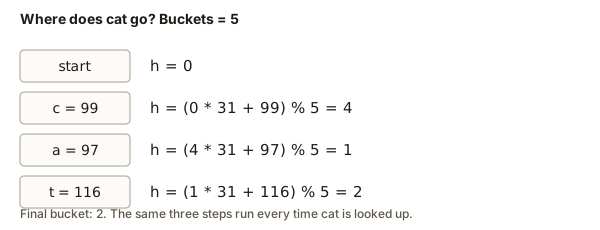 Three steps that place the key cat into bucket 2 of a five-bucket table
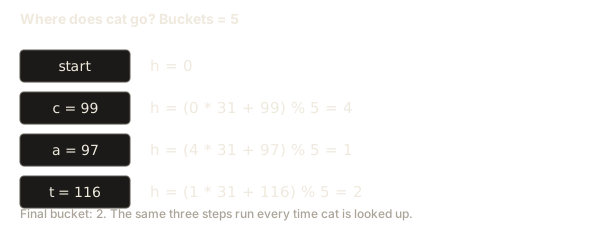
Notice that the hash does not look at the whole table. It only needs the key and the bucket count. That is why lookup does not get slower as you add more keys, as long as the keys spread across buckets.
Your first hash table program
Now write the whole idea as a program. The program below reads a bucket count from the first line of input, then reads words until the end of input. It puts each word in its bucket and prints the buckets in order.
To run it, paste the code into the editor. Then type the following into the Input box, with a line break after the number and the words on the second line:
5
cat dog bird fish antThe output is:
bucket 0:
bucket 1: fish
bucket 2: cat bird
bucket 3: ant
bucket 4: dog
Read the program line by line. vector<vector<string>> table(buckets); creates one empty list for each bucket. The vector type is C++'s resizable array. A vector of vectors is a list of lists. The loop for (const string& word : words) takes each word in turn. The & means the loop uses the word without copying it, and const promises not to change it.
The line table[hashString(word, buckets)].push_back(word); is the whole hash table in one statement. It computes the bucket, then appends the word to that bucket's list. Nothing is searched.
Look at the output. Bucket 0 is empty, so no key hashed there. Bucket 2 holds two words: cat and bird. Two keys share a bucket. Next you will see what that means.
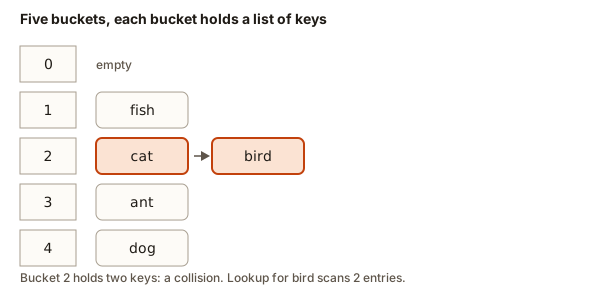 Five buckets drawn as boxes, with bucket 2 holding cat and bird
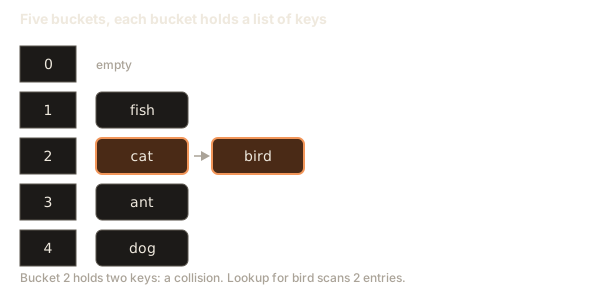
The bucket being used has a thick outline and an arrow. Keys in a row are chained in one bucket. The key being handled has a thick outline.
5 empty buckets. A key goes to bucket (sum of its character codes) mod 5.
Step through the animation above, and watch where each word lands. Pay attention to the moment when a second word lands in a bucket that already has one. That moment is a collision, and the next section explains it.
Collisions: two keys, one bucket
There are more possible keys than buckets. Any table with 5 buckets must put some keys together, because the number of words is unlimited while the number of boxes is fixed. When two different keys land in the same bucket, that is a collision.
A collision is not an error. It is normal. Every hash table must handle it. The question is what to do with the second key, and there are two standard answers.
Answer 1: chaining
With chaining, each bucket holds a small list. Keys that collide go into the same list. To find a key, you compute its bucket, then scan that short list one entry at a time.
In the output above, bucket 2 is a chain of two. To look up bird, you compute bucket 2, then check cat (not a match), then bird (a match). Two comparisons instead of five.
The chain is short when the table has enough buckets. The cost of a lookup is the bucket computation plus the length of one chain. If chains stay short, the lookup is fast.
Answer 2: open addressing
With open addressing, the table keeps one key per slot, and it never uses lists. When the target slot is taken, the table probes the next slot, then the one after that, until it finds a free slot. A lookup follows the same probe sequence and stops at a free slot, which proves the key is absent.
Open addressing uses less memory per entry, because it stores no list pointers. But it makes deletion harder, because a deleted key can break a probe sequence. Many libraries use it in some form. The C++ standard library's unordered_map and unordered_set use chaining in the common implementations. You do not need to implement either method to use the containers, but you should know they exist, because interviewers ask about both.
Open addressing, step by step
Use the same five words and the same five buckets, but this time each slot holds one word and nothing more. The hash values are the same as before: cat goes to 2, dog to 4, bird to 2, fish to 1, and ant to 3. Insert the words in the order cat, dog, bird, fish, ant.
- Insert
cat. Slot 2 is empty, socatgoes there. - Insert
dog. Slot 4 is empty, sodoggoes there. - Insert
bird. Its hash is 2, but slot 2 holdscat. Probe slot 3. It is empty, sobirdgoes there. - Insert
fish. Slot 1 is empty, sofishgoes there. - Insert
ant. Its hash is 3, but slot 3 holdsbird. Probe slot 4, which holdsdog. Probe slot 0, which is empty, soantgoes there. The probe wraps around from the last slot to the first.
Step through the insertions below. Watch which slot each probe checks.
The bucket being used has a thick outline and an arrow. Keys in a row are chained in one bucket. The key being handled has a thick outline.
5 empty buckets. A key goes to bucket (sum of its character codes) mod 5.
The finished table has one word per slot:
| Slot | 0 | 1 | 2 | 3 | 4 |
|---|---|---|---|---|---|
| Word | ant | fish | cat | bird | dog |
To find bird, compute its hash, which is 2. Slot 2 holds cat, so keep going. Probe slot 3, which holds bird. The lookup took two looks. Compare that with chaining, where the same lookup checks one list of two words.
Deletion is where open addressing gets tricky. Suppose you empty slot 3 after removing bird. Now look up ant. Its hash is 3, and slot 3 is empty, so a naive search stops and reports ant as missing. That answer is wrong, because ant sits in slot 0 after the probe. Real tables therefore mark a deleted slot as "deleted" rather than empty, so searches keep going past it. That detail is the main reason many libraries prefer chaining.
Open addressing also needs a free slot to stop a search that finds nothing. A table with no empty slot would be searched forever. Real tables grow before they fill up, which is one more reason the load factor matters.
Tracing a lookup that misses
A lookup is not only for keys that are present. The most common question is "is this key here?", and the answer is often no. A chained table answers no by checking every entry in one bucket and finding nothing. Here is that process for emu in the five-bucket table.
Compute the hash. The code for e is 101, so the first step is 101 % 5 = 1. The second step is (1 * 31 + 109) % 5 = 140 % 5 = 0, using the code 109 for m. The third step is (0 * 31 + 117) % 5 = 117 % 5 = 2, using the code 117 for u. So emu belongs in bucket 2.
Bucket 2 holds cat and bird. Compare emu with cat: no match. Compare emu with bird: no match. The bucket has no more entries, so the search ends and reports absent. That is two comparisons, and nothing else in the table was touched.
This is why a good hash matters for misses as well as hits. If all 1,000 keys sat in bucket 2, a miss would check all 1,000 entries. With a good spread, a miss checks only the handful of keys that share its bucket.
Comparing hash tables with other choices
A hash table is not the only way to store keys. Before you choose one, compare what each structure costs for the operations you need. The table below uses n for the number of stored keys.
| Structure | Find a key | Insert a key | Keeps keys in order | Typical use |
|---|---|---|---|---|
| Unsorted list | O(n) | O(1) at the end | Insertion order | Very small lists |
| Sorted array with binary search | O(log n) | O(n) to shift items | Yes | Data that rarely changes |
Balanced tree (map and set in C++) | O(log n) | O(log n) | Yes | Range and nearest-key queries |
Hash table (unordered_map and unordered_set) | O(1) average | O(1) average | No | Yes-or-no checks and counting |
The hash table wins on speed for plain membership and counting. It loses on order. If your question mentions "smallest", "next larger" or "in a range", a hash table cannot answer it directly, and you need the tree-based containers from lesson 3.
The unsorted list is not always bad. For five items, a scan is faster than computing a hash, because the hash arithmetic costs more than five comparisons. Big-O notation describes growth for large n. For tiny inputs the constant factors can decide the winner.
Counting collisions
A program can measure how crowded a table is. The next program reads a bucket count, then words. It counts the words that land in a bucket that already has a word. It then lists every bucket that holds more than one word.
Type this into the Input box:
3
cat dog bird fish antThe output is:
words: 5
collisions: 3
bucket 0 holds 3
bucket 2 holds 2
Two things to notice. First, collisions is 3 even though only 2 buckets are crowded. The count is not "how many buckets are shared". It is "how many words arrived at a bucket that was already occupied". Five words went into two occupied buckets, so three of them were arrivals at an occupied bucket. The first word in each bucket is free, and the rest are collisions.
Second, the table has three buckets and five words, so some collisions are guaranteed. Pigeonhole logic says that when you put more items than boxes, at least one box holds two items. Collisions are not bad luck. They are the arithmetic of a fixed number of buckets.
Load factor and rehashing
The load factor is the number of stored keys divided by the number of buckets. In the example with 5 buckets and 5 words, the load factor is 1.0. With 3 buckets and 5 words, it is about 1.67.
As the load factor climbs, chains get longer and lookups slow down. A C++ unordered_map watches this. Its max_load_factor() is the threshold. The C++ standard says the default is 1.0. When the load factor would pass that threshold, the container allocates more buckets, and then it places every key again into the new buckets. This step is called rehashing.
The cost of one rehash is proportional to the number of keys, which is O(n). But it happens only now and then, after the table has grown. Spread the big cost over all the inserts that led to it, and the average cost of one insert stays constant. This is called amortized O(1). Amortized means "averaged over a long sequence of operations".
You can check the threshold yourself. The next program prints the maximum load factor of an empty unordered_map. It does not print the bucket count, because that number depends on the library and changes as the table grows.
The output is:
max load factor: 1
empty? yes
size after one insert: 1
Why does the threshold matter so much? Suppose the table has 8 buckets and the load factor limit is 1.0. With 8 keys, a good hash puts about one key in each bucket on average. A lookup computes its bucket and then compares against about one key. If the table grew to 80 keys without rehashing, the average chain would be 10 keys, and every lookup would do about ten comparisons. The rehash step keeps that average near the limit.
Why the average is constant
People say a hash lookup is O(1) on average. The reasoning is short. A good hash spreads keys evenly, so each bucket holds about the load factor's worth of keys. The load factor is kept under a fixed limit, so the expected chain length is also under a fixed limit. A lookup pays for one hash computation and then for one short chain. Both costs are fixed, so the total does not grow with n.
The word "expected" matters. The average assumes the keys spread out like random numbers. A hostile or unlucky set of keys can break that assumption, which is why the worst case is O(n). For interviews, state both parts: O(1) average with a good hash, and O(n) worst case when every key collides.
Counting collisions
Choosing the number of buckets
The bucket count is a choice you make, and it affects how evenly the keys spread. Suppose a hash returns numbers that often share a common factor with the bucket count. If the bucket count is 8 and every hash is even, half the buckets stay empty. A prime bucket count avoids that trap, because a prime has no factors except 1 and itself. Many library implementations choose a prime bucket count for this reason. The C++ standard library implementation used in GCC does so, so you should not expect bucket_count() to be a round number such as 8 or 16.
You will not usually choose the count yourself. The container picks a size, and it grows the table on rehash. If you know roughly how many keys you will store, you can ask the container to reserve space in advance. The call m.reserve(1000) tells an unordered_map to prepare for about 1,000 keys, so it avoids several rehashes on the way. That helps speed, and it does not change any result.
What happens inside memory
This section shows what the computer does, for the curious. You do not need it to use a hash table, but it explains some surprising behaviour.
A chained table in memory has two parts. The first is an array of bucket heads, one slot per bucket. Each slot holds either nothing or a pointer to the first node of a list. The second part is the nodes themselves. Each node holds one key, its value, and a pointer to the next node in the same chain.
When you insert cat, the table computes the bucket index, allocates a new node in heap memory, and links it into the chain. The heap is the region of memory where a program allocates things that outlive a single function call. Because every node is a separate allocation, the nodes can sit far apart in memory. Walking a chain can jump from one part of memory to another. That is one reason a hash table is slower in practice than a plain array, even though both are O(1) on paper.
Here is another consequence. Each node stays at one address until it is erased, so a pointer or reference to a key stays valid after most inserts. A rehash moves the nodes into new bucket slots, so iterators into the table are invalidated, although the standard keeps the element references valid. You will see the practical rule in lesson 2.
A chained set you can build
The best way to understand chaining is to build it. The program below is a small class named ChainedSet. It has an array of buckets, a hash function, and two operations: insert and contains. It reads commands from the Input box. Each command is either add followed by a word, or has followed by a word.
Type this into the Input box:
add cat
add dog
add cat
has dog
has emuThe output is:
added
added
already there
yes
no
Read the class from the top. buckets is a vector of vector<string>, so each bucket holds a list of words. The hash function uses unsigned long long. Unsigned numbers wrap around on overflow instead of breaking, and that is the behaviour you want from a hash. The (unsigned char)c cast makes sure a letter with a code above 127 is still a positive number.
The method contains computes the bucket and scans the chain. The method insert calls contains first, so a word is never stored twice. It returns false when the word is already there. That return value is how the main loop prints already there.
The variable in main is named set. That name also exists as std::set, and the using namespace std line brings it in, so the local variable hides it inside main. The program still compiles, but a real project would call the variable words. Choose names that say what the variable holds.
Why a bad hash hurts
A hash function must spread keys out. The next program compares two hash functions on the same words. The bad one uses only the length of the word. The good one is the one from this lesson. It prints each bucket's count under both, and reports the longest chain for each.
Type this into the Input box:
5
cat dog bird fish antThe output is:
bucket  bad  good
0       0    0
1       0    1
2       0    2
3       3    1
4       2    1
longest chain: bad 3, good 2
The bad hash puts 3 of the 5 words into bucket 3, because cat, dog and ant are all three letters long. The good hash spreads them over buckets 1 to 4. The longest chain is 3 for the bad hash and 2 for the good one. With 5 keys this gap is small. With a million keys it becomes enormous: a bad hash can turn every lookup into a scan of nearly the whole table.
This is the reason real hash functions mix every character into the result. You will not write a production hash yourself. The C++ library provides std::hash for strings and numbers. Still, when you use a custom key type, you must write the hash yourself, and the lesson of this program applies directly.
Common mistakes
These are the mistakes beginners make with hashing. Each one is easy to avoid once you can name it.
- Thinking a collision loses data. With chaining, both keys stay in the table. Nothing is overwritten unless you assign a new value to an existing key. A collision only means a longer chain.
- Assuming the order of a hash table means something. The order in which the buckets are printed depends on the hash values, and nothing guarantees that a key comes out in any particular place. If you print a table and see
fishbeforecat, that is not a bug. Use a sorted container when you need order. - Using a weak hash. A hash that looks at only one feature of a key, such as its length or its first letter, sends many keys to the same bucket. The result is slow lookups that look correct.
- Forgetting the modulo. If you return the raw hash without taking it modulo the bucket count, the index is out of range. In C++ that is undefined behaviour. It often crashes with a message like
Segmentation faulton Linux, or silently writes into memory you do not own. Always reduce the hash to a valid index. - Overflow in a hash. The loop in this lesson takes the modulo after every step, so
hnever gets large. If you multiply and add without reducing,intoverflows after a few characters. Signed overflow is undefined behaviour in C++. Useunsignedorunsigned long long, or reduce at each step, as the programs here do.
Debugging a table that feels slow
Suppose you wrote a table and a lookup for a short word takes long. Here is a method you can use. It needs no special tools.
First, print the size of each bucket after you insert all the keys. The program in the bad-hash section does exactly this for two hash functions. If one bucket holds most of the keys, the hash is weak, or the bucket count is too small.
Second, check the load factor. If the number of keys is much bigger than the number of buckets, the chains are long even with a good hash. Use a larger table, or let unordered_map grow on its own.
Third, check that your key type has a good hash. If you use a custom struct as the key, a hash that returns the same number for every value puts everything in one bucket. The table then behaves like a list, and its lookups cost O(n). The code runs correctly, which makes this bug hard to notice. Only the speed gives it away.
A useful habit is to test with a small table on purpose. Set the bucket count to 3 and insert ten keys. You will see every collision in the output, and you will know that the lookup still works. The structure of the problem becomes visible when the table is small.
Interview angle
Interviewers often ask you to explain how a hash table works. A good answer has four parts. Say that a hash function maps a key to an index. Say that the table stores keys in buckets. Say that collisions happen because the key space is larger than the bucket count, and name chaining or open addressing as the fix. Finish with the cost: average O(1) for insert, lookup and delete, and worst-case O(n) when every key lands in one bucket.
Expect a follow-up about the worst case. A good answer mentions a weak hash function, or an adversary who chooses keys that all collide. Real systems defend against the second case with randomised hashing, so the hash depends on a secret seed chosen at run time.
Real uses
Hash tables sit under many everyday systems. A compiler keeps its symbol table, which maps each variable name to information about it, in a hash table. A web server stores session data keyed by a session token. A database index can use a hash to find a row by its key without reading the whole table. Caches, which you will meet in lesson 5, also rely on this structure. In every case the design question is the same: which key, which bucket count, and which way to resolve collisions.
Practice
- Change the bucket count in the first program to 3 and run it with the same words. Write down which bucket each word lands in before you press Run. Then compare with the output.
Solution
With 3 buckets, cat, bird and fish all hash to bucket 0, ant and dog to bucket 2. The output is bucket 0 with three words and bucket 2 with two. Your prediction should match the output.
- Use the hash in this lesson and compute the bucket for
antwhen there are 7 buckets. Show each step in a table like the one above.
Solution
For ant with 7 buckets: a is 97, so h = 97 % 7 = 6. Next n is 110: h = (6 * 31 + 110) % 7 = 296 % 7 = 2. Next t is 116: h = (2 * 31 + 116) % 7 = 178 % 7 = 3. So ant goes to bucket 3.
- Write a function
int countBucketsUsed(const vector<string>& words, int buckets)that returns how many buckets hold at least one word. Test it with the five words and 3 buckets. The answer should be 2.
Solution
Put each word's bucket into a set of used buckets, then return the size of that set. With the lesson's hash and these five words, buckets 0 and 2 are the only ones used, so the answer is 2.
- Modify the collision counter so it also prints the words in each crowded bucket, not just the count.
Solution
Keep a vector of words per bucket, the same as table in the first program. When the count is above 1, print the bucket index and all its words.
- Explain in your own words why 5 words in 3 buckets must produce at least 2 collisions.
Solution
There are 5 words and 3 buckets. At most 3 words can each have their own bucket, so at least 2 words arrive at a bucket that is already taken.
- Write a
badHashthat uses the first letter of the word, and count the collisions it produces for the five words in 5 buckets.
Solution
Use word[0] % buckets. cat, dog, bird, fish and ant have first letters c, d, b, f, a with codes 99, 100, 98, 102, 97. Modulo 5 gives 4, 0, 3, 2, 2. Bucket 2 holds two words, so there is one collision.
- Change
ChainedSetsocontainsreturns the number of comparisons it made. Test withhas dogafter adding the words in the example. Count one comparison for each word you check in the chain, including the match.
Solution
Count the loop iterations inside the chain scan, and return that count through a reference parameter. For has dog the chain for dog is checked and dog is found in the scan.
- Work out the load factor for 12 keys and 8 buckets. Say what happens to the chains if the load factor passes 1.0.
Solution
Load factor is 12 / 8 = 1.5. Above 1.0 the standard container rehashes. A chained table with a higher load factor has longer chains, so lookups cost more.
- Explain why a lookup in a chained table of 1,000 buckets with 1,000 keys costs about the same as a lookup with 1,000,000 buckets and 1,000,000 keys. Assume a good hash.
Solution
The load factor is 1 in both cases, so each chain has about one key on average. The cost depends on the load factor and the hash, not on the raw size.
- Describe what would go wrong if
hashOfreturnedhwithout the modulo. Predict the error and then test it with a small program.
Solution
Without the modulo, the bucket index can be larger than the number of buckets. Indexing a vector out of range is undefined behaviour. It can crash or read random memory.
- Write down, in three sentences, the difference between chaining and open addressing as if you were explaining it to a friend who has never coded.
Solution
Chaining puts colliding keys in a short list in the same bucket. Open addressing puts them in the next free bucket in the table itself.
- Find a real-world example of a collision that you use every day, such as two items that land in the same category, and explain how a system resolves it.
Solution
Any valid example works. A city sharing a postal code, or two songs with the same title, are good starting points. Explain the rule you use to pick one.
What you now know
- A hash function turns a key into a number. Taking that number modulo the bucket count gives the bucket index.
- A good hash is deterministic, spreads keys out, and is fast.
- A collision happens when two keys share a bucket. It is normal, and chaining keeps both keys in a list.
- The load factor is keys divided by buckets. Rehashing grows the table when the load factor passes the threshold.
- A lookup costs about O(1) on average, and O(n) in the worst case when every key shares one bucket.
- A weak hash is a common cause of slow tables, and it gives no error message.
The next lesson shows how C++ wraps this structure in unordered_map and unordered_set, and how their operators behave.