Why it matters
Divide and conquer is a way of solving a big problem by cutting it into smaller copies of the same problem. Each cut removes a large part of the work, so the total time drops from something slow to something fast. Binary search is the simplest example, and it is one of the most common questions in technical interviews. The habit it teaches is useful in every later lesson of this module: name the range you still need to check, and throw away every part that cannot hold the answer.
By the end of this lesson you will write binary search in C++ from memory, find the first and last position of a value that appears many times, use binary search to answer a question about a number, and explain why the search takes about log n steps.
Start with a simple question
Suppose someone gives you seven numbers in order: 2 5 8 12 16 23 38. They ask you to find the number 23. The simplest plan is to start at the left and check each number in turn. That takes up to seven checks. Now imagine one million numbers in order. The same plan takes up to one million checks, and on a slow machine that is noticeable.
There is a faster plan that uses the order of the numbers. Look at the middle number first. Suppose the middle is 12 and you want 23. Everything to the left of 12 is smaller than 12, so 23 cannot be there. You can throw away the whole left half with one check. The middle of what remains is 16 or 23 or 38, and you repeat the same move.
A printed phone book works the same way. You open it near the middle. If the name you want comes before the page you opened, you ignore the right half of the book. You never read every page. Each look removes half of what is left, and that is the idea behind divide and conquer.
Two words you will see everywhere
An array is a row of boxes. Each box holds one value, and all the boxes sit next to each other in memory. In C++ you can use std::vector<int> for this. Each box has a number called its index. The first box has index 0, the next has index 1, and so on. If an array has n boxes, the last index is n - 1.
A comparison is one check that asks which of two values is bigger, or whether they are equal. Searching and sorting are counted by comparisons, because a comparison is the work you do most often.
The three steps of divide and conquer
Divide and conquer solves a problem in three steps.
- Divide: split the problem into smaller problems of the same kind.
- Conquer: solve each smaller problem. You usually do this by calling the same function on the smaller piece. A function that calls itself is called a recursive function.
- Combine: join the smaller answers into the answer for the whole problem.
Binary search has almost no combine step. Once the half that can hold the target is chosen, the answer for that half is the answer for the whole. Merge sort, in the next lesson, needs a real combine step, because it has to join two sorted halves.
Every recursive function needs a base case. A base case is a situation simple enough to answer directly, with no further calls. For binary search the base case is an empty range. When there is nothing left to check, the target is not in the array, so the answer is -1.
Why cutting in half is fast
Count how many times you can halve a number before you reach 1. Eight halves to four, four to two, and two to one. That is three halvings. Sixteen takes four halvings. A thousand takes about ten, and a million takes about twenty.
The number of halvings needed to reach 1 is called the base 2 logarithm of the number. You write it as log n. You do not need to compute logarithms by hand. You only need the pattern: every time the input doubles, the number of steps grows by one.
| Items in the array | Halvings needed (about) |
|---|---|
| 8 | 3 |
| 1,000 | 10 |
| 1,000,000 | 20 |
| 1,000,000,000 | 30 |
Each step does a fixed amount of work, one comparison and a few index updates. So a binary search on n items does about log n steps. Computer scientists write this as O(log n). The letter O stands for "order of", and the expression describes how the work grows as the input grows. The constant parts of the work are ignored. O(log n) is far smaller than O(n) for large inputs, and that is why the choice of method matters.
Binary search, step by step
Binary search finds a target in a sorted array. Sorted means the values go from smallest to largest, with no value out of order. Binary search does not work on an unsorted array, because a comparison tells you nothing about the half you would throw away.
The search keeps two indexes, lo and hi, which mark the range that could still contain the target. At the start, lo is 0 and hi is the last index. Each step does four things.
- Compute the middle index,
mid, of the range fromlotohi. - If the value at
midequals the target, you have found it. - If the value at
midis less than the target, the target must be to the right ofmid. Setlotomid + 1. - Otherwise the target must be to the left of
mid. Sethitomid - 1.
The + 1 and - 1 matter. You already compared the value at mid, so you do not need to look at it again. If you wrote lo = mid instead, the range might never shrink, and the loop would run forever.
The rule that makes binary search correct is an invariant. An invariant is a statement that stays true during the whole loop. Here it is: if the target is in the array, it lies between lo and hi, including both ends. Each step keeps the invariant true, because you only throw away values that are proven too small or too big. When the loop ends, either you found the target or the range is empty and the target is not in the array.
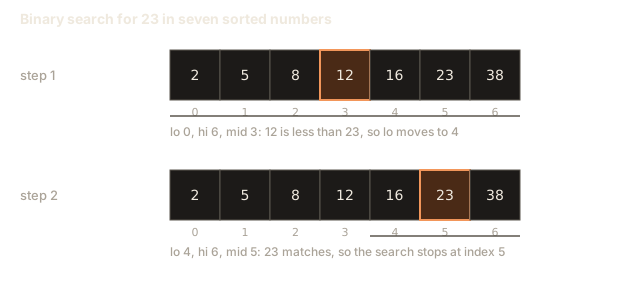
Step through the search below. Watch lo, hi and the middle move, and notice that each step leaves only one side of the array in play.
lo, mid and hi are labelled under the boxes. An outlined box is the middle, a dashed faint box is outside the search range, a filled box is the found item.
Look for 23 in the sorted list. The search range is the whole list.
After the animation, check three things. The range always gets smaller. The middle is always the index halfway between lo and hi. The search stops either at a match or when lo moves past hi. If you see the range stop shrinking, the loop has a bug.
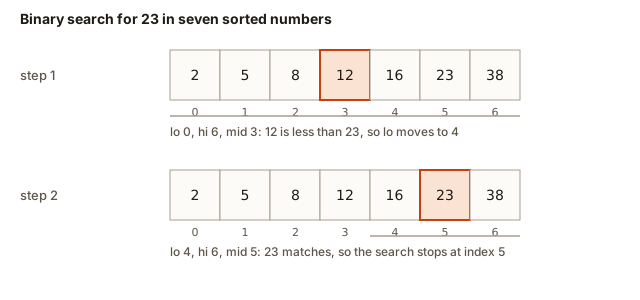 Binary search on seven sorted numbers, looking for 23, shown as the low, high and middle indexes at each step
The precise version in C++
Here is a complete program. It reads a sorted list, then reads a number of queries, and prints the index of each query, or -1 if the value is not in the list.
To try it, press Run. In the Input box, type the following, one value per line:
7
2
5
8
12
16
23
38
3
23
7
2
The first 7 is the number of values. The next seven lines are the sorted values. The 3 says there are three queries, and the last three lines are the queries. cin reads numbers separated by any spaces or line breaks, so you could also type all the numbers on one line. The output is:
5
-1
0
Read the code line by line. int hi = (int)a.size() - 1; converts the size to int first, because a.size() returns an unsigned type. Without the cast you can get surprising results in comparisons, which the common mistakes section explains. The loop runs while lo <= hi, which means the range still has at least one value. The line int mid = lo + (hi - lo) / 2; computes the middle.
Why not write (lo + hi) / 2? Because lo + hi can be bigger than the largest int, which is about 2.1 billion in C++ on most computers. When the sum is too big, the result wraps around to a negative number, and the index is wrong. The form lo + (hi - lo) / 2 never adds two large numbers, so it is always safe. Many people think the difference does not matter for small arrays. It matters in interviews, and it matters when the array is large.
Trace the search by hand
Tracing means writing down the state of every variable after each step. This is the most reliable way to understand a loop. Here is the search for 23 in the array 2 5 8 12 16 23 38.
| Step | lo | hi | mid | value at mid | Decision |
|---|---|---|---|---|---|
| 1 | 0 | 6 | 3 | 12 | 12 is less than 23, so set lo to 4 |
| 2 | 4 | 6 | 5 | 23 | Equal to the target, so return 5 |
Notice that the range went from seven values to three values in one step, and the answer was found in two steps. Now trace the search for 7, which is not in the array. The table has three rows, and the loop ends with lo greater than hi.
| Step | lo | hi | mid | value at mid | Decision |
|---|---|---|---|---|---|
| 1 | 0 | 6 | 3 | 12 | 12 is greater than 7, so set hi to 2 |
| 2 | 0 | 2 | 1 | 5 | 5 is less than 7, so set lo to 2 |
| 3 | 2 | 2 | 2 | 8 | 8 is greater than 7, so set hi to 1 |
After step 3, lo is 2 and hi is 1. The range is empty, so the loop stops and the answer is -1. This is the common ending for a search that fails.
Recursion and the call stack
The same search can be written as a recursive function. Instead of a loop, each step calls the function again on the smaller range. This version makes the divide and conquer pattern very visible, because each call is one divide step and the base case is the empty range.
Before you read the code, you need to know what happens when one function calls another. The computer keeps a stack of frames. A frame is a small block of memory that holds one call's parameters and local variables. When a function is called, its frame is pushed on the stack. When it returns, its frame is popped. The stack grows and shrinks like a pile of plates.
Press Run. You do not need any input for this program. The output is:
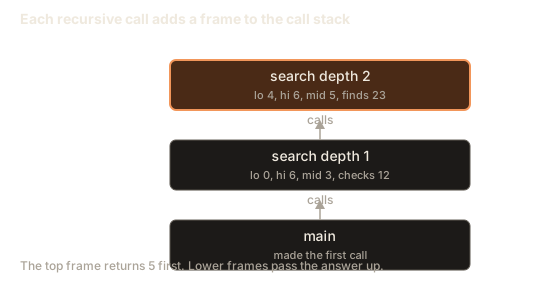
depth 1: check index 3 (value 12)
depth 2: check index 5 (value 23)
answer 5
The first line shows the first call, which checks index 3. The second line shows the call one level deeper, which finds the answer. The if (lo > hi) return -1; line is the base case. The program never reaches it here, because the target is found first. If you search for 7 instead, the calls go one level deeper each time until lo is greater than hi, and then the base case returns -1.
Look at the picture of the stack below. Each box is one frame. The bottom box is main, which made the first call. Each time a call finds a smaller range, a new frame is pushed. When the answer is found, the frames are popped one by one, and the value travels back up to main.
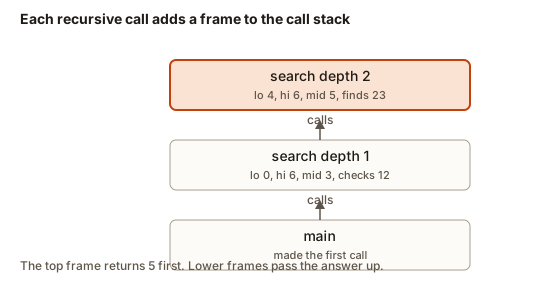 Recursive binary search frames stacked on top of main, each frame holding its own lo, hi and mid
Step through the recursive version below. Watch how each call adds a frame and how the frames are removed when the answer is found.
The top of the stack is the first box. The call on top is the one running. A filled box is returning a value.
Call factorial(4). It goes on top of the stack.
The stack has one frame for each level of halving. With log n levels, the stack needs O(log n) memory. The loop version in the previous section needs only a few variables, so its extra memory is O(1), which means a fixed amount that does not grow with the input. In an interview, either version is acceptable if you explain the difference.
First and last position with duplicates
So far every value was different. Real data often repeats values. Suppose the array is 1 2 2 2 2 3 5 5 8 and you want the first place where 2 appears. If your search stops at the first match it finds, it might return index 2 or 3 or 4, depending on where the middle falls. A plain search does not promise the first match.
The fix is to keep searching after a match, on the left side, to find the first place where the value is at least the target. Programmers call this a lower bound. Similarly, the first place where the value is greater than the target is the upper bound. The number of copies of the target is the upper bound minus the lower bound.
These two helpers use a different style of range. Instead of an inclusive range lo..hi, they use a half-open range lo..hi where hi is one past the last index that is still possible. The loop runs while lo < hi, and hi starts at n, not n - 1. When the loop ends, lo is the answer. This style avoids many off-by-one mistakes, because the empty range is simply lo == hi.
Press Run and type this in the Input box:
9
1 2 2 2 2 3 5 5 8
2
The output is 1 4, which means the value 2 first appears at index 1 and last appears at index 4. Run it again with 7 as the last line of input instead. The output is -1 -1, because 7 is not in the array.
The first == n check is needed. If every value is smaller than the target, lowerBound returns n, and reading a[n] would read past the end of the vector. Reading past the end is one of the most dangerous mistakes in C++, because the program may crash or print garbage without any warning. Always check the bounds before you read an index.
Walk through the first call on 1 2 2 2 2 3 5 5 8 with target 2. The range starts as 0..9, so lo is 0 and hi is 9. The middle is 4, and a[4] is 2. That is not less than 2, so hi becomes 4. The range is now 0..4, the middle is 2, and a[2] is 2 again, so hi becomes 2. The range is 0..2, the middle is 1, and a[1] is 2, so hi becomes 1. The range is 0..1, the middle is 0, and a[0] is 1 which is less than 2, so lo becomes 1. Now lo equals hi, which equals 1, and the loop stops. The lower bound is index 1.
Binary search on the answer
The most powerful use of binary search is not searching an array at all. It is searching over possible answers. This works when the question has a yes-or-no test that changes once. Imagine a list of answers where all the "no" answers come first and all the "yes" answers come after them. You can then find the boundary in log n steps, even if the list of answers is huge and you never write it down.
Here is a classic example: find the integer square root of n, which is the largest whole number x such that x * x is less than or equal to n. For n = 17 the answer is 4, because 4 * 4 = 16 fits and 5 * 5 = 25 does not. A test "is mid * mid at most n?" is yes for small values and no for large values, so binary search finds the boundary.
Type 17 in the Input box and press Run. The output is 4. Try 16 and you get 4, because 16 is a perfect square. Try 1000000000000000000 and you get 1000000000.
Two details matter here. The variable type is long long, a 64-bit integer, because mid * mid can be as large as 10^18, which does not fit in a normal int. The upper limit 1000000000 is the square root of 10^18, so no answer can be bigger. If the upper limit were too big, the product mid * mid could overflow even with long long.
The variable ans remembers the best yes so far. When a test passes, we store it and move lo up, because a bigger value might also pass. When it fails, we move hi down. This pattern appears in many problems: cutting the cost, the time, the distance or the size until the answer is the smallest or largest value that still works.
Complexity summary
| Version | Time | Extra memory |
|---|---|---|
| Loop binary search | O(log n) | O(1) |
| Recursive binary search | O(log n) | O(log n) for the call stack |
| First or last position | O(log n) | O(1) |
| Search on the answer | O(log range) | O(1) |
The time is the same for every successful and unsuccessful search, because the number of halvings does not depend on where the target is. The memory column explains why the loop is usually preferred in production code: it cannot run out of stack space on a very large input, and it is a little faster.
Common mistakes and the messages you will see
Most binary search bugs are off-by-one errors. The range is one index too big or too small, so the target is skipped or the loop never ends. Here are the mistakes beginners make most often.
Running binary search on an unsorted array. The search will still print an answer, but the answer is meaningless. The first step of any binary search is to ask whether the data is sorted. If it is not, sort it first, or use a different method.
Setting lo = mid or hi = mid in a loop that tests equality. If the loop uses lo <= hi and the update is lo = mid, the range can stop shrinking. For example, if lo is 2 and hi is 2, the middle is 2 and lo = mid leaves everything the same. Use mid + 1 and mid - 1 in the equality version. The half-open version uses lo = mid + 1 and hi = mid on purpose, but its loop condition is lo < hi, which makes the range shrink.
Using (lo + hi) / 2 on large numbers. This can overflow, as explained earlier. Use lo + (hi - lo) / 2.
Forgetting to include the header or to call the function. If you call a function before it is declared, the compiler stops. A typical error looks like this, and it comes from a real compile of a broken program:
main.cpp: In function 'int main()':
main.cpp:7:13: error: 'binarySearch' was not declared in this scope
    7 |     cout << binarySearch(a, 5) << "\n";
      |             ^~~~~~~~~~~~
The message says the name binarySearch does not exist where you used it. Check the spelling and check that the function is written above main, or that you declared it earlier. The line number tells you where to look, and the caret points at the name.
Comparing an index with the size of a vector. The size of a vector is an unsigned number, and comparing it with a signed int produces a warning. It is not an error, but it can hide mistakes. This is what the compiler prints when you compile with the -Wall -Wextra flags:
warning: comparison of integer expressions of different signedness: 'int' and 'std::vector<int>::size_type' {aka 'long unsigned int'} [-Wsign-compare]The fix is to make the index an int and cast the size: int hi = (int)a.size() - 1;. The lessons in this module use that form everywhere.
Reading past the end of the array. When lo can become n, reading a[lo] is out of range. In C++ this is not checked for vector by default. The result can be a crash with a message such as Segmentation fault, or a wrong value with no message at all. Always test the range or the index before reading it.
Debugging a binary search
When a binary search is wrong, the fastest way to see the problem is to print the state at the start of each loop. The next program is a trace. It prints lo, hi, mid and the value at mid before each decision. It searches for 7, which is not in the array, so the last line says not found.
Press Run. The output is:
lo=0 hi=6 mid=3 a[mid]=12
lo=0 hi=2 mid=1 a[mid]=5
lo=2 hi=2 mid=2 a[mid]=8
not found
Read the lines as a story. The first line checks the middle, 12, and decides the answer is to the left. The second line checks index 1, which is 5, and decides the answer is to the right. The third line checks index 2, which is 8, and decides the answer is to the left, so hi becomes 1. Now lo is 2 and hi is 1, so the loop stops.
Now imagine you wrote hi = mid; in the else branch by mistake. Change that one line and run the same input again. The first two lines are the same. On the third line, lo=2 hi=2 mid=2 happens, the value 8 is bigger than 7, so hi becomes mid, which is still 2. The same line appears again and again, and the program never stops. A trace that repeats the same line is the signature of an infinite loop, and the fix is to change the update so the range shrinks.
Use this method whenever a search misbehaves. Print four values, run a small input by hand, and compare the output with the trace you wrote on paper. If they disagree, the first line that differs shows the bug.
Variations and edge cases
Good binary search code handles every edge case. Test these before you trust a solution.
- Empty array. The range starts as
lo = 0andhi = -1. The loop conditionlo <= hiis false, so the loop never runs and the answer is-1. This is why the(int)a.size() - 1form matters: for an empty array,a.size() - 1without the cast would wrap around to a huge number. - One value. The range is
0..0. The loop checks that value once and then stops. - Target smaller than the first value. The search keeps moving
hito the left until the range is empty. The answer is-1. - Target bigger than the last value. The search keeps moving
loto the right until the range is empty. The answer is-1. - Target equal to the first or last value. These are the cases where an off-by-one error shows up first. Trace them by hand.
Interview questions and real uses
Interviewers often ask four things about binary search: write it without a bug, find the first occurrence, explain why it is O(log n), and search on an answer. The first two are about careful code. The third is about explaining each step's effect on the range. The fourth tests whether you recognise a yes-or-no test that changes once.
Binary search is also used outside the classroom. A database index is a sorted structure, and a lookup uses the same halving idea. The git bisect command helps find the commit that broke a program by testing commits in the middle of the history and keeping the half where the problem appears. Each test removes half of the commits, which means a history of a thousand commits needs about ten tests.
Reading the loop line by line
Here is what each line of the loop program does, in order.
int lo = 0; and int hi = (int)a.size() - 1; set the range to the whole array. The cast (int) changes the unsigned size into a normal signed number, so the subtraction can go below zero. For an empty array, hi becomes -1, and the range is empty from the start.
while (lo <= hi) keeps the loop running while the range has at least one index. When lo becomes bigger than hi, the range is empty, and the loop ends.
int mid = lo + (hi - lo) / 2; picks the middle index. Division in C++ drops the fraction, so for an even-length range the middle is the lower of the two middle positions. For the range 0 to 5, (5 - 0) / 2 is 2, so mid is 2, not 3. The choice does not affect correctness, as long as the rest of the code uses the same rule.
if (a[mid] == target) return mid; is the success case. It returns as soon as the target is found, so the function never checks an index twice.
if (a[mid] < target) lo = mid + 1; throws away the left half and the middle. The next line, else hi = mid - 1;, throws away the middle and the right half. Both branches remove at least one index, which is what guarantees the loop ends.
return -1; runs only when the loop ends without a match. That is the only way to report "not found" in this function, so the caller must check for -1 before using the index.
Each line supports the invariant from earlier. If the target is in the array, it lies between lo and hi. The first update keeps it, because everything at or below mid is smaller than the target. The second update keeps it for the same reason in the other direction. So when the loop finishes with lo above hi, the range is empty and the target cannot be in the array.
Binary search and hash tables
Beginners often ask why they should not use a hash table, which can find a value in one step on average. A hash table is fast for exact lookups, and it does not need sorted data. The price is memory for the table, and the loss of order. A hash table cannot answer "what is the smallest value that is at least 50?" or "how many values are between 10 and 20?" Binary search on a sorted array answers those questions in O(log n) time, and it uses almost no extra memory. Choose the tool that matches the question. Interviewers test whether you know the difference, and a good answer names the question first and the data structure second.
A checklist for designing a binary search
When a new problem looks like it might need binary search, walk through this list before you write code.
First, state the question as a yes or no test. For a sorted array the test is "is the value at mid less than the target?". For the square root, it is "does mid * mid fit?". If you cannot state a test that flips once, binary search is probably the wrong tool.
Second, decide what the range means. The closed form, lo..hi with both ends included, suits a search for one exact match. The half-open form, lo..hi where hi is one past the last candidate, suits boundary questions such as the first position of a value. Pick one form and write every update to match it.
Third, write the update for each outcome. Every branch must remove at least one candidate, or the loop can run forever. Check that the update uses mid + 1 or mid - 1 in the closed form, or mid only in the half-open form.
Fourth, check the loop condition. The closed form stops when lo is above hi. The half-open form stops when lo equals hi. Trace the empty range and the one-value range on paper, because both sit at the edges of the loop.
Fifth, decide what to return in the failure case. For a search, return -1. For a boundary, return the boundary, which may be the size of the array. Callers depend on that choice, so write it into your comment.
Sixth, test the edge cases: an empty array, one value, the first value, the last value, a value below the range, a value above the range, and duplicates if the problem allows them. A quick test that covers these catches almost every off-by-one error.
Practice
Try these before you open the solutions. Work on paper first, then check with a program.
- Trace the loop search for the target 16 in
2 5 8 12 16 23 38. Write a table with the columns lo, hi, mid and the value at mid.
Solution
Step 1: lo 0, hi 6, mid 3, value 12. 12 is less than 16, so lo becomes 4. Step 2: lo 4, hi 6, mid 5, value 23. 23 is greater than 16, so hi becomes 4. Step 3: lo 4, hi 4, mid 4, value 16. The value equals the target, so the answer is index 4.
- Explain in one or two sentences why
lo + (hi - lo) / 2never overflows whenloandhiare valid indexes into an array ofintvalues, while(lo + hi) / 2can.
Solution
The sum lo + hi can be bigger than the largest int, about 2.1 billion, when both indexes are large. The difference hi - lo is never bigger than the array size, so it always fits. Dividing the difference by 2 and adding lo gives the same middle without the risky sum.
- Write a function
int insertPosition(const vector<int>& a, int target)that returns the index wheretargetwould go to keep the array sorted. For1 3 5 7, the target 4 gives 2, the target 8 gives 4 and the target 0 gives 0.
Solution
This is the same as the lower bound in this lesson. Keep the half-open range and return lo.
int insertPosition(const vector<int>& a, int target) {
    int lo = 0, hi = (int)a.size();
    while (lo < hi) {
        int mid = lo + (hi - lo) / 2;
        if (a[mid] < target) lo = mid + 1;
        else hi = mid;
    }
    return lo;
}- Count how many times a value appears in a sorted vector, using
lowerBoundandupperBoundfrom this lesson. The count is 0 when the value is missing. Check it on1 2 2 2 2 3 5 5 8for the values 2, 5 and 4.
Solution
The count is upperBound(a, t) - lowerBound(a, t). For 2 the answer is 4. For 5 the answer is 2. For 4 the answer is 0, because both bounds point to index 6, the place where 4 would go.
- Write a function that returns the smallest whole number
xsuch thatx * xis greater than or equal ton. Forn = 17the answer is 5, and forn = 16the answer is 4.
Solution
Use the same yes-or-no idea, but record the answer when the test passes and move hi down, so you find the smallest passing value.
long long ceilSqrt(long long n) {
    long long lo = 0, hi = 1000000000LL, ans = 0;
    while (lo <= hi) {
        long long mid = lo + (hi - lo) / 2;
        if (mid * mid >= n) {
            ans = mid;
            hi = mid - 1;
        } else {
            lo = mid + 1;
        }
    }
    return ans;
}- A matrix has
rowsrows andcolscolumns. Every row is sorted, and every value in a row is bigger than every value in the row above it. Write a function that tells whether a target is present, using one binary search over the whole matrix. Hint: indexmidmaps to rowmid / colsand columnmid % cols.
Solution
Treat the matrix as one sorted array of rows * cols values, read row by row. The index mid gives m[mid / cols][mid % cols].
bool findInMatrix(const vector<vector<int>>& m, int target) {
    int rows = (int)m.size(), cols = (int)m[0].size();
    int lo = 0, hi = rows * cols - 1;
    while (lo <= hi) {
        int mid = lo + (hi - lo) / 2;
        int v = m[mid / cols][mid % cols];
        if (v == target) return true;
        if (v < target) lo = mid + 1;
        else hi = mid - 1;
    }
    return false;
}- A peak is a value that is bigger than the value before it and the value after it. The first and last values count as peaks if they are bigger than their one neighbour. Write a function that returns the index of one peak, using binary search. For
1 3 2the answer is 1.
Solution
If a[mid] is less than a[mid + 1], the slope goes up to the right, so a peak must exist to the right of mid. Otherwise a peak exists at mid or to its left.
int findPeak(const vector<int>& a) {
    int lo = 0, hi = (int)a.size() - 1;
    while (lo < hi) {
        int mid = lo + (hi - lo) / 2;
        if (a[mid] < a[mid + 1]) lo = mid + 1;
        else hi = mid;
    }
    return lo;
}- Given a sorted array and a target, return the value in the array that is closest to the target. If two values are the same distance away, return the smaller one. For
1 3 8 12and target 6, the answer is 8, because 8 is 2 away from 6 and 3 is 3 away. Check that case in your code. Hint: first find the lower bound, then compare its left and right neighbours.
Solution
Find the first index lo with a value that is at least the target. The closest value is either at lo or at lo - 1. Compare the two distances, and choose the left value when they tie.
For 1 3 8 12 and target 6, the lower bound is index 2 (value 8). The left neighbour is 3. The distance to 3 is 3, and the distance to 8 is 2, so the answer is 8. The code below gives that result.
int closest(const vector<int>& a, int target) {
    int lo = 0, hi = (int)a.size();
    while (lo < hi) {
        int mid = lo + (hi - lo) / 2;
        if (a[mid] < target) lo = mid + 1;
        else hi = mid;
    }
    if (lo == (int)a.size()) return a[lo - 1];
    if (lo == 0) return a[0];
    return (target - a[lo - 1] <= a[lo] - target) ? a[lo - 1] : a[lo];
}
What you now know
- Divide and conquer splits a problem into smaller copies of itself, solves them, and combines the answers.
- Binary search on a sorted array halves the range each step, so it takes O(log n) comparisons.
- Write the middle as
lo + (hi - lo) / 2to avoid overflow. - Keep an invariant: the target, if present, lies between
loandhi. - A recursive function uses one stack frame per level, so its extra memory is O(log n).
- Lower and upper bounds find the first and last positions of a value that repeats.
- Binary search also works on answers: find the boundary of a yes-or-no test that changes once.
- Trace the state by hand and print it when a loop misbehaves.