Why it matters
A binary search tree, usually called a BST, is a way to keep values in sorted order while you add, find and remove them quickly. The standard containers std::set and std::map in C++ are built on the same idea. Interviewers ask about BSTs because the code is short, but the reasoning is exact. If you know the rule well, you can write the code without guessing, and you can explain why it is fast or slow.
This lesson covers the rule, the words you need for trees, the C++ code for a node, and the two operations you will use in every later lesson: search and insert. Delete, validation and balance come in the next lessons.
Start with a problem you already know
Suppose you have a list of one million phone numbers and you want to know whether one of them is in the list. If the list is in random order, you must look at each entry until you find the number. In the worst case that is one million checks.
If the list is sorted, you can do much better. Open the book in the middle. If the name you want comes before the middle name, you can throw away the whole second half. Repeat the same step on the half you kept. Each check cuts the remaining work in half. For a million names you need about 20 checks, because 2 to the power 20 is 1,048,576.
That method is called binary search. It works on a sorted array, which is a row of values stored one after another in memory. It has one weak point. If you want to add a value to a sorted array, you must shift every larger value one place to the right. That costs time when the array is big.
A BST keeps the same halving idea, but it stores the values in a tree instead of a row. Adding or removing a value changes only a few links. You do not shift anything.
The words you need for trees
A tree is a set of nodes. A node holds one value and up to two links to other nodes. Here are the terms this module uses. Learn them now, because the rest of the lesson uses them without explaining them again.
- Root: the top node of the tree. It has no parent.
- Child: a node linked directly below another node.
- Parent: the node directly above a child.
- Leaf: a node with no children.
- Subtree: a node together with everything below it. A subtree is a tree in its own right.
- Height: the number of nodes on the longest path from the root down to a leaf. An empty tree has height 0. A single node has height 1.
A binary tree is a tree where every node has at most two children. We call them the left child and the right child.
A good way to picture this is a game of twenty questions. The first question splits the possible answers into two groups. Each answer leads to another question with two choices. The tree is the record of all the questions. The root is the first question, and each leaf is a final answer.
The height is important because the cost of most tree operations is proportional to the height. A short tree is fast to search. A tall tree is slow. Keep the word height in mind; it returns in every section of this module.
The BST rule
A binary search tree is a binary tree where, for every node:
- every value in its left subtree is smaller than the node's value, and
- every value in its right subtree is larger than the node's value.
Read the rule carefully. It says "every value in its left subtree", not "the left child". The whole subtree counts. Lesson 3 shows what goes wrong when people check only the direct children.
Here is a tree with nine values that follows the rule.
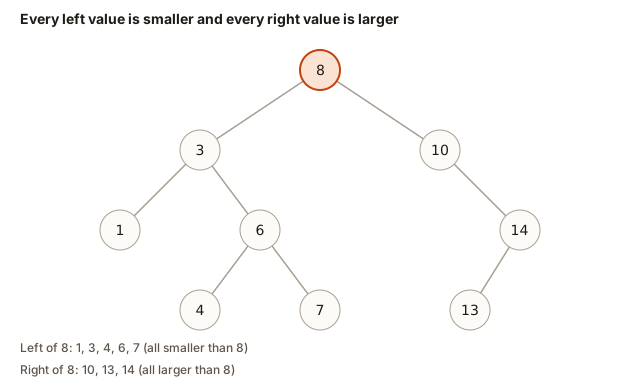 Every left value is smaller and every right value is larger, shown on a nine-node binary search tree
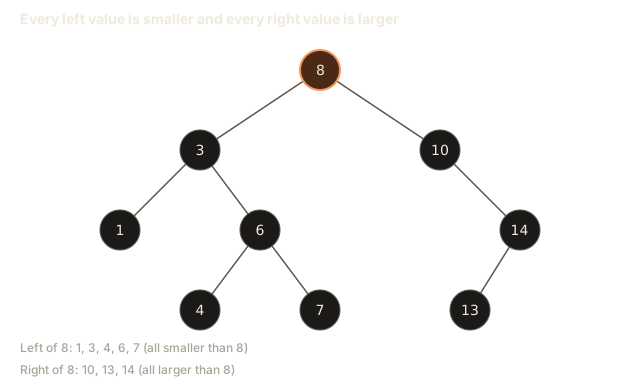
Check the root, 8. The left subtree holds 1, 3, 4, 6 and 7. Each one is smaller than 8. The right subtree holds 10, 13 and 14. Each one is larger than 8. Now check a node deeper down. The node 6 has children 4 and 7. Four is smaller than 6, and 7 is larger. The rule holds at every node, not only at the root.
This lesson assumes that no value appears twice. If duplicates are allowed, you pick one side, usually the right, and always put equal values there. We come back to duplicates in the variations section.
Why the rule gives sorted order
The rule has a useful consequence. Walk the tree in this order: visit the left subtree first, then the node itself, then the right subtree. This is called an inorder traversal. Every value in the left subtree comes out before the node, and every value in the right subtree comes out after it. So the output is sorted.
For the tree in the picture, inorder prints 1 3 4 6 7 8 10 13 14. You did not sort anything. The rule did it for you.
Step through an inorder walk below. Watch which node is visited at each step, and check that the printed values come out in ascending order. Pay attention to the moments when the walk goes back up to a node after finishing its left side. That return is what puts the node between its smaller and larger neighbours.
Numbers are inserted into the tree one by one: smaller goes left, larger goes right. A filled node is being visited. An outlined node is on the path being walked. A dark border means already visited.
inorder: visit left, then node, then right.
Inorder is the first thing to try when you suspect a tree is wrong. If the output is not sorted, the tree breaks the rule somewhere.
A node in C++
A tree in C++ is made of nodes that point to other nodes. To understand that, you need two ideas: a struct and a pointer.
A struct is a way to group several values under one name. Our node has three fields: an integer val, and two pointers, left and right.
A pointer holds a memory address. It does not hold the value itself. The type Node* means "a pointer to a Node". If p is a Node*, then p->val means "go to the Node that p points at and read its val field". The arrow -> is how you follow a pointer to a field.
The special value nullptr means "this pointer points at nothing". We use it as the empty link at the bottom of the tree.
We create nodes with new. The expression new Node(8) asks the computer for memory on the heap, which is a large area of memory for values that live until you free them, and returns the address of the new node. The lessons in this lesson do not free memory, so the nodes stay alive until the program ends. Lesson 2 shows how to free them.
Here is what the memory looks like for a two-node tree, with 8 at the root and 3 as its left child:
Stack (local variable)          Heap (created with new)

root ----------------------->  +-----------+
                               | val  = 8  |
                               | left ----+---------->  +-----------+
                               | right = nullptr        | val  = 3  |
                               +-----------+            | left  = nullptr
                                                        | right = nullptr
                                                        +-----------+
The variable root lives on the stack, which is the working memory for the function that is running. It holds only an address. The nodes themselves live on the heap. Following the arrows is the whole skill of working with trees.
The constructor line is the one you will see in every node in this module:
Node(int v) : val(v), left(nullptr), right(nullptr) {}It sets val to the value you pass in, and it starts both links at nullptr. Without it, the two pointers could contain garbage addresses, and your first search could crash.
Search: follow one path down
To search for a value, start at the root. Compare the target with the node's value. If they match, you are done. If the target is smaller, the only place it can be is in the left subtree, so move to the left child. If the target is larger, move to the right child. If the child you need is nullptr, the target is not in the tree.
Notice that each step throws away one whole side. This is why search is fast. You never look at a subtree you have already ruled out.
Let us trace two searches on the tree from the BST rule picture.
Search for 6:
- Look at 8. The target 6 is smaller than 8, so go left.
- Look at 3. The target 6 is larger than 3, so go right.
- Look at 6. It matches. Found. The search looked at 3 nodes.
Search for 5:
- Look at 8. 5 is smaller than 8, so go left.
- Look at 3. 5 is larger than 3, so go right.
- Look at 6. 5 is smaller than 6, so go left.
- Look at 4. 5 is larger than 4, so go right.
- The right link of 4 is
nullptr. Missing. The search looked at 4 nodes.
Here is a complete program. It builds the tree, prints the inorder walk, finds the minimum and maximum, and searches for 6 and 5. It needs no input, so press Run.
The output is:
inorder: 1 3 4 6 7 8 10 13 14
min: 1, max: 14
search 6: found
search 5: missing
The line for (int v : {8, 3, 10, 1, 6, 14, 4, 7, 13}) is a range-based loop. It visits each number in the list in turn, so v takes the values 8, then 3, then 10, and so on. Each value is passed to insert, which returns the root. We keep the root in the variable root so the tree is not lost.
Look at search. It uses a while loop and moves a local pointer down the tree. It does not change the tree, and it uses the same small amount of memory no matter how big the tree is.
The minValue function walks left until there is no left child. The smallest value is always the leftmost node, because every move to the left goes to a smaller value. maxValue does the same thing going right.
Insert: search, then attach
Insert works like search. It follows the same path a search would take to find the value. The difference is at the end. Search stops when it falls off the tree, with a nullptr, and reports "missing". Insert stops at the same place and puts a new node there.
Here is the insert function again, in full, so you can read it as one piece:
Node* insert(Node* root, int v) {
    if (!root) return new Node(v);
    if (v < root->val) root->left = insert(root->left, v);
    else if (v > root->val) root->right = insert(root->right, v);
    return root;
}
Read it line by line.
if (!root) return new Node(v);is the base case. If the tree is empty here, the new value becomes a new node, and that node is returned to the caller.if (v < root->val) root->left = insert(root->left, v);says that the value belongs in the left subtree. We call insert on the left child and store whatever comes back intoroot->left.else if (v > root->val) root->right = insert(root->right, v);does the same for the right side.return root;hands the current node back to the caller, so the parent can store it.
The line root->left = insert(root->left, v); is the heart of the function. It looks strange at first. Here is what it does in two cases.
If the left child exists, insert goes down into it and returns that same child, possibly changed deeper down. The assignment stores the same pointer back. Nothing visible changes at this level, but the new value was added somewhere below.
If the left child is nullptr, insert hits the base case and returns a brand new node. The assignment stores that new node into root->left. This is the moment the tree grows.
The function looks like it does nothing when it returns the same node. That is correct. A recursive insert changes the tree only at the bottom, and every node on the way down reconnects itself to the child it got back.
Now watch the calls happen. Each call waits for the call one level down to finish, then returns to its caller.
The top of the stack is the first box. The call on top is the one running. A filled box is returning a value.
Call factorial(4). It goes on top of the stack.
Notice that the calls go down the tree one level at a time. The return values then come back up in the reverse order, and each call stores its child before it returns.
Here is a program that reads the values from the Input box. The first number is how many values follow. The next line holds the values. The last number is the value to look for. The program prints the sorted values and how many nodes the search looked at. It also counts steps, so you can see the height at work.
Type this into the Input box, one line at a time:
6
8 3 10 1 6 14
6
The output is:
sorted: 1 3 6 8 10 14
found 6 after 3 steps
Now change the last line of the input to 13 and run it again. The output is:
sorted: 1 3 6 8 10 14
13 is missing (3 steps)
Trace the second run. Start at 8. The target 13 is larger, so the first step looks at 8 and goes right to 10. The target is larger than 10, so the second step looks at 10 and goes right to 14. The target is smaller than 14, so the third step looks at 14 and goes left. The left child of 14 is nullptr, so the search stops after 3 steps.
The count of steps is the height of the path the search took. In a tree of height 3, a search can never take more than 3 steps.
Shape depends on the order of insertion
The tree you get depends on the order in which you insert the values. The rule is always the same, but the shape can change a lot. Inserting the values 1 through 7 in order makes a chain: every new value is larger than the ones before it, so every new node goes to the right of the last one.
Inserting the same seven values in the order 4, 2, 6, 1, 3, 5, 7 gives a tree where 4 is the root and each level is full. The same values give two very different shapes.
This program prints the height of both trees.
The output is:
chain height: 7
balanced height: 3
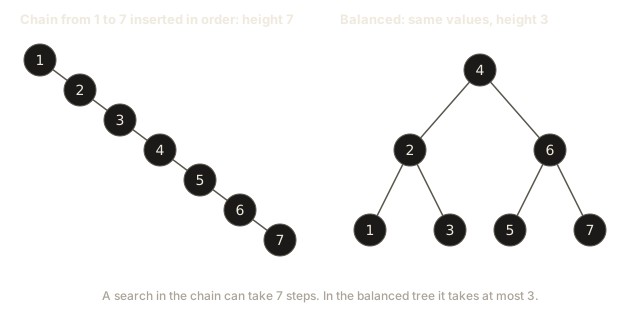
The chain has seven nodes in a line, so its height is 7. The balanced tree has three levels, so its height is 3. A search in the chain can take seven steps, and a search in the balanced tree takes at most three. With seven values the difference looks small. With a million values it becomes the difference between 20 steps and a million steps.
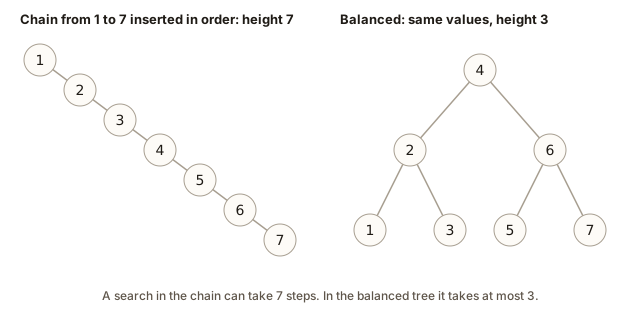 Chain of seven nodes beside a balanced tree holding the same seven values
Now watch the height grow one insert at a time. The next program reads the values and prints the height after each insert. Type this into the Input box:
5
3 1 4 2 5The output is:
1 2 2 3 3 Here is the story behind each number. After 3, the tree is one node, so the height is 1. Inserting 1 puts it to the left of 3, so the height is 2. Inserting 4 puts it to the right of 3, which does not make any path longer, so the height stays 2. Inserting 2 goes left to 1, then right of 1. That path is three nodes long, so the height becomes 3. Inserting 5 goes right to 4, then right of 4. The longest path is still three nodes, so the height stays 3.
Complexity: why the height is what matters
A Big-O expression tells you how the work grows when the input grows. We write O(h) for the cost of search and insert, where h is the height. Each step moves down one level, so the number of steps cannot be larger than the height.
The height depends on the shape:
| Shape of the tree | Height | Cost of search or insert |
|---|---|---|
| Balanced, the usual shape for random input | about log n | O(log n) |
| Skewed, a chain made by sorted input | n | O(n) |
Here n is the number of nodes, and log n is roughly how many times you can cut n in half before reaching 1. For n equal to one million, log2 of n is about 20. A balanced tree needs about 20 steps. A chain needs one million steps for its deepest value.
The gap between these two numbers is the reason this module exists. Plain BSTs are fast only when they stay balanced, and they can become chains when the input is sorted or nearly sorted. Lesson 4 explains the problem in detail, and lesson 5 shows the first fix.
Search and insert have the same cost. Both walk one path from the root to a leaf, so both are O(h).
What happens inside: memory and the call stack
Two kinds of memory matter in this lesson.
The nodes live on the heap. A tree with n nodes uses memory proportional to n, plus a small amount for each pointer. The programs here never free the nodes, so the memory stays in use until the program ends. That is fine for a short program. A long-running program must free what it no longer needs, and lesson 2 shows the function that does this.
The recursive insert uses the call stack. Each time a function calls itself, the computer saves a small frame on the stack. A frame holds the function's parameters, such as root and v, plus the place to return to. Insert calls itself once per level it goes down, so the stack grows to h frames at the deepest point, then shrinks as each call returns.
That means the recursive insert needs O(h) extra memory for the stack. For a balanced tree, that is about 20 frames for a million values. For a chain of one million values, the stack needs one million frames. Most Linux systems give a program about 8 MB of stack by default. A frame for insert is small, but a million of them can still overflow that limit. This is one more reason to keep trees balanced.
Search does not use recursion in our code. It uses a while loop that moves a single pointer down the tree. It needs only one variable more than the tree itself, so its extra memory is O(1), a fixed amount that does not depend on the size of the tree.
If you want to see the memory change, think of each call as a sheet of paper. When insert goes down, it stacks a sheet on top. When it returns, it removes the sheet and passes the answer to the sheet below. The stack is only as tall as the path.
Common mistakes and the messages you will see
These mistakes are common when people write their first BST. Each one comes with what the computer actually shows you.
Mistake 1: dropping the assignment. Insert returns a node, and the caller must store it. If you write insert(root->left, v); without root->left = in front, the new node is created and then lost. The program does not complain. Here is a real run of a broken version. The code inserts 5 as the root, then calls insert(root, 3) and insert(root, 8):
5 8 The value 3 is missing. Nothing crashed, nothing was printed as an error, and the inorder walk just skipped it. The fix is the assignment: root->left = insert(root->left, v);. Whenever a value seems to vanish, check that every recursive call stores its return value.
Mistake 2: forgetting to return the root. Every insert must end with return root;. If you leave it out, the compiler warns you:
bad2.cpp:7:1: warning: control reaches end of non-void function [-Wreturn-type]
    7 | }
      | ^
The warning matters. Without a return value, the function's result is undefined, which means the program may do anything. On one run the broken insert printed the right number, by luck. Do not rely on luck. Compile with -Wall, which turns on this warning, and fix every warning before you move on.
Mistake 3: a dot instead of an arrow. Pointers use ->. A dot works only on a value, not on a pointer. If you write root.val when root is a Node*, the compiler stops and tells you what to do:
bad1.cpp:5:18: error: request for member 'val' in 'root', which is of pointer type 'Node*' (maybe you meant to use '->' ?)
    5 |     if (v < root.val) root->left = insert(root->left, v);
      |                  ^~~
Read the last part of the message. It names the fix. Change the dot to an arrow, and the error goes away.
Mistake 4: reading through a null pointer. A nullptr points at nothing. If you read root->val when root is null, the program crashes. This example prints a line, then reads a field of a null node:
Node* root = nullptr;
std::cout << "about to read\n";
std::cout << root->val << "\n";
When this runs, the shell reports exit code 139, which means the program was killed by a segmentation fault. The line "about to read" does not appear. The output is buffered, meaning C++ holds the text in memory and writes it in larger batches, and the crash happened before that batch was written. Two lessons follow. Check for nullptr before you use a pointer. And when a program crashes with no output, remember that the output you expected may still be sitting in the buffer. Adding std::endl (or std::cout << std::flush) forces the text out.
Mistake 5: calling a function with the wrong number of arguments. Insert needs a root and a value. If you write insert(3), the compiler reports:
bad5.cpp:5:21: error: too few arguments to function 'Node* insert(Node*, int)'
    5 |     Node* r = insert(3);
      |               ~~~~~~^~~
The line that starts with note: declared here points at the real signature. Reading it is the fastest way to check what the function expects.
Mistake 6: assuming the tree is balanced. A BST does not fix its own shape. The code in this lesson works correctly on a chain, but a chain is slow. If you measure only on small random inputs, you may not notice. Test with sorted input too.
Debugging walkthrough: a search that says missing
Here is a realistic bug. A learner writes search and tests it on 8, 3, 10. Searching for 10 says "missing". The learner's code has one line changed:
root = (target < root->val) ? root->right : root->left; // wrong branchesBefore changing anything, add a print at each step. Put this line at the top of the loop:
cout << "at " << root->val << "\n";The output for searching 10 is:
at 8
at 3
not found
Read the trace the way the computer runs it. At 8, the target 10 is larger, so the correct move is right. The printed path went to 3 instead, so the direction is wrong. Once you see the wrong step, you can check the line that chose it and find the swapped branches.
The method works for any tree bug. Print the node you are at, print the decision you made, and compare each decision with the rule. You can also trace by hand on paper: draw the tree and move your finger down the path with the same comparisons. The moment your finger goes somewhere the rule forbids, you have found the bug.
Keep the print statement short and remove it after you fix the bug. It is a temporary tool, not part of the program.
Variations and edge cases
Good tree code handles the small cases. Check each of these before you trust a function.
The empty tree. Search on nullptr returns false right away, because the loop never runs. Insert on nullptr returns a new node, which becomes the root. The functions minValue and maxValue read root->left straight away, so they crash on an empty tree. Always check for nullptr before you call them.
One node. The root has no children. Search finds the value or fails. Min and max both return the same value.
Duplicates. Our insert ignores a value that is already in the tree. Some problems need duplicates, for example a list of exam scores. The usual rule is to send equal values to the right and keep that rule everywhere. The code changes in one place: if (v < root->val) ... else ... with no separate equal case. Search then needs to be sure it stops at the first match. For the rest of this module we ignore duplicates, because they add rules without adding new ideas.
Negative numbers and extreme values. The BST rule works for any values that can be compared. Negative numbers sit to the left of zero, as you would expect. The largest and smallest int values are not special to the tree, but they are special to code that uses them as sentinels. Lesson 3 shows why.
A value larger than everything. Search walks to the rightmost node and then falls off the tree. It returns false after a path that goes all the way down the right side. This is the worst case for that value, and its cost is the height.
Sorted input. Insert 1, 2, 3, 4, 5 and you get a chain. Every operation costs O(n). Expect this in real data, because timestamps, IDs and counters often arrive in sorted order.
Interview questions and real-world use
Interviewers often ask you to write insert and search on a whiteboard. Here is what a strong answer contains. Say the rule before you write the code. Write insert using recursion or a loop. Explain that the cost is O(h), and explain that h can be as large as n. If the interviewer asks how to avoid the worst case, mention that a balanced tree keeps h near log n, and name AVL trees or red-black trees.
A common follow-up is: "How would you find the number of values smaller than x?" The answer uses the same walk down the tree, counting whole subtrees when you go right. Practice exercise 6 asks you to write it.
In real systems, the same structure appears in several places. C++ std::set and std::map store their values in a self-balancing tree called a red-black tree, so you get O(log n) operations without writing the balancing yourself. Database indexes use a close relative called a B-tree, which stores many keys in each node so that it reads fewer disk blocks. The idea of halving a range by comparing with a middle value is the same in all of them.
Practice
Try these before you open the solutions. Each solution is hidden. Write your code first, compile it with g++ -std=c++17 -Wall, and then compare.
- Easy. Write
int maxValue(Node* root)that returns the largest value in a non-empty tree. Hint: the largest value is the rightmost node.
Solution
int maxValue(Node* root) {
    while (root->right) root = root->right;
    return root->val;
}
The loop walks right until there is no right child. Every step right goes to a larger value, so the last node you reach is the largest. It runs in O(h) time and uses O(1) extra memory.
- Easy. Write a recursive version of search:
bool searchRec(Node* root, int target). Hint: the base cases are a null root (not found) and a matching value (found).
Solution
bool searchRec(Node* root, int target) {
    if (!root) return false;
    if (target == root->val) return true;
    if (target < root->val) return searchRec(root->left, target);
    return searchRec(root->right, target);
}
Each call either stops or goes one level down, so the recursion is as deep as the height. The extra memory is O(h) for the call stack.
- Easy. Insert 1, 2, 3 and 4 into an empty BST, in that order. Draw the tree. What is its height, and what does the inorder walk print?
Solution
Each value is larger than the ones before it, so each one goes to the right of the last. The tree is a chain: 1 has a right child 2, which has a right child 3, which has a right child 4. The height is 4. The inorder walk prints 1 2 3 4.
- Easy. Write
int countNodes(Node* root)that returns the number of nodes in the tree. Hint: count this node, then add the counts of both subtrees.
Solution
int countNodes(Node* root) {
    if (!root) return 0;
    return 1 + countNodes(root->left) + countNodes(root->right);
}
Each node is visited once, so the time is O(n). The recursion depth is O(h).
- Medium. Write
int stepsToFind(Node* root, int target). It returns the number of nodes the search looks at, including the node that matches. If the target is missing, it returns the number of nodes it looked at before falling off the tree. Hint: count each node you compare with.
Solution
int stepsToFind(Node* root, int target) {
    int steps = 0;
    while (root) {
        steps++;
        if (target == root->val) return steps;
        root = (target < root->val) ? root->left : root->right;
    }
    return steps;
}
For 6 in the nine-node tree this returns 3. For 5 it returns 4. The loop does exactly the work of the search function, so the count is the length of the path.
- Medium. Write
int countLess(Node* root, int x)that returns how many stored values are less than x. Hint: if the root is less than x, the root and its whole left subtree are less than x too. Count them all, and then keep going to the right.
Solution
int countNodes(Node* root) {
    if (!root) return 0;
    return 1 + countNodes(root->left) + countNodes(root->right);
}

int countLess(Node* root, int x) {
    if (!root) return 0;
    if (root->val < x) {
        return 1 + countNodes(root->left) + countLess(root->right, x);
    }
    return countLess(root->left, x);
}
When the root is smaller than x, the whole left subtree is smaller too, so countNodes adds it in one call. The right subtree may hold more small values, so the function keeps going there. When the root is not smaller than x, nothing on the right can be smaller, so the function goes left only. The walk follows one path, so it makes O(h) decisions. Counting a left subtree costs its size, though, so the total time is O(n) in the worst case. The rule still saves work for the subtrees you never enter, because you skip the whole right side whenever the root is not smaller than x.
- Medium. Write an insert that uses a loop and no recursion:
Node* insertIter(Node* root, int v). It must return the root. Hint: keep a pointer to the link you want to fill, which is the address of eitherrootor a child field.
Solution
Node* insertIter(Node* root, int v) {
    Node** link = &root;               // the link that will hold the new node
    while (*link) {
        if (v < (*link)->val) link = &(*link)->left;
        else if (v > (*link)->val) link = &(*link)->right;
        else return root;              // already stored
    }
    *link = new Node(v);               // the empty link is filled with the new node
    return root;
}
The variable link is a pointer to a pointer. It starts at the address of root. Each step moves it to the address of the left or right field of the node it is looking at. When the link is nullptr, the loop stops, and *link = new Node(v) stores the new node into that field. This version is O(h) time and O(1) extra memory.
- Medium. You insert the values 1 to 1000 in order into a plain BST. What is the height? How many nodes does a search for 1000 look at?
Solution
The tree is a chain of 1000 nodes, so its height is 1000. A search for 1000 starts at 1 and goes right at every step. It looks at all 1000 nodes. This is the O(n) worst case. A balanced tree of the same values would have height 10, because 2 to the power 10 is 1024.
- Medium. Write
int depthOf(Node* root, int x)that returns the depth of x, where the root has depth 0. Return -1 if x is not in the tree.
Solution
int depthOf(Node* root, int x) {
    int depth = 0;
    while (root) {
        if (x == root->val) return depth;
        root = (x < root->val) ? root->left : root->right;
        depth++;
    }
    return -1;
}
Each step down adds one to the depth. The function returns as soon as it finds the value. The time is O(h).
- Hard. Write the lowest common ancestor of two values a and b, both of which are in the tree:
Node* lca(Node* root, int a, int b). The lowest common ancestor is the deepest node that has both a and b below it, counting a node as its own ancestor. Hint: while both values are on the same side of the current node, move to that side. The first node where they split is the answer.
Solution
Node* lca(Node* root, int a, int b) {
    while (root) {
        if (a < root->val && b < root->val) root = root->left;
        else if (a > root->val && b > root->val) root = root->right;
        else return root;              // they split here, or one of them is this node
    }
    return nullptr;
}
Take the tree from the BST rule picture and call lca(root, 4, 7). The root 8 has both values on its left side, so the walk moves to 3. The value 3 has both values on its right side, so the walk moves to 6. At 6, the value 4 is smaller and 7 is larger, so they split here. The answer is 6. The time is O(h), and the extra memory is O(1).
What you now know
- A BST keeps every left value smaller and every right value larger, for whole subtrees.
- Inorder traversal prints the values in sorted order.
- Search follows one path from the root, and each comparison throws away one side.
- Insert uses the same path, then puts a new node in the empty link it reaches.
- The cost of search and insert is O(h), so the shape of the tree decides the speed.
- Sorted input makes a chain, and a chain has height n.
- Free memory you no longer need, and check for
nullptrbefore you use a pointer.
The next lesson covers delete, which is the hardest of the three basic operations.