Why it matters
Much of the data a program handles has two dimensions. A spreadsheet is a grid of cells. A photo is a grid of pixels, with a red, green and blue value in each cell. A chess board, a city map, a seating plan and the tiles of a game level are all grids. Interview questions use them constantly, because a grid question tests two things at once: how you move through two indexes, and how you keep track of the boundaries.
A matrix is the mathematical name for a grid of numbers. This lesson calls it a grid or a matrix, and the two words mean the same thing here. You will store a grid, walk it row by row and column by column, add up its rows and columns, rotate a square grid without making a copy, print it in a spiral, and count the paths through a grid with a table. The last idea, counting paths, is the first full dynamic programming table in this course, so it gets extra attention.
The idea: a shelf unit with rows and columns
Think of a shelf unit with four shelves, and each shelf has six boxes side by side. To find a box, you need two numbers. The first says which shelf, counting from the top, and the second says which box along that shelf, counting from the left. Both count from 0 in C++. The box in the top left is shelf 0, box 0. The box in the bottom right of a 4-by-6 unit is shelf 3, box 5.
A two-dimensional array is that shelf unit. You declare it with two sizes: the number of rows first, then the number of columns. The first index is the row, and the second index is the column. Every cell holds one value of the same type. The row comes first in the brackets, always. Reversing the two numbers is one of the most common grid mistakes, and it is the first thing to check when a grid program misbehaves.
int g[3][4];          // 3 rows, 4 columns, values in g[row][col]
g[1][2] = 7;          // row 1, column 2 holds 7
The C-style form above is fixed in size, like the one-dimensional array from the first lesson. Its sizes must be known when the program is compiled. The vector form, vector<vector<int>>, is a vector of vectors, and it lets you choose the sizes at run time. Both forms use the same g[r][c] syntax, and both index from 0. You will use the vector form in most real code, and the C-style form for small fixed tables.
What the memory looks like
C++ stores a two-dimensional C-style array as one long row of values in memory. It places all of row 0 first, then all of row 1, then row 2, and so on. This order is called row-major. A 3-by-4 array of ints takes 12 consecutive int slots, which is 48 bytes on a typical machine. The next figure shows the order for the array you will meet in the first program.
            column 0   column 1   column 2   column 3
row 0       [0][0]     [0][1]     [0][2]     [0][3]     addresses +0  +4  +8  +12
row 1       [1][0]     [1][1]     [1][2]     [1][3]     addresses +16 +20 +24 +28
row 2       [2][0]     [2][1]     [2][2]     [2][3]     addresses +32 +36 +40 +44
To find g[r][c], the computer computes r times the number of columns, plus c, and multiplies by the size of one value. For g[1][2] in a 3-by-4 array, that is (1 times 4 plus 2) times 4, which is 24 bytes past the start. The arithmetic is the same kind of calculation you saw for one-dimensional arrays. Row-major order also explains why walking along a row is faster than walking down a column. Neighbouring values in a row sit next to each other in memory, so the processor loads them in a batch. Walking down a column jumps by a whole row at each step. For small grids you will not notice. For large images or large tables, the row-first loop can be several times faster, and most performance guides say the same.
Traversal: the nested loop
The standard way to visit every cell is two loops, one inside the other. The outer loop walks the rows, and the inner loop walks the columns of the current row. Visiting the cells row by row is the natural order, and it is also the order that matches memory.
for (int r = 0; r < rows; r++) {
    for (int c = 0; c < cols; c++) {
        // use g[r][c]
    }
}
Each loop uses the same bound rule as the one-dimensional case: the index runs from 0 up to one less than the size. The outer bound is the number of rows, and the inner bound is the number of columns. The nested loops do rows times cols steps in total. For a 3-by-4 grid that is 12 steps, and for an n by n grid it is n squared steps. A grid problem is therefore O(rows times cols) in time, which is the number of cells, and that is the bound interviewers expect you to state.
The most common bug in this loop is to use the wrong bound in the wrong place. Writing r < cols for the outer loop reads too many rows when the grid is tall, and too few when it is wide. Read each bound against the index it controls, the same discipline as before.
Sums of rows and columns
The first program stores a grid from input, then prints the sum of each row and the sum of each column. It uses the nested loop twice: once to add across each row, and once to add down each column. Type the grid as the input below.
Type this into the Input box:
2 3
1 2 3
4 5 6
The program prints:
row 0 sum 6
row 1 sum 15
col 0 sum 5
col 1 sum 7
col 2 sum 9
Read the declaration first. vector<vector<int>> g(rows, vector<int>(cols)); makes rows rows, and each row is a vector of cols zeros. The inner vector<int>(cols) is a value that is copied into each row. The outer vector holds the rows. Reading g[r][c] reads the row vector g[r] first, then its element c. This two-step reading is why the vector form is slower to create than the C-style form, and also why it is so flexible.
The first pair of loops reads the grid row by row. For each row r, the inner loop adds g[r][c] across the columns. The second pair fixes a column c and walks down the rows. The column loop is the one that jumps through memory, because each step moves to a different row vector. For this small grid, the cost does not matter. For a large grid, you could swap the loops if you only need the totals, or you could accumulate the column sums in one pass over the rows, which is the row-major way.
Check the answers by hand. Row 0 is 1, 2, 3, which sums to 6. Row 1 is 4, 5, 6, which sums to 15. Column 0 holds 1 and 4, which sums to 5. Column 1 holds 2 and 5, which sums to 7. Column 2 holds 3 and 6, which sums to 9. The grand total is 21 in both directions, so the row sums and the column sums agree.
The C-style grid and its size
A C-style grid has a fixed size that the compiler knows. The next program declares one, initialises it, traverses it, and prints the total and the size in bytes. It introduces the braces form that matches the grid's shape, which makes the program easy to read.
No input is needed. The program prints:
1 2 3 4
5 6 7 8
9 10 11 12
total = 78
bytes = 48
The braces in the declaration mirror the grid. Each inner pair of braces is one row, so the layout on the page is the layout in the program. This is the best way to write small fixed tables, such as a lookup table or a test grid.
The program prints the row end with c == 3 ? '\n' : ' '. The condition uses the number 3, which is the last column index. Writing a number instead of the column count is a shortcut that can hide a bug if the size changes. A better style stores the sizes in named constants and compares to them. The vector version does this naturally with cols.
The total is 78, which is the sum of 1 through 12. The sizeof value is 48, which is 12 values times 4 bytes. The size calculation works here, because the array is declared in this function. As with one-dimensional arrays, passing the grid to another function turns it into a pointer, and the size is lost. That is why the vector form is the normal choice for grids that functions must read.
Passing a C-style grid to a function
A function that takes a grid must say the number of columns in its parameter type. The compiler needs to know the layout of each row to compute g[r][c]. A common attempt uses int **, which looks like it should work, and it does not:
void show(int **g) {}
int main() {
    int g[3][4] = {};
    show(g);
    return 0;
}
g++ rejects it:
g1.cpp:4:10: error: cannot convert 'int (*)[4]' to 'int**'
    4 |     show(g);
      |          ^
The message says that the grid is a pointer to rows of four ints, which is not the same as a pointer to pointers. The fix is void show(int g[][4], int rows), which states the column count, or the vector form, which carries its own sizes. The vector form is the one you should reach for first.
Rotating a square grid in place
Rotating a grid by 90 degrees is a classic test of how well you can reason about indexes. Picture an image that you turn clockwise. The top row becomes the right column, read from top to bottom, and the left column becomes the top row, read from bottom to top. The figure shows the move for a 3-by-3 grid. The highlighted value 1 starts at the top-left corner and ends at the top-right corner.
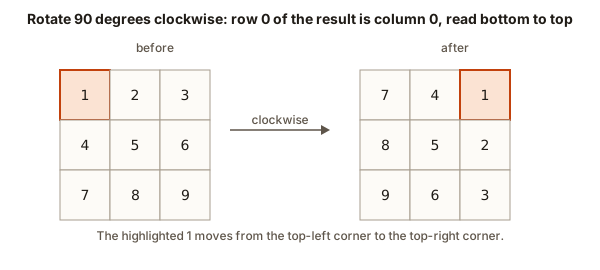 A 3 by 3 grid before and after a clockwise rotation, with the value 1 highlighted in both
The trick that makes this a simple program is that a clockwise rotation can be done in two steps: transpose the grid, then reverse each row. Transposing means swapping each cell (r, c) with the cell (c, r), which turns rows into columns. Reversing each row then fixes the direction. For the 3-by-3 example, transposing gives the grid with rows 1 4 7, 2 5 8 and 3 6 9. Reversing each row gives 7 4 1, 8 5 2 and 9 6 3, which is the rotated grid.
The transpose has one subtle point. Each pair of cells must be swapped exactly once. If the loop swaps every cell with its mirror, each pair gets swapped twice and the grid stays unchanged. To avoid this, start the inner loop at i + 1. Then each pair is visited once, with j always greater than i. The program below uses that start.
Type this into the Input box:
3
1 2 3
4 5 6
7 8 9
The program prints:
7 4 1
8 5 2
9 6 3
Trace the transpose on the top row. When i is 0, the inner loop swaps m[0][1] with m[1][0], which swaps 2 and 4. Then it swaps m[0][2] with m[2][0], which swaps 3 and 7. After those two swaps, row 0 holds 1, 4, 7. The loop for i equal to 1 swaps the one remaining pair, 6 and 8, so row 1 becomes 2 5 8 and row 2 becomes 3 6 9. The transpose is complete, and the grid is 1 4 7, 2 5 8, 3 6 9.
Now step 2. Reversing row 0 turns 1 4 7 into 7 4 1. Reversing row 1 turns 2 5 8 into 8 5 2. Reversing row 2 turns 3 6 9 into 9 6 3. The three rows printed are the rotated grid. The method changes only the values in place, so it uses O(1) extra space, and it does O(n squared) steps, which is the number of cells.
The program uses reverse from <algorithm>, which takes two iterators, the start and one past the end. m[i].begin() and m[i].end() are the bounds of row i. The function reverses the values in place and returns nothing.
To rotate counterclockwise, reverse the rows first and then transpose, or reverse the columns instead of the rows. Test your choice on the 3-by-3 example before you trust it. The direction is the most common error in this problem, and a quick check on the top-left corner catches it.
Printing in spiral order
A spiral walk starts at the top-left corner, goes right along the top row, down the right column, left along the bottom row, and up the left column. Then it repeats on the smaller grid that is left inside, until every cell has been visited once. The walk is tricky because the four edges shrink as you go, and the four loops must stop at the right place each time.
The method uses four boundaries: top, bottom, left and right. Each loop walks one edge, and then moves its boundary inward by one. Before the bottom and left edges are walked, the program checks that the boundaries have not crossed. That check is the most important line in the program.
Type this into the Input box:
3 4
1 2 3 4
5 6 7 8
9 10 11 12
The program prints:
1 2 3 4 8 12 11 10 9 5 6 7Trace the first two loops on the 3-by-4 grid. The first row runs from column 0 to column 3, giving 1 2 3 4. The top boundary then moves to row 1. The right column runs from row 1 to row 2, giving 8 and 12. The right boundary moves to column 2. Both boundaries still hold, so the bottom row runs from column 2 back to column 0, giving 11 10 9. The bottom boundary moves to row 1. The left column runs from row 1 up to row 1, giving 5. The left boundary moves to column 1. The next pass of the outer loop starts at row 1 and column 1, which is the inner grid 6 7. It walks the top row 6 7, the right column with nothing left to add, and then stops, because top is now greater than bottom. The total is 12 values, which matches the grid, and the order is correct.
The checks if (top <= bottom) and if (left <= right) protect the two walks that happen after the boundaries have moved. Remove them and a single row or a single column gets walked twice. Here is the evidence. The program below uses the same walk without the check, on a grid with one row and three columns:
1 2 3 2 1 The correct answer is 1 2 3. The bottom row walk reads the same row again, backwards, and prints 2 and 1 a second time. The fix is the check: after the top row is walked and top moves down, top is greater than bottom, so the bottom walk is skipped. The check is cheap, and it is the detail that interviewers look for in this problem.
Counting paths with a table
The last program is the first full dynamic programming table in this course. The question is this: a robot starts at the top-left cell of a grid and must reach the bottom-right cell. It can move only right or down. Some cells are walls the robot cannot enter. How many different routes are there?
The answer can be built from smaller answers. Let ways[r][c] be the number of routes from the start to cell (r, c). A cell can be reached only from the cell above it or the cell to its left. So the number of routes to (r, c) is the number of routes to the cell above, plus the number to the cell on its left. A wall has zero routes. The start has one route, the empty route. The table fills row by row, and every cell uses values that are already filled, because the cells above and to the left come earlier in the order.
| - | B | D | C | A | B | A | |
|---|---|---|---|---|---|---|---|
| - | 0 | 0 | 0 | 0 | 0 | 0 | 0 |
| A | 0 | ||||||
| B | 0 | ||||||
| C | 0 | ||||||
| B | 0 | ||||||
| D | 0 | ||||||
| A | 0 | ||||||
| B | 0 |
The filled cell is being computed. Cells with a thick outline are the ones it reads. In the last step, underlined bold cells mark the matches that make up the answer.
Cell (i, j) is the length of the longest common subsequence of the first i letters of A and the first j of B. An empty prefix gives 0.
Step through the table above. Each cell's value is the sum of the two cells that feed it. Walls keep the value at zero, and the routes stop there. The answer is the value in the bottom-right corner.
Here is the program. It reads a grid where 1 means a wall and 0 means open, then prints the number of routes.
Type this into the Input box:
3 3
0 0 0
0 1 0
0 0 0
The program prints:
2The table for this grid has the values below, with the wall shown as X:
| row | column 0 | column 1 | column 2 |
|---|---|---|---|
| 0 | 1 | 1 | 1 |
| 1 | 1 | X | 1 |
| 2 | 1 | 1 | 2 |
Fill it by hand. The top-left cell is 1, the start. The first row has only the route from the left, so each cell is 1. The first column has only routes from above, so each cell is 1. The wall is 0. Cell (1, 2) can be reached from above, which has 1 route, and from the left, which is the wall with 0 routes. So it has 1. Cell (2, 1) can be reached from above, which is the wall, and from the left, which has 1. So it has 1. The bottom-right cell is reached from above, which has 1, and from the left, which has 1. So it has 2, and the program prints 2. The two routes are right, right, down, down around the top, and down, down, right, right around the bottom. Neither uses the wall.
The code has two special cases that you should read carefully. The line if (r == 0 && c == 0) sets the start to 1 before any neighbour is considered. The lines with (r > 0) ? ... : 0 avoid reading a row or column that does not exist. Without them, the program would read ways[-1][c] for the top row, which is undefined behaviour.
The table uses long long, because the number of routes grows quickly. In a 20-by-20 open grid the number of routes is about 35 billion, far beyond what an int holds. The routes count grows in a way that can be checked with a formula, but the table handles walls, and that is why it is the method you learn.
What happens inside the grid loops
Each program in this lesson does a fixed number of steps for each cell. The row-major loops read memory in a regular pattern, so the processor's cache works well for them. The table in the path count stores one extra value per cell, so the space is O(rows times cols), and the time is the same order. The spiral walk visits each cell once, and the rotation touches each cell once in the transpose and once in the row reversal. Every method is O(rows times cols) time, and the difference between them is the extra space. Rotation and spiral use O(1) extra space beyond the output, and the path table uses a full grid of extra space.
The cache point deserves one more sentence. A processor keeps recently read memory close to it, in a small fast store called a cache. Reading the next value in memory is cheap if it is already in the cache. A row-major loop reads the next value, which is usually in the same cache line. A column-major loop reads a value a whole row away on each step, which often misses the cache. For a large image, the difference can be large, and it is worth knowing the reason even when the program is small.
Choosing the loop order
Most grid loops offer a choice of order, and the choice matters in two ways. The first is correctness. Some problems need a particular order. The path table must fill row by row, so that the cell above and the cell to the left are ready before the current cell is computed. The rotation and the spiral walk depend on their boundaries, not on a fixed visiting order, but they also need every cell visited in the planned sequence.
The second is speed, through memory. Row-major order walks the grid in the order it sits in memory. For a grid of a million cells, the row-first loop reads memory in long steady runs, and the cache keeps up with it. A column-first loop jumps a whole row at each step, so the cache often misses. On large grids the difference can be several times, and a profiler shows it clearly. For the small grids in this course the speed does not matter, so write the order that is easiest to read. For real images, match the loop to the memory layout.
There is one practical rule. Put the row index in the outer loop and the column index in the inner loop, unless the problem needs the reverse. The column-sum program in this lesson walks the columns in the outer loop on purpose, so you can see the slower pattern in the code. A faster way to get the column sums makes one pass over the rows and adds each cell into a running total for its column. Try rewriting the column part that way, and compare the two versions on a grid of a few thousand cells. The results will be the same, and the access pattern will be friendlier to memory.
Common mistakes and what to check
Swapping rows and columns
The first index is the row. A loop that reads g[c][r] where r runs over rows reads the wrong cells, and the output looks like a plausible grid of numbers. Test with a non-square grid, such as 2 rows and 3 columns, because a square grid can hide the swap. The rule for the first and second index is simple to test, so run a small case.
Transposing twice
Starting the transpose inner loop at 0 instead of i + 1 swaps each pair twice, and the grid ends unchanged. The program looks busy and does nothing. Check the start of the inner loop, and test the transpose on a 2-by-2 grid, where one pair is enough to show the bug.
Forgetting the row length in a jagged grid
A vector of vectors can have rows of different lengths. A loop that uses the length of row 0 for every row reads past the end of a short row. Use the length of the row you are reading, g[r].size(), when the grid is not rectangular.
Passing a grid with the wrong type
The message cannot convert 'int (*)[4]' to 'int**' is the signal that the parameter type is wrong. Use the vector form, which carries its own size, or state the column count in the parameter.
Losing the boundary check in a spiral
The message is not a compiler message. It is the duplicated values in the output, such as 1 2 3 2 1 for a single row. When you see a repeated value that should not be there, look for a boundary check you skipped.
Forgetting walls in the path count
If a wall cell is left at its default 0, the program counts it as an open cell with zero routes, which is harmless. But if a wall is not checked, and its value is copied from the cell above, the routes are wrong. Set the wall value to 0 explicitly, and test a grid where the wall blocks the only route.
Debugging walkthrough: the transpose that did nothing
A student writes the rotation program and gets the grid back unchanged after the transpose. The rows are not rotated, and the output for the 3-by-3 example is the original grid after reversing rows, which is 3 2 1, 6 5 4, 9 8 7. The reversal of each row is visible, but the transpose seems to have done nothing.
The method is to trace one pair. Look at the cells (0, 1) and (1, 0), which hold 2 and 4. The student's inner loop starts at j = 0. When i is 0, the loop swaps (0, 0) with itself, then (0, 1) with (1, 0), swapping 2 and 4. When i is 1, the loop starts at j = 0 again, and it swaps (1, 0) with (0, 1), which swaps 4 and 2 back. The second swap undoes the first. Every pair is swapped twice, so the grid is unchanged by the transpose.
The fix is the start j = i + 1. The lesson is a general one about symmetric loops. When a loop touches a pair of cells, decide whether each pair should be visited once or twice, and write the loop bounds to match. This is the same mistake as the one in the practice list for the first lesson, in a different form.
Variations and extensions
Rectangular grids. Rotation works only for square grids, because the cells would not fit back into the same shape. For a rectangle, the rotated grid has the rows and columns swapped. Build a new grid of the new size and copy each value into its new place.
Counterclockwise rotation. Reverse the columns, then transpose, or transpose and then reverse the columns. Test it on the 3-by-3 example so that the top-left cell lands where you expect.
Matrix multiplication. Multiplying two grids uses three nested loops, and the cost is O(n cubed) for square grids. This is more work than the grids in this lesson, but it uses the same indexing, and it is a good next step.
Obstacles and paths with diagonal moves. If the robot may also move diagonally, the same table works with one more neighbour in the sum. The rule that each cell depends on earlier cells still holds.
Minimum path sum. Replace the count with the smallest sum along any route, and replace the addition with a min of the two neighbours plus the current cell. This is the most common follow-up to the path count in interviews.
Interview-style questions and answers
Question: rotate an image in place. Transpose, then reverse each row, with the transpose starting at i + 1. O(n squared) time and O(1) extra space. Say the two steps out loud, and state the direction you rotate.
Question: print a matrix in spiral order. Four boundaries that move inward, and a check before the bottom and left walks. O(rows times cols) time and O(1) extra space beyond the output. Explain the check in one sentence.
Question: count the paths from the top-left to the bottom-right, moving only right or down. The table of ways, with the sum of the cell above and the cell to the left. O(rows times cols) time, and O(rows times cols) space, which can be reduced to one row if you only need the answer. Mention the one-row version, because it shows you know the table depends only on the row above.
Question: find the cell with the largest row sum. One pass over the rows, keeping the best sum and its row index. O(rows times cols) time, O(1) extra space.
When you answer grid questions, state the boundaries first, then the order of visiting, then the time and space. Interviewers want to see that you keep the grid in mind, and not just the code.
Real-world uses
Grids are everywhere in software. A photo editor applies a filter by visiting each pixel row by row, and it rotates a photo with the transpose method. A spreadsheet recalculates a cell from the cells above and to the left, which is the same dependency as the path table. A game uses a grid to store the map, and a path finder counts or ranks the routes through open cells. A weather model stores temperature and pressure on a grid of points and updates each point from its neighbours. The methods you practised here, the nested loop, the boundary-safe walk and the table, are the building blocks of all of them.
Practice
Try each exercise before you open the solution. Use the Run box to check your work. The first three are easy, the next four are medium, and the last is harder.
- Read a 2-by-3 grid and print the total of all its values. The answer for
2 3with rows1 2 3and4 5 6is 21.
Solution
Use a nested loop and add every g[r][c] into one total. The total is 21. A single pass is enough, and the order of the loops does not change the answer.
- Read an
nbyngrid and print the sum of its main diagonal, the cells where the row equals the column. Test with3followed by1 2 3,4 5 6,7 8 9. The answer is 15.
Solution
Loop once over i from 0 to n - 1, and add g[i][i]. The diagonal values are 1, 5 and 9, which sum to 15.
- Read an
nbyngrid and printYESif it is symmetric (it equals its own transpose), otherwiseNO. Test with2followed by1 7,7 3. The answer isYES.
Solution
Check that g[i][j] equals g[j][i] for every pair with j greater than i. Start j at i + 1, as in the transpose, and stop at the first mismatch. The test prints YES.
- Read a grid and print the row index of the row with the largest sum. If two rows tie, print the smaller index. Test with
2 3followed by1 1 1,3 0 0. Both rows sum to 3, so the tie goes to the smaller index, and the answer is 0.
Solution
Compute each row sum and keep the best sum with its index. Update only when the new sum is strictly greater, so a tie keeps the earlier row. For the test, both rows sum to 3, so the program prints 0, which is the smaller index.
- Read an
nbyngrid and rotate it 180 degrees, printing the result. The 180-degree rotation is the same as reversing every row and then reversing the order of the rows. Test with2followed by1 2,3 4. The answer is4 3, then2 1.
Solution
Print the rows from last to first, and within each row print the values from last to first. The output is 4 3 then 2 1. You can also write it as two steps, reversing the rows and then the list of rows, which matches the rule.
- Read a grid and print the spiral order, but for a single row or a single column only. Test with
1 4followed by5 6 7 8. The answer is5 6 7 8.
Solution
The spiral program from this lesson handles this case, because the check before the bottom and left walks stops the duplicates. Run it on the test and confirm that each value appears once.
- Count the paths from the top-left to the bottom-right of a 2-by-2 open grid, moving only right or down. The answer is 2. Then count them on a 3-by-3 open grid. The answer is 6.
Solution
The table for an open grid has the number of paths that is the binomial count of the moves. For 2 by 2 the table is 1 1 and 1 2, so the answer is 2. For 3 by 3 the table is 1 1 1, 1 2 3, 1 3 6, so the answer is 6. Use the table program from this lesson with all zeros as the wall grid to check.
- Change the path count so that it prints the smallest sum of a route, where each cell holds a cost and the route adds the cost of every cell it enters, including the start and the end. Test with
2 2and the costs1 3and1 1. The cheapest route is 1, 1, 1, which costs 3.
Solution
Let best[r][c] be the smallest sum of a route to (r, c). Set the start to its own cost. For other cells, take the cost of the cell plus the smaller of the cell above and the cell to the left, where it exists. The answer is the bottom-right value. For the test, the cheapest route goes down and then right, through costs 1, 1 and 1, for a total of 3. The route that goes right first costs 1 + 3 + 1 = 5.
- Explain why the path table reads
ways[r - 1][c]only whenris greater than 0, and what goes wrong without the check.
Solution
When r is 0 there is no row above, and r - 1 is -1, which is outside the grid. Reading ways[-1][c] is undefined behaviour, so the program may print garbage or crash. The check uses 0 for the missing neighbour, which is correct because a cell in the top row has no route from above.
- Explain in three sentences why the rotation of an
nbyngrid takes O(n squared) time, and why it needs O(1) extra space.
Solution
The transpose visits each pair of cells once, which is about n squared over two swaps, and the row reversal touches each cell once more, so the total is proportional to the number of cells. The swaps and reversals happen in place, so the only extra memory is the loop counters and one temporary value for each swap. That is a fixed amount regardless of the grid size.
What you now know
- A two-dimensional array is a grid with rows first and columns second, and
g[r][c]is the cell at rowrand columnc. - Memory stores a grid row by row, so row-first loops are the natural and faster order.
- Nested loops visit each cell, and the time is the number of cells, O(rows times cols).
- A square grid rotates clockwise by transposing and then reversing each row, with the transpose starting at
i + 1. - A spiral walk needs four boundaries, and a check before the bottom and left walks stops duplicates on a single row or column.
- A grid table counts routes by summing the cell above and the cell to the left, with walls set to zero. This is the first full dynamic programming table in the course.
- Check the first index is the row, and test the grid shape with a non-square example before you trust a solution.