Why this matters
A computer stores only numbers. Letters, photos, songs, your bank balance and this sentence are all numbers underneath. Knowing how those numbers are written explains puzzling things you will meet soon: why a byte stops at 255, why 0.1 + 0.2 is not exactly 0.3, why an emoji counts as two characters in JavaScript, why web colours look like #ff8800, and why accented letters sometimes turn into rubbish.
This lesson starts with how you count, and builds up to text, pictures and decimals. You do not need to be good at maths. You need patience with small tables.
Why computers use only two digits
Inside a chip are billions of tiny electronic switches called transistors. A switch has two reliable states: off and on. Telling "off" from "on" is easy and stays right even when there is a little electrical noise. Telling ten different levels apart, as a ten-digit system would require, is much harder and more error-prone. So computers use two symbols, 0 and 1, and a system called binary or base 2.
An analogy: a row of light switches on a wall. Each switch is off (0) or on (1). One switch gives you two possible states. Two switches give four: off-off, off-on, on-off, on-on. Three switches give eight. Each extra switch doubles the number of patterns. With 8 switches you can make 256 different patterns, and that row of 8 is a byte. Each switch is a bit, short for "binary digit".
The rule is worth saying plainly: n bits can hold 2 to the power n different patterns.
| Bits | Patterns | Typical use |
|---|---|---|
| 1 | 2 | yes or no |
| 4 | 16 | one hexadecimal digit |
| 8 | 256 | one byte |
| 16 | 65,536 | a small whole number |
| 32 | 4,294,967,296 | a normal whole number in many languages |
| 64 | about 18 quintillion | a big whole number or a memory address |
The patterns do not mean anything by themselves. We decide what each pattern stands for. First, whole numbers.
Counting in decimal, carefully
You already know a place-value system: decimal, or base 10. In the number 4,305, each digit has a place and each place is worth ten times the one to its right.
   4        3        0        5
 1000s     100s      10s      1s
 4x1000 + 3x100 + 0x10 + 5x1 = 4305
Ten symbols (0 to 9) exist. When you run out of symbols in one column, you write 0 and carry 1 to the next column: 9 plus 1 is 10. That is all base 10 is.
Binary follows exactly the same rules, with two symbols. Each place is worth two times the one to its right. Going from the right, the places are 1, 2, 4, 8, 16, 32, 64, 128. These are the powers of two. When you run out of symbols in a column (after 1), you write 0 and carry: 1 plus 1 is 10 in binary, which is the number two.
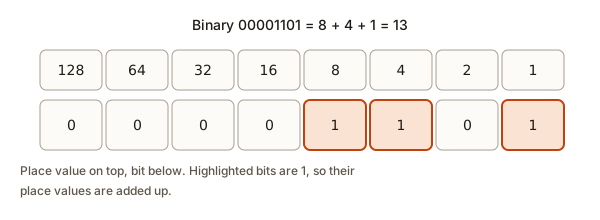 Eight bits labelled with place values 128, 64, 32, 16, 8, 4, 2 and 1, showing 00001101 equal to 13
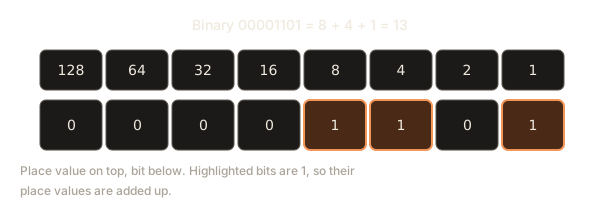
Binary to decimal
To read a binary number, add up the place values wherever there is a 1.
Example 1: 1011. The places from the right are 1, 2, 4, 8. The bits are 1 (eights), 0 (fours), 1 (twos), 1 (ones).
8 + 0 + 2 + 1 = 11So 1011 is 11. Example 2: 11001010. The places are 128, 64, 32, 16, 8, 4, 2, 1.
128 + 64 + 0 + 0 + 8 + 0 + 2 + 0 = 202A handy trick for programs: read left to right. Start with total 0. For each bit, double the total, then add the bit. This is how a computer parses the digits of a number. Run it and watch the total grow.
after 1 total is 1
after 0 total is 2
after 1 total is 5
after 1 total is 11
11
202
0b11001010
Trace 1011. Start at 0. Read 1: 0 doubled is 0, plus 1 is 1. Read 0: 1 doubled is 2, plus 0 is 2. Read 1: 2 doubled is 4, plus 1 is 5. Read 1: 5 doubled is 10, plus 1 is 11. The built-in int(text, 2) does the same thing, and bin goes the other way. The 0b in front is Python's way of saying "this is binary".
Decimal to binary
Two methods work. Pick the one you find easier.
Method A: keep dividing by 2. Divide the number by 2, write down the remainder (0 or 1), and repeat with the quotient until it reaches 0. The remainders, read bottom to top, are the answer. Take 13.
13 / 2 = 6 remainder 1
 6 / 2 = 3 remainder 0
 3 / 2 = 1 remainder 1
 1 / 2 = 0 remainder 1
Read the remainders from the last to the first: 1, 1, 0, 1. So 13 is 1101. Check: 8 + 4 + 0 + 1 = 13. Correct.
Method B: subtract the biggest place. For 100, the biggest power of two that fits is 64. Take 64 off: 36 is left. The next is 32: 4 is left. Then 4 itself. Write a 1 for each place used and a 0 for the others: 64 (1), 32 (1), 16 (0), 8 (0), 4 (1), 2 (0), 1 (0), giving 1100100.
Here is Method A as code with its work printed:
13 divided by 2 is 6 remainder 1
6 divided by 2 is 3 remainder 0
3 divided by 2 is 1 remainder 1
1 divided by 2 is 0 remainder 1
1101
Remainders come out right to left, so each new one is added to the front of digits. That is why the line is str(remainder) + digits and not the other way round. If you swap them you get the number reversed, a very common slip.
The first sixteen numbers
Learn these by heart. They are the pattern of every counting system.
0 0000
1 0001
2 0010
3 0011
4 0100
5 0101
6 0110
7 0111
8 1000
9 1001
10 1010
11 1011
12 1100
13 1101
14 1110
15 1111
Look at the right-hand column of bits. It goes 0, 1, 0, 1 forever. The next column goes 0, 0, 1, 1, 0, 0, 1, 1. The next goes four zeros then four ones. Each column flips half as often as the one to its right, the same way the tens column in decimal changes once for every ten steps of the ones column. Two quick facts follow. A number is even exactly when its last bit is 0. And doubling a number adds a 0 at the right end: 101 (5) becomes 1010 (10), just as multiplying by ten adds a 0 in decimal.
JavaScript has the same tools, named differently:
11
1101
ff
255
00000101
parseInt(text, base) reads text in a base. toString(base) writes a number in a base. padStart(8, "0") adds leading zeros so the result is 8 characters wide, the width of a byte.
How big can a number be?
If you have n bits, the largest whole number you can store (counting from 0) is 2 to the power n, minus 1. The minus 1 appears because 0 uses up one of the patterns. For 8 bits: 256 patterns, so 0 to 255. Forgetting the minus 1 is a classic off-by-one error.
Negative numbers
To store negative numbers, computers use a scheme called two's complement. You do not need to calculate it by hand. You need the idea: split the patterns so that half stand for negative numbers. With 8 bits the "signed" range is -128 to 127. The leftmost bit tells you the sign: 1 means negative. The pattern for -1 is all ones, 11111111, and -5 is 11111011. Run the code to see it and the limits for larger sizes:
8 bits: 0 to 255
16 bits: 0 to 65535
32 bits: 0 to 4294967295
64 bits: 0 to 18446744073709551615
signed 8-bit range: -128 to 127
5 00000101
-5 11111011
-1 11111111
n & 0xFF keeps just the lowest 8 bits so Python shows the 8-bit pattern of a negative number. Python's own integers have no fixed size, so this is done to mimic a byte. The magic of two's complement is that the same adding circuit works for positive and negative numbers. Add 1 to 11111111 (which is -1) in 8 bits and the 1 carries off the left end, leaving 00000000, which is 0. That is correct: -1 plus 1 is 0.
When a result does not fit, the pattern wraps. A signed 8-bit 127 plus 1 becomes -128. This is the overflow from lesson 1 again, and it is the reason for a famous list of bugs, from video counters that jumped negative to a rocket that was lost in 1996 when a number was converted to a smaller type.
Adding in binary
Binary addition is decimal addition with fewer digits. Add column by column from the right. The rules are tiny: 0 plus 0 is 0, 0 plus 1 is 1, and 1 plus 1 is 10, which means write 0 and carry 1.
    1 0 1 1      (11)
  + 0 1 1 0      ( 6)
  ---------
  carry: 1 1 1 .
    1 0 0 0 1    (17)
Column by column from the right: 1 plus 0 is 1. Then 1 plus 1 is 10, so write 0, carry 1. Then 0 plus 1 plus the carry 1 is 10, write 0, carry 1. Then 1 plus 0 plus the carry 1 is 10, write 0, carry 1. The carry has nowhere to go, so it becomes a new leftmost digit 1. The answer is 10001, which is 17. A CPU contains a circuit that does exactly this, a bit at a time, in a fraction of a nanosecond.
Hexadecimal: binary for humans
Long strings of 0s and 1s are hard to read. Hexadecimal, or hex (base 16), is a short way to write them. It has 16 symbols: 0 to 9 and then A to F for ten to fifteen. One hex digit stands for exactly four bits, so a byte is always two hex digits.
binary  1111 1111   ->   F F   ->  ff   ->  255
binary  1010 0001   ->   A 1   ->  a1   ->  161
You see hex all over software: web colours, memory addresses, error codes, and Git commit ids. A web colour such as #ff8800 is three bytes: red ff (255), green 88 (136), blue 00 (0). A mix of full red, mid green and no blue gives orange. Code can build it and also do bitwise operations, which work on each bit separately:
#ff8800
8 14 6
8 10
True False
Line 2 shows the three bitwise operators on 1100 and 1010. AND (&) gives 1 only where both bits are 1: 1000, which is 8. OR (|) gives 1 where either is 1: 1110, which is 14. XOR (^) gives 1 where the bits differ: 0110, which is 6. Line 3 shows shifts. 1 << 3 slides the bits left three places, which multiplies by 8. 40 >> 2 slides right two places, which divides by 4 and drops the rest. Line 4 is a famous trick: a positive whole number is a power of two exactly when n & (n - 1) is 0, because a power of two has a single 1 bit, and subtracting one turns that bit off and every bit to its right on. For 64, 1000000 & 0111111 is 0. For 12, 1100 & 1011 is 1000, not 0.
Unix permissions use the same idea. The number 755 from lesson 2 is three octal digits, each one three bits: 111 101 101, meaning rwx r-x r-x.
Text: letters are numbers
How does a computer store A? It stores a number, and everyone agrees which number means which letter. The oldest agreement is ASCII, from the 1960s. It gives 128 characters their own numbers: A is 65, B is 66, up to Z at 90. Lowercase a is 97, so a lowercase letter is its capital plus 32. The digit characters 0 to 9 are 48 to 57. Notice that the character 5 is the number 53, not 5. A space is 32 and a newline is 10.
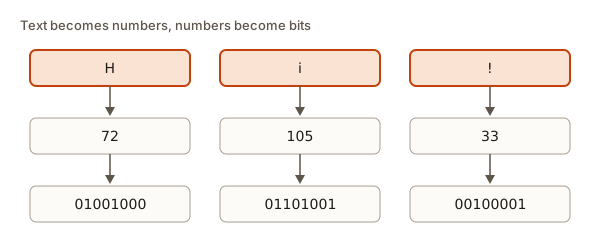 The characters H, i and ! shown as the numbers 72, 105 and 33 and then as 8-bit patterns
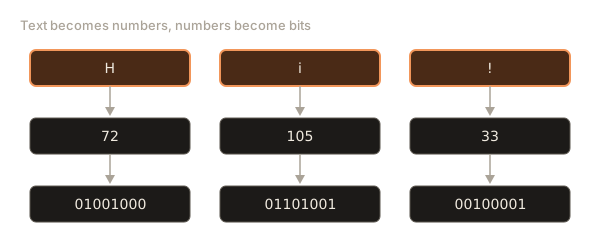
ASCII fits in 7 bits and covers English only. Other languages need thousands more characters: accents, Hindi, Chinese, Arabic, mathematical symbols, emoji. Unicode is the modern agreement. It gives every character in every writing system a number called a code point, written like U+0041 for A or U+20AC for the euro sign. Unicode has well over a hundred thousand characters. The first 128 are exactly ASCII, so old text still works.
A code point is a number, but you still have to decide how to store it as bytes. The method that took over the web is UTF-8. Common letters take one byte, other characters take two, three or four. Because plain English text uses one byte per letter, a UTF-8 file of English is the same as an ASCII file. A file in another language uses more bytes for each character. Run this to see it:
H 72 01001000
i 105 01101001
! 33 00100001
A a €
A has 1 byte(s): [65]
é has 2 byte(s): [195, 169]
€ has 3 byte(s): [226, 130, 172]
😀 has 4 byte(s): [240, 159, 152, 128]
ord turns a character into its number. chr does the reverse. encode("utf-8") shows the actual bytes stored. The letter A uses 1 byte, é uses 2, the euro uses 3 and the emoji uses 4. A string is therefore a row of numbers in RAM, and a text file is that row written to storage. When a program prints text, a font turns each number into a shape on the screen. The computer never stores a picture of the letter.
This has some consequences you can use. Sorting words works because the numbers of letters are ordered. "B" < "a" is true because 66 is less than 97, which is why a plain sort puts all capitals before all lowercase letters. A program that converts case just adds or subtracts 32. A password check that compares characters compares numbers.
When the decoding does not match
Bytes only mean something when you read them with the same table that wrote them. If a text file written in UTF-8 is opened as if it were an older table called Latin-1, the multi-byte characters get split apart and you see garbage. Programmers call this mojibake (a Japanese word, "character change"). Many beginners meet it as é where an é should be.
[99, 97, 102, 195, 169]
café
café
The bytes are the same in all three lines. Only the table used to read them differs. UTF-8 reads 195, 169 as one letter, é. Latin-1 reads each byte as its own character: 195 is à and 169 is ©. So the first rule when you see odd symbols is to check the encoding. For nearly everything today, you should choose UTF-8.
Images: a grid of numbers
A picture on a screen is a grid of tiny dots called pixels. Each pixel has a number that says how bright it is, or three numbers that say how much red, green and blue light to mix. One byte per colour channel gives 0 to 255 of each, and 256 times 256 times 256 gives about 16.7 million colours. That is the origin of #ff8800.
A grey-scale picture needs one byte per pixel: 0 for black, 255 for white. Here is a 5 by 5 image as numbers, drawn using characters whose darkness matches the brightness:
..#..
.:#:.
#####
.:#:.
..#..
25 pixels = 25 bytes
The expression v * 3 // 256 maps 0 to 0, 128 to 1 and 255 to 2, so each value picks one of three symbols. The picture is a cross, and its whole content is 25 numbers. A real photo has millions of pixels, which is why file formats like JPEG compress them. A full-HD colour image, 1920 by 1080 with three bytes per pixel, is about 6 MB before compression, as lesson 1 calculated.
Sound is stored the same way: a microphone measures the air pressure tens of thousands of times a second (44,100 times for CD quality), and each measurement, called a sample, becomes a number. Video is a rapid series of images, typically 24 to 60 each second, plus a sound track. Everything is numbers and the only difference is the meaning we attach to them.
Decimals: why 0.1 plus 0.2 is odd
Whole numbers are easy. Fractions are harder. Computers store numbers with a decimal point using a scheme called floating point, where a number is kept as a fraction part and a power of two, like scientific notation but in base 2.
The snag: in binary, only fractions whose denominator is a power of two can be written exactly. A half is 0.1 in binary, a quarter 0.01, three eighths 0.011. But one tenth cannot be written exactly in a finite number of bits, just as one third cannot be written exactly in decimal (0.3333...). The computer keeps the closest value it can fit and rounds. Run this in JavaScript:
0.30000000000000004
false
true
0.1
0.0001100110011001100110011001100110011001100110011001101
Neither 0.1 nor 0.2 is stored exactly, and the tiny errors leave a result that is just a hair above 0.3. So the equality test says false. Python and every other language show the same result, because the rule comes from the hardware standard (IEEE 754). Last line: half is 0.1 in base 2, a clean number. One tenth is a repeating pattern 0001 1001 1001 ... that is cut off.
Two habits follow. Never test decimals for exact equality. Compare the difference to a small tolerance, as in line 3. And for money, store whole cents as integers (1999 for 19.99), or use a decimal type, so that no tiny errors build up.
Same bytes, different meanings
The most important idea in this lesson is that bytes have no built-in meaning. A given row of bytes can be read in several ways, depending on what the program expects.
[72, 105, 33, 33]
Hi!!
555837768
Four bytes: as separate small numbers, as text, or as one 32-bit whole number. The third reading uses <I, which means "one unsigned 32-bit integer with the lowest byte first". The value is 72 plus 105 times 256 plus 33 times 65,536 plus 33 times 16,777,216, which is 555,837,768. Nothing about the bytes tells you which reading is right. The file format, the program or the type of the variable says so. This is why opening a picture in a text editor shows noise: the editor reads image numbers as letters.
A type, which you will meet in every language, is nothing more than a rule for how to read a few bytes: whole number, decimal, character, true or false. It also explains why "5" and 5 are different things: the first is the character with code 53, the second is the number five.
Where you will meet bits again
You will not write binary by hand at work, but the ideas keep returning in everyday tools. Three examples are worth seeing now.
IP addresses are four bytes
An IPv4 address such as 192.168.1.10 is one 32-bit number split into four bytes, each written in decimal and separated by dots. That is why no part can be above 255: it is one byte. Networking software treats the address as bits when it decides whether two machines are on the same local network. The next module will use these addresses.
[192, 168, 1, 10]
11000000.10101000.00000001.00001010
3232235786
The loop is the same "double and add" trick as before, except each step multiplies by 256 because each part is a whole byte. The final number is what the address looks like to the network hardware. There are only about 4.3 billion possible 32-bit addresses, which is fewer than the number of devices alive today, and that shortage is why a longer system, IPv6, with 128-bit addresses, was created.
Flags: many yes-or-no answers in one number
Sometimes a program needs to remember several on-or-off choices. Instead of three separate variables, it can use one number where each bit is one choice. This is exactly how Unix permissions work. Read is 4 (binary 100), write is 2 (010) and execute is 1 (001). Combine them with OR, test one with AND, and turn one off with AND and the complement.
6 True False
7
5
Start with read and write: 4 + 2 is 6, and the AND test says write is on and execute is off. OR in execute and you reach 7. Then ~WRITE is a number with every bit on except the write bit, and AND-ing with it switches write off, leaving read and execute: 5. Games, file systems, graphics libraries and network protocols are full of flag numbers like this because they pack a lot of information into very little space.
Base64: putting bytes into text
Some channels can carry only text, such as email bodies and parts of web addresses. To send binary data, such as an image, through them, programs use Base64. It takes three bytes (24 bits), cuts them into four groups of six bits, and writes each group as one of 64 safe characters: A to Z, a to z, 0 to 9, + and /. The result is a third bigger than the original but it survives any text channel.
SGkhCheck it by hand. The bytes 72, 105 and 33 are 01001000 01101001 00100001. Regroup the 24 bits in sixes: 010010, 000110, 100100, 100001. Those are 18, 6, 36 and 33. In the Base64 alphabet, 18 is S, 6 is G, 36 is k and 33 is h. When you see long strings of random-looking letters ending in = signs in a web address, a token or an email attachment, they are very probably Base64. It is an encoding and not encryption, so anyone can decode it, and you must never use it to hide a password.
Byte order
One more detail that surprises people. When a number needs more than one byte, which byte comes first in memory? Some machines store the least significant byte first, which is called little-endian, and most of the computers you use work this way. Others use big-endian, with the biggest byte first, and network protocols use that order. The <I you saw in the struct example means little-endian. If two programs disagree, a number like 1 can come out as 16,777,216. You will rarely handle this yourself, but if you ever read a binary file format and the numbers look huge and wrong, a byte-order mismatch is the first suspect.
Why a kilobyte is sometimes 1,024
Memory sizes grew from powers of two, because address wires carry bits. Ten address bits reach 1,024 locations, so a "kilo" of memory was 1,024 bytes and not 1,000. That habit gave us the two spellings from lesson 2: KiB, MiB and GiB for the powers of two, and KB, MB and GB for round decimal thousands. When someone gives you a size, ask which they mean if the exact figure matters. For a rough sense of scale the two differ by less than eight percent at the gigabyte level.
How the pieces fit: from your keypress to bits
Press the H key. The keyboard sends a code to the computer. The OS passes it to the active program. The program stores the code point 72 in a byte in RAM. When you save, the editor encodes the text in UTF-8 and the OS writes the bytes to storage as blocks. When the editor shows the text, a font gives the shape for 72 and the graphics card lights the right pixels, each a few numbers of its own. At every step the data is bytes. What changes is which program is reading them and what it thinks they mean.
Common mistakes
Treating digits as numbers. "1" + "1" is text joining. Try these in JavaScript:
11
2
10
101
5
2
Line 1 joins two pieces of text to make 11. Line 3 multiplies because JavaScript silently converts the text "5" to a number, which hides mistakes. Line 4 reads 101 as decimal, one hundred and one. Line 5 passes the base and reads it as binary: 5. Always pass the base to parseInt. The last line surprises many people: the emoji counts as 2 because JavaScript measures text in 16-bit units, and this character needs two of them. A character that is "one thing" to a human may be several units to a program.
Forgetting the minus one. An 8-bit number holds 0 to 255, not 0 to 256. "Number of patterns" and "largest value" differ by one.
Reversing the digits. When you convert to binary by division, the first remainder is the last digit. If you write them in the order produced, your answer is backwards.
Using the wrong base in a function. Python gives a clear error when a digit does not belong in the base you named:
ValueError: invalid literal for int() with base 2: '12'Read it directly: '12' has a 2, which is not a binary digit.
Comparing decimals with ==. As in the floating-point section, use a tolerance, or integers.
Believing the extension picks the encoding. A .txt file has no label saying which encoding it uses. Programs guess, and wrong guesses give mojibake. Save in UTF-8 and say so when a tool asks.
Debugging walkthrough: the name that turned to rubbish
A student's script reads a list of names from a file and prints them. The name José appears as José. Where is the fault?
- Notice the pattern.
éin place oféis the signature of UTF-8 bytes read as Latin-1. That already tells you which two tables are in conflict. - Find the reader. Look for where the file is opened. If the code opens the file with no encoding given, the language may use a system default, which on some Windows machines is not UTF-8.
- Test the file. Open it in a text editor that shows its encoding (most do in a corner of the window). It says UTF-8, so the file is fine and the reader is guessing wrong.
- Fix the reader. State the encoding: in Python
open("names.txt", encoding="utf-8"). Run again.Joséis back.
The reasoning is the lesson: bytes are the same, the table was different. No data was lost, only misread.
Interview-style questions
- How many values fit in n bits? 2 to the power n. For signed numbers, half are negative.
- How do you check whether a number is a power of two? It must be positive and
n & (n - 1)must be 0. - Why is 0.1 plus 0.2 not 0.3? One tenth has no finite binary form, so it is stored as a close approximation and the errors show up in the sum.
- What is the difference between Unicode and UTF-8? Unicode assigns each character a number (a code point). UTF-8 is a way to write those numbers as one to four bytes.
- Why is hex used? One hex digit is exactly four bits, so two digits fit a byte. It is much shorter to read than binary.
- Count the 1 bits in a number. Repeat
n = n & (n - 1)until n is 0, and count the rounds. Each round removes the lowest 1 bit.
What you now know
- Computers use binary because two states are reliable. n bits hold 2 to the power n patterns.
- Place values double to the left: 1, 2, 4, 8, 16, 32, 64, 128. Binary to decimal adds the places with a 1. Decimal to binary repeatedly divides by 2.
- A byte holds 0 to 255, or -128 to 127 when signed. Overflow wraps around.
- Hex writes four bits per digit and is used for colours and addresses.
- Text is numbers: ASCII for English, Unicode for everything, UTF-8 to store it as bytes. Garbled text means a table mismatch.
- Images are grids of numbers. Sound is samples. Video is a fast sequence of images.
- Decimals are stored in floating point, which is approximate, so compare with a tolerance.
- Bytes have no meaning until a program decides how to read them.
Practice
1. (easy) Convert 1010 to decimal.
Solution
8 + 0 + 2 + 0 = 10.
2. (easy) Convert 37 to binary.
Solution
37 = 32 + 4 + 1, so the bits for 32, 16, 8, 4, 2, 1 are 1, 0, 0, 1, 0, 1: 100101. Check by division: 37, 18 r1, 9 r0, 4 r1, 2 r0, 1 r0, 0 r1; reading the remainders from last to first gives 100101.
3. (easy) How many different values can 10 bits hold?
Solution
2 to the power 10, which is 1,024. The largest unsigned value is 1,023.
4. (easy) What does print(chr(ord("a") - 32)) print?
Solution
A. The code of a is 97, minus 32 is 65, which is A.
5. (medium) Add 0110 and 0111 in binary and give the decimal result. Show the carries.
Solution
6 + 7 = 13. Column by column from the right: 0 plus 1 is 1. 1 plus 1 is 10: write 0, carry 1. 1 plus 1 plus carry 1 is 11: write 1, carry 1. 0 plus 0 plus carry 1 is 1. The result is 1101, which is 13.
6. (medium) Write a Python function to_hex(n) using only division and a lookup string, with no hex() or format. Check that to_hex(255) is ff.
Solution
It prints ff 1000 0. The method is the same as for binary, only the base is 16. Remainders are mapped to symbols with a string lookup.
7. (medium) The text Zoë is encoded as UTF-8. How many bytes is it, and why?
Solution
4 bytes. Z and o are ASCII and take one byte each. ë (U+00EB) is outside ASCII and takes two bytes in UTF-8.
8. (medium) What is the largest number a signed 16-bit value can hold, and what happens if you add 1 to it?
Solution
32,767, which is 2 to the 15 minus 1. Adding 1 overflows and wraps to -32,768.
9. (hard) Write a function count_ones(n) that counts the 1 bits of a non-negative whole number using n & (n - 1), and test it on 0, 1, 7 and 255.
Solution
It prints [0, 1, 3, 8]. Each pass of n & (n - 1) clears the lowest 1 bit, so the number of passes equals the number of 1 bits.
10. (hard) A shop stores prices as decimal numbers and totals a basket of ten items that cost 0.10 each. The total prints as 0.9999999999999999 instead of 1. Explain and give a fix.
Solution
0.10 has no exact binary form, so each addition carries a tiny error, and ten of them add up to a visible one. Fix: store prices in whole cents (10 each), add integers (total 100), and divide by 100 only when displaying. Alternatively use a decimal type such as Python's decimal.Decimal.
11. (hard) A 12 by 8 pixel icon uses 4 bytes per pixel (red, green, blue, transparency). How many bytes is it, and how many hex digits would it take to write it all out?
Solution
12 times 8 is 96 pixels, times 4 is 384 bytes. Each byte is two hex digits, so 768 hex digits.