Why this matters
Almost every program you write holds a group of values. A game keeps a list of players, a shop keeps a list of prices, and a web page keeps a list of comments. The C++ Standard Template Library, usually called the STL, gives you ready-made containers for these groups. A container is a type that stores other values and gives you rules for adding, reading and removing them. Interviewers ask about these containers because the choice of container often decides whether a solution is fast or slow.
This lesson covers the four sequence tools you will use most: vector, pair, list and deque. A sequence keeps its items in an order you control: first, second, third, and so on. The next lesson covers stacks and queues, which are sequences with fewer allowed moves.
Start with the idea of a container
Think of a container as a set of storage boxes with a set of rules. A shoe rack has a fixed order of shelves, and you can reach any shoe by its shelf number. A row of lockers is similar, but to get to locker 40 you might need to walk past lockers 1 to 39 if they are chained together. A bag of loose coins has no order at all. Each of these is a different container, and each makes some jobs easy and other jobs hard.
Every container in the STL answers three questions for you:
- How do I reach an item? By position number, by walking from the start, or by a key.
- How do I add or remove items? At the front, at the back, in the middle, or only at one end.
- What does each job cost? The cost is written with the letter O, which describes how the work grows as the number of items, written n, grows. O(1) means the work stays about the same no matter how large n is. O(n) means the work grows in step with n. O(log n) grows very slowly, adding one step each time n doubles.
You do not need to memorise every cost today. You need to be able to ask these three questions about any container and get an answer. The table at the end of this lesson gathers the answers in one place.
Before we start, we need to define some words that appear everywhere in the STL.
- An iterator is a marker that points at one item in a container. You can move it forward with
++and read the item with*. Think of a bookmark. The next lesson covers iterators in detail, so for now treat them as positions. - A template is a pattern the compiler fills in with a real type.
vector<int>is a vector of ints, andvector<string>is a vector of strings. The same code works for both. - The header is the line at the top of a program that brings a library in.
#include <vector>brings invector. The names of the STL live in thestdnamespace, andusing namespace std;lets you writevectorinstead ofstd::vector. Beginners often use that line in small programs, and it is fine there. Large projects avoid it.
vector: the default choice
A vector is a resizable array. An array is a row of values stored one after another in memory, so that the first value sits next to the second, the second next to the third, and so on. The vector keeps all its values in one block. It also keeps two numbers that you can read with functions:
size()is how many items the vector holds right now.capacity()is how many items fit in the block before it must grow.
You will rarely need capacity() in everyday code, but it explains why adding items at the end is fast. When the block is full, the vector asks for a larger block, copies everything across, and frees the old one. That copy is expensive, but it happens rarely, because the new block is much bigger than the old one. In the common implementations the capacity roughly doubles each time. Over a long run of push_back calls, the average cost of one add is still constant. Computer scientists call this amortized O(1): a single add can be slow, but the total for many adds is proportional to the number of adds.
Here is the cost picture for a vector:
- Reading or writing
v[i]by index is O(1). The address of itemiis the start address plusitimes the size of one item, so the computer jumps there directly. - Adding or removing at the end, with
push_backandpop_back, is O(1) on average. - Inserting or erasing at the front or the middle is O(n), because every later item has to shift one place to make room, or to close a gap.
Look at the array picture below. The items sit in one row, so the memory address of each item is a simple calculation from its position.
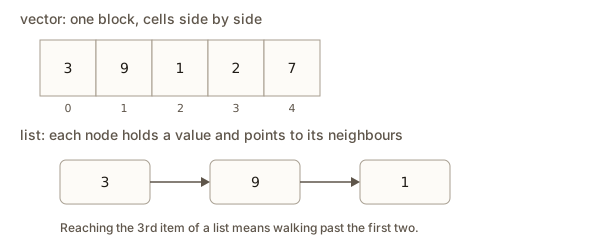 A vector holds its items in one row of cells, so index 2 is found by a single calculation
Two member functions do most of the work you will see in practice. insert adds a value before a position, and erase removes the value at a position. Both take an iterator, not a plain index. You write v.begin() + 1 to mean the position of index 1. The + 1 moves the marker forward by one item. The function v.begin() returns the marker for the first item, and v.end() returns the marker one past the last item, which is a stop sign and not a real item.
Vectors also keep their own order. When you push_back 3, then 1, then 2, the vector holds 3, 1, 2 in that order until you change it. That is different from a set or a map, which you will meet in lesson three, and which sort their items for you.
Use a vector when you do not have a specific reason to use another container. It is cache friendly. A cache is a small, very fast memory close to the processor. When you read item 0, the processor also brings the next few items into the cache, because they sit beside it. Walking a vector from start to end is fast in practice, even when the list of items is long.
Worked example 1: a vector trace
Here is a complete program. Read it once, then read the trace that follows it, which follows the vector one step at a time.
This program does not read any input, so you can press Run straight away. The output is:
size 3
3 9 1 2 7
front 9 back 7
after pop 3
Trace it step by step:
vector<int> v = {3, 1, 2};creates a vector with three values.size()is 3, so the first line printssize 3.push_back(7)adds 7 at the end. The vector is now3 1 2 7.insert(v.begin() + 1, 9)places 9 before index 1, which holds the 1. The items after it shift one step right. The vector is now3 9 1 2 7.- The loop prints each item followed by a space. That gives
3 9 1 2 7with a trailing space, andendlmoves to a new line. The trailing space is harmless. erase(v.begin())removes the first item, the 3. The vector is9 1 2 7.front()is 9 andback()is 7, so the line readsfront 9 back 7.pop_back()removes the 7 at the end. The vector is9 1 2, with size 3.
The loop uses size_t for the index. That is an unsigned type that matches what size() returns. Using a plain int for the index can trigger a warning when you compare it with size(), and that warning is worth taking seriously.
pair: two values as one
A pair holds exactly two values, which can have different types. It lives in the <utility> header, which the STL containers include for you in most cases. You read the parts with .first and .second.
pair<string, int> p = {"Asha", 90};
cout << p.first << " " << p.second << endl;   // Asha 90
A pair is useful any time two values belong together: a name and a score, a row and a column, a word and its count. A vector of pairs is a common way to keep records without writing a new struct. The one rule to remember is that a pair compares first by first, then by second. That is the same as dictionary order. The word apple comes before banana because a comes before b, and if two words start with the same letter, the second letter decides. A pair works the same way with numbers.
This rule has two consequences. First, you can sort a vector of pairs with the default comparison, and the result is sorted by the first value, with ties broken by the second value. Second, when you need a different order, such as highest score first, you write your own comparison. You will do that in the worked example below.
The function make_pair builds a pair and works out the types for you, so make_pair(1, 2.5) gives a pair of an int and a double. Where the type is already known, pair<int, double> p = {1, 2.5}; also works. Use whichever form your team uses.
A function can return a pair when it needs to give back two results. That is cleaner than passing two output variables by reference, which is a technique you will see in older code. The example at the end of this section does it.
Structured bindings
C++17 added a shorter way to unpack a pair. A structured binding names each part at once:
auto [name, score] = p; // name is "Asha", score is 90The variables name and score are copies of the two parts. You can use them like normal variables. This works for pairs, for tuples and for plain arrays. Structured bindings make code that returns two values much easier to read, and you will see them in most modern C++ code.
Worked example 2: sorting pairs by two keys
The program below reads a number of students and their marks, then prints them with the highest mark first. Students with equal marks are listed alphabetically. It stores each student as a pair with the mark first, so the default ordering already helps, and it adds a comparison to flip the mark order.
Type this into the Input box before you press Run:
4
Asha 90
Ravi 75
Mei 90
Dan 60The output is:
Asha 90
Mei 90
Ravi 75
Dan 60
top: Asha
The program stores each row as {mark, name}. Putting the mark first is a choice. It lets the built-in pair comparison do most of the work, and the custom comparison only has to deal with the two cases. The lambda is a small unnamed function written inside the call to sort. Its two parameters are two rows. It returns true when the first row should come before the second. When the marks differ, the higher mark comes first, so it returns a.first > b.first. When the marks are equal, the names decide, and the smaller name comes first. The final rows[0] is the top row, which is safe here because the program has at least one row.
Notice what sort does with a comparison that returns false for equal items. Two students with the same mark and the same name would be treated as equal, and their order would not be guaranteed. Real data often has such ties, so think about what order you want for them.
Worked example 5: returning two values from a function
This program returns a pair from a function and unpacks it with a structured binding. It needs no input.
The output is:
min -2 max 9
range 11
The function starts with the first value as both the lowest and the highest. Then it walks the rest of the vector. The return {lo, hi}; line builds the pair on the spot. In main, the line auto [lo, hi] = minMax(data); creates two new variables from the two parts. The range is 9 - (-2), which is 11. Note that minMax assumes the vector is not empty. Calling it with an empty vector would read v[0] from nothing, which is undefined behaviour, and a later lesson shows how to guard against that.
list: a chain of nodes
A list is a doubly linked list. Each item lives in its own small box, called a node, and each node stores three things: its value, a link to the next node, and a link to the previous node. The nodes are not next to each other in memory. They are chained together, the way train carriages are coupled. You walk from one carriage to the next by following the couplings.
The diagram below shows the difference. The vector holds its values in a row. The list holds each value in a separate node, and each node points to its neighbour.
Each node holds a value and a pointer (dot and arrow) to the next node. An outlined node is where the walk is now. A filled node is new or found.
The list is empty. head points to nothing.
Because the nodes are chained, a list gives you a few abilities that a vector does not have:
- Adding or removing an item when you already hold an iterator to its position is O(1). The list only changes a few links. Nothing shifts.
push_frontandpop_frontare O(1), just likepush_backandpop_back.splicemoves a whole run of nodes from one list into another in O(1). It only changes the links, so the nodes are moved, not copied.
The list also has costs that matter a lot in practice:
- There is no index.
l[2]does not compile. To reach the third item you start at the front and step forward twice, which is O(n). - Each node is a separate allocation, so the items are scattered in memory. Walking a list jumps from place to place. The processor's cache helps less, and a list is often slower to walk than a vector, even when both have O(n) cost.
- Each node also needs space for its two links, so a list uses more memory per value.
The list tells you the honest truth about insertion. Inserting in the middle is O(1) only once you already hold the iterator. Finding that position is itself O(n). This is the most common mistake with lists, and a later section returns to it.
Worked example 3: list operations
The next program builds a list, inserts in the middle, removes a value, and splices another list in. It prints the list after each step, with a helper function show that prints a label, the values and the size.
The output is:
start: 0 1 2 3 4  (size 5)
insert: 0 1 99 2 3 4  (size 6)
remove: 0 1 2 3 4  (size 5)
splice: 0 50 60 1 2 3 4  (size 7)
other:  (size 0)
reverse: 4 3 2 1 60 50 0  (size 7)
Here is what happens, one line at a time:
- The list starts as
1 2 3.push_front(0)puts a 0 at the front andpush_back(4)puts a 4 at the end. That gives0 1 2 3 4. itstarts on the first node, the 0. Two++itsteps move it to the 2.insert(it, 99)places 99 before the node thatitpoints to. The result is0 1 99 2 3 4.remove(99)deletes every node holding 99. There was one, so the list goes back to five values.spotmoves to the second node, which holds 1.splice(spot, other)moves both nodes ofotherin front ofspot. The list becomes0 50 60 1 2 3 4, andotheris left empty, with size 0.reverse()turns the list around. It takes O(n), and the nodes are only relinked, so no values are copied.
The line other: (size 0) has two spaces before the size. That is because the label is followed by a colon and the loop prints nothing, while the code prints a space before the size. Neither space is a bug.
Notice that insert and splice both take an iterator. Notice too that the program does not use l[2] anywhere. That is deliberate. Choose a list when you insert and remove at known positions, and when you move big chunks of data around. Choose a vector for almost everything else.
deque: a line you can work at both ends
A deque (pronounced "deck") is a double-ended queue. It lets you add and remove at both the front and the back in O(1), and it still lets you use d[i] to read any item in O(1). Those three abilities together make it the right tool for problems that work at both ends.
Inside, a deque is not one block like a vector. It keeps a list of several fixed-size blocks, and a small map of where each block lives. Adding at the front fills a block from the middle outward, and when a block runs out, the deque adds a new one. You do not need to know these details to use a deque. What you need to know is the result: you can grow or shrink either end cheaply, and indexing still works.
The diagram below shows the two ends. Pushing and popping happen at the ends, and the middle is still reachable by index.
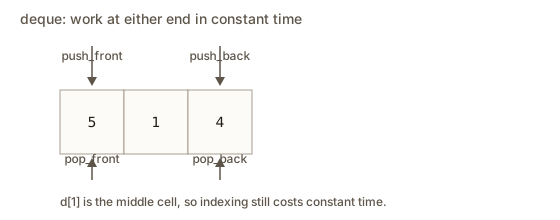 A deque with arrows showing push and pop at both the front and the back
Deque operations, with their costs:
push_front(x)andpop_front()are O(1).push_back(x)andpop_back()are O(1).d[i]andd.at(i)are O(1).atchecks the bounds and throws an exception if the index is wrong, which is the safer choice while you learn.insertorerasein the middle is O(n), because items shift, just as with a vector.
A deque is the usual choice for a sliding window, which is a block of recent values that moves along a stream. You add the newest value at the back and remove the oldest from the front. A vector would need to shift every item to remove the front, which costs O(n) each time. A deque does it in O(1). Lesson five builds a bigger sliding-window tool on top of this idea, and the practice questions here start you on it.
Remember that the deque is not the same as a vector in memory. Holding a reference to an item and then adding to the front can leave that reference pointing to the right value, but iterators are invalidated by changes at the ends, and that is a rule worth looking up before you rely on it in serious code.
Worked example 4: keep the last three values
This program reads a stream of numbers and keeps only the three most recent. The input is the count and then the numbers. It prints the window after each number arrives. Type this into the Input box:
7
5 1 4 8 2 9 3The output is:
read 5: window 5, oldest 5, newest 5
read 1: window 5 1, oldest 5, newest 1
read 4: window 5 1 4, oldest 5, newest 4
read 8: window 1 4 8, oldest 1, newest 8
read 2: window 4 8 2, oldest 4, newest 2
read 9: window 8 2 9, oldest 8, newest 9
read 3: window 2 9 3, oldest 2, newest 3
Each new number goes on the back. Once the window holds four values, the oldest is removed from the front. So the window never holds more than three values. Look at the line for the number 8. Before it arrives, the window is 5 1 4. After push_back(8) it is 5 1 4 8, which is four items. The pop_front removes the 5, and the window is 1 4 8. Each step does one push and at most one pop, so each step is O(1), and the whole program is O(n).
The loop reads window[j] by index. The index access is what makes a deque better than a queue here. A plain queue only lets you see the front and the back. Once you need to look at the middle items too, a deque is the right tool.
Choosing between them
For most problems, start with a vector. Reach for a deque when you add and remove at both ends. Reach for a list when you splice big pieces around or hold many iterators to positions you insert and erase at. Use a pair as the item of a vector or a list when each record has two parts.
The table gathers the costs for the three sequence containers.
| Container | Read by index | Add or remove at front | Add or remove at back | Add or remove in middle |
|---|---|---|---|---|
vector | O(1) | O(n) | O(1) on average | O(n) |
deque | O(1) | O(1) | O(1) | O(n) |
list | not available | O(1) | O(1) | O(1) once you hold the iterator |
The last cell matters. "O(1) once you hold the iterator" hides the cost of finding that iterator, which is O(n) for a list. A correct statement about cost always says what work is included.
What happens inside: memory and growth
Here is what a vector does when you call push_back many times. Suppose the vector has room for four items and holds four already. Calling push_back for a fifth item forces a bigger block. The vector asks the memory system for a new block, copies the four existing items across, adds the fifth, and frees the old block. In the common implementations, the new block holds about twice as many items, so the next few push_back calls need no copy at all.
This explains two rules you will meet in real code. First, every iterator, pointer and reference into a vector can become invalid when the vector grows, because the items may now live somewhere else. Second, when you know the final size in advance, call reserve first. For example, v.reserve(1000) gives the vector room for 1000 items, so the next thousand push_back calls do not need to grow the block. reserve changes the capacity only. The size stays the same, so size() still reports 0 for an empty vector that has reserved space.
A list never moves its items when it grows, since each new node is allocated on its own. That is why list iterators stay valid through most changes. A deque sits between the two. Changing the ends does not move the existing items, but it can invalidate iterators.
The example below shows the bug that vector growth causes. Do not run it. It is a warning, not a program to learn from.
vector<int> v = {1, 2, 3};
auto first = v.begin();        // a marker to the 1
for (int i = 0; i < 100; i++) v.push_back(i);   // the block may move
cout << *first << endl;        // undefined: the marker may point at freed memory
"Undefined behaviour" means the language standard gives no rule for what happens. The program might print 1, print garbage, or crash. The fix is to take a fresh iterator after the changes, or to use an index, which does not go stale.
Interview view: what the costs tell you
Interviewers rarely ask you to recite a container table. They ask questions where the right container makes the answer obvious. Here are four ways the sequence containers show up.
- Reverse a list of values. A vector does this with
reverse(v.begin(), v.end())in O(n). A list has its ownreversemember, and it also works in O(n). - Keep the last k values of a stream. Use a deque. Push at the back and pop from the front when the size passes k. Each step is O(1), so the whole job is O(n) for n values.
- Insert a value at a known position many times. If you hold the position as an iterator, a list does each insert in O(1). If you only know a numeric index, a vector is usually faster in practice, even though each insert is O(n).
- Move a block of values from one place to another. A list
splicemoves the whole block in O(1). A vector copy costs O(k) for a block of k items.
When you answer in an interview, say the cost out loud and say why. "This is O(n) because each step does one push_back and the loop runs n times" is much stronger than "this is fast".
Common mistakes and the messages you will see
The compiler is your first teacher. Here are real messages from the g++ compiler, version 15, using the standard flag -std=c++17. Your version may word them slightly differently, but the key phrase is the same.
Mistake 1: indexing a list. A learner writes l[2] on a list:
error: no match for 'operator[]' (operand types are 'std::__cxx11::list<int>' and 'int')Read the message from the end. "No match for operator[]" says the [] operator does not exist for this type. "operand types are list and int" tells you which type is wrong. The fix is to switch to a vector, or to step with an iterator. A compile error is a mistake the compiler finds before the program runs, and messages like this are the easiest to fix.
Mistake 2: using the result of pop. A learner writes int x = s.pop(); on a stack. The pop function returns nothing:
error: void value not ignored as it ought to beThe message means "you used a void, which holds no value, as if it had one". The fix is to read the value with top() first, then call pop() on its own line. Lesson two covers this in full.
Mistake 3: insert with a plain index. A learner calls v.insert(1, 9):
error: no matching function for call to 'std::vector<int>::insert(int, int)'insert needs an iterator as its first argument. The fix is v.insert(v.begin() + 1, 9). The message says "no matching function" because none of the insert overloads accepts an int as the position.
Mistake 4: running off the end. A learner calls v.at(10) on a vector with three items. This is a runtime error: the program compiles, then stops while it runs:
terminate called after throwing an instance of 'std::out_of_range'
  what():  vector::_M_range_check: __n (which is 10) >= this->size() (which is 3)
The message says the index 10 is too big for a vector of size 3. The program stops, and the exit code is 134, which means it was aborted. The at function is the safe choice while you learn, because it fails loudly. v[10] does not check at all, and it may silently read garbage.
Mistake 5: front or back on an empty container. Calling v.front() on an empty vector is undefined behaviour, just like the iterator case above. Check v.empty() first. The same goes for pop_back and pop_front.
Mistake 6: comparing unsigned and signed sizes. The comparison i < v.size() with a plain int i gives a compiler warning, because size() returns an unsigned type. Use size_t, auto or cast the size when you need a signed value. The warning is not a crash, but it often hides a real bug, such as a loop that never runs when the vector is empty.
Debugging walkthrough
Suppose you wrote this program and it printed nothing useful:
vector<int> v = {3, 1, 2};
for (int i = 0; i < v.size(); i--) cout << v[i] << endl;
Work through it the way a debugger would, one line at a time, with the state written down.
- The start is
i = 0, and the vector has size 3. The conditioni < v.size()is true, so the loop body runs. It prints3. - The update is
i--, which takesifrom 0 to -1, noti++. - The condition now compares -1 with
v.size(). The compiler turns theintinto an unsigned number first, and -1 becomes a huge value. A huge value is not less than 3, so the condition is false and the loop stops.
Run it and you see one line, 3, followed by done. The compiler warns about the mixed signed and unsigned comparison, and that warning points at the bug. Nothing crashes, which is why this kind of bug is easy to miss. The loop quietly does less work than you wanted.
The fix is to count up and to use size_t for the index, so the loop starts at 0 and stops at size. Write the corrected version as for (size_t i = 0; i < v.size(); i++). You can also use the range form for (int x : v) when you do not need the index at all.
The lesson from this walkthrough is that a loop bug often comes from the update step and from a mixed comparison of signed and unsigned numbers. Print the index in the loop if you are unsure. It takes a few seconds and it saves an hour.
Variations and edge cases
A few details change the answer in ways that surprise beginners.
eraseon a vector returns an iterator to the item that now sits where the erased one was. A loop that erases inside it must use that return value, or it will skip items. The corrected loop isit = v.erase(it);and it does not add++itin the erase branch.list::remove(value)deletes every node with that value, whilelist::erase(iterator)deletes one node. Read the function name carefully.- A pair with equal
firstvalues is decided bysecond. A pair with equal values in both parts is equal, andsortmay place equal items in either order. dequeinsert in the middle costs O(n), the same as a vector. Its advantage is only at the ends.- Reserving space does not change
size(). A vector that reserved 100 and holds nothing still answerssize() == 0, soempty()is true.
Interview-style practice in plain words
A common interview task asks you to keep the best k items from a long sequence. The vector way is to sort everything and take the first k, which costs O(n log n). A deque works well when the window is fixed and always moves in one direction. A heap, which you will meet in lesson two, is better still for picking the best k out of a changing set.
Another common task asks you to print a list in reverse. You can build a second list by calling push_front for each value, or call reverse on the original. Both are O(n). Mention the trade-off out loud: the first keeps the original, and the second changes it in place.
Practice
The solutions are hidden below each exercise. Try each one before you open it.
- Create a vector holding
10,20and30. Print the sum of its values with a loop. Expected output:60.
Solution
vector<int> v = {10, 20, 30};
int sum = 0;
for (int x : v) sum += x;
cout << sum << endl;
The range-based loop visits each value once. The output is 60.
- Make an empty vector, call
reserve(100), and printsize()and whether the vector is empty. Expected output:0 1.
Solution
vector<int> v;
v.reserve(100);
cout << v.size() << " " << v.empty() << endl;
reserve changes capacity, not size, so the size is 0 and empty() returns true, which prints as 1.
- Remove every odd number from a vector of ints. Use a loop that does not skip items after an erase. Input:
{4, 7, 2, 9, 6}. Expected output:4 2 6.
Solution
vector<int> v = {4, 7, 2, 9, 6};
for (auto it = v.begin(); it != v.end();) {
    if (*it % 2 == 1) it = v.erase(it);
    else ++it;
}
for (int x : v) cout << x << " ";
cout << endl;
erase returns the next valid iterator, so the loop only advances when it keeps the item.
- Store three students as
pair<string, int>in a vector. Print the name of the student with the highest mark. If two students tie, print the one who appears first in the vector. Input:Asha 90,Ravi 75,Mei 90. Expected output:Asha.
Solution
vector<pair<string, int>> students = {{"Asha", 90}, {"Ravi", 75}, {"Mei", 90}};
auto best = students[0];
for (auto& s : students) {
    if (s.second > best.second) best = s;
}
cout << best.first << endl;
Only a strictly higher mark replaces the best, so the earlier student wins a tie.
- Use a list to rotate its values left by one: move the first value to the back. Input list
1 2 3 4. Expected output:2 3 4 1.
Solution
list<int> l = {1, 2, 3, 4};
l.splice(l.end(), l, l.begin());
for (int x : l) cout << x << " ";
cout << endl;
splice moves the first node to the end in O(1), with no copying.
- Build a second list with the values of a first list in reverse order, using only
push_front. Input1 2 3. Expected output:3 2 1.
Solution
list<int> src = {1, 2, 3};
list<int> out;
for (int x : src) out.push_front(x);
for (int x : out) cout << x << " ";
cout << endl;
Each push_front puts the newest value at the front, so the last value read ends up first.
- Implement a queue of jobs with a deque. Push
a,b,c, then pop one job, then print the front and the size. Expected output:b 2.
Solution
deque<string> jobs;
jobs.push_back("a");
jobs.push_back("b");
jobs.push_back("c");
jobs.pop_front();
cout << jobs.front() << " " << jobs.size() << endl;
Jobs join at the back and leave from the front, which is first in, first out.
- Use a deque to reverse a sequence of ints in place with indexes. Input
1 2 3 4 5. Expected output:5 4 3 2 1.
Solution
deque<int> d = {1, 2, 3, 4, 5};
for (size_t i = 0, j = d.size() - 1; i < j; i++, j--) {
    swap(d[i], d[j]);
}
for (int x : d) cout << x << " ";
cout << endl;
Two indexes move toward each other, and each swap is O(1) because indexing a deque is constant time.
- Sort a vector of pairs
(name, age)so that younger people come first, and equal ages are sorted by name. Input{"Zoe", 30},{"Adam", 25},{"Bea", 30}. Expected output:Adam 25,Bea 30,Zoe 30, one per line.
Solution
vector<pair<string, int>> people = {{"Zoe", 30}, {"Adam", 25}, {"Bea", 30}};
sort(people.begin(), people.end(), [](const auto& a, const auto& b) {
    if (a.second != b.second) return a.second < b.second;
    return a.first < b.first;
});
for (auto& p : people) cout << p.first << " " << p.second << endl;
The lambda compares ages first and names second, which matches the rule in the question.
- Debug this program. It does not compile. Explain the error and fix it so that it prints
6.
list<int> l = {5, 6, 7};
cout << l[1] << endl;
Solution
A list has no index, so l[1] gives "no match for operator[]". Use an iterator instead: auto it = l.begin(); ++it; cout << *it << endl;, which prints 6. A list cannot jump to position 1, so it has to start at the front and step once.
- Two steps: a vector holds
{3, 3, 1}. Calleraseon its first element, then count how many values equal 3 that remain. Expected output:1.
Solution
vector<int> v = {3, 3, 1};
v.erase(v.begin());
cout << count(v.begin(), v.end(), 3) << endl;
After the erase the vector is {3, 1}, and one 3 remains. count is in <algorithm>.
What you now know
- A container is a rule for storing and reaching items. Ask how you reach an item, how you add and remove, and what each job costs.
- A
vectoris a resizable array in one block. Index access is O(1), andpush_backis O(1) on average. - A
pairholds two values and compares byfirst, thensecond. Structured bindings unpack it. - A
listis a chain of nodes. Splicing and inserting at a known iterator are O(1), but there is no index. - A
dequegives O(1) work at both ends and O(1) indexing, which suits sliding windows. - Growth can invalidate iterators, so reserve space when you know the size, and take fresh iterators after changes.