Why it matters
Recursion is the tool behind trees, graphs, divide and conquer, dynamic programming and the backtracking in this module. Interviewers use it to see whether you can reason about a function that calls itself. If you can trace one recursive call by hand, you can read most recursive solutions. If you cannot, the code looks like magic. This lesson gives you a method for writing recursion that stops, and a clear picture of what the computer does while it runs.
Start with a plain idea
A function is a named group of steps. You call it by writing its name with the values it needs in brackets. It runs its steps and gives back a result. Usually the steps in a function call other functions. Sometimes a function calls itself. That is recursion.
Recursion sounds strange at first, so start with an everyday picture. You stand at the top of a staircase in a building with no lights, and you want to know how many steps lead to the ground floor. You cannot see the bottom. You can ask the person one floor down, "How many steps are there from where you stand?" That person asks the person below, and so on. Each question is the same question, asked about a shorter staircase. When someone reaches the ground floor, they answer zero. Then each person adds their own step to the answer they got from below, and the total travels back up to you.
That is the whole shape of recursion. A question is handed to a smaller copy of itself. The smallest copy has an answer you already know. Then the answers climb back up the chain, and each link does a little work on the way up.
The two parts every recursive function needs
Every correct recursive function has two parts.
- The base case handles the smallest input. The function answers it directly, with no further call. In the staircase, the base case is the ground floor, where the answer is zero.
- The recursive case handles every other input. It makes the input smaller and calls the same function on the smaller input. Then it combines the answer it gets back with its own small piece of work.
Two rules keep the chain healthy. First, the base case must be reachable: every chain of calls must eventually land on it. Second, each recursive call must move toward the base case: the input must shrink in a way that can reach the base. If the input does not change, or changes in the wrong direction, the chain never ends.
A common beginner error is a recursive call with the same input. For example, a function f(n) that calls f(n) again has no progress at all. Every call starts the same work and makes the same call. The program never finishes.
What the call stack really is
Your program keeps a region of memory called the call stack. The name tells you its shape. A stack is a pile, and you touch only the top of it. Every time a function is called, the computer creates a frame on top of the stack. A frame is a small block of memory that holds the function's parameters (the values passed in), its local variables (the variables declared inside it) and a note about where to continue when the function finishes. When the function returns, its frame is removed from the top. The caller then picks up where it stopped.
Picture the frames as sheets of paper stacked on a desk. Each sheet records one call's details. The sheet on top belongs to the function that is running now. When that function finishes, you lift its sheet off, and the sheet underneath becomes the active one again.
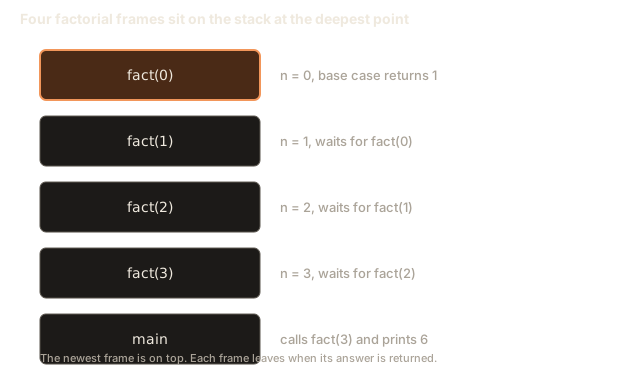
For recursion, the frames pile up on the way down and come off on the way up. If fact(3) calls fact(2), which calls fact(1), which calls fact(0), then four factorial frames sit on the stack at the deepest point. Each one waits for the answer from the frame beneath it. Each frame costs memory, and that is why recursion has a cost that a loop does not have.
The stack has a size limit. On many Linux systems the default is about 8 megabytes, which is 8,388,608 bytes. A frame for a small function is often a few dozen to a hundred bytes. So a recursion depth of about 100,000 is often fine, while a depth of ten million is not. You do not need exact numbers now. Remember only that the stack is finite.
Worked example 1: factorial traced step by step
The factorial of a whole number n, written n!, is the product of all whole numbers from 1 up to n. So 3! is 3 times 2 times 1, which is 6. By definition 0! is 1, because an empty product equals 1.
Look at the pattern. n! equals n times (n minus 1)!. That is a recursive definition, so the code can copy it almost word for word. The base case is 0! equals 1.
The program below adds a print line on entry and on exit, so you can watch the calls happen. Copy it into the editor, leave the Input box empty and press Run.
The output is:
enter 3
enter 2
enter 1
enter 0
base case
leave 1 -> 1
leave 2 -> 2
leave 3 -> 6
6
Trace it line by line. The call fact(3) starts and prints enter 3. Its base case check fails because n is not 0. So it must call fact(2) before it can multiply. That call prints enter 2, and it calls fact(1), which prints enter 1 and calls fact(0). The last call prints enter 0, finds the base case, prints base case and returns 1. Nothing else is called, so the chain turns around.
Now the frames come off. The frame for fact(1) resumes with its variable r set to 1 * 1, which is 1. It prints leave 1 -> 1 and returns 1. The frame for fact(2) resumes with r set to 2 * 1, which is 2. It prints leave 2 -> 2 and returns 2. Last, fact(3) resumes with r set to 3 * 2, which is 6. It prints leave 3 -> 6 and returns 6 to main, which prints 6.
Four factorial frames existed at the deepest point, plus the frame for main underneath them. Each frame waited for one answer, and each one did a single multiplication when the answer arrived. That is the pattern to look for in every recursive function: a wait on the way down, and work on the way up.
Step through the animation below and match each step to the trace above.
The top of the stack is the first box. The call on top is the one running. A filled box is returning a value.
Call factorial(4). It goes on top of the stack.
Watch two things in the animation. The number of frames rises by one for every "enter" line. The number falls by one for every "leave" line. The base case is the turning point between the two halves.
The same picture as a diagram:
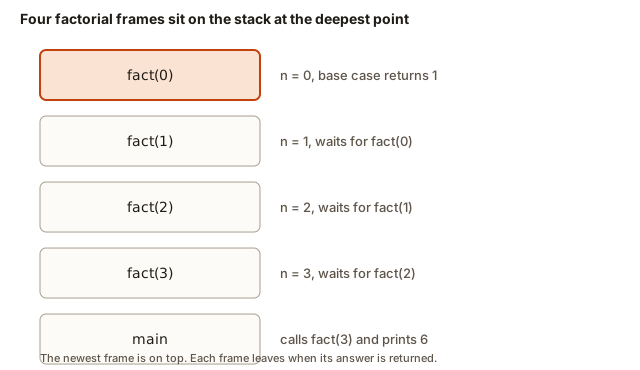 Four frames stacked for fact(3) down to fact(0), with the base case at the top
Worked example 2: code before the call and code after the call
Where you put a line relative to the recursive call changes the order of the output. Code placed before the call runs on the way down. Code placed after the call runs on the way up. This small fact explains many surprising results later.
The first function below prints before the call. The second prints after it. Both count from 4.
The output has trailing spaces at the end of each line, which is why the two lines look a little uneven:
4 3 2 1
1 2 3 4
countDown(4) prints 4, then calls countDown(3), which prints 3, and so on. The numbers come out in the order the calls were made. countUp(4) calls countUp(3) before it prints anything. So it keeps going down until countUp(1) calls countUp(0), which returns at once. Then the prints happen in the reverse order, 1 first and 4 last.
Here is the rule you can apply to any recursive function. Ask whether a line runs before the call, after the call, or both. Then trace the order of prints. Interview questions often hide the answer in this order, so practice it until you can predict the output before running the code.
Worked example 3: power, with input from the learner
Now write a function that takes input. The next program computes a to the power b. It multiplies a by itself b times, and it does so by recursion. That is a^b = a * a^(b-1), with a^0 = 1 as the base case.
Type 2 10 into the Input box, with a space between the numbers, and press Run. The output is:
2 to the power 10 is 1024Look at the chain of calls for power(2, 3). It calls power(2, 2), which calls power(2, 1), which calls power(2, 0). That last call returns 1. Then power(2, 1) returns 2 * 1, which is 2. power(2, 2) returns 2 * 2, which is 4. power(2, 3) returns 2 * 4, which is 8. The chain has four calls for an exponent of 3, so it has one more call than the exponent. A loop would do the same multiplications without any frames.
The variable types matter. The base is a long long because powers grow fast. 2 to the power 62 already fits in a long long, while 2 to the power 63 does not. If you try a bigger exponent, the answer wraps around and prints a wrong number. Signed overflow in C++ is undefined behavior, which means the program is not required to do anything sensible. In practice you get a number that is simply wrong. Always ask how large the answer can get.
Worked example 4: Fibonacci and repeated work
The Fibonacci numbers start 0, 1, and each later number is the sum of the two before it: 0, 1, 1, 2, 3, 5, 8, 13, and so on. The definition is recursive: fib(n) equals fib(n - 1) plus fib(n - 2), with fib(0) equal to 0 and fib(1) equal to 1.
This is the first example where the recursion does far more work than it looks like. The next program counts how many calls it makes. A global variable calls (a variable declared outside any function, which every function can read and change) keeps the count.
Type 10 and press Run. The output is:
fib(10) = 55
calls made: 177
The answer 55 is correct, but 177 calls for n = 10 is a lot. The reason is repeated work. fib(10) calls fib(9) and fib(8). fib(9) calls fib(8) again, and fib(7) twice. The same smaller values are recomputed over and over. The number of calls for n follows the pattern C(n) = 1 + C(n - 1) + C(n - 2), and the total grows roughly 1.6 times for each step up in n.
Try a bigger input in your head. For n = 40 the program makes about 331 million calls. Each call is cheap, but 331 million frames of work takes seconds, and n = 50 takes hours. The fix is to remember answers you already computed, which is called memoization. You will meet it in the dynamic programming module. For now, the lesson is simple: a recursion that calls itself twice at each level can grow exponentially.
Drawing the call tree
For a function that calls itself more than once, a list of calls is hard to read. Draw a recursion tree instead. Each box is one call, with its input. The children of a box are the calls it makes. Here is the tree for fib(4):
fib(4)
├── fib(3)
│   ├── fib(2)
│   │   ├── fib(1)
│   │   └── fib(0)
│   └── fib(1)
└── fib(2)
    ├── fib(1)
    └── fib(0)
Count the boxes. There are 9 calls, which matches the count C(4) = 9 from the Fibonacci example. Now look at the repeats. fib(2) appears twice, and it does the same work both times. fib(1) appears three times. The tree shows you where the waste is, and it makes the case for memoization clearer than a formula does. When you draw a tree like this for your own function, the number of boxes is the number of calls, and the longest path from the top to a leaf is the depth, which tells you the stack space.
Worked example 5: sum from 1 to n, step by step
The last example in this section is a function that adds the numbers from 1 to n. This is a good first function to write from scratch, because the pattern is short.
The idea: the sum of 1 to n is n plus the sum of 1 to n - 1. The base case is that the sum of 1 to 0 is 0.
Type 100 and press Run. The output is:
sum from 1 to 100 is 5050Trace sumTo(3). It returns 3 + sumTo(2). sumTo(2) returns 2 + sumTo(1). sumTo(1) returns 1 + sumTo(0). sumTo(0) returns 0. Now the answers climb: sumTo(1) returns 1, sumTo(2) returns 3, and sumTo(3) returns 6. Count the frames. There are four, which is n + 1, because the base case also gets a frame.
Notice the shape of the answer. sumTo never keeps a running total in a variable. Each frame holds only its own number n. The total is built on the way back up. Compare this with a loop, where one variable total carries the running sum from the start. Both are correct. The loop uses constant memory, and the recursion uses a frame for each level.
What happens when the base case is missing
Now look at a broken version. It is shown as a plain code block, not a runnable one, because it crashes on purpose.
long long sumTo(int n) {
    return n + sumTo(n - 1);    // no base case: n never stops at 0
}
Each call makes a call with a smaller number, but there is no check that stops the chain. The number goes 5, 4, 3, 2, 1, 0, minus 1, minus 2, and it keeps going down forever. Each call adds a frame. The stack fills up until the program runs out of its memory limit and crashes. On Linux the crash message is usually Segmentation fault (core dumped). In a terminal you see that line and nothing else. Some online runners show the crash with a shorter message, so read the end of the output carefully.
A segmentation fault means the program touched memory it was not allowed to use. For a stack overflow, the program ran past the end of its stack region. Both mean the same thing for you: the recursion did not stop. The fix is always the same. Find the base case, check that every call moves toward it, and check that the base case can really be reached.
Note also that the function has a second problem. It goes down to negative numbers. Even with a base case of n equal to 0, an input of negative 3 would never reach it. Before you write a recursive function, decide what inputs are allowed, and reject the others at the top of the function.
A recipe for writing recursion
Experienced programmers write recursive code in the same four steps every time. Follow them until they become automatic.
- State in one sentence what the function returns for any valid input. For example, "sumTo(n) returns the sum of 1 to n."
- Find the base case, the smallest valid input, and write its answer directly.
- Assume the call on the smaller input already works. Do not trace the whole chain in your head. Trust the smaller call to return the right answer for its input.
- Combine that result with the work for the current input, and return it.
Step 3 is the one beginners skip. They try to follow every call to the bottom, and they get lost. When you trust the smaller call, you only need to check two things: the base case is right, and the combination step is right. That is enough to prove the function correct for all inputs, by induction. Induction is the mathematical argument that says a statement is true for the smallest case, and that if it is true for one case it is true for the next. Recursive code has exactly that structure.
Complexity: time and space
Time complexity counts how many steps a function takes as the input grows. Space complexity counts the extra memory it needs. For recursion, the stack counts as space.
fact(n) makes n + 1 calls, so its time is O(n). At its deepest point it has n + 1 frames, so the extra space is O(n). An iterative version with a loop and one variable uses O(1) extra space. That is the first real trade-off you meet with recursion: the code is often shorter and closer to the math, but it uses stack memory.
sumTo(n) behaves the same way, with O(n) time and O(n) stack space.
fib(n) as written above makes about 1.6 to the power n calls, which is exponential. The time complexity is commonly written as O(2 to the power n) as a simple upper bound. Its stack depth is only n, because one branch finishes before the other starts. So the time is exponential but the stack space is O(n).
Keep the two numbers separate in your head. Time depends on how many calls happen in total. Space depends on how many frames are alive at the same moment.
Worked example 6: digits of a number
Recursion works well on the digits of a number, because removing the last digit is one division. The last digit of n is n % 10, and the rest of the number is n / 10. Both use integer division, which drops anything after the decimal point, so 472 / 10 is 47 and 472 % 10 is 2.
This program computes two things. It adds the digits, and it reverses the number. The reverse needs one more idea: an accumulator. An accumulator is a parameter that carries the answer built so far, so the recursion does not have to combine answers on the way back up. Here acc holds the reversed digits. Each call puts the last digit of n onto the end of acc.
Type 1200 and press Run. The output is:
digit sum: 3
reversed: 21
Trace the reversal. reverseNumber(1200, 0) puts the last digit, 0, onto acc, which stays 0, and calls reverseNumber(120, 0). That puts 0 again, then reverseNumber(12, 0) puts 2, so acc becomes 2, and reverseNumber(1, 20) puts 1 on the end, making 21. The answer is 21, not 0021, because a number has no leading zeros. The two zeros at the end of 1200 became leading zeros of the reverse and disappeared. That is a real edge case: reversing a number that ends in zero loses digits. A version that works on a string of characters would keep them.
The digit sum is not affected by zeros, so it prints 3. Notice that digitSum stops at n < 10, which handles any single digit, while reverseNumber stops at n == 0. Both stopping points are valid, but they stop at different places, and you should pick the one that matches the problem.
How to test a recursive function
A recursive function is easy to get almost right. The safest way to find the gaps is to test a small set of inputs that cover each case. For a function with a base case and a recursive case, test these:
- The base case itself, such as n equal to 0 or n equal to 1.
- The first value above the base case, such as n equal to 1 or 2. This catches off-by-one errors, where the recursion skips a step or runs one step too many.
- A typical value, such as 10 or 472.
- The largest value you expect, to see whether the stack and the numeric type are enough.
- An invalid value, such as a negative number, if your function accepts only valid inputs.
Write the expected answer for each case before you run the code. A test with no expected answer tells you nothing. For digitSum, the expected values are 0 for 0, 1 for 1, 9 for 9, 1 for 10, 13 for 472 and 3 for 1200. Checking those six numbers covers most of the risk. Keep the list, because you will reuse the same habit in every lesson of this module.
Recursion and loops: the same work in two shapes
A loop and a recursion can compute the same answer. Here is factorial written with a loop. Many people find it easier to read at first, and it is the form you will see in a lot of production code.
long long factIter(int n) {
    long long result = 1;
    for (int i = 2; i <= n; i++) result *= i;
    return result;
}
The loop keeps the running product in result, and each step multiplies it by the next number. There is one variable and no frames, so the extra memory is the same whatever n is. The recursive version keeps the running product in the answers passed back up the chain, and that needs one frame per step.
Neither shape is better in every case. A recursion matches a definition closely. It also matches data with a nested shape, such as a folder tree, where the depth is not known in advance. A loop is cheaper and safer for a simple pass over a sequence. A good habit is to write the recursion first when the definition is recursive, then ask whether a loop with one variable would do the same job with less memory.
Here is a quick test for which shape fits. If the problem reduces to one smaller copy of itself plus a small step, and the input is a number or a flat list, a loop usually works. If the problem splits into several smaller copies, such as the left and right parts of a tree, a recursion is the natural choice, and a loop would need its own list of pending work. Keeping that list yourself is exactly what the call stack does for you.
Tail calls and why an accumulator helps
A tail call is a call that is the very last thing a function does, with its answer returned unchanged. The factorial above is not a tail call, because it multiplies after the call returns. A version that passes the running product down the chain is a tail call:
long long factTail(int n, long long acc) {
    if (n == 0) return acc;
    return factTail(n - 1, acc * n);
}
Call factTail(3, 1) and follow it. It calls factTail(2, 3), which calls factTail(1, 6), which calls factTail(0, 6). That last call returns 6, and every caller returns that value unchanged. The acc parameter is an accumulator, the same idea as in the loop: the running answer travels down the chain instead of coming back up.
Some compilers can turn a tail call into a jump that reuses the current frame, so the stack does not grow. Whether that happens depends on the compiler and the optimization level, and this course does not rely on it. Write the base case so the program is correct even when the stack does grow.
Common mistakes and the messages you will see
Mistake 1: no base case, or a base case that is never reached. The program crashes, usually with a segmentation fault or a stack overflow. The fix is to check the base case against the smallest input your function really gets.
Mistake 2: missing return in a function that returns a value. Some compilers accept it and then return garbage. g++ warns you. If the recursive branch forgets its return, g++ with -Wall prints this warning:
warning: control reaches end of non-void function [-Wreturn-type]This warning is important. Treat every warning as an error that has not yet hurt you. The missing return causes undefined behavior, so the number your caller receives can be anything.
Mistake 3: calling a function before it is declared. If you write a recursive helper below main and call it from main without a declaration above, g++ stops with this message:
error: 'fact' was not declared in this scopeThe fix is to define the function above main, or to write a declaration (a line with the function's return type, name and parameters, ending in a semicolon) above main.
Mistake 4: the answer overflows. This one is silent. The next program prints 21 factorial using a long long. The true value, 21!, is 51090942171709440000, which is larger than the largest long long, about 9.2 times 10 to the power 18. The program does not stop, and the number it prints is wrong.
The output is:
20! = 2432902008176640000
21! = -4249290049419214848
The first line is right, and the second is not. This is why you should know the range of your inputs before you choose a type. When the answer can be very large, use a big-integer library or a different algorithm.
Debugging walkthrough
Here is a realistic bug. A student wants to add the digits of a number recursively. The program below has a mistake, and the student has added a line to print each call to find it.
#include <iostream>
using namespace std;

int digitSum(int n) {
    cout << "digitSum(" << n << ")\n";
    if (n < 10) return n;
    return digitSum(n) + n % 10;      // bug: should be digitSum(n / 10)
}

int main() {
    cout << digitSum(472) << "\n";
    return 0;
}
When the student runs it, the first lines look like this:
digitSum(472)
digitSum(472)
digitSum(472)
The same number appears again and again. That is the clue. A recursive call that repeats its own input never gets smaller, so the base case is never reached. The bug is that digitSum(n) should be digitSum(n / 10), because integer division by 10 removes the last digit. The corrected version prints 13 for 472, since 4 plus 7 plus 2 is 13. You can check the fix by printing the input on each call. The inputs should go 472, 47, 4, and then the base case applies.
The debugging method has three steps. Print the input on every entry. Check that each recursive call changes the input toward the base case. Check that the base case matches the smallest valid input.
Variations and edge cases
A few small variations appear often in interviews.
Input zero. Many problems ask about 0, the empty array, or the empty string. Decide what the answer is for that case and make it the base case. For factorial, 0! is 1. For sum, the sum of nothing is 0.
Negative input. If the input can be negative, reject it or handle it. A factorial of a negative number is not defined, so a good function either returns a sentinel value or the caller checks first.
Printing versus returning. A function that prints gives no value to the caller. A function that returns a value can be combined with other calls. Prefer returning values in your own code, because it can be tested. Printing is for learning, so you can see the calls happen.
Tail calls. A call is a tail call when it is the last thing a function does, like return f(n - 1);. Some compilers turn tail calls into loops when they optimize. Do not rely on that. Write the base case so the recursion is correct even without optimization.
Interview questions about recursion basics
Interviewers ask these questions to test the ideas above. Answer each in two or three sentences.
- What are the base case and the recursive case, and what goes wrong if the base case is missing? Answer with the stack growing until the program crashes.
- Why is the naive Fibonacci slow? Answer with repeated subproblems, which make the number of calls grow exponentially.
- What is the space complexity of recursive factorial, and how does it compare with a loop? Answer O(n) for the frames, against O(1) for the loop.
- How would you prove a recursive function correct? Answer by checking the base case and then assuming the smaller call is right, which is induction.
Real-world uses
Recursion is not only for math exercises. Your computer uses it all the time. A folder on disk can contain other folders, which contain more folders. A tool that counts the size of a folder calls itself for each subfolder, with the base case being a file. A JSON document can nest objects inside objects. A parser that reads it recurses into each nested value. A menu that expands sub-menus does the same. In all of these, the data is a tree, and recursion matches its shape. The next modules on trees and graphs use exactly this pattern.
Practice
Work through these in order. Write each one in your own editor before you open a solution.
- Write
int sumDigits(int n)that returns the sum of the digits of a non-negative integer, using recursion. Hint: the last digit isn % 10, and the rest isn / 10. Test with 472 and 0.
Solution
int sumDigits(int n) {
    if (n < 10) return n;          // base case: one digit
    return n % 10 + sumDigits(n / 10);
}
The base case is any number with one digit, which is its own digit sum. Each call removes the last digit, so the input shrinks toward the base.
- Write
long long power(long long a, int b)for a non-negative exponent. Then count how many calls it makes for b = 5.
Solution
The function from Worked example 3 is the answer. For b = 5 it makes 6 calls: exponents 5, 4, 3, 2, 1 and 0. In general it makes b + 1 calls.
- Write
int countDownLength(int n)that returns how many numbers are printed bycountDown(n). Explain why the answer is n, not n + 1.
Solution
int countDownLength(int n) {
    if (n == 0) return 0;
    return 1 + countDownLength(n - 1);
}
The answer is n because the base case n equal to 0 prints nothing. The calls for 1 through n each print one number. The base-case call is the extra frame, but it does not print.
- Predict the output of this program before you run it, then check. Explain each line.
#include <iostream>
using namespace std;
void f(int n) {
    if (n == 0) return;
    f(n - 1);
    cout << n;
    f(n - 1);
}
int main() { f(2); cout << "\n"; }
Solution
The output is 121. f(2) calls f(1). That call calls f(0), which returns at once, so f(1) prints 1 and then calls f(0), which also returns at once. Back in f(2), print 2 and call f(1) again. That call prints 1 the same way. The printed digits are 1, 2, 1.
- Write
int stepsToZero(int n)for a positive integer n. Each step halves n by integer division, and a step is counted each time. Return the number of steps to reach 0. For example, 8 takes 4 steps: 8, 4, 2, 1, 0.
Solution
int stepsToZero(int n) {
    if (n == 0) return 0;
    return 1 + stepsToZero(n / 2);
}
The base case is 0. Each call divides by 2, so the input reaches 0 in about log base 2 of n steps.
- A student writes
int f(int n) { return n == 0 ? 0 : f(n); }. Explain the bug in one sentence and give the fix.
Solution
The recursive call passes the same n, so the input never shrinks and the function never reaches the base case. The fix is f(n - 1) in place of f(n), with the combination step added as needed.
- Write
long long factIter(int n)using a loop, then compare its space complexity with the recursive version.
Solution
long long factIter(int n) {
    long long r = 1;
    for (int i = 2; i <= n; i++) r *= i;
    return r;
}
It uses one variable, so the extra space is O(1). The recursive version uses n + 1 frames, which is O(n).
- Explain in plain words why
fib(40)takes noticeably longer thanfib(30), and how many more calls it makes, roughly.
Solution
Each step up in n multiplies the call count by about 1.6. Ten steps multiply it by about 1.6 to the power 10, which is about 110. So fib(40) makes roughly 110 times as many calls as fib(30).
- Write
void printBinary(int n)that prints the binary digits of a non-negative integer without leading zeros, using recursion. Print 0 for input 0. Test with 10, which prints 1010.
Solution
void printBinary(int n) {
    if (n < 2) { cout << n; return; }
    printBinary(n / 2);
    cout << n % 2;
}
The base case is 0 or 1, which print one digit. Otherwise print the digits of n / 2 first, then the last bit. The printing happens on the way up, which is the reverse of the number's own order, so the digits come out correctly.
What you now know
- A recursive function needs a base case that is reachable and a recursive call that moves toward it.
- Each call uses a stack frame, so a deep recursion uses memory that a loop does not.
- Code before the recursive call runs on the way down. Code after it runs on the way up.
- Repeated subproblems make naive recursion grow exponentially, as Fibonacci shows.
- A missing base case causes a crash, and a missing return causes wrong answers.
- Write recursion by stating what the function returns, finding the base case, trusting the smaller call and combining the results.