Why this matters
Pointers are the part of C++ that frightens beginners, and they are also the part that makes the language powerful. Linked lists, binary trees, graphs, dynamic arrays and most of the data structures in a technical interview are built from pointers. If you cannot picture where a value lives and how a pointer reaches it, those topics stay a blur. This lesson builds that picture from nothing.
The whole idea fits in one sentence: a pointer is a variable that stores the address of another variable. The rest of this lesson unpacks that sentence slowly, with examples you can run.
Why pointers exist
Before you read more code, it helps to know why C++ has pointers at all. Some languages hide addresses completely. C++ keeps them for four practical reasons.
The first reason is sharing. Two parts of a program may need to work on the same value. A pointer lets both reach one value without making copies. If each part had its own copy, a change made in one place would never reach the other, and the two copies would drift apart. That trap is common in beginner code, and a pointer avoids it.
The second reason is size that changes. A list or a tree grows while the program runs. Its parts are created one at a time, wherever memory happens to be free, and each part must remember where the next part lives. Only an address can do that job. The linked list in lesson 5 is built on exactly this idea.
The third reason is cost. A pointer is 8 bytes on a 64-bit computer. Passing a pointer to a large structure copies those 8 bytes, not the whole structure. Passing a huge array by value would copy every element on each call. A pointer, or a reference from lesson 3, is the cheap way to say "use that one".
The fourth reason is hardware. Graphics buffers, memory-mapped devices and operating system tables are reached through addresses. Programs that talk to that hardware need pointers, and so do many of the libraries you will use.
Beginners do not need pointers in every program. Many good programs use only values, vectors and strings. The algorithms in this course, from linked lists to trees to graphs, depend on pointers, and interviewers test them directly. That is why this module exists.
Start with memory
Your computer has a large amount of memory, often billions of bytes. A byte is the smallest piece of memory a program can address. It holds a number from 0 to 255. Memory is organised as one long row of these bytes, and every byte has a number that identifies it. That number is its address.
A useful analogy is a long street of houses. Every house has a number painted on the door. The house holds something, such as a family or a piece of furniture, and the number lets you find it. The number is not the family. The number is how you reach the family.
Memory works the same way. The address is the number on the door. The value is what is stored inside the house.
When you write this line in a program:
int x = 42;three things happen. The compiler notes that x is an int, which is a whole number that takes 4 bytes on most computers. The program reserves 4 bytes of memory somewhere. Then it writes the number 42 into those 4 bytes. The name x is only a label that the compiler uses so you do not have to remember the address yourself.
Those 4 bytes have an address. On your machine that address might be 6487524, or 0x7ffd3c2a4b1c in hexadecimal, which is base 16 notation that programmers use for addresses. You do not choose the address. The operating system and the compiler decide it, and it can be different every time you run the program. For this lesson the exact number does not matter. What matters is that the address exists and that you can get hold of it.
What a variable really is
A variable has four facts attached to it. Keep these four facts in mind for the whole module.
- Name. The label you type, such as
x. The name exists only in your source code. The compiled program mostly refers to memory by address. - Type. What kind of value it holds, such as
int,doubleorchar. The type tells the compiler how many bytes to use and how to read them back. - Address. The number of the first byte of the variable's memory.
- Value. The bytes stored there, read using the type.
Most of the time you only use the name and the value. Pointers are the tool that lets you use the address directly. That is why this module is about addresses at all.
The two operators
C++ has two operators for working with addresses. They look similar, so take a moment with the table.
| Symbol | Name | Read it as | Example |
|---|---|---|---|
& | address-of | "the address where this lives" | &x |
* | dereference | "go to the address and use what is there" | *p |
The & operator gives you the address of a variable. If x is an int, then &x is an address, not a number you can add to.
The * operator goes the other way. If p holds an address, then *p means "the value at that address". The word dereference means "follow the reference to the thing it points at". You will see the word a lot.
A pointer is declared with a star after its type:
int* p;This line reads as "p is a pointer to an int". It means p will hold the address of an int. It does not hold an int itself. The star here is part of the type, not the dereference operator, and that double use of the same symbol confuses almost every beginner. The common mistakes section below lists the traps.
Here is the complete pattern in three lines:
int x = 42;
int* p = &x;
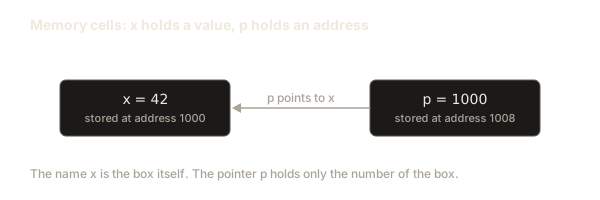
After the second line, p holds the address of x. Think of x as the house and p as a paper slip with the house number written on it. The slip is not the house. But if you follow the number, you reach the house. Writing *p is that walk. It reaches the real x. Writing *p = 50 changes x.
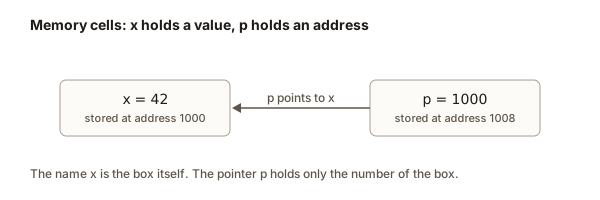 A box x holding 42, and a pointer box p holding the number 1000 with an arrow to x
Worked example 1: one variable, one pointer
Read this program slowly. We will trace every line.
The output is:
42 42
50
1
Trace it line by line.
- Line 1 creates
xand stores 42 in it. - Line 2 creates
pand stores the address ofxin it. Nowpis a slip withx's house number. - Line 3 prints
x, which is 42. Then it prints*p, which walks toxand finds 42. Both give the same answer because they open the same house. - Line 4 writes 50 through the pointer. The walk goes to
xand overwrites its contents. Nothing else changed. - Line 5 prints 50, because
xnow holds 50. Notice that we never wrote toxby name. The change came throughp. - Line 6 compares
pwith&x. Both are the address ofx, so the comparison is true. C++ prints abooltrue as 1 by default.
The important lesson is line 4. Two names, x and *p, open the same box. A change through one shows up when you read through the other.
Worked example 2: the sizes
The size of a pointer is not the size of the thing it points at. This surprises almost everyone the first time.
On a typical 64-bit computer the output is:
sizeof(int) = 4
sizeof(double) = 8
sizeof(char) = 1
sizeof(pa) = 8
sizeof(pd) = 8
sizeof(pc) = 8
The three pointers are all 8 bytes, even though they point at a 4-byte int, an 8-byte double and a 1-byte char. A pointer only needs to hold an address, and an address on a 64-bit machine is 64 bits, which is 8 bytes. The type after the star tells the compiler how to read the thing at the address. It does not change how big the address is.
Your numbers for the int, double and char lines should match the table above on almost every desktop and laptop. The pointer lines can be 4 on a 32-bit system, so do not hard-code 8 in your own code. Use sizeof when you need the real number.
Worked example 3: re-aiming a pointer
A pointer is a variable, so you can change what it holds. Assigning a new address to a pointer makes it point somewhere else. This is called re-pointing or re-aiming.
Output:
1
2
1 20qstarts pointing ata, so*qis 1.q = &b;changes the slip. The paper now holdsb's house number.ais untouched.*qis now 2.*q = 20;writes intob. Soastays 1 andbbecomes 20.
Be careful with the line q = &b;. It has no star. It changes where q points. The line *q = 20; has a star. It changes what q points at. Mixing these up is the most common pointer mistake, and we return to it below.
Worked example 4: two pointers to the same box
Two pointers can hold the same address. Then they are two slips with the same house number.
Output:
9 9 9
1
q = p copies the address from p into q. That copies the slip, not the house. Both pointers now lead to a. Writing through q changes a, and reading through p shows the change. The comparison p == q compares addresses, not values, and it is true because they hold the same address.
Worked example 5: a function that changes your variable
A pointer makes it possible for a function to change a variable that belongs to someone else. You will see the full version in the next lesson on references. Here is the pointer version, which is the older C style.
Type 7 in the Input box and press Run. The output is:
doubled: 14Trace the call. main creates n and reads 7 into it. The call doubleIt(&n) passes the address of n into the function. Inside the function, value is a copy of that address, so it is a second slip with the same house number. *value walks to n and reads 7. The line *value = *value * 2 reads 7, computes 14, and writes 14 back into n. When the function returns, n holds 14.
If the function had written value = value * 2, it would multiply the address by 2 and produce nonsense. The star is what makes the code touch the house instead of the slip.
Worked example 6: swapping two numbers
The classic swap is the cleanest demonstration of pointers. You want two variables to exchange values, and a function has to change both.
Output:
before: x=3 y=8
after:  x=8 y=3
The function keeps a temporary copy of the first value, temp, which is 3. It copies the second value into the first house, so the first house holds 8. Then it copies temp into the second house, so the second house holds 3. Remove temp and the swap fails: the first assignment destroys the only copy of 3. This is a useful habit to build. When a swap, a move or an exchange goes wrong, look for the value you destroyed before you copied it out.
Tracing a program on paper
Experienced programmers check pointer code on paper before they run it. The method is simple. Draw a table with one column for each variable and one row for each statement that changes something. After each statement, write down what every variable holds. For a pointer, write the name of the thing it points at, not the number, because the name is easier to follow.
Here is the trace of worked example 3, the re-aiming program.
| Statement | a | b | q points at | *q |
|---|---|---|---|---|
int a = 1, b = 2; | 1 | 2 | nothing yet | not defined |
int* q = &a; | 1 | 2 | a | 1 |
q = &b; | 1 | 2 | b | 2 |
*q = 20; | 1 | 20 | b | 20 |
Read the last row. The statement *q = 20; changed the value in b, which q points at. The column for a did not change, because nothing wrote to a. The table shows the rule in one place: a statement with a star writes into the target, and a statement without a star changes only the pointer.
Draw the table every time two pointers point at the same thing, or every time a pointer is re-aimed. Those two cases hold most of the bugs in this lesson. If the table and the real output disagree, your model of the code is wrong, and the table shows you where.
Printing addresses
You can print a pointer directly with cout << p. It shows an address in hexadecimal, such as 0x7ffd.... The exact digits change between runs and between computers, so never write a test that depends on them. If you want to see an address while you learn, print it once and move on:
The first two lines show two different addresses. The third line prints same place? 0, because two different variables never share an address. Your two addresses will differ from anything printed in this book, but the last line is always 0 for two distinct variables.
What happens inside the machine
It helps to know what the processor really does, because then the rules stop looking arbitrary.
When the program starts, the operating system gives it a range of memory. The compiler decides where each variable goes inside that range. For int x = 42;, the compiler might place x at address 1000 and emit an instruction that stores the number 42 at that address. You never see that instruction, but the processor runs it.
Now take *p = 50; where p holds the address 1000. The processor does two steps. First it reads the value stored in the cell that belongs to p. That value is the number 1000. Second it writes 50 into the 4 bytes that start at address 1000. So the store to *p is really "load the address from p, then store 50 there". That is why a pointer is cheap to copy. Copying p copies only 8 bytes, not the thing it points to.
The processor does not check whether the address is sensible. If p holds a random number like 16 or 123456789, the processor tries to write there. Sometimes the address is outside the program's memory, and the operating system stops the program with a crash. Sometimes the address belongs to some other part of the program, and the write silently corrupts data. The second case is the worst, because the program keeps running and produces wrong answers far away from the real mistake.
The C++ compiler helps by tracking types. It knows that p is an int*, so *p gives an int. It refuses to let you put an int where an int* is needed. But the compiler cannot check which address you chose. That job belongs to you.
nullptr: a pointer that points to nothing
Sometimes a pointer should not point anywhere yet. C++ has a special value for that: nullptr. It means "this pointer holds no valid address". Older code used the number 0 or the macro NULL for the same job. Use nullptr in modern C++, because it has its own type and cannot be confused with an integer.
Output:
empty points nowhere
pa points to a, and a is 5
The rule to remember is simple. Before you use a pointer that might be empty, test it: if (p != nullptr). Using *p on a null pointer is the most common crash in pointer code. Here is a program that does it on purpose:
#include <iostream>
using namespace std;

int main() {
    int* p = nullptr;
    cout << "before" << endl;
    cout << *p << endl;
    return 0;
}
When we compiled this with g++ and ran it, the output was:
beforeand the program ended with exit status 139, which means it was killed by a segmentation fault. A segmentation fault is the operating system's way of saying "this program touched memory it is not allowed to touch". The line before appears because it was printed before the bad read. The bad read itself printed nothing. Notice the program does not say which line failed. You find it by reasoning, and the debugging section below shows how.
Common mistakes and the messages you will see
Every mistake in this list has happened to a real beginner. Each comes with the message you are likely to see, so you can recognise it quickly.
Mistake 1: forgetting the star when you write through a pointer
int a = 1;
int* p = &a;
p = 50;
Compile this with g++ -std=c++17 and you get an error like this (the exact wording depends on your compiler version):
error: invalid conversion from 'int' to 'int*' [-fpermissive]The compiler reads p = 50 as "make the pointer hold the address 50". An int is not an address, so it refuses. The fix is *p = 50;, which writes into the house.
Mistake 2: giving an int where a pointer is expected
int x = 3;
int* p = x;
The compiler reports the same kind of message:
error: invalid conversion from 'int' to 'int*' [-fpermissive]The value 3 is not an address. You meant int* p = &x;. The & is what turns a value into the address of the value.
Mistake 3: using a pointer that was never set
int* p;
*p = 10;
This compiles without complaint. The compiler does not know what p holds, so it accepts the line. When the program runs, p contains whatever bytes happened to be in that memory before, which is garbage. The write goes to an unknown place. Sometimes you get a crash, and sometimes you silently corrupt data. Give every pointer a value the moment you create it, either an address or nullptr.
Mistake 4: reading int* a, b; as two pointers
int* a, b;Only a is a pointer. The star belongs to the declarator a, not to the type int. b is a plain int. Write two separate lines if you want two pointers:
int* a;
int* b;
Mistake 5: taking the address of a value
int x = 5;
int& r = &x;
With g++ this gives the message:
error: invalid conversion from 'int*' to 'int' [-fpermissive]The & on the right side produces an address, but int& r wants the variable itself. A reference is covered in lesson 3. For now, remember the rule that & on the right side of an = gives an address, and that a pointer variable is needed to hold it.
Debugging walkthrough: a crash you cannot see
Imagine a program that prints before and then stops with a segmentation fault. Here is a method that works for almost every crash of this kind.
Step 1: find the last line that printed. In our example it was before, so the bad line is the one after it.
Step 2: list every pointer used on that line. Here it is p, used as *p.
Step 3: ask where p was set. If it was never set, or it was set to nullptr and nobody checked, you found the cause.
Step 4: add a check before the line, such as if (p == nullptr) cout << "p is null" << endl;. If the message appears, fix the cause: give p a real target, or skip the use when it is null.
Step 5: when the cause is not obvious, compile with extra checks. Compile with g++ -std=c++17 -g -fsanitize=address prog.cpp -o prog. The -g flag keeps line numbers, and -fsanitize=address makes the program check every memory access. When it finds an error, it prints a report that names the line. For the program in the last section, a null read gives a message of the form ERROR: AddressSanitizer: SEGV on unknown address followed by the line that caused it.
Practise this method on purpose. Write a bug, read the message, and find the line. Pointer bugs get much easier once you trust the method more than your memory.
Variations and edge cases
You will meet a few variations of the basic declaration. Each one adds a rule, so learn them as a set.
A pointer to a constant says that you will not change the value through this pointer. Write it as const int* p. Reading through it is fine, but *p = 5; fails to compile. The pointer itself can still be re-aimed.
A constant pointer cannot be re-aimed. Write it as int* const p. Writing *p = 5; is allowed, but p = &other; fails. You can combine both, as const int* const p, which forbids both changes.
The type void* is a pointer to unknown type. It holds an address but no type information. You cannot dereference it directly, and you cannot do arithmetic on it in standard C++. You will see it in old C library functions. In new code, use typed pointers.
Pointers to different types are not interchangeable. An int* is not an int**, and a double* is not an int*. The compiler stops you from mixing them without an explicit cast, and an explicit cast is a sign that something has gone wrong.
A pointer to a temporary value is dangerous. A temporary is a value that exists only for one line, such as the result of 3 + 4. You cannot take its address with & on a value that is not an object. This is one reason why &(3 + 4) does not compile.
Checking whether two pointers are equal, or whether a pointer is nullptr, is always safe. Ordering comparisons such as < make sense only when both pointers point into the same array, so keep them inside one array.
Reading declarations aloud
Pointer declarations look strange until you read them in the right order. Start at the name and read outward, saying what each symbol does to it.
int* p; reads as "p is a pointer to int". The star belongs to the type.
int* a, b; reads as "a is a pointer to int, and b is an int". The star goes with the name that follows it, not with the whole line. That is why the mistakes section warned you.
const int* p; reads as "p is a pointer to an int that is const". The const protects the value, so *p = 5; fails, but p itself can be re-aimed.
int* const p; reads as "p is a const pointer to an int". The const protects the pointer, so p = &other; fails, but *p = 5; is fine.
const int* const p; protects both, and neither can change.
int** pp; reads as "pp is a pointer to a pointer to an int". Each star is one level of indirection, and each * in an expression removes one level.
Write each declaration on paper and read it aloud before you compile. The compiler's messages become easier to follow once the sentence is clear.
Interview-style questions
Interviewers like pointer questions because they show whether you understand memory. Here are four you should be able to answer cleanly.
First question: what does int* p = &x; int* q = p; do? Answer: it creates two pointers that hold the same address. It does not copy x. Writing through either pointer changes the same int.
Second question: why is sizeof(int*) usually 8 on a 64-bit machine, even when you point at a char? Answer: a pointer stores an address. The size of an address depends on the machine, not on what the pointer points at.
Third question: what happens if you dereference nullptr? Answer: the behaviour is undefined in standard C++. On most systems it crashes with a segmentation fault. A correct answer names the crash and says the language gives no guarantee.
Fourth question: how do you swap two ints in a function? Answer: pass their addresses with &, take them as int* parameters, and write through them with *. Mention the temporary variable. Interviewers often ask you to explain why a swap without the temporary fails.
Real-world uses
Pointers are everywhere in systems code. Operating systems keep a table of pointers to running processes. Graphics libraries pass pointers to large image buffers, so the image is not copied for every call. Database engines keep indexes made of pointers to disk pages. Game engines store lists of pointers to objects that move around. In your own code, the first real use is usually a linked list, where each node holds a pointer to the next node. You will build one in lesson 5 and again in the module assignment.
A checklist for every pointer
Use this list whenever you write or read a pointer. Ask five questions about it.
- Where was it set? Find the line that gave it a value, either an address from
&, an address fromnew, ornullptr. - What does it point at right now? Name the variable or the heap block.
- Who owns that thing? A variable on the stack lives until its block ends. A heap block lives until someone deletes it. A raw pointer never owns anything by itself.
- Is it checked before use? Add a
nullptrtest when the value might be empty. - Can the target disappear before the pointer is used again? Look for returns, deletes and the ends of blocks.
When you answer these five questions for every pointer in a function, most bugs show themselves before you run the program. Lesson 4 treats question 3 in depth, and lesson 5 turns it into rules that the compiler can check.
Practice
Exercise 1. Make an int called score with the value 10 and a pointer p that points to it. Use p to add 5 to score, then print score through the name and through *p. Both must show 15.
Solution
int score = 10;
int* p = &score;
*p += 5;
cout << score << " " << *p << endl;
The output is 15 15. The write through p changes the same box that score names.
Exercise 2. Write what int a = 3; int* p = &a; int* q = p; *q = 9; cout << a; prints. Then compile it and check your answer. Hint: two pointers can hold the same address.
Solution
It prints 9. p and q both hold the address of a, so *q = 9 writes into a.
Exercise 3. Create two int variables, first set to 4 and second set to 7. Make a pointer target that starts at first, change *target to 100, then re-aim target at second and set *target to 200. Print both variables. The output must be 100 200.
Solution
int first = 4, second = 7;
int* target = &first;
*target = 100;
target = &second;
*target = 200;
cout << first << " " << second << endl;
The first write changes first. The re-aim moves the pointer, so the second write changes second.
Exercise 4. Print the address of two different variables and confirm the numbers differ. Then compare &a == &a. Explain why this is always true.
Solution
Two different variables never share a box, so their addresses differ. The comparison &a == &a is always true, because both sides are the address of the same variable. A comparison of addresses checks whether two pointers point at the same place, not whether the values match.
Exercise 5. Write a function void addOne(int* p) that adds 1 to the value p points at. Call it on a variable that holds 41 and print the result (42).
Solution
void addOne(int* p) {
    *p = *p + 1;
}
The call addOne(&v) with int v = 41; leaves v equal to 42. The function must write through the star, because a write to p alone would change only the local copy of the address.
Exercise 6. Write a function void setToZero(int* p) that does nothing if p is nullptr and otherwise sets *p to 0. Test it with a real variable and with nullptr. The second test must not crash.
Solution
void setToZero(int* p) {
    if (p != nullptr) {
        *p = 0;
    }
}
With a real variable the function sets it to 0. With nullptr the test skips the write, so the call is safe. This is the pattern for every function that accepts a pointer which may be empty.
Exercise 7. Predict the output of this code and check it: int x = 1; int y = 2; int* p = &x; int* q = &y; *p = *q; cout << x << y;. Explain why x changed but y did not.
Solution
The printed line is 22. The statement *p = *q reads the value 2 from y and writes it into x. Both variables hold 2 now, but only x was written, so x changed from 1 to 2 and y stayed as it was. The write goes to the box that p points at, which is x.
Exercise 8. Find the bug in int* p; cout << *p;. Explain what could be printed and why the program is not safe. Write the corrected version that uses nullptr and a check.
Solution
The pointer p is never set, so *p reads from an address that is whatever garbage was in the pointer's memory. The program might print any number, or it might crash. The safe version is this:
int* p = nullptr;
if (p != nullptr) {
    cout << *p << endl;
} else {
    cout << "no value" << endl;
}
It prints no value.
Exercise 9. Use the swapValues function from worked example 6 and write a void rotate3(int* a, int* b, int* c) that moves the value of a to b, b to c and c to a. Test it with 1, 2 and 3, and print the three values after the call.
Solution
void rotate3(int* a, int* b, int* c) {
    int t = *c;
    *c = *b;
    *b = *a;
    *a = t;
}
The temporary t keeps the last value before it is overwritten. With 1, 2 and 3 the values after the call are 3 1 2. This is the same idea as the swap, extended to three boxes.
Exercise 10. Explain in one paragraph, to a friend who has never programmed, what int* p = &x; does. Use the house and slip analogy and do not use the word address without defining it.
Solution
A pointer is a variable that holds the number of a box in memory. Every box has such a number, which is called its address, the way every house on a street has a number. The expression &x gives the address of the box that holds x. Writing int* p = &x; makes p a slip of paper with that number on it. The slip is not the box. Writing *p means walk to the box with that number and use what is inside it.
What you now know
- A memory address is a number that identifies a place in memory, and a value is what is stored there.
&xgives the address ofx, and*pfollows the pointerpto the value it points at.int* pdeclares a pointer, and the star in a declaration is part of the type.- Assigning
p = &bre-aims the pointer, and assigning*p = 5writes into the target. - Two pointers can hold the same address, and a write through one is seen through the other.
- A pointer has the size of an address, usually 8 bytes on a 64-bit machine, whatever it points at.
nullptrmeans "points nowhere", and dereferencing it crashes the program.- Pointer mistakes produce messages such as
invalid conversion from 'int' to 'int*', and a missing star or a missing&is almost always the cause.
In the next lesson you will move a pointer through an array one element at a time, and you will see how the same star and address rules describe every array you have used so far.