Why it matters
Almost every serious C++ program is built from classes. A stack, a linked list, a bank account, a game character and a file reader are all classes in the end. A class lets you bundle some data together with the functions that are allowed to change it, and it lets you hide the details so that the rest of the program cannot break your rules by accident. Interviewers ask about classes early, because the way you design a class shows whether you understand where a bug can come from and where it can be stopped.
This lesson covers the first half of object-oriented programming (OOP): what a class is, what an object is, how to control access with public and private, and how const protects data. The next lessons build on it with constructors, inheritance and polymorphism.
The idea: a blueprint and the things built from it
Start with a plain idea. A class is a blueprint. It says what a thing looks like and what you can do with it. An object is one actual thing built from that blueprint.
An architect draws one house plan. The plan lists the rooms, the doors and the windows. The plan itself is not a house and you cannot live in it. Then a builder makes three houses from that plan. Each house has the same layout, but each one has its own paint colour, its own furniture and its own family inside. In this picture the plan is the class, and each house is an object.
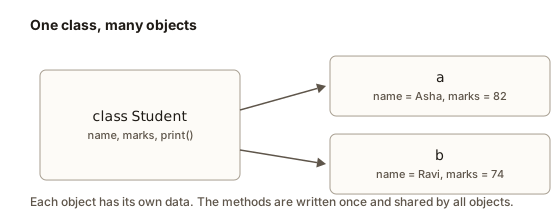 One class drawn as a blueprint, with two objects built from it that each hold their own name and marks
Programmers use the same words in the same way:
- The class
Studentdescribes that every student has a name and marks, and that a student can print a report line. - The objects
aandbare two real students.ahas the name Asha andbhas the name Ravi.
A class has two kinds of members:
- Data members are variables. Each object owns its own copy. Changing
a.marksdoes not changeb.marks. - Member functions (also called methods) are functions that belong to the class. They work on the data of the object they are called on.
Here is the first complete program. Type it into the editor and press Run.
The program prints:
Asha: 82
Ravi: 74
marks differ: 1
Read the program line by line. class Student { ... }; defines the blueprint. The semicolon after the closing brace is required. Student a; creates an object called a. The dot operator (.) reaches a member of an object, so a.name means "the name member of a". a.print() calls the method on a, and inside that method name and marks refer to a's own values.
The last line prints 1 because in C++ a true comparison produces the number 1, and a false one produces 0. a.marks != b.marks is true because 82 and 74 are different. You will see this 1 and 0 pattern again when a function returns a bool.
Worked example 1: two objects, two copies of the data
Trace the program above carefully, because it shows the core rule. Here is what the memory looks like after the two Student objects exist and have values.
| Step | Code | a.name | a.marks | b.name | b.marks |
|---|---|---|---|---|---|
| 1 | Student a; | (empty) | garbage | (empty) | garbage |
| 2 | a.name = "Asha"; | Asha | garbage | (empty) | garbage |
| 3 | a.marks = 82; | Asha | 82 | (empty) | garbage |
| 4 | Student b; | Asha | 82 | (empty) | garbage |
| 5 | b.name = "Ravi"; b.marks = 74; | Asha | 82 | Ravi | 74 |
Step 1 shows a real danger. The int members of a have no value yet, so they hold whatever bytes happened to be in that memory. We call such a value garbage. Reading it is undefined behaviour. The next lesson shows how constructors give members a starting value, and the rest of this lesson uses only members that we set before reading them.
What happens inside an object
It helps to picture what the computer does. Each object gets its own block of memory large enough for its data members. An object of Student holds one string (the name) and one int (the marks). The size of the block depends only on the data members, not on the methods.
The methods are different. The code of print exists once in the program. It is not copied into each object. When you write a.print(), the compiler passes the address of a into the function as a hidden argument. Inside print, the name name means "the name stored at that address". When you call b.print(), the same code runs, but the hidden address now points to b.
Think of a shared recipe card and separate bowls. The recipe is written once. Each cook uses it on a different bowl. The bowls hold the ingredients, and the card just says what to do with them.
This is why a method can be called on an object at all, and why the data of two objects never mixes. As long as your methods only touch the data of the object they were called on, every object stays independent.
Access control: public and private
A class can hide some of its members from the outside world. C++ uses three labels for this:
public: any code can use the member.private: only the class's own methods can use the member.protected: the class's own methods and classes derived from it can use the member. Lesson 3 covers this.
The label applies to all members below it until the next label. Here is the same idea written as a rule: "Hide the data, expose the actions."
Why hide data? Because a bank does not let you walk into the vault. It gives you two buttons, deposit and withdraw. Each button checks the rules before it changes anything. The rules live in one place, so the bank can trust the balance.
In C++ terms, this is encapsulation. The class wraps its data inside a protective shell, and the only way to change the data is through the methods the class provides. The data is hidden, the operations are exposed, and the class decides what is allowed.
Worked example 2: a bank account that protects its balance
Expected output:
1
0
300
Here is the trace of main, step by step.
Account acc;creates an object. The memberbalancehas the default value 0, because of the= 0written next to it.acc.deposit(500)runs.amountis 500, which is greater than 0, sobalancebecomes 500.acc.withdraw(200)runs. The checks pass: 200 is positive and it is not more than 500.balancebecomes 300. The function returnstrue, which prints as1.acc.withdraw(900)runs. The second checkamount > balanceis true, because 900 is more than 300. The function returnsfalsebefore it changes anything, so the balance stays 300. The result prints as0.acc.getBalance()returns 300.
Notice what the class guarantees. Because balance is private, the only code that can change it is deposit and withdraw. Both have checks. So the balance can never become negative. If balance were public, any line such as acc.balance = -1000; in main would break the rule, and no check could stop it.
The following line does not compile. Try it in your own copy to see the error:
acc.balance = -1000; // error: balance is privateWhat the checks are for
Each check in withdraw protects a rule, which programmers call an invariant. An invariant is a statement that must always be true about an object. For the account, the invariant is "the balance is never negative". A class is well designed when every method keeps the invariants true, and no outside code can break them.
Here is how each check works.
amount <= 0stops a withdrawal of zero or a negative number. A negative withdrawal would secretly add money.amount > balancestops an overdraft. The method returnsfalseand leaves the data as it was.amount > 0indepositstops a negative deposit that would also be a secret withdrawal.
A method that refuses an action should leave the object unchanged. That makes the object easier to reason about, because a failed call is a no-op.
const: promising not to change the object
Look at getBalance() const. The word const after the parentheses is a promise. It says that this method does not change the object. The compiler checks the promise. If the body of a const method tries to assign to a data member, the program does not compile.
const matters for two reasons.
First, it documents your intent. A reader of the class sees at once that getBalance only reads.
Second, it lets you call the method on a const object. Suppose a function receives an object by const reference, which means it may read the object but not change it:
void printBalance(const Account& a) {
    cout << a.getBalance() << "\n";   // fine: getBalance is const
    // a.deposit(10);                  // error: deposit is not const
}
The parameter type const Account& says "a reference to an account that this function will not change". Inside the function, the compiler allows only const methods on a. If getBalance had no const, the call a.getBalance() would fail to compile, even though the method only reads data. Forgetting const on read-only methods is one of the most common reasons for a compile error in code that passes objects around.
Worked example 3: a const method and a read-only function
Expected output:
68
77
Trace the conversion. set(20) stores 20 degrees Celsius. report receives t as a const reference, so it can call only inFahrenheit, which is a const method. The formula gives 20 times 9 divided by 5 plus 32, which is 68. After warm(5) the value is 25, and the formula gives 77.
Now imagine report tried to call t.warm(1). That is a non-const method, so the compiler refuses. The error is a useful safety check, because report was only supposed to print.
A rule of thumb for writing methods: if the method reads and never writes, mark it const. Make every getter and every "calculate something from the data" method const. Leave the rest without const.
Defining methods outside the class
So far we wrote each method inside the class body. Real projects often declare the class in a header file (a .h file) and write the method bodies in a source file (a .cpp file). Inside the class you write only the declaration. Outside, you write the body and name the class with ClassName::method. The double colon :: is the scope resolution operator. It means "the method that belongs to this class".
The next program does the same job in one file so you can run it, but it uses the outside-the-class style.
Expected output:
1
12
0
12
The class declares setSize and area, and then they are defined below. Note that the const must appear in both places, in the declaration and in the definition, and that the return type comes first in the definition. The second setSize call fails because the width is negative, so the rectangle keeps its old size of 3 by 4 and the area is still 12.
The trailing underscore in width_ is a naming habit. Many teams mark data members this way so a reader can tell members from parameters at a glance. The language does not require it. Pick one style and keep it across the whole project.
Worked example 4: a stack class with a private vector
A stack is a container with one rule: the last item put in is the first item taken out. Think of a stack of plates. You add a plate to the top and remove the top plate. Stacks appear in function calls, in undo features, in expression checkers and in graph search. Later modules build a stack from scratch with linked nodes, but for now let us build a small one with a class, so you can see encapsulation working for a real data structure.
We will store the items in a vector, which is a resizable array from the standard library. The vector is private, so outside code cannot reach past the stack's methods to break its rules. For example, outside code cannot remove items from the middle, which would break the stack rule.
This program reads commands from the Input box. Each line is one command: push with a number, pop, top or size. The program prints the result of each command.
Type this into the Input box, one command per line, and then run it:
push 4
push 9
top
pop
size
pop
pop
Expected output:
9
popped
1
popped
empty
Trace the run. push 4 puts 4 on the stack. push 9 puts 9 on top of it. top looks at the top item, which is 9, and prints it without removing it. pop removes 9 and prints popped. size now prints 1, because only 4 is left. The next pop removes 4 and prints popped. The last pop finds the stack empty, so pop returns false and the program prints empty.
Look closely at the design. top does not return a value directly, because it has two possible results: a number, or "nothing, the stack is empty". So it returns a bool and writes the number into out. The caller has to check the result before using v. This pattern is common in standard library code, and it stops the program from reading a value that does not exist.
Also notice what outside code cannot do. The items vector is private. There is no method to reach into the middle of the stack. So the only way to change the stack is through push and pop, and the stack rule (last in, first out) always holds.
removed: nothing
The top is the box marked top. An outlined box was just pushed or peeked.
The stack is empty. The last item pushed is the first one popped.
Step through the visualizer above and match each step to a line of the Stack class. Watch how push adds on the right end of the vector, and how pop removes from that same end. The visualizer shows a stack, and the vector in our class plays the same role: its last element is the top.
Designing a class from a description
Writing a class is easier when you start from a plain description of the real thing. Programmers do this every day, and interviewers often give you a paragraph and ask for the class. Here is a short description: "A library lends books. Each book has a title, an author and a copy number. A book can be borrowed by one reader at a time. It must be returned before anyone else can borrow it."
Turn the description into a class with four steps.
Step 1: nouns become data. Read the description and underline the nouns that describe the thing itself. "Title", "author" and "copy number" describe a book, so they become data members. "Borrowed" describes the state of a book, so it becomes a data member too, a bool that is true when the book is out.
Step 2: verbs become methods. The verbs are the actions a reader can take. "Borrow" and "return" are actions, so they become methods. Each method changes the book in a controlled way.
Step 3: rules become checks. The sentence "A book can be borrowed by one reader at a time" is a rule. It becomes a check in borrow: if the book is already out, refuse. The sentence "It must be returned before anyone else can borrow it" is a rule about the same state, so borrow refuses while borrowed_ is true, and giveBack refuses when the book is not out. Each rule is an invariant, and the class protects it.
Step 4: reading is const. Any method that only reports something, such as the title or whether the book is out, is const.
Here is the class that follows from those steps. The names end with an underscore because the data is private, a naming habit from earlier in this lesson.
class Book {
    string title_;
    string author_;
    int copyNumber_ = 0;
    bool borrowed_ = false;

public:
    void setDetails(const string& title, const string& author, int copy) {
        title_ = title;
        author_ = author;
        copyNumber_ = copy;
    }

    bool borrow() {
        if (borrowed_) return false;
        borrowed_ = true;
        return true;
    }

    bool giveBack() {
        if (!borrowed_) return false;
        borrowed_ = false;
        return true;
    }

    bool isBorrowed() const { return borrowed_; }
    const string& title() const { return title_; }
};
This class has a flaw that lesson 2 fixes. A book created without setDetails has an empty title and copy number 0, which may not be a meaningful state. A constructor, covered next, would make it impossible to create a book without details. For now, the skeleton shows the rules.
Trace the rules with a sequence of calls
Walk through a sequence of calls and track the value of borrowed_ after each one. Assume a new book, so borrowed_ starts as false.
| Call | Check | Result | borrowed_ after |
|---|---|---|---|
borrow() | borrowed_ is false, so go on | true | true |
borrow() | borrowed_ is true, so refuse | false | true |
giveBack() | borrowed_ is true, so go on | true | false |
giveBack() | borrowed_ is false, so refuse | false | false |
isBorrowed() | reads only | false | false |
The table shows the invariant in action. The book is never borrowed twice, and it is never returned when it is not out. A caller can ask for either action without fear, because the class answers with true or false and never corrupts the state.
The interface and the implementation
Programmers distinguish two parts of a class. The interface is the list of public members: the names, the parameters and what each one promises. The implementation is the private data and the bodies of the methods. Someone who uses a Book needs only the interface. They call borrow and do not need to know that a bool is used inside.
This separation is powerful. You can change the implementation later, for example by storing the borrower's name instead of a bool, and the code that uses the class keeps working, as long as the interface stays the same. When you design a class, decide the interface first. Ask: what does a caller need to do, and what must always be true? Then choose the private data to make those promises hold.
A good interface is small. Each public method should do one clear thing. If a class has forty public methods, most of them are probably helpers that belong in another class or should be private.
How to decide what goes public
Use this quick test on every member.
- Does a caller need it to do their job? Then it can be public.
- Could a caller use it to break a rule? Then it must be private, and the rule must be enforced by a public method.
- Is it a helper that only other methods of the class use? Then it is private, and callers never see it.
Apply the test to Book. The title is needed by callers, but it is only read, so a const reference getter is enough and nobody can rename the book. The borrowed_ flag must be private, because a caller who sets it directly could mark a book as out without a reader. The methods borrow and giveBack are public because they are the actions a caller needs.
Naming that helps the next reader
Names are part of the design. Use nouns for classes (Book, Account, Stack) and verbs for methods (borrow, deposit, push). Use names that say what a value means: copyNumber_ tells the reader more than n_. Use is or has for bool queries, such as isBorrowed and hasOverdraft. A method that changes something should sound like an action, and a method that only reads should sound like a question or a noun.
Keep the same word for the same idea everywhere. If the class calls a thing a "copy" in one method and an "item" in another, the reader will wonder whether they are different. Choose one term and use it in the class, in the tests and in the documentation.
Common mistakes in class design
Beginners often make the same few design errors, and interviewers look for them.
Everything is public. This makes the class a bag of variables, and any caller can break its rules. The fix is to make data private and add methods that enforce the rules.
Everything is private with no way to use it. Some beginners make all the data private and forget to add public methods. The class compiles and does nothing useful. The fix is to ask what callers need and expose exactly that.
A getter and setter for every member. A setter that accepts any value enforces no rule and does not protect anything. If a member has no rule, a plain public member can be honest and simple. Add a setter only when the setter can refuse a bad value.
A method that does two jobs. A method such as borrowAndPrint mixes a rule and an output. Keep the rule in one method that returns a result, and let the caller decide how to print it. Then the rule can be tested without reading the output.
A class that does too much. If a class stores the book, prints the library report, saves to a file and sends emails, split it. Each job belongs to a class with a single clear purpose.
Common mistakes with real compiler messages
Students make a small set of mistakes when they first write classes. Here are the ones you are most likely to hit, with the message the compiler prints. The messages below come from g++ 15 on Linux. Other compilers word them differently, but the meaning is the same.
Mistake 1: reaching a private member from outside.
Account acc;
acc.balance = -1000;error: 'int Account::balance' is private within this contextRead it this way: the compiler names the member (Account::balance), says its type (int), and says why you cannot use it here (it is private). The fix is not to make balance public. The fix is to call deposit or withdraw, which check the rules.
Mistake 2: changing data inside a const method.
class Counter {
    int n = 0;
public:
    void reset() const { n = 0; }
};error: assignment of member 'Counter::n' in read-only objectThe const on reset promises no change, and the assignment breaks the promise. Either remove the const from reset, because it really does change the object, or pick a different design.
Mistake 3: writing a default object with parentheses.
#include <iostream>
#include <string>
using namespace std;
class Book {
public:
    string title;
};
int main() {
    Book b();
    cout << b.title << "\n";
}error: request for member 'title' in 'b', which is of non-class type 'Book()'The compiler reads Book b(); as a function declaration named b that returns a Book. This is the most vexing parse. Its name comes from C++ folklore, and it is common enough that you should learn the fix. Write Book b; with no parentheses. If you want the value to be set to zero or empty explicitly, write Book b{};.
Mistake 4: forgetting the semicolon after the class.
The closing brace of a class must be followed by a semicolon. Without it, the next line of code is read as part of the class declaration and the compiler reports an error near the end of the class. The message usually says expected ';' after class definition. Check the line just after the closing brace whenever a class error points to code that looks fine.
Mistake 5: forgetting public.
If you write a class and leave out the public: label, its methods are private, so main cannot call them.
class Clock {
    int hours = 0;
    void setHours(int h) { hours = h; }
};
int main() {
    Clock c;
    c.setHours(5);
}error: 'void Clock::setHours(int)' is private within this contextThe message names the method and its class, the same pattern as mistake 1. The fix is a public: label above the method.
Mistake 6: uninitialised members.
An int member without a value or a default initialiser holds garbage. The program may print a random-looking number, and it may print a different number every run. The fix is to write int balance = 0; in the class, or to give the member a value in a constructor (lesson 2).
Debugging walkthrough
Suppose you write the account program and see this message:
main.cpp:8:9: error: 'int Account::balance' is private within this contextWork through it in four steps.
- Read the location first.
main.cpp:8:9means filemain.cpp, line 8, column 9. Go to that line. - Read the first error only. Later errors often follow from the first one, so fix the first and compile again.
- Read the names in the message.
Account::balancetells you which class and member. "Private within this context" tells you the rule you broke. The context ismain, which is outside the class. - Decide on the design fix, not the quick fix. Making
balancepublic would make the error go away, but it would remove the protection. The correct fix is to call a public method.
Now the debugging of logic bugs, which the compiler does not catch. Put a print statement in withdraw that shows amount and balance before the check. Run the program with a case that fails. If the printed numbers are not what you expect, the bug is in the values, and you know where to look. Print statements are the simplest debugger, and they work well for small classes.
Variations and edge cases
A struct is a class with public default. In C++ the keywords class and struct are almost the same. The only difference is the default access. Members of a class are private until you write public:, and members of a struct are public until you write private:. Many programmers use struct for plain bundles of data with no rules, such as a point with x and y, and class for objects with rules to protect. Either works, but the choice tells the reader something. A struct says "this is just data". A class says "this object has rules".
An empty class is not zero bytes. Even a class with no data members occupies at least one byte, so that each object has a distinct address. You do not need this fact to write code, but it explains why sizes are never zero.
Getters and setters are not always needed. Beginners often write a getter and a setter for every member, which just makes the data public with extra steps. A setter should exist only when it enforces a rule. If there is no rule, a public member may be fine for a simple data bundle. The purpose of encapsulation is protection, not ceremony.
Methods can call other methods. Inside a method you can call any other method of the same class without writing this->. In the Account class, withdraw could call getBalance() directly. Lesson 2 explains this, which is what makes that work.
Returning a reference to private data is a leak. If you write int& getBalance() { return balance; }, outside code gets a handle to your private data and can change it. Return by value for simple types, or return a const reference if the object is large and the caller only needs to read it.
Interview questions and how to answer them
What is the difference between a class and an object? A class is the blueprint that defines data members and methods. An object is an instance created from it, with its own copy of the data. Give the house example to make the answer clear.
What is encapsulation? It is the practice of hiding data inside a class and exposing operations that enforce the class's rules. A good answer includes an invariant. For example: "A bank account must never have a negative balance, so the balance is private and only withdraw changes it."
Why do we mark methods const? It promises that the method does not change the object, which lets the compiler check the promise and lets callers use the method on a const object or reference.
What is the difference between class and struct in C++? The default access is private for class and public for struct. Otherwise they are the same.
Why does withdraw return bool instead of void? So the caller learns whether the action happened. A silent failure is harder to find than an explicit false.
Real-world uses
Classes model things that have state and rules. A game character has health, which must stay between 0 and the maximum. A shopping cart has items and a total, which must match the items. A file handle has an open or closed state, and writing to a closed file must be refused. In each case the class hides the state and offers methods that keep it valid. When you read a library's documentation, you are reading the public methods of its classes, and the private members are hidden on purpose.
In interviews you will also meet classes as data structures. A linked list class hides the node pointers so that callers cannot break the chain. A hash table class hides its buckets. A priority queue class hides the heap order. Each of these is encapsulation applied to a data structure, and the rest of this module builds on that idea.
Practice
Try each exercise before you open the solution. Use the Run button to test your code. For each exercise the hidden solution is below it.
- Write a
Rectangleclass withwidthandheightas privatedoublemembers, asetSizemethod that refuses non-positive values, and aconstmethodarea(). Create one rectangle, set it to 3 by 4, and print its area. Hint: the setter returnsbool, likeAccount::withdraw.
Solution
#include <iostream>
using namespace std;

class Rectangle {
    double width = 0;
    double height = 0;

public:
    bool setSize(double w, double h) {
        if (w <= 0 || h <= 0) return false;
        width = w;
        height = h;
        return true;
    }
    double area() const { return width * height; }
};

int main() {
    Rectangle r;
    r.setSize(3, 4);
    cout << r.area() << "\n";
    return 0;
}
Prints 12. The setter checks the values before it changes anything, so a bad call leaves the old size in place.
- Change
Account::depositso it refuses any single deposit above 100000 and returnsbool. Test it with a deposit of 150000 and a deposit of 500. Hint: add one more condition to theifand returnfalsein the other case.
Solution
bool deposit(int amount) {
    if (amount <= 0 || amount > 100000) return false;
    balance += amount;
    return true;
}
A deposit of 150000 returns false and the balance is unchanged. A deposit of 500 returns true. The return type changed from void to bool, so the caller can tell the difference.
- Add a
bool isEmpty() constmethod to theStackclass from worked example 4. It should returntruewhen there are no items. Hint:items.empty()already does this.
Solution
bool isEmpty() const { return items.empty(); }The method is const because it only reads the vector. The stack's rule is unchanged, and the caller gets a clear answer without touching the private vector.
- In one or two sentences, explain why
balanceinAccountmust be private, using the word "invariant".
Solution
The balance must never go negative, which is an invariant. If balance were public, any code could set it to a negative value and skip the checks in withdraw, so the invariant could be broken anywhere in the program.
- Write a
Counterclass with a privateint countthat starts at 0, a methodincrement(), a methodreset(), and aconstmethodvalue(). Inmain, increment three times, print the value, reset, and print again. Predict the output before you run it. Expected output:3then0.
Solution
#include <iostream>
using namespace std;

class Counter {
    int count = 0;

public:
    void increment() { count++; }
    void reset() { count = 0; }
    int value() const { return count; }
};

int main() {
    Counter c;
    c.increment();
    c.increment();
    c.increment();
    cout << c.value() << "\n";
    c.reset();
    cout << c.value() << "\n";
    return 0;
}
The output is 3 and then 0. reset is not const because it changes count.
- The following class does not compile when
maincallssetHours. Find the reason and fix it without making the data public.
class Clock {
    int hours = 0;
    void setHours(int h) { hours = h; }
};
int main() {
    Clock c;
    c.setHours(5);
}
Hint: look at the label above setHours.
Solution
setHours is private because no public: label appears above it, so main cannot call it. Add public: above the method:
class Clock {
    int hours = 0;
public:
    void setHours(int h) { hours = h; }
};
The data stays private, and the method is the only way to change it.
- Write a
Clockclass with privatehours(0 to 23) andminutes(0 to 59). Addbool setTime(int h, int m)that refuses out-of-range values, and aconstmethodshow()that printsHH:MMwith two digits each. Hint:cout << setw(2) << setfill('0') << hoursneeds<iomanip>.
Solution
#include <iostream>
#include <iomanip>
using namespace std;

class Clock {
    int hours = 0;
    int minutes = 0;

public:
    bool setTime(int h, int m) {
        if (h < 0 || h > 23 || m < 0 || m > 59) return false;
        hours = h;
        minutes = m;
        return true;
    }
    void show() const {
        cout << setw(2) << setfill('0') << hours << ":"
             << setw(2) << setfill('0') << minutes << "\n";
    }
};

int main() {
    Clock c;
    c.setTime(9, 5);
    c.show();
    return 0;
}
The output is 09:05. The setw and setfill manipulators pad the number with a zero when it has one digit.
- Explain in your own words why a
constmethod cannot call a non-constmethod of the same class. Hint: think about what the promise means for the object.
Solution
A const method promises not to change the object. A non-const method may change the object, so calling it could break that promise. The compiler therefore refuses the call. The fix is to make the called method const too, if it really only reads.
- Add a method
void peekAll() constto theStackclass from worked example 4 that prints every item from bottom to top on one line, separated by spaces. Hint: a loop with an index from 0 toitems.size()- 1 runs in bottom-to-top order.
Solution
void peekAll() const {
    for (size_t i = 0; i < items.size(); i++) {
        cout << items[i];
        if (i + 1 < items.size()) cout << " ";
    }
    cout << "\n";
}
For pushes of 4, 9 and 2, it prints 4 9 2. The loop reads only, so the method is const.
- Make
Accountprint a short line each time it changes, so you can follow the balance. Write the change so that the deposit message appears only when the deposit actually happens. Predict the output ofdeposit(0)followed bydeposit(50).
Solution
void deposit(int amount) {
    if (amount <= 0) return;
    balance += amount;
    cout << "deposited " << amount << ", balance " << balance << "\n";
}
The call deposit(0) returns at once and prints nothing. The call deposit(50) prints deposited 50, balance 50 when the balance started at 0.
What you now know
- A class is a blueprint and an object is one thing built from it. Each object has its own data members.
- Methods work on the data of the object they are called on, and their code is shared.
privatehides data,publicexposes the operations, and encapsulation keeps the class's rules true.- A method marked
constpromises not to change the object, and the compiler checks the promise. - Methods can be defined outside the class with
ClassName::method. - Common compile errors are private access, a const method that changes data, and the most vexing parse.
- Next, lesson 2 shows how constructors set up a valid object when it is created, how destructors clean up, and what
thismeans.