Why it matters
A linked list is the first data structure you build yourself out of pointers. Stacks, queues, trees and graphs all reuse the same idea: an object that holds the address of another object. If you can follow a chain of pointers without losing your place, the later lessons in this module will feel like small steps. Interviewers also use linked lists to check whether you understand memory, edge cases and pointer changes, because a single wrong line can lose half the data.
This lesson starts from the very basics. You do not need to know anything about C++ pointers yet. By the end you will build a list, walk it, count its items, search it and read an item by its position. You will also see the mistakes that crash most first attempts, and learn how to read the error output when they happen.
Memory in plain words
Your computer has a large row of numbered memory cells. Each cell holds one byte, which is a small number from 0 to 255. Every cell has an address, which is its number in that row. You can think of the addresses as the house numbers on a long street.
A variable is a name you give to a cell or a group of cells. When you write int score = 72;, the compiler reserves enough cells to hold an int (usually 4 bytes on the common compilers) and stores 72 in them. The name score is a label that the compiler translates into an address.
Most variables hold values: numbers, characters, true or false. A pointer is a variable that holds an address. It does not hold the value stored at that address. It holds the house number, and you can go to the house with the pointer when you need what is inside.
Here is the idea in one picture. Suppose score lives at address 1000, and ptr holds the address 1000. Then ptr points to score. Reading *ptr means "go to the address that ptr holds and read what is there", which gives 72.
The star * has two jobs in C++. In a declaration like int* ptr;, it means "ptr is a pointer to an int". In an expression like *ptr, it means "the value at the address ptr holds". This double meaning confuses many beginners, so keep both readings in mind.
The ampersand & is the address-of operator. &score gives the address of score. So int* ptr = &score; means "ptr now holds the address of score".
Pointers to structures and the arrow
A struct groups several values under one name. A struct can contain a pointer to another struct of the same type. That is the trick behind linked lists. Here is the smallest useful version:
struct Node {
    int data;     // the value stored in this node
    Node* next;   // the address of the next node, or nullptr
};
A Node takes the memory of one int and one pointer. On a typical 64-bit system a pointer takes 8 bytes, so one Node takes 16 bytes, after padding that keeps the pointer aligned. You do not need the exact number. What matters is that each node is a separate block of memory that holds a value and the address of the next block.
To reach a field through a pointer, you can write (*p).data, but C++ gives you a shorter form, p->data. The arrow means "follow the pointer p, then take the field data". Use the arrow every time you work with a pointer to a struct. You will see it hundreds of times in this module.
nullptr is a special value that means "this pointer points to nothing". It is the end marker of a linked list. Older code used NULL or the number 0 for the same purpose, but nullptr is clearer and safer, so use it.
A constructor fills in the fields when you create a node. Here is the constructor line from the course code:
Node(int d) : data(d), next(nullptr) {}It means: set data to the number you pass in, and set next to nullptr. If you forget the next(nullptr) part, next holds whatever junk was in memory before, and the first traversal may wander into random memory and crash. Always initialize pointers.
Reading pointer declarations
Pointer declarations look strange at first, because the star and the word const can sit in several places. Read a declaration from the name outward, one symbol at a time, and it becomes clear.
Node* p means that p is a pointer to a Node. You can change where p points, and you can change the fields of the node it points to. const Node* p means that p points to a constant Node. You can move p to another node, but you cannot change the fields through p. Node* const p means that p is a constant pointer. It always points at the same node, but you can change that node's fields. const Node* const p forbids both.
This matters for lists. A function that only reads the list, such as length or contains, should take const Node* head. Then the compiler rejects an accidental write, such as head->data = 0;, and GCC reports assignment of member 'Node::data' in read-only object.
There is a limit you must know. The const on head does not extend to the nodes after it. In const Node* head, the expression head->next is a Node* const, a constant pointer to a non-constant node, so head->next->data = 0; still compiles. The protection stops at the first pointer. A function that must not change the list at all has to be written with that in mind, and a const on the head is only a partial guard.
Also note the difference between a reference and a pointer to a pointer. Node*& head is a reference to the caller's pointer. Node** head is a pointer to the caller's pointer. Both let a function change the caller's head, and the reference form is shorter, which is why this module uses it.
The idea of a linked list
An array keeps its items side by side in one block of memory. A linked list keeps each item in its own node. The nodes can sit anywhere in memory. To connect them, every node stores the address of the next node.
Think of a treasure hunt. The first clue is hidden under a rock in the garden. It says "You may have a prize, and the next clue is under the blue pot." Under the blue pot is the next clue, and so on. The last clue says "No more clues". You never know where the second clue is until you have found the first. You can only move forward by following the chain.
A linked list works the same way. Each node is a clue. The data field is the prize, and the next field is the address of the next clue. The last node has next equal to nullptr, which is the "No more clues" note.
You keep one pointer to the first node. It is called the head. If you lose the head, you lose the whole list, because no other variable knows where the nodes are. That single fact explains most of the rules you will learn in this module.
The formal name for each step along the chain is a link. A list of n nodes has n data values and n next pointers, one of which is nullptr.
Building a list by hand
The best way to understand a linked list is to build a short one by hand. Here is the complete program. It makes three nodes, links them, and prints their values.
10 -> 20 -> 30Here is what happens, one line at a time. Read it slowly, because every later example works the same way.
Line Node* head = new Node(10); asks the heap, which is a large pool of memory the program can use while it runs, for enough space for one node. new creates the node, runs the constructor so data is 10 and next is nullptr, and returns the address of the new node. That address is stored in head.
Line head->next = new Node(20); creates a second node with data 20. Its address is stored in the next field of the first node. Now the first node points to the second.
Line head->next->next = new Node(30); reads as "follow head, then follow next, then set the next field of that node". Following head gives the first node. Following its next gives the second node. Setting the next of the second node to the address of a new third node finishes the chain.
After these three lines the memory looks like this:
head --> [ 10 | *] --> [ 20 | *] --> [ 30 | null ]The * is a pointer. The word null stands for nullptr. Each box has two parts: the data on the left, the next pointer on the right.
The loop at the end walks the list. We look at it closely in the next section.
Walking the list with a temporary pointer
To visit every node, you need a pointer that moves. Call it cur, short for "current". It starts at head. At each step you read cur->data, then move cur to cur->next. You stop when cur becomes nullptr.
This is called traversal. The loop in the program above has three parts:
- The start,
Node* cur = head, which begins at the first node. - The test,
cur != nullptr, which says "keep going while there is a node". - The step,
cur = cur->next, which moves to the next node.
Here is a trace of the loop on the list 10, 20, 30. The table shows the value of cur before each check.
| Check | cur points to | cur is not nullptr? | Prints | Next cur |
|---|---|---|---|---|
| 1 | node 10 | yes | 10 then -> | node 20 |
| 2 | node 20 | yes | 20 then -> | node 30 |
| 3 | node 30 | yes | 30, no arrow because next is nullptr | nullptr |
| 4 | nullptr | no | loop stops |
Notice that head never moved. It still points to node 10 after the loop. This is the most important habit in linked list code. Use a second pointer to walk, and keep the first one where it is.
Now try the shorter form of the loop, which you will see in most professional code. It makes no difference to the result, so read both versions until you can switch between them without thinking.
for (Node* cur = head; cur != nullptr; cur = cur->next) {
    // use cur->data here
}for (Node* cur = head; cur; cur = cur->next) {
// the same loop: a non-null pointer is true in an if or a loop condition
}A pointer converts to a boolean. nullptr becomes false and any other address becomes true. So cur alone means cur != nullptr. The explicit version is clearer for beginners, so the lessons use it when a point matters. The short version is common in interviews and in real code.
Step through a traversal below. Watch the cursor move one node at a time while the head stays on the first node.
Each node holds a value and a pointer (dot and arrow) to the next node. An outlined node is where the walk is now. A filled node is new or found.
The list is empty. head points to nothing.
Watch for the moment the cursor leaves the last node. Its next is nullptr, so the loop stops there, and nothing after it is ever read.
Worked example: length, contains and getAt
Three small functions cover most of the reading you will do on a list. Each one follows the same traversal pattern. The first counts nodes, the second checks whether a value exists, and the third reads a value by its position.
length: 3
contains 8: 1
contains 9: 0
getAt 2: 15
getAt 5: -1
Trace length on the list 4, 8, 15. The variable n starts at 0. The loop visits node 4 and adds 1, visits node 8 and adds 1, visits node 15 and adds 1, then reaches nullptr and stops. The function returns 3. Notice that length must visit every node, so its cost grows with the size of the list. It runs in O(n) time, where n is the number of nodes, and it uses O(1) extra memory because it only needs n and cur.
Trace contains(head, 8). The loop checks node 4: not equal to 8, keep going. It checks node 8: equal, so the function returns true, which prints as 1 because cout prints a bool as 1 or 0 by default. The loop never reaches node 15. An early return is the usual way to stop a search as soon as you find the answer.
Trace contains(head, 9). The loop checks 4, 8 and 15. None of them equals 9. The loop then reaches nullptr, so the function falls through to return false. The search always costs O(n) in the worst case, because the list has no index to jump to. You must check nodes one by one.
Trace getAt(head, 2). The variable cur starts at node 4 and k starts at 0. The loop runs while k is less than 2 and cur is not null. First step: cur moves to node 8 and k becomes 1. Second step: cur moves to node 15 and k becomes 2. Now k is not less than 2, so the loop stops. cur points to node 15, and the function returns 15.
Trace getAt(head, 5). The loop moves cur forward. After two steps cur is node 15. The third step would set cur to nullptr, but the loop condition k < 5 is still true, and cur != nullptr is now false, so the loop stops with cur equal to nullptr. The check if (cur == nullptr) return -1; catches this and the function returns -1. Without that check, the final line cur->data would read through a null pointer and crash.
This is the first real lesson in defensive code. Every time you follow a pointer, ask yourself whether it can be nullptr at that point. In getAt, the answer is yes whenever the index is too big, so the code checks before it reads.
Worked example: adding to the tail
Adding a value at the end of a list needs one more idea. You must walk to the last node first, then point its next at the new node. Here is the function:
void append(Node*& head, int value) {
    Node* node = new Node(value);
    if (head == nullptr) {
        head = node;
        return;
    }
    Node* cur = head;
    while (cur->next != nullptr) {
        cur = cur->next;
    }
    cur->next = node;
}
The parameter Node*& head has an ampersand. That means head is a reference to the caller's pointer, not a copy. If head were a plain Node* head, then head = node; would change only the local copy, and the caller would still have nullptr. The reference is what lets an empty list become a list with one node. We will look at this in more detail in lesson 2.
The loop uses cur->next != nullptr rather than cur != nullptr. It stops on the last node, not after it. That is what we need, because the last node's next must be set to the new node. If the loop stopped at nullptr, cur would be null and cur->next = node would crash.
Trace append on an empty list, value 5. head is nullptr, so the first branch runs. node is a new node with data 5. head now equals node. The function returns. The list is 5.
Trace append on the list 5, then value 7. head is not null. cur starts at node 5. Its next is nullptr, so the while loop does not run. cur->next = node sets the next of node 5 to the new node 7. The list is 5 -> 7.
Trace append on the list 5 -> 7, then value 9. cur starts at node 5. Its next is node 7, which is not null, so cur moves to node 7. Node 7's next is nullptr, so the loop stops with cur on node 7. Then node 7's next becomes node 9. The list is 5 -> 7 -> 9.
The cost is O(n) per append, because we walk the whole list each time. Lesson 2 shows how to keep a pointer to the tail so that appends cost O(1). For now, the O(n) version is the one that teaches the pattern.
Here is the complete program with the three appends and a print, so you can run the function yourself.
5 7 9
5 7 9 12
What the computer does with each node
The heap is the part of memory where new puts objects that must live until you delete them. When you write new Node(10), the runtime asks the heap for enough bytes, calls the constructor on them, and gives you back the address. The node stays there until you call delete on that address, or until the program ends.
The stack is different. Local variables such as cur, n and i live on the stack. They disappear when their function returns. A pointer on the stack can point to a node on the heap, and the node stays alive after the function returns. That is why head can live in main while the nodes are created inside append.
A diagram helps. The next picture shows three nodes at scattered addresses, joined by their next pointers. The nodes could be anywhere on the heap. The only thing that connects them is the chain of addresses.
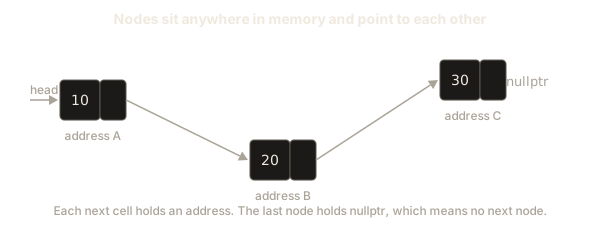
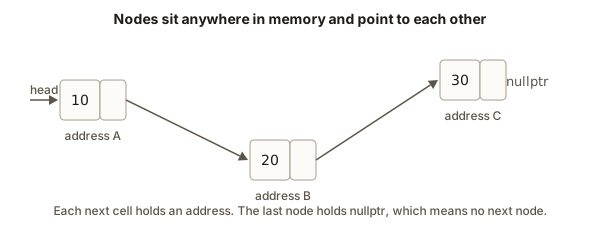 Three list nodes at scattered addresses, each next cell pointing to the following node, the last one pointing to nullptr
This is the reason linked lists are slow to search but quick to change. The nodes do not need to sit side by side, so inserting a node never moves the others. The price is that you must follow the chain from the head, and the CPU cannot predict where the next node is. Each step can miss the cache, which is a small fast memory near the processor. A large array scanned in order is often much faster than a linked list of the same size, even though both need O(n) time to find an item.
Arrays versus linked lists
Interviewers often ask you to compare the two. Here is the honest table, with the reasons behind each cell.
| Operation | Array | Singly linked list | Why |
|---|---|---|---|
| Read item at index i | O(1) | O(n) | An array computes the address as start plus i times the size. A list must walk i nodes. |
| Search for a value | O(n) | O(n) | Both must look at items one by one when nothing else is known. |
| Insert at the front | O(n) | O(1) | An array shifts every item. A list changes only the head pointer and one next pointer. |
| Insert after a node you already hold | O(n) | O(1) | An array shifts the items after it. A list changes two pointers. |
| Append at the end (no tail pointer) | O(1) amortized | O(n) | An array has a spare slot most of the time. A list must walk to the end. |
| Memory per item | value only | value plus a pointer | Each node stores the address of the next node. |
"Amortized" means the cost averages out over many operations. An array that doubles its size sometimes copies everything, but the average cost of a push stays O(1). You will see this idea again with vectors.
The table gives a rule of thumb. Choose a linked list when you often insert or remove at a place you can reach directly by a pointer, and you rarely need to read by position. In practice, the standard library's vector is faster for most jobs, even when the operation count favours a list, because of memory layout. Linked lists matter for learning, for interviews and for a few real designs such as the list of free blocks inside a memory allocator or the order of entries in a cache.
Edge cases you must handle
An edge case is an unusual input that a simple solution often forgets. Linked list code is full of them. Test each one before you trust a function.
The empty list has head equal to nullptr. Most functions must return the right answer without touching head->data. For example, length(nullptr) should return 0, and the loop in length does that for free, because the test cur != nullptr is false at the first check.
A list with one node has head->next equal to nullptr. Code that writes head->next->data crashes on a one-node list. The same happens with any code that follows next twice without a check.
The last node is special, because its next is nullptr. Loops that stop at cur->next != nullptr stop on the last node. Loops that stop at cur != nullptr stop after it. Choose the test that matches what you do with the node.
Duplicates are normal. Two nodes can hold the same value, and contains returns true for either one. If a problem asks for the position of a value that appears twice, decide which one counts before you write any code.
Index out of range is the most common input error. getAt(head, 5) on a three node list must not read memory after the end of the list. Check for nullptr before you follow the pointer.
Here is a small example that shows the one-node case and the empty case in the same program.
-1
42
2
Trace lastValue(single). The head is not null, so the function starts cur at node 42. Its next is nullptr, so the while loop does not run. The function returns 42. The one-node case works because the loop condition is checked before any move.
Trace lastValue(two). cur starts at node 1. Its next is node 2, so cur moves to node 2. Node 2's next is nullptr, so the loop stops and the function returns 2.
Common mistakes and the messages you will see
Most first crashes in linked list code have one of a few causes. Learn to recognise them from the output.
The first mistake is dereferencing nullptr. Writing cur->next->data when cur->next is null tries to read address zero plus a small offset. The operating system stops the program. On Linux the shell prints Segmentation fault (core dumped). Some online judges say runtime error or SIGSEGV. These all mean the same thing: the program touched memory it may not touch. The fix is to check the pointer before you follow it.
The second mistake is moving head while you traverse. If your loop is for (; head != nullptr; head = head->next), then head ends as nullptr, and the list is gone from the point of view of every other function. The fix is the temporary pointer cur from the earlier section.
The third mistake is an uninitialized next. If a constructor forgets next(nullptr), the field holds leftover data. A traversal may follow it into random memory. The result is often a crash that happens in a different function, far from the real bug.
The fourth mistake is losing a node. Suppose you write head = new Node(5); while head already points to a list. The old list is still in memory, but nothing points to its first node. You cannot reach it or free it. This is a memory leak: memory that is allocated and never freed or reached. Leaks do not crash small programs, but they grow over time and can exhaust memory in a long-running one.
The fifth mistake is reading head->next after delete head. Once you delete a node, its memory may be reused at any time. Reading it is undefined behaviour, which means the language makes no promise about what happens. It may appear to work, which is the most dangerous outcome, because the bug hides until a later change. Lesson 2 shows the right order: save next, delete, then move.
When you want a clear report instead of a silent wrong answer, compile with the address sanitizer. It is a tool built into g++ that checks each memory access at run time. Compile with g++ -std=c++17 -g -fsanitizer=address -o prog prog.cpp, run ./prog, and it prints a report. A bad read of a freed node looks like this:
==12345==ERROR: AddressSanitizer: heap-use-after-free on address 0x602000000018
READ of size 4 at 0x602000000018 thread T0
    #0 0x55d1 in main prog.cpp:27
The first line names the bug. The line with #0 names the place in your code. The numbers change on every run, so do not copy them. Read the words and the line number.
For a null pointer, the sanitizer says SEGV on unknown address 0x000000000008 or a similar line. The address is small because it is the null pointer plus the offset of the field you read. That is a strong hint that you followed a nullptr.
A debugging walkthrough
Suppose your getAt crashes when the index is 3 on a list of length 3. Here is a method you can use on any linked list bug. It takes five steps.
First, write down the input. The list is 4, 8, 15. The index is 3. Write both on paper before you touch the code. Many bugs disappear when the input is written out.
Second, trace the loop by hand. Start cur at node 4 and k at 0. Step 1: k is 0 and less than 3, cur is not null, so move to node 8 and k is 1. Step 2: move to node 15 and k is 2. Step 3: k is 2 and less than 3, cur is node 15, so move to nullptr and k is 3. Step 4: k is 3, not less than 3, so the loop stops with cur equal to nullptr.
Third, check the line after the loop. Without the if (cur == nullptr) check, the line return cur->data; reads from nullptr. That is the crash. Your trace found the exact line, so you do not need to guess.
Fourth, decide the rule. An index equal to the length is out of range, so return -1 for it. The check you already have handles that.
Fifth, test the boundary. Run the function with index 2 (the last valid node), index 3 (one past the end) and index 100 (far past the end). If all three give sensible results, the boundary is right.
A debugger can do steps two and three for you. In gdb you type break getAt, then run, then next to step line by line, and print cur to see the pointer. Printing a pointer shows an address, and print *cur shows the node. Use these tools after you have traced by hand, not instead of it.
Interview patterns for this lesson
Three patterns cover most interview questions on singly linked lists. You will use them in every later lesson.
The first pattern is walk with a cursor. Keep one pointer that moves through the list, and read the data at each step. Length, contains, sum, maximum and print all use this. It takes O(n) time and O(1) extra space.
The second pattern is walk to the node before the target. To insert or delete at position i, you need the node just before it, because that node's next must change. This is called the predecessor. A loop that stops one node early gives you the predecessor directly. Lesson 2 uses this in detail.
The third pattern is check for null first. Before you read cur->next->..., check that cur->next is not null. Interviewers look for this habit more than anything else, because most bugs in linked list code come from skipping it.
When an interviewer asks you to write length or search, say the pattern out loud before you type. For example: "I will walk with a cursor from the head. I will stop at nullptr. The time is O(n) and the space is O(1)." That sentence shows the interviewer that you know the shape of the solution. It also gives you a checkpoint if your code goes wrong.
Another common question is "What is the time complexity of getting the middle element?" The answer for a plain singly linked list is O(n), because you must walk to the middle. The fast and slow pointer trick in lesson 3 finds the middle in one pass, but it is still O(n). Do not say O(1), even though the trick feels fast.
Practice
Try each exercise on paper first, then in a file. Solutions are hidden. Open each one only after you have written your answer.
- Write
int sum(Node* head)that returns the total of all the data values. Use the cursor pattern and return 0 for an empty list.
Solution
int sum(Node* head) {
    int total = 0;
    for (Node* cur = head; cur != nullptr; cur = cur->next) {
        total += cur->data;
    }
    return total;
}
The loop visits each node once, so the time is O(n) and the space is O(1). An empty list has head equal to nullptr, so the loop never runs and the function returns 0.
- Write
int maxValue(Node* head)that returns the largest value. Return -1 for an empty list, and assume all values are 0 or more.
Solution
int maxValue(Node* head) {
    if (head == nullptr) return -1;
    int best = head->data;
    for (Node* cur = head->next; cur != nullptr; cur = cur->next) {
        if (cur->data > best) best = cur->data;
    }
    return best;
}
The first node sets the starting value, so the loop starts at its next. This avoids comparing the first node with itself, and it still works for a single-node list.
- Write
int countEven(Node* head)that counts the nodes whose data is even.
Solution
int countEven(Node* head) {
    int n = 0;
    for (Node* cur = head; cur != nullptr; cur = cur->next) {
        if (cur->data % 2 == 0) n++;
    }
    return n;
}
The remainder operator % gives 0 for even numbers. This includes negative even numbers, because -4 % 2 is 0 in C++.
- Write
bool isSorted(Node* head)that returns true when every value is less than or equal to the value after it. An empty list and a one-node list are sorted.
Solution
bool isSorted(Node* head) {
    if (head == nullptr) return true;
    for (Node* cur = head; cur->next != nullptr; cur = cur->next) {
        if (cur->data > cur->next->data) return false;
    }
    return true;
}
The loop stops on the last node, so cur->next is never null inside the body. This is the "stop on the last node" pattern from the lesson.
- Write
Node* findNode(Node* head, int x)that returns the node holding x, ornullptrif there is none. The caller can then change that node.
Solution
Node* findNode(Node* head, int x) {
    for (Node* cur = head; cur != nullptr; cur = cur->next) {
        if (cur->data == x) return cur;
    }
    return nullptr;
}
Returning the node instead of a bool is more useful. A bool tells you the value exists. A pointer also lets you read or change the node.
- Write
int secondToLast(Node* head)that returns the value of the node before the last one. Return -1 if the list has fewer than two nodes.
Solution
int secondToLast(Node* head) {
    if (head == nullptr || head->next == nullptr) return -1;
    Node* cur = head;
    while (cur->next->next != nullptr) {
        cur = cur->next;
    }
    return cur->data;
}
The loop stops when cur->next is the last node. That means cur is the node before the last one. The check at the top protects the two-step read cur->next->next.
- Write
void printInOrder(Node* head)that prints each value on its own line, from the head to the end. Then explain in one sentence why printing the values in reverse order is harder.
Solution
void printInOrder(Node* head) {
    for (Node* cur = head; cur != nullptr; cur = cur->next) {
        cout << cur->data << "\n";
    }
}
Printing in reverse is harder because the list gives you no way to step backwards, so the last node is only reachable after all the others. A stack or recursion can hold the earlier nodes until the end. Lesson 3 shows the recursive version.
- Trace this function on the list 3, 1, 4, 1, 5 and state its output:
int mystery(Node* head) { int r = 0; for (Node* c = head; c; c = c->next) if (c->data > r) r = c->data; return r; }
Solution
The function returns 5. It keeps the largest value seen so far in r, starting from 0. The values 3, 4 and 5 each replace r in turn, and the 1s do not. Because it starts at 0, it would return 0 for a list of only negative numbers, which is a hidden assumption worth noting in an interview.
- Explain in one paragraph why
Node*& headis needed inappendand what goes wrong withNode* head.
Solution
With Node* head, the function receives a copy of the caller's pointer. Setting head = node changes only the copy when the list was empty, so the caller's head stays nullptr and the new node is lost. With Node*& head, the function works on the caller's own variable, so the change is visible after the call. A non-empty list does not need the reference, because the function only changes cur->next, which is a field of a node and not the head variable.
- A list has n nodes. Write the number of
nextpointers that are notnullptr, in terms of n, and explain your answer.
Solution
There are n minus 1 pointers that are not null. Each node except the last has a next that points to another node. The last node's next is nullptr. For an empty list the answer is 0, which the formula gives only if you treat the empty case separately. Be ready to say that in an interview.
What you now know
- A pointer holds an address.
*preads the value at that address andp->fieldreads a field of the struct it points to. - A singly linked list is a chain of nodes. Each node holds data and the address of the next node. The head pointer is the only way in.
- Traversal walks the chain with a temporary cursor. The cursor moves, the head does not.
- Reading by index costs O(n), inserting at the front costs O(1), and an array wins for random reads.
- Check for
nullptrbefore you follow a pointer, and useNode*&when a function must change the head. - The common crashes are a null dereference, a moved head, an uninitialized next and a reference to a deleted node. The address sanitizer reports them with a line number.
The next lesson covers inserting and deleting in the middle of a list, freeing memory correctly and building a list with a tail pointer.