Why this matters
A program with one long main is hard to read, hard to test and hard to fix. A function is a named block of code that does one job. You write it once, give it a name, and call it wherever that job is needed. Almost every real C++ program, from a game to a compiler, is built from many small functions. Interviewers ask you to write them on a whiteboard, so this lesson is the foundation for the rest of the course.
You will learn to read a function signature the way the compiler does, to pass values in and get values out, and to use a prototype so that the order of functions in your file does not break the program.
The idea: a named set of steps
Start from first principles. A program is a list of instructions. The computer runs them from top to bottom. Suppose you need to print the same three-line warning in five places in your code. You could copy the three lines five times. Then, when the warning text changes, you must find and change all five copies, and it is easy to miss one.
A function solves that. You put the three lines in one place, give that block a name, and then call the name five times. One change in the function updates every call.
Think of a recipe card. The card says "boil an egg" and lists the steps once. Each time you want a boiled egg you do not rewrite the steps in your head. You follow the card. In this picture, the function is the card and each call is one time you follow it.
Your first function
Here is a complete program with one function, greet, called twice from main.
Press Run. There is no input for this program, so leave the Input box empty. The output is:
Hello from a function!
Hello from a function!
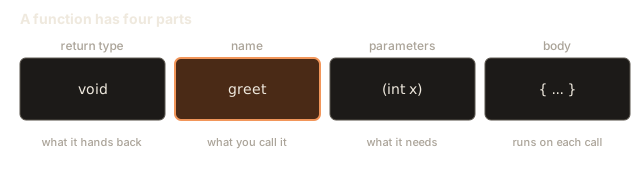
Let us take the function apart. The first line of the function is its signature. Here it is:
void greet()The signature has three parts, and each one answers a question the compiler asks.
- The return type is
void. It answers "what does this function hand back?" The wordvoidmeans nothing. Later in this lesson you will see functions that hand back anint, adoubleor abool. - The name is
greet. It answers "what do I call it?" A name may use letters, digits and underscores. It cannot start with a digit or contain spaces. C++ is case sensitive, soGreetandgreetare two different names. Pick a name that says what the function does. A good name often starts with a verb, such asprintReport,isValidorcomputeTotal. - The parameter list is inside the brackets. It answers "what information does this function need?" Here the brackets are empty, so the function needs nothing from the caller.
After the signature comes the body. The body is the code between the braces { and }. The body runs every time the function is called.
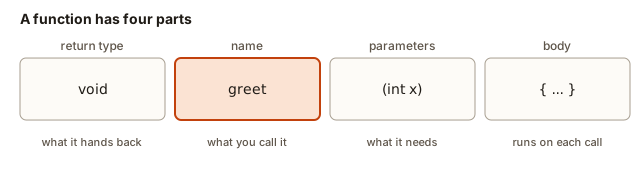 A function signature split into return type, name, parameter list and body
To call a function, write its name, then the brackets, then a semicolon: greet();. A call is a statement, so it ends with a semicolon. When the computer reaches the call, it jumps into the function, runs the body from top to bottom, and then jumps back to the line after the call. That is why the message appears twice. The body ran twice, once for each call.
What happens inside
Every call is a short trip. Before jumping, the computer notes the line it is on so that it can come back. It also sets aside a small area of memory for the function's parameters and local variables. When the function ends, that area is released and the computer resumes at the saved line. In the last lesson of this module you will see that these areas are stacked one on top of another, which is why the name is the call stack.
For now, the important rule is simple: the code after a call waits until the call has finished. The line cout << "back in main" in a program only prints after every line of the function has run.
Functions that give back a value
Most functions produce a result. The return type says what kind of result comes back, and the return keyword sends the value to the caller.
Press Run. No input is needed. The output is:
25
25
Here is what happens, one step at a time, for the first line of main.
- The call
square(5)starts. The parameterxreceives a copy of the value 5. - The body runs
return x * x;. The multiplication gives 25. returnsends 25 back to the place where the call was. The call now stands for the value 25.int a = ...stores 25 in the variablea.cout << aprints 25.
The second line has two calls inside one expression. square(3) runs first and gives 9. Then square(4) runs and gives 16. The addition 9 + 16 gives 25. A call can be used anywhere a value of its return type can be used: in an assignment, in a cout, in an if condition, or inside another call.
Two words need care, because interviewers use them precisely.
- A parameter is the variable in the function's signature. In
int square(int x)the parameter isx. - An argument is the value you pass in the call. In
square(5)the argument is5.
Many people mix these words up in conversation. Use them correctly on paper and in interviews.
The return statement ends the function immediately. Any line after it, in the same function, is skipped:
int firstPositive(int a, int b) {
    return a;
    return b;   // this line never runs
}
Your compiler may warn you about the unreachable line, but the function still compiles. The rule to remember is that return is an exit, not a note to self.
A worked example: converting temperatures
The next program reads one number from the learner and prints it converted from Celsius to Fahrenheit. The formula is F = C × 9 / 5 + 32, and it lives in its own function, so main only reads and prints.
To run it, type 25 in the Input box, then press Run.
Input: 25
Expected output:
77Trace the run step by step:
cin >> creads the text25from the Input box, turns it into the number 25, and stores it inc.- The call
toFahrenheit(c)starts. The parametercelsiusreceives a copy of the value inc, which is 25. - The body computes
celsius * 9.0first, because multiplication and division come before addition. That is 225.0. Then it divides by 5.0, giving 45.0. Then it adds 32.0, giving 77.0. returnsends 77.0 back tocout.coutprints the number. Adoubleis printed without trailing zeros, so you see77, not77.0.
The decimal points in 9.0 and 5.0 matter. If you write 9 and 5 as whole numbers, C++ divides integers and throws away the fraction. Then 9 / 5 is 1, not 1.8. In this program celsius is already a double, so celsius * 9 / 5 would still work, but the trap is real and often appears in code that mixes whole numbers. Keep one rule in mind: when a division must keep its fraction, make at least one operand a decimal number.
Try two more inputs before you go on. Type 100 and the output is 212. Type -40 and the output is -40, because -40 is the one temperature where both scales agree.
Several parameters, and a bool result
A function can take as many parameters as it needs. Arguments are matched to parameters by their position. The first argument goes to the first parameter, and the second to the second. The names of the parameters inside the function are local to it, so you can reuse them in other functions without any clash.
Press Run. No input is needed. The output is:
13
1
In maxOf(8, 13), the parameter a gets 8 and b gets 13. The test a > b is false, so the if body is skipped and the function reaches return b;, which gives 13.
isEven returns a bool, which holds either true or false. The expression n % 2 == 0 is true for 10, so the function returns true. When cout prints a bool, it shows 1 for true and 0 for false. If you want the words, write cout << boolalpha << isEven(10), and the output becomes true. Use the words when a person will read the output, and the numbers when you only need to test the value.
A useful habit: every path through a function that returns a value must reach a return. In maxOf, both paths do. If one path did not, the compiler would warn you, and you would be relying on luck for the answer. You will see that warning later in this lesson.
The top-to-bottom rule and prototypes
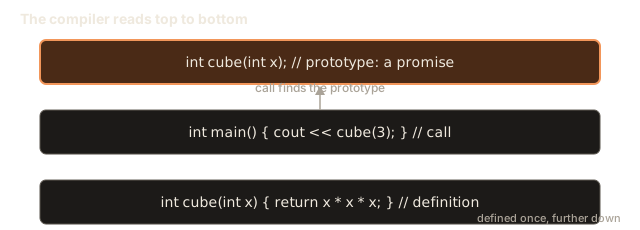
The compiler reads your file from top to bottom. When it meets a call such as cube(3), it must already know that a function called cube exists, what parameters it takes, and what it returns. If it has not seen one yet, it stops with an error. Here is a program that breaks that rule:
#include <iostream>
using namespace std;

int main() {
    cout << cube(3) << endl;   // the compiler has not seen cube yet
    return 0;
}

int cube(int x) {
    return x * x * x;
}
The compiler reports this message, which names the function and the line:
error: 'cube' was not declared in this scopeNote the message says "not declared", not "not defined". The compiler does not need the body of cube to make the call. It only needs to know the function exists. That is the job of a prototype, which is also called a declaration. A prototype is the signature followed by a semicolon. It goes above the code that calls the function.
Press Run. No input is needed. The output is:
27The prototype int cube(int x); is a promise. It says: a function named cube takes one int and returns an int, and its body will appear later in the file. The definition, the part with the braces, keeps that promise.
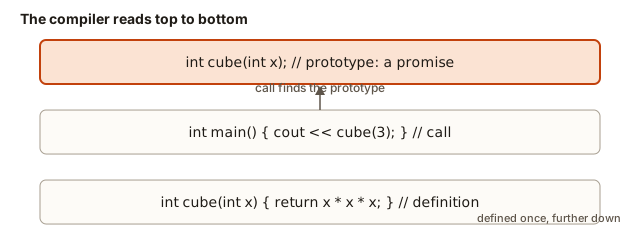 Lines of a file in order: a prototype above main lets main call a function defined below it
Two rules keep prototypes safe.
- A function may be declared many times, but it must be defined exactly once. Defining it twice gives the error
redefinition of 'int cube(int)'. - The prototype and the definition must agree on the return type and the parameter types. Parameter names may differ, because the compiler ignores them when it matches calls.
Many programmers put main at the top, with the prototypes above it and the definitions below it. Others put the helper functions first and main last. Both styles work. The only thing that matters is that every function is declared before its first call.
In a large project, the prototypes move into separate header files that end in .h or .hpp, and the definitions go into .cpp files. You will meet that layout later. The idea is the same.
Functions that call other functions
Functions can call each other, as long as each name is declared before it is used. The next program has three functions. main calls report, and report calls isLeapYear. Both prototypes sit above main, so every call is legal even though the bodies come later.
To run it, type 1900 in the Input box, then press Run.
Input: 1900
Expected output:
1900 is not a leap yearTrace it:
cin >> yearstores 1900 inyearinsidemain.maincallsreport(1900). The parameteryearinreportgets a copy of 1900.reportcallsisLeapYear(1900). Its first test is1900 % 400 == 0. The remainder of 1900 divided by 400 is 300, so the test is false.- The second test is
1900 % 100 == 0. The remainder is 0, so the test is true and the function returnsfalse. - Back in
report, theifcondition is false, so theelsebranch prints the second message.
The year 1900 is the classic exception to the leap-year rule. A year divisible by 100 is a leap year only when it is also divisible by 400. You would only find out whether your code handles this rule by testing a year like 1900, which is why picking test values is part of writing a function.
Worked example: grading scores
The last example in this lesson uses everything so far. It reads three scores and prints a letter grade for each. The grade rule lives in one function, gradeOf. main calls it three times.
To run it, type 95 72 40 in the Input box, then press Run. The numbers can be separated by spaces or new lines.
Input: 95 72 40
Expected output:
A C FThe function returns a char, a single character such as 'A'. Notice the single quotes. Single quotes are for one character, and double quotes are for text.
The run goes like this.
cin >> a >> b >> creads three numbers in turn:abecomes 95,bbecomes 72 andcbecomes 40.- The first
gradeOf(a)call gets score 95. The first test95 >= 90is true, so it returns'A'. The otherifs are never reached. - The second call gets score 72.
72 >= 90is false, and72 >= 75is also false, because 72 is below 75. The third test72 >= 60is true, so it returns'C'. - The third call gets score 40. All three tests are false, so the last
returngives'F'.
Each return ends its call before the later tests run. That is why the order of the tests matters: the checks go from the highest threshold down to the lowest.
The three calls are independent. Each one is a separate trip into the function, and each trip starts with a fresh copy of its parameter. That independence is why one function can serve many callers.
What happens inside: the compiler's view of a call
When the compiler reads gradeOf(a), it checks four things against the prototype or definition. It checks the name exists. It checks the number of arguments matches the number of parameters. It checks each argument can be converted to its parameter's type. It then gives the whole call the return type, so the call can sit inside an if, a cout or an assignment.
When the program runs, three things happen for each call. The argument value is copied into the parameter. The body runs. The return value is handed back to the expression that made the call. Nothing else is shared between the caller and the function, unless you pass a reference, which is the subject of lesson 3.
Designing a function before you write it
Experienced programmers design a function on paper before they type it. Four questions give you the signature and the tests, and they take about two minutes.
- What does it need? List the inputs and their types. For a function that finds the number of days in a month, the inputs are the month, a whole number from 1 to 12, and whether the year is a leap year, which is a true or false value.
- What does it give back? Pick the return type. The answer is a whole number of days, so the return type is
int. - What happens in the middle? Write the rule in plain words. Months 4, 6, 9 and 11 have 30 days. February has 28 days, or 29 in a leap year. Every other month has 31 days.
- What examples prove it? Pick a few inputs with known answers, and include the edges. For this function the examples are: month 2 in a leap year gives 29, month 2 in another year gives 28, month 4 gives 30 in any year, and month 12 gives 31.
From those answers you get the signature, int daysInMonth(int month, bool leapYear). Write the prototype first, then the body, then test each example. Notice that the examples were chosen where a rule changes: February, a 30-day month and the last month. A test set that only uses month 5 would pass a function with the wrong February rule, and you would never know.
Trace one example to see the rule at work. Call daysInMonth(2, true). The first test asks whether the month is 4, 6, 9 or 11. The month is 2, so that test is false. The second test asks whether the month is 2. It is, so the function looks at the leap year flag. The flag is true, so it returns 29. The same rule with false returns 28.
The main function in more detail
main is a function too, but it has rules of its own. The operating system calls it when the program starts. The value it returns is the program's exit code, which tells whatever started the program whether it worked. return 0; means success, and any other number means that something went wrong. On Linux or macOS you can read the exit code of the last program with the command echo $? typed in the terminal right after the program ends.
Two facts about main come up in interviews. First, its return type must be int. Writing void main() is not standard C++, and most compilers reject it or warn about it. Second, if the end of main is reached without a return, C++ returns 0 for you. Writing return 0; anyway makes your intention clear to a reader.
Naming and size
A good function name says what the function does. It is usually a verb or a verb phrase, such as printReport, isValid, countVowels or computeTotal. A weak name says how the function works, such as loopOverArray, or says nothing, such as doIt or f.
A good function does one job. If its name needs the word "and", it probably does two jobs. A function called printAndSave should become two functions, printReport and saveReport, and main calls both. Each one is then easy to test, and each one can be reused on its own.
A good function is also short enough to read without scrolling. Most functions in this course fit on one screen. A long function is a sign that some of its steps can move into helpers with their own names.
Reading a call next to its signature
When you meet a call you did not write, you can check it against the signature in three steps. Find the function name. Count the arguments. Match each argument to a parameter type.
Take the call maxOf(8, 2.5) and the signature int maxOf(int a, int b). The name matches, and two arguments match two parameters. The second argument is a double, because 2.5 has a decimal point, and the parameter is an int. So the decimal part is cut off and the value 2 is used. The result is an int, so the caller receives 8. The call compiles, but the reader may not expect the conversion. A quick check like this catches many mistakes before you run the program.
Why use functions
Functions bring four benefits, and each one is something an employer will check for.
- Reuse. You write
gradeOfonce and call it three times, or three hundred times. - Readability. The name
isLeapYear(year)explains itself. Ten lines of arithmetic do not. - Testing. A small function with one job is easy to test by itself. You can call it with ten inputs and check ten outputs.
- Fewer bugs. When a rule changes, you change it in one place.
A sign that a function is worth writing: you find yourself copying the same lines a second time. Stop, cut them out, and put them in a function with a name.
Complexity: what a call costs
Calling a function has a small fixed cost. The computer saves its place, sets up the parameters and returns. That cost does not grow with the size of your data, so one call is a constant amount of work. In Big-O terms, the overhead of a single call is O(1).
The cost matters when a call sits inside a loop. Suppose a function isPrime(k) checks divisors up to the square root of k. Its cost is about the square root of k. If you call it for every number from 1 to n, the total work is roughly the sum of the square roots, which is about (2/3) × n^1.5. That is O(n × √n), not O(n). Count the calls, and multiply by the cost of each call. Interviewers often ask for the complexity of a program that calls a helper inside a loop, and this is how you answer.
Interview questions on this topic
Interviewers use short questions to see whether you understand the basics. Here are three, with answers you can say in your own words.
What is the difference between a declaration and a definition? A declaration (the prototype) tells the compiler a function exists and gives its signature. A definition gives the body. A function can be declared many times but defined once.
What does void mean as a return type? It means the function returns nothing. The call is a statement, and it cannot be used as a value. int x = showMessage(); is an error if showMessage returns void.
Why does C++ need prototypes when Python does not? C++ is a compiled language. The compiler checks each call as it reads the file, from top to bottom, so it needs the signature before the call. A prototype gives it that signature early.
Common mistakes
These are the mistakes beginners make most often in this lesson. Each one comes with the message the compiler prints, so you can recognise it.
- Defining a function inside
main. C++ does not allow it. The compiler sayserror: a function-definition is not allowed here before '{' token. Move the function outsidemain, above or below it. - Calling a function that is defined below
mainwithout a prototype. You geterror: 'cube' was not declared in this scope. Add the prototype abovemain. - Forgetting
returnin a function that promises a value. The compiler warns:warning: control reaches end of non-void function [-Wreturn-type]. The compiler accepts the program, but if the missing path is taken, the returned value is undefined. Your output is then unpredictable, and it may change between runs or compilers. Always give every path areturn. - Returning a value from a
voidfunction. Writingreturn 5;in avoidfunction giveserror: return-statement with a value, in function returning 'void'. Usereturn;with no value, or just let the function end. - Passing the wrong number of arguments. Calling
square()with nothing giveserror: too few arguments to function 'int square(int)'. Read the error: it prints the expected signature for you. - Defining the same function twice. You get
error: redefinition of 'int cube(int)'. Keep one definition, and as many prototypes as you need. - Writing a function's return type as
intwhen it returns a decimal. The decimal part is cut off silently. A functionint average(int a, int b)returns 2 foraverage(2, 3), not 2.5. The return type decides what the caller gets, so pick it on purpose.
Debugging walkthrough: a function that returns the wrong number
A function returns the wrong value. The problem is usually one of four things. Work through this checklist in order.
- Read the signature. Check the return type and the parameter types. Look for
intwhere you meantdouble. - Check the call site. Count the arguments, and check their order.
average(3, 2)andaverage(2, 3)may behave differently if the function is not symmetric. - Print the inputs inside the function. Add a temporary line such as
cout << "a=" << a << " b=" << b << endl;at the top of the body. Run the program. If the printed values are not what you passed, the call site is wrong. If they are right, the body is wrong. - Check every path reaches a
return. A missingreturnon one branch is a common cause of strange values.
Here is a real case. A student writes this:
int average(int a, int b) {
    return (a + b) / 2;
}
and calls average(2, 3). The step-by-step trace is: a + b is 5, and 5 / 2 in integer arithmetic is 2, because the fraction is thrown away. The function is working as written. The bug is the return type. Changing it to double and the arithmetic to (a + b) / 2.0 gives 2.5, which is what the student wanted.
The lesson of the debugging walkthrough is to find the first line where the printed value differs from what you expected, and to explain it before you change anything.
Variations and edge cases
Several details look small but come up in interviews and in real code.
int f()andint f(void). Both mean a function with no parameters in C++. In C, thevoidform was once different. Use the empty brackets.- Unused parameters. A function may ignore a parameter. Many compilers warn about it, but the program still runs. Leave the name out, as in
void f(int), if you want to say that on purpose. - Functions with the same name as a variable. This is legal, but confusing. Give the function a verb-like name and the variable a noun-like name, so
countandcountItemsdo not clash in a reader's mind. - A
mainthat returns a value.mainis special. It must return anint, and the value is the program's exit code.return 0;means success. A non-zero value tells the operating system that something went wrong. You can leave outreturn 0;inmain, and the compiler inserts it, but writing it is clearer. - Zero as input. A function that divides by its parameter must check that the parameter is not zero. The compiler does not check this for you, and integer division by zero crashes the program on most systems.
Real-world uses
Functions are everywhere in professional code. Here are three places you will meet them after this course.
- Input checking. A function such as
isValidEmail(text)returns abool. The rest of the program then asks one simple question instead of repeating the checks. - Calculations used by many screens or commands. A tax function, a distance function or a score function is written once and called from every place that needs the number.
- Test suites. Each test calls one function with known inputs and checks the output. The smaller the function, the easier the test.
Practice
Try these yourself before you open the solutions. Each solution is hidden, so you can check your work after you attempt the problem.
- Write
void printStars()that prints twenty*characters on one line and then a new line. Call it three times frommain.
Solution
#include <iostream>
using namespace std;

void printStars() {
    for (int i = 0; i < 20; i++) {
        cout << "*";
    }
    cout << endl;
}

int main() {
    printStars();
    printStars();
    printStars();
    return 0;
}- Write
int add(int a, int b)and printadd(4, 5). The output should be9.
Solution
#include <iostream>
using namespace std;

int add(int a, int b) {
    return a + b;
}

int main() {
    cout << add(4, 5) << endl;
    return 0;
}- Write
bool isPositive(int n)that returns true whennis greater than zero. Test it with 5 and with -2. Print1and0.
Solution
#include <iostream>
using namespace std;

bool isPositive(int n) {
    return n > 0;
}

int main() {
    cout << isPositive(5) << endl;
    cout << isPositive(-2) << endl;
    return 0;
}
The output is 1 and then 0.
- Write
double average(double a, double b)and printaverage(2, 3). The output should be2.5. Then explain why it would print2if the parameters wereint.
Solution
#include <iostream>
using namespace std;

double average(double a, double b) {
    return (a + b) / 2;
}

int main() {
    cout << average(2, 3) << endl;
    return 0;
}
The output is 2.5. Because a and b are double, the sum is a decimal, so the division keeps the fraction. With int parameters, (a + b) / 2 divides two whole numbers, so 5 / 2 becomes 2.
- Take any program with
mainat the top and a function defined below it. Movemainbelow the function and check that it still works. Then movemainback to the top and add a prototype so it works again. Write the prototype line you added.
Solution
Copy the first line of the function, which is the signature, and add a semicolon. For example, if the function is int cube(int x) { ... }, the prototype is int cube(int x);. Place it above main.
- Write
int maxOfThree(int a, int b, int c)that returns the largest of three ints. Call a helpermaxOf(int a, int b)from inside it. Put the prototypes for both abovemain.
Solution
#include <iostream>
using namespace std;

int maxOf(int a, int b);
int maxOfThree(int a, int b, int c);

int main() {
    cout << maxOfThree(4, 9, 6) << endl;
    return 0;
}

int maxOf(int a, int b) {
    if (a > b) {
        return a;
    }
    return b;
}

int maxOfThree(int a, int b, int c) {
    return maxOf(maxOf(a, b), c);
}
The output is 9.
- Write
int cubeOf(int n)andint sumOfCubes(int n). The second function calls the first inside a loop from 1 ton. PrintsumOfCubes(3). Predict the answer before you run it. It should be 1 + 8 + 27 = 36.
Solution
#include <iostream>
using namespace std;

int cubeOf(int n) {
    return n * n * n;
}

int sumOfCubes(int n) {
    int total = 0;
    for (int i = 1; i <= n; i++) {
        total = total + cubeOf(i);
    }
    return total;
}

int main() {
    cout << sumOfCubes(3) << endl;
    return 0;
}
The output is 36. sumOfCubes calls cubeOf three times, so the complexity is O(n) calls, each of constant cost.
- Find the bug in this function, and fix it.
int twice(int n) { if (n > 0) { return 2 * n; } }
Solution
The function has no return for the path where n is zero or negative. The compiler warns control reaches end of non-void function, and the value returned for those inputs is undefined. One fix is to add a second return after the if:
int twice(int n) {
    if (n > 0) {
        return 2 * n;
    }
    return 0;
}
Choose the value that makes sense for your problem. Returning 0 is a decision, and it should be written down, not left to chance.
- Write
void showSquare(int n)that printsSquare:followed by the square ofn. Call it with 4. The output isSquare: 16.
Solution
#include <iostream>
using namespace std;

void showSquare(int n) {
    cout << "Square: " << n * n << endl;
}

int main() {
    showSquare(4);
    return 0;
}- Predict the order of the output for this program.
maincallsfirst(), andfirstprints"start first", then callssecond(), then prints"end first".secondprints"inside second". Write the three lines in order.
Solution
start first
inside second
end first
first runs until it calls second. It waits there. second runs to completion, and only then does first continue with its next line.
- Write
int countDigits(int n)that returns the number of digits in a positive integer. Use a loop, not recursion. Test it with 7 (answer 1), 1024 (answer 4) and 100 (answer 3).
Solution
#include <iostream>
using namespace std;

int countDigits(int n) {
    int count = 0;
    while (n > 0) {
        count++;
        n = n / 10;
    }
    return count;
}

int main() {
    cout << countDigits(7) << endl;
    cout << countDigits(1024) << endl;
    cout << countDigits(100) << endl;
    return 0;
}
Each division by 10 removes the last digit. The loop runs once per digit.
What you now know
- A function has a return type, a name, a parameter list and a body. The signature is the first three parts.
- You call a function by writing its name and brackets. The caller waits until the call returns.
returnsends a value back and ends the function at once. Every path that promises a value must reach areturn.- A parameter is the variable in the signature. An argument is the value you pass in the call.
- The compiler reads top to bottom, so every function must be declared before its first call. A prototype is a signature followed by a semicolon.
- A function must be defined exactly once, and its prototype must match the definition.
- Give functions names that say what they do, and keep each one to a single job.