Why this matters
Every program you have written so far does the same steps in the same order each time it runs. That is fine for printing a receipt, but a useful program has to decide things. A bank app must refuse a withdrawal that is bigger than the balance. A game must decide whether the player has won. A login form must check the password before it lets you in. The if statement is the C++ tool for this. It lets the program choose which lines to run, based on a test.
Once you can write if and else correctly, you can read most of the decision logic in real code. Every other lesson in this module builds on it. The else if ladder, the switch statement and the ternary operator are all different ways of writing the same idea: pick one path out of several.
The idea in everyday words
Think about a rule you already follow. "If it is raining, take an umbrella. Otherwise, leave it at home." You do not do both. You look at the sky, and that look is the test. If the test is true, you take one action. If it is false, you take the other action. Then you carry on with the rest of the day, which is the same whatever the weather was.
A program works the same way. The test is called a condition. A condition is an expression whose result is either true or false. The actions you run when the test is true go inside a block after if. The actions for the false case, if you have any, go inside a block after else. When one of those blocks has finished, the program moves on to the line after the whole structure.
Two words need a plain definition before we go on:
- A block is a group of statements wrapped in curly braces,
{and}. Everything inside the braces belongs together. - A statement is one complete instruction, such as
cout << "Hi";. Statements end with a semicolon.
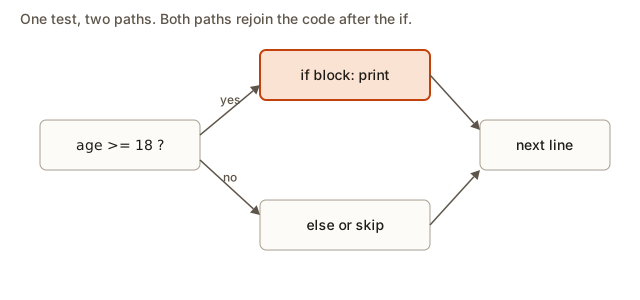 A decision with a yes branch and a no branch, where both paths rejoin the code that follows the if
Your first if
Here is the simplest decision. It has one condition and no else.
Read it top to bottom the way the computer does. The variable temperature is set to 35. The program reaches the if and evaluates the condition temperature > 30. Is 35 greater than 30? Yes, so the condition is true. The program runs the block, so It is hot. prints. The block ends, and the program moves on to Done.. That line is after the if block, not inside it, so it always prints.
The output is:
It is hot.
Done.
Now change the first line so that temperature is 20. The condition becomes false. The program skips the whole block and prints only Done.. Skipping is the second half of the rule. A false condition does not stop the program. It only means the lines in the block are not run.
The parts of an if have fixed positions, and C++ enforces them:
- The keyword
ifcomes first, in lowercase. - The condition goes inside round brackets,
(and). Those brackets are required. - The code to run goes inside curly braces,
{and}.
Think of the condition as a question you ask the program. The round brackets hold the question. The curly braces hold what to do with the answer.
Adding else
else is the "otherwise" branch. It runs when the condition is false. Exactly one of the two blocks runs. Never both, and never neither. That exactly-one rule is what makes if and else such a clean tool for yes-or-no decisions.
Here is a program that reads an age from the keyboard.
Type 16 into the Input box and press Run. Then run it again with 18. The results are:
Too young to vote.
You can vote.
Look at the boundary. The age 18 gives "You can vote." The operator >= means greater than or equal to. If you had written >, the program would reject an 18-year-old. Boundary values like this are where most decision bugs hide, and we will come back to them several times in this lesson.
The line cin >> age; reads a number typed by the user and stores it in age. You met cin in the earlier lessons. What is new is that the input now drives a decision. Two different inputs lead to two different outputs. That is the whole purpose of an if.
What happens inside
Your computer does not understand the word if. The compiler turns age >= 18 into a comparison instruction. The processor compares the number in age with 18 and records whether the comparison held. Then it runs a jump instruction. When the comparison did not hold, the jump moves the processor past the first block, to the code that comes after the else block. When the comparison did hold, the processor runs the first block and then jumps over the else block so that it does not run too.
You never write those jump instructions yourself. Knowing they exist still explains two things. First, a false condition does not "run" the block in any sense. The processor simply never visits those lines. Second, skipping a block costs almost nothing. So you should write the if that is clearest to read, and not try to avoid it for speed.
Turning a rule into a condition
Most of the work in writing a decision is translating a plain English rule into a condition. Beginners often get stuck here, not on the syntax. Here is a table of common phrases and the condition each one needs. Read the table once now, and come back to it when you write your own.
| Plain English rule | Condition in C++ |
|---|---|
| the score is at least 50 | score >= 50 |
| the score is more than 50 | score > 50 |
| the age is under 12 | age < 12 |
| the number is zero | n == 0 |
| the number is not zero | n != 0 |
| the value is between 10 and 20, inclusive | 10 <= x && x <= 20 |
| the value is below 10 or above 20 | x < 10 || x > 20 |
| the user is an adult and has a ticket | age >= 18 && hasTicket |
Two details need care. The phrase "inclusive" means the end values count, so 10 and 20 are both inside the range. And the phrase "between" in English is often vague, so when you are unsure, ask the person who wrote the rule which way it goes at the ends. The condition you write must match their answer, not your guess.
The three logical operators
A single comparison answers one question. To ask two questions at once, you join conditions with the logical operators. There are three:
&&means "and". The result is true only when both sides are true.||means "or". The result is true when at least one side is true.!means "not". It flips the value. True becomes false, and false becomes true.
A truth table lists every combination of inputs and the result. Here are the tables for the two binary operators. Let A and B stand for two conditions, with T for true and F for false.
| A | B | A && B | A || B |
|---|---|---|---|
| T | T | T | T |
| T | F | F | T |
| F | T | F | T |
| F | F | F | F |
Read the && column: it is true only in the first row, where both are true. Read the || column: it is false only in the last row, where both are false. The ! operator has one row for each value: !T is F, and !F is T.
So age >= 18 && hasTicket is true only when the person is an adult and holds a ticket. age < 12 || age > 65 is true for a child or a senior citizen. !isRaining is true when it is not raining.
Precedence: which operator goes first
When one line has several operators, C++ follows a set of precedence rules. The comparison operators bind tighter than &&, and && binds tighter than ||. So this line:
if (age < 12 || age > 65 && hasTicket)means age < 12 || (age > 65 && hasTicket). That may not be what you meant. A senior citizen without a ticket gets no discount in this reading, and a child with no ticket gets in. Whenever you mix && and || in one condition, add brackets. Brackets cost nothing and remove any doubt for the next reader.
Zero, non-zero and what counts as true
C++ does not have a separate true and false type in the way some other languages do. It treats a number as a condition too. The number 0 counts as false, and every other number counts as true, including negative numbers. This is useful but easy to misread. Here is a program that depends on it.
#include <iostream>
using namespace std;

int main() {
    int items = 3;
    if (items) {
        cout << "Cart has items" << endl;
    }
    if (!items) {
        cout << "Cart is empty" << endl;
    }
    return 0;
}
The output is:
Cart has itemsThe first if tests items directly. Because items is 3, which is not zero, the test is true. The second if uses !items, which is true only when items is zero. Here it is false, so nothing prints.
The program is correct, but it hides its meaning. A reader has to remember the zero rule to understand it. Write if (items > 0) instead. That line says exactly what you mean, and the next person who reads it does not need to remember anything. The same holds for the bool type, where if (ok) reads well. When the value is a number, a direct test is a guess about the meaning, so state the comparison.
A worked example: even or odd
Now a program that uses the remainder operator, %. A number is even when dividing it by 2 leaves a remainder of 0.
Trace it with the input 7, one step at a time:
cin >> nstores 7 inn.- The condition is
n % 2 == 0. The%operator binds tighter than==, so it is worked out first.7 % 2is 1, because 7 = 2 × 3 + 1. - The comparison is now
1 == 0, which is false. - The
elseblock runs and prints7 is odd.
The output is:
7 is oddNow trace the input -4. The remainder of -4 % 2 is 0, because -4 is exactly -2 × 2. The program prints -4 is even. Try 0 as well. Zero is even, and the program prints 0 is even. Testing negative numbers and zero before you trust a program is a habit that saves hours later. It is also a common interview follow-up question.
Notice that both cout lines are in a decision, but only one runs for any input. You can read the whole program as one decision with two outcomes.
A worked example: the larger of two numbers
Here is a second decision, this time with two inputs.
Type 12 30 into the Input box. The program reads a as 12 and b as 30. The condition a > b is 12 > 30, which is false. The else runs and prints 30 is larger.
Now type 30 12. This time a > b is true, and the first block prints 30 is larger. Both runs print the same words, but they take different paths through the code. Two inputs can take two paths and end with the same message. Real code often looks like this.
What about a tie, where both numbers are equal? Type 5 5. The condition a > b is false, so the else runs and prints 5 is larger. That is wrong. Two equal numbers have no larger one. The program has a gap in its logic. This is the first example of an edge case: an input that the simplest test does not handle correctly. The fix needs a third outcome, which the next lesson adds with else if. For now, keep the gap in mind. Finding gaps like this is most of the job of testing a decision.
Tracing a decision with a table
When a decision has several inputs, a table of test cases shows you the behaviour at a glance. For the larger-of-two program, the table has one row per input, with the expected output written before you run the code. Writing the expected result first is a good discipline. It stops you from accepting whatever the program prints.
| Input | Expected output | Why |
|---|---|---|
12 30 | 30 is larger | 12 is not bigger than 30 |
30 12 | 30 is larger | 30 is bigger than 12 |
5 5 | a message for a tie | no larger number exists |
-3 -8 | -3 is larger | -3 is greater than -8 |
The last row is a good one to test by hand before running. The program prints -3 is larger. Its condition a > b is -3 > -8, which is true. Negative numbers follow the same ordering rules as positive ones, and -3 is greater than -8 because it is closer to zero.
When the table and the program disagree, the program is wrong or the table is. Either way, you have found the question you need to answer before you go on.
Braces, and the one-line form
If a block holds one statement, C++ lets you leave out the braces.
if (x > 0)
    cout << "positive";
This compiles and works. It is also a trap. The if controls only the single line directly after it. Later, someone adds a second line that they believe is inside the decision:
if (x > 0)
    cout << "positive";
    cout << "and I will always print";
The second cout is not part of the if. It runs every time, whether x is positive or not. The indentation in the source does not change how C++ reads the code. Only the braces do. The safe habit is to always write the braces, even for one line. The cost is two extra lines. The benefit is that the next change cannot silently break the decision.
The semicolon trap
A semicolon placed right after the closing bracket of an if is a common accident. It ends the if statement early. The block that follows is then not part of the if at all.
The output is:
bigHere, if (x > 5); is a complete if whose body is an empty statement: a single semicolon that does nothing. When the condition is false, that empty body is skipped. The next block, which is wrapped in braces on its own lines, runs as an ordinary block. It always runs, so big prints even though x is 1. The compiler accepts this without an error. A build with -Wall shows a warning, which is one reason to compile with warnings turned on.
If a program prints something that makes no sense for your condition, look at the if line for a stray semicolon before you look anywhere else. This bug is silent, so it can hide for a long time.
Assignment inside a condition
A single equals sign, =, stores a value. A double equals sign, ==, compares two values. Mixing them up is one of the best-known bugs in the C family of languages.
The output is:
x is five, and x is now 5The expression x = 5 does two things. It stores 5 in x, and its result is the value 5. A non-zero result counts as true, so the block runs. The program printed "x is five" even though x was 3 before the test. The fix is x == 5, which compares and does not store.
Some programmers write the constant first, as in 5 == x. That style has a safety net. If you type 5 = x by mistake, the compiler refuses, because you cannot store a value into a number. You cannot make that mistake with the constant on the left, so the bug is caught at compile time. You can adopt this habit or not, but you should at least know why people use it.
Compilers can warn about the plain if (x = 5) form. With -Wall, g++ prints a warning that suggests putting parentheses around the assignment when it is used as a truth value. If you truly mean to assign inside the condition, write the extra brackets to show the intent. Otherwise, fix the = to ==.
Comparing characters and strings
A single character is written in single quotes, such as 'A'. A piece of text is written in double quotes, such as "A". They are different kinds of value, and they cannot be compared directly. Here is a broken program.
#include <iostream>
using namespace std;

int main() {
    char grade = 'A';
    if (grade == "A") {
        cout << "top";
    }
    return 0;
}
The compiler reports this error, with a warning before it:
error: ISO C++ forbids comparison between pointer and integer [-fpermissive]The word "pointer" is the clue. A double-quoted text is stored as an address in memory, which is a pointer to its first character. The variable grade holds a single character code. The two cannot be compared as if they were the same kind of value. The fix is grade == 'A'.
When you need to compare whole words, you use std::string instead of char, and == compares the text of the two strings as you would expect. You will meet strings properly in a later module. For one character, always use single quotes.
Common mistakes and the messages you will see
Here are the mistakes that cost beginners the most time. Each one comes with the message the compiler shows, so you can recognise it when it happens.
Missing round brackets. Writing if x > 5 { produces:
error: expected '(' before 'x'The compiler wants the bracket that starts the condition. Put (x > 5) in place and the error goes away.
A semicolon after the condition. As shown above, if (x > 5); makes the next block unconditional. No error appears, so this bug is silent.
Using = where you meant ==. The condition becomes an assignment, and the program takes the branch when the stored value is not zero. Look for a single = inside any if.
Comparing a character with a string. Use single quotes for one character. The message about a pointer is the clue.
Forgetting that a block is a scope. A variable declared inside braces exists only inside those braces. Code after the block cannot see it, and the compiler says so:
error: 'bonus' was not declared in this scopeDeclare the variable before the if if the code after the block needs it. The braces define the scope of the variable, and you will study scope properly in the functions module.
Missing semicolon inside a block. Each statement in the block needs its own semicolon. If you forget one, the compiler points at the next line, which is often a line after the real mistake. When an error mentions a line that looks fine, check the line above it first.
A condition that is always true. The test if (x > 0 || x < 10) is true for every number. Any number is either above 0 or below 10, or both. The test does nothing useful. Check that each part of an || can actually be false when you want it to be.
An else that seems to belong to the wrong if. This is covered in full in the next lesson, but here is the short rule: an else pairs with the nearest if above it that does not already have an else. Braces make the pairing obvious.
Reading a compiler error for an if
Compiler messages look intimidating, but most of them follow the same pattern. Here is a useful way to read them.
- The first line gives the file, the line number and the column, such as
main.cpp:5:8. Go to that place first. - The word
errorsays the program will not build. Awarningsays it builds, but something looks wrong. - The message text names the problem. For
expected '(' before 'x', the compiler expected an opening bracket and found the wordxinstead. - Arrows and carets under the code show where the compiler stopped reading. They point at the spot, which is often one character after the real mistake.
Work through them from the top. The first error is usually the real one. The later errors are often a consequence of the first. Fix the first one, compile again, and see what is left.
Debugging a decision that takes the wrong path
Sooner or later a decision will go down the wrong branch. The fastest way to find out why is to print the values that the condition depends on. Here is a short program with a bug. Read it before you run it.
#include <iostream>
using namespace std;

int main() {
    int score = 65;
    int bonus = 10;
    if (score + bonus > 70) {
        cout << "pass with distinction" << endl;
    } else {
        cout << "pass" << endl;
    }
    return 0;
}
Here the total is 75, which is more than 70, so the program prints pass with distinction. Suppose the output had been wrong. How would you find out why? Add a line that prints the value the condition depends on, placed just before the if:
cout << "debug total = " << score + bonus << endl;The output shows the number the condition is really comparing. Most of the time the bug is one of three things. The total is not what you expected, a variable holds a value you did not plan for, or a variable was never set. Printing the inputs to the condition, and then the branch that ran, reveals the cause quickly. Remove the debug lines once you have the answer.
For a complicated condition, give the test a name. This is clearer and easier to debug:
bool passed = score + bonus > 70;
cout << "passed? " << passed << endl;
if (passed) {
    cout << "pass with distinction" << endl;
}
A bool is a type that holds only true or false. When you print a bool with cout, C++ shows 1 for true and 0 for false. The name passed explains what the test means, and the printed value confirms that the test works.
Variations and edge cases
Good decision code tests the edges of every condition. Here are the edge cases to check each time you write an if.
The exact boundary. For the test age >= 18, check the ages 17, 18 and 19. The difference between > and >= lives at the boundary. An off-by-one error is a bug where the boundary is one step too early or too late. Test the value on the line, the value just below it and the value just above it.
Zero and negative numbers. If a value can be zero or negative, test it. Division by zero crashes or gives nonsense, and a negative number in a test meant for positive numbers passes without any warning. The even-or-odd program handles negatives correctly, because the remainder of a negative number is zero or negative, and the test == 0 still works.
Equal values. When you compare two numbers, test two equal ones. The larger-of-two program fails for 5 5 because it has no branch for a tie.
Ranges. A value inside a range needs two complete comparisons joined with &&. The maths form 0 <= x <= 100 looks natural, and C++ accepts it, but it does not mean what it looks like. Here is the trap.
Type -5 into the Input box. The output is in range, which is wrong. C++ reads 0 <= x <= 100 from left to right. It first computes 0 <= x, which is 0 <= -5, which is false. A false value is stored as 0. Then it compares that 0 with 100. The test 0 <= 100 is true, so the whole condition is true. The program never checks in a meaningful way that x is at most 100. The correct version writes both comparisons:
if (0 <= x && x <= 100) {
    cout << "in range" << endl;
}
Type 150 into the wrong version and it also prints in range, because 0 <= 150 is true and then 1 <= 100 is true. This is one of the most common traps in C++ interviews. Be ready to explain it in one sentence: the chained comparison runs left to right, and the second comparison checks the 0 or 1 result of the first against 100, not the value of x.
Short-circuit evaluation. When two conditions are joined with &&, C++ stops as soon as the answer is known. If the left side is false, the right side is never checked, because false && anything is always false. The same is true of ||: when the left side is true, the right side is skipped. This matters when the right side can crash. For example, n != 0 && 100 / n > 10 is safe when n is zero, because the division never runs. Put the guarding test on the left.
Interview example: the largest of three
A common interview question asks for the largest of three numbers. It tests whether you can combine conditions and handle ties. Here is a correct solution using only if statements.
Type 4 9 2 into the Input box. Trace it:
largeststarts asa, which is 4.b > largestis 9 > 4, which is true, solargestbecomes 9.c > largestis 2 > 9, which is false, solargeststays 9.- The program prints
largest = 9.
The output is:
largest = 9This is the keep-the-best-so-far pattern. You begin with a candidate and replace it whenever you find something better. Ties cause no harm. If b equals largest, the test is false and nothing changes, and that is still correct because the value is the same.
Now the complexity. The program does at most three comparisons, whatever the numbers are, so the running time is constant. Computer scientists write that as O(1). It uses one extra variable, largest, which is also constant space, O(1). An interviewer will expect you to say both facts without being asked. Adding a fourth number takes one more if, which is why this pattern scales better than comparing every pair of numbers with nested decisions.
What happens when the input is unexpected
A program that reads input must decide what to do with a value that makes no sense. Consider the age program. An age of -3 or 400 should not be accepted, but the program above accepts both. Checking input is a decision in its own right, and it uses exactly the tools in this lesson.
Here is the shape of a validation check:
int age;
cin >> age;
if (age < 0 || age > 120) {
    cout << "invalid age" << endl;
} else {
    cout << "age accepted: " << age << endl;
}
The check rejects the two clearly impossible ranges. It does not prove that 110 is a real age, which is a question for the business rules. But it stops the obvious nonsense before it reaches the rest of the program. Notice that the boundaries are tested in both directions, and that the two rejection conditions are joined with ||, because either one is enough to reject.
Validation is also where edge-case thinking pays off most. Ask what the program should do with a missing number, a letter typed where a number was expected, and a number at the exact limit. The next lesson shows how to structure several outcomes so that each of these cases has one clear place in the logic.
Real-world uses
Decisions appear everywhere in real software, and the patterns match the ones above. A form checks that a field is not empty before it submits. A shop applies a discount only when the total is above a minimum. A server returns an error when a request has no valid login. A game checks whether a shot hit a target by comparing a distance with a radius. In every case, the code is an if whose condition is built from comparisons and logical operators.
Compilers and tools use the same logic. A compiler checks whether a variable was declared before the line that uses it. A database checks each row against a filter. An operating system checks whether a process is allowed to read a file. None of them is more complicated than the conditions in this lesson. What makes them hard is the number of conditions and the number of edge cases, and the discipline of testing those edges is the same discipline you practise here.
Writing a decision step by step
When you write a decision from a rule, follow the same order every time. This order prevents most of the bugs described above.
- Write the rule in plain words, and then write the expected output for three inputs: one clearly true, one clearly false and one on the boundary.
- Translate the rule into a single condition, using the table earlier in this lesson. Put brackets around every part of a mixed
&&and||. - Write the
ifwith braces and theelsefor the other outcome. Give theelsea meaning. If there is no sensible action, leave theelseout, and say so in a comment. - Compile with
-Wall. Fix every warning before you run the program. - Run the three inputs from step 1 and compare the output with what you wrote down. Then try the values on either side of the boundary.
This takes a few minutes for a small decision, and it saves much longer when the decision becomes part of a bigger program.
A short checklist for every if
Before you move on, run through this list each time you write a decision:
- Is the condition inside round brackets?
- Is every branch inside braces?
- Did I use
==for comparing, and=only for storing? - Did I test the boundary value, the value just below it and the value just above it?
- Did I test zero, negative numbers and equal values where they can occur?
- For a range, did I write two complete comparisons joined with
&&? - If two conditions are mixed with
&&and||, did I add brackets to show which one is worked out first? - If I expect one branch for each input, is there an
else, or a gap I can explain?
Practice
Try each exercise yourself before you open the solution. Write the program, compile it with -Wall, run it, and test the boundaries. For every exercise, write the expected output before you run anything.
- Read one integer. Print
positiveif it is above zero, andnot positiveotherwise. Test with 5, 0 and -2.
Solution
#include <iostream>
using namespace std;

int main() {
    int n;
    cin >> n;
    if (n > 0) {
        cout << "positive" << endl;
    } else {
        cout << "not positive" << endl;
    }
    return 0;
}- Read two integers and print the larger one with
ifandelse. Run it with5 5. Explain why the output is wrong for a tie, and what the program should print instead.
Solution
The program as written prints the second number for a tie, which is correct only by accident. Both numbers are equal, so either one is fine. The bigger problem is the lesson's point: for a tie, the else branch prints b and calls it the larger number. A tidy fix is to print "tie" in a separate branch, which you will learn to write in the next lesson. Until then, you can note the gap in a comment.
- Read one temperature in degrees Celsius. Print
Take a jacketif it is below 15. Print nothing otherwise. Use oneifand noelse. Test with 14, 15 and 16.
Solution
#include <iostream>
using namespace std;

int main() {
    int t;
    cin >> t;
    if (t < 15) {
        cout << "Take a jacket" << endl;
    }
    return 0;
}
The value 15 is not below 15, so it prints nothing. That is the boundary to check.
- Read one integer and print
evenorodd. Then test0and-7. Explain why both results are correct.
Solution
Zero is even, because 0 divided by 2 leaves no remainder. The test n % 2 == 0 is true for 0, so the output is even. For -7, -7 % 2 is -1 in C++, which is not 0, so the output is odd. Some people expect 1 here, but C++ keeps the sign of the dividend, so the remainder of a negative number is zero or negative. The test == 0 still identifies even numbers correctly.
- Read an integer age and print
adultif it is 18 or more, andminorotherwise. Test 17, 18 and 19 to check the boundary.
Solution
#include <iostream>
using namespace std;

int main() {
    int age;
    cin >> age;
    if (age >= 18) {
        cout << "adult" << endl;
    } else {
        cout << "minor" << endl;
    }
    return 0;
}
The inputs 17 and 18 are on either side of the boundary, so they show whether >= was chosen correctly.
- Read two integers
aandb. Printboth positiveif both are above zero, andnot both positiveotherwise. Test with0 3and2 2.
Solution
#include <iostream>
using namespace std;

int main() {
    int a, b;
    cin >> a >> b;
    if (a > 0 && b > 0) {
        cout << "both positive" << endl;
    } else {
        cout << "not both positive" << endl;
    }
    return 0;
}
The input 0 3 must give not both positive, because a > 0 is false, and && needs both sides to be true.
- Read one integer
x. Printinsideifxis from 10 to 20 inclusive, andoutsideotherwise. Use two comparisons joined with&&, not the chained form. Test with 9, 10, 20 and 21.
Solution
#include <iostream>
using namespace std;

int main() {
    int x;
    cin >> x;
    if (10 <= x && x <= 20) {
        cout << "inside" << endl;
    } else {
        cout << "outside" << endl;
    }
    return 0;
}
The inputs 10 and 20 must print inside, because the range includes both ends. The inputs 9 and 21 must print outside.
- Read one integer
n. Printdivisible by 3ifndivides by 3 with no remainder, andnot divisibleotherwise. Test with 9, 10 and -6. Explain why the test isn % 3 == 0.
Solution
#include <iostream>
using namespace std;

int main() {
    int n;
    cin >> n;
    if (n % 3 == 0) {
        cout << "divisible by 3" << endl;
    } else {
        cout << "not divisible" << endl;
    }
    return 0;
}
The remainder is zero exactly when the number divides evenly, so the comparison == 0 is the test. The output for 9 is divisible by 3, for 10 it is not divisible, and for -6 it is divisible by 3.
What you now know
- An
ifruns its block only when the condition is true, andelseruns when it is false. - Conditions are comparisons such as
>=and==, combined with&&,||and!. - Zero is false and every other number is true. Write
x > 0where you can, so the meaning is clear. - Always use braces. Watch for a stray semicolon after an
if, and for=where you meant==. - Test the boundary, the values just outside it, zero, negatives and ties. Write a range with two complete comparisons.
With these tools you can build a decision that picks one of two outcomes. The next lesson handles three or more outcomes, and decisions that sit inside other decisions.