Why this matters
Every bug you will ever chase happens inside a machine that does only a few things: it keeps numbers in memory, and it does tiny arithmetic steps on them, very fast. If you know where your data lives and who touches it, error messages stop looking like magic. A message such as "out of memory", "index out of range" or "maximum call stack size exceeded" becomes a plain statement about a real part of the machine.
This lesson builds the picture from the ground up. You will meet the CPU, RAM and the storage drive. You will run a tiny pretend computer written in about twenty lines of Python and watch it do the same loop that your real processor does. By the end you will know why your editor can hold a file on disk but must copy it into RAM before you can type into it.
The kitchen analogy
Picture a small restaurant kitchen.
- The cook reads one step of a recipe at a time and does it: chop, stir, taste.
- The counter is the work surface right in front of the cook. It is small, and anything on it can be grabbed in a second.
- The pantry down the hall is big and holds everything the restaurant owns. Fetching from it takes a minute. When the power cuts, the food in the pantry is still there.
- The counter is cleared at the end of every shift. Nothing stays on it overnight.
Map this to a computer:
| Kitchen | Computer | What it does |
|---|---|---|
| Cook | CPU (central processing unit) | Follows instructions, one tiny step at a time |
| Counter | RAM (random access memory) | Holds the data and instructions in use right now |
| Pantry | Storage (SSD or hard disk) | Keeps everything long-term, even with the power off |
| Recipe | Program | A list of instructions |
The cook never cooks out of the pantry. Ingredients are brought to the counter first. In the same way, the CPU never works directly on files in storage. A program is copied from storage into RAM, and the CPU reads it from there. That one sentence explains a lot of everyday computing, and we will return to it again and again.
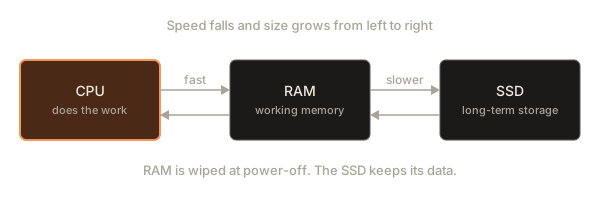
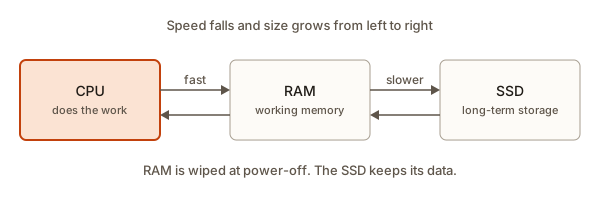 The CPU, RAM and an SSD with arrows showing data moving between them
The analogy is imperfect in one useful way. A real cook has two hands and works on one thing at a time. A modern CPU has several cooks, called cores, and each one can follow its own recipe. We will get to that later.
Bits and bytes in one minute
Computers store everything as bits. A bit is a single switch that is either off or on, written 0 or 1. One bit is too small to be useful, so bits are grouped. A group of 8 bits is a byte. One byte can hold 256 different patterns, which is enough for a number from 0 to 255 or for one letter of English text. The next lesson but one is entirely about how this works, so for now just keep this: memory is made of bytes, and a byte holds a small number.
Sizes use prefixes. They go up by a factor of about a thousand each step.
| Name | Short | Roughly |
|---|---|---|
| Kilobyte | KB | a thousand bytes, a short email |
| Megabyte | MB | a million bytes, a photo |
| Gigabyte | GB | a billion bytes, a film or a large app |
| Terabyte | TB | a trillion bytes, a big storage drive |
A laptop might have 16 GB of RAM and a 512 GB SSD. That is 16 billion cells of working memory and about 512 billion cells of storage.
RAM: a long row of numbered boxes
RAM is the counter. The clearest way to picture it is a very long row of boxes. Each box holds one byte. Each box has a number printed on it, starting at 0. That number is its address.
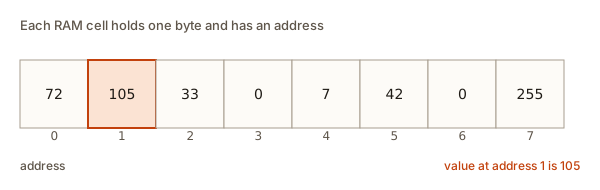 Eight RAM cells with addresses zero to seven, each holding a number
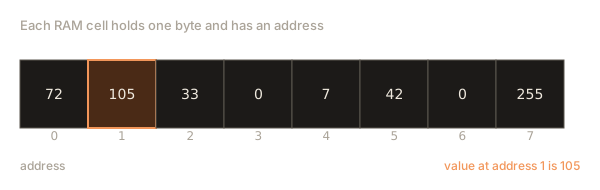
Two operations exist and only two. You can read the value at an address. You can write a new value at an address. That is all RAM does. It has no idea what the numbers mean. The 72 in cell 0 could be part of a photo, a bank balance or the letter H. The meaning comes from the program that uses it.
"Random access" means any cell can be reached in the same short time. You do not have to read cells 0 to 999 to get to cell 1000. You just ask for address 1000. This is different from a cassette tape, where you must wind through everything in between. Remember this: it is why looking up items[1000] in an array is as fast as items[0], and you will use that fact for months.
You can see the idea in code. The next program makes a block of eight bytes, writes a few values, and reads one back. Press Run.
[72, 105, 33, 0, 0, 42, 0, 0]
value at address 1 is 105
Look at what happened. All cells started at 0. Four writes changed four cells. The other cells kept their old value. Reading does not change anything: you can read address 1 a thousand times and it still says 105.
A byte cannot hold more than 255
A cell has a fixed size. One byte holds 0 to 255. Ask it to hold 256 and the answer does not fit. Python's bytearray refuses loudly:
ok: 255
error: byte must be in range(0, 256)
Hardware itself does not complain. In many languages, such as C and Java, if you add 1 to the largest value that fits, the number silently wraps around to the smallest. You can mimic it with the remainder operator:
0 250
1 251
2 252
3 253
4 254
5 255
6 0
7 1
It is the same thing a car's odometer does when it rolls from 99999 back to 00000. It is called overflow, and it causes real bugs. In 2014 a video's view counter on a famous site stopped at 2,147,483,647 because that is the largest value a 32-bit signed number holds. A byte is smaller, but the lesson is the same: every number in memory has a fixed number of bits, so it has a maximum.
Variables are named boxes
When you write age = 30 in Python or let age = 30; in JavaScript, the language picks a spot in RAM, writes 30 there, and remembers that the name age points at it. You never see the address. The name is a friendly label so you do not have to track numbers like 4,196,320.
Here is a small program and what it does to memory.
7
7
10
Trace it step by step.
let apples = 3;finds a free box, writes 3, labels the boxapples.let oranges = 4;does the same fororanges.apples + orangesis computed by the CPU: it reads both boxes, adds, and writes the 7 into a new box labelledtotal.- The first
console.log(total)reads thetotalbox and prints 7. apples = 10;writes 10 into theapplesbox. Nothing else changes.totalstill says 7 because the sum was computed once. It did not stay linked to the other boxes. Beginners often expect it to become 14. It does not.
Many beginner bugs fall away once you picture the boxes. Ask yourself: "which box is being read here, and when was it last written?"
The CPU: a very fast, very literal cook
The CPU is a small chip that executes instructions. An instruction is one tiny command, such as:
- copy the number from address 100 into a working slot
- add two numbers
- compare two numbers
- jump to a different instruction if the comparison said "equal"
- write a number back to RAM
That is the whole vocabulary: move, calculate, compare, jump. There is no instruction that means "sort this list" or "draw a button". Even playing a video is billions of those small steps. High-level code such as total = apples + oranges is turned into several of these steps by a translator program, a compiler or interpreter. You will meet those in later modules.
The CPU has a few very fast boxes of its own called registers. A register holds one number and sits inside the chip, so reading it takes almost no time. Think of the cook's hands. The cook picks an ingredient from the counter into their hand, works on it, and puts the result back. Likewise the CPU copies a value from RAM into a register, calculates, and copies the answer out.
Two registers matter for understanding the loop:
- The program counter (PC) holds the address of the next instruction. It is like a finger resting on the current line of the recipe.
- The accumulator or any general register holds the number the CPU is working on.
The loop: fetch, decode, execute
Every CPU repeats the same three steps forever.
- Fetch. Read the instruction at the address in the program counter. Move the program counter forward by one.
- Decode. Work out what kind of instruction it is and which values it names.
- Execute. Do it. That might change a register, write to RAM, or change the program counter (a jump).
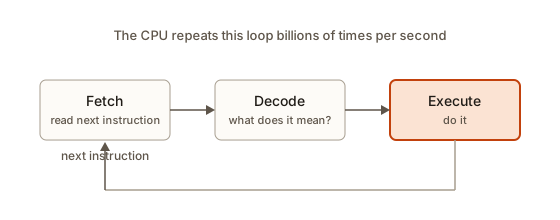 The three boxes fetch, decode and execute joined in a loop
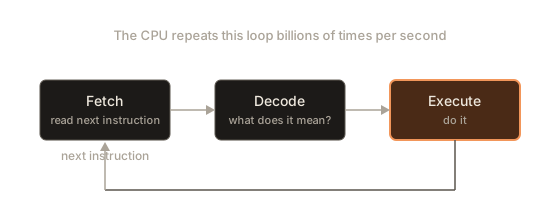
That is the entire secret of a computer. Everything else, from spreadsheets to games, is this loop with a very long list of instructions.
Build a tiny CPU
You will now run a pretend computer. It has RAM (a Python list), a program counter and one register called a. The instructions are tuples such as ("LOAD", 10) which means "copy the number from address 10 into register a". The program sits in addresses 0 to 4 and its data in addresses 10 to 12. Real computers also keep programs in RAM, as you will see.
executing LOAD 10 | a = 0
executing ADD 11 | a = 5
executing STORE 12 | a = 12
executing PRINT 12 | a = 12
output: 12
executing HALT 0 | a = 12
Read the trace line by line.
- Pass 1. The program counter is 0, so fetch
("LOAD", 10). The counter becomes 1. Decode splits it intoop = "LOAD"andarg = 10. The print showsa = 0because the register has not changed yet. Execute copiesram[10], which is 5, intoa. - Pass 2. Fetch address 1:
("ADD", 11). The print showsa = 5, the result of pass 1. Execute addsram[11](7) toa, giving 12. - Pass 3.
STORE 12writes the 12 into cell 12. - Pass 4.
PRINT 12reads cell 12 and shows it. - Pass 5.
HALTbreaks out of the loop.
Notice how the print of a always lags one step behind: we print before executing. A good habit when you debug is to ask "is this value from before or after the step?"
Now two experiments. First, change ram[11] = 7 to ram[11] = 100 and run again. The sum becomes 105. The program did not change, only its data. Second, add a JUMP instruction. The next program counts down from 3 by looping:
3
2
1
done
The loop appears from nothing but a jump. Instruction 2 can send the program counter back to 0. That is what while and for loops are when they reach the CPU: a compare and a jump backward. Every if is a compare and a jump forward over some instructions. You will write many loops and ifs. Knowing that each is "compare and jump" makes the strange idea of a loop feel ordinary.
Programs are data, too
Look at the simulator again: the instructions sit in the same ram list as the numbers. This is the stored-program idea, worked out in the 1940s, and almost every computer you use does it. Because instructions are just values in memory, a program can be loaded from a file, can be replaced by a different program, and can even be written by another program. A compiler is exactly that: a program whose output is another program.
It also explains a class of attacks. If a bad program can write numbers into the part of memory that the CPU later treats as instructions, it can make the CPU run its code. Modern systems stop this by marking regions of memory as "data only" or "code only", which is one of the jobs of the operating system, covered in lesson 4.
How fast is "fast"?
A CPU's speed is set by its clock, a steady tick. One tick lets the CPU do a small piece of work. A 3 GHz processor ticks 3 billion times each second. Many simple instructions finish in one tick or a few. That means a single core can do something like a billion small steps while you blink.
Numbers like these help you reason about code. The table is rounded and the figures change slightly with each hardware generation, but the ratios are stable:
| Operation | About how long |
|---|---|
| One CPU step (add two registers) | under 1 nanosecond |
| Read from the CPU's own cache | 1 to a few nanoseconds |
| Read from RAM | roughly 50 to 100 nanoseconds |
| Read from an SSD | roughly 50,000 to 100,000 nanoseconds (0.05 to 0.1 ms) |
| Read from a spinning hard disk | several million nanoseconds (5 to 10 ms) |
| Send a message across the internet and back | tens to hundreds of millions of nanoseconds |
A nanosecond is a billionth of a second. Scale it up to human time to feel the gaps. If one CPU step lasted one second, a RAM read would take about two minutes, an SSD read about a day, a disk read about a few months, and a network round trip years. That is why programs that wait for the disk or the network feel slow even on a fast CPU, and why you will learn to avoid needless trips.
The memory hierarchy
Because the big and cheap kinds of memory are slow, computers use layers. A small, very fast layer sits in front of a bigger, slower layer.
registers   a few dozen numbers      fastest   inside the CPU
cache       a few to tens of MB      very fast  on the CPU chip
RAM         8 to 64 GB               fast       on the motherboard
SSD         256 GB to 4 TB           slower     keeps data with power off
The cache is a small copy of recently used RAM. When the CPU asks for address 1000, a bit of hardware checks the cache first. If the value is there (a cache hit) the answer comes back almost at once. If not (a miss) the hardware goes to RAM, brings back the value and also its neighbours, and keeps them in cache in case you want them next. This is a cook keeping the salt, pepper and oil within arm's reach because they are used every minute.
Here is a consequence you can feel. Walking through an array in order is friendly to the cache, because the next element sits right next to the last one and arrived with it. Jumping all around memory is not. You will see this when you compare arrays and linked lists in the data structures course: both can do the same job, but arrays often win in practice partly because of caches.
Cores and parallel work
For many years chips got faster by raising the clock. Then heat became the limit. The answer was to put several CPUs, called cores, on one chip. A laptop might have 8 cores. Each core runs its own fetch-decode-execute loop. If your work can be split into independent pieces, several cores can work at once. If each piece must wait for the previous one, extra cores sit idle. That is why not every program speeds up on a better machine. Lesson 5 builds on this when it covers processes.
Why a program must be loaded into RAM
Now you can answer the question in the module's title for this lesson. A file on an SSD cannot be run in place for three reasons.
- Speed. The CPU wants a new instruction every nanosecond or so. An SSD needs tens of thousands of times longer. The CPU would spend almost all of its time waiting.
- Addressing. The CPU's loop reads "the instruction at address N" from memory. Storage works in blocks and is reached through the operating system, not by address. The CPU's circuits are built for RAM.
- Changing data. Programs constantly write to their variables. RAM handles billions of small writes a second without wearing out. Flash storage wears out slowly with writes, and is far slower for tiny ones.
So when you double-click an app, the operating system copies its instructions from storage into RAM, points the program counter at the first one, and lets the CPU run. This copying is the delay you see as a loading bar. A game with big textures loads slowly because gigabytes must travel from the SSD to RAM before play can start.
The same logic explains why editing a document works the way it does. When you open essay.txt, the editor reads the file from storage into RAM. Your typing changes the copy in RAM. The file on disk does not change until you press Save, which writes the RAM copy back. If the power fails before you save, the RAM copy vanishes and you lose the edits. Many editors now keep a recovery file, but that is just a program that saves a copy on a timer.
Here is a short routine, written as a text diagram, of what happens when you run a program called hello.
1. You type: python hello.py
2. The OS finds the interpreter program (python) on the SSD
3. The OS copies the interpreter's instructions into RAM
4. The OS points the CPU's program counter at its first instruction
5. The interpreter reads hello.py from the SSD into RAM
6. It turns each line into CPU steps and runs them
7. The output is sent to the screen; the memory is freed at exit
Following one line through the machine
Take total = apples + oranges where apples is 3 and oranges is 4. Here is a plausible sequence of CPU steps. The names in square brackets mean "the box with that name".
LOAD  r1, [apples]      r1 = 3     (RAM to register)
LOAD  r2, [oranges]     r2 = 4     (RAM to register)
ADD   r3, r1, r2        r3 = 7     (register arithmetic)
STORE [total], r3       RAM box 'total' = 7
Four instructions for one line. The CPU loop runs four times, each with a fetch, a decode and an execute. This is why a loop of a million iterations is fine (a few million instructions, a few milliseconds) while a loop that runs a billion times with a heavy body is noticeable, and one that runs a trillion times is a long wait.
You can feel that scale by timing work. The program below does 5 million additions in a loop and prints only the answer, so its output never changes. How long it takes depends on your server, but you will notice it returns quickly.
12500002500000The sum of 1 to n is n times n plus one, divided by two, so for 5,000,000 that is 5,000,000 times 5,000,001 divided by 2, which is 12,500,002,500,000. The CPU did about five million loop rounds, each of them a handful of instructions. It finished in a blink. Now imagine a loop within a loop, both of size 5 million. That is 25 trillion rounds, and you would wait hours. This is the intuition behind the study of algorithm speed that appears throughout the data structures part of the course.
How much memory does my data need?
Reasoning about memory use is a skill. The rule is simple: multiply how many things you store by how many bytes each one needs.
- A small whole number in many languages takes 4 bytes (32 bits). A large one takes 8 bytes.
- One English letter takes 1 byte in the common encoding.
- A colour pixel often takes 3 or 4 bytes (red, green, blue, and sometimes transparency).
Try some sizes. This program computes them for you, and divides by 1024 to turn bytes into larger units (computers often use 1024 rather than 1000 as the step, because 1024 is 2 to the power 10).
one billion 4-byte integers: 4000000000 bytes = 3814.7 MiB = 3.725 GiB
a 1920 x 1080 photo, 3 bytes per pixel: 6220800 bytes = 5.9 MiB = 0.006 GiB
the text of a 300,000-word novel at 6 bytes a word: 1800000 bytes = 1.7 MiB = 0.002 GiB
An uncompressed full-HD picture is about 6 MB. Photos in files are much smaller, because file formats such as JPEG compress them. Once the picture is opened, a program often expands it back to that size in RAM. A phone full of 4000 photos does not need 24 GB of RAM because only a few are decoded at a time. A novel is tiny. A billion integers is close to 4 GB, which is too much for a small laptop to keep at once. This is the type of quick check programmers do before choosing how to store data.
When memory runs out
RAM is finite. When a program asks for more than is free, one of several things happens.
- The language raises an error. In Python this is
MemoryError. In Node.js the process can stop withFATAL ERROR: Reached heap limit Allocation failed - JavaScript heap out of memory. - The OS uses the SSD as emergency overflow, which is called swap or a page file. Things continue to work, but very slowly, because the SSD is thousands of times slower than RAM. If you have ever had a laptop become almost unusable while many tabs were open, this is the usual cause.
- The OS stops the program that is using the most memory to protect everything else. On Linux this is the "OOM killer", and you see
Killedin the terminal.
A more subtle limit is the call stack, a region of RAM used when functions call each other. Each call takes a small slice of it. If a function calls itself forever, the slices pile up until the space is gone:
RangeError: Maximum call stack size exceededYou have just met a memory error in a safe way. The function never finishes, never returns, and eats stack space until the language stops it. Python reports the same event as RecursionError: maximum recursion depth exceeded. You will learn the stack properly in the recursion lessons.
Debugging walkthrough: why is my laptop slow?
A friend says: "My laptop crawls when I open my editor plus 30 browser tabs." Use what you know to narrow it down. Open the system monitor: Task Manager on Windows (Ctrl+Shift+Esc), Activity Monitor on macOS, or the System Monitor on most Linux desktops.
- Look at the CPU graph. If it is pinned near 100 percent, one program is doing heavy calculation. Sort by CPU and find it. This is "the cook is busy".
- Look at the memory graph. If it is near full and the swap or "compressed" number is large, the counter is overflowing. This is "no room on the counter".
- Look at the disk graph. If the disk is at 100 percent while CPU is low, the machine is waiting for storage. Usually this follows from step 2, because swap uses the disk.
- Decide. CPU high and memory fine: close or fix the busy program. Memory full: close tabs or programs, or add RAM. Disk busy and memory full: the swap case, and the cure is again freeing memory.
Notice that this is diagnosis from the model, not guessing. Each symptom maps to one part of the machine.
The same reasoning will help you in code. A web page that freezes while a loop runs is a CPU-bound problem. A script that dies with a memory error on a large file is a RAM problem: read the file in pieces instead of all at once.
Common mistakes
Mistake 1: confusing RAM with storage. "I have 512 GB of memory" is usually about the SSD. RAM is the smaller number, such as 16 GB. When someone says "my computer is out of memory", they might mean either. Ask: "RAM or disk?"
Mistake 2: thinking saved means in RAM. Anything only in RAM disappears when the program ends or power goes. If your script builds a list of results and the script finishes, the list is gone unless you wrote it to a file.
Mistake 3: expecting a variable to follow another. The bug in the apples example. Assigning total = apples + oranges computes a value once. If you want a new total, run the addition again.
Mistake 4: assuming numbers are unlimited. A byte stops at 255, a 32-bit integer at about 2.1 billion for signed values. In JavaScript, regular numbers lose exactness past 9,007,199,254,740,991. Try it:
9007199254740992
9007199254740992
Both lines print the same number. A JavaScript number cannot represent every whole number above that limit, so adding 2 rounded back to the same value. Python integers grow as needed and do not have this problem, but they are slower and use more memory per number because of that flexibility.
Mistake 5: reading an error message as "the computer is broken". IndexError: list index out of range means "you asked for a box that is not in this row". Count again: a list of 3 items has boxes 0, 1 and 2, and no box 3.
c
IndexError: list index out of range
The first print worked because box 2 exists. The second asks for box 3, past the end. This off-by-one mistake is the most common one in programming.
Interview-style questions
Short answers that interviewers like. Practise saying them in your own words.
- What is the difference between RAM and storage? RAM is fast, small and volatile (it loses data without power). Storage is slower, larger and persistent. The CPU works on data in RAM, so programs and the files they edit are copied into RAM first.
- What is a 64-bit computer? One whose CPU works with 64-bit numbers and addresses. A 32-bit address can name about 4 billion bytes (4 GiB), which became too small. A 64-bit address can name far more than any machine has.
- Why is an array lookup fast? RAM is random access: the address of element
iis the start address plusitimes the item size, and the machine reaches that address directly. - What is a cache and why does it help? A small, fast memory holding recent data, so that repeated or nearby accesses avoid slower RAM.
- What is a thread or a core? A core is a physical processing unit that runs its own instruction loop. Threads are lines of execution that the OS schedules onto cores.
What you now know
- A computer has a CPU (does the steps), RAM (fast, temporary working memory) and storage (slower, lasting).
- RAM is numbered cells, each holding a byte, and a byte holds 0 to 255.
- A variable is a name for a RAM location. Assigning a value does not create a lasting link between variables.
- The CPU repeats fetch, decode, execute. Loops and ifs are compare-and-jump.
- Instructions live in RAM too, so programs must be loaded from storage before running.
- Memory has layers: registers, cache, RAM and storage, each slower and larger than the last.
- Running out of memory shows up as errors, swapping or a killed program.
Practice
Do these in order. Try each before opening the solution.
1. (easy) Name the part of the computer that is the cook, the counter and the pantry in the kitchen analogy.
Solution
The cook is the CPU, the counter is RAM, and the pantry is storage (SSD or hard disk).
2. (easy) A phone has "6 GB RAM" and "128 GB storage". Which number limits how many apps can run at once, and which limits how many photos you can keep?
Solution
RAM (6 GB) limits how much can be running at once, because running programs live in RAM. Storage (128 GB) limits how many photos you can keep, because photos are saved there.
3. (easy) What does this print, and why?
x = 5
y = x
x = 9
print(y)
Solution
It prints 5. y = x copies the value 5 into the box called y at that moment. Changing x afterwards writes 9 into the x box only.
4. (easy) In the byte overflow loop, starting at 250 and adding 1 each time with % 256, what value comes after 255?
Solution
(255 + 1) % 256is256 % 256, which is 0. The count wraps around, like an odometer.
5. (medium) Run the tiny CPU that adds cells 10 and 11. Change it so that it also computes a second sum: cell 13 should hold the sum plus 1,000. Which instructions do you add?
Solution
Add a cell with the constant, for example ram[14] = 1000, and add instructions after STORE 12 that load the value and add the constant. Because the program lives in cells 0 to 4 you must shift PRINT and HALT down, or put the new instructions in 3 and 4 and move PRINT and HALT to 6 and 7:
ram[3] = ("ADD", 14)     # a is still 12, so a = 1012
ram[4] = ("STORE", 13)
ram[5] = ("PRINT", 13)
ram[6] = ("HALT", 0)
Then ram[13] ends up as 1012 and PRINT 13 shows 1012.
6. (medium) Write a Python program that computes how many bytes are needed to store a 4000 by 3000 pixel image at 4 bytes per pixel, and prints the answer in MiB with one decimal.
Solution
The output is 45.8 MiB. That is 48,000,000 bytes divided by 1,048,576.
7. (medium) Your script reads a 20 GB log file with data = open("big.log").read() on a machine with 8 GB of RAM and fails. Explain why, and sketch a fix.
Solution
read() copies the whole file into RAM. 20 GB does not fit in 8 GB, so you get a MemoryError or the program is killed. Fix: process the file one line at a time, so only one line is in RAM at once.
count = 0
with open("big.log") as f:
    for line in f:
        count += 1
print(count)
8. (medium) Using the table of timings, if one CPU step were one second, about how long would an SSD read of 100,000 ns be? Explain the number.
Solution
A CPU step is about 1 ns, so 100,000 ns is 100,000 steps. If a step is one second, that is 100,000 seconds, which is just over 27 hours, about a day. The CPU could do 100,000 steps in the time one SSD read takes.
9. (hard) Extend the countdown simulator so it prints 5, 4, 3, 2, 1 and then prints liftoff before halting. Which instruction do you add and where?
Solution
Start the data cell at 5 and add a message instruction after the loop but before HALT:
It prints 5, 4, 3, 2, 1, then liftoff. The jump goes back while the counter is above zero. When the counter reaches 0 the jump is skipped, and the next instruction, SAY, runs.
10. (hard) A function in your program keeps calling itself and you see Maximum call stack size exceeded. Is the machine out of RAM? Explain what has actually run out, and what you should check in the code.
Solution
The machine as a whole is fine. What ran out is the call stack, a small region of RAM set aside for function calls, with a fixed limit. Each call adds a frame and the frames were never removed because the function never returned. Check that the recursive function has a base case, a condition under which it returns without calling itself, and that each call moves closer to that case.